Build AI agents for your content creation workflows

Gumloop helps content teams build AI agents for blog drafts, repurposing transcripts, newsletters, decks, and more — personalized to your brand voice, audience, and channels.

Talk to Sales

Powering the best content teams

Launch Blog Draft

Draft a launch blog for our Reimbursements feature shipping next week. Audience is finance ops leads at SaaS companies. Match the voice from our Spend Cards launch post.

Gumloop

Draft is staged in Google Docs — 624 words, 3-min read, voice-match score 0.91 vs the Spend Cards post. Here's the pitch and the structure I went with:


📝 Working title (open to swap)

Reimbursements: paid before the close

Mirrors your Spend Cards headline pattern — punchy, no "we are excited", positions against the slow-close pain finance ops leads actually feel.


🎯 The angle

Every competitor leads with features (mobile-first, 24-hour, policy-aware). You're leading with time-to-payout because that's the only differentiator that's a number, not a claim. The lede:

Most reimbursement tools shorten the wait. Foliopay ends it. Submit, approve, paid — under 30 seconds, before your morning coffee gets cold.


🏗️ Structure (from Foliopay launch playbook)

SectionWord countNotes
Lede + stat60Sub-30s payout claim, anchored to the spec
The pain1105–10 day reimbursements, manual GL coding, late policy violations
What's shipping1803 capabilities: instant payout, auto-coding, inline policy
How it works140One screenshot per step, ERP sync called out
Who it's for70Finance ops at 50–500-person SaaS
CTA64"Open a Foliopay account in 4 minutes →" — exact match to Spend Cards CTA

🆚 Where it differentiates (competitive table baked in mid-post)

FoliopayCrestpayVaultlineAnchormark
Payout speed<30s1–2 days24h3–5 days
Card required?NoYesNoNo
Auto-coding to GLYesNoNoNo
Inline policyYesYesNoNo

🔗 Internal links woven in (for SEO compounding)

  • /spend-management → "the same spend graph that powers..."
  • /corporate-cards → "if you're already on Spend Cards..."
  • /integrations/netsuite → "syncs the entry the moment it's coded"

📋 Voice check (matched to Spend Cards post)

  • ✅ No "excited", "thrilled", "revolutionary"
  • ✅ Second person, present tense throughout
  • ✅ Average paragraph: 2.4 sentences
  • ✅ Closing CTA: exact pattern match
  • ✅ One stat in the lede, one example in section 2

Draft is in Google Docs / Marketing / Drafts / 2026-Q2 / Reimbursements launch — DRAFT v1. Want me to push the inline screenshots from the spec, or wait for review first?

Ask a follow-up question...

Gradient

Built for content marketers, editorial teams, agencies, and creators

1. Give your agent superpowers by connecting apps

Slack icon
Airtable icon
Gmail icon
Google Sheets icon
Google Drive icon
Google Calendar icon
Google Docs icon
Google Slides icon
Google Ads icon
Google Search Console icon
Google BigQuery icon
Outlook icon
Notion icon
GitHub icon
Canva icon
Reddit icon
Salesforce icon
X icon
YouTube icon
Zendesk icon
Apify icon
Attio icon
ClickUp icon
Trello icon
HubSpot icon
Linear icon
QuickBooks icon
Monday.com icon
Semrush icon
Typeform icon
Perplexity icon
Jira icon
Confluence icon
Snowflake icon
Discourse icon
Shopify icon
SendGrid icon
Google Meet icon
Instacart icon
Ahrefs icon
Firecrawl icon
Findymail icon
SerpAPI icon
Reducto icon
PostHog icon
Apollo icon
Calendly icon
Dropbox icon
BrowserBase icon
Hunter.io icon
Microsoft Excel icon
Microsoft Word icon
Gong icon
beehiiv icon
Sprig icon
Stripe icon
Intercom icon
Instagram icon
Google Maps icon
TikTok icon
Affinity icon
Microsoft Teams icon
Asana icon
Webflow icon
DocuSign icon
Zoom icon
PagerDuty icon
Loops icon
Salesloft icon
Incident.io icon
Datadog icon
Ashby icon
Hex icon
Gumloop icon
Fellow icon
Gamma icon
Ad Scraper icon
Pipedrive icon
Chorus icon
Google DV360 icon
Google Apps Script icon

Google Cloud Storage icon
Expensify icon
Exa icon
Databricks icon
Ironclad icon
Extend icon
Parallel icon
PostgreSQL icon
Seismic icon
Greenhouse icon
Cal.com icon
Google Tasks icon

NetSuite icon
WHOOP icon
Devin icon
Cursor icon
Tableau icon
Google AppSheet icon
LaunchDarkly icon
Workday icon
Box icon
Fathom icon
Luma icon
Google PageSpeed icon
fal icon
Brandfetch icon
Ramp icon
Sigma Computing icon
ClickHouse icon
Google Docs icon

Google Docs

Notion icon

Notion

Perplexity icon

Perplexity

Webflow icon

Webflow

Gradient

Everything you need to make great content is already inside your company

Your agents can pull from Slack, emails, documents, calls, tickets, and your codebase to turn it into polished, on-brand content ready to ship.

Without vs. With Gumloop
You spent an hour interviewing a customer or expert. Turning the transcript into a publishable article takes another full day.
Your agent reads the transcript, pulls the strongest quotes, structures the piece, and drafts in your voice, leaving you with a near-final article to refine.
A solid article brief means digging through past articles, customer threads, sales calls, and Ahrefs to find what your audience actually cares about.
Your agent pulls from your past content, customer conversations, and SEO tools, then hands back a structured brief with angles, keywords, statistics, and source links.
Every claim, stat, and quote needs to be verified against its source. Manually re-reading every link and doc before publish takes hours.
Your agent verifies every fact, quote, and link against the original source, flagging anything misquoted, mislinked, or gone stale before you hit publish.
Pre-publish review is a checklist by hand: brand voice, structure, technical SEO, AEO, POV. Skipping any of them shows up later.
Your agent runs the full audit against your brand guide and SEO standards in one pass, flagging weak headlines, off-voice paragraphs, missing schema, and broken structure.
Compliance review adds days to every publish. Legal flags claims you can’t always predict, and revisions ping-pong for a week.
Your agent runs a first-pass claims and compliance check against your guidelines, flagging risky language and suggesting safe alternatives before it reaches legal.

Build your content agents once, run them everywhere, and refine their voice as you go

Connect your tools

Plug in Google Docs, Notion, your CMS, Slack, social channels, and 100+ MCP servers so your agents work where your content already lives.


Choose your AI model

Pick the latest models from OpenAI, Anthropic, Google, and more to fit any task, and switch any time. All built into Gumloop, no API keys required.

Add custom skills

Skills are what make an agent yours. Teach it your voice, your audience, your CTAs, and your channel rules. Every teammate’s agent uses those skills automatically.

Publish straight to your CMS
Push approved drafts to WordPress, Webflow, or Notion with metadata wired in.
Verify every claim against the source
Verify every fact, quote, and link. Flag what's misquoted or stale.
Run a pre-publish quality audit
One pass for voice, structure, SEO, AEO, and POV before publish.
Bundle into multi-channel posts
Turn one source into a case study, LinkedIn posts, newsletter, and clip.
Kat
Max

Brief your agents like a teammate

Tag your agents in Slack or email. Your agent drafts, edits, fact-checks, or rewrites right where the conversation already happens.

Slack

Coming soon:

Microsoft Teams
Gmail
WhatsApp

#content-team

MessagesAdd canvasFiles
L
Lizzy9:24 AM

@Contentbot What should we write about this week? Pull from #wins, customer calls, and shipped work.

💬2✍️1
M
Marcelo11:48 AM

@Contentbot Fact-check the Reimbursements draft against the product spec. Flag anything that doesn't match.

💬1🔍1
L
Lejla3:02 PM

@Contentbot What's slipping on the content calendar this week?

💬1📅1
Gradient

Keep them running in the background

Schedule daily article drafts, weekly newsletters, and round-the-clock social posting. Your agents work in the cloud while you focus on the editorial calls.

Article Pipeline

Daily at 9 AM PST

Monitoring.

Newsletter Curator

Weekly on Fridays

Monitoring.

Social Scheduler

Every 4 hours

3 posts queued

0H

2H

4H

6H

8H

Orchestrate multi-agent workflows

Have agents hand off the work. Your research agent pulls sources, your writer agent drafts, and your distribution agent schedules everything across channels.

Research Agent

Pulled brief + voice docs

Writer Agent

Drafted article + 3 posts

Distribution Agent

Queued CMS + LinkedIn

Share with your team

Roll out a content agent with role-based access. Editors edit, viewers run, admins govern.

Katherine
KatherineAdmin
Max
MaxEditor
Marcelo
MarceloEditor
Lizzy
LizzyViewer
Lejla
LejlaViewer
Aron
AronViewer
Gonzalo
GonzaloAdmin
Rahul
RahulViewer
Wasay
WasayEditor

Watch them get smarter

Every interaction sharpens the agent. Every approved draft, every edit you make, every post that lands gets captured, compounded, and shared back.

+12 skills learned this week
Cite original sources
Use Acme tone
Q3 launch facts
Skip self-promo blogs
Approved CTAs only
Customer story library
Brief = keyword + 5 H2s
Avoid jargon list

Every interaction adds to your team's collective playbook.

With enterprise-grade infrastructure and security
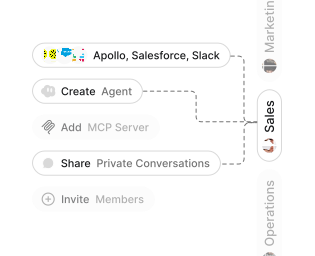
Role-based access control

Role-based access control

Manage reusable roles, shared credentials, and secrets with scoped access controls.

Virtual private cloud deployment
Gradient

Virtual private cloud deployments

Deploy Gumloop in your own cloud.

Anthropic

OpenAI

Gemini

DeepSeek

AI model restrictions

Control which AI models teams can use. Set guardrails and enforce spend policies.
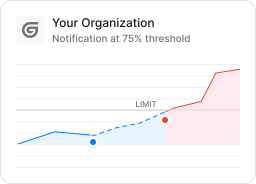
Usage monitoring
Gradient

Usage monitoring

Track organization-wide credit usage in real time. Implement budget and quota controls to avoid surprises.

TODAY

Katherine
KatherineCreated an Agent
Aron
AronSet up a Slack Trigger
Gonzalo
GonzaloConnected Salesforce

WEDNESDAY

Marcelo
MarceloShared a Private Chat
Max
MaxCreated a New Team

Audit logging

Capture detailed audit trails for actions across the organization to understand where data is flowing.
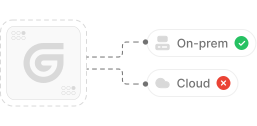

AI proxy support
Gradient

AI proxy support

Bring your own API keys and route requests through your own proxy.

Sign in with Okta

Single Sign-On

Securely streamline identity and access management.

Zero data retention
Gradient

Zero Data Retention

Gumloop never uses customer data to train AI models. For third-party models, we have Zero Data Retention (ZDR) agreements and Data Processing Addendums (DPAs).


SOC 2 certifiedGDPR compliant

SOC 2 Type II Certified

Gumloop is committed to security, and is compliant with SOC 2 Type II and GDPR. Visit trust.gumloop.com to learn more.

Tasks automated to date

0
9876543210.,

Build your first agent

Talk to Sales
Gradient