Turn a keyword into a writer-ready SEO content brief
Use the SEO content brief generator to research the SERP, expand keywords with real metrics, and produce a complete brief a writer can draft from.


Trusted by leading teams




Skip the brief-building grind
What used to take hours of SERP research, keyword tabs, and outline writing now runs in one chat.
What is the SEO content brief generator?
The Gumloop SEO content brief generator is an AI assistant that turns a target keyword into a complete, writer-ready content brief. Give it a keyword and it researches the live SERP with web search, scrapes the top-ranking pages with Firecrawl, expands the keyword set with real keyword data, and returns a structured brief: strategy, SERP snapshot, competitor analysis, keyword guidance, a detailed outline, and writer instructions.
It does not write the article for you. It does the research and strategy a senior SEO would do first, so a writer can sit down and draft a high-ranking piece without redoing the legwork. It works for any page type: a how-to guide, an explainer, a comparison or best-of listicle, a product review, or a landing page. Give it the keyword and it reads the intent and builds the right structure. Give it a reference URL on top and it learns that page and adapts it to your target.
This template is a starting point. The agent is fully customizable: feed it a reference URL to match a proven structure, hand it competitor URLs to beat directly, or give it product context to shape positioning and CTAs. When you are happy with the brief, ask it to export the whole thing into a formatted Google Doc or push keyword tables to Sheets.

What you can do with the SEO content brief generator
Workflows the agent handles out of the box.
SERP and competitor research
Searches the live SERP and scrapes the top-ranking pages to map their structure, strengths, and gaps, so your brief targets what the current results miss.
Keyword expansion with real metrics
Pulls related keywords, variants, semantic terms, and questions to answer, grouped into must-include, nice-to-include, and entities, using real metrics only.
Works for any page type
How-to guides, explainers, landing and product pages, comparisons, listicles, and reviews. It reads the keyword intent, or learns the structure from a reference you hand it, then builds the outline that page actually needs.
Writer-ready outline and instructions
Delivers a detailed H2/H3 outline, title options, meta guidance, content requirements, and writer instructions complete enough to draft from directly.
Google Docs and Sheets export
Returns the brief in chat by default, then optionally formats it into a shareable Google Doc or exports keyword and SERP tables to Sheets.
How to use the SEO content brief generator
Get from landing page to live agent in a few clicks.
- 1
Click "Use this agent"
A preconfigured agent is created in your Gumloop workspace with DataForSEO, Firecrawl, Google Docs, and Google Sheets attached, plus web search built in. Takes a few seconds.
- 2
Connect your research tools
Authorize the integrations you want to use. The agent works with whatever is connected and tells you what it could not access, so you are never blocked waiting on a tool.
- 3
Give it a keyword
Drop a target keyword in chat, optionally with a reference URL, competitor URLs, or product context. The agent researches, then returns a full brief you can hand to a writer.
SEO content brief generator use cases
Real workflows teams run with this agent.
Briefing a how-to guide that ranks
Hand it a "how to X" keyword. It maps the steps, prerequisites, and common mistakes readers are searching for, so the guide answers the query end to end.
Briefing a landing or product page
Point it at a product or use-case page, or a transactional keyword. It shapes a conversion-focused brief with positioning, key benefits, and CTA placement.
Planning a comparison or best-of listicle
Give it a "best X" or "X alternatives" keyword. It finds the gaps in the top results and builds a comparison structure with evaluation criteria.
Matching any reference you hand it
Drop in any reference URL that already ranks, whatever its format. The agent extracts its structure and adapts it to your target keyword without copying it.
Why use Gumloop for the SEO content brief generator
Preconfigured for content briefs
No agent setup and no API keys. Firecrawl, keyword data, Google Docs, and Sheets are built in, and web search is on by default.
Research it shows, not invents
Every brief cites the competitor URLs it analyzed and only uses real keyword metrics. It never fabricates volume, difficulty, or competitor claims.
A brief, not a checklist
The output is specific and writer-ready: real outline, real gaps, real keyword groups. Not a generic list of SEO best practices.
Customize as you chat
Adjust the angle, swap the product list, change the format, or export to a Google Doc, all in the same conversation without leaving chat.
Related agents



SEO keyword research agent
Find the keywords worth ranking for first, ranked by volume and difficulty, before you brief the article.
AI SEO Optimization Agent
Prefer a visual, downloadable brief that scores the terms your competitors use? Use the optimization agent.



AI internal linking agent
Once the article is live, find the internal links that help it rank, both inbound and outbound.
With enterprise-grade infrastructure and security
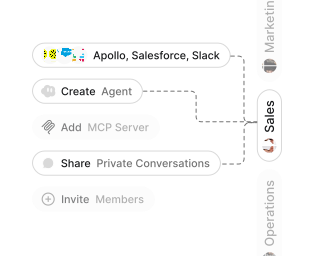
Role-based access control
Manage reusable roles, shared credentials, and secrets with scoped access controls.


Virtual private cloud deployments
Deploy Gumloop in your own cloud.
Anthropic
OpenAI
Gemini
DeepSeek
AI model restrictions
Control which AI models teams can use. Set guardrails and enforce spend policies.
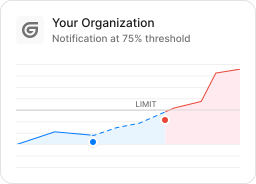
Usage monitoring
Track organization-wide credit usage in real time. Implement budget and quota controls to avoid surprises.
TODAY



WEDNESDAY


Audit logging
Capture detailed audit trails for actions across the organization to understand where data is flowing.
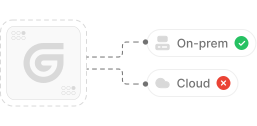

AI proxy support
Bring your own API keys and route requests through your own proxy.
Sign in with Okta
Single Sign-On
Securely streamline identity and access management.


Zero Data Retention
Gumloop never uses customer data to train AI models. For third-party models, we have Zero Data Retention (ZDR) agreements and Data Processing Addendums (DPAs).


SOC 2 Type II Certified
Gumloop is committed to security, and is compliant with SOC 2 Type II and GDPR. Visit trust.gumloop.com to learn more.
Frequently asked questions
Tasks automated to date
Try the SEO content brief generator