Automate LinkedIn research and lead gen with a LinkedIn automation agent
The LinkedIn automation agent pulls public LinkedIn data, enriches it with live web research, and turns it into enriched lead lists, prospect monitors, job trackers, and post drafts in Google Sheets and Google Docs.




Trusted by leading teams




Stop copying LinkedIn profiles into spreadsheets by hand
The agent pulls the data, enriches it with live web research, and delivers lead lists, monitors, and drafts to the tools you already use.
What is the LinkedIn Agent?
The Gumloop LinkedIn automation agent automates the research, lead-gen, and monitoring work around LinkedIn that normally eats your week. It pulls public LinkedIn data, enriches it with live web research, and turns it into the output you actually need: an enriched lead list, a prospect monitor, a job tracker, a content brief, or a one-page lead brief. You describe the goal and it runs the right workflow end to end.
It is built around five playbooks. It enriches raw lists of people or companies into outreach-ready leads with backgrounds, emails, and icebreakers. It watches prospects and competitors and alerts you when they post or change jobs. It tracks new job openings for the roles and companies you care about. It studies high-performing posts in your niche and drafts new ones in your voice. And it can research every inbound lead automatically the moment it arrives.
It works only with public data and never logs into a LinkedIn account, so there are no connection requests, messages, or posts sent on your behalf and no risk to your account. Instead it builds durable output in the tools you already use: living trackers and lead lists in Google Sheets, and briefs and post drafts in Google Docs, with recurring monitors you can put on a schedule.

What you can do with the LinkedIn Agent
Workflows the agent handles out of the box.
Lead enrichment engine
Turns a raw list of people or companies into outreach-ready leads with title, company, email, a background summary, a recent signal, and a personalized icebreaker.
Prospect and competitor monitor
Watches the profiles and companies you choose and alerts you only when something new happens, a fresh post or a job change, with a note on why it matters.
Job market tracker
Monitors new job postings for the roles, companies, and locations you care about, dedupes against what it has seen, and keeps a running list on a schedule.
Content research and drafting
Finds high-performing posts in your niche, analyzes the hooks and formats that drive engagement, and drafts new posts in your voice in a Google Doc.
Inbound lead briefs
Produces a one-page brief on any new lead, who they are, their company, likely priorities, and conversation starters, and can run automatically as leads arrive.
How to use the LinkedIn Agent
Get from landing page to live agent in a few clicks.
- 1
Click "Use this agent"
A preconfigured agent is created in your Gumloop workspace with LinkedIn scraping, web research, Google Sheets, and Google Docs connected and the five playbooks loaded into its instructions.
- 2
Describe your goal
Tell it what you want, enrich a list, watch some prospects, track jobs, or research content, or pick from its menu. It collects the specific inputs it needs before running anything.
- 3
Get output and automate it
It pulls the data, enriches it with live web research, and delivers a Google Sheet or Doc. For monitors and trackers, it offers to run on a recurring schedule.
LinkedIn Agent use cases
Real workflows teams run with this agent.
Enrich a lead list for outreach
Hand it a list of names, companies, or profile URLs and get back enriched leads with emails, backgrounds, recent signals, and icebreakers tied to what you sell.
Monitor prospects and competitors
Watch a set of people and companies and get alerted when they post or change jobs, so you reach out in the moment instead of finding out days late.
Track new job openings
Follow new postings for specific roles and companies on a schedule, with each genuinely new listing added to one tracker you can act on.
Research content and draft posts
Study what is working in your niche, then get post ideas and full drafts written in your voice in a Google Doc, ready for you to edit and publish.
Why use Gumloop for the LinkedIn Agent
Real data, not guesses
Every lead and brief is built from the actual profile and live web research, and it leaves a field blank rather than inventing an email or a fact.
No login, no ban risk
It only reads public data and never signs into a LinkedIn account, so there is nothing automated against your profile and no risk of a ban.
Output in your own tools
Lead lists and trackers land in Google Sheets and briefs and drafts in Google Docs, so the work is durable and easy to edit and share, not stuck in chat.
Automate it on a schedule
Monitors, job trackers, and inbound research can run on a recurring schedule or trigger, so the tracking keeps itself current without you checking.
Related agents







With enterprise-grade infrastructure and security
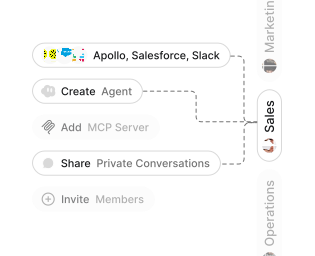
Role-based access control
Manage reusable roles, shared credentials, and secrets with scoped access controls.


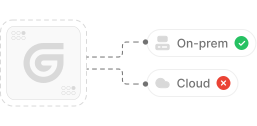
Virtual private cloud deployments
Deploy Gumloop in your own cloud.
Anthropic
OpenAI
Gemini
DeepSeek
AI model restrictions
Control which AI models teams can use. Set guardrails and enforce spend policies.
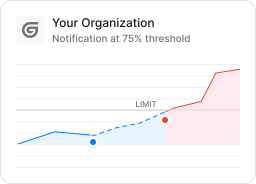
Usage monitoring
Track organization-wide credit usage in real time. Implement budget and quota controls to avoid surprises.
TODAY



WEDNESDAY


Audit logging
Capture detailed audit trails for actions across the organization to understand where data is flowing.

AI proxy support
Bring your own API keys and route requests through your own proxy.
Sign in with Okta
Single Sign-On
Securely streamline identity and access management.


Zero Data Retention
Gumloop never uses customer data to train AI models. For third-party models, we have Zero Data Retention (ZDR) agreements and Data Processing Addendums (DPAs).


SOC 2 Type II Certified
Gumloop is committed to security, and is compliant with SOC 2 Type II and GDPR. Visit trust.gumloop.com to learn more.
Frequently asked questions
Tasks automated to date
Try the LinkedIn Agent