What is an MCP gateway? A must read for enterprise AI

It’s easy to start using AI without an MCP gateway. That’s when things get messy.
Maybe it starts with just using the Microsoft Copilot features included in your Microsoft 365 subscription. Or signing up for Claude or ChatGPT to make a business report. (Or, hey, Gumloop, right?)
But the moment you upload a spreadsheet to ask Claude a question or connect any AI tool to a business tool (e.g. Slack, CRM, data warehouse, etc)… you have a data security problem. And potentially a liability.
Don’t worry: Implementing an MCP gateway will lead you to the promised land of security, regulatory compliance, and scalability. Praise JSON.
If you rolled your eyes there, I get it. It seems like every day there are new AI-related acronyms and phrases to memorize over your 5am coffee, your jaw clenched tight as you try to make sense of a new-to-you concept that feels like making sense of a serial killer’s yarn-and-newspaper conspiracy wall map. But it feels like if you don’t, one day soon a humanoid robot or Gen Alpha high schooler will steal your job.
LLM, MCP, RBAC, ABAC, SCIM, vibe coding, citizen development…
It’s enough to sometimes make me want to deploy myself to The Moon. There are no data lakes on The Moon.
I promise, MCP gateways aren’t scary. This is everything I’ve learned about MCP gateways, how they work, who actually needs one (and who doesn’t), and how to pick the right one for your organization.
What is an MCP?
Put simply, the Model Context Protocol (MCP) is an open, standardized way of connecting AI to external tools, such as a data source, Slack, Salesforce, or any other app.
Before MCP was invented, any connection between an AI platform and an external data warehouse or app had to be custom coded with custom APIs, usually as a proprietary integration created by a software company or developer. MCP turned all that custom development work into a single universal system.
MCP is like if you could get a brain implant that instantly translates any foreign language to your native language, both for speaking and hearing — you instantly understand others and they understand you.
MCP avoids most misunderstandings between an AI and an app, like when you’re travelling and specifically, urgently need a toilet and pleadingly ask a local where the restroom is only for them to awkwardly take you to a quiet alcove with a cot in it.
There are three MCP-related terms to know:
- MCP host: The main, centralized LLM, AI application, or agentic tools you’re working in (e.g. Gumloop, Claude Desktop, ChatGPT, Microsoft Copilot, etc).
- MCP client: Layered between the host and server to “translate” the host’s language into MCP’s universal JSON format.
- MCP server: Provides the functional capabilities an AI model needs to do what you ask. Contains groups of related tools (functions the LLM can use), resources (data sources/contextual information), and prompts (templates for specific actions).
For example: a scheduling MCP server has calendar APIs for Google, Apple, etc (resources), database-writing actions (tools) to add events, and prompt templates to guide the AI model in how to choose the best upcoming meeting time.
Here’s how MCP operates in the real world:
You want a faster way to optimize ad campaigns. You find Gumloop’s Google Ads optimizer AI agent template and sign up for a free account.
You open up Gumloop (MCP host) and ask your Gumloop AI agent (MCP client) for a quick ROAS report across all your paid ad accounts.
The AI agent sends the request to the Google Ads, Meta, and LinkedIn MCP servers to gather the data it needs to generate a report. Those MCP servers send back the information in a way the AI agent can understand, thanks to MCP “translating” the technical details, and you receive a plain language summary you can use right away.
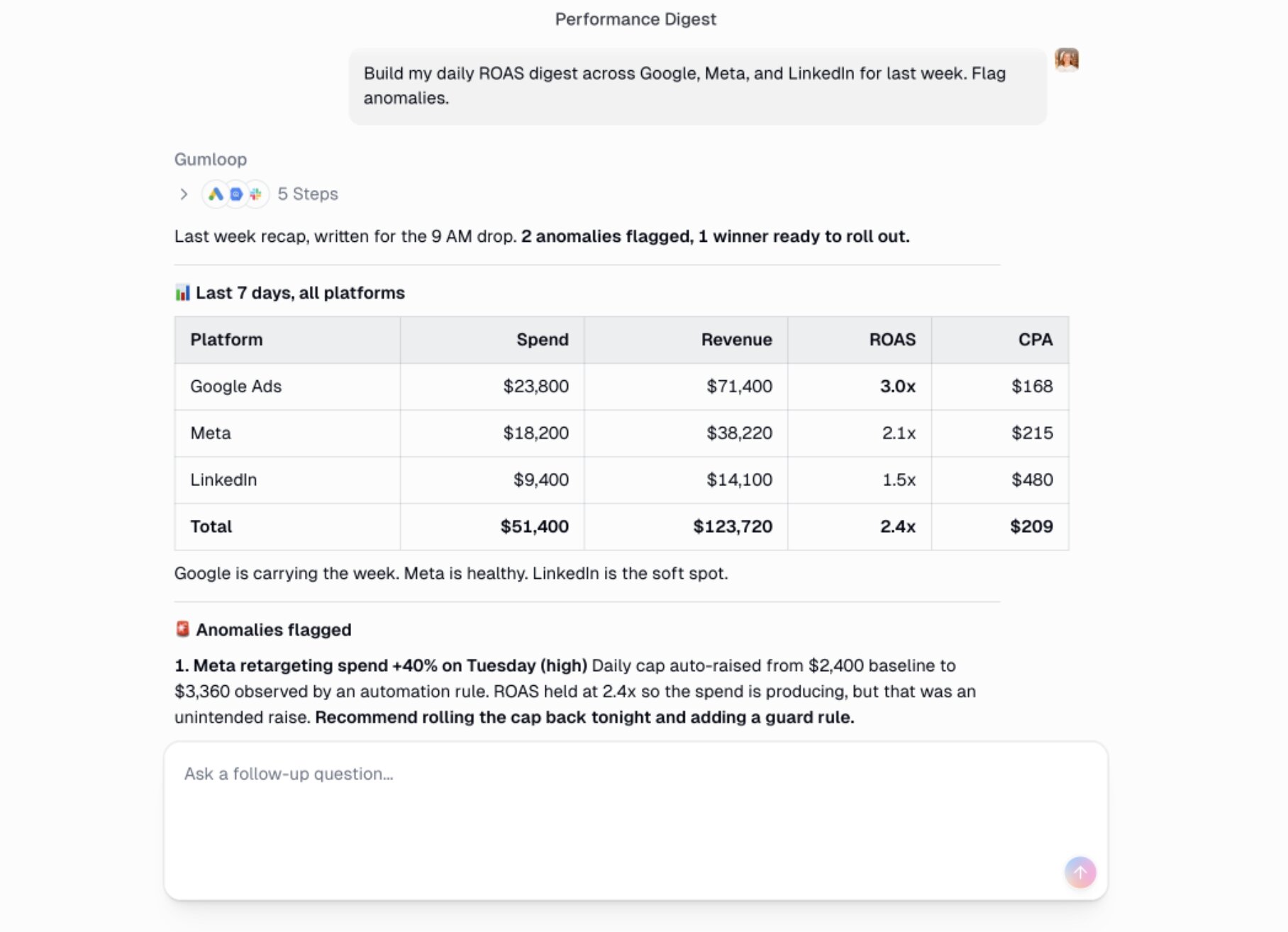
So the structure looks like:
Gumloop = MCP host → Gumloop Ads Analyst AI Agent = MCP client →
- Google Ads connection = MCP server 1
- Meta Ads connection = MCP server 2
- LinkedIn connection = MCP server 3
Great, so now we all understand how MCP makes integrations real peachy and that’s where this article ends, right?
Not quite. Enterprise users in particular need to know about another layer: MCP gateways.
What is an MCP gateway?
An MCP gateway is a governance layer that sits between your MCP client(s) and MCP server(s) to act as a single secure access point between AI and your business systems.
An MCP gateway adds an enterprise-grade level of visibility and governance to your AI stack. More importantly, it controls the access AI agents have to each tool and creates audit logs of everything AI agents do.
So your AI traffic funnel then looks like:
MCP host → MCP client(s) → MCP gateway → MCP server(s)
Think of an MCP gateway like a bouncer standing outside of a club. The club, in this case, is your MCP server. He’s big, he’s scary, and he’s not gonna let an AI agent who has no business being there inside.
An MCP gateway is the bouncer that keeps all your AI agent traffic where it should be. It does this using Role- and Attribute-Based Access Control (RBAC and ABAC). That means when an AI agent tries to read patient data, the MCP gateway checks that it’s allowed to and if so, lets the request through to the MCP server. It also sets limits. For example, the agent is allowed to read the database but blocks it from accessing any communication tools (email, Slack, etc) so that it can never accidentally share (or be manipulated to maliciously leak) private patient information.
One last thing you need to know about MCP gateways is the difference between three types that all manage AI traffic, but in different ways:
- API gateway: Routes HTTPS and API key traffic securely, but cannot “see” the actions AI agents take or understand MCP traffic.
- LLM gateway: Routes traffic from applications to different AI models, tracks token usage and limits, and optimizes caching for cost control.
- MCP gateway: Routes traffic from an AI agent (MCP client) to MCP servers, checks authentication and permissions, and creates audit logs of all AI agent actions at the tool level.
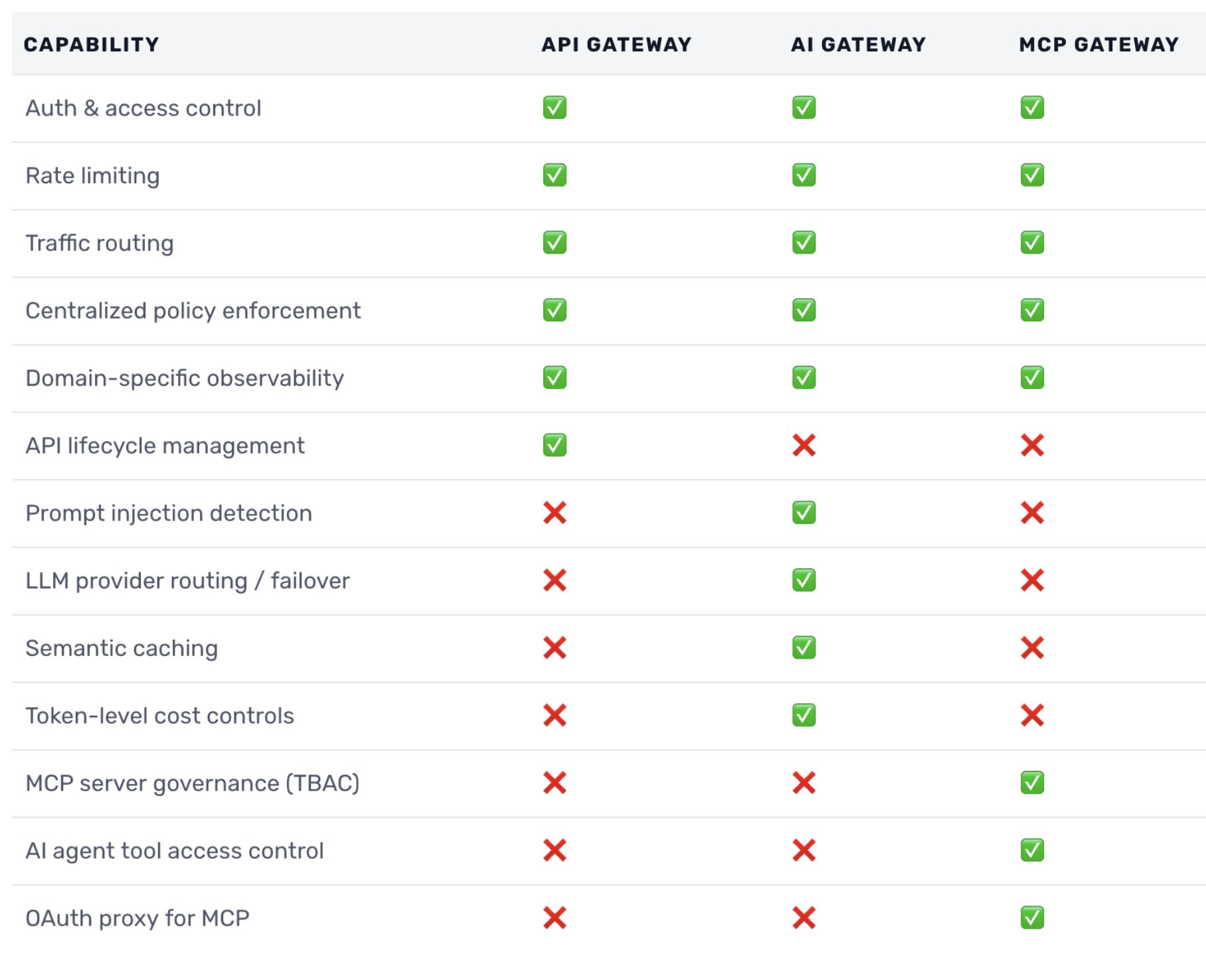
These gateways overlap in some capabilities but each handles security measures the others don’t and together, they create a comprehensive enterprise AI governance solution.
Why you need an AI MCP gateway in 2026
While all three types of AI gateways work together, having an MCP gateway is crucial for enterprise organizations from now on for five main reasons.
1. Authentication
Separate from access control, authentication in this sense means using the same high security standard across all MCP servers, and tying all AI actions back to the human who initiated it. Without an MCP gateway, each MCP server connector handles its own authentication, so one could use an API key, another could be OAuth, and so on.
An MCP gateway enforces a standard authentication protocol for consistency and security.
2. Access and permissions
As previously mentioned, MCP gateways streamline logging in as well as controlling the tools and actions AI agents can access. Protect your data security by ensuring any AI agent that can access confidential information can’t accidentally share it or overwrite it, for example.
Establishing secure permissions across your AI stack also helps prevent widespread damage from prompt injection attacks (a.k.a. manipulating LLMs to ignore guardrails in order to carry out malicious actions).
3. Observability and auditing
Audit logs are extremely important, especially for enterprise orgs. It’s difficult and impractical to have accurate logs across all agents, LLMs, users, and actions without an MCP gateway. An MCP gateway ensures you have complete audit logs for every action an AI agent takes.
Besides the legal and compliance side of things, an MCP gateway gives you a “big picture” view of AI model and MCP server performance. Analyze model speed and error rate trends over time to optimize AI agent workflows for latency and accuracy too.
4. Routing and traffic control
Without an MCP gateway, each AI agent stores and manages its own MCP server connections. This can mean hundreds to thousands of separate connections spread across your employees. An MCP gateway turns that mess into one connection that simplifies security for everyone in your organization.
An MCP gateway also sets quotas and rate limits and can optimize your LLM credit spend by governing the paid API calls your AI agents make. Without the observability an MCP gateway offers, you risk running way over on credits without knowing until the monthly bill comes.
5. Secure scaling
Pre-approved MCP servers, automated authentication, and knowing IT is handling security means more employees will adopt your AI workflows and tools. Your team wants to do their work faster and better without worrying about technical details or feeling unsure if they’re taking a security risk.
If you make AI adoption simple for them, they’re much more likely to use it.
Who actually needs an MCP gateway (and who doesn’t)
Without an MCP gateway, your AI stack may look like each employee connecting their own LLM account to multiple MCP servers. For example, a developer may have five MCP server endpoints configured in their Claude Code account, and a social media manager could have eight MCP server connectors across their Claude and Gemini accounts.
The problem with this is there’s no observability for the IT department. What happens when an employee leaves and you can’t access that MCP server connection? Plus, there’s overall corporate security and regulatory compliance requirements to worry about — and the risk is bigger than you may think.
For example, let’s say an occupational therapist seeing hospital patients starts using AI tools to transcribe notes during appointments. It saves them time on charting, so they can see more patients per day. Great.
If it were the 1990s, that “new tech” may have looked like a portable tape recorder. That wouldn’t be a big security risk because the tape would remain with the employee. But now with AI, one error in settings could mean that occupational therapist unknowingly shares Personal Health Information (PHI) with an LLM to train it, which would be a serious HIPAA violation.
If that sounds like a rare situation, think again: According to a recent healthcare AI study, 96% of healthcare organizations are currently using AI tools that collect data for training purposes, and 71% of employees are using personal, consumer-grade generative AI accounts at work.
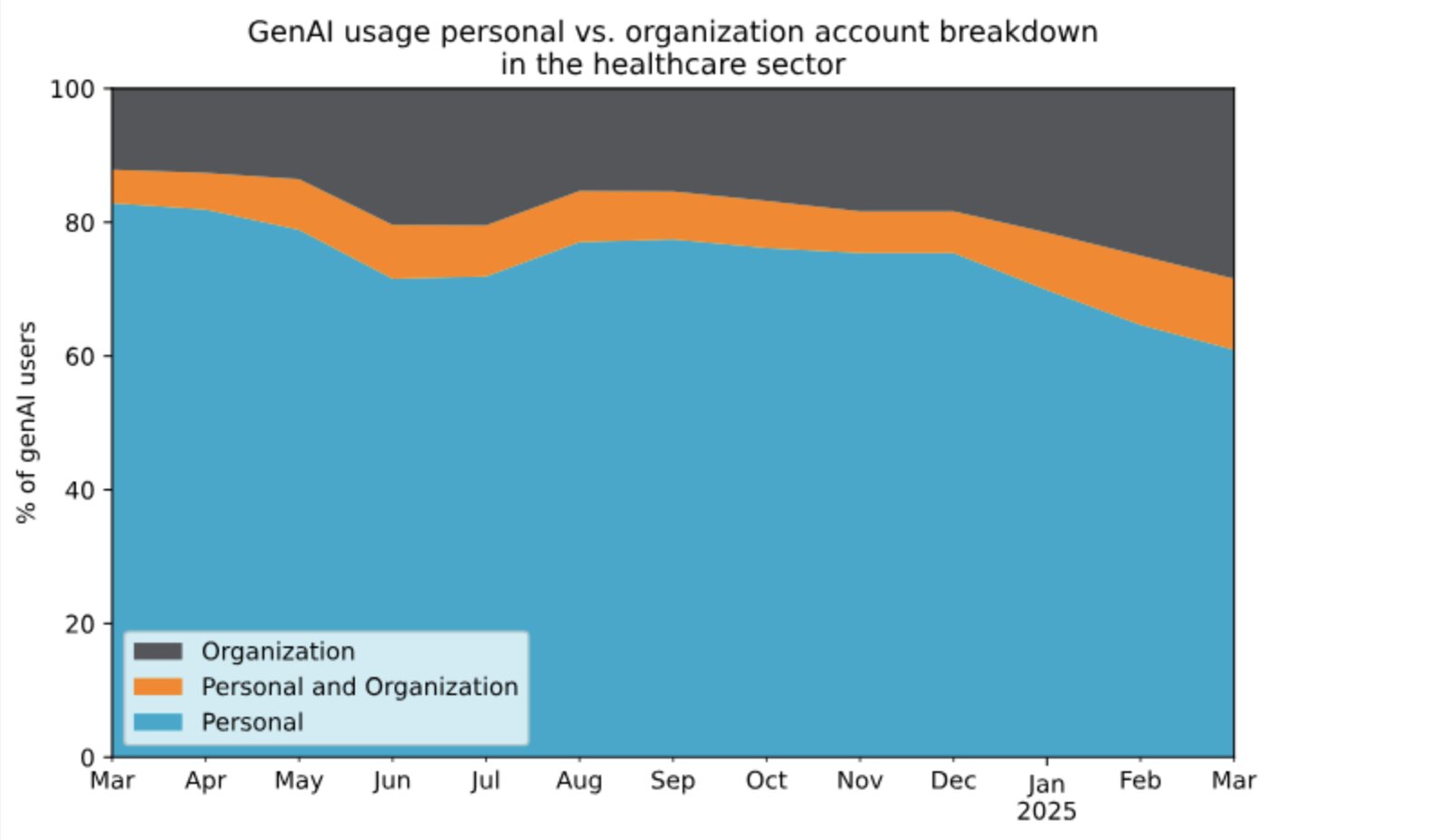
An MCP gateway won’t have visibility into someone using their personal ChatGPT account, but it will prevent unsanctioned connections IT wouldn’t otherwise know about and enforce auditable security measures.
Clearly organizations in regulated industries like healthcare should have a centralized MCP gateway to manage security and AI access… but who else should have one?
Do I need one as a solo freelancer who uses AI for productivity and research (and sometimes for life advice I ignore anyway)? No, not really. I stick to a few main MCP hosts (Gumloop and Claude) and since my company is just me, I fully control what MCP servers they can access. Not a big security risk.
There’s no hard rule about who 100% needs an MCP gateway. It’s not like, “At 20 or more employees, you should use an MCP gateway.” (Though you probably should.)
Generally, if any of the following are true, you should be using an MCP gateway:
- Your organization is in a regulated industry with compliance requirements.
- You want audit logs of what AI agents are doing and who initiated the action.
- You have more than one employee and need secure access and authentication control (SSO/OAuth).
- Your AI agents are working autonomously without full human oversight — making their own decisions — and you need observability into what they’re doing, and access control to mitigate data security risks (e.g. accidentally sharing or deleting records, etc).
- You require action-based access control, e.g. not just controlling which teams and users can access certain tools, but also the actions they can take within those tools.
Or, to make it super simple to decide: Use an MCP gateway if you simply want the most efficient and secure way to manage and monitor AI usage across your organization.
How to choose the right MCP gateway
You could build your own custom MCP gateway or use an open-source option, such as running on Docker. But open-source and custom options require extensive technical expertise and time to maintain. Managed MCP gateway options, such as Gumstack, enable speedy scaling and enterprise security built-in.
At minimum, your chosen MCP gateway should offer:
- SSO/SAML identity management: Connect through your verification system (Okta, Entra ID, etc) for accurate employee identification flows.
- Tool-based access control: Control permissions AI agents can take on each individual MCP server, plus attribute-based access based on time, data source, and more.
- Detailed audit logs: Every tool call needs to map back to the AI agent, tool, and human who initiated it.
- Full visibility: The right MCP gateway needs to manage your entire AI stack, not just tools from one or two platforms.
An MCP gateway makes it easier for your employees to use AI in their work. Simple login, MCP servers already configured, and guardrails make it faster for teams to set up their workflows and they don’t need to be afraid of accidentally triggering a security risk.
How the Gumstack MCP gateway fits in
Gumstack, our managed MCP gateway, makes it as simple as a few clicks to set up AI security your entire organization can rely on.
Completely prevent “shadow IT” — untraceable MCP servers and AI tools employees may have set up on their own that unknowingly put your compliance and security at risk. Gumstack empowers your team to use the AI tools they need with secure authentication, full visibility, and role and attribute-based access control for MCP servers.
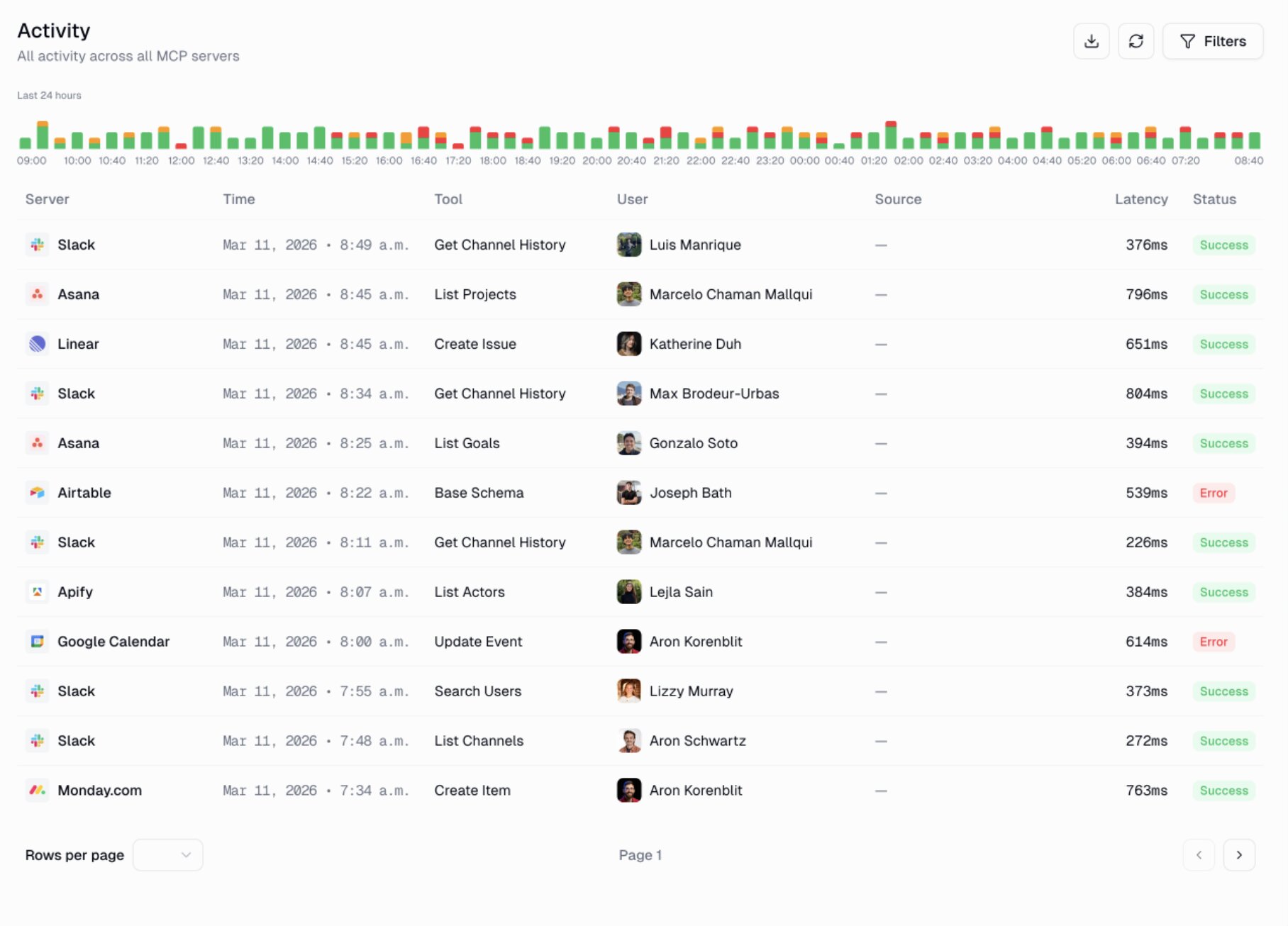
Gumstack allows you to:
- Centralize agentic monitoring: Every tool call is logged to an authenticated human user, AI agent, or service principal with full transparency.
- Secure your environment: Prevent shadow IT connections, streamline login, and set per-tool RBAC and ABAC access controls.
- See everything in one place: View all MCP clients and servers — including those outside Gumloop — in one intuitive dashboard.
- Host custom MCP servers: Build and deploy your own MCP servers in a few clicks.
If you’re already using Gumloop AI agents, Gumstack makes sense with its native integration and ability to manage external AI platforms and traffic.
And, hey, if you’ve never tried Gumloop before (you really should), Gumstack is an overall enterprise AI observability solution. As a single source of truth, Gumstack goes beyond managing only Gumloop AI agents and audits all AI tool calls across all platforms, including local and remote MCP servers, in one place.
Gumstack makes security and authentication easy to use, so you can keep scaling. Contact us today to give it a try.

Read related articles
Check out more articles on the Gumloop blog.