Top 10 best Zapier alternatives I’ve tested in 2026

I’m a huge Zapier fan.
But over the past couple of years, with the rise of AI and LLMs, I’ve found myself constantly experimenting with new automation tools.
Especially with AI agents being all the craze now, I wanted to find a tool that had the automation features I love about Zapier with the AI capabilities of modern LLMs.
This way, I can not only create automated workflows between my apps, but I could use ChatGPT or Claude to “talk” to my apps and execute tasks on my behalf.
That's when I started my search for the best alternatives to Zapier for building autonomous AI agents, not just connectors that pass data between apps, but tools that can reason, decide, and act on my behalf. I tried over a dozen different platforms, and today I'm going to give you a list of my favorite ones that I actually use.
For each tool, I’ll explain what it does, who it’s best for, and what I personally like (and don’t like) about it.
But first, let’s go over what to actually look for when finding an alternative to Zapier. I can tell you what is best, but I think it’s important for you to also understand what will truly fit your own needs based on the nuances of your business.
So first, let’s go over that.
What to look for in a Zapier alternative
I don’t know the exact reason why you might be switching away from Zapier. It could be the price, lack of AI features, or something else.
While I love the concept of “zaps” and different connectors with Zapier, I’ve found through my own experience that there are a lot of underrated tools that can do exactly what Zapier does.
Some of these tools are great for all use cases, while others are good at very specific ones like customer service, finance, marketing, operations, or something else.
So first, let’s make sure we know what to look for when selecting a tool from the list below. Here’s what you should consider when finding a Zapier alternative:
- Can it integrate with your existing tools? Maybe you have a trusted CRM with tons of data already. Or you have a specific workflow using Semrush for your SEO. Whatever it is, make sure that the platform you choose can integrate with your existing tech stack.
- Is it AI native? Today, everything is AI. So it’s a good idea to find an automation tool that is built with an AI-first approach. This means it should be able to integrate with all the modern LLMs so it can communicate with tools in your tech stack. It should also be able to integrate with MCP servers.
- Is it fun to work with? Most of our time during weekdays is filled with work. So you might as well use tools that are fun to use. This means it has a user-friendly interface and the UI/UX just makes sense. I love well-designed tools, and I made sure to include Zapier alternatives below that fit my own criteria of that.
- Does it give you a competitive edge? Of course it’s important for any tool to fulfll your automation needs. But you should also find tools that are constantly evolving to help your business make more money (or save more time). Find platforms that are constantly adding new features (and showing you how to use them).
- Is there good support (and resource)? Automation tools aren’t the simplest of tools out there. So make sure whatever platform you choose has a community around it. Is the customer service good? Are there templates and YouTube videos that show you how to use the tool? While not the most important criteria for some, for me this matters a lot.
While there’s a bunch of nitty gritty stuff we can go over for evaluating these tools, I truly believe the ones I listed above give you a good north star for what to pick. And below, I listed out 10 of my favorite Zapier alternatives, all of which I mention who it’s best for.
Alright let’s get into it.
10 Zapier alternatives and competitors in 2026
Here are the best Zapier alternatives:
Alright, let’s go over each one.
1. Gumloop
- Best for: AI-powered workflow automation for non-technical teams
- Pricing: Starts at $37/month with a 14-day free trial
- What I like: Built-in AI assistant (Gummie), 35+ AI models in one plan, and Interfaces feature to turn automations into apps
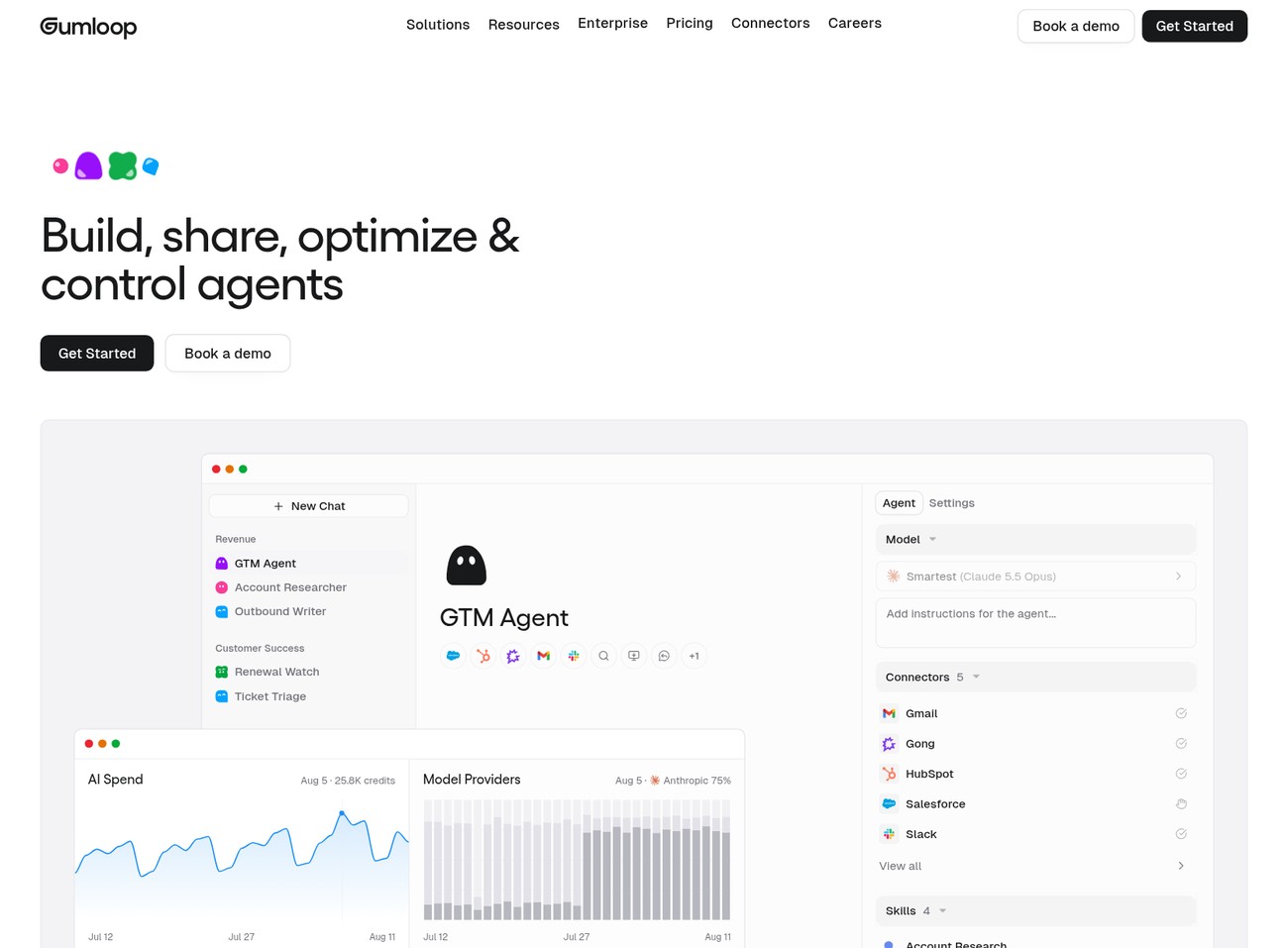
Gumloop is an AI automation platform that I've been using more and more recently. It's one of the closest alternatives to Zapier that I've found, except with an AI twist.
It's built for non-technical marketers, founders, HR managers, sales reps, and customer service teams. The tool essentially gives you the power of an AI engineer without having to know how to code.
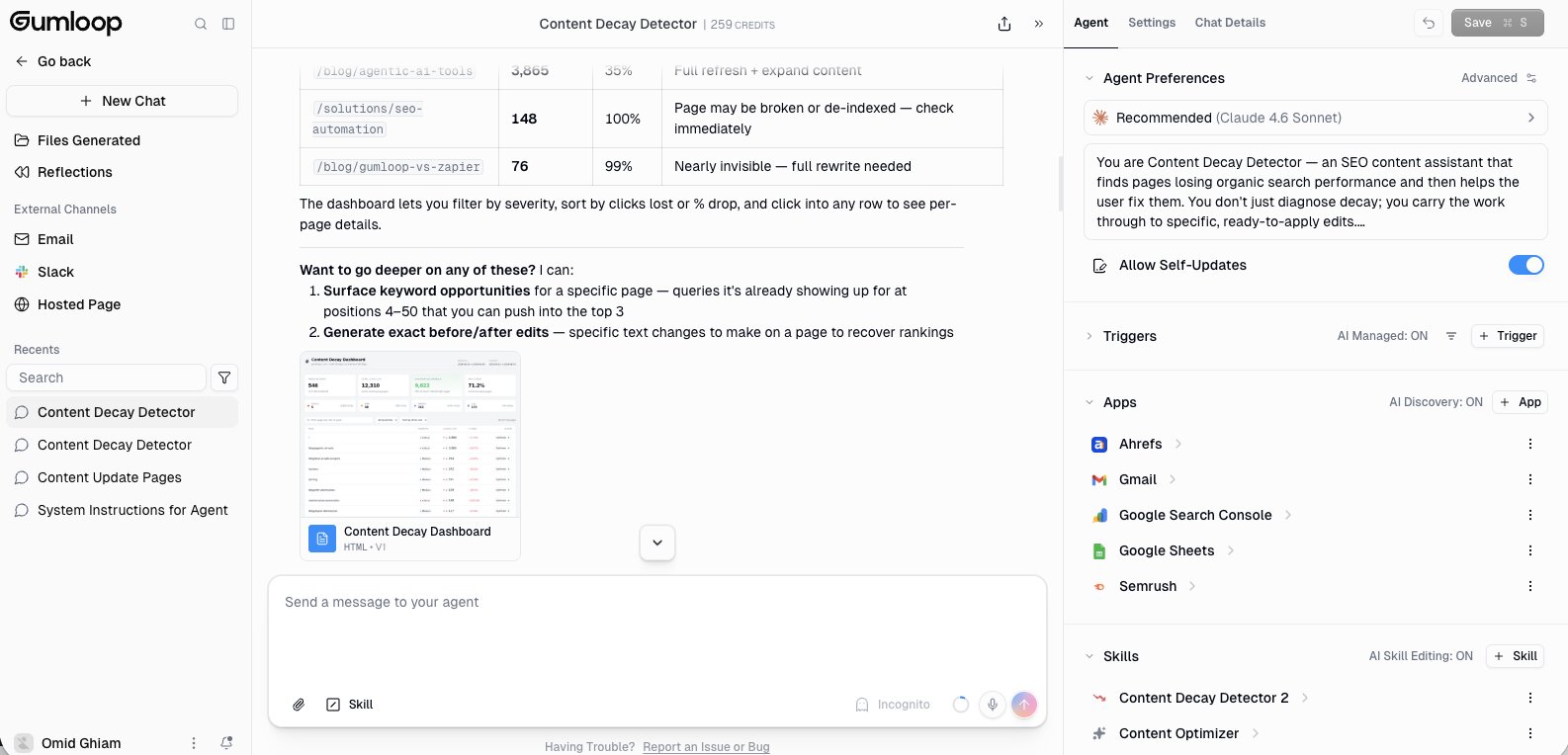
All you do is build your automated workflows by dragging your favorite apps onto a visual canvas and connecting them together with conditional logic.
Just like Zapier, Gumloop lets you integrate all your favorite apps. And with guMCP, you can integrate with almost any application that has an MCP server. What makes Gumloop different from a platform like Zapier is that it takes it a step further by allowing you to add a layer of AI using LLMs like ChatGPT, Claude, Gemini, Grok, or whatever to integrate AI into your automations.
I personally use it to help me run my content marketing agency, but I know some huge brands also use it. Companies like Shopify, Instacart, and Webflow use Gumloop internally to automate processes across their hundreds of employees. So the platform has been created with enterprise customers in mind as well.
Some things I like about Gumloop:
- Clean UI/UX that makes it easy to build any automated workflow
- Has an AI assistant named Gummie that can help you build any automation and debug errors
- The Pro plan includes 35+ AI models, and you can still bring your own API keys if you want
- Create AI-enhanced decision making where AI can route and choose the next best steps in your automations
- Tons of templates so you can start building right away
- Gumloop's Interfaces feature allows you to turn your automations into apps that your team members or friends can use
Here are some things that could be improved:
- Still a fairly new platform and they're adding new features constantly, so the UI can change sometimes
- Requires that you already have an existing workflow that you want to automate
Overall, it's an amazing platform and I've been using it for the past 9 months. I found myself slowly moving my Zapier workflows into Gumloop. If you're weighing Gumloop vs Zapier, the biggest difference is the AI layer. Zapier is great at passing data between apps, while Gumloop lets AI reason through the steps in between. So if you're a solo operator (like me) or someone who works in-house at an agency or startup, you need to check this out.
Gumloop pricing
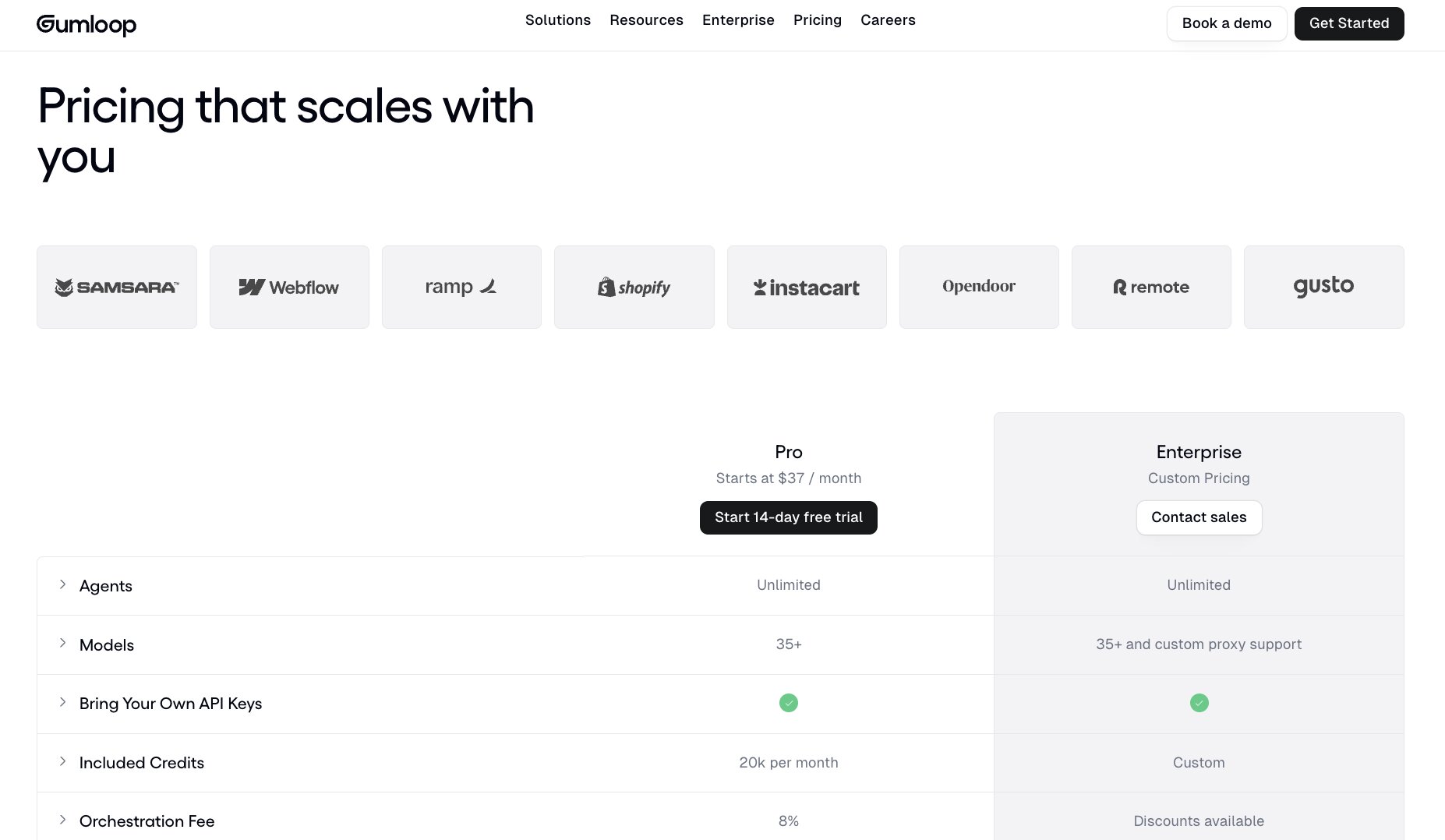
Here are Gumloop's pricing plans:
- Pro: Starts at $37/month with 20k credits/month, unlimited agents, 35+ AI models, bring your own API keys, unlimited seats and teams, and a 14-day free trial
- Enterprise: Custom pricing with custom credits, custom model proxy support, org-wide guardrails, an optional virtual private cloud, and admin and security features like role-based access control, SCIM/SAML, and audit logs
If you want to learn more about what each plan has to offer, you can check out the pricing page.
Gumloop reviews
Here are what customers of Gumloop have to say about the tool:
"Gumloop has been critical in helping all teams at Instacart - including those without technical skills - adopt AI and automate their workflows, which has greatly improved our operational efficiency." — Fidji Simo, CEO @ Instacart
"Gumloop wins time back across an org. It puts the tools into the hands of people who understand a task and lets them completely automate it away." — Bryant Chou, Co-Founder @ Webflow
You can see what others say on social media on the Gumloop Wall of Love.
2. Make

- Best for: Budget-friendly visual workflow automation with lots of app integrations
- Pricing: Free, then starts at $12/month
- What I like: Over 3,500 pre-built apps, MCP server support, and lots of educational resources on YouTube
Make (formerly Integromat) is a popular AI automation tool very similar to Zapier. It has the same visual interface where you can drag your apps into a workflow and connect them with conditional logic.
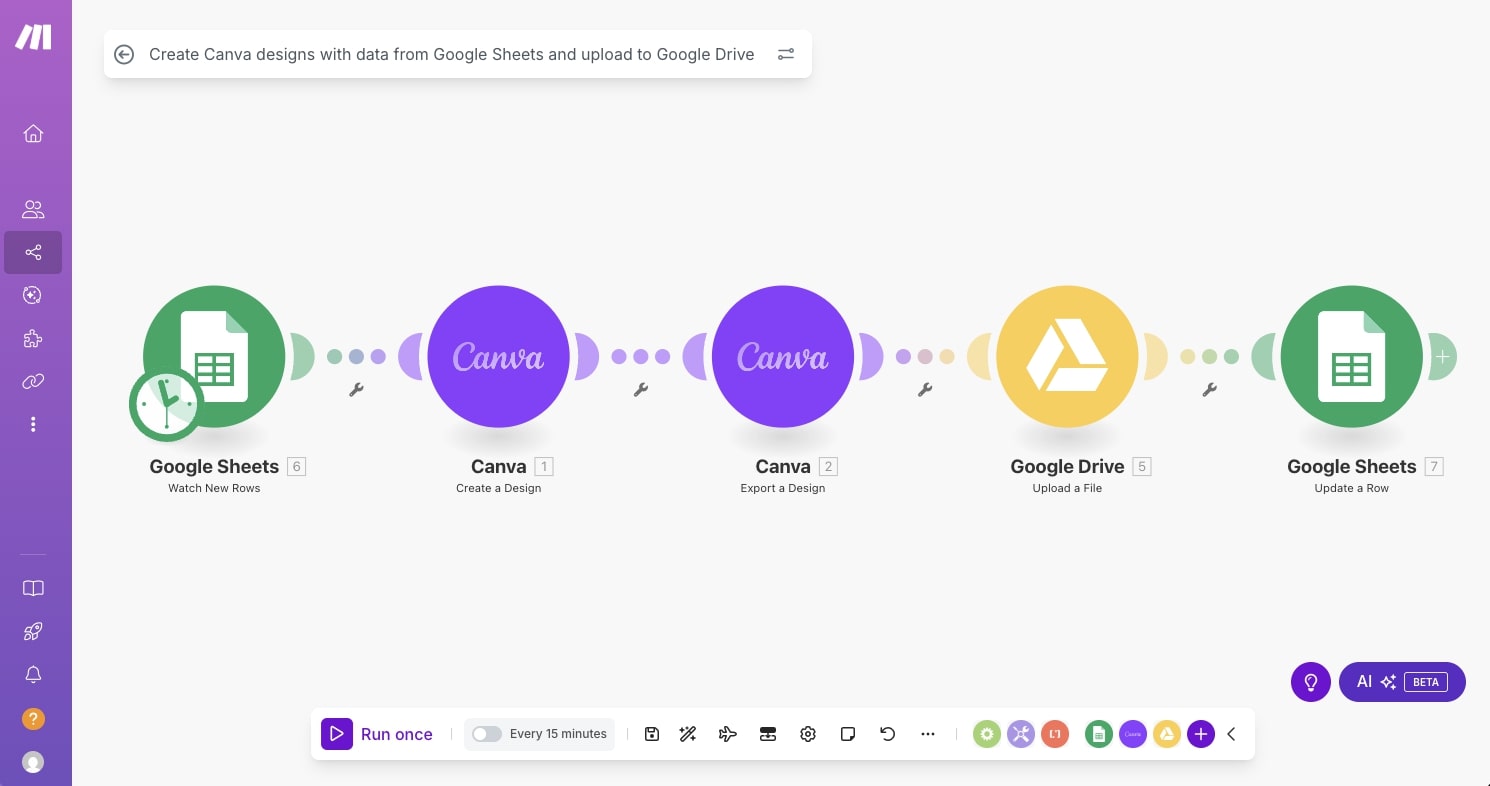
The platform has become popular among no-code enthusiasts and even AI service providers. It's fairly budget-friendly compared to other tools in this space, so a lot of small startups and freelancers on a budget like to use the platform.
Whether you're building your own automations for your business or helping other businesses build out their automations, Make is a pretty solid choice if you're already familiar with how Zapier works.
Some things I like about Make:
- Popular platform with lots of educational resources on YouTube
- Includes over 3,500 pre-built apps
- Has an MCP server so you can connect to most apps
- Allows you to connect to LLMs to build AI agents
Here are some things that could be improved:
- The UI/UX can feel a bit outdated and clunky
- Not as stable as a platform like Zapier
Overall, I would say Make is the budget-friendly version of Zapier. It's a bit more downgraded and not as polished, but it does help you build simple automations with the same power that Zapier would (at a fraction of the cost).
Make pricing
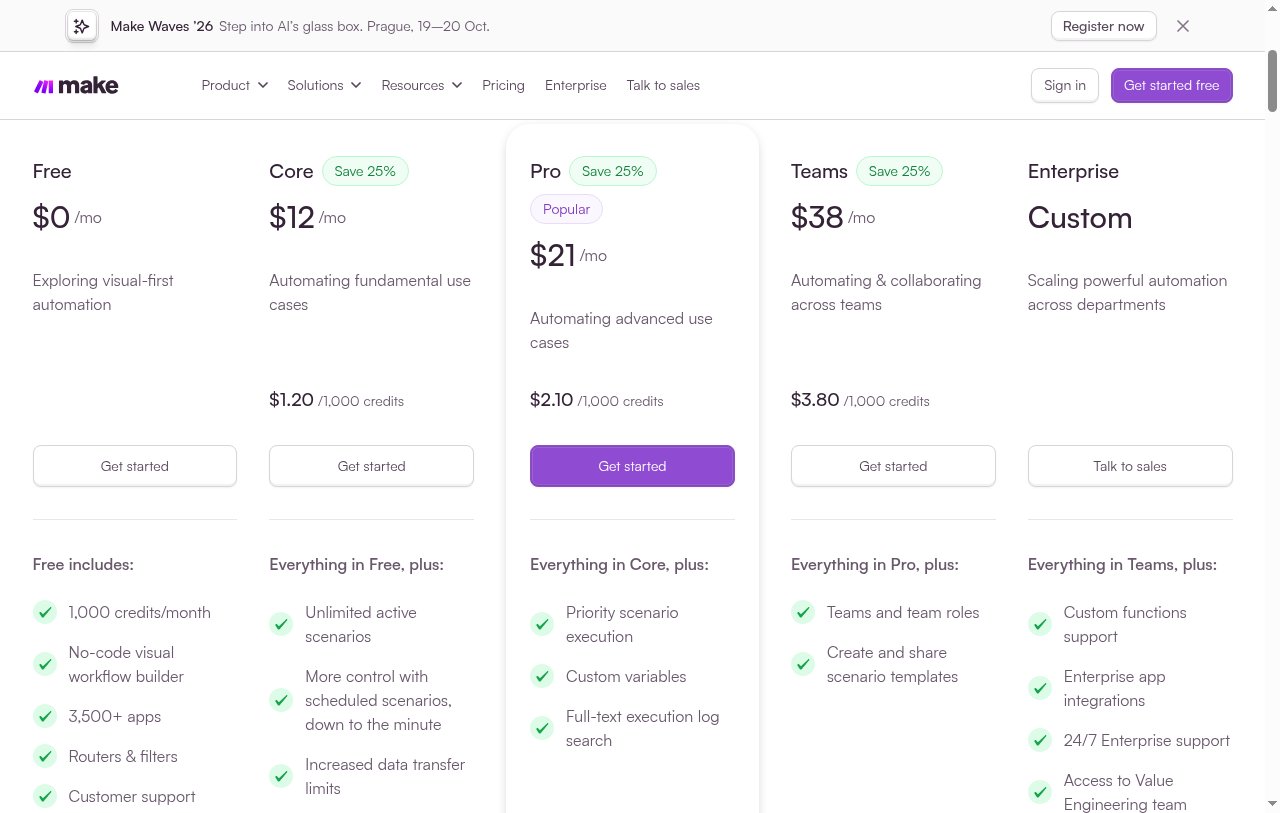
Here are Make's pricing plans:
- Free: $0/month with up to 1,000 credits/month
- Core: $12/month for 10,000 credits/month
- Pro: $21/month for 10,000 credits/month
- Teams: $38/month for 10,000 credits/month
- Enterprise: Custom pricing with 24/7 enterprise support
If you want to learn more about what each plan has to offer, you can check out the pricing page.
Make reviews
Here’s what customers of Make rate the platform on third-party review sites:
- G2: 4.7 out of 5 star rating (from +252 user reviews)
- Capterra: 4.8 out of 5 star rating (from +406 user reviews)
3. n8n
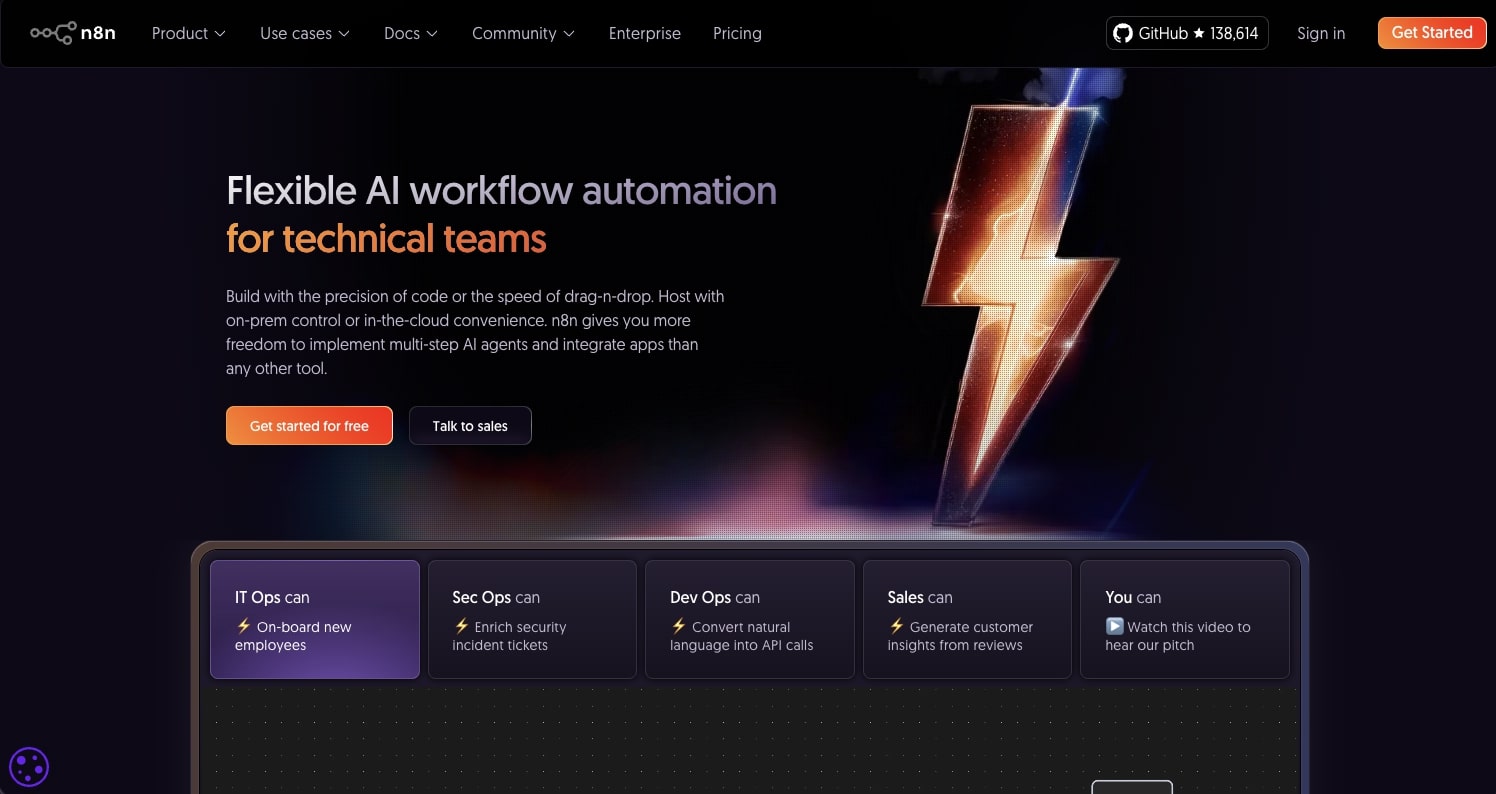
- Best for: Self-hosted workflow automation for developers and technical teams
- Pricing: Starts at $20/month, billed annually (hosted)
- What I like: Self-hosting features, wide range of community templates, and used by big companies like Microsoft and Vodafone
n8n is a workflow automation platform that has been growing in popularity. It's similar to Make, however it does have more advanced features. The platform is known for having self-hosting capabilities, making it a popular choice for developers.
It does lean a bit more on the technical side, so if you're not used to using low-code tools, there might be a steep learning curve.
Similar to Gumloop, the platform can help you automate literally anything, from IT operations, DevOps, sales, marketing, customer service, and a ton more. It's like a catch-all tool for any use case that requires you to use AI to automate repetitive tasks.
My biggest gripe used to be that you needed your own API key to use LLMs like ChatGPT or Claude. n8n's cloud plans now include AI models without API keys, so that's less of an issue. My main gripe now is the learning curve, since it still leans technical.
Some things I like about n8n:
- Super popular platform with tons of free resources on YouTube
- Includes self-hosting options for developers
- Has a wide range of templates created by community members
- Used by some big companies like Microsoft, Vodafone, Wayfair, and more
Here are some things that could be improved:
- It's more of a low-code platform, so you will need some technical knowledge
- Similar to Make, the interface can feel a bit clunky and old
- Pricing jumps fast once you need team features, since the Business plan starts at $800/month and is self-hosted only
Overall, if you're looking at n8n as an alternative to Zapier, it's a solid choice if you want to replace Zapier. It's a great platform for creating automated workflows, however the only reason why I like Gumloop more is because it's a bit more user-friendly to build with.
n8n pricing
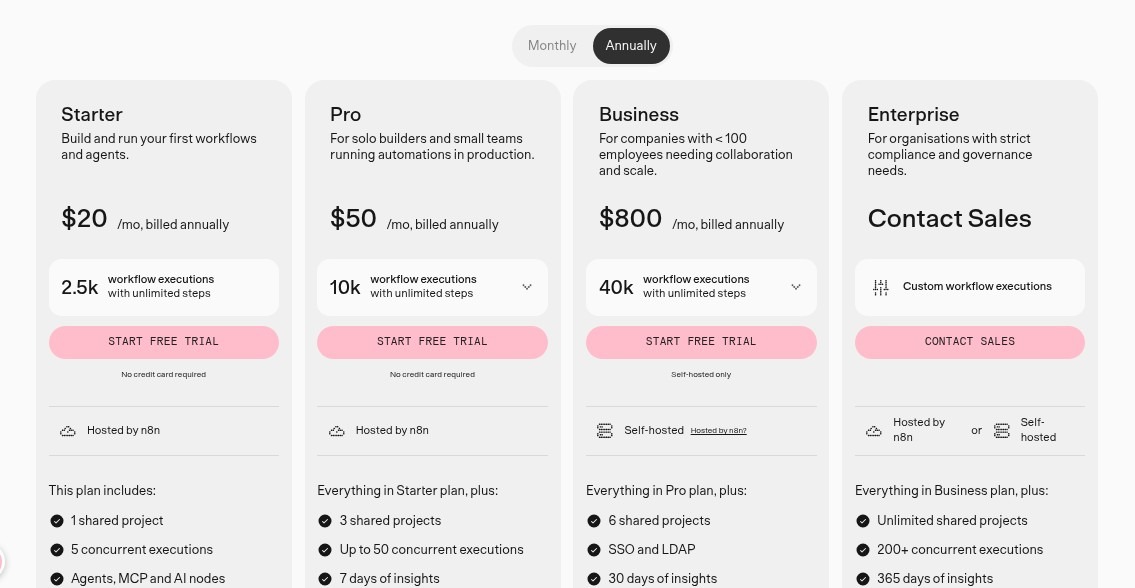
Here are n8n's pricing plans:
- Starter: $20/month, billed annually, with 2,500 workflow executions (hosted by n8n)
- Pro: $50/month, billed annually, with 10,000 workflow executions (hosted by n8n)
- Business: $800/month, billed annually, with 40,000 workflow executions (self-hosted)
- Enterprise: Custom pricing with unlimited shared projects and dedicated support
There's also a free, self-hosted Community Edition on GitHub if you'd rather run n8n on your own servers.
If you want to learn more about what each plan has to offer, you can check out the pricing page.
n8n reviews
Here's what customers of n8n rate the platform on third-party review sites:
- G2: 4.8 out of 5 star rating (from +135 user reviews)
- Capterra: 4.6 out of 5 star rating (from +39 user reviews)
4. Activepieces
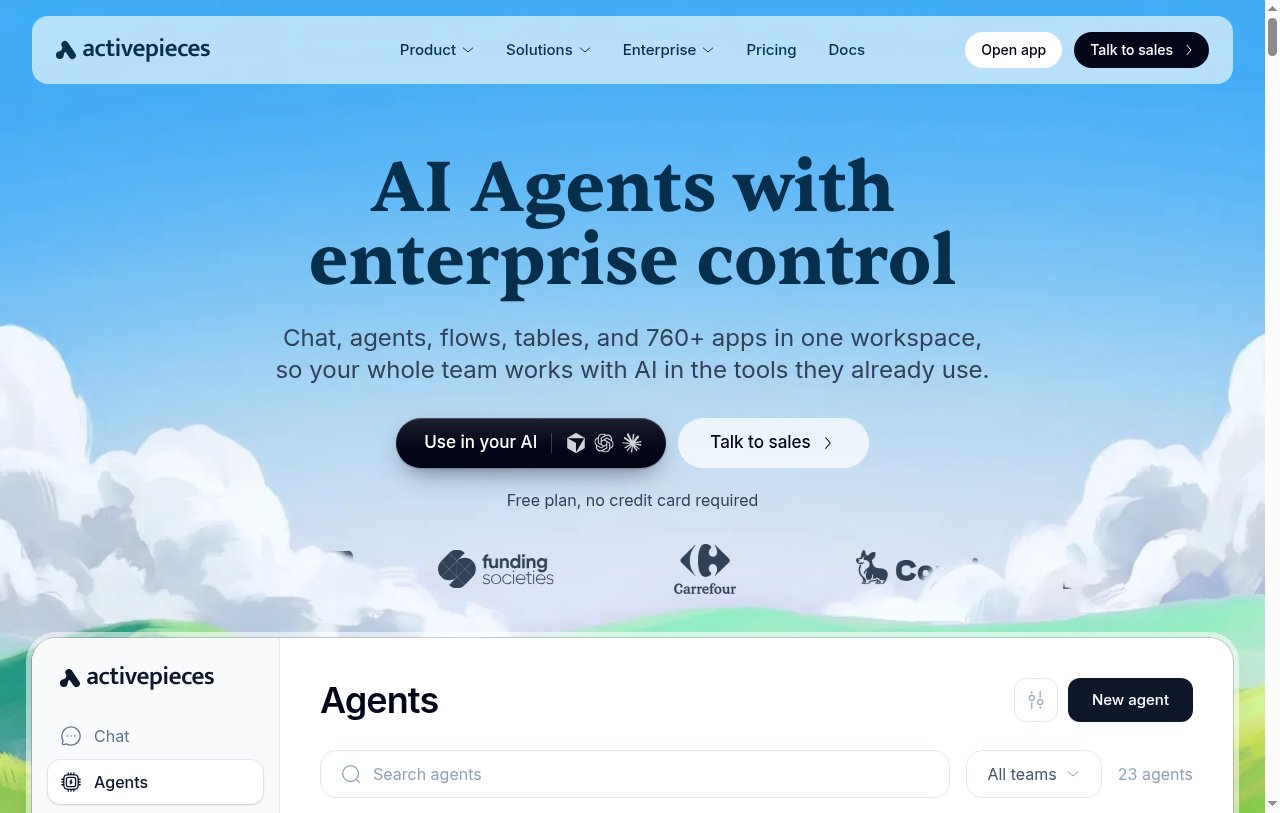
- Best for: Teams that want an open source Zapier alternative they can self-host
- Pricing: Free, then $20/month (free to self-host)
- What I like: MIT-licensed Community Edition, 760+ integrations, and agents, flows, and tables in one workspace
Activepieces is the open source Zapier alternative I'd point you to if you want to own your automation stack. Its Community Edition is released under the MIT license, so you can self-host it for free.
It works a lot like Zapier. You pick a trigger, add steps, and connect your apps. But it has also moved well past simple automations, with chat, AI agents, flows, and tables in one workspace, plus 760+ app integrations (they call them pieces) and MCP support.
If you're comparing Activepieces vs Zapier, Zapier still has the much bigger integration library. Activepieces wins on price and control, and since pieces are open source TypeScript, you can build any integration that's missing.
Some things I like about Activepieces:
- The Community Edition is open source under the MIT license, so you can self-host it for free
- The free cloud plan includes 1,000 credits a month, unlimited flows, and up to 5 users
- Anything with an API works through the HTTP piece or a webhook, even if there is no native integration yet
- You can bring your own AI keys on paid plans
Here are some things that could be improved:
- The integration library is a lot smaller than Zapier's
- Enterprise features like SCIM, custom roles, and audit logs are on the custom Ultimate plan
- Self-hosting means you own the updates, uptime, and scaling, which is real work for a non-technical team
Overall, Activepieces is the best pick on this list if open source and self-hosting matter to you. If they don't, the other tools here will probably get you to a working AI automation faster.
Activepieces pricing
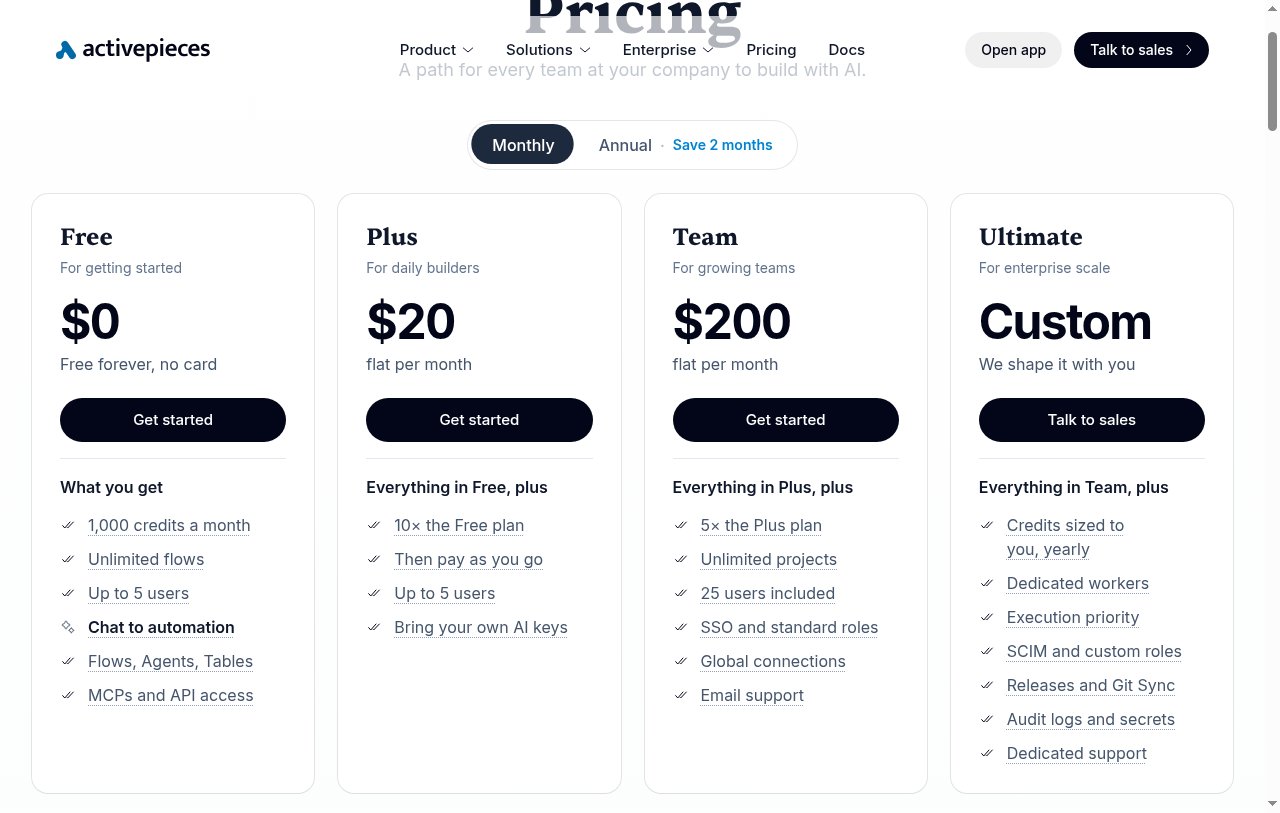
Here are Activepieces' pricing plans:
- Free: $0/month with 1,000 credits a month, unlimited flows, and up to 5 users
- Plus: $20/month flat with 10x the Free plan, then pay as you go
- Team: $200/month flat with 5x the Plus plan, 25 users, and SSO
- Ultimate: Custom pricing with dedicated workers, SCIM, audit logs, and dedicated support
Self-hosting is available on every plan. If you want to learn more about what each plan has to offer, you can check out the pricing page.
Activepieces reviews
Here's what customers of Activepieces rate the platform on third-party review sites:
- G2: 4.8 out of 5 star rating (from +128 user reviews)
5. IFTTT
- Best for: Simple personal automations and basic work tasks
- Pricing: Free, then starts at $2.99/month (billed annually)
- What I like: Insanely affordable, simple to use with iOS and Android apps, and used by hundreds of thousands of people
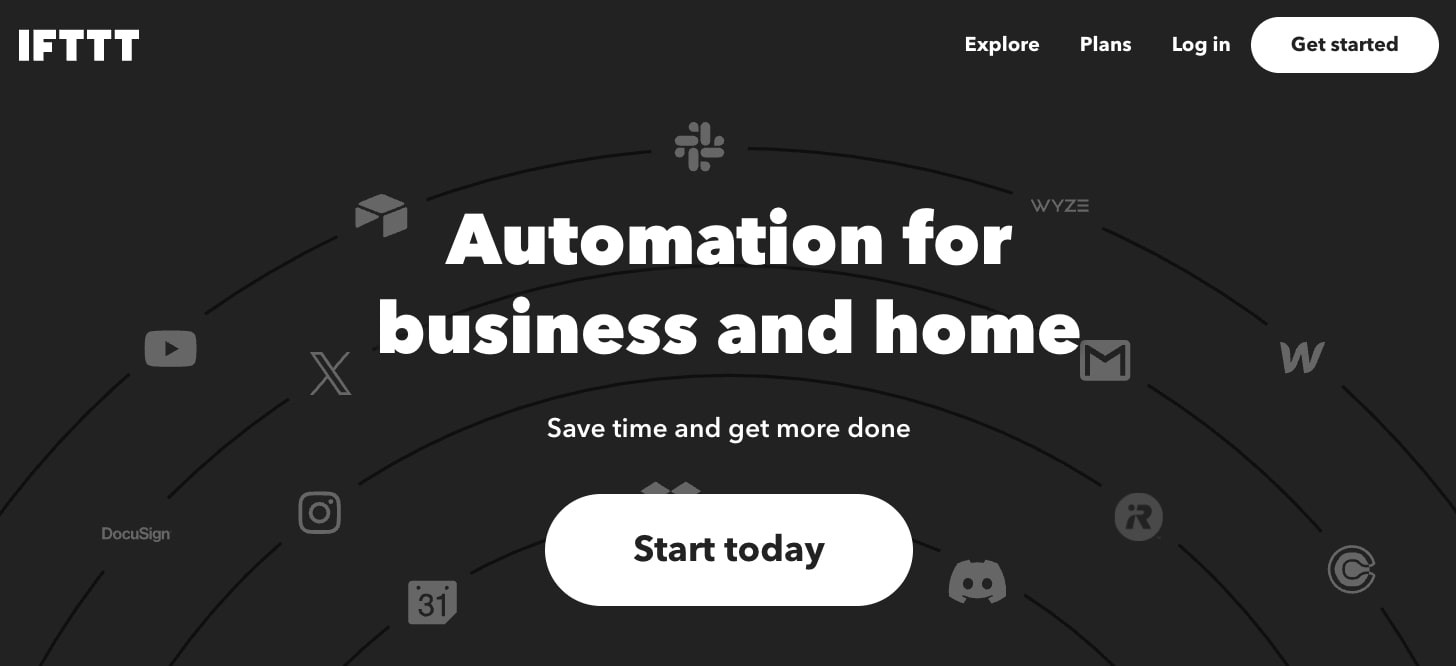
IFTTT, which stands for "if this then that," is one of the original automation tools that ever existed alongside Zapier. It's the most basic tool on this list and it's mostly great for personal automations.
If you just want simple automations like getting the weather forecast every day at a certain time, or even if you have work-related things like setting up events in Google Calendar, then this is the platform for you.
It's also super affordable and it's the cheapest tool on this list. So if you just need simple automations for your personal life (and a little bit for your work life), I highly recommend checking out IFTTT.
Some things I like about IFTTT:
- Insanely cheap and affordable
- Simple to use and has iOS and Android apps
- Used by hundreds of thousands of people, so it's quite reliable
Here are some things that could be improved:
- Not the best for creating advanced workflows
- Can feel a bit outdated
- Doesn't integrate with every modern tool that you need
Overall, if complex functionality and automating business processes is not high on your list, and you really need just something to automate your personal life, this is the platform for you.
IFTTT pricing
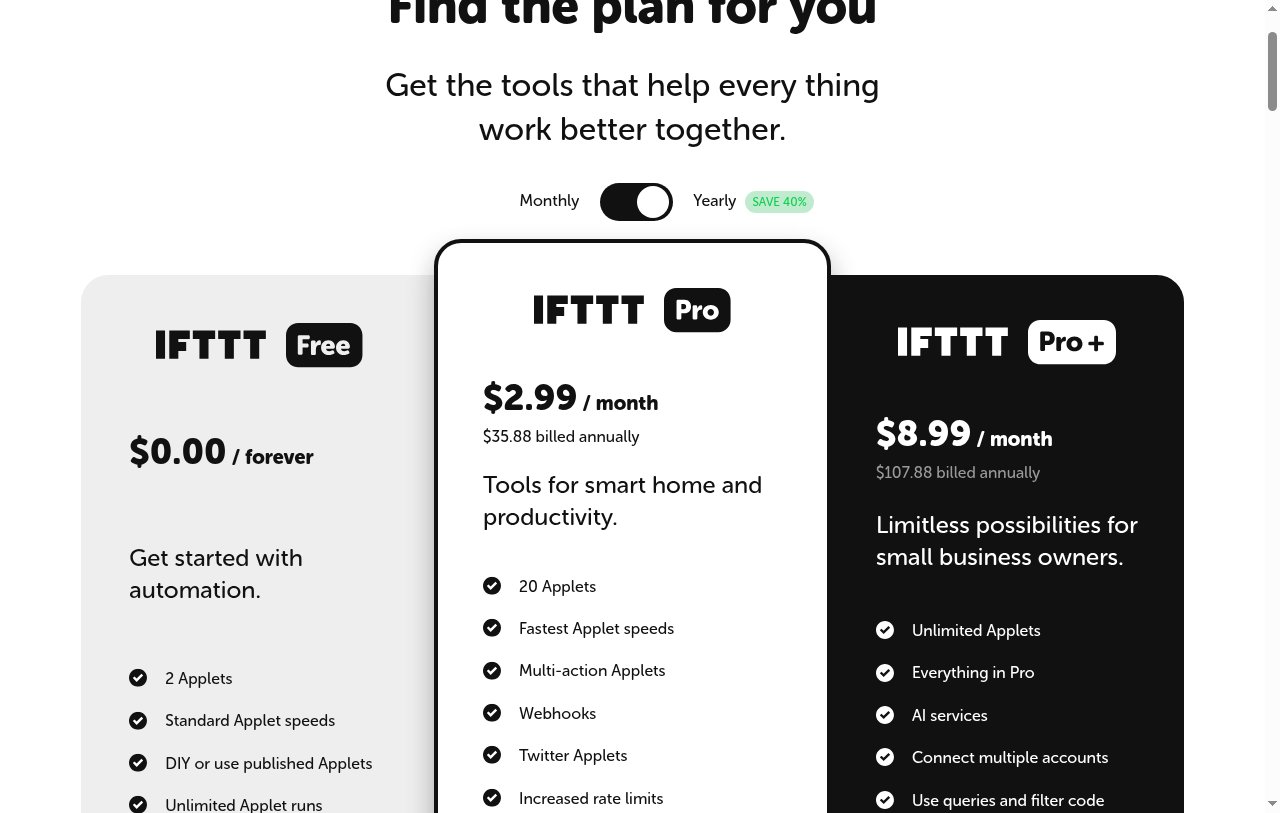
Here are IFTTT's pricing plans:
- Free: $0/month with 2 Applets and unlimited Applet runs
- Pro: $2.99/month, billed annually, with 20 Applets, multi-action Applets, and webhooks
- Pro+: $8.99/month, billed annually, with unlimited Applets, AI services, and queries and filters
If you want to learn more about what each plan has to offer, you can check out the pricing page.
IFTTT reviews
Here's what customers of IFTTT rate the platform on third-party review sites:
- G2: 4.5 out of 5 star rating (from +114 user reviews)
- Capterra: 4.6 out of 5 star rating (from +221 user reviews)
6. Lindy AI
- Best for: Creating AI employees for sales operations and customer service
- Pricing: Free credits, then starts at $49.99/month
- What I like: Strong focus on sales and customer service and has a chatbot interface for building agents
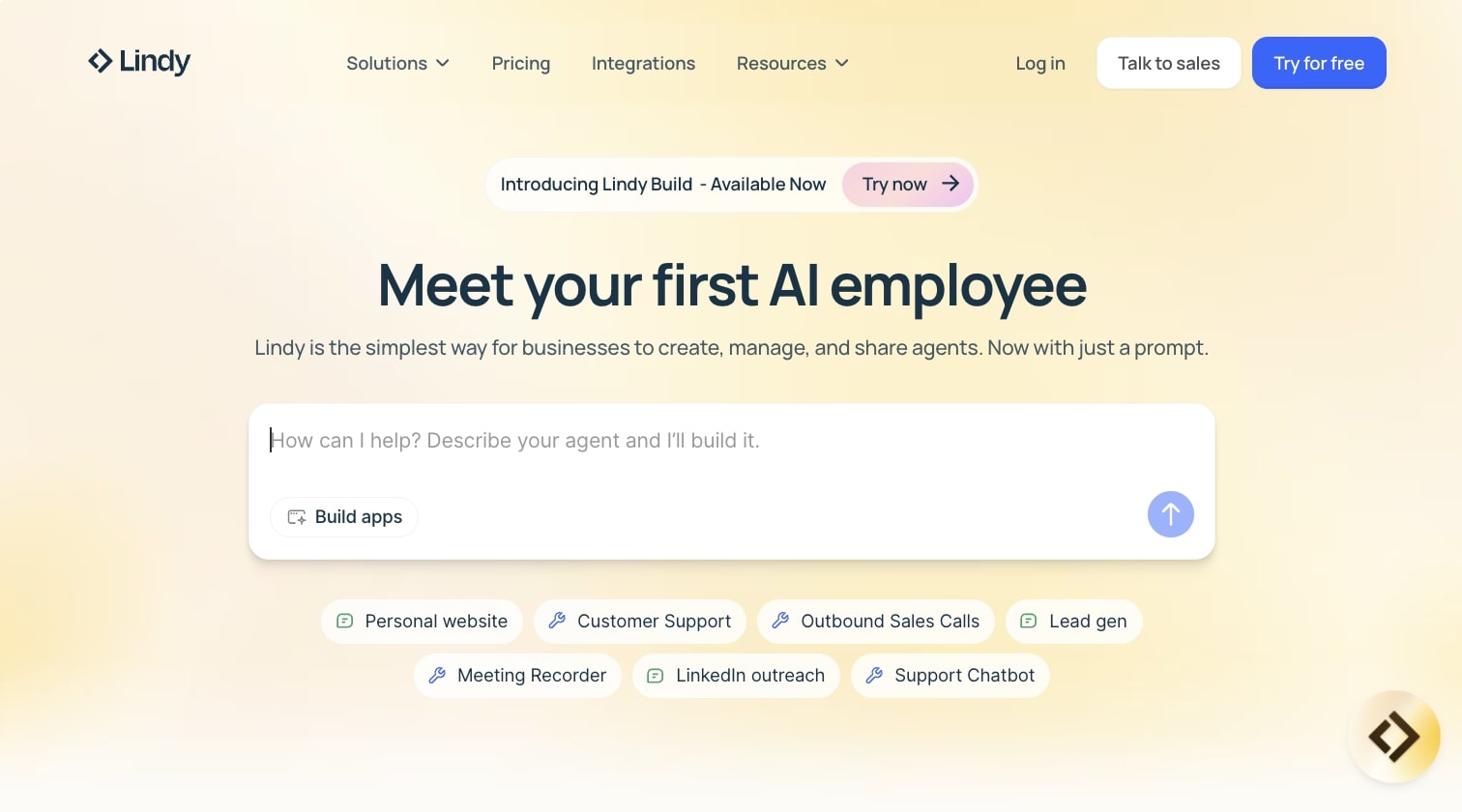
Lindy AI is an AI agent platform designed to help you create AI employees. It's very similar in concept to Zapier in that you can create AI or automated workflows, however Lindy AI has branded itself as an AI employee creator.
If you work in sales or customer service, then this is a platform you should definitely check out because the AI use cases focus a lot around outbound sales calls, lead generation, meeting recorders, LinkedIn outreach, and support chatbots.
What makes the platform different compared to Zapier is that it has a chatbot interface where you simply explain what type of agent you're trying to build and Lindy AI will help you create it.
Some things I like about Lindy:
- A strong focus on sales operations and customer service (if that's the space you're in)
- Connects with hundreds of different apps used by most sales teams
- Can use LLMs to help you qualify leads and do automated outreach, eliminating the need for some other outreach tools
Here are some things that could be improved:
- The free option is $50 in credits that only last 7 days, and the paid plan is a bit more pricey compared to Zapier and some other tools
- Not the best tool for marketing operations or HR use cases
Overall, if you're looking for an AI agent builder that you can speak to in natural language, then Lindy AI is a platform you should definitely check out.
Lindy AI pricing
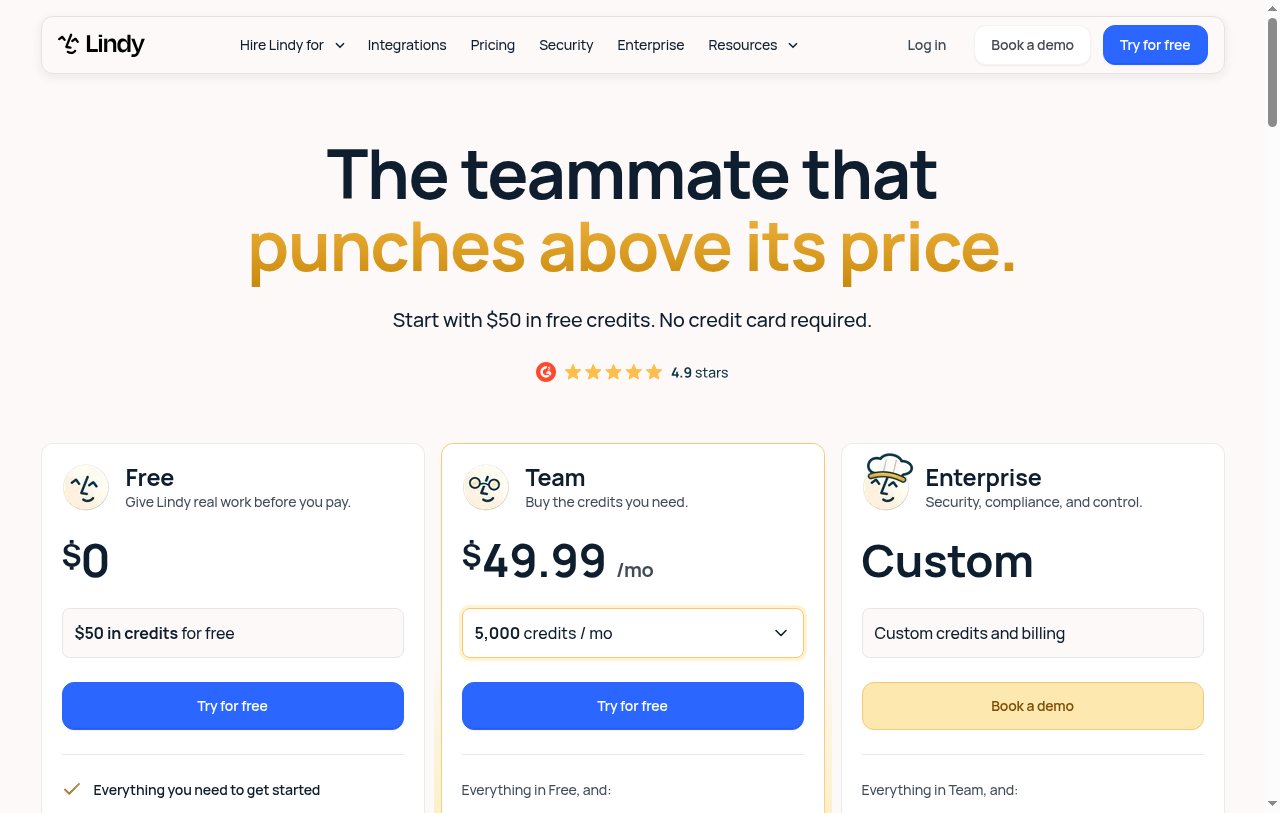
Here are Lindy AI's pricing plans:
- Free: $0 with $50 in credits that last 7 days, no credit card required
- Team: $49.99/month per active user with 5,000 credits each, pooled across your team (top-ups are $10 per 1,000 credits)
- Enterprise: Custom pricing with HIPAA compliance, SSO and SCIM, audit logs, and dedicated support
If you want to learn more about what each plan has to offer, you can check out the pricing page.
Lindy AI reviews
Here's what customers of Lindy AI rate the platform on third-party review sites:
- G2: 4.9 out of 5 star rating (from +111 user reviews)
- Capterra: 3.2 out of 5 star rating (from +2 user reviews)
7. OttoKit

- Best for: All-in-one automation platform for WordPress websites
- Pricing: Free, then starts at $9/month, billed annually
- What I like: WordPress plugin integration, easy to use according to users, and great replacement for Zapier on WordPress sites
OttoKit (formerly SureTriggers) is an all-in-one automation platform built specifically for WordPress websites. If you're already using WordPress as your CMS or website builder of choice, and you're looking for an automation tool that can easily integrate with all aspects of your website, you have to check out OttoKit.
The great thing about OttoKit is that the tool is a plugin, so you can actually use it within your WordPress dashboard. And you can connect it to things like forms, email marketing platforms, post scheduling software, and even your analytics.
Some things I like about OttoKit:
- One of the best automation tools for WordPress websites
- Many users report how easy it is to use
- Many users report that it's a great replacement for Zapier
Here are some things that could be improved:
- Lots of users report slow responses from customer support
- The pricing is cheap, but you have to compare monthly, yearly, and one-time options to find the best deal
If you're a content person or a marketer managing a WordPress website, and you're looking to give it some automation superpowers, you have to check out this tool.
OttoKit pricing
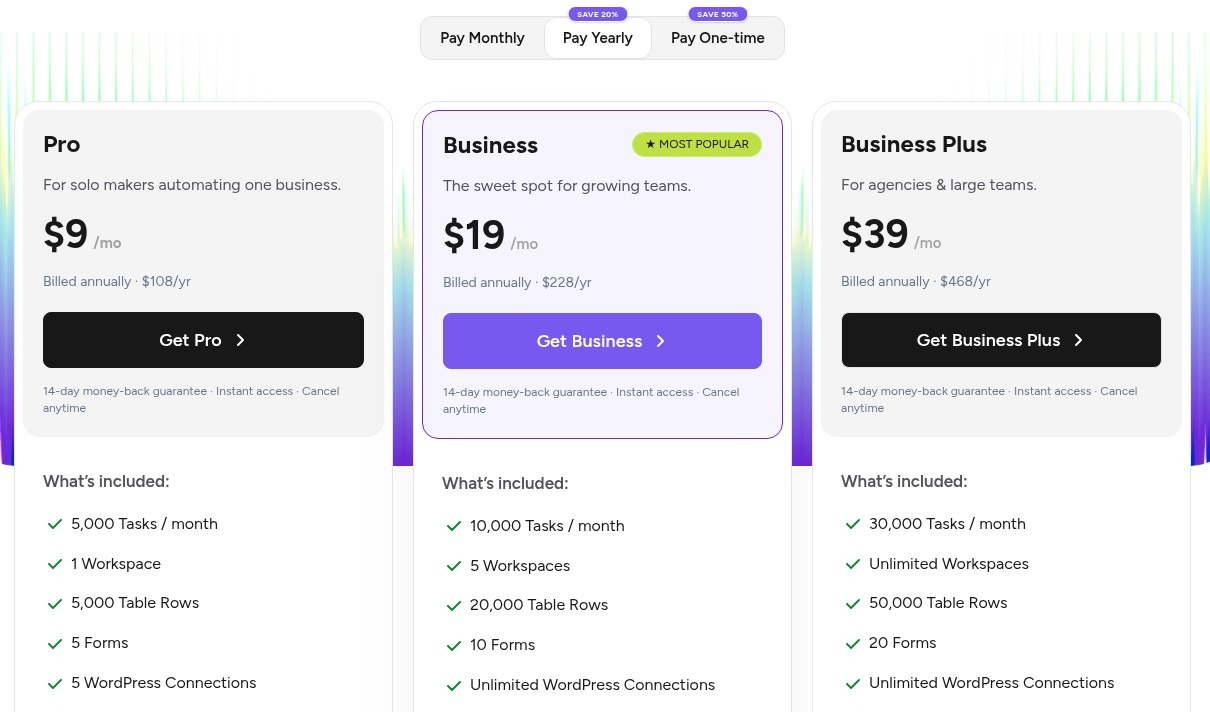
Here are OttoKit's pricing plans:
- Free: $0 with 250 tasks/month and 20 workflows
- Pro: $9/month, billed annually ($108/year), with 5,000 tasks/month and 5 WordPress connections
- Business: $19/month, billed annually ($228/year), with 10,000 tasks/month, 5 workspaces, and unlimited WordPress connections
- Business Plus: $39/month, billed annually ($468/year), with 30,000 tasks/month and unlimited workspaces
OttoKit also sells lifetime plans, with one-time payments of $499 for Pro, $799 for Business, and $1,499 for Business Plus. So if you're hunting for a Zapier alternative lifetime deal, this is one of the few legit options. If you want to learn more about what each plan has to offer, you can check out the pricing page.
OttoKit reviews
Here's what customers of OttoKit rate the platform on third-party review sites:
- G2: 4.8 out of 5 star rating (from +2 user reviews)
- WordPress: 4.9 out of 5 star rating (from +96 user reviews)
8. Relevance AI

- Best for: Creating AI agents and workforce automation for mid-market SaaS companies
- Pricing: Contact sales for a quote
- What I like: Ability to switch between different LLM models, used by companies like Canva and Freshworks, and lots of templates for beginners
Relevance AI is an AI workflow builder built for creating AI agents. It's very similar to Lindy AI in that it promises to help you create your AI workforce. The tool is a no-code platform, which makes it easy for anyone on your team to quickly start using it.
Relevance AI also has a lot of app integrations with tools like Google Workspace, Slack, Salesforce, Airtable, and a ton more. Similar to most tools on this list, it also has a decent amount of templates that help you get started with creating complex automations.
Some things I like about Relevance AI:
- Allows you to switch between different LLM models similar to Gumloop
- Used by a lot of SaaS companies like Canva, Freshworks, and Databricks
- Has lots of templates making it approachable for beginners
Here are some things that could be improved:
- There is no free or self-serve plan anymore, so you have to talk to sales to get started
- There is a learning curve to using the tool
- Most of the AI task automation features are on higher-tiered plans
Overall, if you're looking around to experiment with different Zapier alternatives, this is a decent choice if you work at a mid-market software company.
Relevance AI pricing
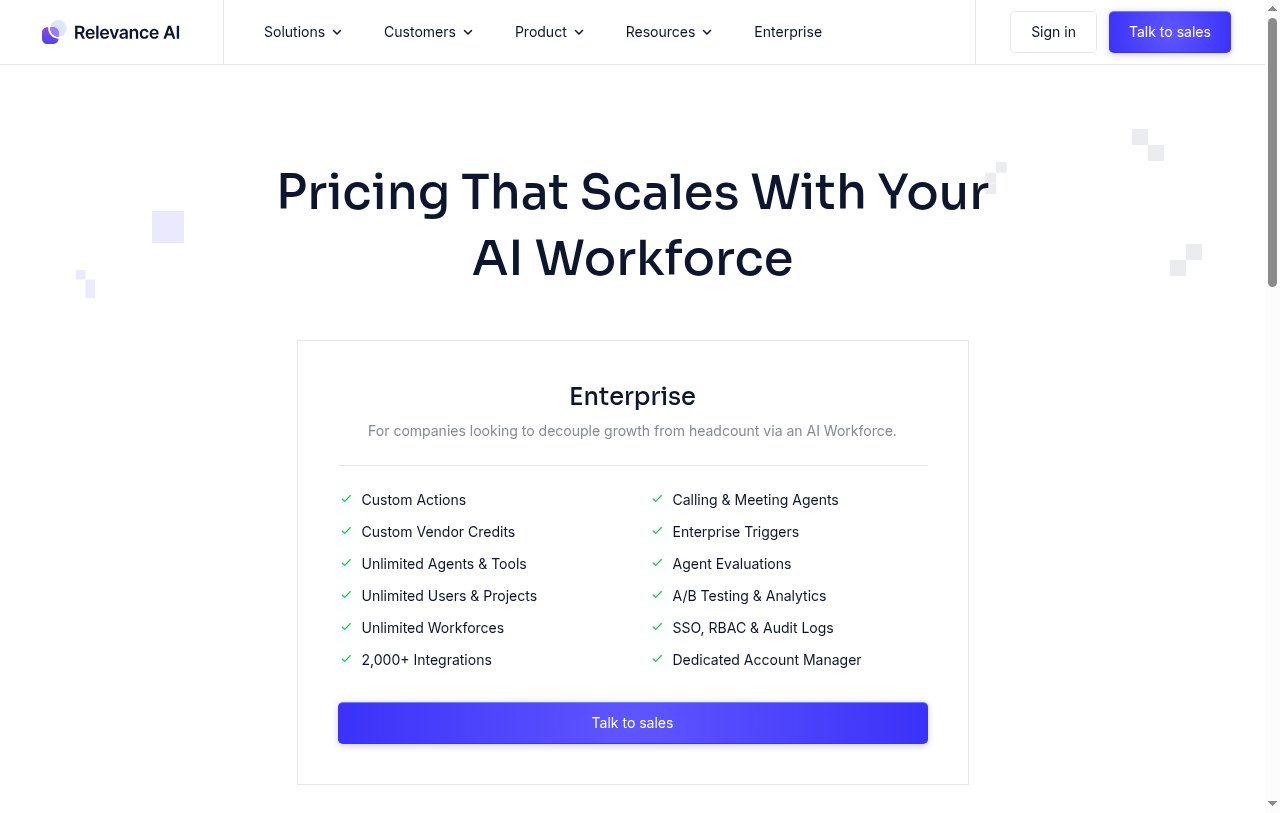
Relevance AI now lists a single Enterprise plan on its pricing page. It includes unlimited agents, tools, users, and projects, 2,000+ integrations, calling and meeting agents, and SSO, RBAC, and audit logs. You will need to contact sales for a quote.
If you want to learn more about what each plan has to offer, you can check out the pricing page.
Relevance AI reviews
Here's what customers of Relevance AI rate the platform on third-party review sites:
- G2: 4.5 out of 5 star rating (from +17 user reviews)
- Capterra: 4 out of 5 star rating (from +1 user review)
9. Integrately

- Best for: Custom workflow automation platform for ecommerce businesses
- Pricing: Free, then starts at $19.99/month (billed annually)
- What I like: Over 20 million ready-made automations, has a free plan, and connects with over 1,400 apps
Integrately is a custom workflow automation platform that's great for ecommerce businesses. The platform has tons of integrations that are great if you already use tools like Freshdesk, Mailchimp, BigCommerce, SendFox, and really any tool that helps you manage the day-to-day operations of an ecommerce store.
The platform doesn't have the same user-friendly drag-and-drop interface as tools like Gumloop or Make, but it does have a lot of robust integrations if you're using more legacy tools. What I'm trying to say is that if you work for an ecommerce business that uses a lot of older SaaS tools, Integrately most likely can work with them.
Some things I like about Integrately:
- Has over 20 million ready-made automations
- Inclusive free plan and the paid plans are competitive
- Can connect with over 1,400 different apps
Here are some things that could be improved:
- May not be the best choice if you're not an ecommerce site
- Doesn't have the same clean UI/UX as some other tools on this list
- Doesn't have the best AI-native features
Overall, if you're an ecommerce website, this is a tool to definitely check out if some other platforms on this list don't satisfy all of your needs.
Integrately pricing
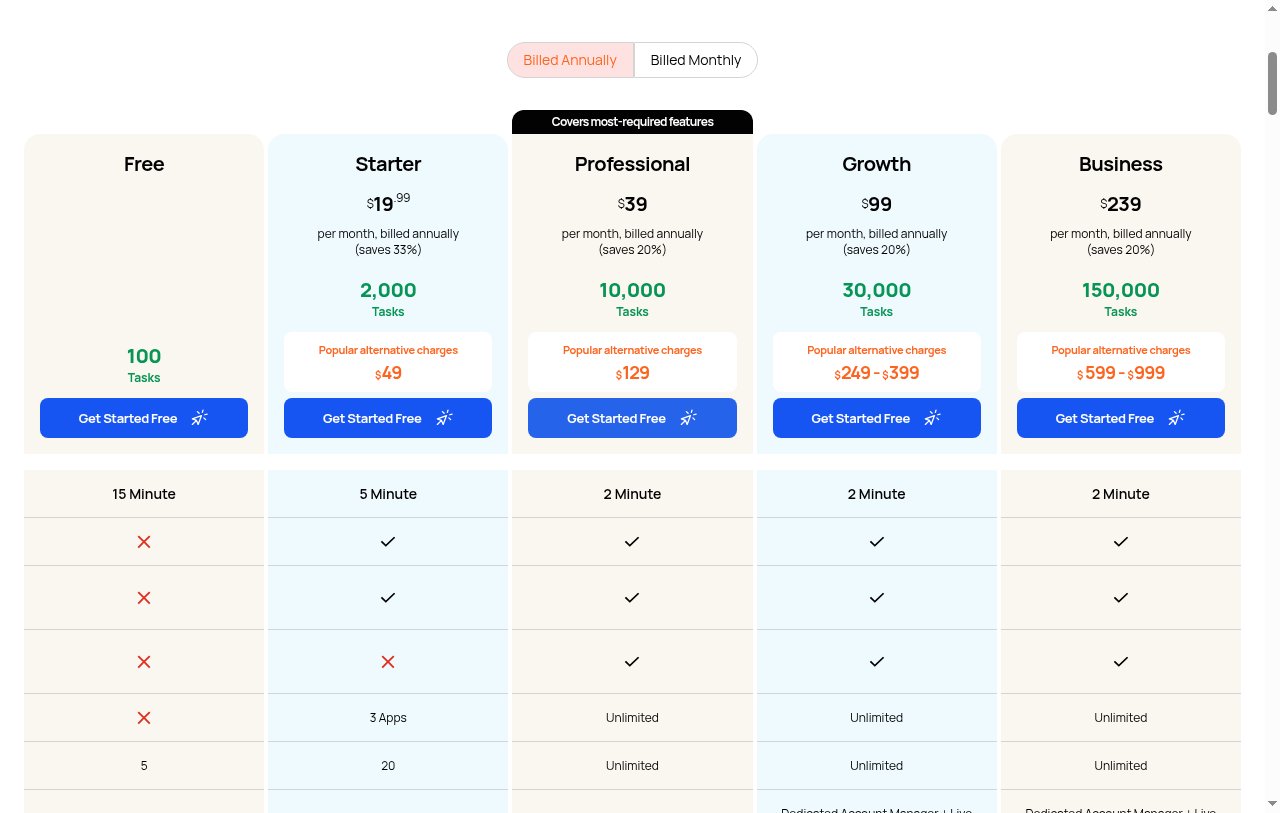
Here are Integrately's pricing plans:
- Free: $0/month with 100 tasks per month
- Starter: $19.99/month with 2,000 tasks per month, billed annually
- Professional: $39/month with 10,000 tasks per month, billed annually
- Growth: $99/month with 30,000 tasks per month, billed annually
- Business: $239/month with 150,000 tasks per month, billed annually
If you want to learn more about what each plan has to offer, you can check out the pricing page.
Integrately reviews
Here's what customers of Integrately rate the platform on third-party review sites:
- G2: 4.7 out of 5 star rating (from +693 user reviews)
- TrustPilot: 3.7 out of 5 star rating (from +60 user reviews)
10. Workato

- Best for: Enterprise-level agentic automation tool for large companies
- Pricing: Custom pricing (contact sales)
- What I like: MCP server connectivity, built-in enterprise security and scalability, and used by big companies like Adobe and Zendesk
Workato is an enterprise-level agentic automation tool. It's mostly used by bigger companies that want to build internal automated workflows.
If platforms like Zapier, Make, or n8n feel more like indie tools, then Workato is made to fulfill specific needs of enterprise companies. You can create customizable workflows, and even code-based automations, to help you calculate things like marketing ROI impact on your content and create an internal knowledge base.
Some things I like about Workato:
- Has an MCP server so you can connect it with your favorite AI platforms
- Has built-in enterprise security and scalability
- Used by some big companies like Adobe, Zendesk, Booking.com, Cisco, and Atlassian
Here are some things that could be improved:
- Feels outdated, like most enterprise software
- Doesn't have self-serve options, so you have to book a demo to see how it works
- Doesn't work in the same way as Zapier or other popular workflow automation tools
Overall, if you're a large enterprise shopping around for a Zapier alternative, it's worth checking out Workato as it's used by some pretty big companies. But if you're looking for something a bit more self service, it might be worth looking into a Workato alternative.
Workato pricing
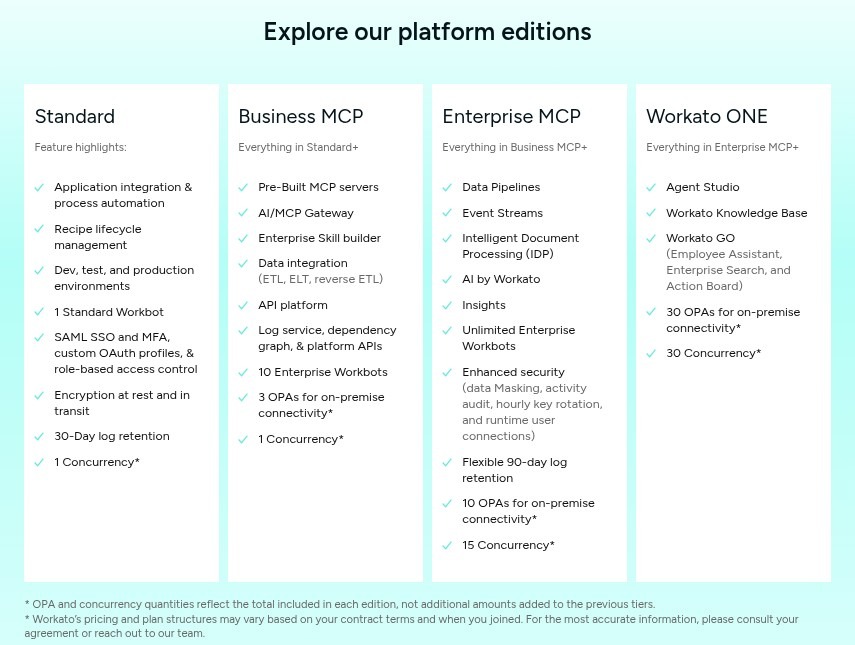
Workato uses platform plus usage pricing, so you pick an edition and then pay for what you use. It has four platform editions.
- Standard: Application integration and process automation, dev, test, and production environments, 1 Standard Workbot, and SAML SSO with role-based access control
- Business MCP: Everything in Standard, plus pre-built MCP servers, an AI/MCP gateway, data integration, and an API platform
- Enterprise MCP: Everything in Business MCP, plus data pipelines, event streams, intelligent document processing, and AI by Workato
- Workato ONE: Everything in Enterprise MCP, plus Agent Studio, Workato Knowledge Base, and Workato GO
If you want to learn more about their pricing options, you'll need to contact their sales team for a custom quote.
Workato reviews
Here's what customers of Workato rate the platform on third-party review sites:
- G2: 4.7 out of 5 star rating (from +630 user reviews)
- Capterra: 4.6 out of 5 star rating (from +84 user reviews)
Is there anything better than Zapier?
Yes, I would say Gumloop is a better alternative if you’re looking for an AI-native platform (with a 14-day free trial). And n8n is a great alternative to Zapier if you’re looking for something that is self-hosted and is focused more on business process automation.
However, Zapier is still incredibly popular in the no-code community for good reason. It's reliable and has tons of integrations. But if you want something that feels similar to Zapier while adding modern AI capabilities, Gumloop is the closest thing I’ve found.
So is Zapier still worth it with today's AI tools? For simple, reliable app-to-app automations, yes. The free plan gives you 100 tasks per month and paid plans start at $19.99/month. But if you're paying the higher price mainly to bolt AI onto your workflows, an AI-native tool will usually give you more for the money. And if price is the main issue, Make and IFTTT are cheaper ways to run simple automations.
After testing all these platforms over the past couple of years, the biggest thing I've learned is that the best automation tool is the one you'll actually use consistently. Each platform on this list has its strengths, whether that's Make's budget-friendly pricing, n8n's self-hosting capabilities, or IFTTT's simplicity.
But here's the reality is that you need workflows that can think through problems and make smart decisions based on context.
If you're ready to move beyond simple automations and want to build workflows that can actually reason through complex tasks using AI, I'd recommend starting with Gumloop. You can start building your first AI-powered automation right away with a 14-day free trial.
The combination of a clean interface, built-in AI capabilities, and a 14-day free trial makes it the easiest way to see what's possible when you combine automation with modern LLMs. Plus, with Gummie helping you build and troubleshoot, you're never stuck figuring things out alone.
Happy automating!

Read related articles
Check out more articles on the Gumloop blog.