Turn your search data into a shareable SEO dashboard
The SEO dashboard generator pulls your Google Search Console performance, layers in competitive context, and builds an interactive dashboard you can download and share.


Trusted by leading teams





Stop rebuilding the same dashboard every month
Your search data, turned into a polished interactive dashboard in one chat, ready to download and share.
What is the SEO Dashboard Generator?
The Gumloop SEO dashboard generator turns your search performance into an interactive, self-contained dashboard. Give it a domain and a timeframe and it pulls your Google Search Console data, clicks, impressions, top pages, and top queries, then renders a clean, high-contrast dashboard with hero stats, an executive summary, and a traffic trend chart.
It is not limited to first-party data. If you do not have a Search Console property connected, the agent builds the same dashboard from competitive data instead, so you can profile any domain. When both are available, it pairs your verified numbers with competitive context like top organic competitors and traffic share.
The output is a single HTML file. Tables for top pages and top keywords scroll with sticky headers, long URLs always show in full, and the whole thing is self-contained, so you can download it, reopen it offline, or drop it in front of a stakeholder. This template is a starting point: change the timeframe, point it at a competitor, or ask it to refine the design, all in the same conversation.

What you can do with the SEO Dashboard Generator
Workflows the agent handles out of the box.
First-party Search Console dashboards
Pulls clicks, impressions, top pages, and top queries from your verified Google Search Console property and turns them into a finished dashboard.
Competitive fallback and benchmarking
No Search Console property connected? The agent profiles any domain from competitive data instead, and benchmarks you against your top organic competitors.
Executive summary, not just charts
Leads every dashboard with two to three specific takeaways, like traffic velocity and content concentration, so the data tells a story.
Scrollable tables with full URLs
Top pages and top keywords render in scrollable tables with sticky headers, and every URL is shown in full so no row is ambiguous.
Self-contained, shareable HTML
Delivers one downloadable HTML file with the charts and data embedded, so it opens offline and shares cleanly with no broken dependencies.
How to use the SEO Dashboard Generator
Get from landing page to live agent in a few clicks.
- 1
Click "Use this agent"
A preconfigured agent is created in your Gumloop workspace with the right tools and system prompt loaded, ready to build your first dashboard. Takes a few seconds.
- 2
Connect your tools
Authorize Google Search Console so the agent reads your real performance data, and the competitive data source so it can benchmark and fill gaps. You only do this once.
- 3
Give it a domain and timeframe
Drop a domain in chat, with an optional timeframe (30 days by default). The agent pulls the data, renders the dashboard, and returns a downloadable HTML file.
SEO Dashboard Generator use cases
Real workflows teams run with this agent.
Reporting performance to leadership
Generate a clean monthly dashboard with hero stats, a trend chart, and plain-language takeaways instead of pasting a raw export into a deck.
Profiling a domain you do not own
Point the agent at a competitor and build the same dashboard from competitive data alone, with no Search Console access required.
Capturing a before-and-after snapshot
Build a dashboard at the start of a project and re-run it later to show the lift, side by side, in the same format.
Standing up client dashboards at an agency
Spin up a branded, self-contained dashboard per client in minutes and hand over a file they can open without any tooling.
Why use Gumloop for the SEO Dashboard Generator
First-party data first
The agent prioritizes your verified Search Console numbers and only falls back to competitive estimates when it has to, so the dashboard is grounded in real data.
Insights, not just a data dump
Every dashboard opens with an executive summary that interprets the numbers, so readers get the takeaway before the tables.
A file you keep and share
The deliverable is a self-contained HTML dashboard you can download, reopen offline, and send to anyone, not a chat window you have to screenshot.
Customize as you chat
Change the timeframe, switch to a competitor, adjust the sections, or refine the design, all in the same conversation without touching code.
Related agents


SEO content refresh agent
Find the decaying pages behind a traffic dip and get a prioritized plan to win the clicks back.


SEO keyword research agent
Discover and prioritize the keywords worth ranking for, ranked by volume and difficulty.


AI SERP Analysis Agent
Break down the live top ten results for any keyword and see exactly where you can compete.
With enterprise-grade infrastructure and security
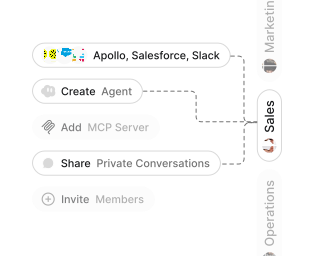
Role-based access control
Manage reusable roles, shared credentials, and secrets with scoped access controls.


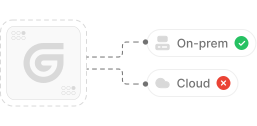
Virtual private cloud deployments
Deploy Gumloop in your own cloud.
Anthropic
OpenAI
Gemini
DeepSeek
AI model restrictions
Control which AI models teams can use. Set guardrails and enforce spend policies.
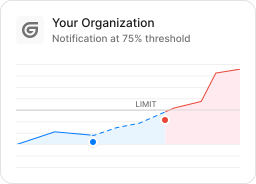
Usage monitoring
Track organization-wide credit usage in real time. Implement budget and quota controls to avoid surprises.
TODAY



WEDNESDAY


Audit logging
Capture detailed audit trails for actions across the organization to understand where data is flowing.

AI proxy support
Bring your own API keys and route requests through your own proxy.
Sign in with Okta
Single Sign-On
Securely streamline identity and access management.


Zero Data Retention
Gumloop never uses customer data to train AI models. For third-party models, we have Zero Data Retention (ZDR) agreements and Data Processing Addendums (DPAs).


SOC 2 Type II Certified
Gumloop is committed to security, and is compliant with SOC 2 Type II and GDPR. Visit trust.gumloop.com to learn more.
Frequently asked questions
Tasks automated to date
Try the SEO Dashboard Generator