Build a shareable sales dashboard from a single chat
The sales dashboard generator pulls your pipeline, call activity, and prospecting data, then builds an interactive dashboard you can download, email, or save to Drive.


Trusted by leading teams



Stop rebuilding the same sales report every week
Your pipeline, call activity, and prospecting, turned into one polished dashboard in a single chat, ready to download and share.
What is the Sales Dashboard Generator?
The Gumloop sales dashboard generator turns your sales data into an interactive, self-contained dashboard. Connect Salesforce and it pulls your open pipeline, stage breakdown, rep performance, and close-date forecast, then renders a clean dashboard with KPI cards, charts, and an executive summary that explains what the numbers mean.
It is not limited to the CRM. The agent layers in call activity, like call volume and talk-to-listen ratios, and prospecting context, like enriched account and lead data, so pipeline sits next to the activity driving it. When a source is not connected, it degrades gracefully and notes the gap instead of inventing data.
The output is a single HTML file. KPI cards, a rep leaderboard, a pipeline-by-stage chart, deal velocity, and a top-deals table render in a responsive light or dark layout. Download it, reopen it offline, email it to your team, or save it to Drive for a shareable link, all from the same conversation.

What you can do with the Sales Dashboard Generator
Workflows the agent handles out of the box.
Live pipeline and forecast
Pulls open opportunities, stage breakdown, and close-date forecast straight from your CRM and turns them into KPI cards and charts.
Rep performance leaderboard
Ranks each rep by pipeline value, deal count, closed won, and win rate, so you can see who is carrying the number at a glance.
Call activity intelligence
Layers in call volume, talk-to-listen ratios, and activity trends so you can connect pipeline movement to the conversations behind it.
Prospecting funnel context
Adds enriched account and lead data next to your pipeline, so top-of-funnel coverage sits alongside the deals it feeds.
Email and Drive delivery
Ships a self-contained HTML dashboard you can download, email to stakeholders, or save to Drive as a shareable link in one step.
How to use the Sales Dashboard Generator
Get from landing page to live agent in a few clicks.
- 1
Click "Use this agent"
A preconfigured agent is created in your Gumloop workspace with the right tools and system prompt loaded, ready to build your first dashboard. Takes a few seconds.
- 2
Connect your tools
Authorize your CRM, call tool, and prospecting source so the agent reads your real numbers, plus email and Drive if you want to share. You only do this once.
- 3
Ask for a dashboard
Tell the agent what you want in chat, like a pipeline overview or a rep leaderboard. It pulls the data, renders the dashboard, and returns a downloadable HTML file you can email or save to Drive.
Sales Dashboard Generator use cases
Real workflows teams run with this agent.
Weekly pipeline reviews
Generate a current pipeline and forecast dashboard before every review instead of rebuilding charts in a spreadsheet by hand.
Rep performance check-ins
Build a leaderboard of pipeline, win rate, and activity per rep to ground one-on-ones in the same numbers every time.
Board and leadership updates
Hand leadership a polished, self-contained dashboard with hero stats and plain-language takeaways, not a raw CRM export.
End-of-quarter snapshots
Capture a dashboard at quarter close and save it to Drive, so you have a shareable record you can reopen anytime.
Why use Gumloop for the Sales Dashboard Generator
Only real numbers
The agent shows only what your connected tools return and uses clean empty states when a source is missing, so it never invents data.
Insights, not a data dump
Every dashboard opens with key findings in plain English, so readers get the takeaway before the tables.
A file you keep and share
The deliverable is a self-contained HTML dashboard you can download, reopen offline, email, or save to Drive, not a chat you screenshot.
Customize as you chat
Change the timeframe, focus on one rep or stage, add a source, or refine the design, all in the same conversation without code.
Related agents


AI Salesforce agent
Run pipeline insights, record creation, and CRM hygiene from chat, without clicking into Salesforce.
CRM agent
Keep your CRM clean and current by letting an agent handle the data entry and busywork.


Call analysis agent
Pull objection trends and competitive intel from every sales call automatically.
With enterprise-grade infrastructure and security
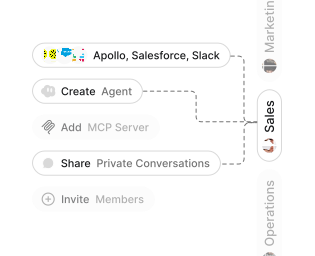
Role-based access control
Manage reusable roles, shared credentials, and secrets with scoped access controls.


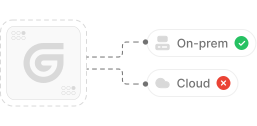
Virtual private cloud deployments
Deploy Gumloop in your own cloud.
Anthropic
OpenAI
Gemini
DeepSeek
AI model restrictions
Control which AI models teams can use. Set guardrails and enforce spend policies.
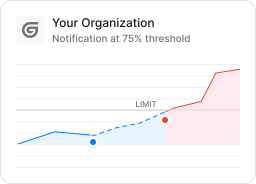
Usage monitoring
Track organization-wide credit usage in real time. Implement budget and quota controls to avoid surprises.
TODAY



WEDNESDAY


Audit logging
Capture detailed audit trails for actions across the organization to understand where data is flowing.

AI proxy support
Bring your own API keys and route requests through your own proxy.
Sign in with Okta
Single Sign-On
Securely streamline identity and access management.


Zero Data Retention
Gumloop never uses customer data to train AI models. For third-party models, we have Zero Data Retention (ZDR) agreements and Data Processing Addendums (DPAs).


SOC 2 Type II Certified
Gumloop is committed to security, and is compliant with SOC 2 Type II and GDPR. Visit trust.gumloop.com to learn more.
Frequently asked questions
Tasks automated to date
Try the Sales Dashboard Generator