Run Salesforce from chat with an AI Salesforce agent
The AI Salesforce agent manages your CRM from a single conversation. It pulls pipeline insights, creates and cleans records, and logs activity, so you never have to click into Salesforce to get an answer.


Trusted by leading teams



Stop running your CRM one click at a time
The agent runs the queries, checks for duplicates, and logs the work itself, so your pipeline stays clean and your answers are one message away.
What is the Salesforce AI Agent?
An AI Salesforce agent is an assistant that runs your CRM from chat. Instead of clicking through reports, list views, and record pages, you ask a question or hand it a task in plain English, and it executes the queries, updates, and lookups directly in Salesforce on your behalf.
The Gumloop AI Salesforce agent connects to your Salesforce org with full API access. It runs SOQL queries and SOSL searches, creates and updates records, runs reports, pulls dashboards, and posts notes and Chatter messages. It is built for RevOps, sales, and marketing teams who live in the CRM but lose hours to the clicks around it.
It works the way a careful operator would. It checks the current state before it changes anything, looks for duplicates before it creates a record, and translates raw fields and IDs into a clear answer. You give it your funnel definitions and priorities once, and from then on it filters out the junk and reports back in language you can act on.

What you can do with the Salesforce AI Agent
Workflows the agent handles out of the box.
Pipeline insights from a question
Ask about slipped deals, stale opportunities, or quota coverage and it runs the SOQL query live, then answers in plain English instead of a wall of rows.
Report and dashboard summaries
It pulls live dashboard components and runs reports, filters out junk records using your funnel definitions, and hands back an executive summary with the trends called out.
Inbound record creation without duplicates
Give it a new lead and it searches the org first, updates the record if a match exists, and only creates a new one when it should, so duplicates never pile up.
CRM hygiene and enrichment
It finds duplicate accounts, contacts, and leads, fills in missing industry, size, and title fields, standardizes messy values, and flags stale records for review.
Clean call notes and activity logging
Hand it rough notes or a transcript and it writes a readable summary with action items, then logs it as a note or Chatter post on the right account or opportunity.
How to use the Salesforce AI Agent
Get from landing page to live agent in a few clicks.
- 1
Click "Use this agent"
A preconfigured agent is created in your Gumloop workspace with Salesforce, web research, and enrichment tools ready to connect and the Salesforce instructions loaded into its system prompt.
- 2
Connect your Salesforce org
Authorize Salesforce with your own credentials. The agent uses your access and permissions, so it can only see and change what you already can.
- 3
Ask, create, or clean up
Ask a pipeline question, drop in an inbound lead, or paste your call notes. The agent runs the right queries, verifies before it writes, and reports back in plain language.
Salesforce AI Agent use cases
Real workflows teams run with this agent.
Running a daily pipeline standup
Ask what slipped, what went quiet, and what is at risk over a threshold. The agent queries live data and returns a short brief you can read out in the meeting.
Turning an inbound lead into a clean record
Paste an inbound email or form fill. The agent checks if the person exists, enriches their company from the web, and creates or updates the record with the context attached.
Cleaning up before a board report
Ask it to find duplicate accounts and incomplete records. The agent merges, enriches, and standardizes so the numbers in your report hold up to scrutiny.
Logging a call you just got off
Drop your rough notes in chat. The agent writes a clean summary with next steps and logs it to the opportunity, so the deal history reads like a story.
Why use Gumloop for the Salesforce AI Agent
It executes, it does not just advise
The agent runs the queries, pulls the reports, and updates the records itself. It never tells you to go open Salesforce and do it by hand.
It verifies before it writes
Before creating or updating anything, it checks the current state and searches for duplicates, so you get clean data instead of a mess to clean up later.
Answers in plain English
It translates raw fields, IDs, and statuses into a readable answer with the trends called out, rather than dumping rows or JSON on you.
It lives in your workspace
The agent runs inside Gumloop with your tools connected, so checking pipeline, enriching an account, or logging a call is one conversation, not a tour through the CRM.
Related agents




With enterprise-grade infrastructure and security
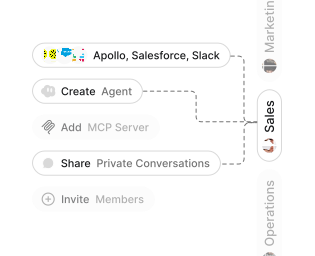
Role-based access control
Manage reusable roles, shared credentials, and secrets with scoped access controls.


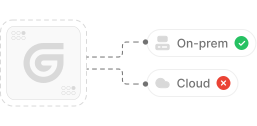
Virtual private cloud deployments
Deploy Gumloop in your own cloud.
Anthropic
OpenAI
Gemini
DeepSeek
AI model restrictions
Control which AI models teams can use. Set guardrails and enforce spend policies.
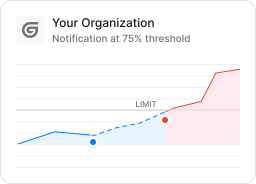
Usage monitoring
Track organization-wide credit usage in real time. Implement budget and quota controls to avoid surprises.
TODAY



WEDNESDAY


Audit logging
Capture detailed audit trails for actions across the organization to understand where data is flowing.

AI proxy support
Bring your own API keys and route requests through your own proxy.
Sign in with Okta
Single Sign-On
Securely streamline identity and access management.


Zero Data Retention
Gumloop never uses customer data to train AI models. For third-party models, we have Zero Data Retention (ZDR) agreements and Data Processing Addendums (DPAs).


SOC 2 Type II Certified
Gumloop is committed to security, and is compliant with SOC 2 Type II and GDPR. Visit trust.gumloop.com to learn more.
Frequently asked questions
Tasks automated to date
Try the Salesforce AI Agent