Turn all your marketing data into one analytics dashboard
The marketing analytics dashboard generator pulls your Google Analytics and Search Console data, layers in competitive intelligence, and assembles a single executive dashboard that leads with the takeaways and builds even when a source is missing.



Trusted by leading teams




Stop stitching three tools into one report every month
Your analytics, search, and competitive data, turned into one polished dashboard in a single chat, ready to download and share.
What is the Marketing Analytics Dashboard Generator?
The Gumloop marketing analytics dashboard generator turns scattered marketing data into one executive dashboard in a single chat. Give it a domain and it pulls first-party traffic, engagement, and conversion data from Google Analytics, search performance from Google Search Console, and third-party competitive and keyword intelligence, then renders a clean, executive-friendly dashboard with KPI cards, trend charts, and tables.
It is built to be useful even when a source is missing. If Google Analytics or Search Console is not connected, it still builds the dashboard from whatever is available, labels the result as partial or SEO-only, and shows a clear banner explaining exactly what to connect to unlock the rest. Missing data is treated as a graceful fallback, never an error or a broken report.
The output is a self-contained HTML file. KPI cards sit at the top, charts come before tables, and every section is labeled with its data source. It opens with an executive summary and closes with grouped, prioritized recommendations, so readers get the story and the next steps, not just a data dump. Download it, reopen it offline, or hand it to a stakeholder. The three tools it ships with are just a starting template: because the agent runs in Gumloop, you can connect as many other data sources and MCP servers as you want, like your ad platforms, CRM, or product database, and ask it to fold them into the same dashboard.

What you can do with the Marketing Analytics Dashboard Generator
Workflows the agent handles out of the box.
One dashboard from three sources
Combines first-party traffic and conversions from Google Analytics, search performance from Google Search Console, and third-party competitive intelligence into a single report.
Graceful degradation
Builds with whatever is connected and labels the result complete, partial, or SEO-only, with a banner that explains exactly what to connect to unlock the rest.
Executive summary and recommendations
Leads with a few specific takeaways grounded in the data and closes with grouped, prioritized recommendations, so the numbers come with next steps.
KPI cards, charts, and readable tables
Renders KPI cards per source, trend and channel-mix charts, and scrollable tables for queries, pages, keywords, and competitors, each labeled with its source.
Self-contained, shareable HTML
Delivers one downloadable HTML file with the charts and data embedded, so it opens offline and shares cleanly with no broken dependencies.
How to use the Marketing Analytics Dashboard Generator
Get from landing page to live agent in a few clicks.
- 1
Click "Use this agent"
A preconfigured agent is created in your Gumloop workspace with the right tools and system prompt loaded, ready to build your first dashboard. Takes a few seconds.
- 2
Connect your tools
Authorize Google Analytics, Search Console, and your competitive data source so the agent reads your real data. Connect what you have, plus any other MCP server you want pulled in. It works with any subset and flags the rest.
- 3
Give it a domain and timeframe
Drop a domain in chat, with an optional timeframe (30 days by default). The agent pulls the data, renders the dashboard, and returns a downloadable HTML file.
Marketing Analytics Dashboard Generator use cases
Real workflows teams run with this agent.
Reporting performance to leadership
Generate a clean monthly dashboard with KPI cards, trend charts, and plain-language takeaways instead of stitching three exports into a deck.
Standing up client dashboards at an agency
Spin up a self-contained dashboard per client in minutes and hand over a file they can open without any tooling or logins.
Profiling a domain you do not own
Point the agent at a competitor and build an SEO-only dashboard from competitive data alone, with no Analytics or Search Console access required.
Capturing a before-and-after snapshot
Build a dashboard at the start of a growth initiative and re-run it later to show the lift, side by side, in the same format.
Why use Gumloop for the Marketing Analytics Dashboard Generator
First-party data first
The agent prioritizes your verified Analytics and Search Console numbers and only leans on competitive estimates to fill gaps, so the dashboard is grounded in real data.
Useful even when incomplete
A missing tool never blocks the report. The agent builds with what it has and tells you precisely what to connect to complete the picture.
Insights, not just a data dump
Every dashboard opens with an executive summary and ends with prioritized recommendations, so readers get the takeaway and the next step.
A file you keep and customize
The deliverable is a self-contained HTML dashboard you can download and share, and you can change the timeframe, sources, or design right in the chat.
Related agents


SEO Dashboard Generator
Turn your Search Console data into an interactive, shareable SEO performance dashboard.



Ad campaign management
Audit ad accounts, track competitor ads, and report on campaign performance.

AI Brand Monitoring Agent
Track brand and competitor mentions across the web on a live, shareable dashboard.
With enterprise-grade infrastructure and security
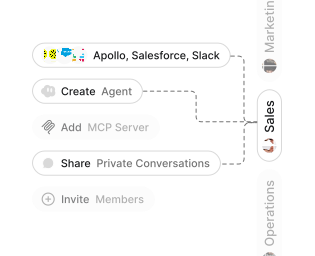
Role-based access control
Manage reusable roles, shared credentials, and secrets with scoped access controls.


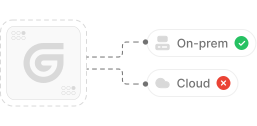
Virtual private cloud deployments
Deploy Gumloop in your own cloud.
Anthropic
OpenAI
Gemini
DeepSeek
AI model restrictions
Control which AI models teams can use. Set guardrails and enforce spend policies.
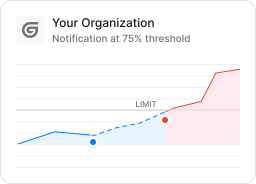
Usage monitoring
Track organization-wide credit usage in real time. Implement budget and quota controls to avoid surprises.
TODAY



WEDNESDAY


Audit logging
Capture detailed audit trails for actions across the organization to understand where data is flowing.

AI proxy support
Bring your own API keys and route requests through your own proxy.
Sign in with Okta
Single Sign-On
Securely streamline identity and access management.


Zero Data Retention
Gumloop never uses customer data to train AI models. For third-party models, we have Zero Data Retention (ZDR) agreements and Data Processing Addendums (DPAs).


SOC 2 Type II Certified
Gumloop is committed to security, and is compliant with SOC 2 Type II and GDPR. Visit trust.gumloop.com to learn more.
Frequently asked questions
Tasks automated to date
Try the Marketing Analytics Dashboard Generator