7 best Julius AI alternatives I'm using in 2026


Creating a data analyst agent is one of the most powerful use cases of AI.
Us marketers can get the most out of AI when we give it context. Context of our data, our marketing strategy, our goals, etc.
The more context, the better the models give us what we want.
And if you're reading this, chances are you're looking for a Julius AI alternative that is great at analyzing data and not only automating tasks, but giving you insights you otherwise wouldn't have visibility into.
I've been testing AI tools for the past two years, and in this post I'm going to give you my favorite tools for data analysis. These tools will help you build real AI agents that allow you to chat with your data and make real-time changes.
I'm really excited for this one, so let's just jump right into it.
What to look for in a Julius AI alternative?
At its core, Julius AI is designed to help you analyze data by connecting your spreadsheets, databases, and other data sources to an AI that can answer questions in natural language. This means to find the right alternative, you need to look for a platform that can handle data analysis, generate visualizations, and work with the tools you already use.
Most of the tools I listed below can help you do that, but before I just hand you the list, I think it's important to know how to evaluate the right tool for yourself.
Your data stack has nuances that only you understand. But if you know what key features to look for based on your use cases, then finding a Julius AI alternative becomes way easier.
Here are some things you should consider before choosing a Julius AI alternative:
- Data source integrations: Does it connect to your existing tools like Google Sheets, BigQuery, Snowflake, or your CRM? If you have to manually export CSV files every time you want to run an analysis, that defeats the purpose.
- Natural language queries: Can you ask questions in plain English and get useful answers? The whole point of these tools is to skip the technical setup. If you still need to write Python or SQL for basic questions, it might not be the right fit.
- Data visualization: Can it generate charts, graphs, and reports automatically? A good alternative should turn your data into clear visuals without you needing to build them manually.
- Forecasting and advanced analysis: Does it go beyond simple summaries? If you need things like trend analysis, forecasting, or statistical modeling, make sure the platform can handle that level of complexity.
- Code access when needed: Even if you want a no-code experience most of the time, having the option to use Python or SQL for more complex analysis can be helpful. Some platforms lock you out of the code entirely.
- Automation and reporting: Can it run reports on a schedule and deliver them to Slack or email? If you're pulling the same data every week, automating that saves a ton of time.
- Pricing model: Is it priced per query, per seat, or a flat rate? Some platforms get expensive fast if you're running a lot of analyses, so make sure you understand how costs scale.
- Security and compliance: Does it meet your company's security requirements? If you're working with sensitive data, things like SOC 2 compliance and data encryption matter.
Okay, now that you know what to look for, let's get into the list.
7 best Julius AI alternatives and competitors in 2026
Here are the best Julius AI alternatives:
Alright, let’s take a deeper look at each one.
1. Gumloop

- Best for: Teams who want to create AI data analyst agents without needing to code or bring their own API keys
- Pricing: Free plan available, paid plans start at $37/month
- What I like: All premium AI models are included out of the box and the Gummie agent can help you build workflows using natural language
Gumloop is a powerful AI agent builder and automation platform. It's the easiest tool, in my opinion, to create AI agents. All you do is connect your existing tools, like Google Workspace, HubSpot, BigQuery, GA4, etc., select your AI model of choice (they are all included), and give your agent instructions (aka functionality) on how it should perform.
From there, you can create a data analyst agent that you can talk to in Slack, or simply in the Gumloop agent builder. You can ask it things like:
- "Give me a sense of {insert customer} product usage over the last two weeks." The agent queries your data, analyzes it, and gives you a summary.
- "Give me a graph breaking down traffic per landing page over the last 48 hours." It generates the visualization for you.
Once your analytics and data is hooked up, the agent can do anything you ask it to. This makes it the perfect Julius AI alternative as the agents can interact with any datasets.
If you want to check out a pre-built data analysis agent, you can use this template:

Ask natural-language questions about your data and get instant, structured answers — summaries, metrics, charts, and visualizations.
Gumloop pros and cons
Here are the pros of using Gumloop:
- Can create AI agents as easy as talking to ChatGPT
- Includes all premium AI models without needing API keys or separate accounts
- It's LLM agnostic, so you can test different models for different use cases
- Integrates with any MCP server and includes built-in integrations with dozens of apps
Here are the cons of using Gumloop:
- The platform is still growing so the UI/UX can change at times
- The app library is growing so you may have to rely on MCP servers for some integrations
Overall, Gumloop is, in my opinion, the closest Julius AI alternative that can also do more (as you can create an agent for anything). I've been using the platform for 9 months now and it just keeps getting better and better. I'm not an employee, but a customer, which is why I am saying this.
Just give it a try, it's completely free to build your first agent with (no need to pull out a credit card).
When to use Gumloop over Julius AI
You should consider Gumloop over Julius AI if:
- You want to create AI agents that can do more than just data analysis. Gumloop lets you build agents for sales, marketing, ops, recruiting, and pretty much anything else.
- You don't want to deal with API keys or separate AI subscriptions. Gumloop includes access to all premium AI models (GPT, Claude, Gemini, etc.) out of the box.
- You prefer building agents using natural language. The Gummie agent can help you create workflows just by describing what you need.
- You want your data analyst agent to live in Slack so your team can interact with it directly where they already work.
- You need flexibility to connect to any tool using MCP servers, not just pre-built integrations.
- You want a platform that can grow with you. Gumloop can handle everything from simple automations to complex multi-step agent workflows.
Gumloop pricing

Here are Gumloop's pricing plans:
- Free: $0/month with 2,000 credits per month, 1 seat, 1 active trigger, 2 concurrent runs, access to the Gummie agent, unlimited nodes and flows, and forum support
- Solo: $37/month with 10,000+ credits per month, unlimited triggers, 4 concurrent runs, webhooks, email support, and the option to bring your own API key
- Team: $244/month with 60,000+ credits per month, 10 seats, 5 concurrent runs, unlimited workspaces, unified billing, dedicated Slack support, and team usage analytics
- Enterprise: Custom pricing with role-based access control, SCIM/SAML support, admin dashboard, audit logs, custom data retention, incognito mode, and virtual private cloud options
If you want to learn more about what each plan has to offer, you can check out the pricing page.
Gumloop reviews
Here are what customers of Gumloop say about the platform:
"Gumloop has been critical in helping all teams at Instacart - including those without technical skills - adopt AI and automate their workflows, which has greatly improved our operational efficiency."
— Fidji Simo, CEO @ Instacart
"Gumloop wins time back across an org. It puts the tools into the hands of people who understand a task and lets them completely automate it away."
— Bryant Chou, Co-Founder @ Webflow
2. Relay.app
- Best for: Teams who want to create simple AI-powered workflows without a steep learning curve
- Pricing: Free plan available, paid plans start at $38/month
- What I like: Clean interface and used by some solid companies like Cursor, Motion, and Ramp
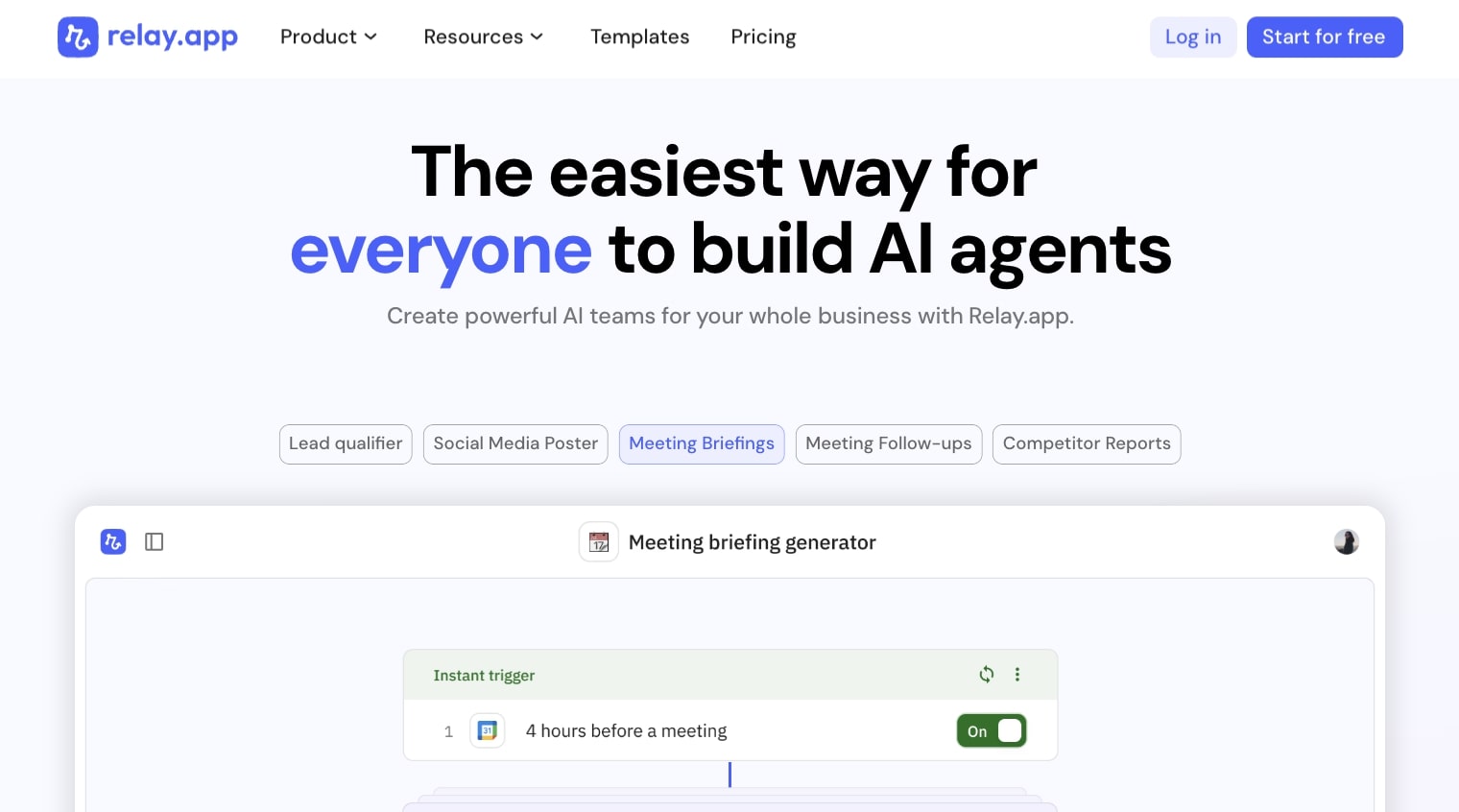
Relay.app is an AI agent builder that allows you to create multiple “AI teammates” by integrating your tech stack together with AI. I know, that’s a handful. But it’s essentially a platform, very similar to Gumloop, that allows you to create automated agents that can run different tasks.
I would say Relay.app is a more simplified version of Gumloop, where it’s primarily focused on creating automated workflows, similar to Zapier (which we’ll get into later). The platform can help you with things like qualifying inbound leads, automated social media posts, creating meeting briefings, and generating competitor reports.
Relay.app pros and cons
Here are some of the pros of using Relay.app:
- The platform is easy to use for simple automations
- Used by some cool companies like Cursor, Motion, and Ramp
- Includes templates and integrations with almost any app
- Affordable pricing
Here are some of the cons of Relay.app:
- Feels more like an AI workflow builder over an AI agent builder
- Great for simple uses cases with Google products, but may not be the best for complex marketing and sales tasks
Overall, Relay.app is a great platform if you’re looking for a platform that can help you create automated workflows. It’s easy to use and I would say a great alternative to Zapier if you’ve used that platform for automations.
But if you’re looking for something that is a bit more similar to Julius AI, with more data analysis agent features, it might be worth looking into a different platform on this list.
When to use Relay.app over Julius AI
You should consider Relay.app over Julius AI if:
- You need to automate workflows across your tech stack rather than analyze data. Relay.app is built for connecting apps and running automated tasks, while Julius AI is focused on turning raw data into insights.
- You want to create "AI teammates" that handle repetitive tasks like qualifying leads, generating meeting briefs, or posting to social media.
- You're looking for a Zapier-style automation tool with AI baked in, not a dedicated data analysis platform.
- Your team already uses tools like Google Workspace, Slack, or Notion and you want simple integrations without needing to write code.
Relay.app pricing
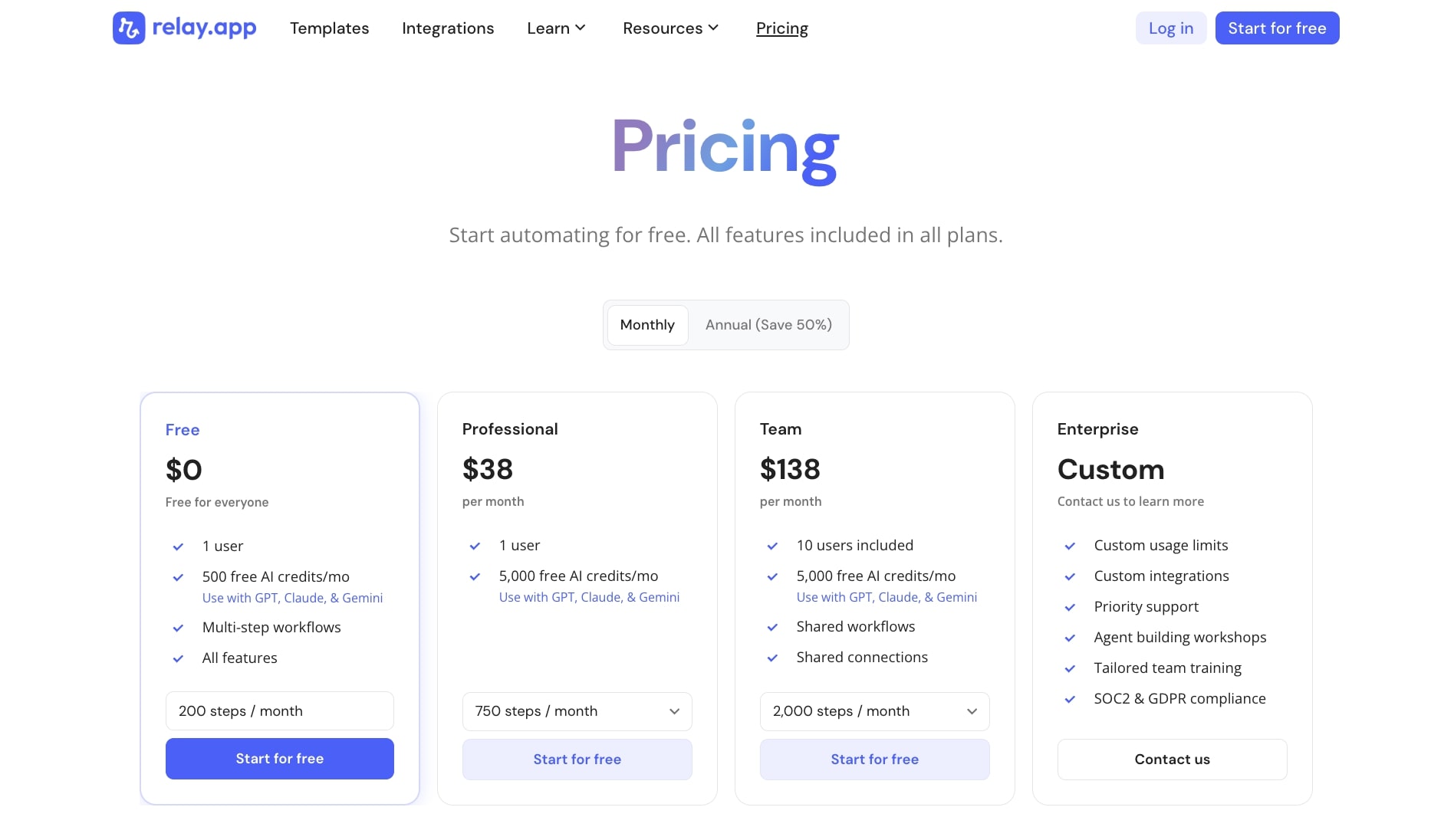
Here are Relay.app's pricing plans:
- Free: $0/month with 1 user, 500 AI credits per month, multi-step workflows, and access to all features
- Professional: $38/month with 1 user, 5,000 AI credits per month, and 750 steps per month
- Team: $138/month with 10 users included, 5,000 AI credits per month, shared workflows and connections, and 2,000 steps per month
- Enterprise: Custom pricing with custom usage limits, priority support, SOC2 and GDPR compliance, and tailored team training
If you want to learn more about what each plan has to offer, you can check out the pricing page.
Relay.app reviews
Here's what customers of Relay.app rate the platform on third-party review sites:
- G2: 4.9/5 star rating (from +71 user reviews)
- Capterra: 5/5 star rating (from +1 user review)
3. Zapier
- Best for: Teams who need rock-solid integrations with thousands of apps and reliable if-this-then-that automations
- Pricing: Free plan available, paid plans start at $29.99/month
- What I like: Battle-tested platform that integrates with almost anything and has been around for years
Zapier is the OG automation platform. If you've worked in marketing or operations in the tech space, there's a good chance you've already heard about it. And I've actually been a customer of Zapier for over 8 years now.
Zapier is known for its ability to integrate with almost any tool that exists out there. And now, you can create AI agents with it by combining automated workflows with the power of AI models.
What makes Zapier a great alternative to Julius AI is that it can integrate with things like BigQuery and your CRM (HubSpot, Salesforce, etc.) to create different data analyst agents. This can be anything from collecting data, organizing and formatting it, or generating reports.
Zapier pros and cons
Here are the pros of Zapier:
- Stable and trusted platform used by thousands of businesses
- Can integrate with almost any tech tool
- Great for if-this-then-that automations
Here are some of the cons:
- The agent feature is an add-on, so pricing can be higher compared to some other tools on this list
- You need your own API keys to use LLM models (does not include them for free the way Gumloop does)
- More of an AI workflow builder first over an AI agent builder
Overall, Zapier is a solid alternative to Julius AI if you know exactly what you need to automate on the data and analytics side. It's great for creating stable workflow automations. But if you need something a bit more flexible, that can act as a real AI agent, it might be worth looking into an alternative.
When to use Zapier over Julius AI
You should consider Zapier over Julius AI if:
- You need to move data between apps automatically rather than analyze it. Zapier excels at connecting tools and triggering actions, while Julius AI is built for asking questions about your data and getting insights.
- You already have a workflow automation setup and want to add AI capabilities on top of it.
- You need integrations with thousands of apps. Zapier's library is massive and covers almost any tool you can think of.
- You want a platform with a long track record of stability and reliability. Zapier has been around for over a decade and powers automations for millions of users.
- Your main goal is to collect, organize, and format data across systems rather than run deep analysis or generate visualizations.
Zapier pricing
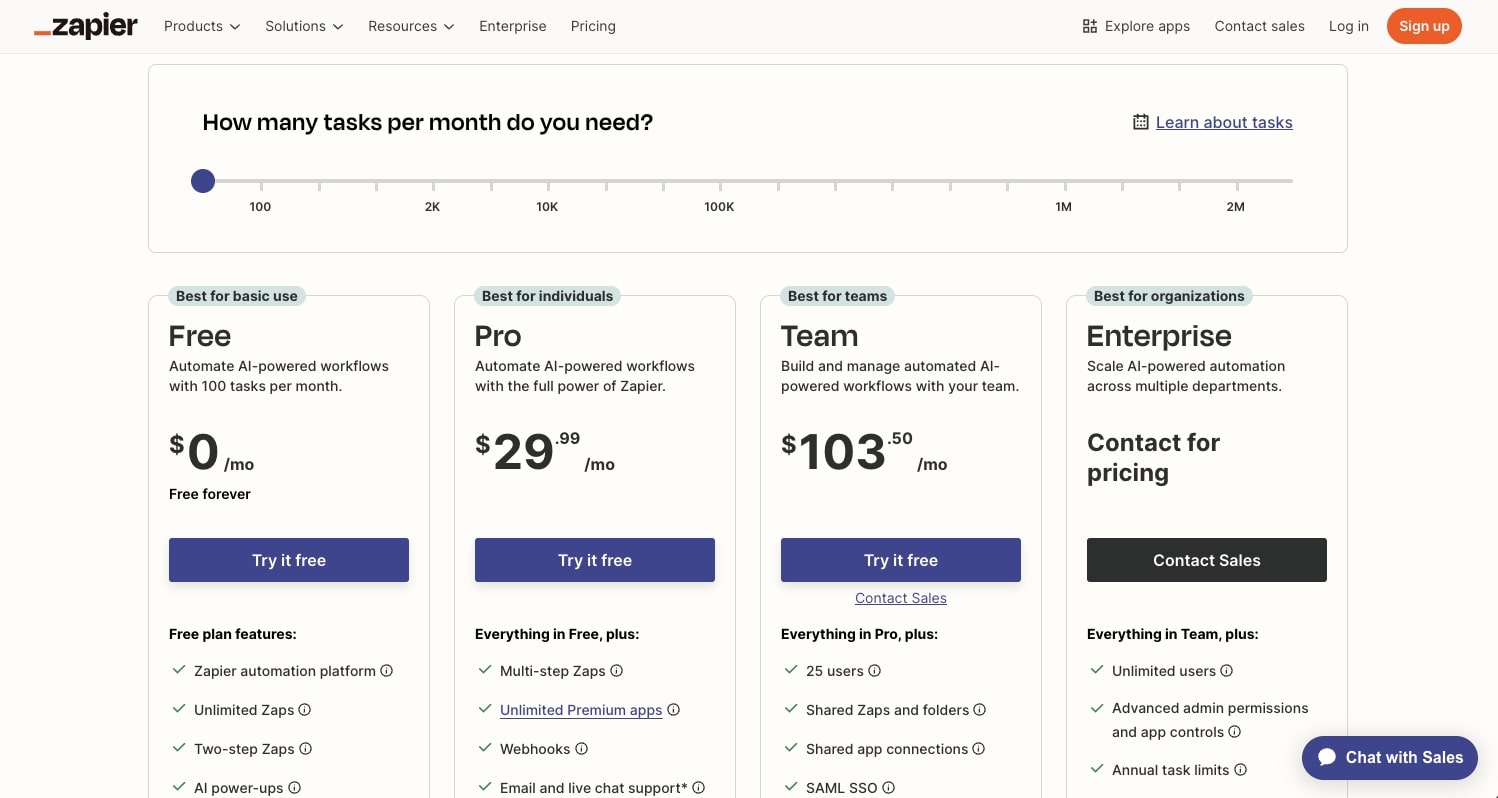
Here are Zapier's pricing plans:
- Free: $0/month with 100 tasks per month, two-step Zaps, unlimited Zaps, Tables, and Interfaces, and access to Zapier Copilot for AI-powered Zap building
- Professional: Starting at $29.99/month with multi-step Zaps, unlimited premium apps, webhooks, and AI fields (requires your own OpenAI account)
- Team: Starting at $103.50/month with 25 users, shared Zaps and folders, shared app connections, SAML SSO, and Premier Support
- Enterprise: Custom pricing with unlimited users, advanced admin permissions, annual task limits, and a dedicated Technical Account Manager
If you want to learn more about what each plan has to offer, you can check out the pricing page.
Zapier reviews
Here's what customers of Zapier rate the platform on third-party review sites:
- G2: 4.5/5 star rating (from +1,717 user reviews)
- Capterra: 4.7/5 star rating (from +3,028 user reviews)
4. Roadway AI
- Best for: Growth marketing teams who want AI-powered analytics and automated ad campaign management
- Pricing: Enterprise solution (contact sales for pricing)
- What I like: Built specifically for performance marketing and used by fast-growing companies like Clay, Notion, and Gamma
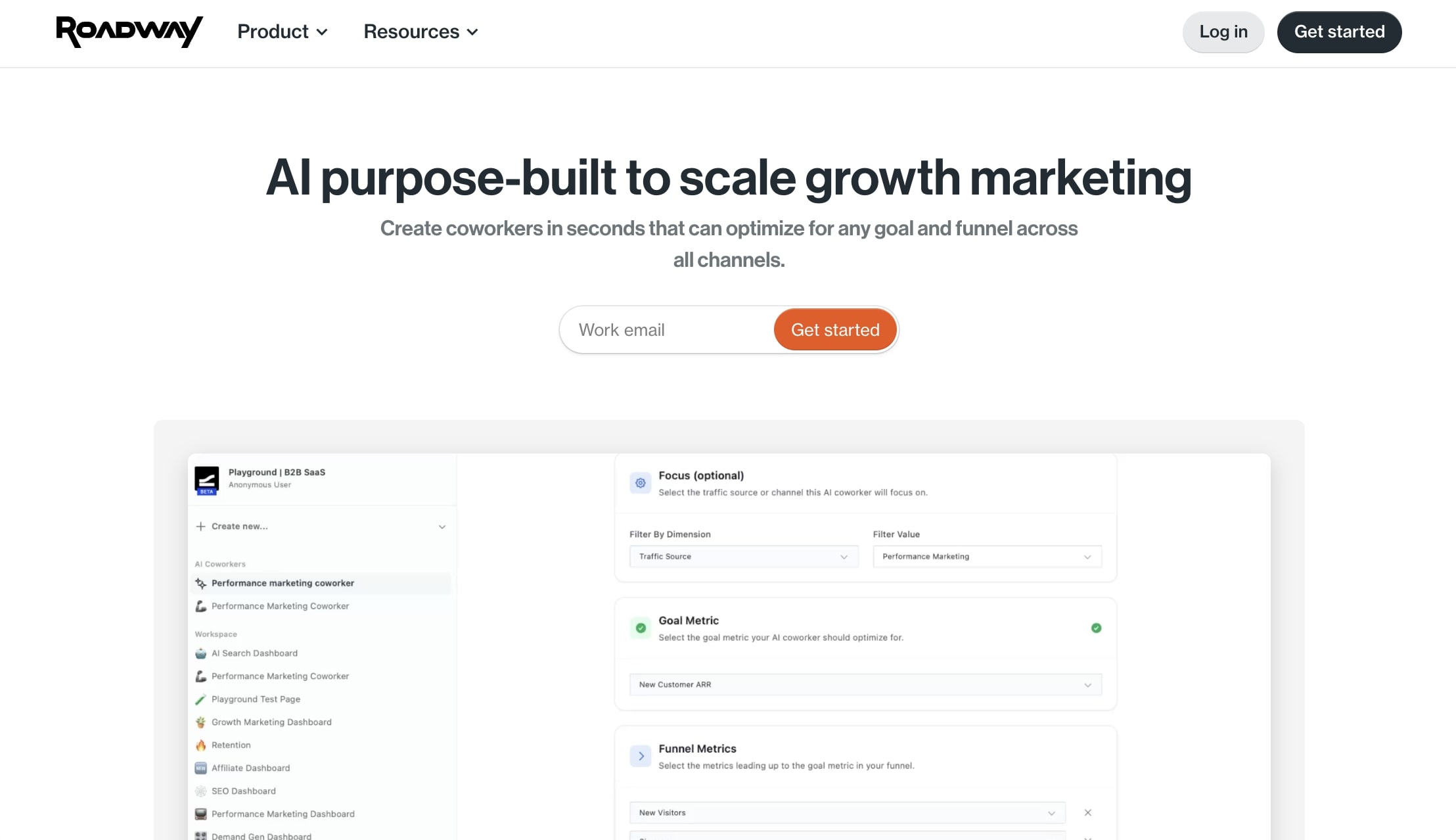
Roadway AI is a performance marketing platform that lets you use AI to run and scale your ad campaigns. If you use Julius AI for tracking growth marketing performance and how your ad campaigns are doing, this is definitely a platform to look into.
The main goal of Roadway is to bring all of your analytics into one place and use "AI Coworkers" to help you make sense of the data and tell you what to optimize and launch next. The platform can also integrate with your ad accounts so the agent can ship campaigns for you.
Roadway AI pros and cons
Here are some of the pros of Roadway AI:
- Built specifically for growth analytics and performance marketing
- Can integrate with your existing analytics stack
- Leverages AI agents to launch ad campaigns for you
- Used by some growing startups like Clay, Notion, and Gamma
Here are some of the cons:
- It's an enterprise solution (for now) so you have to book a call to get started
- Built specifically for ads and growth marketing, so not the best for other data analysis features like Julius AI has
Overall, if you're looking for a Julius AI alternative that is built specifically for understanding performance marketing analytics, this is it. But if you need something that can help you with use cases across operations, scientific research, data science, or finance, then it might be worth looking into an alternative.
When to use Roadway AI over Julius AI
You should consider Roadway AI over Julius AI if:
- Your main focus is performance marketing and paid ads. Roadway is purpose-built for this, while Julius AI is a general-purpose data analysis tool.
- You want AI agents that can actually launch and optimize ad campaigns for you, not just analyze the data.
- You need to consolidate analytics from multiple ad platforms into one dashboard.
- Your team is already running significant ad spend and needs a dedicated solution for growth marketing insights.
- You're comfortable with an enterprise sales process and want a platform tailored to your specific needs.
Roadway AI pricing
Roadway AI is currently an enterprise solution, so pricing is not publicly available. You'll need to book a call with their team to get started and learn more about pricing based on your specific needs.
Roadway AI reviews
Roadway does not currently have a lot of reviews. The platform is still very new to the scene and is mostly working with large companies that want to stay private. However, there is a 5 star review on Product Hunt that you can read into.
5. Lindy AI
- Best for: Teams who want to create AI agents for sales, customer service, and automated phone calls
- Pricing: Free plan available, paid plans start at $49.99/month
- What I like: Can create voice agents that automate phone calls and has over 6,000 integrations on paid plans
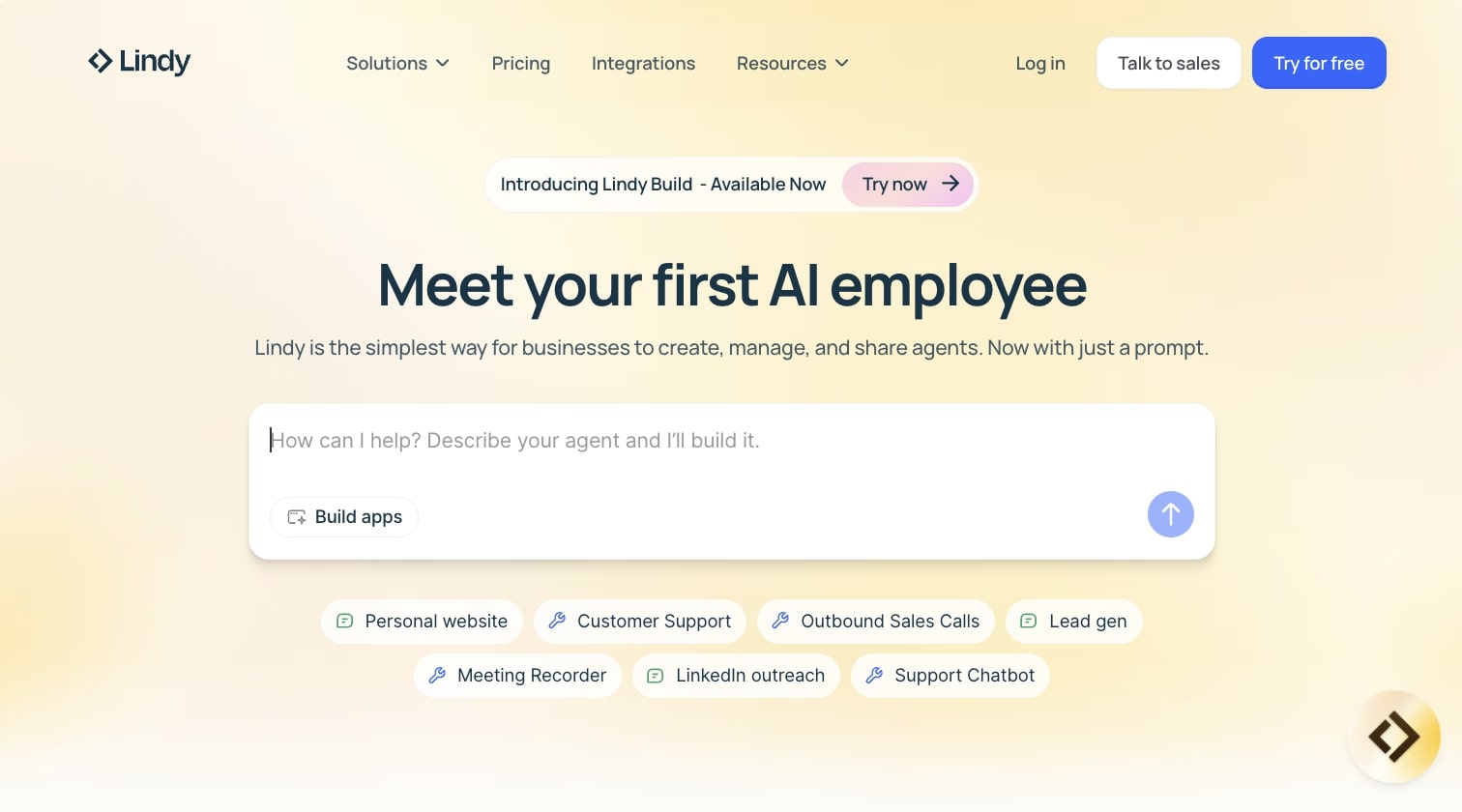
Lindy AI is an AI tool that helps you create automated workflows and agents. It's very similar to Relay.app and Gumloop in that it allows you to connect your existing tools, alongside an AI model, to run data analysis workflows.
The platform markets itself as an "AI employee" creation tool, which essentially means it allows you to create AI agents that can execute tasks on your behalf. For example, if you need a report on how your LTV:CAC ratio is looking, you can ask a Lindy AI agent to run the analysis for you.
But, while it is a solid platform for marketing use cases, I would say it's better at running sales agents. For example, you can set up a voice agent that automates phone calls (very cool). But, that does make it different from the use cases Julius AI has.
Lindy AI pros and cons
Here are the pros of Lindy AI:
- Has a lot of integrations with analytics and data tools
- Can leverage AI models to help you run reports
- Built for creating AI agents that can handle multiple tasks
Here are some of the cons of Lindy AI:
- While good at marketing use cases, it's better suited for sales or customer service agents
- Pricing can be a bit higher compared to other tools in this space
Overall, Lindy AI is a solid choice if you need AI agents that can do multiple tasks across different departments. But if you're looking for a tool that is exceptional at data analysis, it might be worth looking into an alternative.
When to use Lindy AI over Julius AI
You should consider Lindy AI over Julius AI if:
- You need AI agents that can make phone calls or handle voice-based tasks. Lindy has built-in support for automated phone calls, which Julius AI doesn't offer.
- You want to create "AI employees" that handle a mix of sales, customer service, and operational tasks rather than just data analysis.
- You need a platform that can execute actions on your behalf, not just generate insights from your data.
- Your use case leans more toward automating outreach, qualifying leads, or handling customer inquiries rather than running reports and visualizations.
Lindy AI pricing

Here are Lindy AI's pricing plans:
- Free: $0/month with 400 credits per month, up to 40 tasks, 1M character knowledge base, and 100+ integrations
- Pro: $49.99/month with 5,000 credits per month, up to 1,500 tasks, 30 phone calls per month, 20M character knowledge base, 6,000+ integrations, and the ability to invite team members at $19.99 per seat
- Business: $199.99/month with 20,000 credits per month, everything in Pro, 100 phone calls per month, 30+ supported phone call languages, and 50M character knowledge base
- Enterprise: Custom pricing with unlimited credits, unlimited phone calls, unlimited character knowledge base, priority support, and a dedicated success manager
If you want to learn more about what each plan has to offer, you can check out the pricing page.
Lindy AI reviews
Here's what customers of Lindy AI rate the platform on third-party review sites:
- G2: 4.7/5 star rating (from +170 user reviews)
- Capterra: 3.5/5 star rating (from +2 user reviews)
6. Make

- Best for: Freelancers and small teams who want powerful workflow automations on a budget
- Pricing: Free plan available, paid plans start at $10.59/month
- What I like: One of the most affordable automation platforms out there with a no-code drag-and-drop interface
Make (formerly Integromat) is an AI workflow automation platform that allows you to connect apps together to create automated workflows. It's very similar to Zapier or n8n, but it is cheaper than both of them.
In fact, I have a lot of friends that freelance or run small agencies that use Make for automations because of how budget-friendly it is.
The platform helps you build and orchestrate agents that can help with almost any task out there. However, similar to Zapier, it feels more like an AI workflow builder. So you need to come into it already knowing the exact workflows that you want to run for data analysis.
It's not the same as Gumloop in that you can just create a data analyst agent that has access to all of your tools and then you can ask very specific questions on what to do.
Make pros and cons
Here are some of the pros of Make:
- Budget-friendly platform for creating automated workflows
- Can integrate with almost any data sources you give it
- Great for beginners as it has a no-code drag-and-drop interface
Here are some of the cons of Make:
- Requires you to bring your own ChatGPT API key to leverage AI
- The UI/UX can feel a bit outdated and clunky at times
Overall, Make is an amazing platform if you're familiar with creating automation workflows. It's a great alternative to Julius AI if you have already used Zapier or Relay.app, and you're looking for a cheaper solution.
When to use Make over Julius AI
You should consider Make over Julius AI if:
- Budget is a major factor for you. Make is one of the most affordable automation platforms out there, starting at just $10.59/month.
- You already know exactly what workflows you want to build and just need a tool to execute them. Make is great for predefined automations, while Julius AI is better for exploratory data analysis.
- You're a freelancer or running a small agency and need to automate workflows for multiple clients without breaking the bank.
- You want access to 3,000+ app integrations and prefer a visual, no-code workflow builder.
- You're comfortable bringing your own API keys for AI features and don't need built-in LLM access.
Make pricing
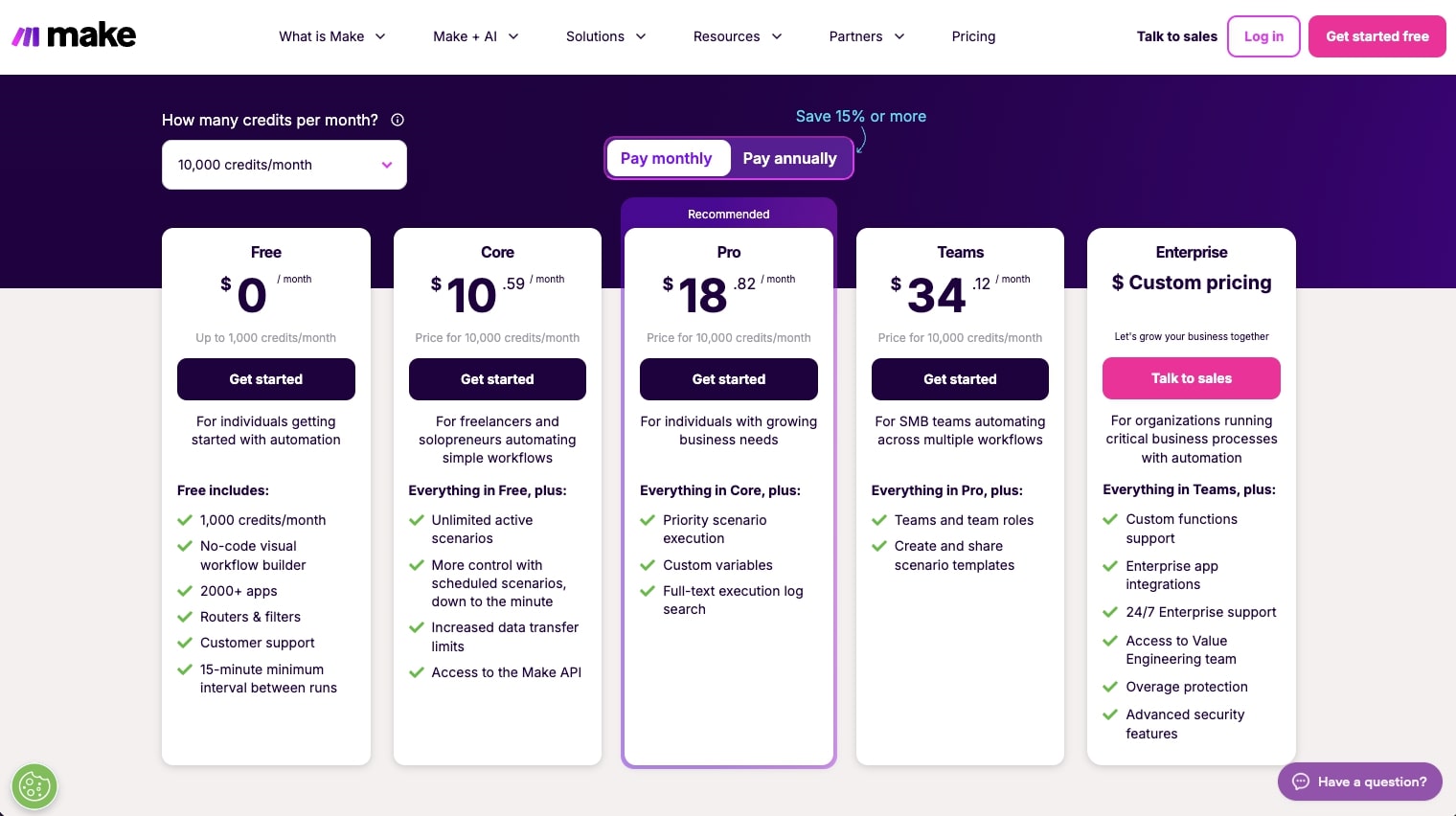
Here are Make's pricing plans:
- Free: $0/month with 1,000 credits per month, no-code visual workflow builder, 3,000+ app integrations, and a 15-minute minimum interval between runs
- Core: $10.59/month for 10k credits with unlimited active scenarios, scheduled scenarios down to the minute, and access to the Make API
- Pro: $18.82/month for 10k credits with priority scenario execution, custom variables, and full-text execution log search
- Teams: $34.12/month for 10k credits with team roles, and the ability to create and share scenario templates
- Enterprise: Custom pricing with 24/7 support, custom functions, enterprise app integrations, and advanced security features
If you want to learn more about what each plan has to offer, you can check out the pricing page.
Make reviews
Here's what customers of Make rate the platform on third-party review sites:
- G2: 4.6/5 star rating (from +266 user reviews)
- Capterra: 4.8/5 star rating (from +406 user reviews)
7. n8n

- Best for: Technical teams who want a flexible, self-hostable automation platform with a large community
- Pricing: Paid plans start at $24/month (self-hosted option available for free)
- What I like: Massive community with over 7,000 templates and the option to self-host for full control
n8n is an AI automation platform that has quickly become one of the most popular agent builders for technical teams. The great thing about n8n is that it has a ton of templates created by its community.
So if you need a very specific data analysis workflow, you can browse through the templates to see what works. The only downside with n8n is that you need to be a bit tech-savvy to get your way around the tool.
Unlike Gumloop, that has the Gummie agent that can build data analysis workflows with natural language, with n8n you need to build things out piece by piece. You also need to bring your own API keys if you want to leverage LLMs.
n8n pros and cons
Here are the pros of n8n:
- Has a community of over 7,424 templates
- Has a ton of tutorials on YouTube on how to use the platform
- Can be self-hosted if your IT team is focused on security
Here are the cons of n8n:
- Has a steep learning curve for non-technical users
- Requires you to bring your own API keys to use the AI models
Overall, n8n is a really powerful workflow builder. It's very similar to Make and Zapier in that it can help you create AI-powered automations in a visual canvas.
And if you work on an IT team and you want flexible controls, like self-hosting options, then n8n is definitely a noteworthy platform to look into.
When to use n8n over Julius AI
You should consider n8n over Julius AI if:
- You have a technical team that's comfortable building workflows from scratch. n8n gives you more control but requires more hands-on setup compared to Julius AI's conversational interface.
- Security and data privacy are top priorities. n8n offers self-hosting so you can keep everything on your own infrastructure.
- You want access to a massive library of community-built templates. With over 7,000 templates, there's a good chance someone has already built something close to what you need.
- You prefer open-source tools with flexibility over managed platforms. n8n has a strong developer community and is highly customizable.
- You're already comfortable bringing your own API keys and don't need built-in LLM access.
n8n pricing

Here are n8n's pricing plans:
- Starter: $24/month with 2,500 workflow executions, unlimited steps, 1 shared project, 5 concurrent executions, unlimited users, and forum support
- Pro: $60/month with 10,000 workflow executions, 3 shared projects, 20 concurrent executions, 7 days of insights, admin roles, and workflow history
- Business: $800/month with 40,000 workflow executions, self-hosted option, 6 shared projects, SSO and SAML, 30 days of insights, version control using Git, and scaling options
- Enterprise: Custom pricing with unlimited shared projects, 200+ concurrent executions, 365 days of insights, dedicated support with SLA, and the option to be hosted by n8n or self-hosted
n8n also offers a free self-hosted option if you want to run it on your own infrastructure. If you want to learn more about what each plan has to offer, you can check out the pricing page.
n8n reviews
Here's what customers of n8n rate the platform on third-party review sites:
- G2: 4.8/5 star rating (from +181 user reviews)
- Capterra: 4.7/5 star rating (from +41 user reviews)
Build your own data analyst agent
If you made it this far, you're probably serious about finding the right Julius AI alternative for your team.
And honestly, you can't go wrong with most of the tools on this list. They all have their strengths depending on what you're trying to do.
If you need a dedicated data analytics tool that lets you chat with spreadsheets and get actionable insights, Julius AI is still a solid option. It's great at visualization tools and has strong data security with SOC 2 compliance.
But if you want something that can do more than just analyze data, and actually build AI agents that take action across your entire tech stack, then Gumloop is my top pick.
I've been using Gumloop for almost a year now and it's become my go-to for anything AI automation related. The fact that it includes all the premium AI models without needing separate API keys is a huge plus. And the Gummie agent makes it easy to build workflows even if you're not technical.
What I also like about Gumloop is that it has a growing ecosystem of integrations and MCP servers, so you're not limited to just the built-in apps. Plus, the collaboration tools make it easy to share agents across your team.
But don't just take my word for it. Most of these tools have a free tier, so you can test them out and see which one fits your workflow best.
Happy building!

Read related articles
Check out more articles on the Gumloop blog.