How to build AI agents in 6 simple steps (2026 guide)

About 14 months ago, I created my first AI agent. And I'm not talking about some automated workflow that is rebranded as an "agent."
I'm talking about an actual AI assistant that can make decisions on its own, self correct when running into an issue, and act like a real addition to my team.
As a result, much of my work, especially when it comes to content marketing, has improved with the help of different AI agents.
And by improved I mean I can not only do more as a one person team, but I can do it better as well.
So in this guide, I'm going to show you everything you need to know about how to build AI agents in 2026. I tried to not make this article biased towards any point of view.
It's just my honest take on what I've learned over the past year building AI agents (using multiple different methods).
I'm confident you'll walk away from this article having a better idea of what you can automate in your work and how you can actually do it using AI agents.
Okay, before we jump in, let me explain what an AI agent actually is (there's a lot of misleading info out there).
What is an AI agent?
An AI agent is a software automation that can understand its environment, know what tools it needs to take certain actions, and can execute on tasks on your behalf.
AI agents today can do the same quality of work as a junior employee would. But, they are only good as the person who creates them.
Read that again. Because anyone telling you AI agents are the solution to all their problems haven't actually created and used them for an extended period of time.
Over the past year of building and using AI agents myself, I've found that they are only as good as your ability to train them.
There are three core things you need to be aware of to make AI agents work right. I'll explain more about what those three things are in the "what you need before your start" section, so keep reading.
Types of AI agents
Through all of my testing, I've found that there are two main ways to categorize AI agents. The first is by complexity, and the second is by how they're built.
Task-specific agents vs. multi-agent systems
A task-specific agent is built to do one thing well. You give it a single goal, the right tools, and clear instructions/skills, and it runs that task on repeat.
An example would be an agent that scrapes competitor blog posts every morning and sends you a summary in Slack.
A multi-agent system is when you have multiple agents working together, each handling a different part of a larger workflow. One agent does the research, another one writes the draft, another one edits it. Each agent has access to its preferred LLM, its own tools, and its own set of instructions. They pass information between each other and operate as a team.
Multi-agent systems are more powerful but also more complex. The reasoning and decision-making has to be coordinated across agents, which means there's more room for error. If you're reading this, I'd recommend building a single task-specific agent first and expanding from there. I'll show you how you can expand later, so keep reading.
Cloud-hosted agents vs. self-hosted agents
The other way to categorize agents is by how they're built and where they run.
Cloud-hosted agents run on a platform that handles the infrastructure for you. Self-hosted agents are built from scratch with code and run on your own servers.
Both can be fully autonomous, use the same AI models, tools, and data sources. The difference comes down to who's building it, how fast you need it running, and how easy it is to share with your team.
I'll break down the trade-offs between both approaches later in the guide when we get to choosing a platform.
For now, just know that we're going to focus on building a cloud-hosted, task-specific agent. It's the fastest way to get real value from AI agents in just a few minutes of setup time. You're about to see how easy building AI agents really is.
But before we jump into my steps for how I build them, I need you to deeply understand AI agent first principles before we start.
What you need before you start
Before you build your first AI agent, there are three things you need to pay attention to. You cannot mess this part up, as these are the three pillars that will determine the quality of your agent.
From first principles, you should think about AI agents in these three pillars:
- The data
- The tools
- The skills
AI agents are only as good as their data. I've found that AI is incredible at synthesizing and doing things with a data source you provide it.
This data could be anything from your analytics data, your CRM, your CMS, customer insights, third-party data from APIs, etc. It's just an accurate data source that an AI can have access to.
Next is the tools. These are the tools you let your agent have access to. Usually done through MCP servers, this can be anything like access to your CRM, access to SEO tools (which can double as data), access to Slack, Docs, Notion, etc.
The tools are generally the read/write capabilities you give your agent. This way, you agent can make informed decisions (from pillar one), and then use tools in your tech stack to act on tasks you give it.
And the third pillar are skills. Skills are the knowledge and instructions you give your agent. It acts as your agent's brain.
If we think of an agent as a human robot, you can think of it this way:
- The data: The robot's resources to draw from
- The tools: The robot's hands
- The skills: The robot's brain
Once all of these are in place, you can then prompt your agent and ask it questions related to a specific task it has been trained on. You can think of this whole section as the training your agent needs to work properly.
Without understanding this, you will not build your agents on a solid foundation. Hence, why I made it its own section before we got into the actual step-by-step guide.
Okay, now let's go over how to build an AI agent using my five step formula.
How to build an AI agent (step-by-step)
Here's a step by step guide to building an AI agent without coding
- Define the agent's goal
- Choose your AI model
- Choose your AI agent platform
- Connect your tools & data sources
- Write your agent's instructions
- Test and iterate
Let's go over these in depth.
1. Define the agent's goal (what you need to get started)
The first thing you need to do is define your agent's goal. This goes back to two things we went over earlier: the type of agent you're building and the training it needs.
As a quick recap, we can take two routes with the type of agent:
- A single agent
- A multi-agent system
I already wrote a guide on how to orchestrate AI agents that you can check out. It's a bit more advanced. So for the sake of this guide, I'm going to go simple and do a single agent.
We also need to figure out the training this single agent needs.
So first, I'm going to decide what agent to build. I'm going to start with an all purpose GTM content agent.
For the remainder of this article, we are going to focus on building out this agent.
Now, the goal of the agent is to:
- Take existing blog content
- Audit it for SEO gaps
- Run keyword research based on a specific brief
- Deliver optimization recommendations
All without me manually going through each page.
The agent is built for marketing teams (or solo marketers like me) who are juggling content production and optimization at the same time with limited bandwidth.
If you're a content writer managing a high volume of posts, an SEO specialist auditing pages across different regions, or a content marketing manager building sales collateral for specific audience personas, this is the type of agent that will bring you actual value.
Now, let's map this back to the three pillars I mentioned earlier.
- The data for this agent is the blog post URLs you feed it, plus the keyword data it pulls from Semrush based on your brief. You tell it what audience you're targeting, what keyword intent you care about (high-commercial, low-volume, whatever), and it uses that as its data source.
- The tools are what give the agent its hands. In this case, it uses Firecrawl to scrape the content from your URLs, Semrush to run the keyword research, and then Gmail and Google Sheets to deliver the output. You can also interact with it through Slack, which is the easiest way to trigger it.
- The skills are the instructions you give it. Your brief is the brain. The more specific you are with your campaign goal, target persona, and keyword intent, the sharper the output. If you give it a vague prompt, you'll get vague recommendations. This is true for every agent you'll ever build.
Once all three pillars are defined, the agent can do its job. And that's really the core of step one.
Before you touch any AI agent platform or start dragging and dropping nodes, you need to know exactly what your agent is supposed to do, what data it needs, what tools it should have access to, and what instructions will guide its decisions.
Get this part right and everything else becomes easier. Skip it and you'll end up with a mess of an agent that hallucinates.
2. Choose your AI model
The next step is to figure out what AI model you want your agent to run on. Not all AI models are built the same.
ChatGPT is great at deep research and helping you come up with plans for more personal stuff.
Claude is great at writing, coding, and helping you think through solutions to problems.
Gemini is great at web research, design, and working within the Google ecosystem.
If you need an all around great model, anything from Anthropic is great. But, what most people do is they pick a model based on what's popular instead of what fits the task.
For the GTM content agent we're building, we need a model that's strong at writing, understanding context, and following detailed instructions. That's why I'd lean towards Claude for something like this. Both handle long-form content analysis well and can follow a brief without going off the rails.
If your agent is more research-heavy (like pulling data from multiple sources and summarizing findings), you might lean towards a model with stronger web access and retrieval capabilities.
You can read more about the different AI models here.
But the point is, your model choice should be based on what your agent actually needs to do. Not what's trending on X (unless there's a step function in improvement).
A few things to think about when picking your model:
- What's the primary task? (writing, research, data analysis, coding)
- How long are the inputs? Some models handle longer context windows better than others.
- How important is instruction-following? If your agent needs to stick to a specific format or brief, some models are more reliable at that than others.
- Cost is a big one. Different models have different pricing. If your agent is running hundreds of tasks a day, you're going to have a hefty bill.
For most marketing and content use cases, you honestly can't go wrong with Claude or GPT models. But test both if you can (I'll show you how in the next step). The difference in output quality for your specific use case might surprise you.
3. Choose your AI agent platform
Okay, now we know what we want our agent to do, and we have a general idea of what AI model might fit best for it.
Now we need to pick an AI agent builder to help us put everything together. Essentially, we need an environment where we can host our AI agents and fully control them.
There are a handful of ways you can build AI agents, but there are two main routes.
No-code, cloud hosted
This means using a platform that gives you a visual interface to build, manage, and run your agents without writing any code.
Everything lives in the cloud, so your agents are accessible from anywhere and easy to share with team members. Most platforms in this category also come with enterprise-grade security, dedicated support, and pre-built integrations (with MCP support).
If you're working on a team or want to deploy agents that other people (especially non-technical people) can actually use, this is the better route in my opinion.
Coded, self-hosted
This would be something like using Claude Code, AutoGPT, or LangChain to build your agents from scratch with code. You host everything yourself, which gives you total customization over how the agent works.
But you do have to be aware of a few critical things. One major one being that the security is on you.
Sharing agents with teammates (especially ones who aren't technical) can be tricky. And maintenance is a big thing. Every time an API changes or a model updates, you're the one fixing it.
(This is essentially why people opt to pay for SaaS products even though there are a lot of open source options out there.)
For most people reading this article, especially if you're in marketing, sales, or ops, the no-code route is going to be the faster and more practical path.
What I use
For building AI agents, I use Gumloop. It's a no-code AI agent platform that lets you connect AI models to your existing tools without needing to write code.
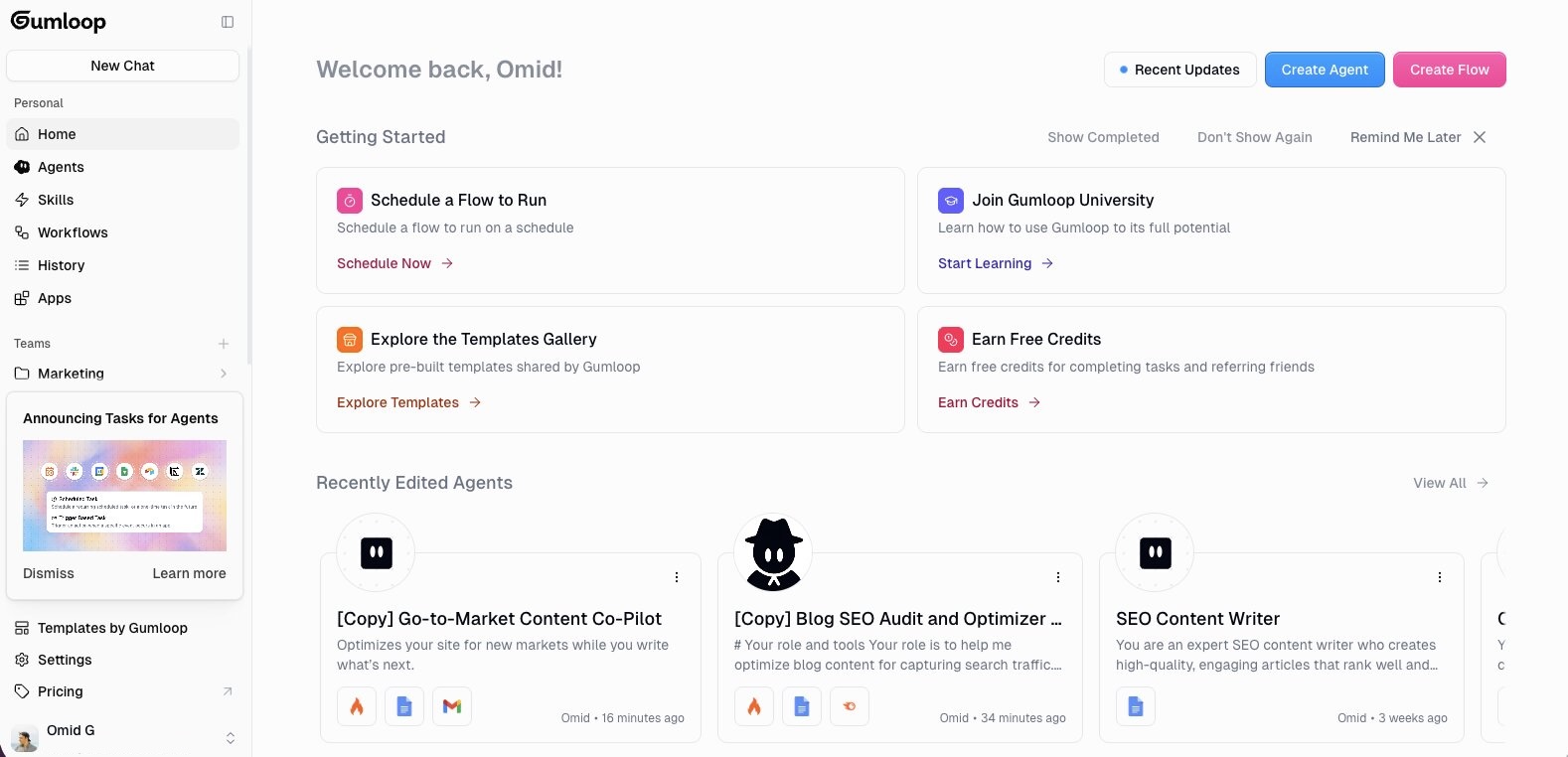
Looking at the dashboard, you can see it separates things into Agents, Skills, and Workflows, which maps directly to how I think about building agents.
Your agents live in one place, the skills (instructions and knowledge) that power them live in another, and any workflows you build are organized separately.
You also get access to a templates gallery with pre-built agents you can clone and customize instead of starting from zero. The GTM content agent we're building in this article is actually based on one of those templates.
What I like about it is that you can go from idea to working agent pretty quickly. And if you're working with a team, you can organize agents under team folders (you can see the "Marketing" team folder in the sidebar) so everyone has access to the same agents and workflows.
You can also interact with your agents through a chat interface or trigger them through Slack.
For this guide, I'm going to use Gumloop to build out the rest of the steps. If you want to follow along, they have a generous free plan you can start with.
4. Connect your tools & data sources
Now that you have your platform, it's time to give your agent the tools and data it needs to actually do its job.
If you're using Gumloop, this is all done in the right sidebar of your agent's dashboard. Under the Tools section, you add every integration your agent needs access to.
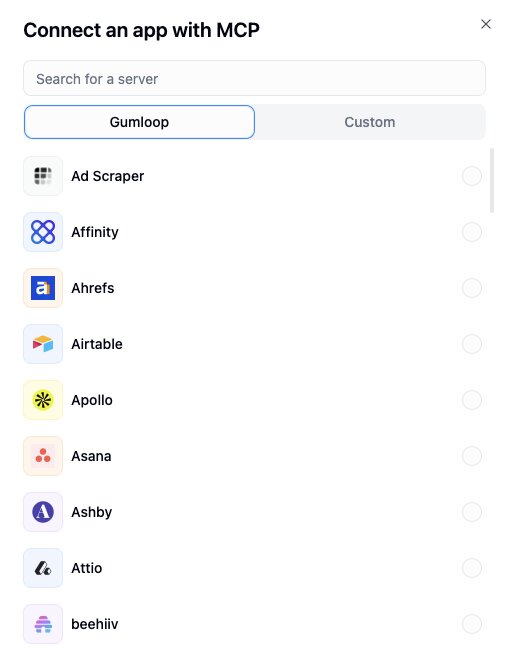
For the GTM content agent, here's what I connected:
- Firecrawl to scrape the blog content from the URLs I feed it
- Semrush to run keyword research based on my brief
- Google Docs for generating content drafts
- Gmail to send me a summary of the optimization recommendations
- Google Sheets to deliver the full output in a structured format I can review
- Slack so I can trigger the agent directly from a Slack channel instead of logging into the platform every time

There are also options for Web Search and Image Generation, but I have those turned off for this agent since it doesn't need them.
Connecting each tool is as easy as toggling it on and authenticate your account. Gumloop has a ton of built in integrations so you don't need to manage API keys (unless you want with custom integrations), and you don't need to write code. If you have ever connected an app to Zapier or Make, it's the same idea.
This is where the "data" and "tools" pillars from earlier come together. The tools give your agent its hands. The data (your blog URLs, your Semrush account, your Google Sheets) gives it something to actually draw from.
Without both, your agent is just sitting there with nothing to do.
[image]
We can also select our AI model. In this case, I'm using Claude Sonnet. And now all that's left is the brain of our agent. Let's get to that.
5. Write your agent's instructions
Now that your agent has access to the right tools and data, the next step is giving it instructions. Think of this as your agent's brain that refines how it approaches a task you give it.
Once your agent has access to right data and tools, it's already smart enough to figure out what you want it to do based on your prompts.
But instructions help it stay consistent, especially if you're running the same type of task repeatedly. Instead of re-explaining what you want every time, the instructions act as a template the agent follows by default.
In Gumloop, there are two layers to this: core instructions and skills.
Core instructions
This is the Agent Preferences panel on the right side of the dashboard. It's where you define what the agent is, who it's for, and how it should approach its work.
For our GTM content agent, the core instructions explain that this agent optimizes existing content for campaigns, new markets, or sales enablement. It tells the agent to scrape the URLs provided, run keyword research through Semrush based on the brief, and deliver structured optimization recommendations through Gmail and Google Sheets.
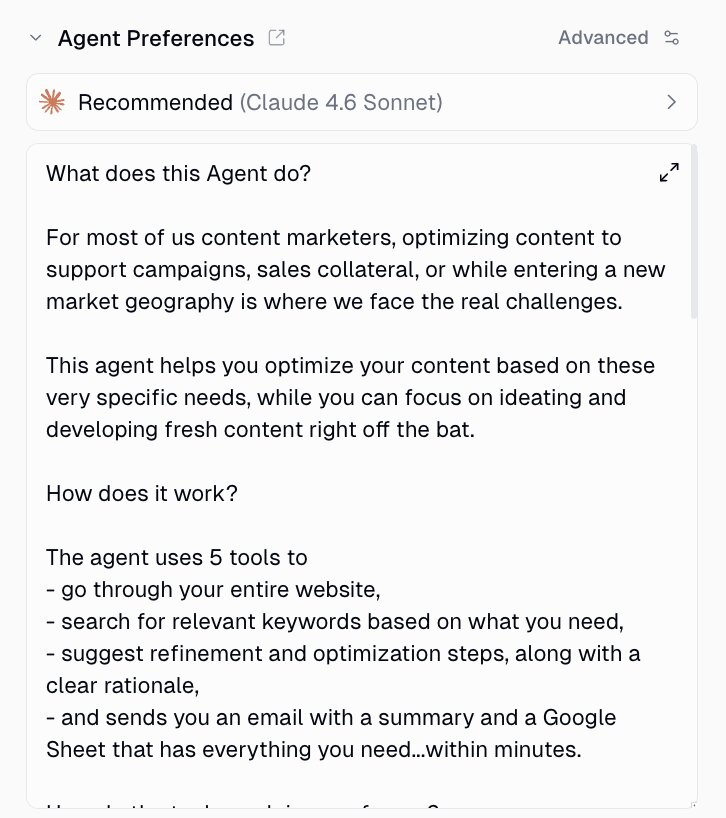
The key with instructions is specificity. The more specific you are, the less you have to correct the agent later.
For example, "help me with SEO" is going to give you vague output.
But something like "audit these 5 URLs for keyword gaps targeting high-commercial-intent terms for a B2B SaaS audience and deliver the recommendations in a Google Sheet with columns for page URL, recommended keyword, placement location, and rationale" is going to give you something way more higher quality.
A few tips for writing good agent instructions:
- Define the agent's role and who it's for
- Specify the exact output format you want (Google Sheet, email summary, doc, etc.)
- Include the steps the agent should follow in order
- Mention any constraints (tone of voice, word count, what to avoid)
- Be clear about what tools to use and when
You can also use the AI to help you write these instructions. In the chat interface, there's a "Skill" button at the bottom of the message input. You can ask the agent to help you build out your instructions based on what you want it to do.
Skills
Skills take things a step further. A skill is a folder of detailed instructions, scripts, and reference files that your agent can pull in when it needs them.
Instead of cramming everything into one giant system prompt (which gets expensive and makes the agent's performance worse), skills let the agent access specialized knowledge on demand.
The agent decides when to pull in context from a specific skill based on what the task requires.
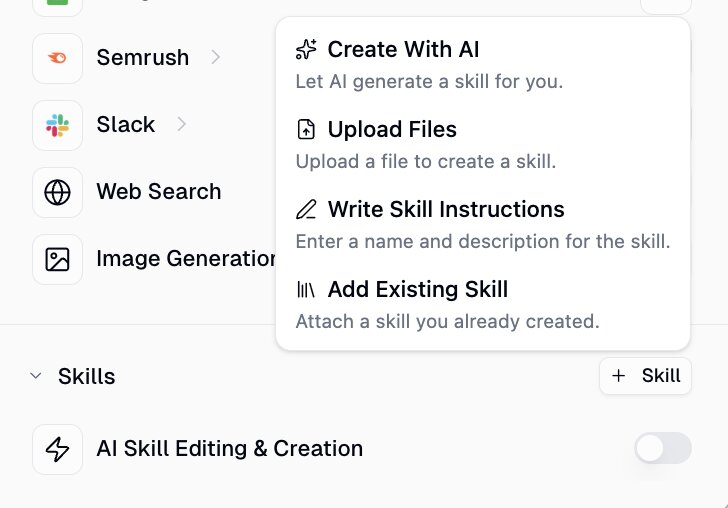
Having skills also make it easy to create a wide range of use cases that can be used across different agents. So it's a good practice to start building out skills as templates and then connecting them or sharing them with other teammates creating their own agents.
For example, if you have a sales agent, it might have a "Salesforce Admin" skill, a "Call Analysis" skill, and an "Outbounding" skill. Each one contains deep context the agent only loads when it's relevant. It can also be reused across different agents.
Also, the thing that has completely blown my mind is that your agents can create and improve their own skills over time.
Every time you correct the agent or point out something it got wrong, it can document that learning inside a skill. So over time, the agent gets better at the tasks you care about without you having to manually rewrite anything.
For the GTM agent, you could start with just your core instructions and then let the agent build skills as you use it. After a few runs, it might create a skill for how you like your keyword recommendations formatted, or a reference file with your brand voice guidelines.
If you want to learn more about how skills work in Gumloop, check out this page.
Running your agent automatically with tasks
Once your instructions and skills are dialed in, you don't have to manually chat with your agent every time you want it to run.
Gumloop recently launched Agent Tasks, which let your agents run on their own. You can set up:
- Scheduled tasks like "run this agent every Monday at 8am"
- Trigger-based tasks like "run this agent every time a new email comes in"
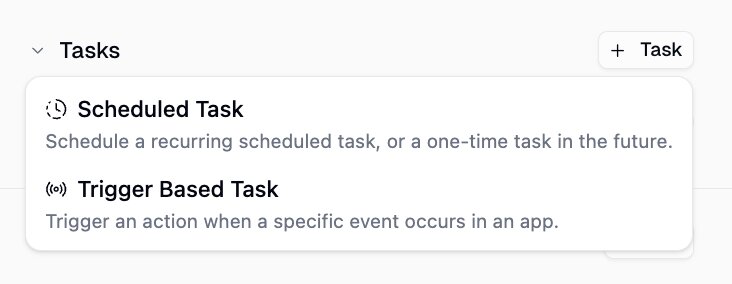
For the GTM content agent, we could set a weekly task to audit your top blog posts every Monday morning. The recommendations just show up in your inbox or Google Sheet on schedule without you needing to open the platform.
If you want to learn more about Agent Tasks, you can check out this page.
And that's pretty much it! When you use a cloud-hosted agent platform, it's super easy to deploy AI agents. You just need a platform that lets you integrate the right tools and give agents proper skills.
But, even though it is fairly easy to create AI agents nowadays. We still need to put them through some QA testing.
6. Test and iterate
Once your agent is set up, run it through a few real tasks before you rely on it.
Here's what it looks like when I test the GTM content agent. I gave it a simple prompt: "can you look at the gumloop website and give me some optimization tips?"
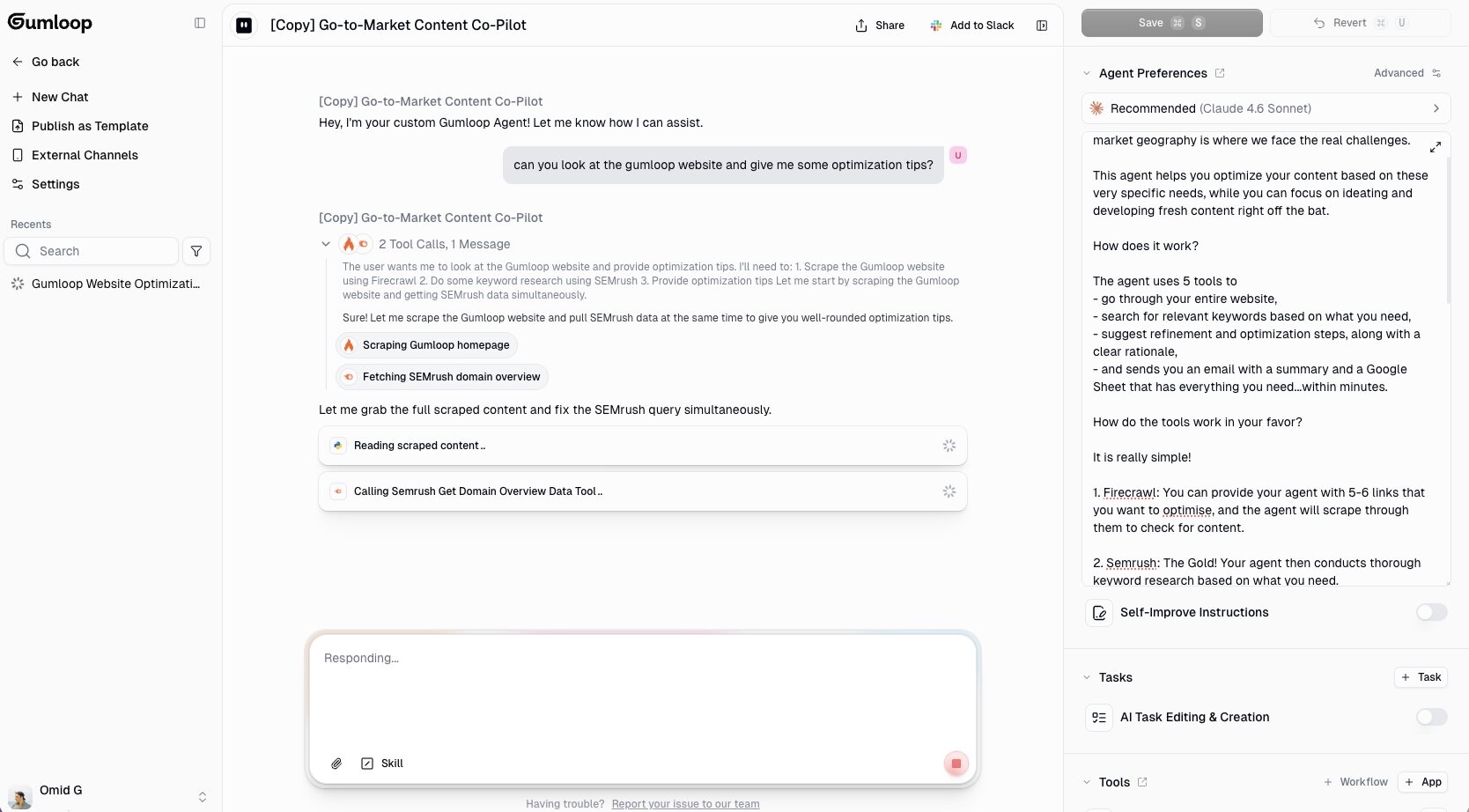
You can see the agent immediately figured out what it needed to do. It scraped the Gumloop homepage using Firecrawl, pulled the Semrush domain overview data, and started reading through the content. All from a single prompt. I didn't tell it which tools to use or what order to run them in. It figured that out on its own.
And here's the output it came back with:
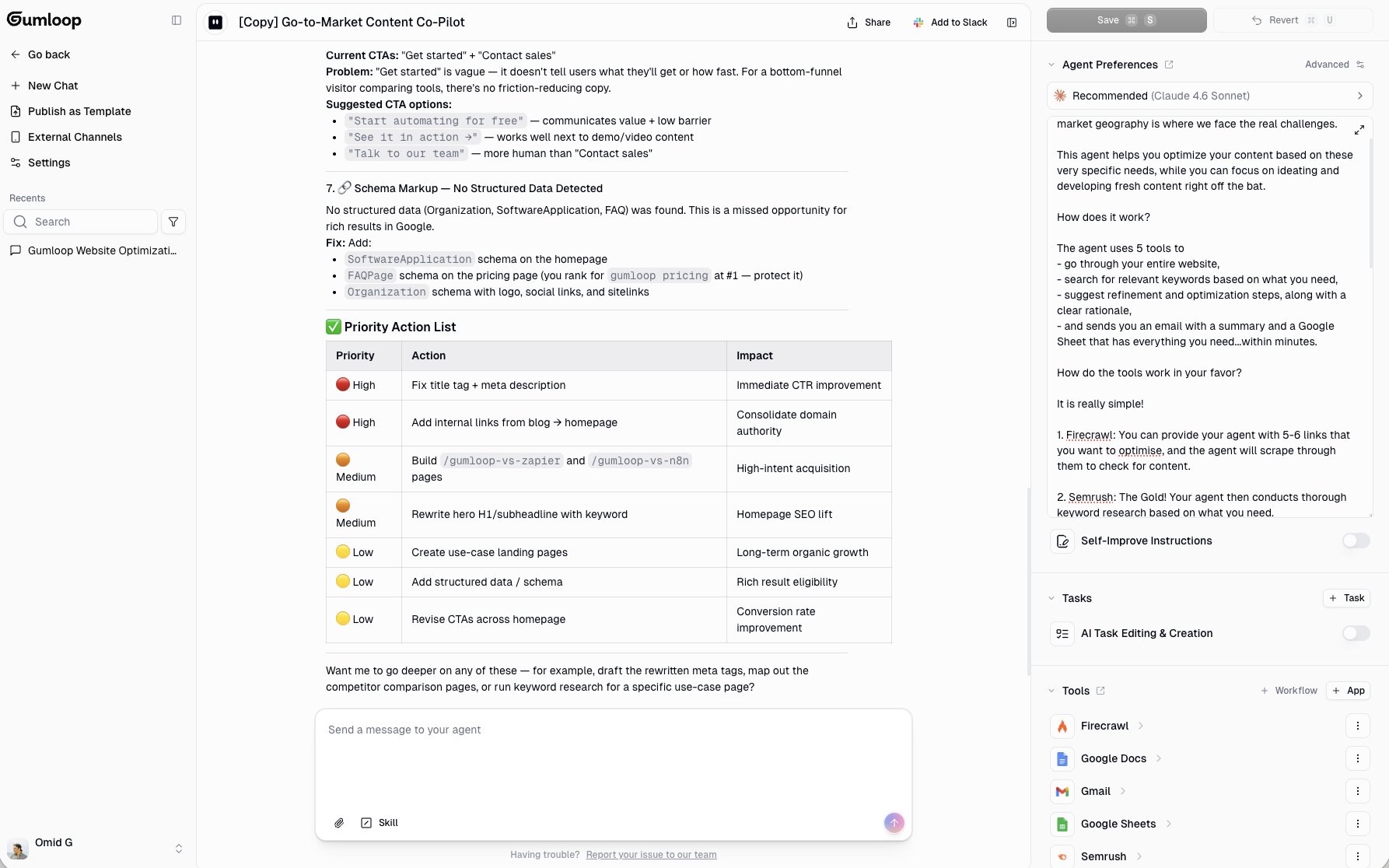
It ran a full content optimization audit on the Gumloop homepage. It pulled in the Semrush snapshot (organic keywords, traffic, estimated value), identified seven specific issues with fixes, and even organized everything into a priority action list at the bottom with impact levels.
That's a pretty thorough audit from a single prompt. And it literally took less than a minute.
But this is also where you need to review the output carefully. AI agents can hallucinate data points or make recommendations that don't make sense for your specific situation. Go through each recommendation and make sure the data is accurate and the suggestions actually apply.
If the output isn't what you expected, here are a few things to try:
- Switch the AI model: Gumloop lets you swap models in the Agent Preferences panel. If you're getting surface-level output, try switching to a stronger model like Claude Opus or thinking models from GPT. Different models handle different tasks better, so it's worth testing a few.
- Tighten your instructions: If the agent is missing the mark on format or depth, go back to Step 5 and be more specific about what you want. You can have the agent help you refine the instructions too based on your feedback.
- Check the tools: Make sure the agent actually used the tools you connected. If it's giving you keyword recommendations without pulling from Semrush, it's just making stuff up.
- Improve your brief: The more context you give in your prompt (audience, keyword intent, campaign goal), the sharper the output.
This is also where skills start to show their magic. If you notice the agent keeps making the same mistake, correct it and let it document that learning in a skill. Next time it runs, it won't repeat the same error.
One thing I'd recommend is starting small. Don't try to automate your entire workflow on day one. Get one agent working well on one specific task, then expand from there.
The best agents I have built were not perfect on the first run. They got good because I kept testing, correcting, and refining them over a few weeks.
What I wish I knew before building my first AI agent
My first AI agent was a writing proofreader. It would look at a Google Doc and proofread it. Like Grammarly, but it would everything in just a few seconds. Pretty simple compared to the agentic workflows I build now, but it taught me a lot about how this whole process works.
Since then, I've built agents for content marketing, SEO, lead research, and a bunch of internal ops stuff. And through all of that experience, there are a few things I wish someone told me before I started.
Stop over-writing your agent's skills
This was my biggest time waster early on. I would write detailed instructions on how every single tool should be used. Step-by-step breakdowns, edge cases, formatting rules for each integration.
Turns out, LLMs are really smart at figuring out how to use tools on their own. You don't need to hand-hold them through every interaction. Vercel actually published a great piece on this where they removed 80% of their agent's tools and got better results. That article was an eye opener for me.
Give your agent the right tools, give it a clear goal, and let it figure out the execution. You'll be surprised how much it can handle without you micromanaging the process.
Not everything needs to be automated
When you have the best hammer in the world, everything looks like a nail.
I went through a phase where I tried to automate everything. Every workflow, every repetitive task, every piece of content. And honestly, some of those agents were a complete waste of time to build because the task didn't need automation in the first place.
In some case, I ended up doing more work, and the quality was worse. Like drafting an email with AI. It's not a good output (the receiver can easily tell, and lost trust in me) and I have to rewrite it anyways.
Knowing what to automate and what not to is a skill in itself. If something takes you five minutes and you do it once a week, you probably don't need an agent for it. Save your energy for the workflows that have a high frequency (like daily), are repeatable, and can be taught to an intern. Those are the good candidates for automation.
The model matters more than you think
Three years ago, I started with OpenAI's ChatGPT. Then 2 years ago, I switched to Anthropic's Claude. Then a year ago, I went back to OpenAI. Then 6 months ago, I went back to Claude and have stuck with it since. It just keeps getting better. Opus is expensive but the quality is insane.
But, I'm not sure this will always be the case.
AI is moving so overwhelmingly fast and new models keep coming out. Each time, the reasoning gets better.
But they are not all created equal.
What surprised me most is how sensitive the output is to the model you choose. Using Opus compared to an open source model like Llama is a night and day difference.
And it's not just in the reasoning. Different models react to tools differently. Some handle certain integrations better than others.
So if you test and iterate your agent on one model, think carefully before switching to another one later. You might end up re-doing a lot of that work.
Don't automate what you can't articulate
This is probably the most important thing I've learned.
AI has leveled the playing field. Generative AI has made everyone a generalist by default. But the people who get the most value out of AI agents are the ones who are specialized. The user who has deep, specific knowledge in their domain will always build better agents than someone who's just asking AI to "act as an expert."
Think of it like being a super IC (individual contributor). If you can't do the task well yourself without any tools, you're not ready to automate it. Because you won't have the judgement to know if the output is good or bad. And you won't know how to tweak it.
You can only develop taste through reps and deep observation over time. No amount of planning or development shortcuts will replace that.
So before you go build your next agent, get good at the thing manually first. Once you can articulate exactly what good output looks like, then you're ready. That's when AI agents become a real force multiplier in your work.
I said at the beginning of this article that AI agents are only as good as the person who creates them. After 14 months of building them, I believe that more than ever now. The agents didn't make me better at my job. My knowledge of my job made my agents better.

Read related articles
Check out more articles on the Gumloop blog.