8 Firecrawl alternatives I've tested for web scraping


Firecrawl has become a popular choice for collecting LLM-ready web data, but it's far from the only option.
Depending on what you're actually building, you may need a crawler, a search engine, a browser automation platform, or a complete workflow that combines all three.
Comparing Firecrawl alternatives can be a challenge. Your workflow will usually narrow the options much faster than a feature comparison.
I didn't rank these platforms from best to worst. Instead, I focused on where each one performs best, the downsides to be aware of, and the teams I think will get the most value from it.
What to look for in a Firecrawl alternative
Choosing a Firecrawl alternative starts with understanding what role you need it to play.
Some platforms are designed to crawl websites at scale, while others focus on browser automation, structured extraction, or feeding clean data into AI applications. If you're still in the tool exploratory phase, it's also worth looking at the best AI web scrapers and understanding how to scrape data from a website before narrowing down your shortlist.
I evaluated each platform using the criteria that are most likely to influence your decision:
- Core scraping and crawling capabilities – Does it support JavaScript rendering, structured extraction, and modern websites?
- Best fit – Is it better suited to LLM data pipelines, large-scale crawling, scheduled monitoring, or another use case?
- Ease of setup – How quickly can you get started, and how much technical work is involved?
- Automation and scheduling – Can you automate crawls and run them on a schedule?
- Integrations and APIs – How well does it integrate with your existing stack, and how mature are its APIs or SDKs?
- Scalability – Can it handle large crawls, and are there meaningful rate limits?
- Anti-bot handling – How well does it deal with dynamic websites, bot protection, and proxies?
- Pricing – Is the pricing transparent, flexible, and suitable for different workloads?
- Output formats – Can it return clean Markdown, JSON, HTML, or other structured formats?
- Support and reliability – Is the platform well supported, actively maintained, and reliable enough for production use?
8 best Firecrawl alternatives and competitors in 2026
Not every platform here is trying to replace Firecrawl outright, and that's exactly what makes the comparison interesting.
Alright, let's go over each one.
1. Exa

- Best for: Developers building AI applications that need semantic search and LLM-ready web data
- Pricing: Free tier available, with paid plans starting from $7 per month
- What I like: Search-first approach built specifically for AI applications
Exa approaches web data from a completely different direction than Firecrawl. Instead of starting with a website and extracting its contents, Exa starts with a search query, helping developers discover relevant information before retrieving it in a format that's ready for AI applications.
It's designed for developers building AI search, RAG systems, research tools, and AI agents that need reliable access to high-quality web content. It doesn’t act as a traditional crawler; it combines semantic search with content retrieval, making it easier to find the information you actually need instead of scraping entire websites.
How Exa works

You begin with a search query rather than a URL.
Exa uses neural search to identify relevant web pages before returning structured results, summaries, or full page contents through its API. If discovering information is just as important as extracting it, that search-first workflow makes Exa fundamentally different from Firecrawl.
Why choose Exa over Firecrawl
I'd choose Exa if my starting point was a question rather than a website.
It's a particularly good fit for AI search, RAG pipelines, and research assistants. If you need to discover relevant information before extracting it, Exa makes much more sense than a traditional crawler.
Exa pros and cons
Pros:
- Purpose-built semantic search for AI applications
- Clean, LLM-ready outputs with flexible APIs
- Strong fit for RAG, research, and AI agent workflows
Cons:
- Not designed for large-scale website crawling
- Usage-based pricing can become expensive as search volume grows
Exa pricing

Here are Exa's pricing tiers:
- Free tier available
- Paid plans start at $7/month
- Usage-based pricing scales with API requests and content retrieval
- Enterprise plans available
Exa's pricing page explains how request-based billing scales as your usage grows.
Exa reviews
- G2: 4.8/5 star rating from 2+ reviews
- Product Hunt: 5/5 star rating from 14+ founder reviews
Public reviews are still fairly limited but early feedback points to Exa's semantic search quality, straightforward API, and developer experience as standout strengths. The main trade-off is that it isn't trying to solve the same problem as Firecrawl, it's designed to help you find the right content before you decide what to extract.
2. Apify

- Best for: Developers and businesses managing web scraping and browser automation at scale
- Pricing: Free tier available, with paid plans starting from $29/month
- What I like: Huge library of ready-made Actors
Apify feels like the kind of platform you grow into. If your scraping needs are fairly straightforward, it can seem like more than you need. But once you're running multiple projects or scraping lots of different websites, the breadth of the platform starts to make a lot more sense.
The feature I'd be most likely to use is the Apify Store.
Having access to thousands of ready-made Actors means you're often adapting an existing solution rather than building a scraper from scratch, which can save a significant amount of development time.
How Apify works

Apify revolves around Actors, reusable cloud programs that handle scraping, crawling, browser automation, and data processing. You can run an existing Actor from the marketplace, customize it, or build your own using JavaScript, Python, Playwright, Puppeteer, or Crawlee.
Why choose Apify over Firecrawl
If I knew I'd be managing multiple scraping projects over the long term, Apify would probably be my first choice.
Its Actor marketplace, scheduling capabilities, and broad framework support make it much better suited to running a wide variety of scraping workloads than a platform focused primarily on AI-ready web crawling.
Apify pros and cons
Pros:
- Large marketplace of ready-made Actors
- Supports Playwright, Puppeteer, Crawlee, and Python
- Built to handle large-scale scraping and automation projects
Cons:
- Steeper learning curve than Firecrawl
- The number of features can feel overwhelming if you only need a simple crawler
Apify pricing
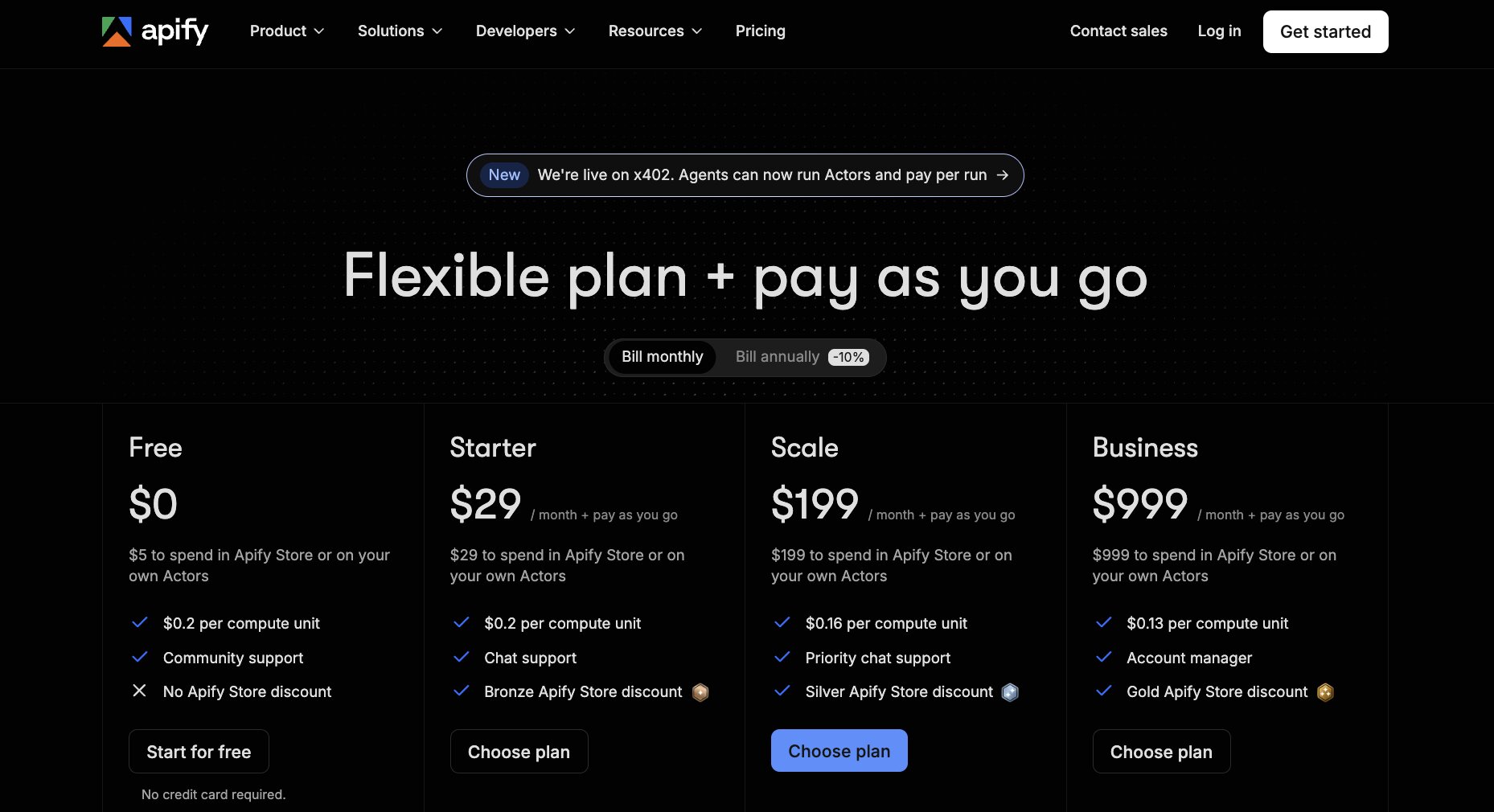
Here are Apify's pricing tiers:
- Free tier available
- Starter: $29/month
- Scale: $199/month
- Business: $999/month
- Enterprise: Custom pricing
If you're comparing plans, Apify's pricing page also shows what's included with each credit allowance.
Apify reviews
Here's how users rate the platform on third-party review sites:
- G2: 4.7/5 star rating from 539+ reviews
- Capterra: 4.8/5 star rating from 511+ reviews
The breadth of the platform comes up time and again in customer reviews, particularly the flexibility of the Actor marketplace.
The biggest downside (if you can call it that) is that new users can find the platform overwhelming at first because there's so much functionality to explore. If you want to learn more about the different features between Apify and Firecrawl, you should check this out.
3. Browse AI

- Best for: Business users and teams that want no-code web scraping and monitoring
- Pricing: Free tier available, with paid plans starting from $19/month
- What I like: Great monitoring and scheduled data extraction features
The appeal of Browse AI is obvious from the moment you start using it. Instead of asking you to build a scraper, it asks you to show it what you want to collect. That makes the platform surprisingly approachable, even if you've never worked with web scraping before.
I can see why it's become popular with operations, sales, ecommerce, and market research teams.
Instead of building a scraper yourself, you train a Browse AI Robot by interacting with a website in your browser. Once it's set up, it can extract data or monitor changes automatically on a schedule.
How Browse AI works
Browse AI uses Robots to automate data extraction from websites.
Once you've shown a Robot what information to collect, it can revisit the site on a schedule, detect changes, and export the results to spreadsheets, APIs, or automation tools such as Zapier and Make.
Why choose Browse AI over Firecrawl
I'd choose Browse AI if speed and simplicity mattered more than flexibility.
If your goal is to monitor competitor pricing, track inventory, collect leads, or extract structured data without involving developers, it's much quicker to get up and running than a developer-focused platform.
Browse AI pros and cons
Pros:
- No coding required
- Simple workflow for scheduled monitoring and data extraction
- Integrates with popular automation platforms
Cons:
- Less flexible than developer-first scraping platforms
- Usage limits can become restrictive for larger scraping projects
Browse AI pricing

Here are Browse AI's pricing tiers:
- Free plan available
- Personal: $19/month
- Professional: $69/month
- Premium: $500/month
Browse AI separates its plans by task volume and monitoring limits, which are outlined clearly on its pricing page.
Browse AI reviews
Here's how users rate the platform on third-party review sites:
- G2: 4.8/5 star rating from 60+ reviews
- Capterra: 4.6/5 star rating from 63+ reviews
A common theme across the reviews is how quickly people are able to automate scraping tasks without technical knowledge. Ease of use comes up repeatedly, while the most frequent criticism is that larger projects can become expensive because pricing scales with task usage.
4. Spider AI Web Crawler

- Best for: Developers building AI agents and large-scale web crawling pipelines
- Pricing: Pay-as-you-go
- What I like: Fast crawling with multiple output formats
Spider feels very developer-first.
While some platforms try to simplify web scraping for non-technical users, Spider leans into performance, scale, and flexibility. It brings crawling, scraping, browser automation, and search together behind a single API that's designed for AI applications from the outset.
What I found particularly interesting is how much emphasis Spider puts on measurable performance. Rather than making broad claims, the website publishes benchmark data comparing its crawl success rates, latency, and pricing against competing platforms, which isn't something I saw many of the other tools doing.
How Spider AI Web Crawler works
Spider exposes a single API for crawling websites, scraping pages, searching the web, and rendering content in a real browser.
It can return clean Markdown, JSON, HTML, text, CSV, XML, and other structured formats, making it easy to feed web data directly into LLMs and RAG pipelines. Built-in anti-bot capabilities, browser sessions, and rotating proxies are also available when crawling more heavily protected websites.
Why choose Spider AI Web Crawler over Firecrawl
I'd consider Spider if performance and scale were my biggest priorities.
Its API covers much more than basic crawling, and the pay-as-you-go pricing could be attractive if your workloads vary from month to month. I also like that failed requests aren't billed, which makes experimenting with larger crawls feel less risky.
Spider AI Web Crawler pros and cons
Pros:
- Single API for crawling, scraping, browser automation, and search
- Wide range of output formats for AI workflows
- Pay-as-you-go pricing with no subscription required
Cons:
- Better suited to developers than non-technical users
- Limited independent customer reviews compared with more established competitors
Spider AI Web Crawler pricing

Here's how Spider AI Web Crawler structures its pricing:
- Pay-as-you-go available with no subscription
- Unlimited plans start at $40/month
- AI Studio available as an optional add-on
- Enterprise pricing available
Spider offers both pay-as-you-go and monthly subscription plans, so you can choose the model that best fits your workload. If you're planning to run crawls regularly, the unlimited plans are likely to offer better value than paying per request.
For full details, you can check out Spider AI Web Crawler's pricing page.
Spider AI Web Crawler reviews
At the time of writing, Spider doesn't have an established collection of public customer reviews on G2, Product Hunt or Capterra.
5. Nimble

- Best for: Businesses that need reliable web data at enterprise scale
- Pricing: Free trial available, with pay-as-you-go API pricing
- What I like: Strong focus on reliability and anti-bot performance
The more time I spent looking through Nimble, the more it felt like a data platform rather than a scraping tool. It's built for teams that depend on fresh, structured web data every day, whether that's for competitive intelligence, ecommerce, market research, or feeding AI applications.
What really sets it apart is its Web Search Agents. Rather than asking you to configure every crawl yourself, Nimble offers purpose-built agents that are designed to return structured data for specific use cases, reducing much of the work that typically goes into building and maintaining scraping workflows.
How Nimble works
Nimble combines search, crawling, extraction, and browser automation through a suite of APIs and AI-powered Web Search Agents.
Depending on your workflow, you can use pre-built agents to retrieve structured data or build your own pipelines using the Search, Crawl, Extract, and Map APIs.
Why choose Nimble over Firecrawl
If reliability was my biggest priority, I'd have Nimble high on the shortlist.
It's clearly designed for organisations collecting large volumes of production data, with a strong emphasis on handling anti-bot protections and delivering structured outputs that can be fed directly into business systems or AI workflows.
Nimble pros and cons
Pros:
- AI-powered Web Search Agents reduce manual configuration
- Broad suite of APIs covering search, crawling, mapping, and extraction
- Built for enterprise-scale data collection
Cons:
- Better suited to technical teams than non-developers
- Pricing is more complex than many of the other platforms on this list
Nimble pricing

Here's how Nimble structures its pricing:
- Free trial available (5,000 web pages)
- Pay-as-you-go API pricing available
- Custom enterprise plans available
Nimble offers usage-based pricing across its APIs, alongside larger enterprise packages for organisations with high-volume data requirements. That gives you plenty of flexibility, although it does mean pricing takes a little longer to evaluate than platforms with simple monthly subscriptions.
Explore Nimble's pricing options to see which model best fits your workload.
Nimble reviews
Here's how users rate the platform on third-party review sites:
- G2: 4.9/5 star rating from 19+ reviews
Nimble doesn't currently have a Capterra or Product Hunt profile for its web data platform.
The reviews that are available often mention the platform's reliability, responsive customer support, and ability to handle large-scale web data collection. Several reviewers also highlight how straightforward the APIs are to integrate, although a few note that the documentation could go further for more advanced use cases.
6. Browserbase

- Best for: Developers building AI agents and browser automation at scale
- Pricing: Free plan available, with paid plans starting from $20/month
- What I like: Great observability and debugging tools
Browserbase’s main job isn't really scraping websites. Instead, it gives developers reliable browser infrastructure without having to manage headless browsers themselves.
That distinction matters more than I expected. If you've ever had browser automation fail because of infrastructure rather than your code, Browserbase is solving that problem for you. Instead of worrying about browser sessions, scaling, proxies, or CAPTCHA handling, you can focus on building the workflow itself.
How Browserbase works
Browserbase provides managed cloud browsers through an API. It handles browser provisioning, session management, proxies, CAPTCHA solving, and debugging, while supporting frameworks such as Playwright, Puppeteer, and Selenium. Together, this makes it much easier to run browser automation reliably without maintaining your own infrastructure.
Why choose Browserbase over Firecrawl
I'd put Browserbase on the shortlist if browser automation sits at the centre of your workflow, not web crawling itself. It gives developers much more control over browser sessions and infrastructure, making it a strong fit for AI agents, testing, and complex automation tasks that go beyond extracting page content.
Browserbase pros and cons
Pros:
- Managed browser infrastructure with built-in scaling
- Supports Playwright, Puppeteer, and Selenium
- Strong debugging and session replay capabilities
Cons:
- More infrastructure-focused than Firecrawl
- Better suited to developers than non-technical teams
Browserbase pricing

Here are Browserbase pricing tiers:
- Free: $0/month
- Developer: $20/month
- Startup: $99/month
- Scale: Custom pricing
The Developer plan includes 100 browser hours, then charges $0.12 per additional browser hour. The Startup plan includes 500 browser hours, with additional usage charged at $0.10 per hour.
Browserbase also explains browser-hour allowances and overage pricing in more detail on its pricing page.
Browserbase reviews
Here's how users rate the platform on third-party review sites:
- G2: 4.3/5 star rating from 19+ reviews
- Product Hunt: 5/5 star rating from 14+ reviews
Rather than focusing on scraping features, reviewers talk about stability, developer experience, and how much infrastructure work Browserbase removes from browser automation projects.
Faster setup and responsive support also come up regularly, while some users note that the platform makes the most sense once you're running browser automation at scale.
7. Gumloop

- Best for: Teams that want to turn scraped web data into complete AI-powered workflows
- Pricing: Free plan available, with paid plans starting from $37/month
- What I like: Combines web scraping with AI agents and workflow automation
Gumloop earns its place on this list because scraping is only the beginning of what you can build with it. You can collect information from a website, use an LLM to analyze or structure it, and then send the results into tools such as Google Sheets, Slack, HubSpot, or Salesforce without leaving the same visual workflow.
That end-to-end approach is what I find most useful. Gumloop’s dedicated scraping tools sit inside a broader platform for building AI agents and automations, so the data you collect can immediately trigger the next stage of a process. It’s a strong option for teams already comparing the best AI workflow automation tools, particularly if traditional platforms feel too focused on moving data between apps. Gumloop’s comparison with Zapier explains that distinction in more detail.
How Gumloop works

Gumloop uses a visual canvas where you connect scraping, AI, logic, and integration nodes into a workflow. Its website scraper can pull content from a URL, while the Web Agent Scraper handles multi-step interactions such as clicking elements or loading content before extraction.
From there, an AI model can summarize, categorize, enrich, or convert the information into structured data. The same workflow can then save the output to a spreadsheet, update a CRM, send a message, or trigger another business process.
Why choose Gumloop over Firecrawl
Gumloop makes the most sense when collecting the data is only one stage of a larger workflow. Firecrawl gives developers an API for turning websites into clean data, while Gumloop lets business and technical teams build the scraping, analysis, and follow-up steps in the same place.
I’d favor Gumloop for recurring workflows such as competitor monitoring, lead enrichment, or research that needs to end with a usable spreadsheet or an action in another system. It removes the need to connect a separate crawler, LLM, and automation platform yourself.
Gumloop pros and cons
Pros:
- Scraping, AI processing, and workflow automation in one platform
- Visual builder is accessible to non-developers
- Connects web data directly to business apps and multiple AI models
Cons:
- Less control than a dedicated developer-first crawling API
- Credit usage can require closer monitoring as workflows become more complex
Gumloop pricing

Here are Gumloop's pricing plans:
- Free: $0/month with 5,000 credits, one seat, and unlimited agents and flows
- Pro: Starts at $37/month with 20,000+ credits and unlimited seats
- Enterprise: Custom pricing with advanced security, governance, and administrative controls
Gumloop’s pricing scales according to monthly credit usage. The free plan is enough to test scraping and automation workflows, while Pro adds collaboration features and higher execution limits.
A full breakdown of the credits and features included with each plan is available on Gumloop’s pricing page.
Gumloop reviews
Here's how users rate the platform on third-party review sites:
- G2: 4.8/5 star rating from 7+ reviews
- Capterra: 5/5 star rating from 2+ reviews
The small but growing pool of public feedback is especially positive about Gumloop’s visual interface, fast setup, and customer support. Several comments describe the platform as easier to work with than traditional automation products, although one G2 reviewer found the initial setup challenging when building more complex agents.
8. Thunderbit
- Best for: Business users who want AI-powered web scraping without writing code
- Pricing: Free plan available, with paid plans starting from $15/month
- What I like: AI automatically identifies the data you want to extract
Thunderbit lowers the barrier to web scraping more than almost any other platform I looked at. Instead of configuring selectors or writing scraping logic, you describe what you want to collect in plain English and let AI do much of the heavy lifting.
I can easily see sales, operations, ecommerce, and research teams getting value from it, when they need structured web data but don't necessarily have technical resources available. Thunderbit's collection of AI web scraping guides also gives a good sense of the everyday workflows the platform is designed to automate, from lead generation to competitor monitoring.
How Thunderbit works
Thunderbit runs as a Chrome extension that uses AI to understand the structure of a webpage before extracting the information into a table. It can scrape websites, PDFs, and images, while automatically handling pagination and field detection without requiring manual setup.
The extracted data can then be exported into Google Sheets, Airtable, Notion, or Excel, making it easy to feed web data into existing business processes.
Why choose Thunderbit over Firecrawl
I'd recommend Thunderbit if your priority is getting from webpage to spreadsheet as quickly as possible.
Where Firecrawl is built around APIs and developer workflows, Thunderbit focuses on giving business users a straightforward way to collect structured data with minimal setup. If your team spends more time analysing data than building infrastructure, that trade-off could work in your favor.
Thunderbit pros and cons
Pros:
- Very little technical setup required
- AI automatically detects and extracts page data
- Supports websites, PDFs, and images
Cons:
- Less configurable than developer-first scraping platforms
- Better suited to business workflows than complex crawling projects
Thunderbit pricing

Here are Thunderbit's pricing tiers:
- Free plan available
- Starter: From $15/month
- Pro: From $38/month
- Business: Custom pricing
Thunderbit uses a credit-based pricing model, with larger plans increasing monthly AI credits and automation limits. The pricing page breaks down what's included in each tier, making it easy to compare plans before committing.
Thunderbit reviews
Here's how users rate the platform on third-party review sites:
- G2: 4.4/5 star rating from 10+ review
- Capterra: 4.8/5 star rating from 9+ reviews
The public review base is still relatively small, but the feedback available is encouraging. Rather than focusing on technical capabilities, users tend to talk about how quickly they're able to build useful scraping workflows and the amount of manual work the platform removes. Ease of use is a recurring theme, particularly among people without a development background.
Which Firecrawl alternative should you choose?
By now, you should have a pretty good idea of which names belong on your shortlist. The final decision comes down to one question: what do you need to happen after the data has been collected?
- Choose Exa when discovery and semantic search matter more than crawling a known website.
- Choose Apify if you need a flexible scraping platform that can support many projects over time.
- Choose Browse AI for no-code extraction and scheduled website monitoring.
- Choose Spider AI Web Crawler when speed, scale, and flexible output formats are the priority.
- Choose Nimble for reliable, enterprise-grade web data collection.
- Choose Browserbase if you need managed browser infrastructure for AI agents or complex automation.
- Choose Gumloop when scraping is only the first step and you want to process the data or trigger actions in the same workflow.
- Choose Thunderbit when business users need a quick route from webpage to spreadsheet without developer support.
The deciding factor is where web data sits within the wider system you're building.
A dedicated crawler may be enough for a focused extraction task, while more complex agentic AI tools often need search, browser interaction, data processing, and automation working together.
I’d start by mapping the full workflow, including what needs to happen after the data is collected. That will usually reveal whether you need a close Firecrawl replacement or a platform that solves a broader part of the process.

Read related articles
Check out more articles on the Gumloop blog.