7 best Budibase alternatives I've tested in 2026

Why do so many teams end up comparing completely different platforms.
I think a lot of teams start looking for Budibase alternatives after running into the same realization.
At first, the goal feels simple enough. You need an internal tool, a dashboard, an operations app, or a way to replace a spreadsheet that's slowly becoming a business-critical system.
Then you start evaluating platforms and discover there are dozens of different ways to solve the problem.
Some tools are optimized for speed and simplicity. Some are designed for developers who want complete control. Others lean heavily into workflow automation, AI, enterprise governance, or full application development.
The more platforms I compared, the more obvious it became that most of them aren't really competing on the same thing. They're competing on different ideas of how software should be built.
That's why I don't think the best Budibase alternative is necessarily the one with the longest feature list. It's the one that aligns with the way your team works, the skills you already have, and the types of applications you're actually trying to build.
In this article, I'll walk through the Budibase alternatives I think are genuinely worth considering, where each one stands out, and the tradeoffs I'd be weighing before making a decision.
How I evaluated these Budibase alternatives
Budibase is designed to help teams build internal tools faster.
Whether you're creating dashboards, operational apps, approval workflows, admin panels, or other business software, the goal is the same: reduce the amount of custom development needed to get useful applications into users' hands.
So why look at alternatives?
In my experience, it usually comes down to one of three things. Teams need more flexibility, they want a different development experience, or they're looking for capabilities that Budibase wasn't specifically designed around, such as workflow automation, AI-powered functionality, or enterprise-scale governance.
With that in mind, I evaluated each platform based on the areas I think matter most when choosing a Budibase alternative:
- Internal app development capabilities: How well the platform supports building internal tools and business applications.
- Ease of use: Whether it's designed for non-technical users, developers, or somewhere in between.
- Customization and flexibility: How much control you have as applications and workflows become more complex.
- Integrations: How easily it connects to the tools, databases, and systems your team already uses.
- Collaboration and governance: The features available for managing users, permissions, security, and scale.
- Pricing: How well the pricing model fits different team sizes and growth plans.
Some of the tools on this list are direct Budibase competitors. Others solve the same underlying problem from a completely different angle. My goal wasn't to find a single winner but to identify which platforms make the most sense for different teams and use cases.
What to look for in a Budibase alternative
One thing that became clear while comparing these platforms is that they make very different tradeoffs.
Some prioritize speed and accessibility. Others focus on developer flexibility, enterprise governance, workflow automation, or AI-powered functionality. You need to think carefully about what success actually looks like for your team before comparing feature lists.
Here's what I'd look for in a Budibase alternative:
- How quickly can you build useful internal tools? Some platforms are optimized for dashboards, admin panels, and operational apps, while others are better suited to more complex software projects.
- Who is expected to build and maintain the apps? Some tools are genuinely accessible to business users, while others assume developer involvement from day one.
- How much customization do you need? It's easy to build a basic application. The real test is how well the platform adapts as requirements become more complex.
- How strong are the integrations? Most internal tools need to connect to databases, APIs, CRMs, and other business systems.
- Does the platform support workflow automation? Some tools focus purely on app development, while others combine applications and automation in a single platform.
- What governance and security features are included? Permissions, audit logs, SSO, role-based access controls, and deployment options become increasingly important as adoption grows.
- Can teams collaborate effectively? Features like shared projects, reusable components, and version control can make a big difference once multiple teams get involved.
- Does the pricing model scale well? The cheapest option upfront isn't always the most cost-effective once more users, applications, and workflows are added.
- How much AI functionality is built in? Some platforms are beginning to incorporate AI-assisted development and AI-powered workflows, while others remain focused on traditional application building.
- Does the platform fit your long-term development strategy? The right choice depends as much on how your team prefers to build software as it does on the features available today.
7 Budibase alternatives and competitors in 2026
After comparing a lot of platforms, these are the Budibase alternatives I'd be considering today.
Some are direct competitors. Others approach internal software development from a completely different angle. Depending on your priorities, whether that's internal tools, workflow automation, AI-powered applications, enterprise governance, or no-code development, some will be a much better fit than others.
Here are the Budibase alternatives I'd actually look at:
Right, let's take a closer look at each one.
1. Gumloop

- Best for: Teams that want to automate business processes with AI-powered workflows
- Pricing: Free plan available, with paid plans starting at $37/month
- What I like: It approaches the same operational challenges as Budibase but from a completely different direction
Gumloop is probably the least direct Budibase competitor on this list.
If your goal is building dashboards, admin panels, and traditional internal applications, platforms like Retool, Appsmith, and Superblocks are much closer comparisons.
The reason I still included Gumloop is that many teams aren't actually looking for an internal tool builder. They're looking for a way to reduce manual work.
And that's where Gumloop becomes interesting.
Instead of helping teams build software to support a process, Gumloop focuses on automating the process itself. The platform allows users to create AI-powered workflows that can connect to business systems, move data between applications, perform research, enrich records, generate content, and complete multi-step tasks with minimal human involvement.
That makes it a very different proposition from Budibase.
For example, a sales team could build an internal application to manage lead qualification. Alternatively, they could use Gumloop to automate large parts of the qualification process in the first place. The same applies to operational workflows, customer onboarding processes, reporting, research, and many of the repetitive tasks that often end up driving internal tool projects.
The thing I kept coming back to while evaluating Gumloop is that it starts with automation rather than application development.
If, like mine, your team spends more time moving information between systems than interacting with internal software, that can be a compelling alternative.
Gumloop key features
Some things I like about Gumloop:
- AI-powered workflow builder with a visual drag-and-drop interface
- Ability to create reusable AI agents and automations
- Integrations with a wide range of business applications and data sources
- MCP server hosting and proxying support
- Shared workflows and collaboration features for teams
- Enterprise security features including SAML, SCIM, audit logs, role-based access controls, and observability tooling
- Support for both simple automations and more complex multi-step workflows
Here are some things that could be improved:
- Not designed primarily for building traditional internal applications
- Teams may need to rethink existing processes to get the most value from automation
- Credit-based pricing can require more planning than straightforward seat-based pricing
Gumloop pricing

Current pricing includes:
- Free: 5,000 credits per month
- Pro: Starts at $37/month
- Enterprise: Custom pricing
One thing I like about Gumloop's pricing structure is that the Pro plan includes unlimited seats, which makes collaboration easier as adoption grows across a team.
You can view the full pricing breakdown on Gumloop's pricing page.
Gumloop reviews
Here's how customers rate Gumloop on third-party review platforms:
- G2: 4.8 out of 5 star rating (from +7 user reviews)
- Product Hunt: 5 out of 5 star rating (from +9 user reviews)
Because Gumloop is newer than many of the platforms on this list, the review volume is still relatively small. But the feedback I found consistently highlights things like ease of use, workflow flexibility, and the ability to create AI-powered automations without extensive technical knowledge.
2. Make
- Best for: Teams that want to automate workflows across multiple business systems
- Pricing: Free plan available, with paid plans starting at $9/month
- What I like: The visual workflow builder makes complex automation surprisingly approachable
Make is one of the easiest Budibase alternatives to justify including on this list because many internal tools exist primarily to move information between systems.
While Budibase focuses on helping teams build applications, Make focuses on helping them automate processes.
That might sound like a subtle distinction, but I think it's an important one.
In some situations, building an internal tool is the right answer. In others, the better solution is eliminating the manual work altogether by connecting the systems already in place. That's where Make stands out.
The platform allows teams to build automated workflows using a visual drag-and-drop interface. Users can connect applications, move data between systems, create approval processes, trigger notifications, synchronize records, and automate repetitive operational tasks without needing to write large amounts of code.
One thing I especially like about Make is that it strikes a good balance between accessibility and flexibility. Non-technical users can get started relatively quickly, while more advanced users still have access to custom logic, APIs, webhooks, and sophisticated workflow controls.
If your team is spending more time manually moving information between tools than actually building internal applications, Make may be worth considering alongside Budibase.
Make key features
Some things I like about Make:
- Visual workflow builder with drag-and-drop automation design
- Thousands of integrations across popular business applications
- Support for APIs, webhooks, and custom connections
- Conditional logic, routing, scheduling, and advanced workflow controls
- Large library of pre-built automation templates
- AI-powered features and integrations with leading AI models
- Strong balance between ease of use and flexibility
Here are some things that could be improved:
- Not designed for building traditional internal applications or dashboards
- Complex workflows can become difficult to manage as they grow
- Usage-based pricing requires ongoing monitoring as automation volume increases
Make pricing
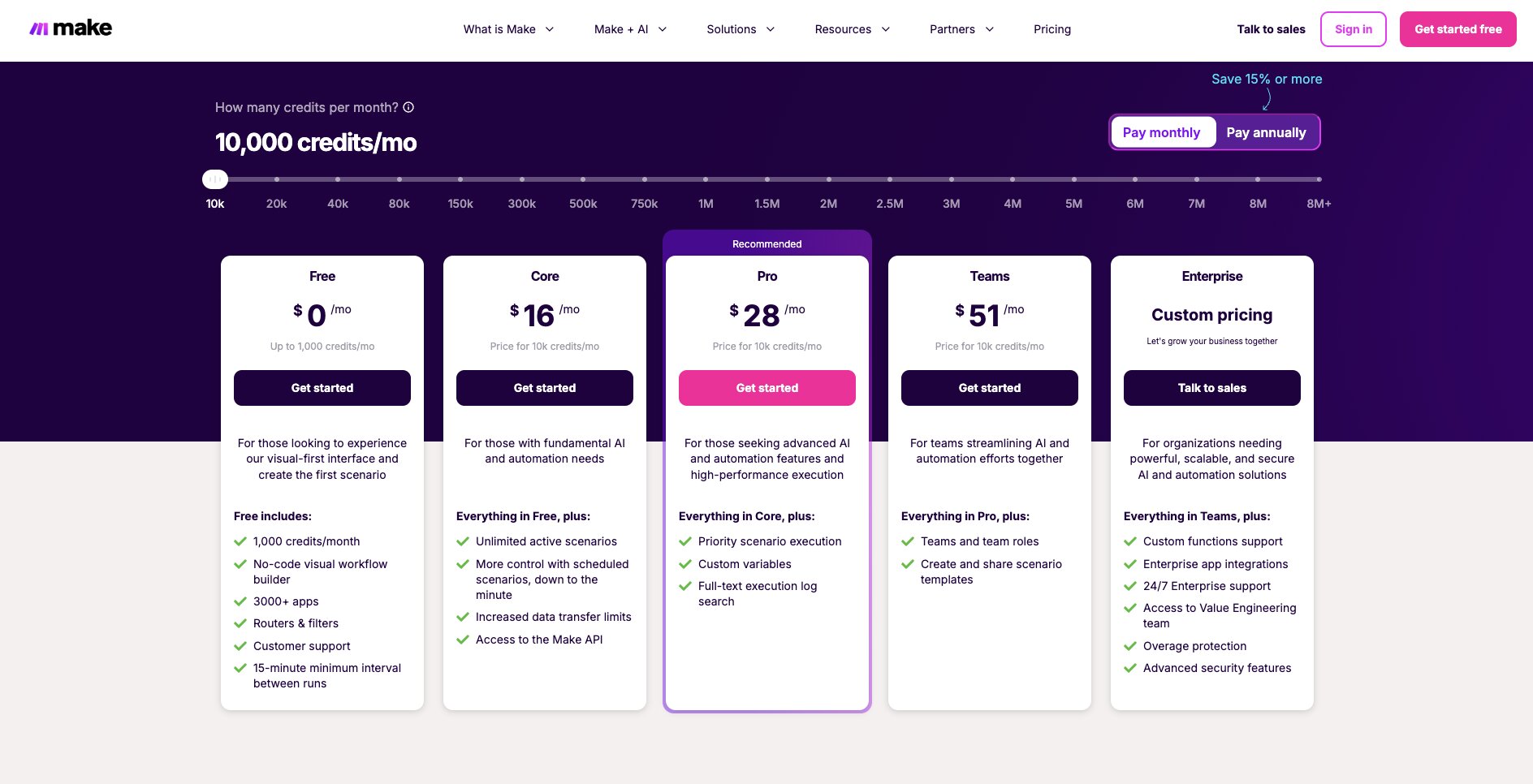
Make offers a free plan alongside several paid options.
Current pricing includes:
- Free: Up to 1,000 operations per month
- Core: Starts at $9/month
- Pro: Starts at $16/month
- Teams: Starts at $29/month
- Enterprise: Custom pricing
The pricing structure is relatively accessible for smaller teams, but costs can increase as workflow complexity and usage grow.
You can view the full pricing breakdown on Make's pricing page.
Make reviews
Here's how customers rate Make on third-party review platforms:
- G2: 4.6 out of 5 star rating (from 314+ user reviews)
- Product Hunt: 4.8 out of 5 star rating (from 43+ user reviews)
One theme that came up repeatedly while looking through Make reviews was flexibility. Users frequently praise the visual workflow builder, integration library, and ability to automate complex business processes without heavy development work. The most common criticisms tend to focus on pricing at scale and the learning curve associated with more advanced workflows.
3. Glide

- Best for: Teams that want to build business apps quickly without a traditional development process
- Pricing: Free plan available, with paid plans starting at $19/month
- What I like: It makes app development feel accessible to people who don't think of themselves as developers
Glide is probably one of the most approachable Budibase alternatives on this list.
While platforms like Retool, Appsmith, and Superblocks often target developers and technical teams, Glide is designed to help business users build useful applications without getting pulled into a traditional software development workflow.
The platform enables users to create applications using existing business data, whether that's stored in spreadsheets, databases, or connected systems. Instead of starting with code, users start with the data they already have and build the application around it.
That makes Glide particularly appealing for operational teams, customer success teams, project managers, and other business functions that need software quickly but don't necessarily have engineering resources available.
One thing I found interesting while comparing Glide with Budibase is how much emphasis the platform places on speed.
Speed clearly takes priority over absolute flexibility. The focus is helping teams move from idea to working app as quickly as possible.
For organizations that want to replace spreadsheets, modernize internal processes, or build simple business applications without a lengthy development cycle, that's a compelling proposition.
Glide key features
Some things I like about Glide:
- No-code application builder designed for business users
- Ability to build apps using spreadsheets, databases, and existing business data
- AI-powered app generation capabilities
- Responsive applications that work across desktop and mobile devices
- Large library of templates and pre-built components
- Built-in user authentication and permissions
- Fast deployment with minimal technical setup
Here are some things that could be improved:
- Less flexibility than developer-focused platforms
- Complex applications can eventually run into platform limitations
- Advanced customization often requires workarounds compared with more technical tools
Glide pricing

Glide offers a free plan alongside several paid options.
Current pricing includes:
- Free: $0/month
- Individual Explorer: Starts at $19/month
- Individual Maker: Starts at $49/month
- Business: Starts at $199/month
- Enterprise: Custom pricing
The pricing structure is relatively straightforward and gives teams room to start small before moving to higher-tier plans as application usage grows.
See the full pricing breakdown on Glide's pricing page.
Glide reviews
Here's how customers rate Glide on third-party review platforms:
- G2: 4.7 out of 5 star rating (from 813+ user reviews)
- Product Hunt: 4.9 out of 5 star rating (from 16+ user reviews)
Looking through Glide reviews, the theme that appeared most consistently was speed. Users frequently highlight how quickly they can turn spreadsheets and business data into usable applications, as well as the platform's ease of use for non-technical teams. The most common criticisms relate to customization limits and the challenges that can arise as applications become more complex.
4. Appsmith

- Best for: Developers who want flexibility, control, and self-hosting without enterprise pricing
- Pricing: Free plan available, with paid plans starting at $15/month per user
- What I like: The open-source model gives teams significantly more control than many low-code platforms
If Glide is designed to help business users build applications as quickly as possible, Appsmith takes a much more developer-centric approach.
It's also one of the closest Budibase competitors on this list.
Both platforms are designed to help teams build internal tools, dashboards, admin panels, and operational applications without having to start every project from scratch. As a result, they're often evaluated by the same teams.
The difference is largely in how much control you want over the development process.
While Budibase does a good job of balancing accessibility and flexibility, Appsmith leans more heavily toward customization and developer control. It gives teams more freedom to work directly with databases and APIs, customize application logic, and manage their own infrastructure when needed.
Something that stood out to me while comparing the two platforms is how much the open-source model shapes the Appsmith experience. Teams can self-host the platform, customize their environment, and retain greater control over how applications are developed and deployed.
For organizations with strict security, compliance, or infrastructure requirements, that can be a meaningful advantage.
I also think Appsmith appeals to a slightly more technical audience than Budibase. You still get visual development tools and pre-built components, but the platform feels designed for teams that want flexibility first and simplicity second.
If your team likes the idea of Budibase but wants more control over how applications are built, deployed, and managed, Appsmith is one of the strongest alternatives worth considering.
Appsmith key features
Some things I like about Appsmith:
- Open-source platform for building internal tools
- Self-hosting and cloud deployment options
- Drag-and-drop UI builder with developer-friendly customization
- Support for databases, APIs, and third-party integrations
- Git-based version control
- Role-based access controls and user management
- Large library of widgets and reusable components
Here are some things that could be improved:
- More technical than no-code platforms such as Glide
- Business users may still require developer support for complex applications
- The flexibility can create a steeper learning curve for new users
Appsmith pricing

Appsmith offers a free plan alongside paid and enterprise options.
Current pricing includes:
- Free: $0/month
- Business: Starts at $15/month per user
- Enterprise: $2,500/month per 100 users
I’m a fan of Appsmith's pricing model as it's relatively straightforward compared to some of the others on this list. Teams pay for the users building and managing applications rather than navigating multiple user classes or complicated usage tiers.
Take a look at the full pricing breakdown on Appsmith's pricing page.
Appsmith reviews
Here's how customers rate Appsmith on third-party review platforms:
- G2: 4.6 out of 5 star rating (from 67+ user reviews)
- Product Hunt: 4.9 out of 5 star rating (from 34+ user reviews)
What stood out while reading Appsmith reviews was how often users mentioned flexibility. Many reviewers specifically highlighted the open-source model, self-hosting options, and developer-friendly customization. The most common criticisms relate to the learning curve and some limitations around advanced UI customization.
5. Retool

- Best for: Teams building sophisticated internal tools and operational software
- Pricing: Free plan available, with paid plans starting at $10/month per builder
- What I like: It strikes an impressive balance between development speed and enterprise-grade functionality
If Appsmith is all about flexibility and developer control, Retool is about helping teams build internal software as quickly as possible without sacrificing capability.
Like Budibase, Retool is designed for building dashboards, admin panels, operational tools, and internal business applications. The difference is that Retool has spent years establishing itself as one of the most widely adopted platforms in this category.
One thing that stood out while comparing the two platforms is just how mature the Retool ecosystem feels.
The platform offers a huge range of integrations, pre-built components, workflow capabilities, and deployment options that make it possible to build surprisingly sophisticated internal software without starting from scratch. Whether you're connecting databases, APIs, third-party SaaS applications, or internal systems, Retool handles most of the heavy lifting.
I also think Retool does a particularly good job of balancing visual development with technical flexibility. Developers can move quickly using drag-and-drop components while still retaining the ability to write custom code when needed.
For teams evaluating Budibase, Retool often feels like the more enterprise-focused option. It offers additional governance, security, deployment, and scalability features, but that additional capability can also come with greater complexity and cost.
If your team is building mission-critical internal software that needs to scale across multiple departments, Retool is one of the strongest alternatives available.
Retool key features
Some things I like about Retool:
- Low-code platform for building internal tools and business applications
- Extensive library of pre-built UI components
- Integrations with databases, APIs, SaaS platforms, and internal systems
- Workflow automation capabilities
- AI-assisted development features
- Granular permissions and governance controls
- Cloud, self-hosted, and hybrid deployment options
Here are some things that could be improved:
- Pricing can get expensive as teams and usage grow
- More complex than platforms aimed primarily at business users
- Advanced customization may still require developer expertise
Retool pricing

Retool offers a free plan alongside paid and enterprise options.
Current pricing includes:
- Free: $0/month
- Team: Starts at $10/month per builder
- Business: Starts at $50/month per builder
- Enterprise: Custom pricing
Retool's pricing is relatively accessible for smaller teams, but costs can increase quickly as more builders, end users, and advanced enterprise features are added.
Take a look at the full pricing breakdown on Retool's pricing page.
Retool reviews
Here's how customers rate Retool on third-party review platforms:
- G2: 4.6 out of 5 star rating (from 358+ user reviews)
- Product Hunt: 4.8 out of 5 star rating (from 33+ user reviews)
Retool's reviews tend to focus on productivity. Users frequently highlight how quickly they can build internal tools, connect data sources, and deliver applications without large development teams. The most common criticisms relate to pricing, learning curves for more advanced functionality, and the complexity that can emerge as applications grow.
6. Superblocks
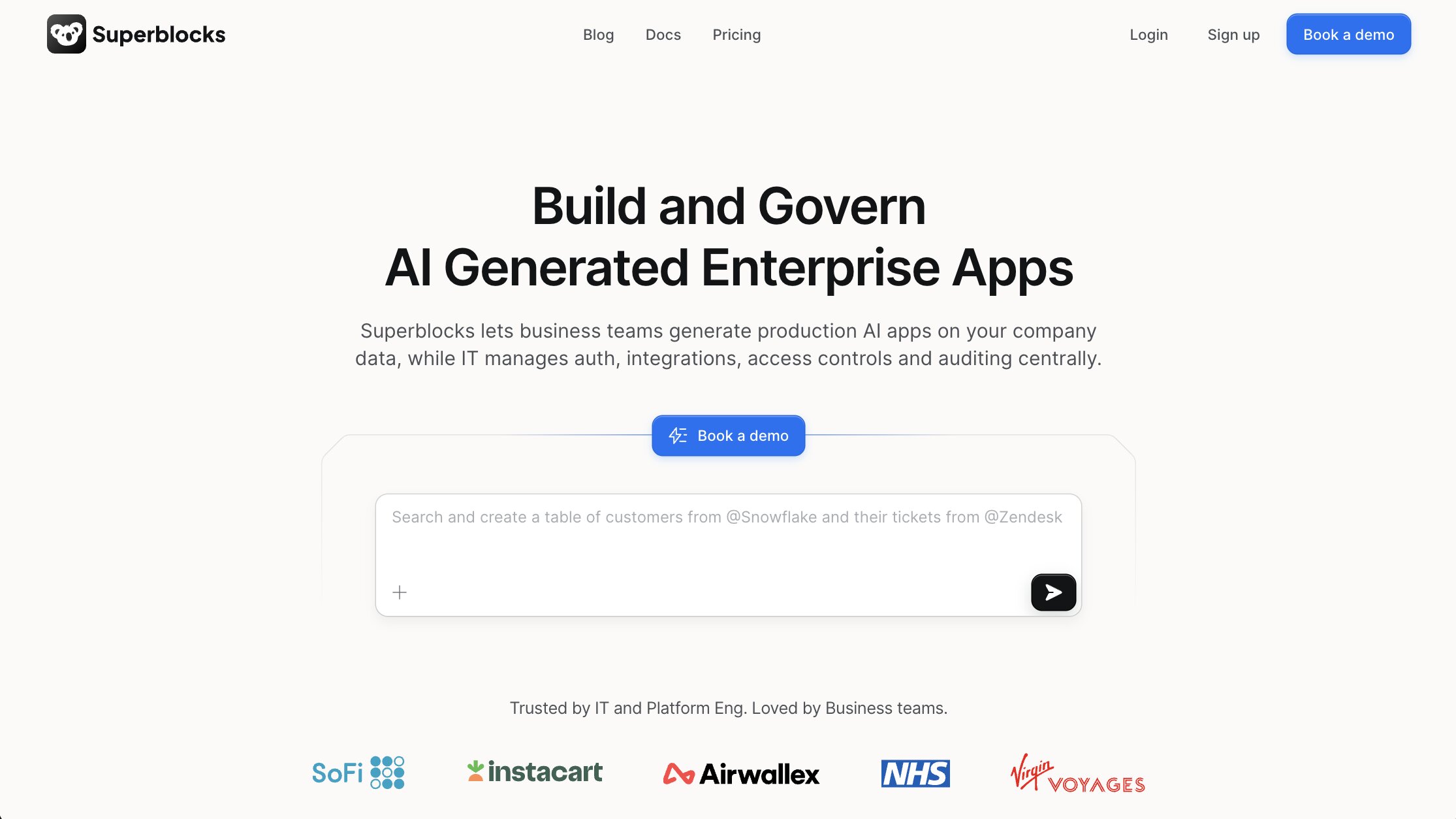
- Best for: Enterprises that need governance, security, and scalability alongside internal application development
- Pricing: Free trial available, with paid plans starting at $100/month per AI Builder, billed annually
- What I like: It feels purpose-built for organizations that need to standardize how internal software gets built and managed
If Retool focuses on helping teams build internal tools quickly, Superblocks places much more emphasis on how those tools are governed, deployed, and managed at scale.
It's another platform that sits very close to Budibase in terms of use case.
Teams use both platforms to build dashboards, admin panels, operational tools, customer support applications, and internal business software. But Superblocks tends to position itself more heavily around enterprise requirements such as security, governance, and observability.
That became increasingly clear while comparing the two platforms.
Where some low-code platforms are designed primarily around speed and accessibility, Superblocks feels designed for organizations that expect internal software to become a core part of their operational infrastructure.
Combining visual application development with workflow automation, API orchestration, and developer tooling, it also offers a range of deployment options, including cloud, hybrid, and self-hosted environments. This is a big win for organizations operating in regulated industries or complex infrastructure environments.
I also like how Superblocks approaches collaboration between developers and business teams.
One thing I kept noticing while researching Superblocks is how often the conversation comes back to governance and deployment flexibility.
If your organization is evaluating Budibase but needs stronger governance, deployment flexibility, and enterprise controls, Superblocks should be on your list.
Superblocks key features
Some things I like about Superblocks:
- Low-code platform for internal applications and operational software
- Workflow automation and API orchestration capabilities
- Support for cloud, hybrid, and self-hosted deployments
- Granular permissions and governance controls
- Built-in observability and monitoring features
- Enterprise security features, including SSO and role-based access controls
- Collaboration tools for developers and business users
Here are some things that could be improved:
- Enterprise-focused capabilities can increase platform complexity
- Smaller teams may not need the full governance feature set
- Pricing can become expensive compared to lighter-weight alternatives
Superblocks pricing
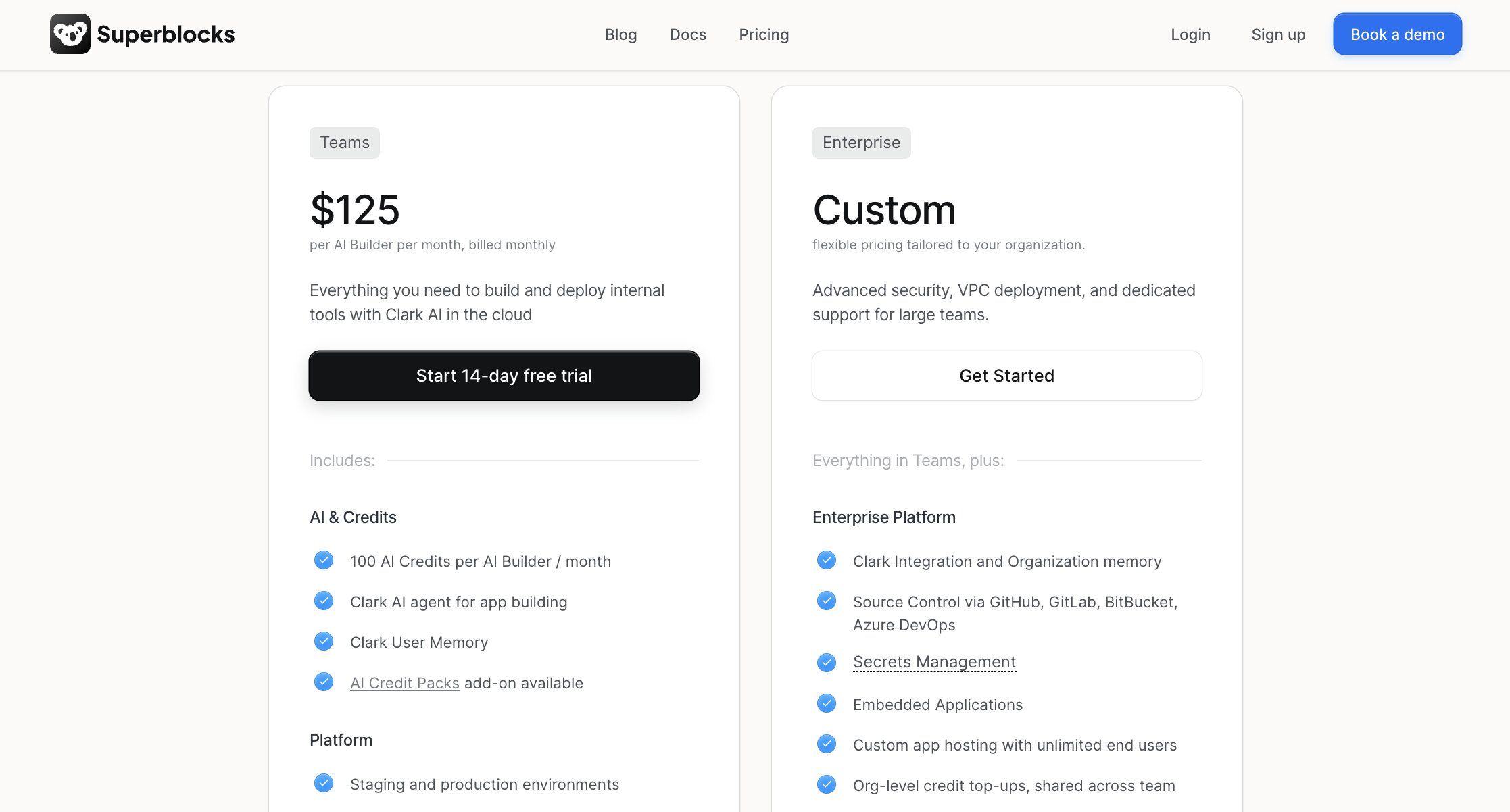
Superblocks offers a free 14-day trial alongside paid and enterprise options.
Current pricing includes:
- Teams: Starts at $100/month per AI Builder, billed annually
- Enterprise: Custom pricing
The platform is clearly designed with larger teams and enterprise deployments in mind, so pricing is best evaluated alongside governance, security, and infrastructure requirements.
You can see the full pricing breakdown on Superblocks' pricing page.
Superblocks reviews
Here's how customers rate Superblocks on third-party review platforms:
- G2: 4.7 out of 5 star rating (from 190+ user reviews)
- Product Hunt: 5 out of 5 star rating (from 6+ user reviews)
Enterprise readiness came up regularly in Superblocks' reviews. Users often praised the platform's combination of development speed, governance controls, and deployment flexibility. While the most common criticisms relate to pricing and the time required to fully understand some of the more advanced capabilities.
7. Bubble
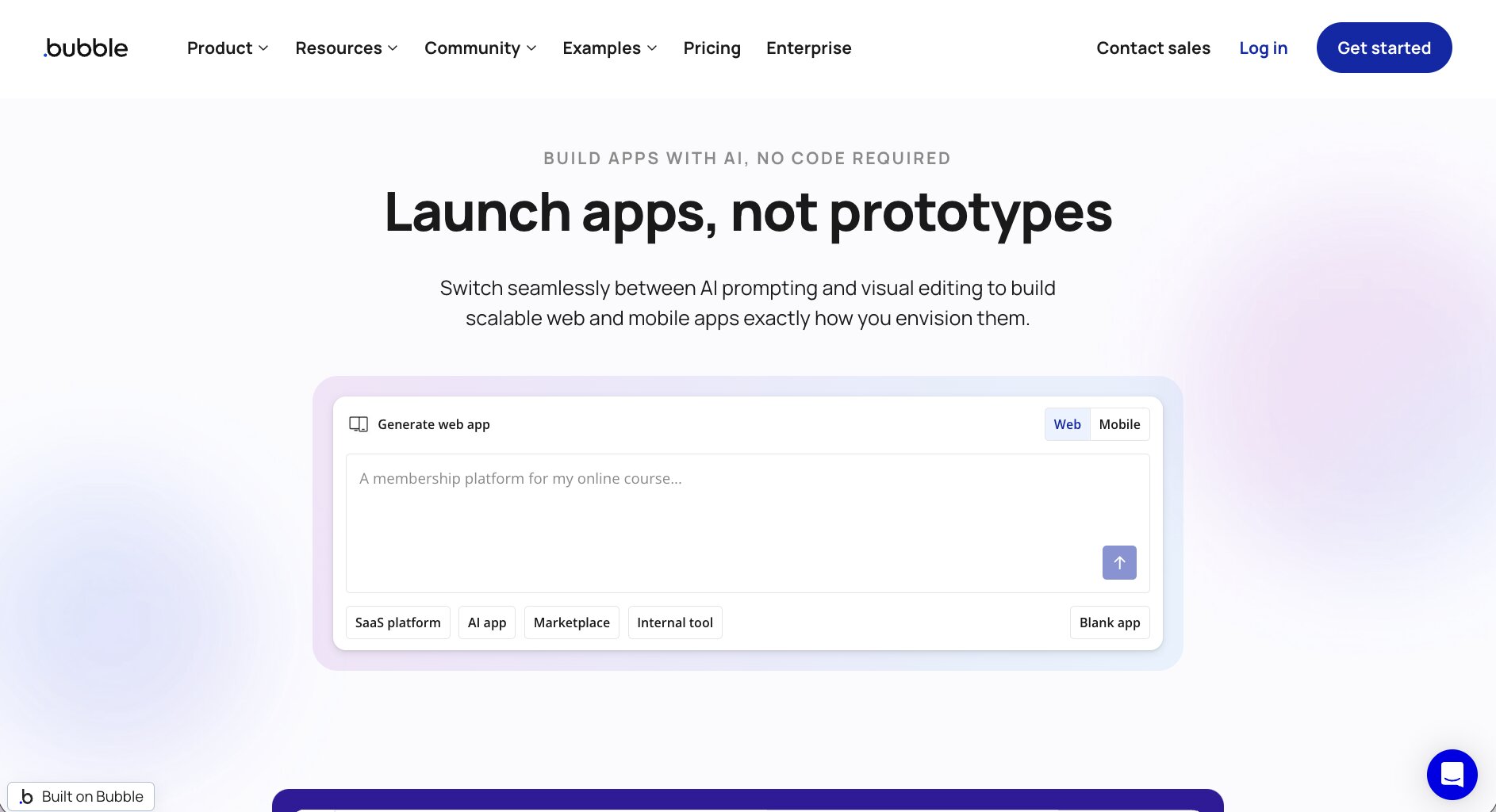
- Best for: Teams building full web applications without traditional software development
- Pricing: Free plan available, with paid plans starting at $59/month
- What I like: It allows teams to build far more than internal tools
Most of the platforms on this list focus primarily on internal software.
Bubble takes a different approach.
Rather than concentrating on dashboards, admin panels, and operational applications, Bubble is designed to help teams build complete web applications without writing large amounts of code.
While Budibase excels at helping teams build internal tools, some organizations eventually discover they need something more ambitious. They may want to launch a customer-facing application, build a SaaS product, create a marketplace, or develop a more complex web experience.
That's where Bubble starts to stand out.
One thing that became clear while comparing platforms is that Bubble offers a much broader application development environment than many of its competitors. Users can design interfaces, manage workflows, create databases, build user authentication systems, and launch complete applications from a single platform.
Of course, that flexibility comes with tradeoffs.
Bubble is capable of building significantly more complex applications than many internal tool builders, but it can also take longer to learn and master as a result.
If you’re looking at Budibase because you want to build internal software, Bubble may be more platform than you need. But if you're looking beyond internal tools and considering customer-facing applications as well, it's one of the strongest no-code platforms available.
Bubble key features
Some things I like about Bubble:
- No-code platform for building full web applications
- Visual application builder and workflow engine
- Built-in database and user authentication capabilities
- Large plugin and integration ecosystem
- Support for responsive web applications
- Ability to build customer-facing products and SaaS applications
- Extensive customization options compared to many no-code platforms
Here are some things that could be improved:
- Steeper learning curve than simpler no-code tools
- Application performance can require careful optimization
- Complex applications can become difficult to manage as they scale
Bubble pricing
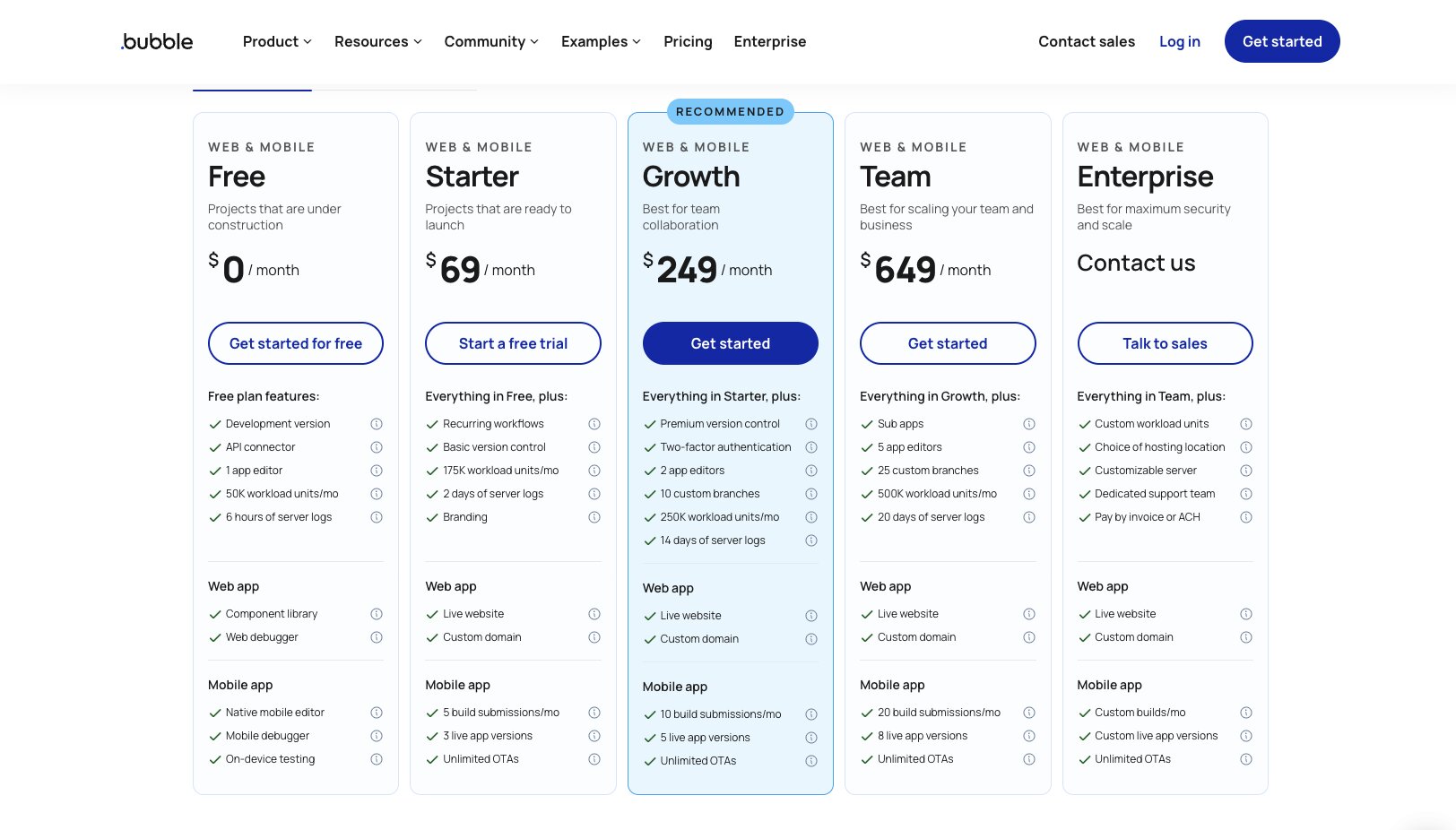
Bubble offers a free plan alongside several paid options.
Current pricing includes:
- Free: $0/month
- Starter: Starts at $59/month
- Growth: Starts at $209/month
- Team: Starts at $549/month
- Enterprise: Custom pricing
Bubble's pricing structure is designed to support teams as applications grow from prototypes into production products, making it one of the more scalable no-code platforms on this list.
Have a look at Bubble's pricing page.
Bubble reviews
Here’s how customers rate Bubble on third-party review platforms:
- G2: 4.5 out of 5 star rating (from 166+ user reviews)
- Product Hunt: 4.8 out of 5 star rating (from 69+ user reviews)
Unlike many of the internal tool platforms on this list, Bubble reviews often focus on product development rather than operational efficiency. Users regularly highlight the ability to launch customer-facing applications without hiring a large engineering team. The biggest criticisms tend to center on the learning curve, workload pricing, and managing more complex applications as they scale.
Which Budibase alternative should you choose?
The right choice depends on what you're actually trying to build.
Some of these platforms focus on internal applications. Others focus on automation, governance, or full product development. Here's how I'd think about it:
- Choose Gumloop if you want to automate operational work using AI-powered workflows and agents.
- Choose Make if workflow automation and integrations are more important than building internal applications.
- Choose Glide if your priority is building business apps quickly without a traditional development process.
- Choose Appsmith if you want open-source flexibility, self-hosting options, and greater developer control.
- Choose Retool if you're building sophisticated internal tools and want a mature, enterprise-ready platform.
- Choose Superblocks if governance, security, and deployment flexibility are critical requirements.
- Choose Bubble if you're building customer-facing applications or full software products rather than internal tools.
For teams evaluating Budibase alternatives, there isn't a single best option. The right platform depends on your technical requirements, team structure, and long-term goals.

Read related articles
Check out more articles on the Gumloop blog.