Cut through the chaos with a chief of staff agent
The chief of staff agent turns your raw thoughts into prioritized, strategic action. It reads your calendar, email, Drive, and Slack before it answers, so every recommendation comes with the real context behind it.




Trusted by leading teams



Stop starting every week buried under everything at once
The agent reads the context behind your thoughts and hands back a prioritized week, so your time goes to the work that actually moves your goals.
What is the Chief of Staff Agent?
A chief of staff agent is an AI assistant that takes your raw thoughts and turns them into clarity, prioritized action, and strategic focus. Instead of just capturing a to-do list, it reads the real context behind each item, your calendar, your email, your files, and your team chat, and tells you what actually matters this week and why.
The Gumloop chief of staff agent connects to Google Calendar, Gmail, Google Drive, and Slack. When you send it a brain dump or ask for a weekly plan, it researches before it answers: it checks what meetings need prep, finds the email threads and documents tied to what you mentioned, and surfaces decisions already made in Slack. Then it sorts everything into fires, strategic priorities, operational tasks, and parking-lot ideas.
It works from your priorities, not a generic productivity framework. You tell it your goals, your operating style, and your recurring rhythms once, and from then on every recommendation ties back to those priorities. Anything that feels urgent but does not move them gets flagged, so your attention goes to the work that compounds instead of the work that shouts loudest.

What you can do with the Chief of Staff Agent
Workflows the agent handles out of the box.
Brain dump triage
Send it everything on your mind and it parses the mess into urgent fires, strategic opportunities, operational tasks, ideas to park, and personal logistics, with a clear next action for each.
Context pulled before it answers
When you mention a person, project, deadline, or meeting, it searches your calendar, email, Drive, and Slack first, so recommendations arrive with the relevant threads, docs, and history attached.
Priority-based filtering
Every item is checked against the priorities you set, so work that is urgent but off-strategy gets flagged rather than silently taking over your week.
Weekly kickoff and Friday wrap
It runs a Monday overview that flags meetings needing prep, overloaded days, and missing focus time, and a Friday review of what happened versus planned and what rolls into next week.
Calendar and inbox actions
Beyond organizing, it can find free slots, block focus time, draft email replies for your review, and surface the threads and Slack messages that need a response.
How to use the Chief of Staff Agent
Get from landing page to live agent in a few clicks.
- 1
Click "Use this agent"
A preconfigured agent is created in your Gumloop workspace with Google Calendar, Gmail, Google Drive, and Slack ready to connect and the chief of staff instructions loaded into its system prompt.
- 2
Tell it about you once
Fill in your role, your top priorities, your operating style, and your recurring rhythms. It uses these to filter every recommendation, and it asks rather than guessing when something is missing.
- 3
Brain dump or ask for the week
Send a stream of thoughts or ask for a Monday overview. It researches your tools, runs the prioritization process, and hands back a clear, context-rich plan you can act on.
Chief of Staff Agent use cases
Real workflows teams run with this agent.
Monday weekly kickoff
Ask for a Monday overview and it pulls the full week, flags meetings that need prep, spots overloaded days and missing focus blocks, and recommends the two or three things that matter most.
Processing a brain dump
Dump everything spinning in your head and it sorts it into fires, strategic priorities, operational tasks, and ideas to park, each with a next action grounded in what it found.
Prepping for a meeting or call
Name a person or meeting and it finds the recent emails, Slack conversations, shared docs, and calendar history, so you walk in with the full picture instead of cold.
Catching overload early
When you feel buried, it checks the calendar for overcommitment and finds what can be deferred or delegated, so focus stays the strategy instead of an afterthought.
Why use Gumloop for the Chief of Staff Agent
It researches, it does not just listen
Most assistants only organize what you tell them. This agent reads your calendar, email, Drive, and Slack first, so its plan reflects what is actually true, not just what you remembered to mention.
Tied to your priorities
You set your goals and operating style once, and every recommendation maps back to them. Urgent-but-off-strategy work gets named as such instead of running your week.
Direct, not a yes-machine
It skips the validation and corporate filler, makes a clear recommendation, and tells you the tradeoffs, including when the honest answer to a new commitment is no.
It lives in your workspace
The agent runs inside Gumloop with your tools connected, so checking your week, prepping a meeting, or blocking focus time is one conversation, not a tour through five apps.
Related agents








With enterprise-grade infrastructure and security
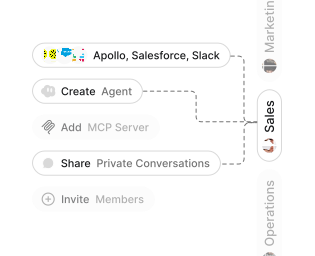
Role-based access control
Manage reusable roles, shared credentials, and secrets with scoped access controls.


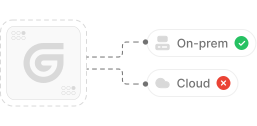
Virtual private cloud deployments
Deploy Gumloop in your own cloud.
Anthropic
OpenAI
Gemini
DeepSeek
AI model restrictions
Control which AI models teams can use. Set guardrails and enforce spend policies.
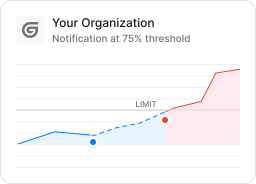
Usage monitoring
Track organization-wide credit usage in real time. Implement budget and quota controls to avoid surprises.
TODAY



WEDNESDAY


Audit logging
Capture detailed audit trails for actions across the organization to understand where data is flowing.

AI proxy support
Bring your own API keys and route requests through your own proxy.
Sign in with Okta
Single Sign-On
Securely streamline identity and access management.


Zero Data Retention
Gumloop never uses customer data to train AI models. For third-party models, we have Zero Data Retention (ZDR) agreements and Data Processing Addendums (DPAs).


SOC 2 Type II Certified
Gumloop is committed to security, and is compliant with SOC 2 Type II and GDPR. Visit trust.gumloop.com to learn more.
Frequently asked questions
Tasks automated to date
Try the Chief of Staff Agent