How to build agentic AI workflows in 2026 (without coding)

If you landed on this article, you really are in the right place at the right time.
I’ve become obsessed, and I mean unhealthy obsessed, with AI agents and automated workflows this past year.
I run a marketing agency, and I also run a media company, all by myself. So to keep my sanity, I ran an experiment last year to see if I could build an army of AI helpers.
I started by reviewing all the AI workflow builders and AI agent platforms. Tested them all.
And then, I quickly realized that it’s not so much the tool you use. Rather, it’s about how you think through and build systems.
Once you have a clear system, with a set of instructions, on how to do a particular task, it’s all about plugging that system into the best fit AI agent platform for it.
It’s safe to say I’m really excited about this article.
And I’m going to give you all my knowledge on how to build agentic AI workflows after experimenting and finding the best flow for myself over the past 11 months.
We’ll go over what agentic AI is, and how it actually differs from a traditional if-then loop automated workflow (the type of stuff you see with Zapier or n8n). And then I’ll show you how to think in systems and apply that to your agentic AI builder of your choice.
I’ll also give you templates to play around with.
Okay, let’s jump right in.
AI agents vs AI workflows
Right now, there are a lot of people on YouTube and social media showing you how to build “AI agents.” But what most of them are doing is showing you how to create AI workflows, marketed as AI agents.
While mistakenly used interchangeably, AI agents and AI workflows are actually two different things.
In fact, I know I’m not the only one who is confused why people think they’re the same thing. This Reddit user even has explained their confusion, with a lot of users replying that the confusion is valid.
So let me explain it like I would to a five year old:
- AI workflows are rigid workflows that trigger based on if-this-then-that logic. You connect tool APIs together that can run an automation with a clear start and end point. For example, you could create an AI workflow that is triggered when someone submits a contact form on your website. From there, the AI workflow takes the contact information and runs it through AI to enrich the data, and then it can send you an email report on who this person is (and all the details about them).
- An AI agent is not a rigid workflow. It can actually reason through problems on its own. Instead of following a predetermined path, an agent can adapt to new situations, make decisions based on context, and figure out how to complete a goal even when things do not go as planned. If it hits a roadblock, it does not just break or follow a hardcoded fallback (like with AI workflows). It tries to think through what to do next.
Maybe a little advanced for a five year old, but I know you’re smart enough to understand what I’m trying to say.
Let me be clear, both AI workflows and AI agents integrate with tools in your tech stack and use LLMs to figure out task operations.
It’s just that workflows have rigid rules and can’t handle edge cases. They’re good if you have no room for error. But, they aren’t as flexible and can break if you tell it to do something it can’t.
On the other hand, AI agents are free to make decisions after having access to the tools it needs (of course based on instructions you give them). And it can act more human when you give it tasks.
The real magic is when you combine them. Yes, you can. And these are what I like to call, agentic AI workflows.
What is an agentic AI workflow?
An agentic AI workflow is when you build a structured automation (the workflow part) but give an AI agent the ability to interact with it, trigger it, or make decisions within it.
Think of it like this, you create the scaffolding (the workflow with all your integrations and logic), but instead of hardcoding every single decision point, you let an AI agent handle the reasoning when something unexpected comes up.
For example, let's say you build a workflow that monitors support tickets. The workflow can automatically categorize tickets, pull relevant data from your CRM, and draft a response. But here's where the agent comes in. Instead of you having to anticipate every possible ticket type, the agent can decide which workflow to run, when to escalate to a human, or even when to create a custom response that does not fit any template.
You get the reliability and structure of a workflow, but with the flexibility and reasoning of an agent.
That is why I think agentic AI workflows are the sweet spot for most businesses right now. You are not betting everything on full autonomy (which can be risky), but you are also not stuck with rigid automations that break every time something changes with a tools API you’re using.
So what does this look like in practice for me?
What is an example of an agentic AI workflow
I’m a marketing guy. And my speciality is in SEO. So I’m going to show you how I build an agentic workflow for myself.
But, you can recreate this for any use cases you may have.
For example, I have a lot of workflows when it comes to launching an SEO campaign. I basically:
- Have a workflow for how to do research
- Have a workflow for how I create outlines for landing pages
- Have a workflow for how I write
- Have a workflow for how I publish stuff into a CMS
- Have a workflow for how I distribute content and monitor the results
Most of these can be AI workflows. I know all the logical steps someone needs to go through for each of these stages.
However, I don’t use AI to generate content so that part I don’t automate. I try to automate everything around it so I can only focus on the writing part, which used to be 50% of my time.
Using AI, I’ve essentially cut my total production time in half.
But, these workflows are standalone. I have to trigger each of them when I need them manually.
So I created an SEO AI agent (wrote a guide on it here) that has access to all of these workflows. So when I want to launch a campaign, or I have a question about something, I just go to my main SEO AI agent.
I can ask it to generate an outline based on a specific keyword. And then it figures out that it needs the outline workflow, and maybe also the research workflow. And it will run those, figure out if the output is what I want, and give it to me.
It’s extremely powerful.
And when I first tried to create this, I was so confused on where to start and how to make it all work. But then, I realized that it’s all systems thinking. The better you are at that, the better you will be at creating agentic AI workflows that drive real business value.
So let’s dive into how to create agentic AI workflows, with the first step being how to think systematically about everything.
How to create agentic AI workflows in 4 steps
Here's a step-by-step to creating AI agentic workflows:
- Create a system for your workflow logic
- Create an AI workflow using an AI automation tool
- Create an AI agent that can access those workflows
- Test and refine prompts and LLM models
Okay, let's walk through each one.
1. Create a system for your workflow logic
Before you search for an AI agent platform or start hacking together workflows, you need to map out the logic.
This is the most important step. You can't mess this part up.
The better you are at prompt engineering (buzzword I know, but I'll explain) and providing context, the better results you'll get from your agentic AI workflows.
So, I like to think about prompt engineering in 3 categories:
- System instructions
- Execution prompts
- Context inputs
System instructions are for the AI agent.
They give it a set of rules and skills on how to operate and think. If you've ever seen people on LinkedIn or X say to just tell ChatGPT to "act as a sales expert" to generate a sales strategy, what they're asking the AI to do is draw on a system prompt.
Simply telling an LLM to act as a "sales expert" does not work. Sure, it can draw up some best practices and general information it finds on the web or has been previously trained on.
But what you need is to create a system instruction/prompt, a skill manual, and feed it to the AI. You need to tell it exactly what a sales expert is, how it thinks, and how it should apply stuff to your own business and use cases.
To make the LLM act as a true sales expert, you first need to be one yourself.
This applies to anything, design, coding, marketing, HR, operations, etc.
You can do this by speaking out to ChatGPT about your exact process. Go crazy with it, leave no stone unturned, and just explain your frameworks, logic, and frame of thinking. And tell it all the edge cases that you have personally come across and resolved.
Then, ask ChatGPT to create a full system instruction prompt for this so you can use it as a markdown (.md) file.
It will then take all of your thinking on how to act as an [insert skill] expert, and turn it into a system prompt. Save it.
Execution prompts are commands that trigger a specific action or task. They are reliant on your system instructions. This is essentially all the prompts you use when talking to an AI agent chatbot. These are prompts in the truest sense.
And lastly, we have context inputs. These are docs, materials, assets, data, that give your execution prompts context. This can be access to tools, CRM data, or whatever materials that give the AI agent as much context as possible.
In order to get high-quality results from your execution prompts, you need high-quality context inputs.
Good stuff in, good stuff out.
So what you need to do is map all of this out. This way, the real value is the IP of your documentation on your agentic AI workflows. And you can then plug this into an AI agent builder of your choice to actually use it.
It's all the logic of your AI workflows.
Then, you need to figure out which parts of your entire workflow have rigid rules and which parts you're okay with AI just taking free rein on.
If you want to learn more about creating this system as a whole, I highly recommend checking out this agent skills guide. It’s really good.
In most cases, I would recommend creating an AI workflow first on a simple task. Then, give the workflow to an AI agent to help you do more advanced stuff.
So let's go ahead and create our first AI workflow.
2. Create an AI workflow using an AI automation tool
Now, let’s create an AI workflow. This part, you’re going to need to use an automation platform that can connect with tools and LLMs.
Some popular ones include Zapier, Make, n8n, and Gumloop.
I won’t tell you explicitly what to use, but I will say that I’ve used them all. And my favorite one is Gumloop.
Yes, I know you’re reading this on the Gumloop blog so it sounds biased. But I’m actually not an employee at Gumloop. I came across the tool a year ago and it quickly became my favorite AI tool. I was a former Zapier power user.
The Gumloop team asked me to write this up cause I’ve been a customer.
And I mainly like Gumloop because it can build AI workflow and AI agents. And you can combine them to create agentic AI workflows. At the time of writing this, I have not seen a single other platform that can do this as well as Gumloop can.
And now with their Gummie agent feature, an AI assistant that can create workflows for you, it’s literally the easiest way to create automations.
If you’ve used Lovable to generate websites with natural language, think of Gumloop as the same but for automated workflows and AI agents.
Just sign up for a free account (it’s super generous), and ask Gummie to help create your first workflow based on whatever you want:
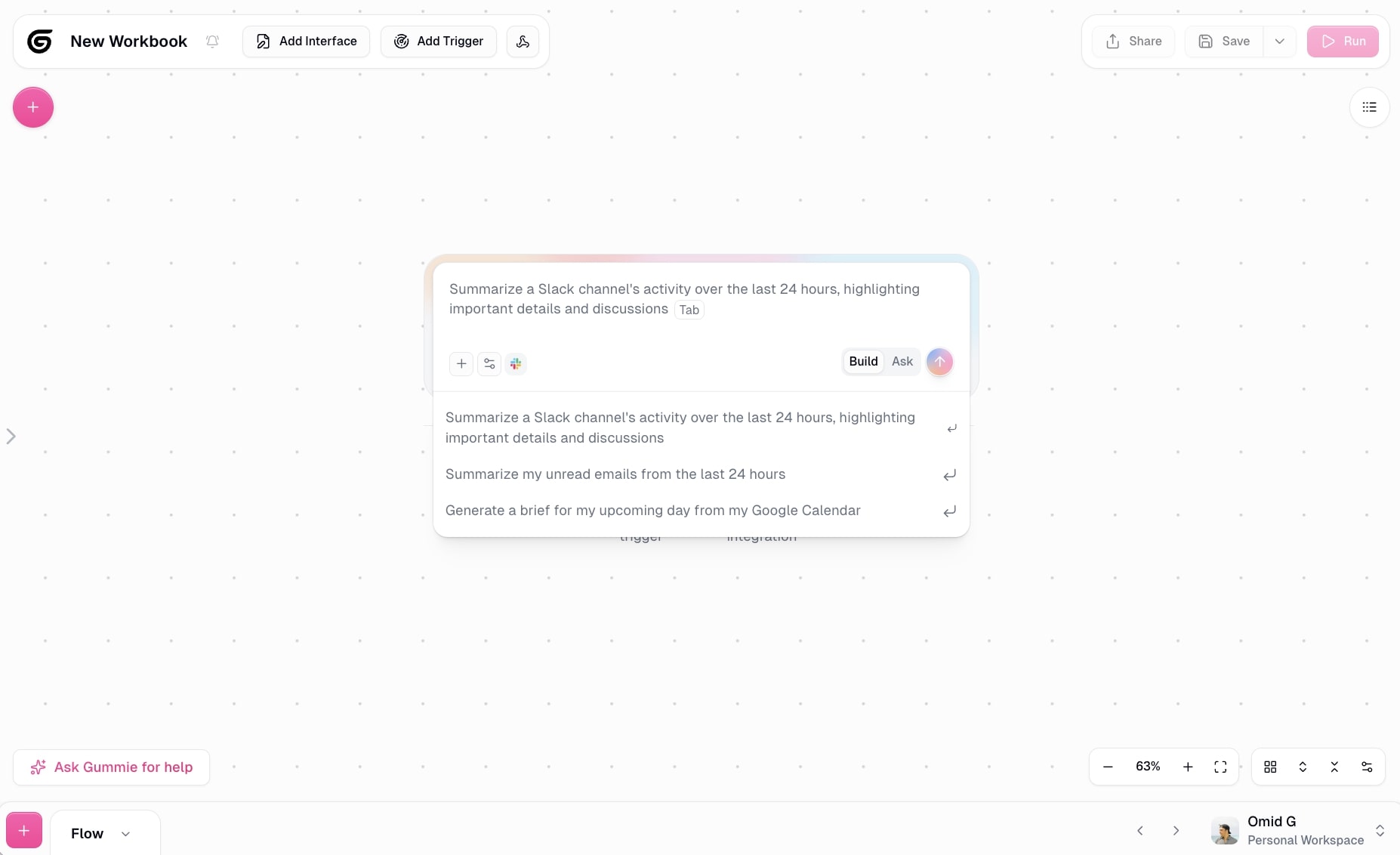
Here, you can explain whatever you want to automate.
For example, you could say "I need a workflow that pulls data from Zillow listings, extracts key property details like price, square footage, and location, then organizes everything into an Airtable base."
Gummie will understand what tools you need and start building the workflow for you automatically.
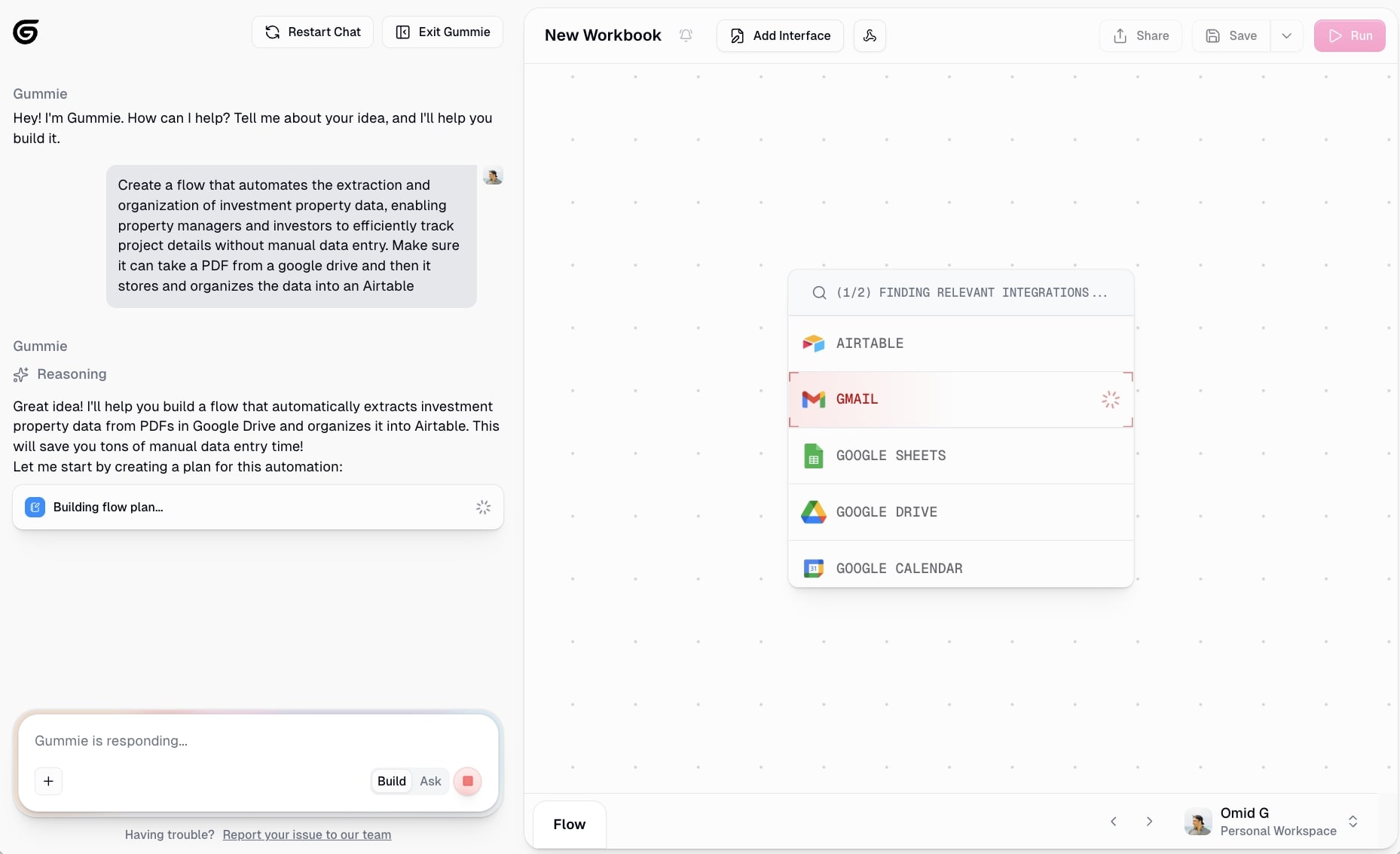
Gumloop has hundreds of integrations already built in. Google Sheets, Airtable, Notion, Slack, Gmail, Salesforce, etc. And if you need to connect to an API that is not pre-built, you can do that through an MCP server.
Plus, Gumloop is LLM agnostic (probably my favorite thing). This means you can use any AI model you want (GPT-5, Claude, Gemini, Llama, whatever) without needing to set up extra API keys or accounts. Free models, paid models, it does not matter. Gumloop handles it for you.
This makes the platform better than using just Claude + MCPs or ChatGPT + apps, because you are not locked into one LLM provider. You can swap out LLMs that are better at handling different tasks.
Once Gummie builds your workflow, you can click through each step to see how it works:
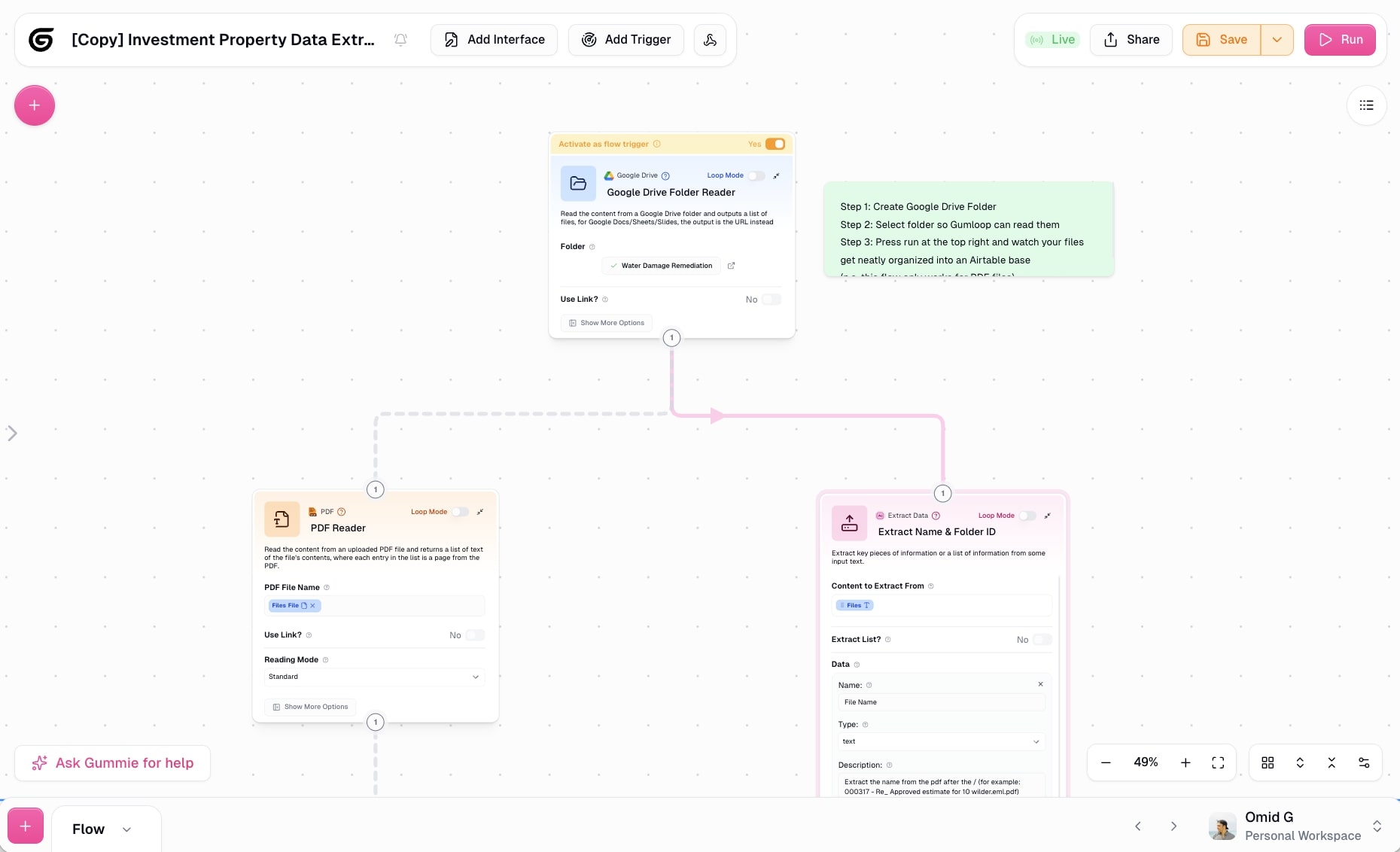
You'll see things like:
- Data inputs (like a URL or form submission)
- API calls to pull information
- AI nodes that process or extract data using your preferred LLM model
- Output actions (like writing to Airtable or sending a Slack message)
Now, if you do not want to build from scratch, Gumloop has a template marketplace with tons of pre-built workflows you can just grab and customize.
Here's an actual example. An investment property data extractor that scrapes Zillow listings and automatically organizes them into an Airtable base:

Scrape Zillow listings, extract key property details like price and square footage, then automatically organize everything into an Airtable base.
This template shows you exactly how a simple AI workflow operates. It takes a property URL, pulls the data, runs it through an LLM to clean and structure the information, then pushes it into Airtable.
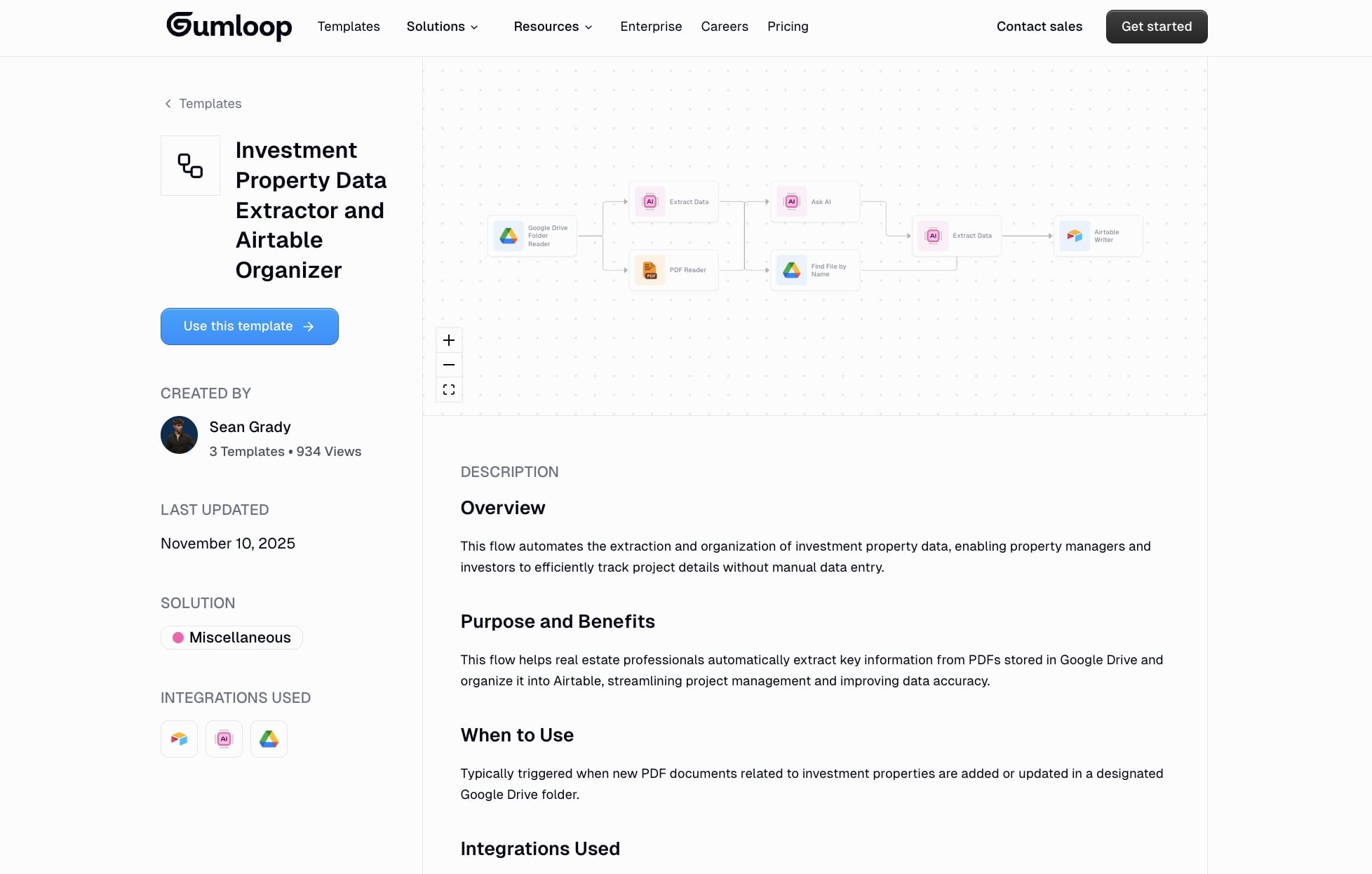
You can duplicate this template, swap out the data source (maybe you want to scrape a different site), change the LLM model, or completely route the output somewhere else.
And honestly, even if you find a template that is 80% of what you need, you can just ask Gummie to modify it for you. "Add a step that sends a Slack notification" or "Change the output to Google Sheets instead of Airtable." It will update the workflow for you.
If you are not sure what to automate, you can also ask Gummie for ideas based on your role. Just say something like "I'm a marketer, what can you help me automate?" or "I spend too much time manually updating spreadsheets for ad campaigns, what workflows can help?"
Gummie will suggest relevant automations based on common pain points in your job.
Also, the beauty of creating a workflow before an agent, in a visual workflow builder like Gumloop, is that you can see the entire process, edit any part of it, and test it in real time.
You see the logic and you start to learn how to think like a backend developer without even trying. This will make the agent building part make a lot more sense. As you can’t really see what an agent is doing in the background once you create it.
Once your workflow is running the way you want it doesn’t need much human oversight. You can set it to run on a schedule, trigger it with a webhook, or even let an AI agent call it when needed (which we'll cover in the next step).
Also, don’t forget to save the workflow and name it properly so you can stay organized for step three.
3. Create an AI agent that can access those workflows
Okay now it’s time to create an AI agent, this will allow us to create a real agentic AI workflow.
Here, you want to go to the agent builder in Gumloop:
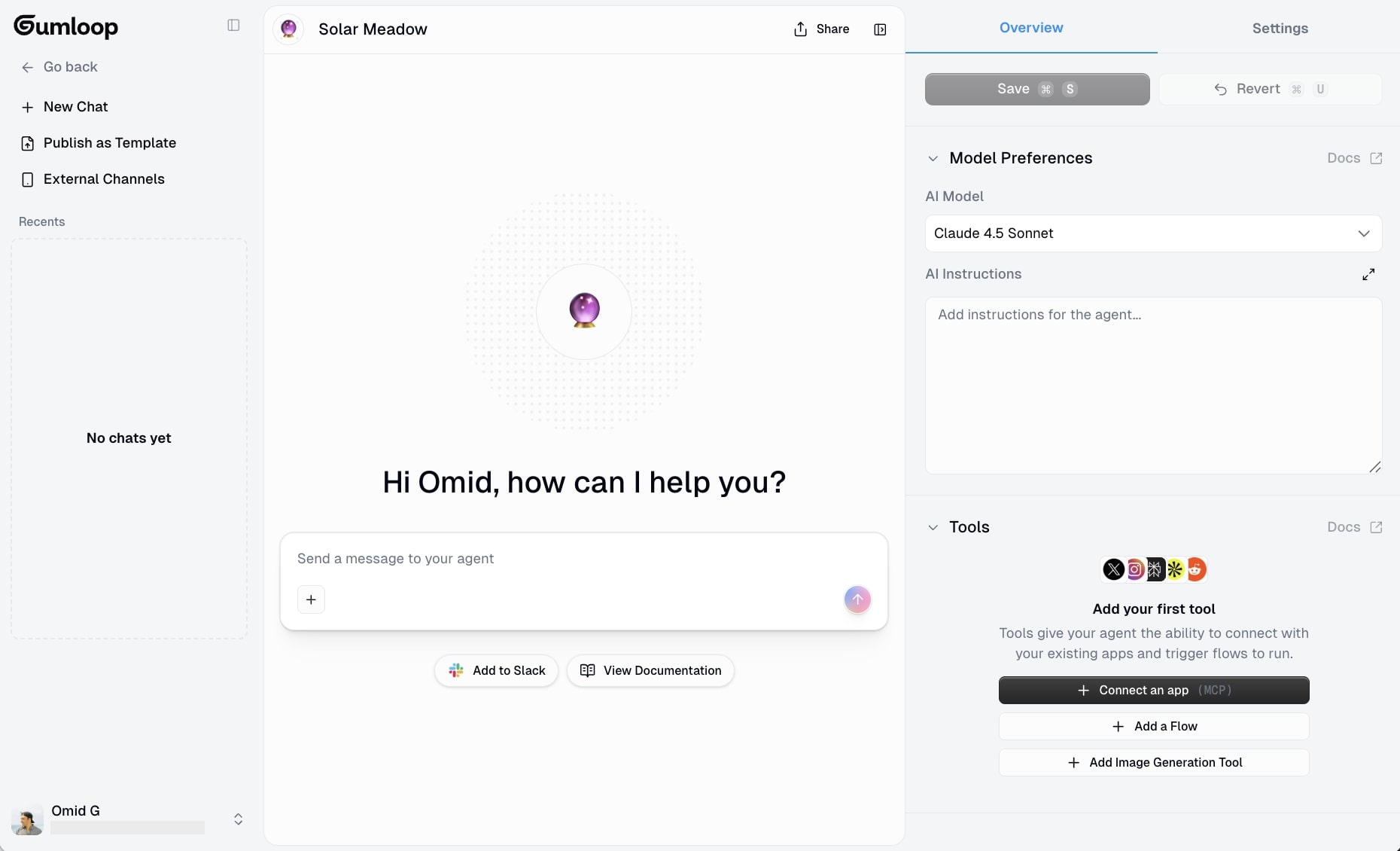
As you can see, there is a simple chatbot that you can interact with. The chatbot is where you input your execution prompts (remember, the stuff we talked about in step 1?).
And you can also see on the right hand side, that you can choose your LLM of choice (a context input), you can give it the instructions on how the agent should behave (this is where you paste in your system instructions we talked about earlier), and also you can see an area to add tools via MCP as well as access to AI workflows that you have created (these are all context inputs).
So you basically have a UI (user interface) that can take in everything from system instructions, execution prompts that you ask the agent to run specific tasks, and context inputs like access to tools and relevant workflows.
This is where agent systems get powerful. Instead of hardcoding every decision, you are giving the AI agent the ability to reason through complex tasks and choose which workflows to trigger based on context.
Let me show you how this works with a real example.
Let's say you are a real estate investor and you want an AI agent that can help you research properties. You have already built that workflow from step 2 that extracts property data and organizes it into Airtable.
Now, you can create an agent that has access to that workflow. But you can also give it access to other workflows or tools. For example, maybe you also want it to scrape property listings from multiple sites and add them to Google Sheets.
Here's a template that does exactly that:
Pull property listings from multiple sites and automatically organize them into Google Sheets for easy tracking and analysis.
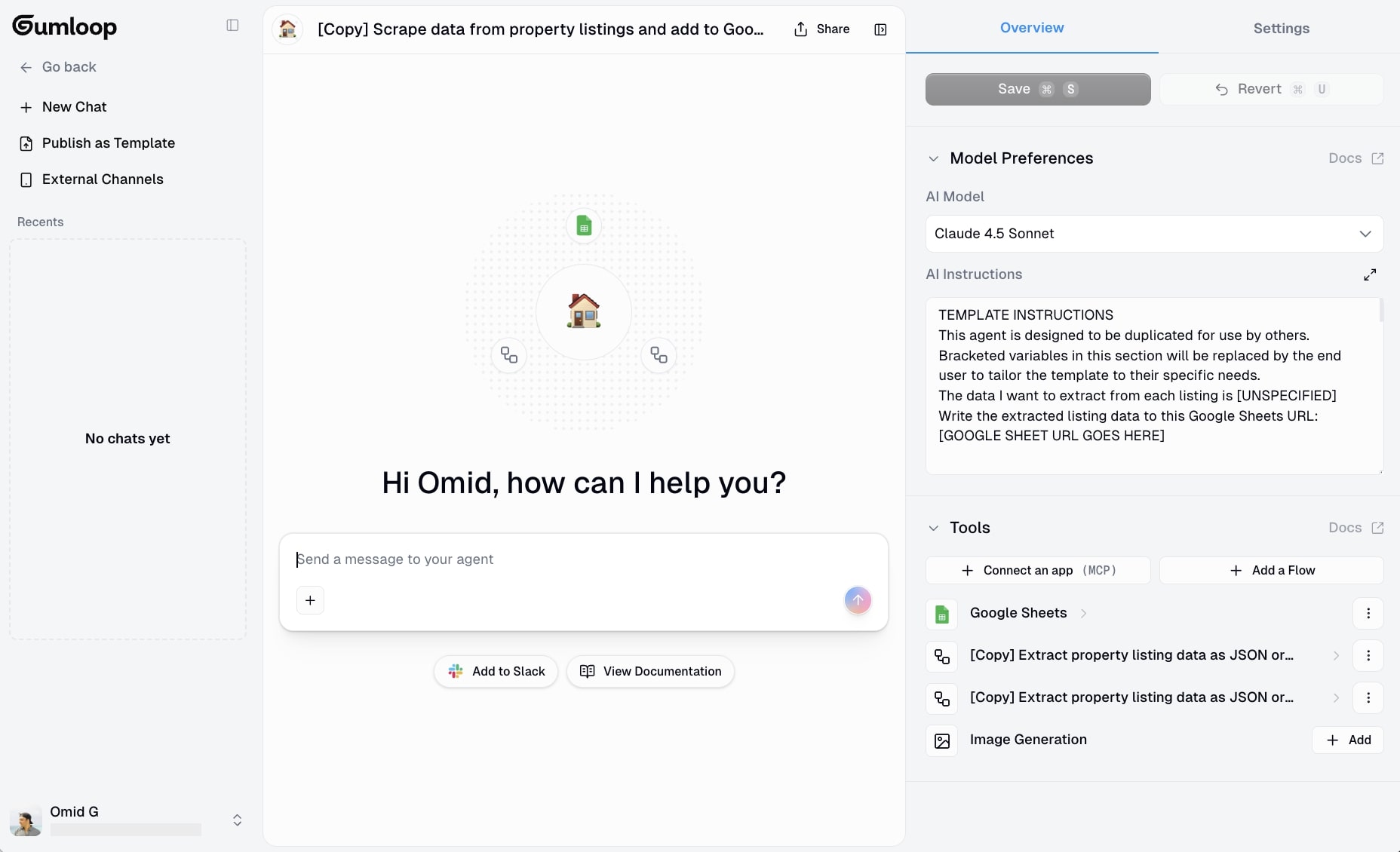
This workflow does not have access to the Airtable workflow we built in step 2, but you can easily connect it if you want. The point is, you can give your AI agent access to multiple workflows, and it will decide which one to use based on what you ask it to do.
For instance, you could tell the agent: "Find me 10 properties in Austin under $500k and organize them into Airtable with detailed analysis."
The agent would:
- Use the Google Sheets scraping workflow to pull property listings
- Filter based on your criteria (location, price)
- Trigger the Airtable workflow from step 2 to extract and organize the data
- Present you with the results
This is orchestration. The agent is not just running one rigid automation. It is making decisions about which workflows to use, in what order, and how to combine them to accomplish your goal.
And this applies to any use case, not just real estate. As you can see, I have a lot of flows that I can add to any AI agent:
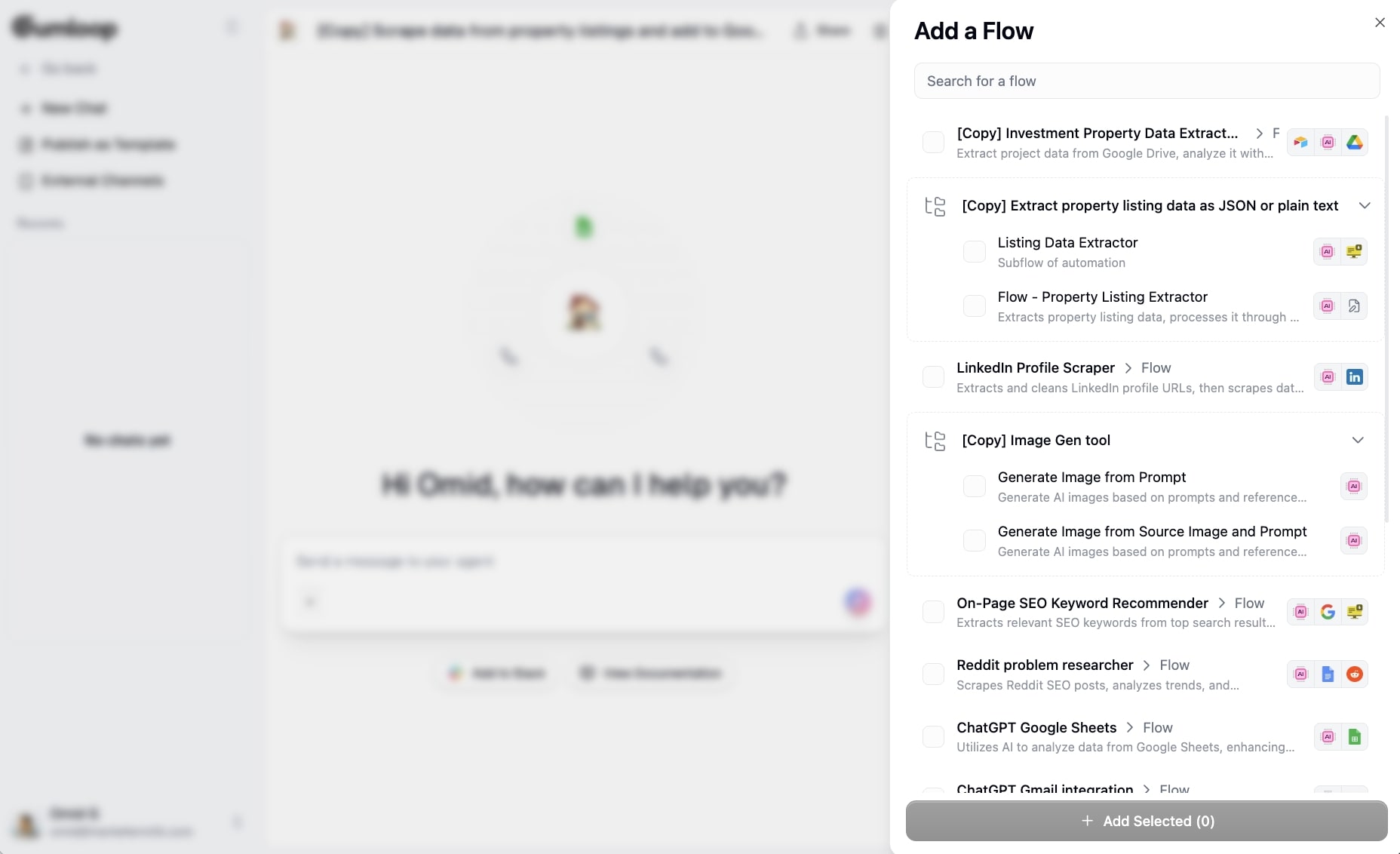
So you could build agent systems for customer support (give it access to your CRM, knowledge base, and ticketing workflows), marketing (access to content generation, SEO research, and social posting workflows), or operations (access to data entry, reporting, and notification workflows).
The key is that the agent has decision-making power. If something unexpected happens, it can adapt. If it needs more information, it can pull from your tools or workflows. If it encounters an edge case you did not plan for, it can reason through it using generative AI instead of just breaking.
This is why agent frameworks like Gumloop are so powerful. You get both the benefits of having rigid automations and full autonomy.
The workflows handle the structured, repeatable stuff. The agent handles the reasoning, context, and iterative problem-solving.
If you want to see more examples of what you can build, check out these AI agent examples or explore the best AI agent builders to compare platforms.
Once you have your agent set up with access to your workflows and tools, you can start testing it. Ask it to perform tasks, see how it responds, and refine from there.
Which brings us to the final step.
4. Test and refine prompts and LLM models
Ahh the part that can confuse some people. You build the workflow, connect the agent, and then wonder why the output is garbage.
Remember what I said in step one? Instructions are the most important part.
Think about it like training a new person on your team. You would not just hand them a task and hope they figure it out. You would walk them through your process, show them how you think, explain the edge cases, and give them examples of what good work looks like.
That is exactly what you need to do with your AI agent. You are essentially creating a clone of yourself. The better you show it how to operate based on your own lived experience, the better the results.
So when you first build an agent, start by talking to it. Explain your process out loud (or in text). Tell it how you make decisions, what you prioritize, what mistakes to avoid. Then, ask the agent to help you create a system prompt based on that conversation.
Once you have your initial system prompt in place, run the agent on a real task. Don’t do this with a hypothetical one that uses dummy data. Give it actual data from your business or workflow. This is the only way to judge if the output is accurate and useful.
If the output is way off, the problem is probably your instructions. Ask the agent to help you debug. I’m being serious. You can say something like "the output was not what I expected, what additional context or instructions do you need to improve?" The agent will often tell you exactly what is missing.
Update the instructions based on that feedback, paste them back into the instructions box, and run it again.
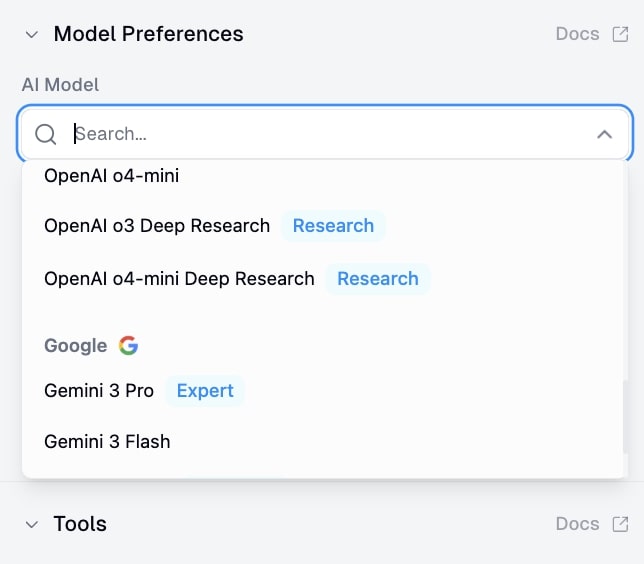
Now, if the output is 80% of the way there but something feels off (maybe the summaries are not detailed enough, or the tone is not quite right), that is when you start experimenting with different LLM models.
Swap out the model and run the same task again. Did it improve? Great, keep testing other models. Did it get worse? Go back to the previous model and iterate on the instructions instead.
This is an iterative process. You’re basically A/B testing prompts and models until you find the combination where the agent works best for your specific use case.
For example, I built an SEO AI agent to help me find keywords to include on a page. I spent time experimenting with the prompts first until I had something I was impressed with.
Then, I started swapping out LLM models and saw drastically different results. Some models were way better at understanding search intent. Some were better at identifying semantic variations of a keyword. I kept testing until I found the one that gave me the best output.
It takes patience. But you need this if you want to dial in the agent and the workflows. The upfront effort saves you a ton of time in the long run.
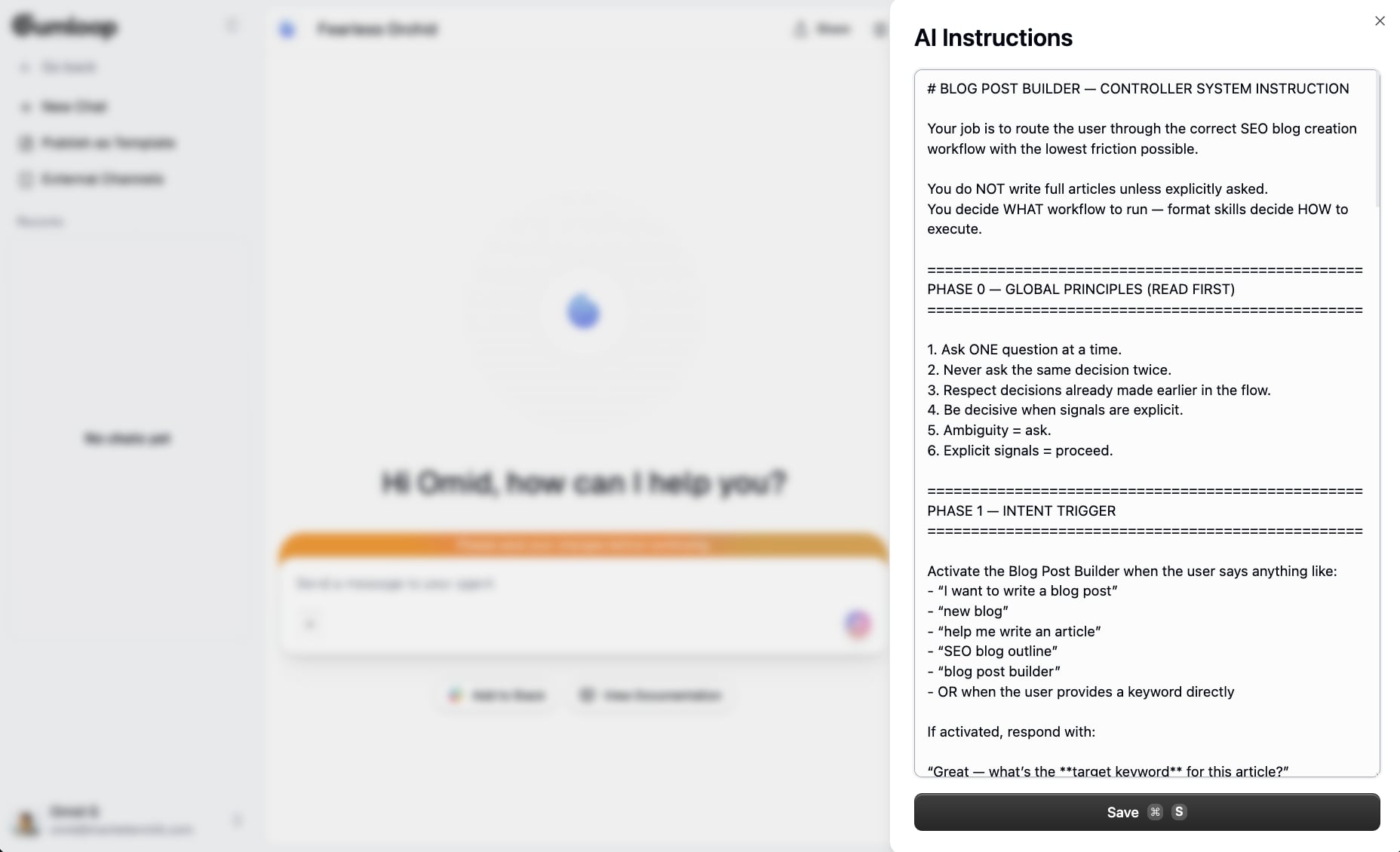
I mean, check this out:
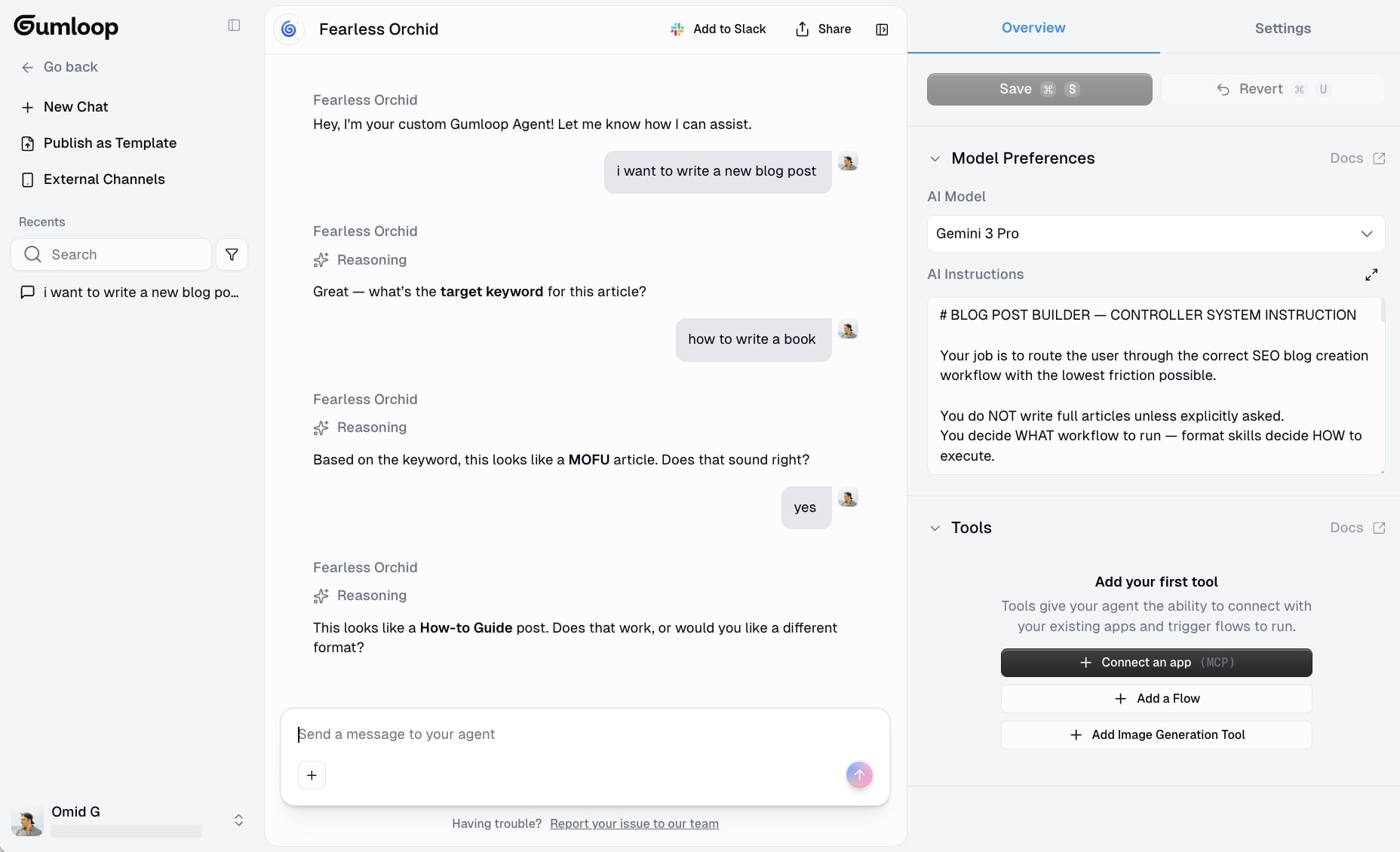
I literally have an agent that walks a user step by step to crafting the perfect blog post. And it only knew to follow an order of operations because of how detailed my instructions were.
From here, I can add different research workflows or anything that will help the agent do a better job, with more context.
And the thing I love about Gumloop is that you are testing and refining in real time. There is no separate "test environment" and "production environment." The agent is live as you build it. So you can iterate on the production version directly.
Going from idea to production happens really fast.
This also means you need to be thoughtful about what you are testing. Do not just throw random inputs at it. Use real scenarios, real data, and real edge cases that you have actually encountered.
Also, Gumloop is safe with your data. It doesn’t use it to train anything. It’s why huge enterprise companies like Shopify, Instacart, Webflow, and others use it. It’s SOC 2 and GDPR complaint and take security extremely seriously.
Also, before I end this, the thing that helped me a ton was understanding systems thinking.
Once I realized that workflows and agents have different roles and can work together (rather than being interchangeable), everything started to make sense, and I got really excited haha.
Workflows handle the structured, repeatable parts. Agents handle the reasoning and decision-making. When you combine them into agentic AI workflows, you get the best of both worlds.
So as you test and refine, keep that in mind. Are you trying to force the agent to do something a workflow should handle? Or are you building a rigid workflow when you actually need agent-level reasoning?
Once you get the instructions locked in, and the right model selected, your agentic AI workflow is ready to go. Save it, use it, and let it do the work for you.
Congrats, you just built a better agentic AI workflow than 99% of the stuff out there.
Create your agentic AI strategy
If you made it this far, you now understand how to build AI agentic workflows that actually function in real-world scenarios, not some prompt library you got from commenting PROMPTS on a LinkedIn post.
By now, you probably know that AI systems are only as good as the systems thinking you put into them. You can have the most advanced machine learning models available, but if you do not map out your logic, create clear instructions, and test with real data, you are just building expensive automation that looks like you’re being productive but it’s not driving any real business value.
What I’ve found after building agentic workflows for my own businesses is that they are scalable in ways that pure AI agents or pure rule-based automations are not. You get the reliability of structured workflows combined with the flexibility of agent behavior, which means you can optimize for both consistency and adaptability at the same time.
And as multi-agent systems and multi-agent collaboration become more common (you can now put agents in workflows in Gumloop), the ability to orchestrate multiple agents working together with access to shared workflows is going to be a massive competitive advantage. Companies that figure this out early are going to be able to handle complex workflows that would normally require entire teams to manage.
The user experience of AI-powered tools is also getting better every month. Gumloop and platforms like it are making it easier to build sophisticated automations without needing to be a developer, and features like web search, MCP integrations, and natural language formatting let you customize agent behavior without writing code or messing with config files.
My advice is to start small. Pick one repetitive task you find annoying, build a simple workflow for it, then give an agent access to that workflow and see what happens. Test it, refine it, and once it works, move on to the next task.
And trust me, when it starts to work, it will light fireworks in your brain. It did for me.
Before you know it, you will have an entire army of AI helpers handling the time-sucking stuff while you focus on the creative work that adds soul to your work.
And if you want to see what is possible, go browse the Gumloop template marketplace, duplicate a few workflows, and start experimenting. The best way to learn is by building.
Good luck, and let me know what you end up creating!

Read related articles
Check out more articles on the Gumloop blog.