7 best Retool alternatives I've tested in 2026


Automation is over. I want more than easy tasks done faster. I want smart, multi-step workflows that free up my entire to-do list. I want AI agents who can think through complex problems and turn what I say into custom apps that solve real problems.
Retool is a big name in enterprise-level citizen development (or “vibe coding,” if you’re cool). It puts the power of custom app development in the hands of more people by letting non-technical people, like me, build big things. But Retool still requires some engineering knowledge or access to a dev team, to go beyond the basics.
If you need something like Retool but that’s truly no code and easy to use, or have a specific wishlist item Retool can’t fulfill, AI-native, 100% free, self-hostable, stronger governance, etc. You’re in the right place.
I purposely chose Retool alternatives that excel at different things so there’s something for everybody on this list.
First, a quick peek into how I chose these seven Retool alternatives before I get into the deep reviews.
What to look for in a Retool alternative
Retool is a solid choice for creating custom internal tools, especially if those include databases. But maybe you’re trying to save money compared to Retool’s per end user pricing, or just want an AI-native workflow instead.
Here’s what I was thinking about when testing Retool alternatives:
- Can I make what I want by myself? Retool can be frustrating for non-engineers (like me) when you need a developer to make your app work the way you want it to. I want the best AI agent builder without being bottlenecked by developer support requests or team capacity.
- How fast can I create a working first version? Testing and iterating is so important. I want to go from idea to something I can start using as fast as humanly possible. (Psst: like these awesome AI agent use cases, for example.)
- Deployment options: Can I self-host? Is there cloud hosting? Is this tool open-source? Does it meet my IT department’s expectations?
- Does this have the data security I need? Whether you need to comply with HIPAA, GDPR, and industry-specific audit trails, or need advanced SOC 2 Type II certification or zero data retention, the right Retool alternative needs to fit your regulatory requirements.
- How does it handle AI governance? Having multiple users building apps without oversight is a security risk. Good Retool alternatives have AI governance and IT oversight built-in to eliminate the risk of “shadow IT” a.k.a. employees using unapproved or unsecure tools that could put company data at risk.
- How does the pricing model compare to Retool? Retool’s per-user pricing can quickly become expensive depending on your team size and how many standard users (editors) you have vs. end users (viewers). Credit-based pricing adapts to real usage so you only pay for what you need. Several Retool alternatives, including Gumloop, combine credits with unlimited users so your entire team can stay involved without worrying about unused license costs.
And finally (arguably, most importantly):
- Is this tool, like… good? Does the UI suck? Is it confusing? Are integrations and modules easy to find? Are there AI agent templates to help me get started? What’s customer support like? Are there training and FAQ resources to get building my own no-code solutions right away? What’s the vibe like? Do I enjoy using this tool?
As with most software (and things in life), not all the Retool alternatives I tested live up to all of these questions and features. The best one for you depends on your needs, from critical must-haves to most-desired features.
7 Retool alternatives and competitors in 2026
I tested seven of the top Retool alternatives in depth, including AI agent platforms, open-source AI platforms, no-code app builders, and enterprise/low-code tools. Here they are:
You’re smart and you’re reading the Gumloop blog so you know I’m going to talk about Gumloop first. In my opinion, Gumloop can do everything Retool can, easier and faster, especially for non-technical users. But read my full reviews below to find the best Retool alternative for you.
1. Gumloop

- Best for: Non-technical teams wanting custom internal tools without SQL queries or engineers
- Pricing: Free plan available, then $37/month for Pro. Enterprise is custom-priced.
Gumloop is a truly no-code AI native platform where anyone can build the internal tools, apps, and workflow automations they want, instantly.
Gumloop is the easiest way to use conversations to build automations and apps without needing a development team.
I’m familiar with AI and tech but I have zero coding experience. Pre-AI, I wouldn’t have been able to turn any of my ideas into something useful without hiring a dev team. (Hey, Big Tech, still waiting on a fridge that will text me what I actually need when I’m standing dumbstruck in the middle of the grocery aisle…)
Gumloop is exactly what I want: an AI-first tool that actually understands what I want to build and turns any idea into a working AI agent or app within minutes.
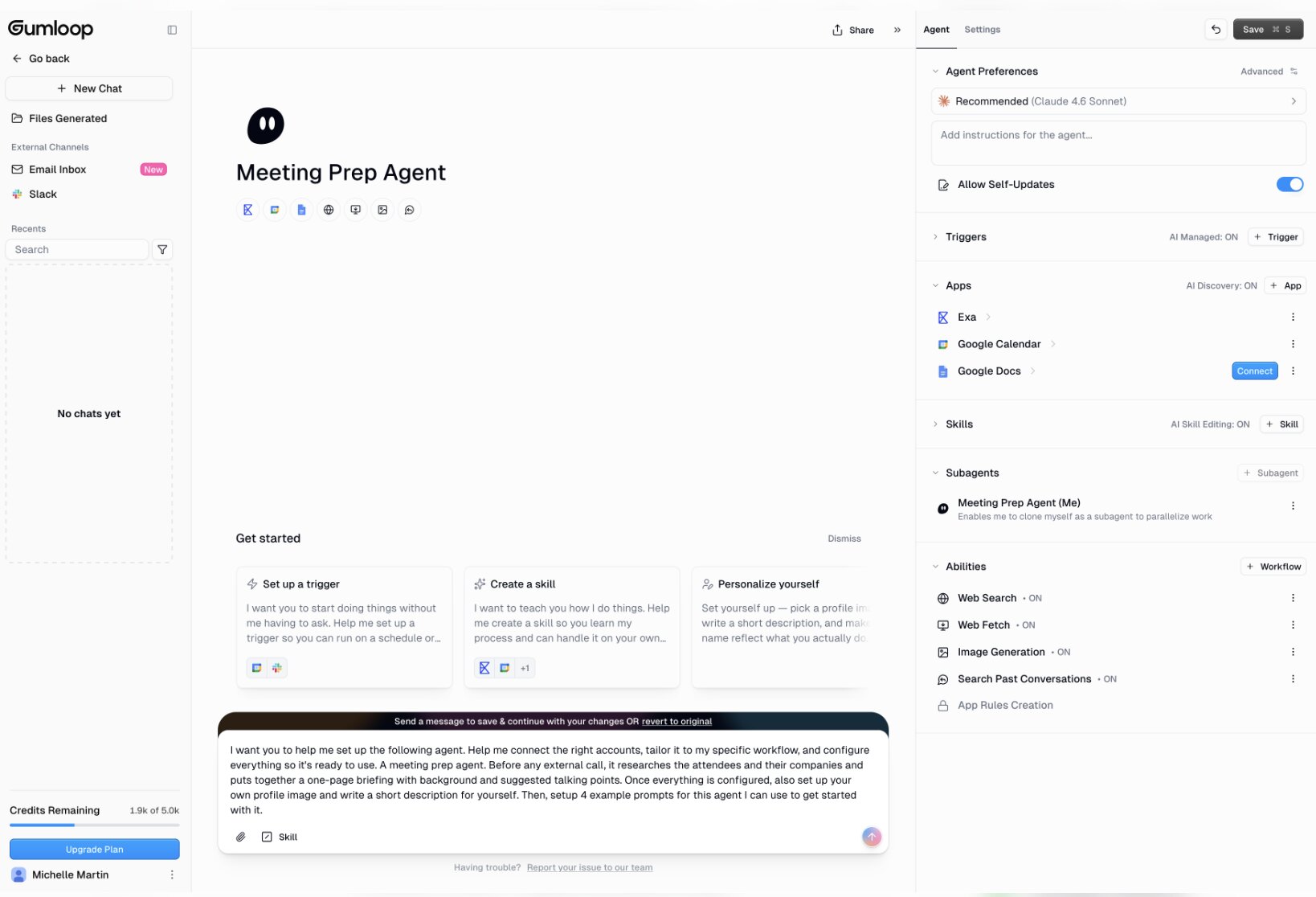
That’s all you have to do: tell Gumloop what you want in plain language and it makes it for you. As a non-technical person, Gumloop isn’t overwhelming. You can also easily create from scratch by dragging-and-dropping triggers, connectors, and actions together in a visual workflow, with plenty of tooltips and help docs right there if you get stuck.
Plus, Gumloop’s library of AI agent templates makes it easy to clone common uses and customize them, the first AI agent I made was a Meeting Prep assistant to scan my calendar for upcoming external meetings, research participants, and send me custom talking points via Slack. I duped the template, connected it to my Google Calendar and Slack accounts, and had it operational in a few minutes. Perfect.
Whether starting from a template or 100% custom, Gumloop can create data analysis agents, customer support agents, CRM and sales agents, content creation agents, and much more.
While Gumloop is straightforward for everyone to use, advanced users and IT teams will appreciate the Gumstack AI Gateway for managing your AI ecosystem with enterprise-grade security controls.
Key features:
- Native AI agents that read, write, and act across connected apps (not just query a database)
- MCP servers for governance & per-tool/per-user permissions
- 200+ native integrations, plus add your own custom MCP server
- Skills system, reusable capabilities across all AI agents
- Setup triggers and schedules for fully automated workflows
- Gumstack AI Gateway for centralized authentication, MCP management, access controls, and AI governance
- Enterprise plan offers Single Sign-On (SSO), audit logging, bring your own API keys (BYOK), VPC deployment, credit rollover, and more
How Gumloop compares to Retool
Retool can build powerful apps but that’s the key word: you have to build them. Retool puts what would otherwise be raw code into a nicely organized UI, but you still need to know how the code building blocks work together and understand how to create databases and queries (or wait for the dev team to fix issues or add features).
Retool is low-code, not no-code. Gumloop is no-code.
Okay, pop quiz:
Do you know what a PATCH request is? What a REST API is? How to create a database query to pull and display data? And then how to add an event handler so it can actually update data?
If you answered “no” to any of those, then Retool is not for you… but Gumloop likely is.
Wondering what you can make with Gumloop? Check out our guide to the top enterprise AI agents for unlocking secure, scalable, smart automation.
Gumloop pricing

Here are Gumloop's pricing plans:
- Free is $0/month for 5,000 monthly credits, 1 seat, 1 active trigger, unlimited AI agents, and more.
- Pro is $37/month for 20,000 monthly credits, unlimited seats and teams, 5 concurrent runs, guardrails, MCP server hosting and proxying, and more.
- Enterprise is custom priced based on your requirements, and includes role-based access, virtual private cloud, audit logs, SCIM/SAML, AI model access control, advanced security and governance, and much more.
Compare all Gumloop pricing plans and current rates.
Gumloop uses credits, meaning you only pay for actual usage. Pro and Enterprise plans include unlimited users and you can use your own API keys to further maximize your Gumloop credits.
In contrast, Retool’s per-user pricing means costs can quickly balloon for company-wide apps.
Gumloop user reviews
Gumloop has a 4.8 star rating on G2, a 5.0 star rating on Product Hunt, and a 5.0 star rating on Capterra
Plus, Product Hunt awarded Gumloop its 2026 Best for Rapid AI Prototyping award.
“The product is incredible, both with its flexibility and power. Building with drag and drop feels like lego, but this is not a toy. You can build useful and dynamic utility with AI that connects to your favourite data sources, and further extend with web hooks as triggers - and once it works once, you can depend on it to scale.” – Dexter from Cal.com on Product Hunt
“I love how Gumloop is extremely easy to use and it's extremely fun working on it. I can go from idea to a working solution with just prompts, without needing to be a coder or engineer. The platform fills out the workflow for me.” – Sean G. on G2
“Comparing to traditional low code automation platforms, there is a ton more customization here where you can solve much large problems. [...] It's pushing the limits of what can be solved in low code environments. Plus they have insane support and that's what matters most, who is shipping the fastest.” – Kagan A. on Product Hunt
2. Superblocks
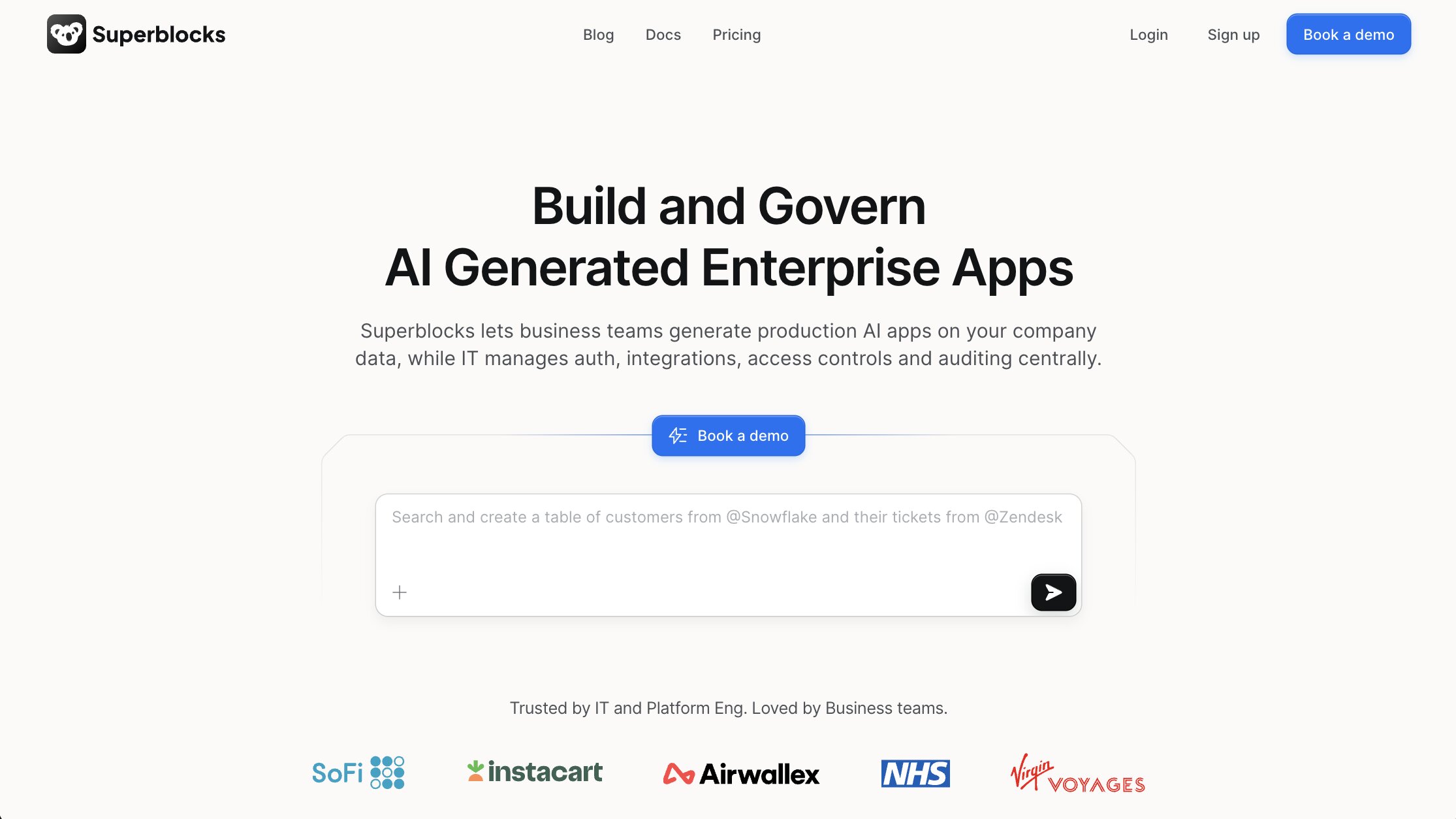
- Best for: Engineering teams speeding up enterprise internal apps with better AI
- Pricing: Teams plan starts at $125/month per builder + $100/month per app. Enterprise is custom-priced.
Superblocks shortens dev cycles and produces clean React code, but still requires coding skills to bring apps to production. So if that's a dealbreaker, it might be worth looking into an alternative.
Like Retool, Superblocks helps developers code production-ready apps faster, although Superblocks is superior when it comes to native AI features and enterprise security.
Superblocks uses their proprietary Clark AI to assist dev teams building internal apps with natural language prompts. I was surprised it took my hare-brained “fridge cam” idea and really did turn it into a prototype.

Non-technical users can build full apps with Clark AI’s help, but it’s most useful for large teams collaborating on internal app development, especially if most users have a technical background. Your engineers can build the AI apps they need while IT handles organization-wide access control, governance, and security monitoring with Superblocks MCP.
Key features:
- Only AI vibe coding platform to run fully inside your VPC for top security
- Proprietary Clark AI learns over time and constantly updates data schema across your organization for increased efficiency
- Superblocks MCP for advanced AI governance and enterprise security
- Export apps as complete React projects via source code; no vendor lock-in
How Superblocks compares to Retool
Like Retool, Superblocks’ governance layer centralizes app management. Meaning, individual apps don’t directly communicate with your sensitive data, Superblocks acts as the in-between facilitator and auditor. However, Superblocks boasts stricter governance capabilities than Retool with private VPC deployments, data residency, and more.
And while both Retool and Superblocks generate code in React, only Superblocks allows you to export your app’s source code. Retool limits you to JSON files or other package formats that only run within Retool. With Superblocks, you’re never locked into the platform forever.
Superblocks pricing
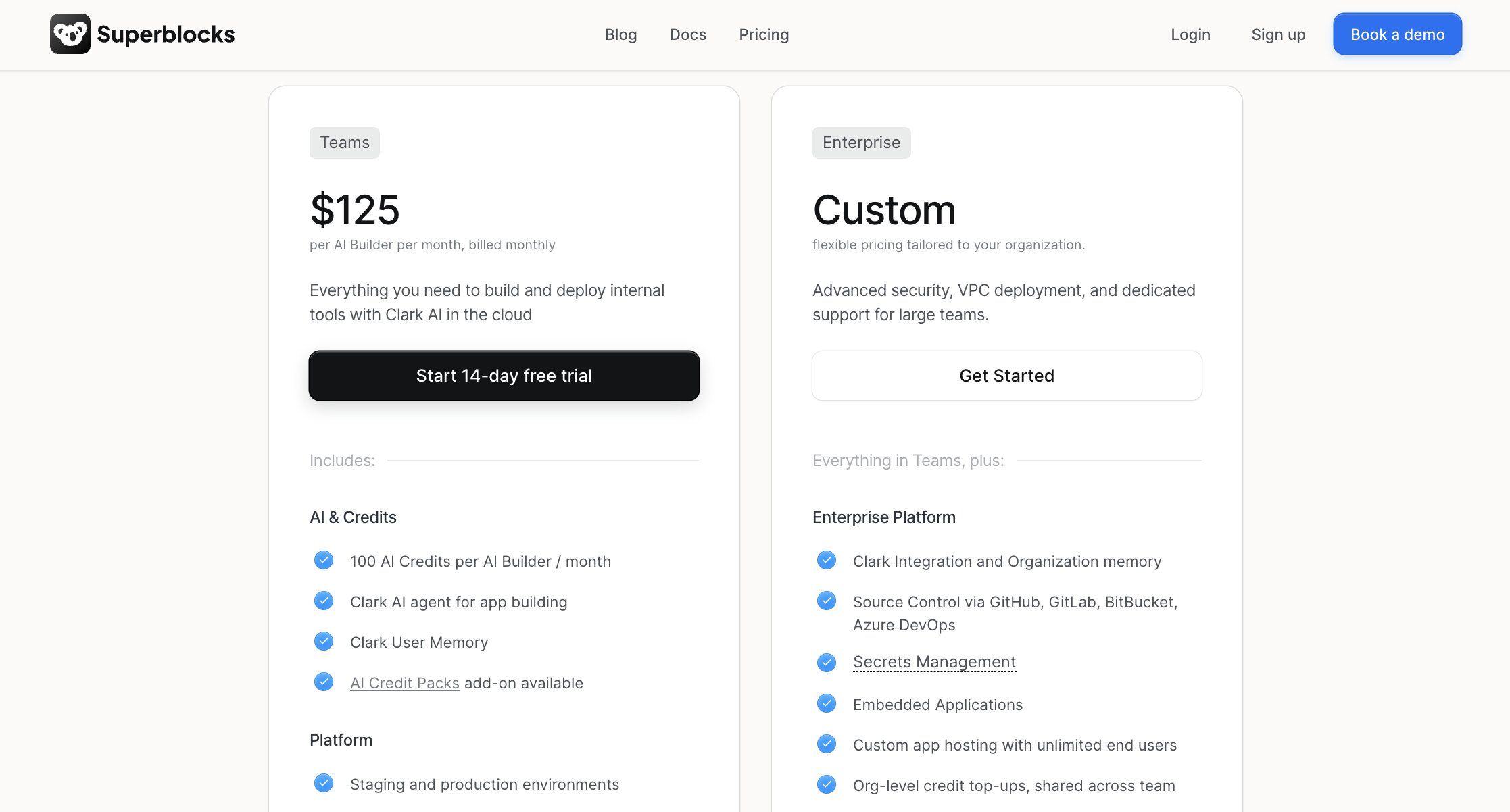
- The Teams plan starts at $125/month per builder license (user creating apps) and $100/month per app.
- Enterprise offers custom pricing based on builder and app count.
Both plans include unlimited end users (or app viewers/non-builders).
Superblocks user reviews
Superblocks has a 4.7 star rating on G2 and a 5.0 star rating on Product Hunt.
“Self-hosting Retool required running 6 RDS databases across 3 VPCs. Switching to the Superblocks On-Premise Agent has allowed us to seamlessly build apps across multiple VPCs with minimal additional overhead, maximizing our ROI.” – Nadeesha Cabral, SVP of Engineering, me&u
3. Kissflow
- Best for: No-code business process automation for non-technical teams
- Pricing: Basic plan starts at $2,500/month. Enterprise is custom-quoted.
Kissflow excels at automating business workflows for onboarding, approvals, procurements, and other operational processes.
Do you need to build a recruiting dashboard for HR, or would it be more impactful to digitize your hiring process instead?
It’s tempting to always think “app first” in today’s AI-first world but there are many cases where digitizing and automating existing processes is faster and saves more time and money long-term. Common use cases include internal processes, such as approval or purchasing workflows, and external processes, such as client service requests and support tickets.
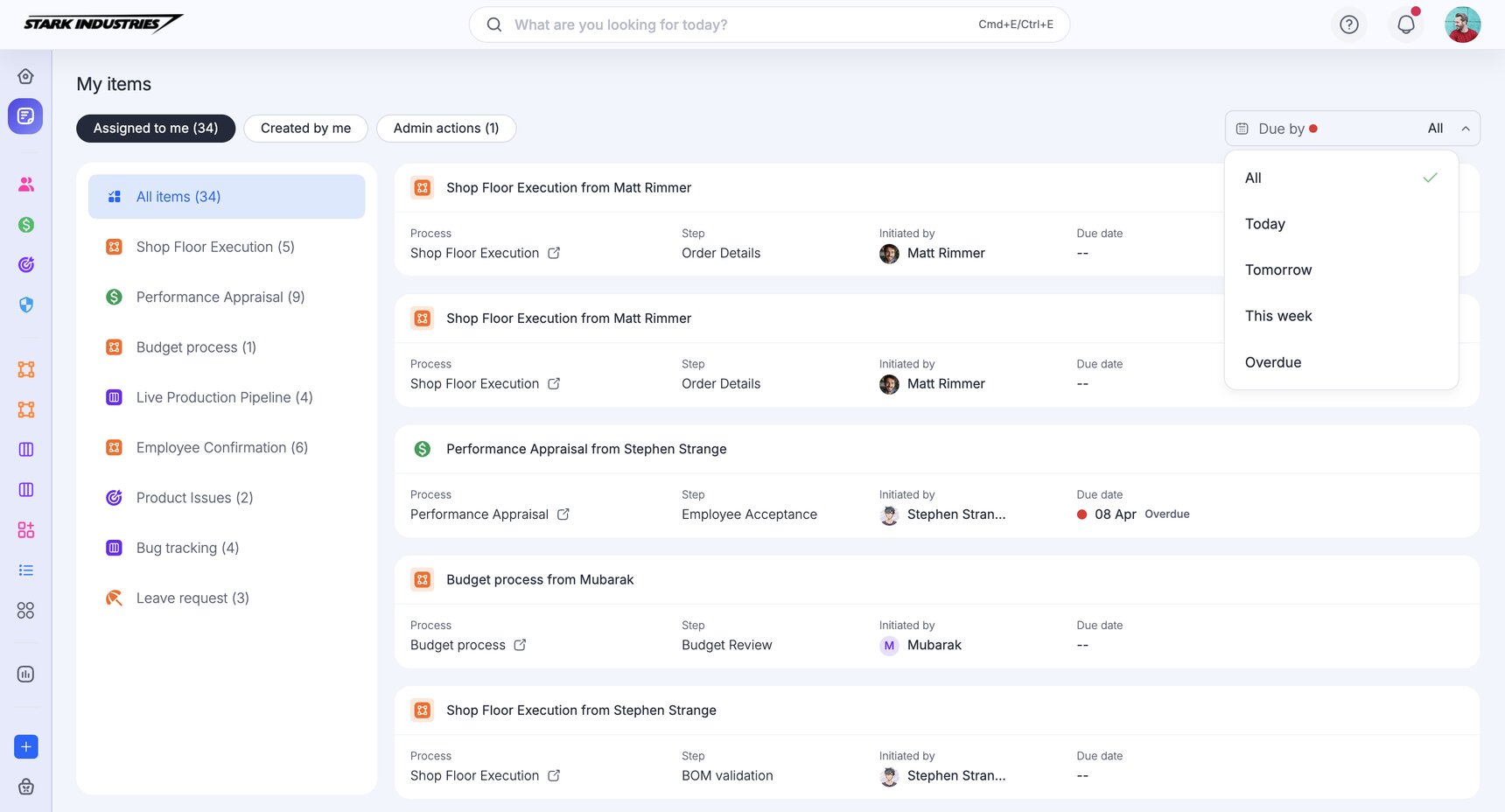
Kissflow makes it easy to centralize my data from various forms, spreadsheets, and CRMs and set up a workflow that automatically puts everything where it needs to be. Rule-based logic and escalation triggers mean I only have to get involved in specific or unusual situations, while everything else is automated for me.
If you don’t need a super-custom app to do a Very Obscure Thing for your business, Kissflow strikes the right balance of AI-assisted app development and workflow orchestration.
Key features:
- Automating business processes is easy for anyone to do with the no-code, drag-and-drop UI
- Kissflow AI drafts automations and apps from natural language prompts
- Create custom forms, tables, and Kanban-style boards to work collaboratively
- Built-in governance with auditing and access controls
- Detailed analytics dashboards to track workflow efficiency, bottlenecks, and custom KPIs
- Two-way sync across connected apps for accurate, centralized data management
How Kissflow compares to Retool
Kissflow is actually quite different from Retool but it might be what you really need. While Retool is for building custom apps that interact with databases, Kissflow is all about streamlining and automating business processes.
You can build custom enterprise apps with Kissflow, though that becomes a low-code endeavor targeted more toward engineers, similar to Retool.
Kissflow pricing
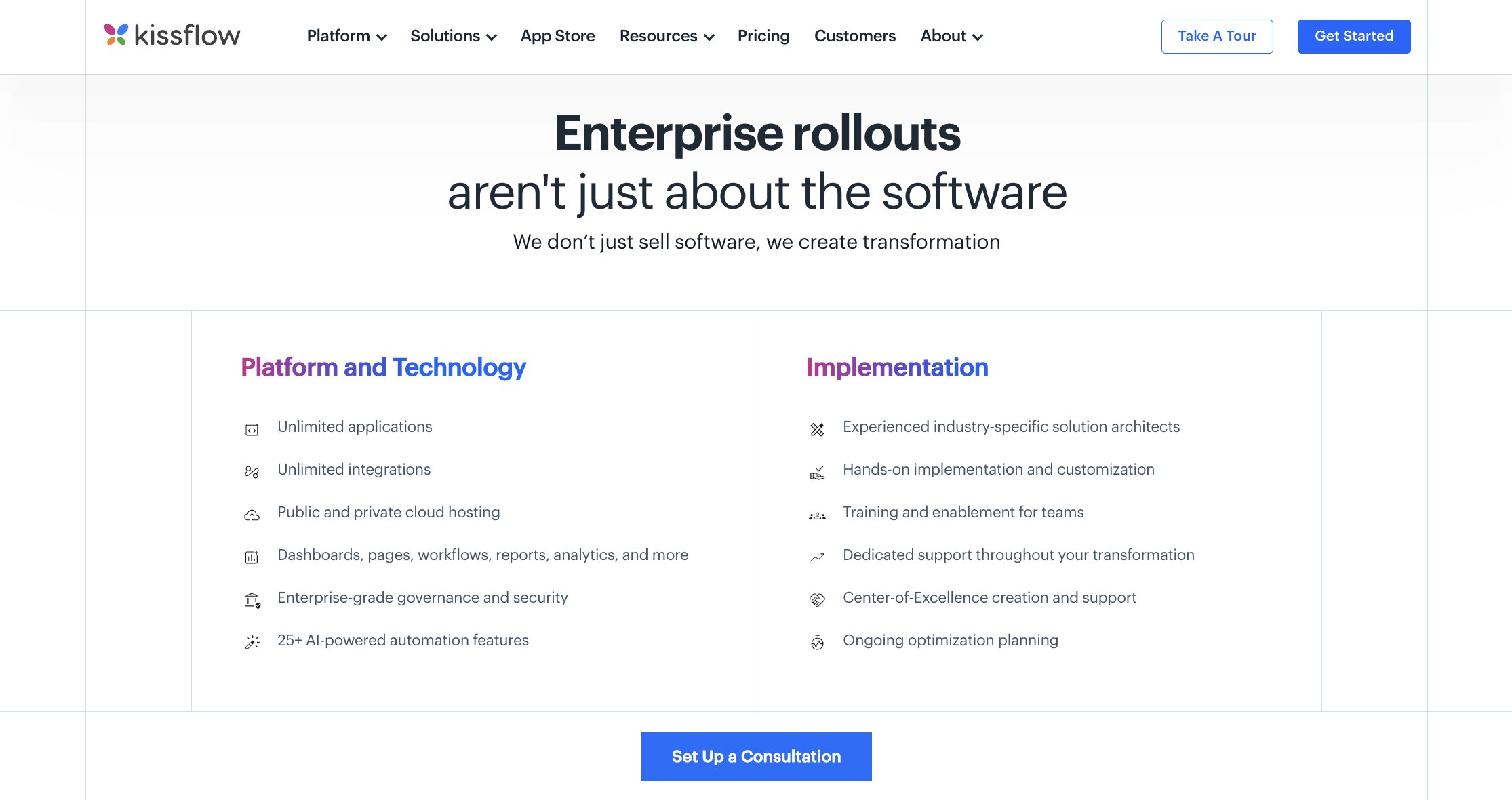
Kissflow pricing is primarily user-based without additional charges per connector (integration). Each tier has minimum user counts, which aren’t specified on their website, but were previously referenced as up to 50 users on the Basic plan and over 50 for the Enterprise plan.
- Basic starts at $2,500 per month for limited apps and integrations, and is for internal users only.
- Enterprise is custom quoted per client and unlocks all features, unlimited apps and workflows, private environments, and the ability for internal and external users.
Kissflow user reviews
Kissflow has a 4.3 star rating on G2 and a 4.2 star rating on Capterra.
“With a clean UI and low-code tools, Kissflow makes it easy for business teams to design and manage workflows on their own, reducing day-to-day dependence on IT.” – Carlos C., Head of Projects and Sales
4. Budibase
- Best for: Teams with specific data residency requirements, or who prefer to self-host
- Pricing: Free open-source self-hosted edition. Managed cloud plans start at $23/month.
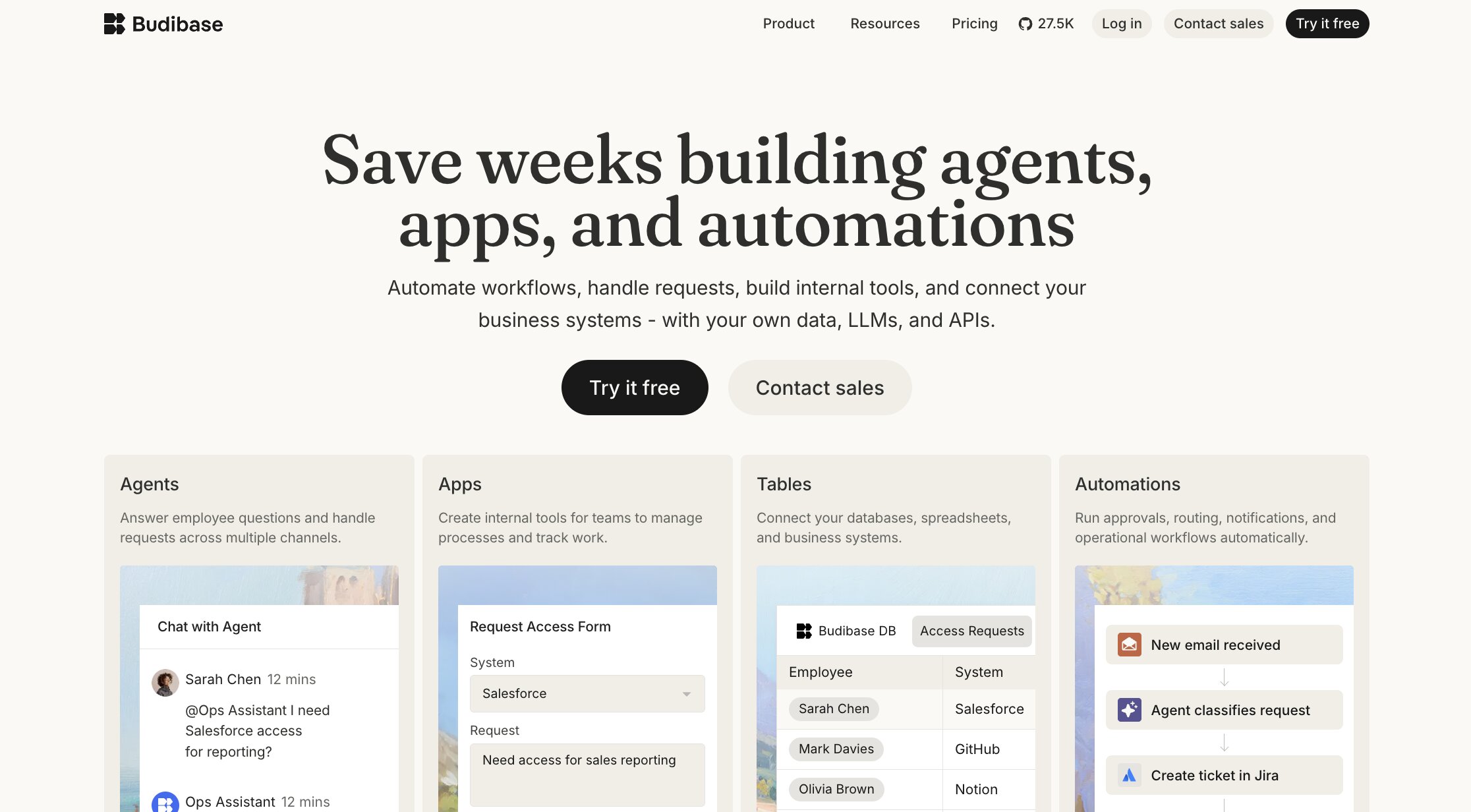
Affordable and open-source, Budibase is the go-to low-code app builder for security-conscious organizations needing self-hosted internal tools.
Budibase is a unique Retool alternative because it offers the ability to self-host on all plans, even for free. Whether you just want ownership of your security or are in a regulated industry, Budibase is an excellent choice for using with your own infrastructure.
While recent, Budibase’s AI assistance features let you build apps or make changes with natural language processing, although this is currently only available on cloud hosted plans.
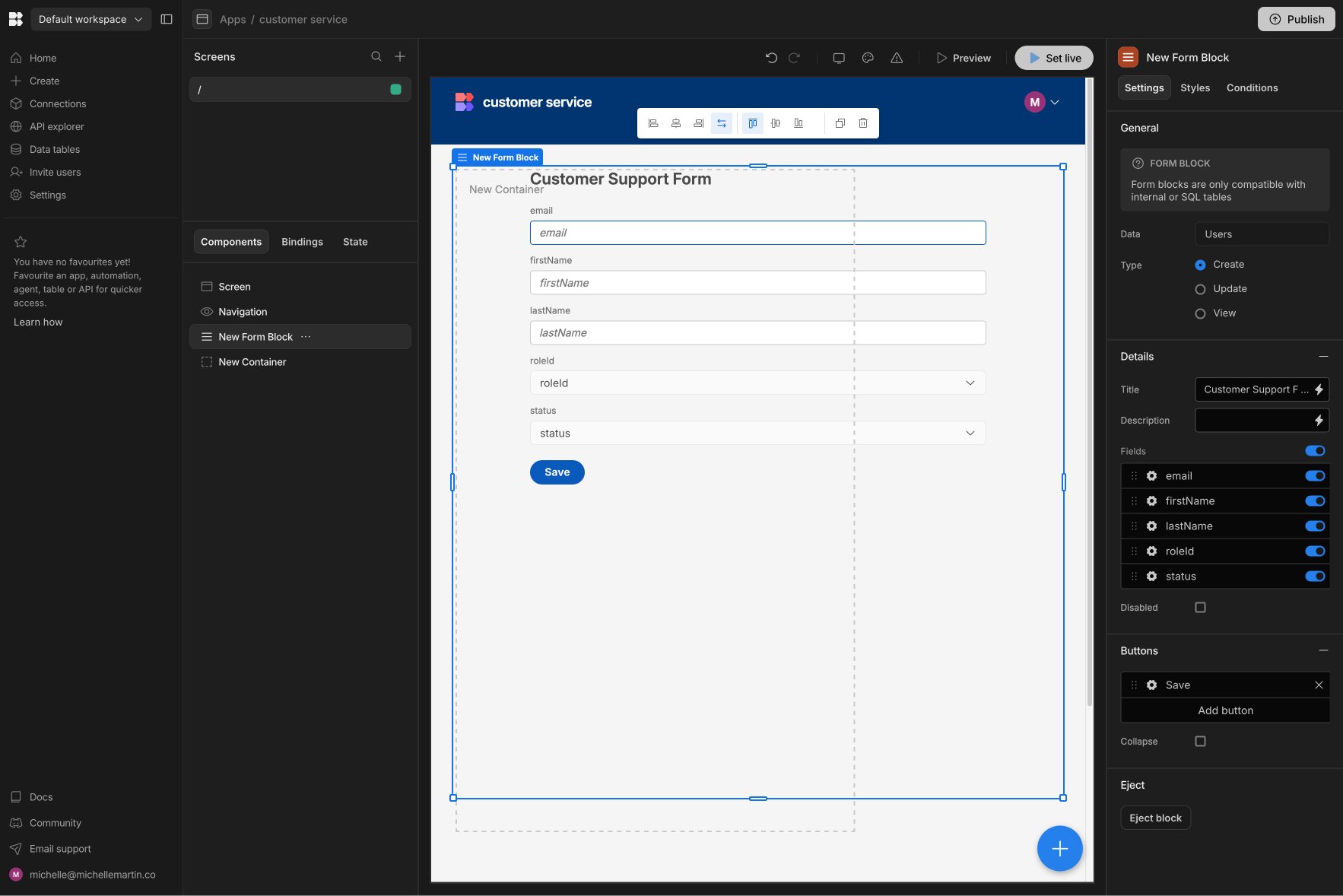
The template library and drag-and-drop app creator make it easy to get started, though Retool offers more UI customization options. You can add custom JavaScript, although both Retool and Appsmith offer more JavaScript-friendly capabilities.
Key features:
- Open source to avoid vendor lock-in
- Free to self-host via Docker, Windows Server, Kubernetes, or DigitalOcean (or choose managed cloud)
- Active development community with open-source plugins
- Native support for Claude, OpenAI, Google, Groq, Mistral, and OpenRouter plus the ability to add a custom LLM
- Supports REST, GraphQL, SQL data sources and custom data sources (self-hosted only)
How Budibase compares to Retool
How does free sound? Yep, Budibase is totally 100% free and open source so you don’t have to worry about building complex apps and being stuck paying subscription fees forever to use them.
Budibase costs scale with usage, not user count. For teams needing to scale, including those in regulated industries such as healthcare or government, Budibase’s combination of powerful low-code app building and scalable deployment costs is an attractive offer.
Budibase pricing
Using Budibase self-hosted is free and open-source, however hosting costs vary based on your chosen vendor and usage.
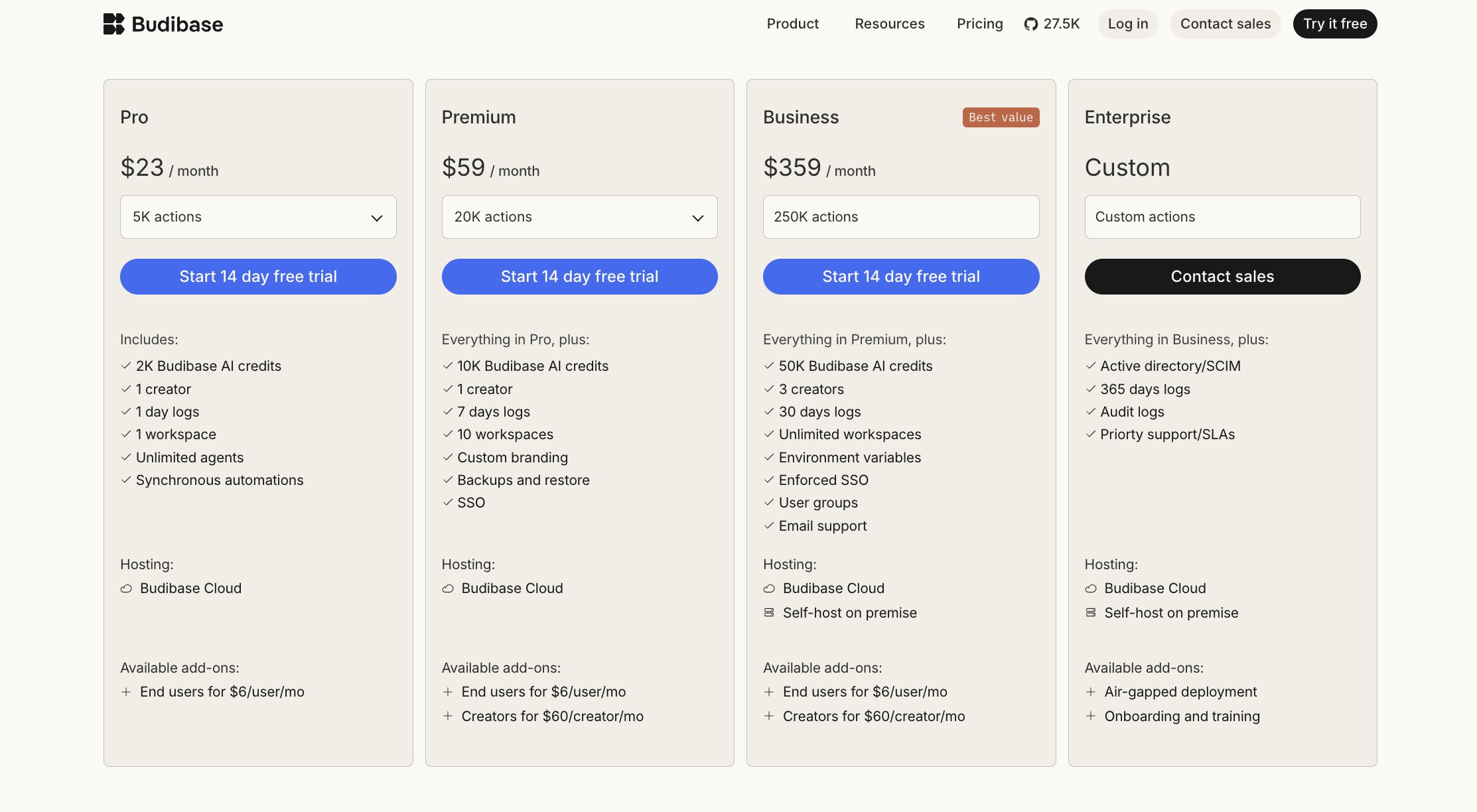
Budibase also offers paid plans hosted on their managed cloud platform. Pricing is based primarily on scale, not head count.
- Pro is $23/month for up to 5,000 actions, unlimited agents, and 2,000 monthly AI credits.
- Premium is $59/month for up to 20,000 actions, backup/restore, Single Sign-On (SSO), and 10,000 monthly AI credits.
- Business is $359/month for up to 250,000 actions, user groups, three creators, and 50,000 monthly AI credits.
- Enterprise plans with custom action limits, audit logs, priority support, and optional onboarding are available via custom quote.
You can add additional end users for $6 each per month to any plan, or add creator users for $60 each per month to Premium or Business plans. Business and Enterprise plans can also be self-hosted on premise.
Budibase user reviews
Budibase has a 4.5 star rating on G2 and 27,900 stars on GitHub.
“Awesome tool to build CRM systems and the like. I've deployed it successfully using the Digital Ocean 1-click deploy. Easy!” – Nuno P. on Product Hunt
5. Dust

- Best for: Teams needing AI assistants trained in company knowledge, not an app
- Pricing: $29/user/month for Pro. Enterprise is custom-quoted.
Dust eliminates data silos by deeply understanding and sharing company data across teams and powering smart automated workflows.
Dust is like that one really smart employee who’s been at your company forever, with encyclopedic knowledge about everything across all roles, and who never takes a sick day or sleeps so you can ask them for advice 24/7. (Shoutout to Joy who I worked with in 2011, you da real MVP!)
By connecting it to all your data sources and tools, Dust learns everything there is to know about your organization. Then, add in custom AI agents to automate tasks from sales outreach to marketing content creation and everything in between. Now your employees can interact with Dust to either ask questions or use an AI agent to carry out workflows, all rooted in company processes, knowledge, and your existing tool stack.
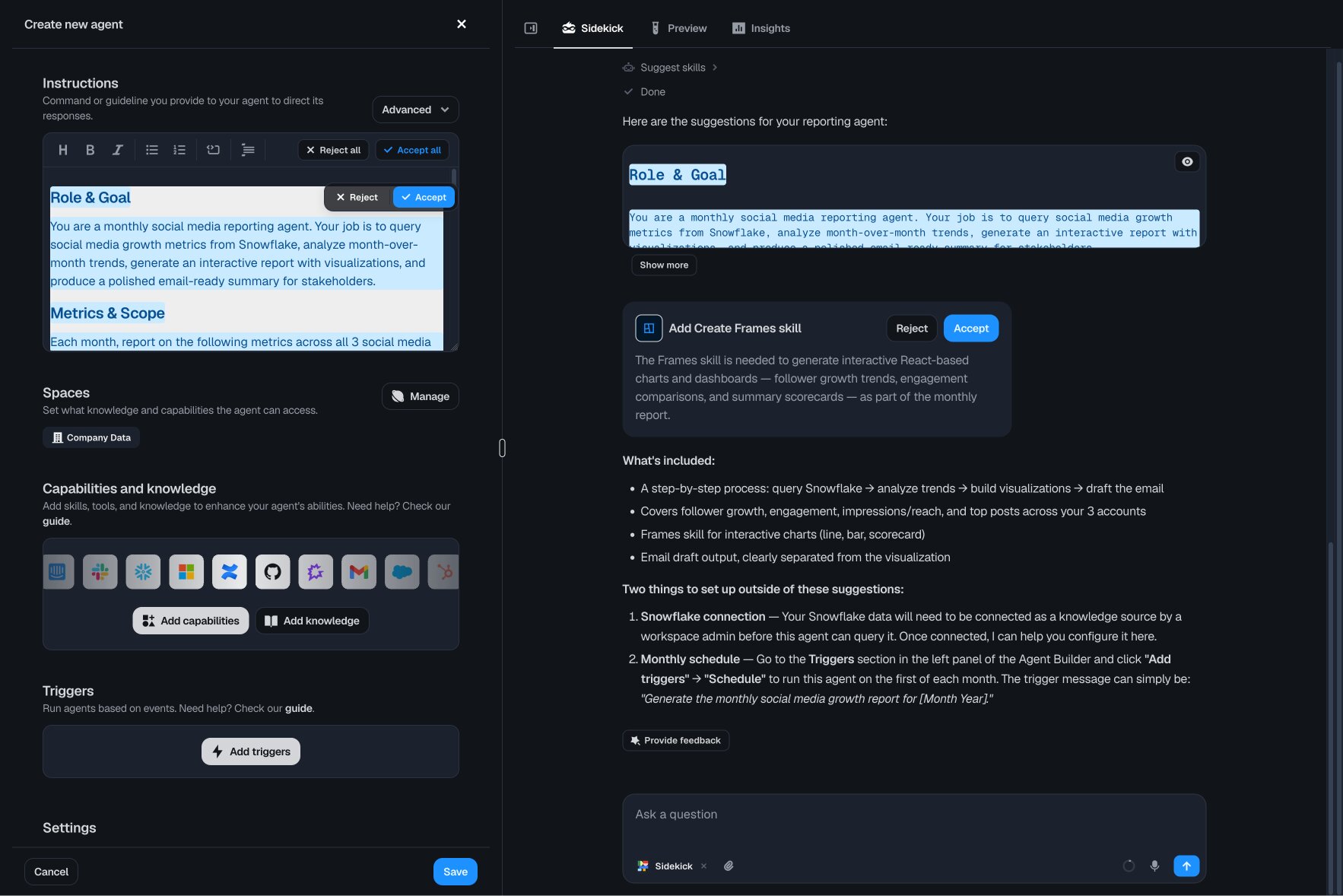
Instead of using an app, your employees have a conversation with an AI agent to ask quick questions, get new insights, or carry out agent tasks.
Dust describes itself as “the operating system for the AI era” and I agree: it feels like the “glue” that can hold businesses together, keeping AI actions consistent across teams and departments thanks to its deep knowledge foundation.
Key features:
- AI agent orchestration to manage multiple agents in one place, and enable them to act across multiple workflows
- Secure governance with SOC 2 Type II, GDPR compliance, EU data residency, role-based access, and auditing
- No-code AI agent builder understands natural language; good for non-technical users
- Proprietary LLM data connections that allow Dust agents to run semantic searches across all connected tools at once
- Use any LLM model and switch anytime; no lock-in
How Dust compares to Retool
Instead of building finished apps like Retool, Dust has an agent-first approach, connected AI assistants tackle tasks and improve overall productivity and efficiency. Your employees won’t sign into a finished app or dashboard, they’ll interact with Dust agents via Slack, browser extensions, or the Dust dashboard to get answers or complete tasks.
Dust pricing

Dust has a per-user pricing model.
- Pro is $29 per user per month and supports from 1 to 100 users.
- Enterprise is custom quoted based on users and includes advanced security features, larger storage, Salesforce tool, Single Sign-On (SSO) and more.
Dust user reviews
Dust has a 4.8 star rating on G2 and 1,400 stars on GitHub.
“I like how easy it was to set up and connect with the tools we already use. It saves me a lot of time by answering repeated HR and policy questions. The search across our company docs feels smooth and reduces a lot of back and forth.” – Vijay S. on G2
6. Appsmith

- Best for: Engineers wanting the technical capabilities of Retool, but open-source
- Pricing: Free open-source self-hosted edition. Cloud is free for up to 5 users; Business is $15/user/month.
Appsmith speeds up development with low-code AI tools and offers free self-hosting, but still requires engineers to create finished apps.
Whether you want Retool’s functionality but are on a budget, or simply want a powerful app builder that’s self-hostable, Appsmith is for you. Appsmith fits a niche area of this market: it’s open-source like Budibase, developer-focused like Retool, while also offering a more JavaScript-centric architecture and native Git support for version control.

Plus, Appsmith’s free Community Edition allows you to self-host entirely for free, without user or usage limits.
I’m not a developer, so it takes more than the mention of JavaScript for me to ooh and ahh, but I can see how Appsmith is a good fit either for small teams needing a cost-effective, self-hosted solution, or large teams who want absolute control over security without being locked in to a subscription.
Key features:
- Open source, free Community Edition for unrestricted self-hosting
- Start with drag-and-drop React component templates and UI themes, or fully customize
- Role-based access controls and Git version control
- Made for developers with choice of libraries and AI-assisted auto-complete coding
- Professional services team available to hire to build your apps
How Appsmith compares to Retool
The biggest difference is that Appsmith is open source and offers a completely free self-hostable edition. Additionally, Git sync is included in all Appsmith plans, even free! While it’s an Enterprise-only feature with Retool.
Cost wise, Retool offers a per use case pricing option on their Enterprise plan while Appsmith’s paid plans are all per user, including Enterprise.
Appsmith pricing

- Free, open source Community Edition available for self-hosting.
- Free cloud hosted edition for up to five users with three role-based access controls and three Git repositories.
- Business is $15/month/user up to 99 users and includes unlimited environments, workspaces, and Git repositories, plus custom roles and premium integrations.
- Enterprise starts at $2,500/month for 100 users and includes SAML/OIDC Single Sign-On, managed cloud hosting, custom integrations, and more.
Appsmith user reviews
Appsmith has a 4.6 star rating on G2 and a 4.9 star rating on Product Hunt.
“Unlike other low-code and no-code tools, AppSmith uses clear logic based on JavaScript, SQL queries, and other data sources. Other no code platforms often use their own formulas and operators, which, instead of simplifying the development process, actually complicate it.” – Nikolai P. on Product Hunt
7. Microsoft Power Apps

- Best for: Enterprise teams already invested in the Microsoft 365 ecosystem
- Pricing: Free Developer plan. Premium starts at $20/user/month, or may already be included in Microsoft 365 Business Premium and higher.
Source: Microsoft
Power Apps just makes sense for Microsoft-heavy enterprises: it’s robust, natively connects across Microsoft tools for seamless setup, and is often already included in your licenses.
If your organization uses Microsoft tools like SharePoint, Dynamics 365, Office 365, Power Automate, Copilot Studio, and Power BI, it’s difficult to argue using anything other than Microsoft Power Apps as your AI app builder.
Power Apps isn’t the easiest to use right away (I find it super intimidating, actually) but it still allows non-technical people to easily create apps once you get the hang of it. You can build apps and AI agents with text prompts in Copilot Studio, or create entirely custom apps with Canvas.
It easily connects to everything Microsoft so there aren’t any fiddly third-party plugins or data connections to authenticate, just seamless integration right away. However, its biggest strength is also its biggest limitation: if your organization uses tools outside of Microsoft’s ecosystem, you’re probably better off going with Retool or a Retool alternative, as the add-on costs and complexity can really pile up.
Key features:
- Enterprise-grade AI governance and compliance with Microsoft Cloud for complete managed security
- Deep integration across all Microsoft tools and includes Copilot AI assistance and Power Automate capabilities for workflow automation
- 275+ native data sources, including Microsoft tools and third-party tools, such as Salesforce, Confluence, GitHub, and more
- Native mobile app support and unique ability to build and deploy apps within Microsoft Teams
How Power Apps compares to Retool
Power Apps offers the best integration and data access across Microsoft apps for builders, and all-in-one AI governance and security for IT teams, providing you’re using Microsoft across your organization.
Power Apps also offers more advanced database functionality compared to Retool. Microsoft calls it Dataverse, a built-in tool to create custom data models inside a visual relational workspace where you can migrate schemas, model relationships, and set role-based security rules.
Microsoft Power Apps pricing
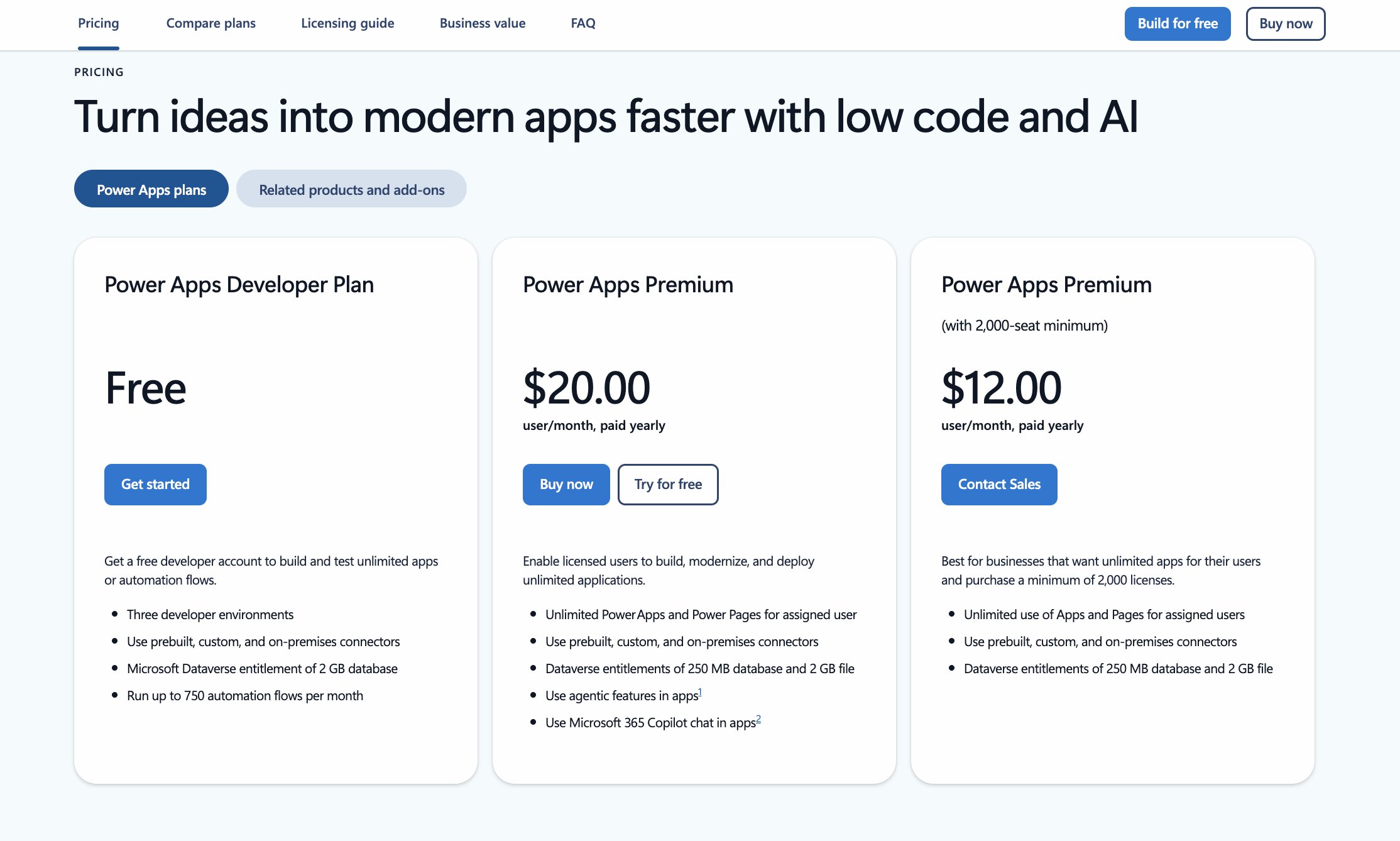
- Power Apps’ Developer plan is free for up to three environments (meant as a trial phase before deployment).
- Power Apps Premium starts at $20/month/user for unlimited apps, agentic AI features, and Copilot AI chat.
Depending on your user count, Power Apps can be significantly cheaper than Retool on a per user basis. At the 2,000+ user level, Power Apps is only $12/month/user. Even better, Power Apps may already be included in your license if you subscribe to Microsoft 365 Business Premium or higher.
However, Power Apps has a complex web of add-on charges that may significantly impact its overall cost, depending on your usage. Additional fees apply for AI credits, users accessing Power Pages or other apps, higher storage limits, and more. Their pricing is so complex, it takes a 37 page deck to explain it.
Microsoft Power Apps user reviews
Power Apps has a 4.3 star rating on G2, a 4.5 star rating on Capterra, and is named as a leader in low-code development platforms by Forrester and Gartner.
“The seamless integration with Microsoft 365 tools like SharePoint, Teams, and Excel makes it very practical for real business use cases. It empowers teams to solve operational problems fast without waiting on long development cycles.” – Arkajit D., Chief Technology Officer, on G2
“While it’s easy to get started [with Power Apps], things can become quite complex as you try to build more advanced applications. Managing logic, especially with formulas and data handling, can feel a bit unintuitive and sometimes requires trial and error.” – Thodoris P. on G2
Is there anything better than Retool?
Well, yeah… depending what you need.
Retool is awesome if you’re a developer (or have a team available), a clear database schema, and need a lot of custom UIs. But one of these Retool alternatives is better if you…
- Want AI-native without needing engineers → Gumloop
- Want Retool’s model, but better AI and enterprise security → Superblocks
- Need a self-hosted, open-source solution → Budibase (more drag-and-drop) or Appsmith (more developer-y)
- Don’t actually need an app, but need to automate business processes → Kissflow
- Need centralized company knowledge management with AI assistants → Dust
- Already use Microsoft 365 across your org → Power Apps
It’s also important to think about where your organization and apps will be six months, a year, and two years from now. Some of these Retool alternatives make it easy to migrate your projects while others lock you into their platform.
But at the end of the day, all of these tools help with the most important thing: starting to build something today.
Create a fully functioning AI agent in the next five minutes that starts automating your work and solving problems, no code, no learning curve, no credit card. Start your free Gumloop workspace now.

Read related articles
Check out more articles on the Gumloop blog.