8 best Lyzr AI alternatives I've tested in 2026

Lyzr AI is an enterprise-focused AI agent-building platform, but it’s not the only one out there.
Lyzr AI describes their product as an “enterprise AI agent platform.”
Now, “enterprise AI agent platform” is a pretty broad term that doesn’t elaborate on what an enterprise does, specifically, with the AI agents in question.
But that’s deliberate, because Lyzr offers products that cover the entire development lifecycle of enterprise AI agents. From designing and building agents, to evaluation and deployment, to observation and governance: Lyzr aims to be your organization’s full-stack agent infrastructure.
You don’t necessarily have to use Lyzr for all parts of your agentic AI stack, though. For example, you could use Lyzr’s Control Plane product to govern agents built on other platforms like LangChain or Agentforce. Or, you could also just use their Lyzr Agent Studio product as a no-code environment for building AI agents.
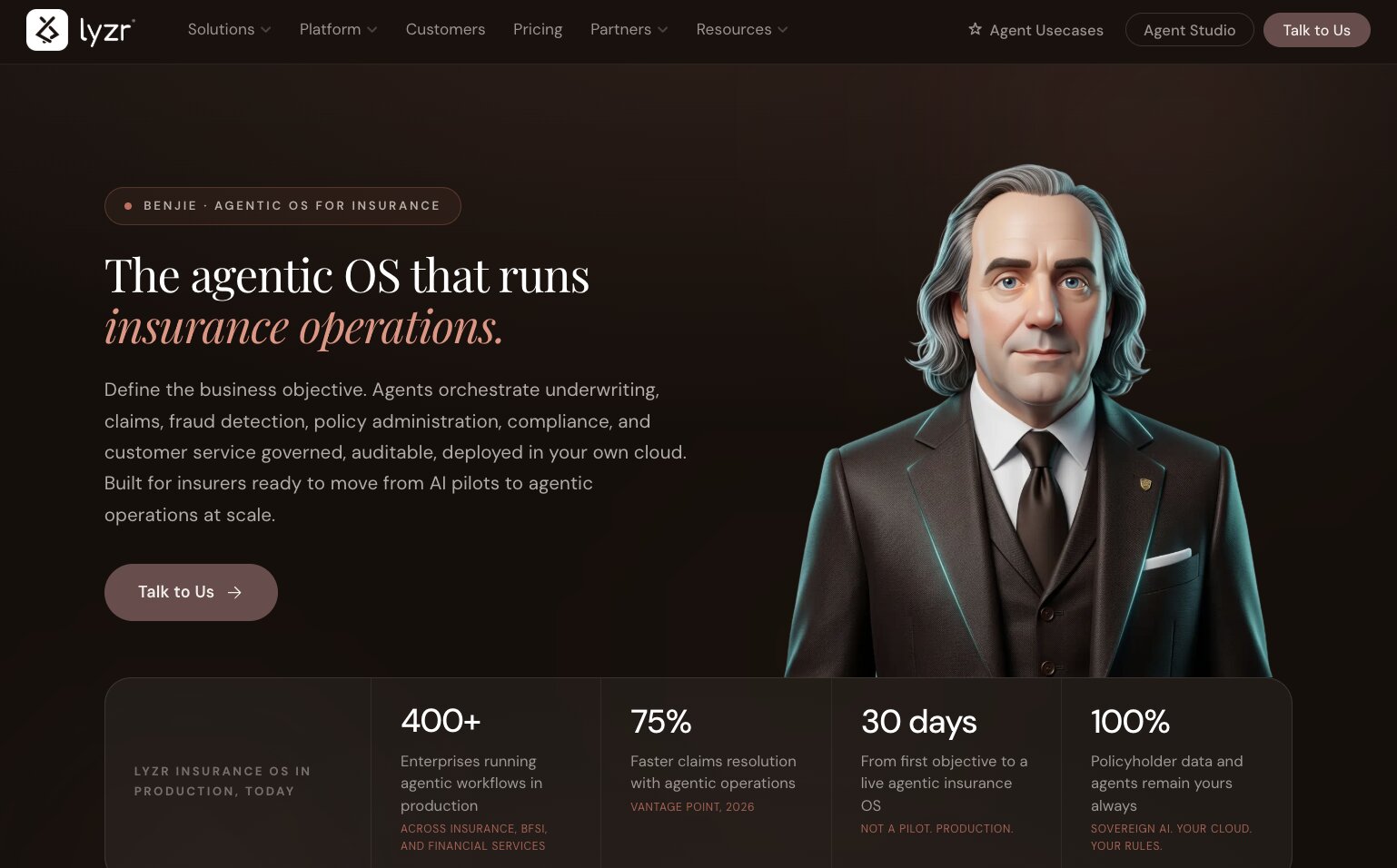
Intriguingly, Lyzr looks to be moving into the physical hardware space soon: they promise to start shipping their Lyzr Optimus on-prem appliances in Q4 2026, in sizes ranging from “personal desktop” to support individuals to “enterprise rack” to support a team of thousands.
Manufacturing physical hardware in a product category that’s typically software-only is no small feat, so the fact that Lyzr’s roadmap is headed in this direction is a strong indication of where their development priorities are. So, if your enterprise organization requires a fully airgapped stack with absolutely no external API calls, Lyzr is worth checking out.
That being said, it’s always worth doing the research and weighing all available options before committing to any platform.
What to look for in a Lyzr alternative
Since Lyzr has several different sub-products, answering the question of “What’s the best alternative to Lyzr?” is difficult. The clichéd and somewhat unsatisfying answer is, of course, “It depends.” But clichés are clichés for a reason, and in this case there’s no one “right” answer.
Different product offerings will be better suited to different organizations’ needs, and depending on why you started looking at Lyzr in the first place, certain alternatives will be more or less appropriate.
For agent building
If you’re evaluating Lyzr and its alternatives because you want an agent-building platform, consider the following:
- What integrations does this platform support?: Does the platform integrate with the tools your team is already using? Can your team interact with agents using the tools they already use every day, like Slack, Microsoft Teams, or email?
- Can teams collaborate effectively?: Can you safely share agents, skills, and workflows with teammates? How easy is it to share?
- Who is this platform built for?: Is the platform designed for developers, business users, or a mixture of both? Is the product well designed for the end users’ needs and technical skill levels?
For agent governance
If you’re evaluating Lyzr and its alternatives because you want a governance and observation tool, consider the following:
- How well does this platform fit into our existing stack?: Ideally, you want a platform that will integrate with your already-operational databases, APIs, and business systems.
- How does this platform implement policy guardrails?: Policies are meaningless if they’re not enforced. What options does this platform have for enforcing access and usage controls?
- Does this platform meet our needs for compliance and data privacy?: Any platform that advertises itself as “enterprise-grade” should meet certain table-stakes requirements, like SOC 2 Type II certification. Depending on your industry and the type of data your organization handles, you might also need to consider Zero Data Retention (ZDR) agreements, GDPR commitments, HIPAA compliance, etc.
And regardless of whether you’re planning to build agents, govern agents, or both, you should always consider these factors too:
- What hosting options does this platform offer?: If virtual private cloud (VPC) deployment is non-negotiable for your organization, your shortlist of possible alternatives will look very different compared to that of someone who’s fine with (or would prefer to have) a managed SaaS deployment.
- How much model flexibility do we have with this platform?: Are you locked into particular models or providers, or can you choose between different models depending on the task?
- Will this platform’s pricing model scale with our usage?: The cheapest starting price isn’t necessarily going to be the best; think about how each platform’s pricing model will scale as your teams and usage grow.
8 Lyzr AI alternatives and competitors in 2026
Here are the best Lyzr alternatives I found:
- Gumloop
- Gemini Enterprise Agent Platform
- Glean
- CrewAI
- LangSmith (by LangGraph)
- Dust
- Workato
- Salesforce Agentforce
Alright, lets go over each of these.
1. Gumloop
- Best for: Teams that want business users to build agents and real enterprise hosting options
- Pricing: 14-day free Pro trial, then $37/mo plus pay-as-you-go usage; custom Enterprise plans
- What I like: Model-agnostic, VPC support, white-labeled Slack agents
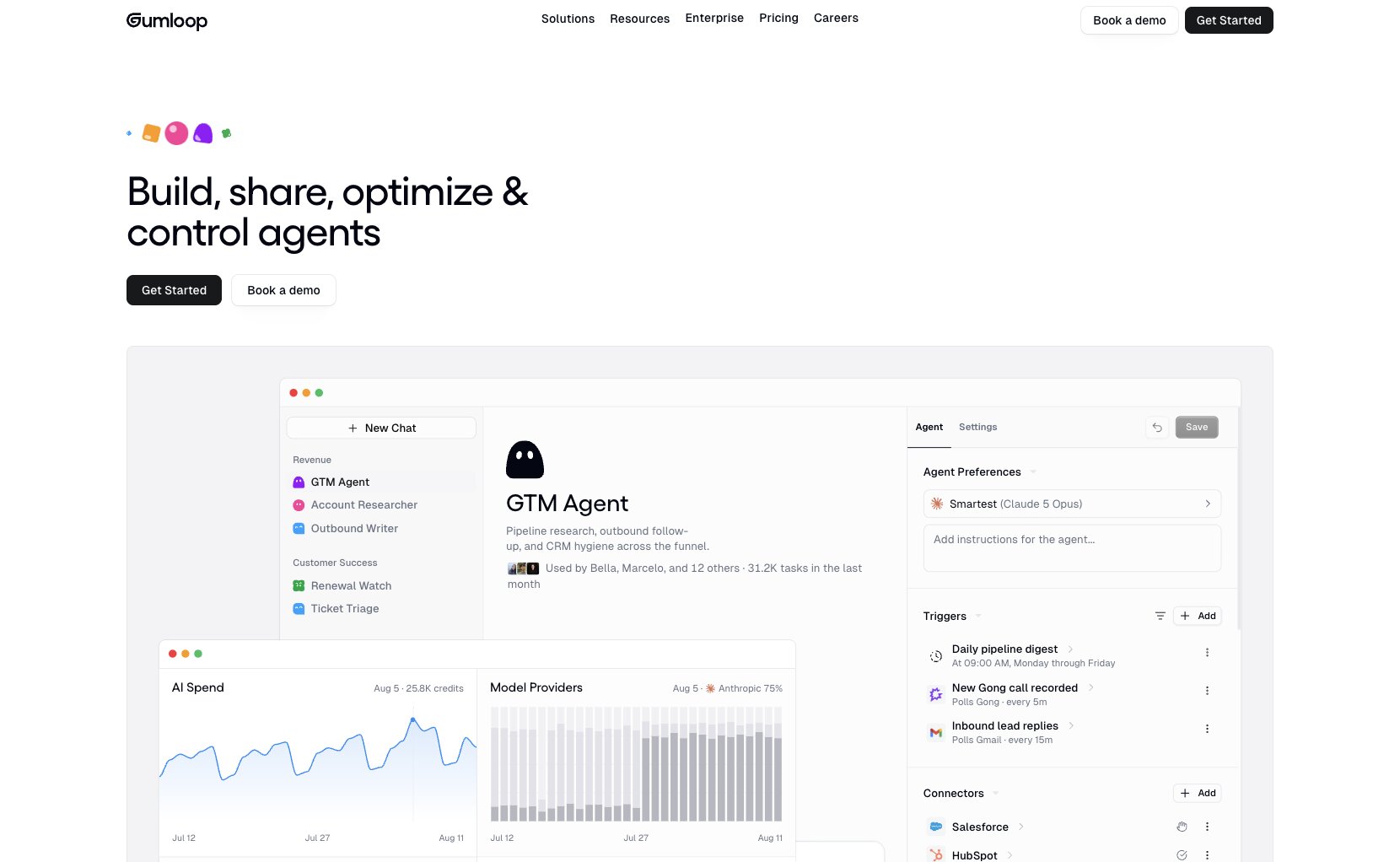
Gumloop is an enterprise agent layer that lets everyone within an organization build and share securely, while giving admins the observability and governance capabilities they need. The end users closest to the business problems can build the agents they need and share them across the company, without writing a framework or using code. Access to data is granted per person, team, or org, and enforced by SSO, RBAC, and audit logs.
Agent-building in Gumloop is through a simple configuration interface and chat: give an agent instructions, pick a model, connect it to tools, equip it with reusable skills, and optional triggers. Users can then talk to the agent in the Gumloop interface, or in Slack, Microsoft Teams, or email. Gumloop agents can call tools, run code in a sandbox, hand work to subagents, and pause for human-in-the-loop approval steps. Gumloop Brain indexes connected company sources so agents can search company knowledge sources like Google Drive, Notion, and GitHub. Skills can be synced from GitHub, which is useful if engineering wants pull requests or version history.
On the governance side, Gumloop Enterprise offers a centralized control plane with SAML/SCIM, custom roles for role-based access control (RBAC), org-wide connector policies and guardrails, audit logs, model access control, incognito/zero-data-retention options, and optional VPC deployment in the customer’s own cloud.
Gumloop pros and cons
If your organization needs a platform that both technical and non-technical users can use to build and share agents, and you need VPC, SSO, and org-wide governance policies, Gumloop might be the right choice.
If your developers want code-level, granular control over orchestration runtime or a dedicated pre-production simulation environment, Gumloop has fewer features dedicated to those use cases.
Where Gumloop shines:
- Model flexibility and bring your own key (BYOK) options: Gumloop allows users to swap freely between 35+ models, without ever being locked to one provider. Select proprietary models from frontier labs like Anthropic and OpenAI, or open models like Kimi and GLM. Customers can bring their own API keys, and on Enterprise plans they can route through a custom AI proxy.
- Custom agents live in the tools your teams already use: Slack, Microsoft Teams, and email are all first-class surfaces for interacting with Gumloop agents. Slack implementation in particular is very extensive, with support for white-labeled and custom-branded agents, workspace-wide agents, and DM support. Team-wide adoption doesn’t rely on everyone having to learn to use a new chat UI.
- Virtual private cloud support: Enterprise customers can run Gumloop in their own VPC and manage access with SSO/SCIM, role-based access control (RBAC), and org-wide connector policies.
What could be improved:
- No built-in simulation features: Gumloop has Evaluations to automatically score completed agent runs against criteria, tags, and sentiment. However, Gumloop does not currently offer pre-deployment simulation features.
- Less granular control than a code-first graph runtime: While you can orchestrate multi-agent workflows with agents and subagents that can call each other using Gumloop’s visual workflow builder, developers may prefer a code-first framework like LangGraph or CrewAI for more precise control over individual state transitions.
Gumloop pricing
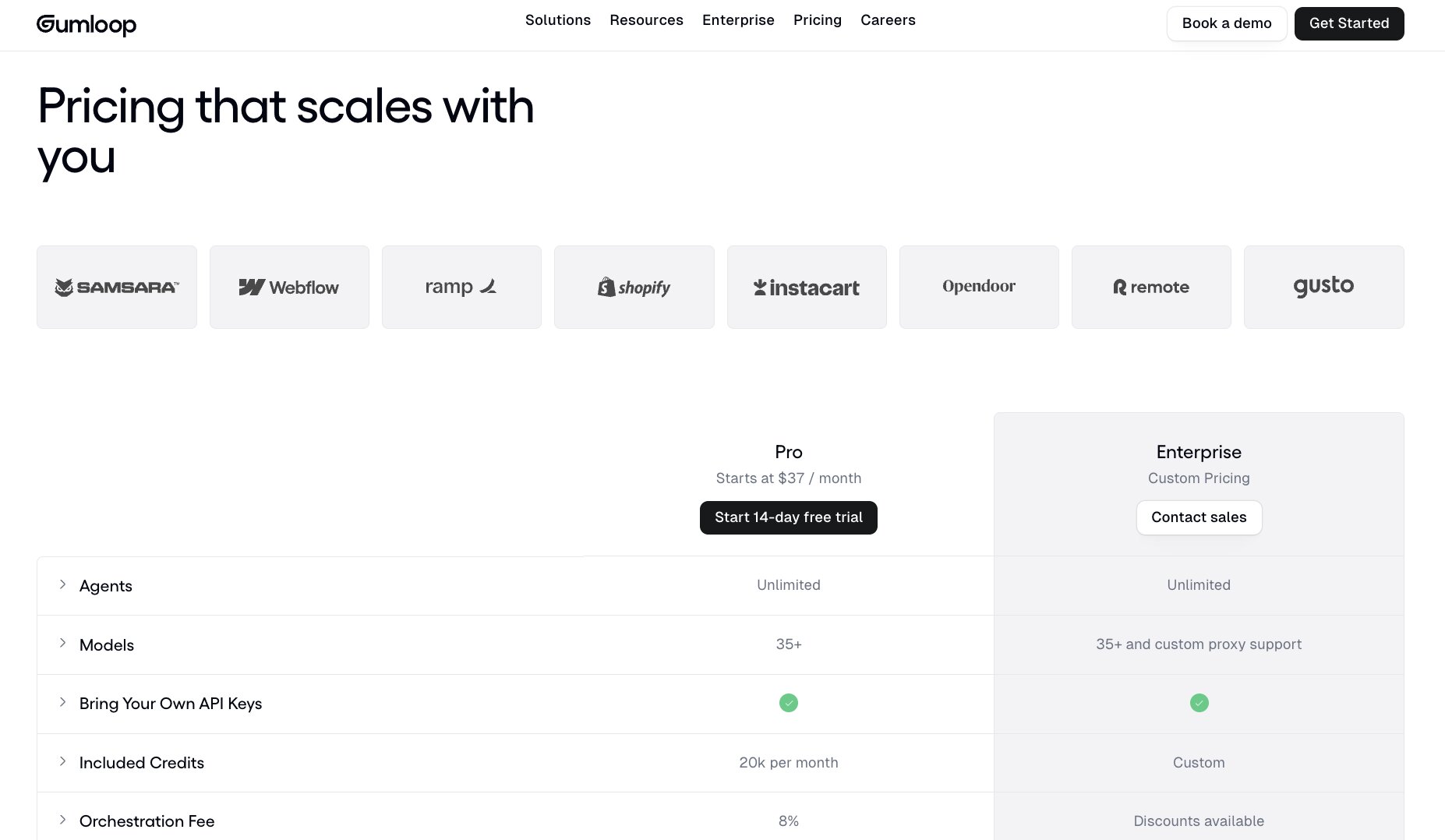
Gumloop currently has a self-serve plan, Pro, and a sales-assisted plan, Enterprise. New accounts get a 14-day Pro trial.
- Pro: starts at $37/month, 20,000 credits included per month with pay-as-you-go usage pricing after that. Includes unlimited seats/teams/agents, 35+ models, BYOK support, 1 hosted MCP server, and agent-scoped connector policies.
- Enterprise: custom pricing. Adds SSO/SCIM, RBAC, audit logs, org-wide policies, incognito mode/ZDR, custom/proxy models, and optional VPC support.
1 Gumloop credit equals $0.005. The cost of an agent run is the cost of the tokens from the model, plus the cost of any tool calls, plus the cost of compute, with an 8% orchestration fee.
Gumloop ratings and reviews
2. Gemini Enterprise Agent Platform
- Best for: Complex, multi-agentic orchestration for Google Cloud-using developers
- Pricing: Pay-as-you-go (see below)
- What I like: Scalability, security, and governance built in by default
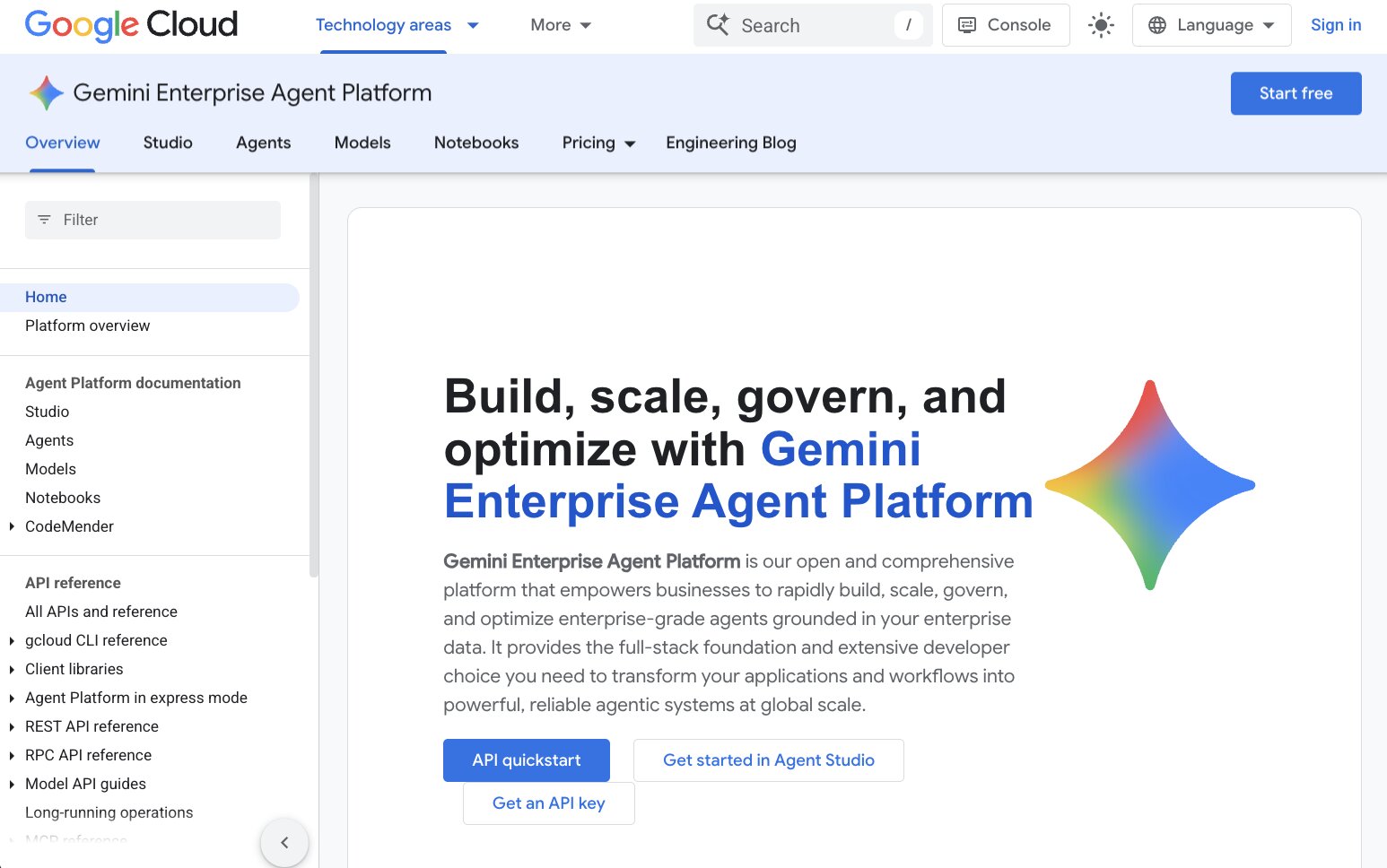
The Gemini Enterprise Agent Platform comprises dozens of different Google Cloud products organizations can use to build, scale, and govern enterprise-grade agents. In typical Google fashion, the platform currently known as “Gemini Enterprise Agent Platform” is actually a reorganization of several different products which have gone through numerous iterations and rebrands. You might have previously heard of Google Vertex AI Agent Builder, Vertex AI, or Google Agentspace, but as of April 2026, Google Cloud consolidated all of these names under the Gemini Enterprise brand.
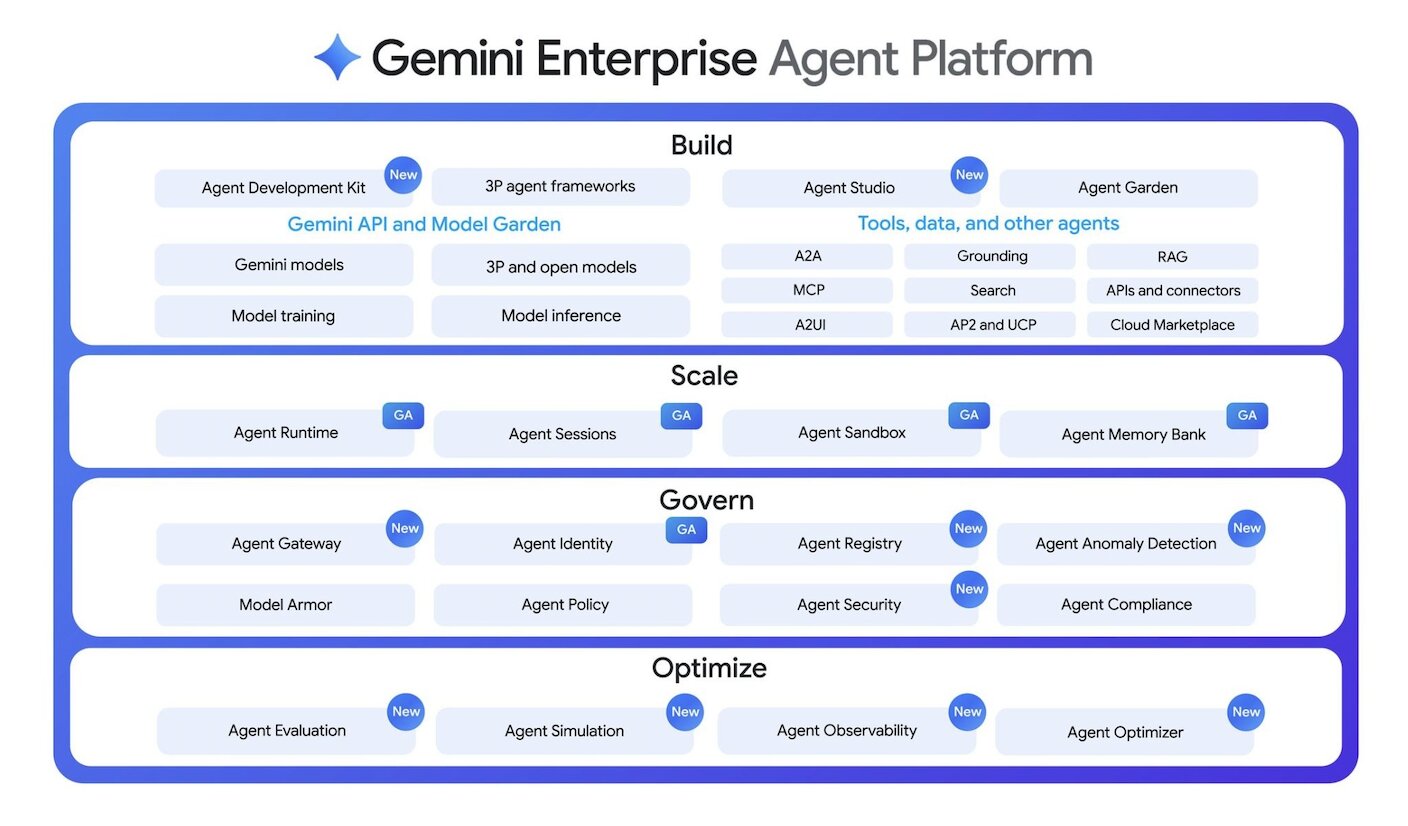
With Gemini Enterprise Agent Platform, you get a lot of options. For example, if you want to build an agent, you can use Agent Studio (their visual, low-code option), the Managed Agents API on Agent Platform (a managed code option that lets users build agents inside a fully managed sandbox environment), or the Agent Development Kit (ADK) (a custom code option that lets developers build complex, multi-agentic orchestrations with granular control).
On the governance side, Agent Platform also has built-in access to the security frameworks that come with Google Cloud. The Agent Registry product provides a unified central hub for securely managing and observing your enterprise’s agents. The Agent Identity auth manager comes fully integrated with Google’s policy systems, which support standard IAM allow/deny policies, and VPC service controls.
Gemini Enterprise Agent Platform pros and cons
With Gemini Enterprise Agent Platform, your developers and engineers will be able to orchestrate extraordinarily complex multi-agentic systems, all while using Google Cloud’s enterprise-grade security and governance tools. This is especially true if your organization is already a Google shop.
However, if your team doesn’t already use Google, and you’re interested in enabling non-technical users to build, you might be better off with another tool.
Where Gemini Enterprise Agent Platform shines:
- End-to-end integration: Agent Platform combines almost everything related to AI agent creation and governance — data processing, model training, agent building, deployment, monitoring, lifecycle management, etc. — into a single, unified system.
- Strong custom RAG options: Agent Platform supports connections to local files, BigQuery, Cloud Storage, Google Drive, Slack, so your agents’ responses are grounded in real organizational knowledge, rather than hallucinations.
- A2A support for agent-to-agent orchestration: In 2025, Google launched the Agent2Agent (A2A) protocol, which lets agents using different platforms communicate with each other. It’s designed to complement MCP, which handles how agents connect to tools and data. Naturally, as a Google product, Agent Platform makes full use of A2A and allows users to manage agents across diverse platforms and cloud environments.
What could be improved:
- Steep learning curve for non-technical users: For non-developers, the experience of getting an agent up and running using the Gemini Enterprise Agent Platform is pretty cumbersome. At minimum, it requires creating a Google Cloud project with associated billing, configuring IAM roles, and enabling several APIs.
- Google Cloud lock-in: Gemini Enterprise Agent Platform doesn’t just include Google models (in fact, they support open models like Llama and third-party partner models like Claude or Grok). However, Agent Platform is a Google product through and through, and if platform neutrality is important to you, building on a Google product will always be a non-starter.
- Confusing documentation: Because of the number of times Google has renamed and reorganized this product surface, finding documentation and support for the appropriate products can be challenging.
Gemini Enterprise Agent Platform pricing
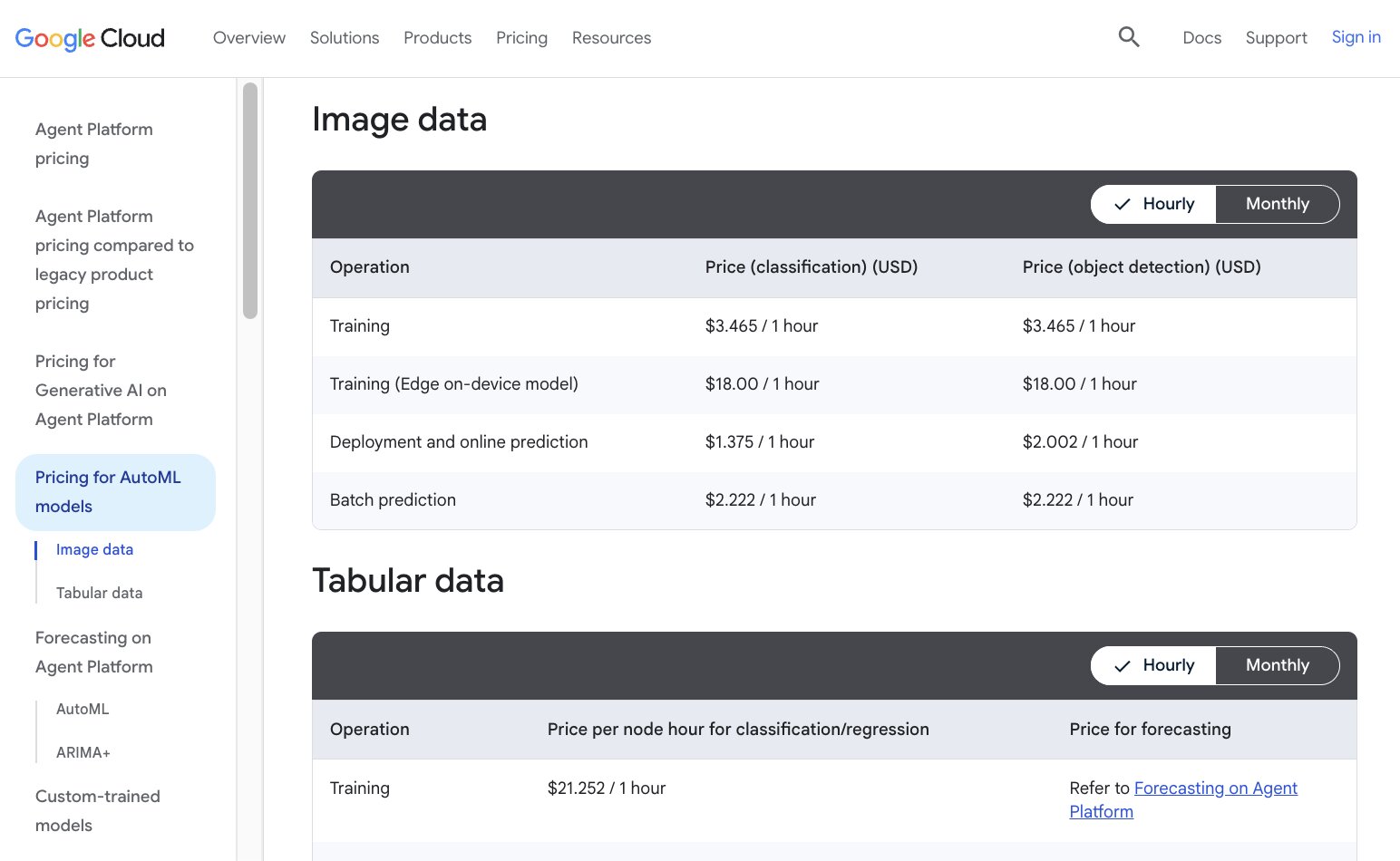
Gemini Enterprise Agent Platform mostly (but not always) uses pay-as-you-go pricing. However, what pay-as-you-go pricing actually looks like in practice can be a bit complicated.
A single agent interaction, for example, will incur fees for Agent Compute ($0.085/vCPU-h), Agent Memory ($0.009/GiB-h), Agent Storage ($0.30/GiB-month), as well as the token costs associated with whichever model is being used. (Currently, Google is offering Gemini 3.7 Flash and Gemini 3.6 Flash with introductory pricing of $0.75 / $3.75 per 1M tokens input / output through December 31, 2026.)
If you plan to use the Vector Search RAG features, those incur additional costs based on the type of virtual machine being used (starting at $68.480132 / 1 month) and the quantity of data being processed ($3.00 / GiB). Rather than a true pay-as-you-go model, you can also opt to pay for a bundled Storage-Optimized Capacity Unit ($1679.00 / 1 month), rather than individual VMs and separate compaction jobs.
The other features available under Agent Platform (e.g. prediction, custom model training, data labeling, etc.) each have their own separate pricing structures as well.
As of August 2026, Agent Platform pricing is documented here, but be forewarned: it’s a long doc.
Gemini Enterprise Agent Platform ratings and reviews
- G2: 4.3 / 5 rating (from 740 ratings)
- Gartner Peer Insights: 4.4 / 5 (from 316 ratings)
3. Glean
- Best for: A unified search layer for your entire org
- Pricing: Combination of per-user/per-month licensing and pay-per-use credits for “advanced AI features”
- What I like: Powerful and efficient enterprise search
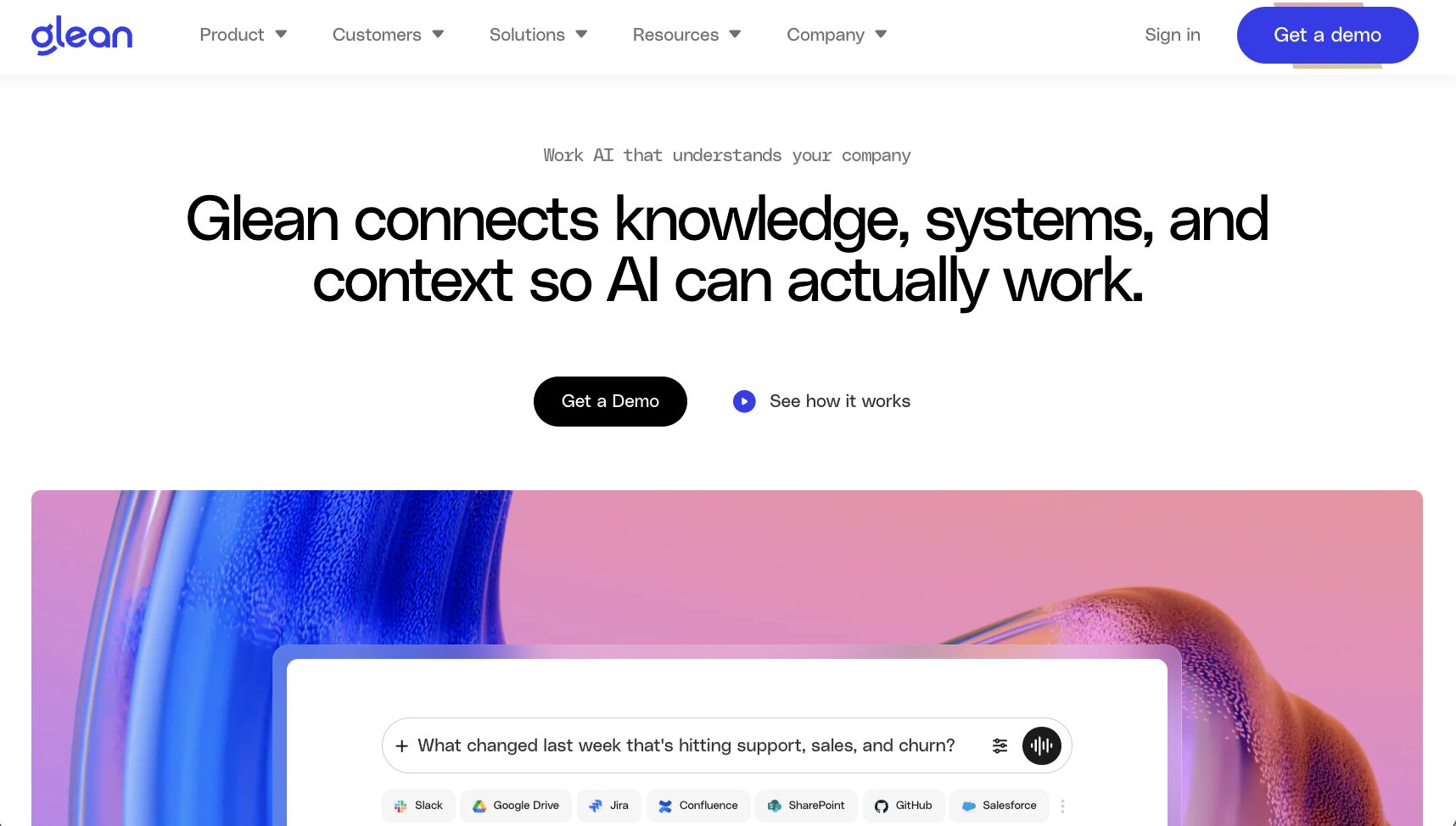
Glean was originally developed as a knowledge management tool, and indeed, that is where Glean excels. Glean uses AI to index multimodal data from enterprise SaaS tools like Salesforce, Slack, and Gong as well as data warehouses like Snowflake. For end users, Glean’s UI has a familiar chat-like interface that makes it relatively straightforward to pick up and start finding the organizational knowledge that they need, quickly and with minimal friction. If you’re interested in Lyzr’s Knowledge Base as a service offering, you should definitely check out Glean.
A common complaint about Glean has been that it was just a search tool; that while it was great at searching for information, there were limited options for taking action with that information and executing on work.
More recently, Glean has taken steps to move out of this specific niche and to become more of an end-to-end AI enterprise platform. A few months ago, they released tools for AI agent creation, orchestration, and governance (Agent Builder, Agent Orchestration, and Agent Governance, respectively).
Glean pros and cons
If your primary use case for an enterprise AI platform is creating a searchable index of company knowledge for your entire org, Glean makes it possible for end users of any technical level to ask questions and get the answers they need, quickly.
However, if your team is looking for more than just enterprise search (like agent building or governance), other platforms might give you more extensive capabilities and customization.
Where Glean shines:
- Fast, grounded search: Search results are indexed in real time and enforce the existing permissions of the data sources, so users get the most up-to-date results that they’re allowed to access.
- Option for customer-hosted deployment: While they don’t offer a traditional self-hosted model, Glean can deploy its tenant as a managed service in isolation within the customer’s own GCP or AWS cloud environment. Glean retains access to the customer’s environment for debugging and support purposes.
- Support for multiple models and providers: Glean supports frontier models from providers like OpenAI, Anthropic, and Google, as well as some open models like GLM, and even their own proprietary model, Waldo (based on NVIDIA Nemotron 3 Nano).
What could be improved:
- Search-first architecture: Glean’s agent-building and governance features are deployed alongside the core Glean search product. Even if your team is primarily interested in building and using AI agents, your team will still need to roll out a full enterprise search deployment in order to use Glean.
- Less mature non-search capabilities: The flip side of Glean being built around enterprise search is that its non-search tools are less established. Options for multi-agent orchestration, for example, are significantly less sophisticated than some of the other alternatives listed in this article.
- Per-seat pricing gets expensive at scale: Glean doesn’t provide official numbers on their pricing, but reports from customers indicate that the per-seat cost typically starts at about $50/user/month. However, this number doesn’t account for the additional cost of advanced AI capabilities (which are charged using a separate system), nor does it account for the seat minimums that are required on their enterprise contracts.
Glean pricing
Glean recently migrated their pricing to something called “Glean Enterprise Flex,” which combines per-user, per-month seat pricing (“Enterprise Flex Seats”) with pay-per-use pricing (“FlexCredits”).
The intended purpose of this pricing model seems to be so that organizations can have the predictable budgeting of seat-based pricing with the flexibility of pay-as-you-go pricing.
Glean outlines the structure of their enterprise pricing in this doc, although they don’t publicly provide dollar amounts for the different actions and capabilities, as they require custom quotes for all enterprise plans.
Glean ratings and reviews
- G2: 4.7 / 5 rating (from 170 ratings)
- Gartner Peer Insights: 4.5 / 5 (from 361 ratings)
4. CrewAI
- Best for: developers building flexible, code-first multi-agentic systems
- Pricing: free plan with 50 workflow executions per month; custom Enterprise pricing
- What I like: strong multi-agent orchestration, flexible deployment options
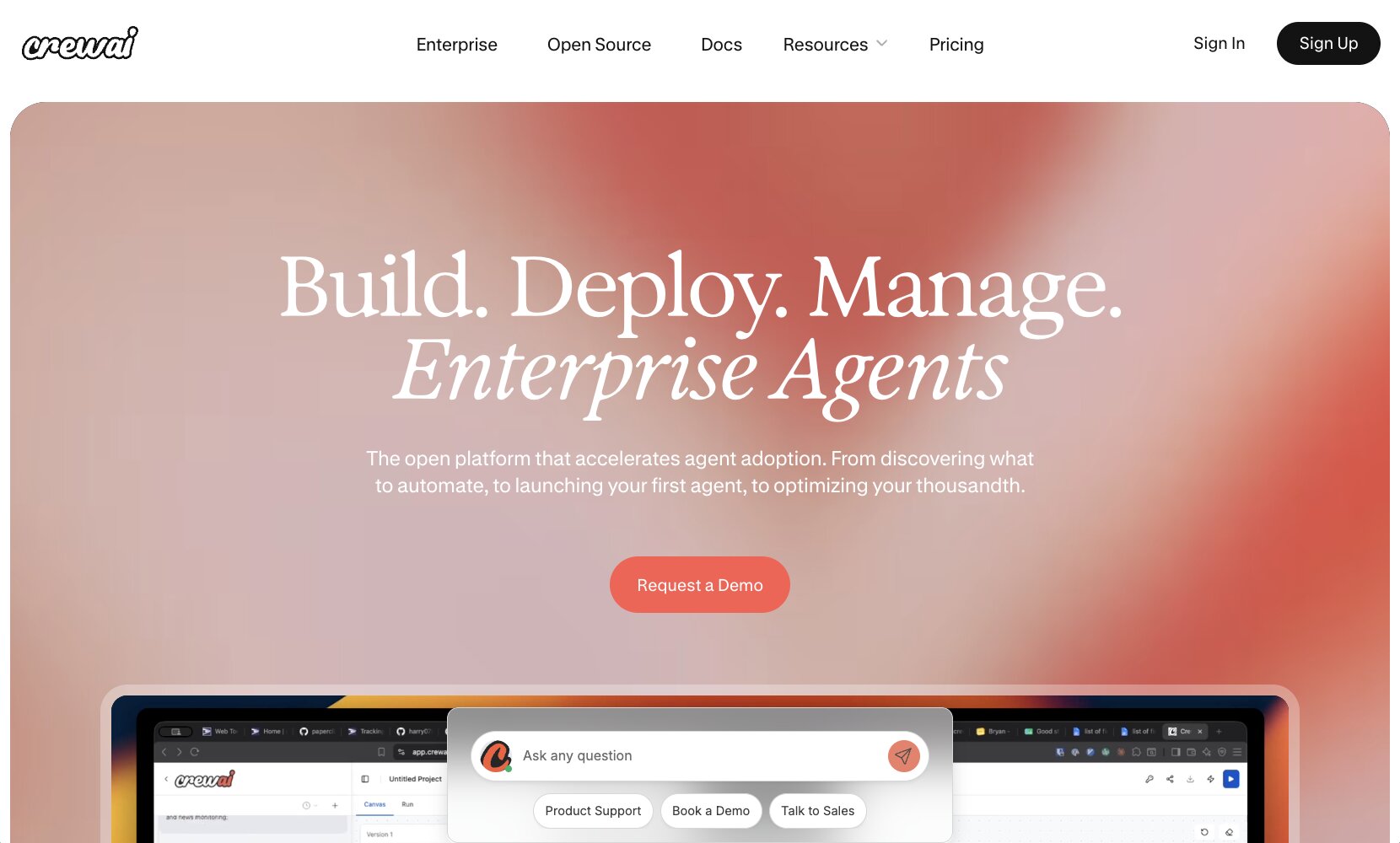
CrewAI began as an open-source Python framework for developers and has since evolved into an enterprise AI platform for orchestrating multi-agent systems. Organizations can use CrewAI to build autonomous AI agents, join those agents together into a multi-agent system called a “Crew,” and create structured, event-driven Flows to chain together multiple Crews into complex workflows. The combination of Flows and Crews allows developers to combine predictable logic with autonomous agent behavior.
On Enterprise plans, organizations get access to CrewAI AMP (Agent Management Platform). Within CrewAI AMP, business users can build agents visually or through chat and join those agents into Crews with a no-code tool called Crew Studio. Teams can either deploy the agent directly to CrewAI AMP, or download the code and continue developing it elsewhere. CrewAI Enterprise plans also include governance features like SSO and role-based access control (RBAC), organization policies and task-level guardrails, and built-in tracing capabilities for observability.
Certain features are still code-only right now: for example, Flows must be built through code, and attaching skills to agents also requires code. However, CrewAI’s recent change logs indicate that they’re looking to expand their options for conversational building, so stay tuned.
CrewAI pros and cons
If your developers are passionate about open source, want fine-grained control over every aspect of orchestrating multi-agent systems, and want the flexibility of not being tied to a specific model provider, CrewAI could be a strong option.
On the other hand, if your team is looking for a platform that is more approachable to business users, CrewAI may be too demanding. Crew Studio allows for basic no-code prototyping, but the finer details of configuration and deployment still require a fair amount of technical know-how (at least for now).
Where CrewAI shines:
- Open-source, open-model framework: Fittingly for CrewAI’s open-source origins, the platform supports a wide range of models from multiple providers. Choose frontier models from OpenAI, Anthropic, and Google, or choose open models like Kimi, Deepseek, and GLM, and swap between them freely.
- Multiple deployment options: On Enterprise plans, customers can choose to run CrewAI in a CrewAI-managed cloud environment, on their own dedicated VPC, or on their own infrastructure by using the self-hosted CrewAI Factory option.
- Built-in and custom PII redaction: CrewAI AMP can be set up to automatically detect and mask Personally Identifiable Information (PII) in execution traces so that sensitive data like credit card numbers, social security numbers, and names are not exposed in CrewAI AMP traces. You can even create custom recognizers to detect organization-specific PII.
What could be improved:
- Steep learning curve for non-technical users: Crew Studio allows business users to generate a working agent through chat, but CrewAI’s DNA as a developer-first tool means that many of the platform’s more complex features are still only accessible through code.
- Awkward handoff between visual and code-based development: Users can export generated code from agents developed visually in Crew Studio, but any changes made to the code cannot be imported back into Studio to be edited later.
- Built-in testing options have limited providers: CrewAI includes a CLI testing feature that runs a crew repeatedly and assigns performance scores. However, OpenAI is currently the only supported provider for the testing feature, which could be an issue for teams standardizing on other providers.
CrewAI pricing
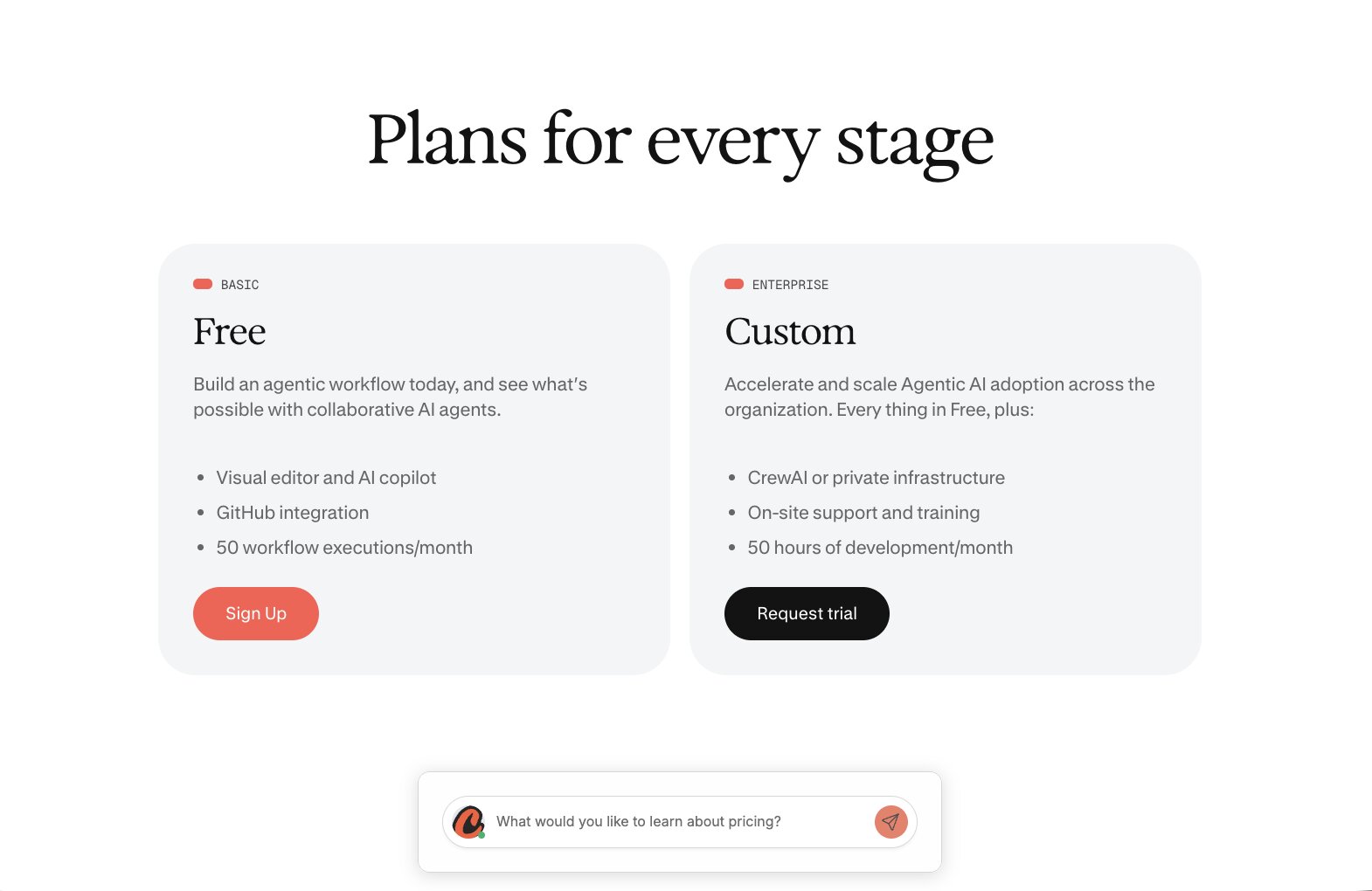
CrewAI offers a free Basic plan, which includes 50 workflow executions per month, as well as access to the visual editor, an AI copilot, and GitHub integration.
If you need governance features or private deployment options (or just want to execute more than 50 workflow per month), you’ll need CrewAI’s Enterprise plan. Since they don’t have a paid self-service tier or publicly stated price for Enterprise, contact their sales team for more info.
CrewAI ratings and reviews
- G2: 4.4 / 5 rating (from 17 ratings)
5. LangSmith (by LangChain)
- Best for: Engineering teams that want to deploy, trace, and evaluate agents
- Pricing: LangSmith Developer is $0/seat; LangSmith Plus is $39/seat/month plus usage; custom Enterprise pricing
- What I like: Flexible deployment options, strong observability and evaluation tools
Although LangSmith is a commercial platform for observing, evaluating, and deploying agents, it’s actually built atop two different open-source libraries: LangChain (a more general framework for building applications on large language models) and LangGraph (a more specific framework for agent orchestration). LangChain is also the name of the company behind all these different tools.
You can use LangSmith with LangGraph, LangChain, or other frameworks; conversely, you can use LangGraph without using LangSmith. If you’re evaluating Lyzr alternatives, you’re most likely looking for a full platform rather than an agent-building framework, so let’s consider the entire stack of LangSmith and LangGraph together.
Building agents with LangSmith can be done with code, or through a no-code product called LangSmith Fleet, which lets business users create agents from templates or chat. Orchestrating agents with LangSmith is mostly a code-first experience. To connect agents together, developers write graphs in LangGraph and interact with deployed agents through the LangGraph CLI and the Python or JavaScript SDK. They can also use a different LangChain product called LangSmith Studio as an IDE to visualize the graph, iterate on prompts, and deploy.
With LangSmith Enterprise, customers get AI governance options for SAML/OIDC SSO, SCIM, RBAC, and attribute-based access control (ABAC). LangChain has also recently invested in LangSmith Engine, an agent that surfaces and diagnoses recurring issues based on your production traces.
LangSmith pros and cons
If your developers want granular control over their agents and evaluation/tracing tools to monitor those agents once they’re in production, LangSmith and LangGraph is a strong choice.
If you want your non-technical users to be able to build and share agents, LangSmith might not be the best option for your team. Although LangSmith Fleet allows business users to build simple internal automations, anything more complex will require a developer comfortable with writing in LangGraph.
Where LangSmith shines:
- Strong observability and evaluation options: LangSmith Observability has extensive tracing capabilities and also offers dedicated SmithDB databases designed for agent observability. LangSmith Evaluation can turn production traffic into datasets and run offline experiments.
- Fine-grained graph control via LangGraph: LangGraph makes it possible for developers to combine deterministic Python with LLM nodes, and add in checkpoints or human-in-the-loop steps.
- Flexible deployment options: LangSmith Enterprise offers a wide range of deployment options managed cloud, hybrid (LangChain runs the control plane; customer owns the agent runtime), fully self-hosted, or even a standalone Agent Server if the customer only wants runtime from LangSmith.
What could be improved:
- Steep learning curve for non-technical users: Non-technical users can create simple agents with LangSmith Fleet, but that’s about it. Getting value out of the rest of the LangSmith product suite, like LangSmith Studio, LangSmith Engine, and LangSmith Deployment, requires a team that is, at minimum, comfortable with writing graphs.
- Sprawling product family can get confusing: Several of the products under the LangChain umbrella have recently been renamed, which can make it especially difficult to figure out which products you actually need or want to purchase.
- Pricing can get expensive across multiple dimensions: Per-seat pricing (with seats on Plus starting at $39/month), base vs. extended tracing, LCUs ($1.50), LSUs ($1.00), deployment uptime, Fleet usage, and Engine scans are all billed separately.
LangSmith pricing
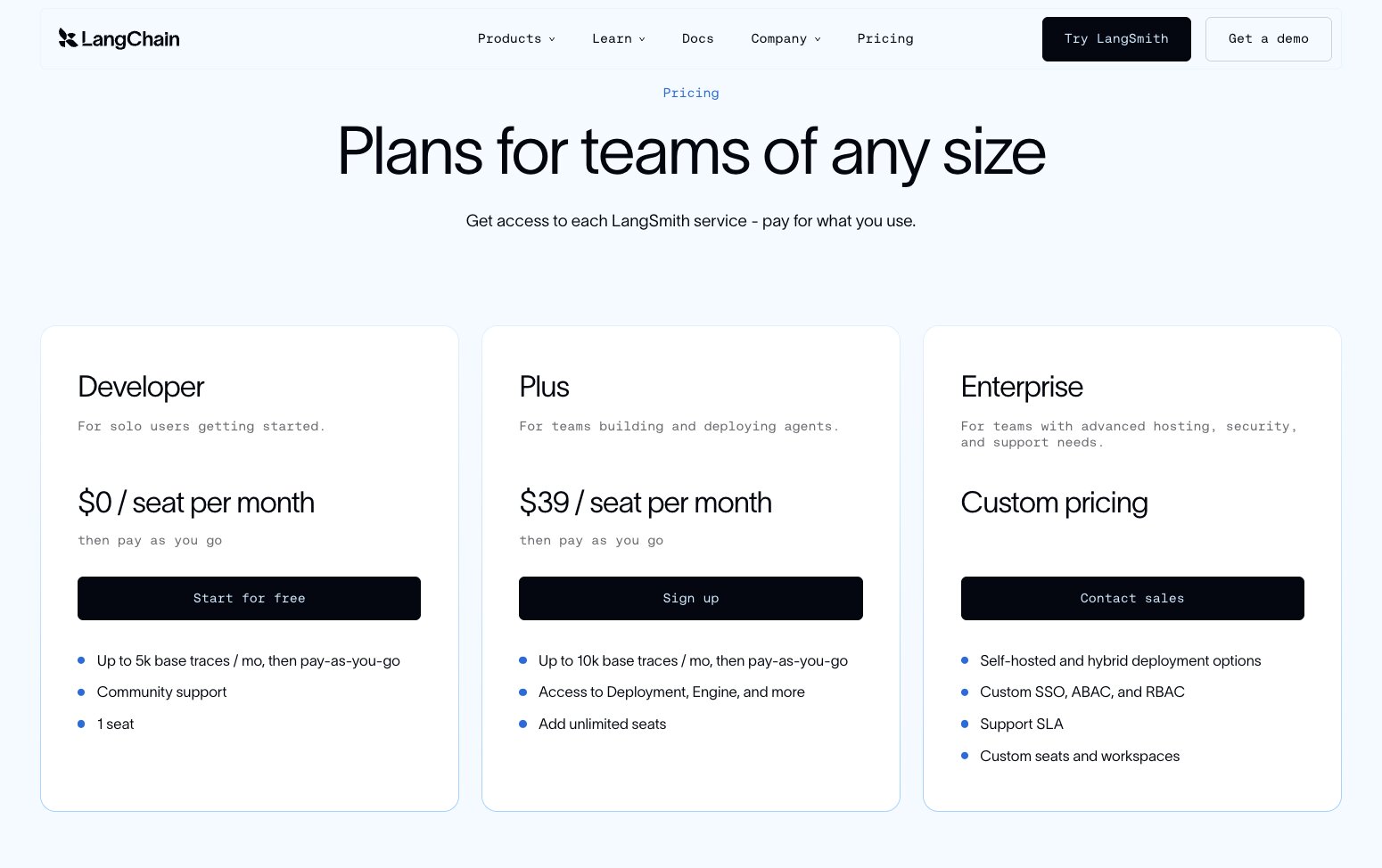
The open-source LangChain and LangGraph libraries are both free.
The LangSmith commercial product has three tiers:
- Developer: $0/seat/month, 1 seat, 5,000 base traces/month included, then pay-as-you-go. No managed deployment option.
- Plus: $39/seat/month, 10,000 base traces/month included, then usage-based pricing. Access to Deployment, Engine, and related services, and 1 free small serverless deployment.
- Enterprise: Custom pricing, invoiced annually. Adds self-hosted/hybrid options, custom SSO, ABAC, RBAC, support SLAs, and custom seats/workspaces.
Usage is metered in LCUs (compute/work, $1.50) and LSUs (storage/traces, $1.00). Base traces are retained 14 days; extended traces are retained 400 days and cost extra. Fleet includes a small monthly LCU allowance (5 on Developer, 25 on Plus) and then pauses or bills. Engine is an extra LCU charge; LangChain estimates roughly 5–30 LCUs per Engine run.
LangSmith ratings and reviews
- G2: 4.5 / 5 rating (from 70 ratings)
- Gartner Peer Insights: 4.4 / 5 (from 22 ratings)
6. Dust

- Best for: non-technical users building no-code AI agents based on company knowledge
- Pricing: Free seat with 500 lifetime credits; Pro $29/seat/month or $24 billed yearly; Max $150/seat/month or $120 billed yearly; custom Enterprise
- What I like: approachable agent-building, agents that live in Slack
Dust is an AI platform for creating and running agents on top of shared company knowledge and tools. Rather than starting from code (the way that you might with LangSmith or CrewAI), Dust starts from shared workspace tools. Connect your company’s Slack, Drive, Notion, GitHub, and other shared sources, then have users talk to agents through Slack, email, or in the Dust interface.
Agent building is mostly no-code: the user provides instructions, picks a model, connects knowledge sources, tools, and skills, and optionally adds scheduled or webhook triggers. Dust comes with a built-in helper chatbot called Sidekick that drafts instructions and recommends tools, skills, and models. Dust agents can also call other Dust agents (recursion is capped at 4) and use temporary sandboxes for running code.
Governance in Dust follows a space-based model. Admins connect data sources, put them in open or restricted Spaces, and control who can create or publish agents. Dust supports SSO (Okta, Entra ID, Jumpcloud), role-based access; on Enterprise plans, Dust also supports SCIM, audit logs, custom retention, and single-tenant deployment.
Dust pros and cons
If your organization is interested in giving a wide range of business users the ability to create and use agents based on shared knowledge, without having to write code, Dust could be a good choice.
However, if you need granular multi-agentic orchestration, heavy-duty eval/trace options, or to run the platform in your own VPC, Dust may not be the right fit.
Where Dust shines:
- Usable for non-technical team members: Agent-building on Dust is intended to be accessible for all users in a company, not just developers or engineers.
- Model flexibility: All plans include access to 20+ models from OpenAI, Anthropic, Google, Mistral, and more. Choose the desired model per agent and swap it freely at any time.
- Agents show up where users do their work: Slack is a first-class surface for Dust agents. Dust can also be used through a Chrome extension, email, webhooks, and in Microsoft Teams.
What could be improved:
- Meaningful caps on self-serve Business plans: Business plans are for teams of up to 100 people, but teams on Business plans are limited to a maximum of 3 company data source connections, 5 remote MCP servers, and 5 Spaces. (Since Spaces are the main mechanism for permissions, this effectively limits Business-tier teams’ permissioning options.)
- Fewer multi-agent orchestration options: Dust agents can call other agents, but you have to pick which agent(s) to call and write instructions about the circumstances when those agents get called. Unlike code-first tools like LangGraph or CrewAI, Dust doesn’t allow users to mix deterministic code and LLM steps together into complex workflows.
- Limited hosting options: You can choose US or EU hosting, and the Enterprise plan adds the option for single-tenant hosting. Unlike most of the alternatives on this list, Dust does not support customer VPC.
Dust pricing
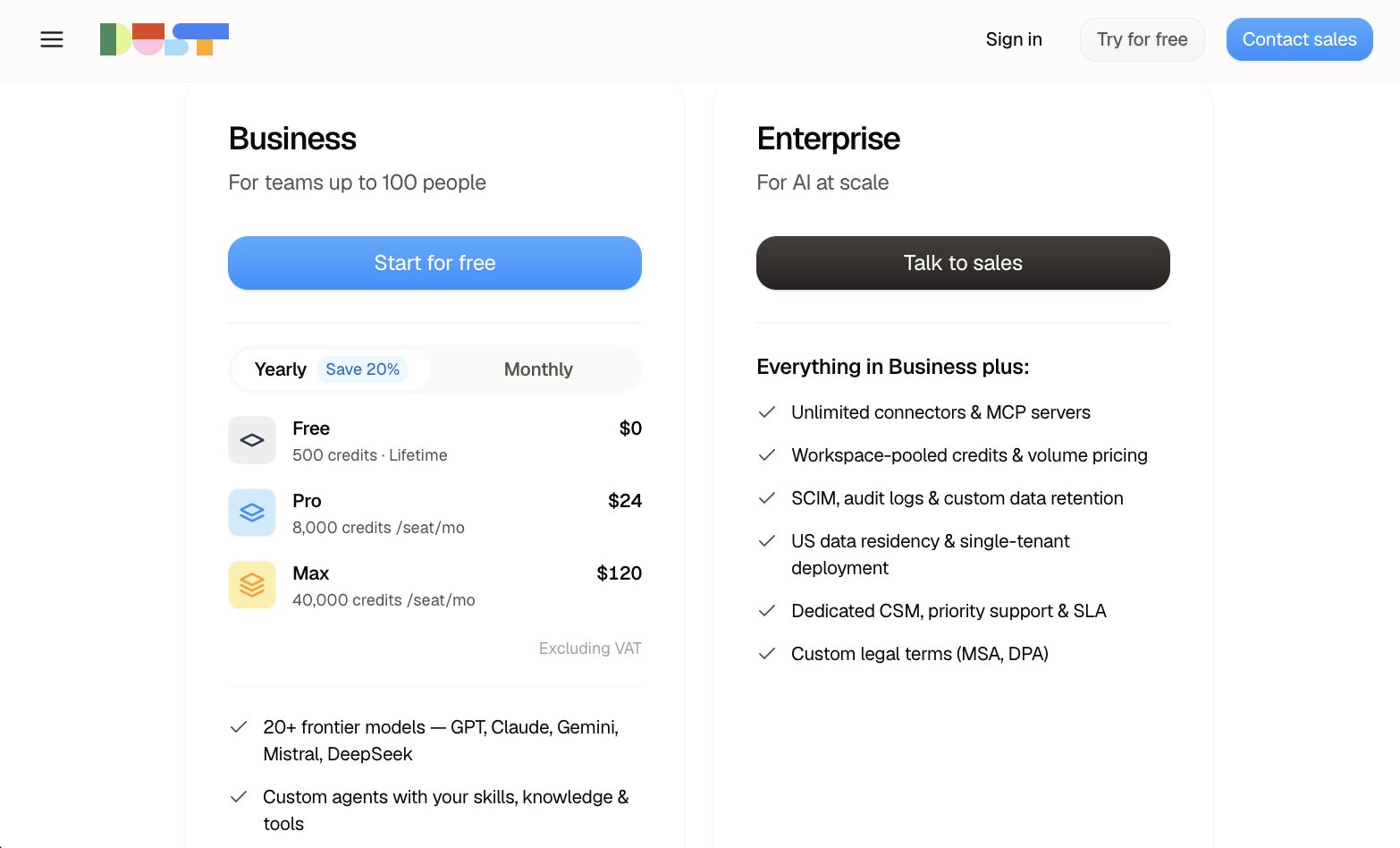
Dust offers a self-serve Business plan and a sales-assisted Enterprise plan.
Business is a workspace plan with three seat types you can mix:
- Free: $0, 500 credits lifetime. Occasional users / trial.
- Pro: $29/seat/month, or $24/seat/month billed yearly, 8,000 credits/seat/month.
- Max: $150/seat/month, or $120/seat/month billed yearly, 40,000 credits/seat/month. Aimed at people running deep research or tool-heavy automations.
Credits are Dust’s usage unit. Consumption depends on the model and on tools (search, retrieval, code execution, actions in connected apps). Unused credits do not roll over. If a Pro/Max user runs out, an admin can allow capped workspace overage; Free users get prompted to upgrade. Programmatic usage on Business is listed at $0.01 per credit.
Enterprise is a custom plan with workspace-pooled credits, volume pricing, unlimited connectors/MCP, SCIM, audit logs, custom retention, single-tenancy, and an SLA.
Dust ratings and reviews
- G2: 4.6 / 5 rating (from 85 ratings)
7. Workato

- Best for: teams that need an integration platform as a service (iPaaS), with additional agentic support
- Pricing: custom pricing only; agent features require Workato One edition
- What I like: agents that can take action in many different connected apps
Workato has long been an established player among the low-/no-code options for enterprise companies building integration workflow automations. Their core building blocks are called recipes, and consist of a trigger and a series of deterministic workflow steps across connected apps.
As of 2026, Workato has launched an automation platform for agentic AI called Workato One. Workato One is subdivided into Workato Agentic (a set of tools for building and managing agents) and Workato Orchestrate (a set of tools for orchestrating data, applications, and processes). Within Workato Agentic, Agent Studio is a low-code toolkit for designing and testing “genies,” the term Workato uses for custom agents. A genie has a model, a job description, a chat surface (Slack, Microsoft Teams, or the Workato GO app), a knowledge base, and “Skills.”
Confusingly, Skills in Workato are not the same as SKILL.md files, the open markdown standard used to give AI agents instructions across different platforms. What Workato calls Skills are essentially Workato recipes, and operate more like traditional automation workflows. Like SKILL.md files, Workato Skills specify how agents should perform tasks; unlike SKILL.md files, Workato Skills accomplish this by running API connectors and deterministic logic rather than guiding a model’s behavioral prompts.
Governance for agents in Workato is based on Workato’s existing identity model. Agent Studio has RBAC on genies and knowledge bases, as well as audit trails. For customers with stricter data requirements, Workato offers Virtual Private Workato (VPW) as a paid add-on that puts your environment in a dedicated, isolated AWS VPC that Workato still operates and peers into your network.
Workato pros and cons
If your organization is already building on Workato, or is specifically looking for an integration platform, adding Workato genies on top of that will allow you to get up and running quickly.
If you are primarily looking for a tool that allows business users to build agents, it’s a big ask to purchase the most expensive tier of the Workato platform, for a feature that arguably isn’t the core functionality.
Where Workato shines:
- Predictable work, repeatable at scale: With Skills, a genie can kick off a multi-step process using the same connectors and error handling as the rest of the Workato platform.
- Identity-aware actions and approvals: Verified user access runs Skills under the end user’s credentials rather than a shared service account.
- Chat where teams already work: In addition to support for Slack and Microsoft Teams as first-class services, there is also a headless API to embed genies in other apps.
What could be improved:
- Agent-building is gated behind the highest plan: Workato offers four tiers of pricing: Standard, Business, Enterprise, and Workato One. Agent Studio is only available on Workato One, the most expensive tier. Even if your team is mostly interested in agent-building and less interested in the core Workato workflow automation product, you cannot purchase a lighter tier without upgrading the entire platform.
- Building useful genies requires integration work: Genies’ effectiveness is largely determined by how useful its skills are. If your team already has a mature Workato deployment, this process is made much easier; however, teams without previous Workato experience will need to build out an entire integration system before getting their agents up and running.
- Evaluation tooling is still maturing: As of August 2026, Workato describes batch runs and automated grading as forthcoming rather than available.
Workato pricing

Workato does not publish list prices. Customers pay:
- A platform edition fee (Standard → Business MCP → Enterprise MCP → Workato ONE
- A usage fee in a shared billing unit, allocated across capabilities
Each prompt to a genie (from a user, another genie, or an app event) counts as agent-related usage. Certain features like VPW, on-prem agents, or pre-built genies are separate, paid add-ons.
Workato ratings and reviews
- G2: 4.7 / 5 rating (from 777 ratings)
- Gartner Peer Insights: 4.9 / 5 (from 582 ratings)
- Capterra: 4.6 / 5 (from 85 ratings)
8. Salesforce Agentforce
- Best for: enterprises already running Salesforce who want agents grounded in CRM data
- Pricing: Requires that you already pay for Salesforce. Salesforce Foundations gives access to Agentforce for $0; Flex Credits at $500 per 100k credits or Conversations at $2 each, plus per-user add-ons and editions
- What I like: deep CRM grounding, strong agent testing tools
Salesforce, the most famous name in enterprise CRM SaaS, has made its move into the era of agentic AI with its Agentforce platform. They’re committed enough to the Agentforce branding that they’ve renamed much of their product portfolio accordingly: Sales Cloud is now Agentforce Sales, Service Cloud is now Agentforce Service, and the Salesforce Platform is now the Agentforce 360 Platform.
The main selling point of Agentforce is that unlike other agent platforms, which have to connect to your CRM, Agentforce agents allow you to build within the Salesforce ecosystem directly. The agents can reason from your live CRM data (accounts, cases, opportunities, etc.) and take action using the same permissions your Salesforce admins already maintain.
Users can build agents in Agentforce using either the no-code visual canvas tool Agentforce Builder (inside Agentforce Studio), or using a declarative language called Agent Script. Agent Script allows for developers to design agentic systems that use both deterministic logic and nondeterministic LLM reasoning. More recently (in June 2026), Salesforce also shipped support for multi-agent collaboration.
Given its Salesforce origins, Agentforce has the testing and governance options you would expect from a mature enterprise product. Agentforce Testing Center can simulate multi-step conversations against user personas and score agents against evaluation criteria. and expose full execution traces for those test runs.
The Salesforce Einstein Trust Layer is Agentforce’s architecture for AI governance: it provides ZDR agreements with third-party model providers, data masking features, and full execution traces for agent runs. Admins can implement org-wide policies with Agentforce Guardrails. Agentforce agents inherit existing role-based permissions from Salesforce, so if your organization is already on Salesforce, you won’t need to set up RBAC again..
Salesforce Agentforce pros and cons
If your organization already uses Salesforce as its system of record and you want agents that can act directly on your live customer data, Agentforce has a real edge that no other alternative on this list can offer.
The flip side of this is that if your company doesn’t already run Salesforce, Agentforce is hard to recommend. If you’re looking for a lightweight platform that anyone on your team can use to build agents that can connect with other tools, Agentforce is probably not the best fit.
Where Agentforce shines:
- Built-in grounding and permissions: If you’re already a Salesforce customer, Agentforce means you’ll never have to worry about whether or not your agents are properly synced with your CRM. Your Salesforce admins also won’t need to do any additional work to set up roles and permissions for your agents.
- Supports both deterministic logic and LLM reasoning: Agent Script gives developers a level of flexibility and granular control over agentic workflows that is typically only accessible through code-first frameworks.
- Well-developed pre-production testing tools: Agentforce supports simulated conversations with personas, custom natural-language evaluation criteria with pass/fail thresholds, and execution traces.
What could be improved:
- Value is contingent on your team already using Salesforce: There are almost no situations in which the amount of cost and upfront work that would be required to set up an entire Salesforce instance, just to use Agentforce, would be justifiable.
- Complicated pricing that adds up, fast: There are three different buying models, two different types of usage-based pricing, and seat-based pricing for certain feature add-ons. Actions consume credits at tiered multipliers that differ between production and sandbox (see the next section for more details).
- Steep learning curve: Agent Script is a proprietary declarative language, so even an experienced developer is going to need some time to properly onboard.
Salesforce Agentforce pricing
In order to use Agentforce, your organization already needs to be on Salesforce. So before calculating the cost of Agentforce, you also need to consider the amount that your organization is paying for Salesforce CRM.
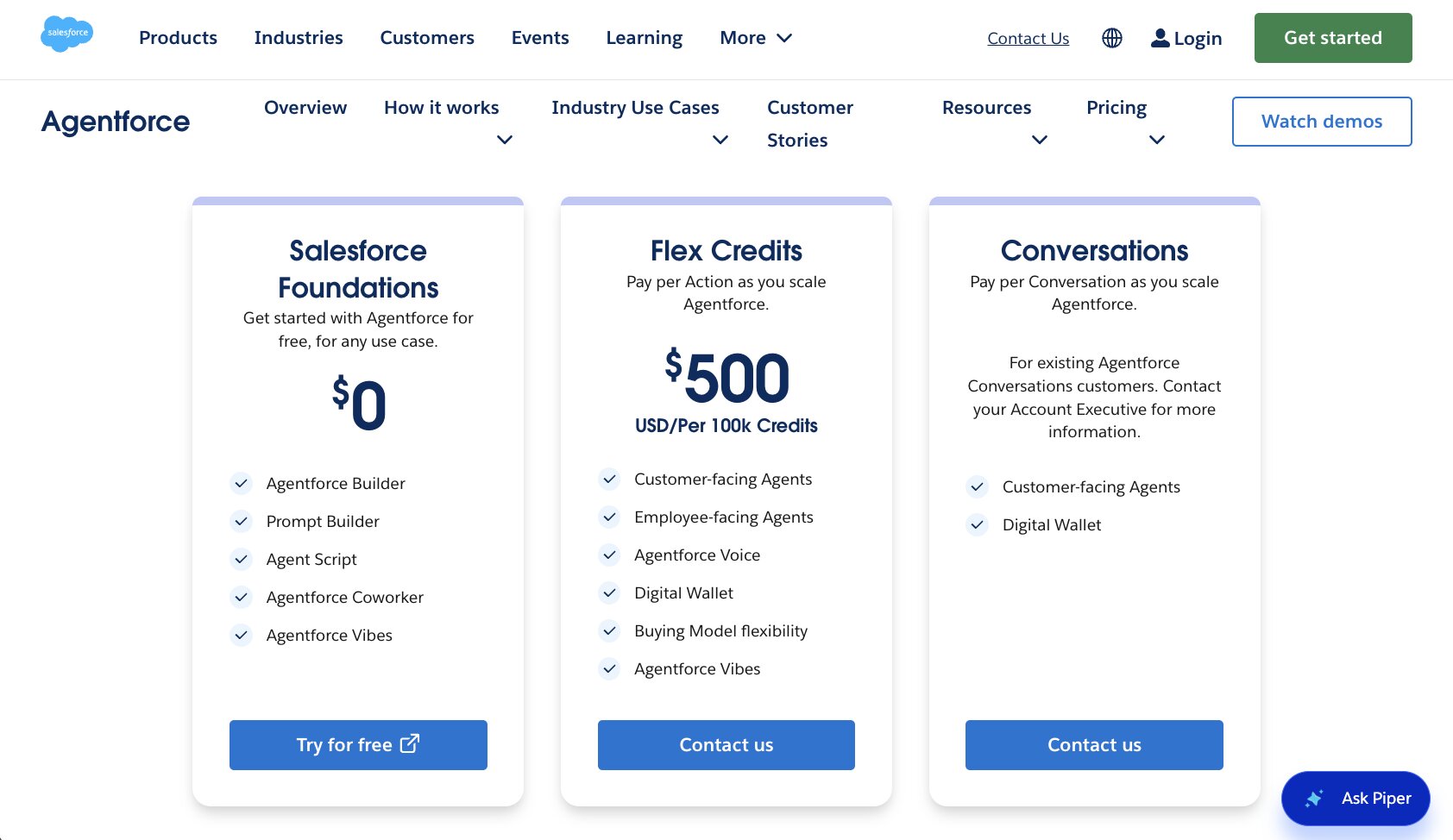
Assuming you already have Salesforce CRM, Salesforce Foundations is a $0 add-on to the CRM product that includes Agentforce Builder, Agent Script, Prompt Builder, Agentforce Coworker, and Agentforce Vibes. As usage increases, there are three different buying models for purchasing credits: Pre-Purchase (pay upfront for a set number of credits), Pre-Commit (commit for a set number of credits without paying upfront) and PayGo (pay-as-you-go pricing calculated based on actual usage).
Usage-based pricing is calculated in two different ways:
- Flex Credits: $500 per 100,000 credits, fungible across Actions, Prompts, Translations, and Voice Actions. A standard agent action consumes 20 credits, so roughly $0.10 per action; voice actions cost 30, and prompts run from 2 to 16 depending on complexity. Sandbox usage is billed at lower multipliers than production.
- Conversations: $2 per conversation, aimed at customer-facing agents that want predictable flat pricing.
On top of that, there’s also seat-based pricing for various add-ons.
- Agentforce User License: $5 per user/month for company-wide employee access to a limited set of CRM objects. (Still requires Flex Credits for the usage itself.)
- Per-user add-ons: $125 user/month for Sales, Service, and Field Service, or $150 for Industries Clouds, both covering unmetered employee usage.
- Agentforce 1 Editions: from $550 user/month, which bundles the add-on and 2.5M Flex Credits per org per year.
Salesforce Agentforce ratings and reviews
- G2: 4.3 / 5 rating (from 1,203 ratings)
- Gartner Peer Insights: 4.3 / 5 (from 72 ratings)
Which Lyzr AI alternative should you choose?
After researching all these tools, it’s clear that there’s no one right answer. A lot depends on what your team is already doing and what specific capabilities you’re looking for.
If your organization is looking for a tool that your developers can use to build, iterate on, and test extremely complex multi-agentic workflows, a code-first platform like CrewAI or LangSmith might be a good fit. But if you want non-technical and business users to be able to build agents on their own, without developers, an end-user friendly tool like Gumloop or Dust will better meet your needs.
If your team is already using Salesforce or Workato, Agentforce and Workato One respectively are each worth evaluating. If your organization is already heavily invested in the Google Cloud Platform ecosystem, check out Gemini Enterprise Agent Platform. Of course, if your team doesn’t already use these platforms, they are much less appealing alternatives.
For enterprise organizations that are trying to strike a balance between a bottoms-up approach of empowering end users to build agents themselves, while also providing top-down security and governance frameworks required for enterprise use cases, Gumloop gives you the best of both worlds. Gumloop makes agents easy to build and accessible through Slack, Microsoft Teams, and email, while also providing observability, audit logging, policy guardrails, and VPC deployment.

Read related articles
Check out more articles on the Gumloop blog.