7 Superblocks alternatives for building enterprise AI apps


Internal AI tooling is having a moment, and if you're reading this, you're probably already looking for a Superblocks alternative.
I don't blame you. Every week there's a new platform promising to let your team build AI apps without engineers, ship internal tools faster, or replace half your SaaS stack.
Superblocks is one of the bigger names in this category, but it's far from the only one. And depending on what you're actually trying to build, it might not even be the right one.
I've been testing a bunch of platforms in this space over the past few months, and they all look pretty similar on a landing page. But once you actually start building, the day-to-day experience of putting workflows together, sharing them across a team, and keeping things governed at scale can feel completely different from one tool to the next.
So in this post, I'm going to walk through the Superblocks alternatives I think are actually worth a look, what each one is good at, and the tradeoffs to watch out for before you commit.
What to look for in a Superblocks alternative
Superblocks became popular because it gave engineering teams a faster way to build internal tools without starting everything from scratch. If your company needed an ops dashboard, approval workflow, admin panel, or customer support tool connected to databases and APIs, it solved a real problem.
But internal tooling is changing pretty quickly right now.
A lot of teams aren’t just looking for low-code builders anymore. They also want AI agents, workflow automation, more collaborative workflows across teams, and platforms that non-engineers can actually use without constantly relying on developers. Pricing structure and deployment flexibility matter more now too, especially once these tools move beyond a small engineering team and into wider company use.
Here’s what I’d look for in a Superblocks alternative:
- Can it actually build apps without writing code? Some platforms still assume your team is comfortable working in SQL or JavaScript. Others are much easier for non-engineers to pick up.
- Does it have native AI or agent capabilities? There’s a big difference between platforms built around AI workflows and tools that added AI features later.
- What deployment models does it support? Depending on your security requirements, you may need self-hosting, VPC deployment, or on-premise support instead of cloud-only hosting.
- How strong are the integrations? A mature connector library saves a lot of engineering time compared to relying on custom APIs for everything.
- Does the pricing model scale well? Per-seat pricing can get expensive fast once multiple teams start using the platform.
- What enterprise governance features are included? Look closely at SSO, RBAC, SCIM, audit logs, and observability controls.
- How fast can non-engineers build something useful? Some ‘low-code’ tools still require significant engineering involvement before teams can actually ship something production-ready.
- Can apps, workflows, or agents be shared safely? Reusable workflows and permission controls become important quickly once multiple teams are involved.
- Is the platform LLM-agnostic? You probably don’t want to get locked into a single AI model provider long term.
- Does it already have customers at your scale? Customer logos aren’t everything, but they’re still a useful signal for platform maturity and enterprise readiness.
Now let’s get into the platforms I’d actually look at if you’re evaluating alternatives to Superblocks.
7 Superblocks alternatives and competitors in 2026
The interesting thing I’m finding about this market right now is that internal app builders are starting to split into very different categories.
Some platforms are doubling down on developer tooling and backend flexibility. Others are leaning hard into AI agents, workflow automation, and making these tools accessible to non-engineering teams too.
Here are the Superblocks alternatives I’d actually look at:
Alright, let’s go over each one.
1. Gumloop

- Best for: Teams that want an AI-agent-native platform where workflows, agents, and internal tools can be shared across the company
- Pricing: Free, then starts at $37/month
- What I like: The multiplayer approach. Teams can build workflows and agents once, then reuse them across the organization instead of everyone rebuilding the same automations from scratch
Gumloop is probably the most interesting Superblocks alternative I’ve looked at recently because it approaches the problem from a pretty different direction.
Superblocks started as a developer-first internal app builder, whereas Gumloop feels much more AI-native from the ground up. Instead of focusing primarily on dashboards and internal apps, it leans heavily into AI workflows, agents, automation, and multiplayer collaboration across teams.
What became obvious to me fairly early is that Gumloop is designed around shared workflows and institutional knowledge.
So instead of one ops person building an automation for themselves, teams can create agents and workflows that other people across the company can safely reuse. For example, my sales ops team could build outbound enrichment workflows that every AE uses, or my marketing team could create reusable SEO and research workflows for new team members.
I also think Gumloop is one of the stronger options right now if your company is moving toward AI workflows more broadly. Features like MCP server hosting and proxying, organization-wide workflow sharing, and enterprise governance controls make it feel much more purpose-built for AI operations
Some things I like about Gumloop:
- Anyone on your team with the right permissions can build workflows and agents that other people across the company can reuse
- The platform supports MCP server hosting and proxying, which gives teams much more flexibility connecting workflows to external tools
- Enterprise plans include governance features like SCIM/SAML, RBAC, audit logs, and custom data retention controls
- The pricing model is built more around team usage than charging aggressively per seat, which makes more sense for collaborative AI workflows
- Companies like Ramp, Shopify, and Gusto already use the platform, which gives me a lot more confidence in the platform at enterprise scale.
Here are some things that could be improved:
- There’s still a learning curve if your team has never worked with AI agents or workflow automation before
- Credit-based pricing can become harder to predict once usage scales across multiple teams
- Some of the more advanced enterprise security and deployment controls are only available on custom Enterprise plans
Gumloop pricing

Here are Gumloop’s pricing plans:
- Free: $0/month with 5,000 credits per month, 1 seat, 1 active trigger, and forum support
- Pro: Starts at $37/month with 20,000+ credits per month, unlimited seats, 5 concurrent runs, 25 concurrent agent interactions, MCP server hosting, and team usage analytics
- Enterprise: Custom pricing with everything in Pro, plus SCIM/SAML, RBAC, audit logs, custom data retention controls, Virtual Private Cloud deployment, and AI model access controls
One thing I like about Gumloop’s pricing model is that it’s built more around organizational usage than charging heavily per seat. That makes much more sense once multiple teams start sharing agents and automations across the organization.
If you want to compare plans in more detail, you can check out Gumloop’s pricing page.
Gumloop reviews
Here’s how customers of Gumloop rate the platform on third-party review sites:
- G2: 4.8 out of 5 star rating (from +7 user reviews)
- Product Hunt: 5 out of 5 star rating (from +9 user reviews)
The review volume is still relatively small compared to more established platforms like Retool, but that’s pretty normal for newer AI-native workflow tools. Most of the early reviews focus on ease of use, workflow flexibility, and how quickly teams can get useful automations running.
2. Retool

- Best for: Engineering-led teams that want a highly customizable platform for building internal tools
- Pricing: Free, then starts with usage-based and seat-based pricing
- What I like: Retool still has one of the most flexible environments for building complex internal apps if your team is comfortable working with SQL, JavaScript, and APIs
Retool is probably the closest direct competitor to Superblocks on this list.
Both platforms are built around the same core idea: helping engineering teams build internal tools faster without coding every interface completely from scratch. If your company is building admin panels, ops dashboards, approval systems, or internal operational apps tied into databases and APIs, Retool is very much in that world.
And honestly, Retool became the category leader for a reason.
The platform is extremely flexible, the component library is mature, and engineering teams can move pretty quickly once they understand the system. Compared to a lot of newer no-code tools, Retool still leans much more heavily toward developers, and honestly, that’s part of the appeal. You can go pretty deep technically when you need to.
That said, I also think Retool highlights where this market is starting to split.
Compared to platforms like Gumloop, Retool feels much less AI-native and much more focused on traditional internal software development. Retool has added AI functionality, but it still doesn’t feel like the core identity of the platform. The learning curve is also noticeably steeper for non-technical teams. Even though Retool is technically ‘low-code,’ most serious implementations still benefit from people who are comfortable with SQL, APIs, JavaScript, and backend systems.
Pricing can also become a real consideration once usage scales. Retool’s pricing model separates builders, standard users, external users, workflows, and AI agents, which gives flexibility, but can become harder to predict across larger organizations.
Some things I like about Retool:
- One of the most mature and flexible internal tooling platforms on the market
- Excellent for engineering-led teams building complex operational software quickly
- Strong integrations with databases, APIs, and third-party services
- Supports cloud, self-hosted, and VPC deployment models for enterprise environments
- Widely adopted across startups and enterprise engineering teams
Here are some things that could be improved:
- The learning curve for non-engineers is still fairly steep despite the low-code positioning
- Pricing can become expensive once you scale builder seats, workflows, AI agents, and usage
- AI capabilities still feel more additive than truly AI-native compared to newer platforms
Retool pricing

Here’s the general structure from Retool’s pricing page:
- Free: Limited builders and app usage for small teams
- Team: Starts around $10-$12 per standard user/month, with additional pricing for builders and workflow usage
- Business: Adds advanced permissions, audit logs, SSO, and governance controls
- Enterprise: Custom pricing with self-hosting, VPC deployment, SCIM, advanced support, and enterprise governance features
One thing I’d recommend with Retool is modeling expected usage before committing. The platform is powerful, but pricing can scale faster than teams initially expect once multiple departments and workflows get involved.
If you want the full breakdown, you can check out Retool’s pricing page.
Retool reviews
Here’s how customers of Retool rate the platform on third-party review sites:
- G2: 4.6 out of 5 star rating (from +350 user reviews)
- Capterra: 4.5 out of 5 star rating (from +34 user reviews)
3. Appsmith

- Best for: Teams that want an open-source internal app platform with self-hosting and infrastructure control
- Pricing: Free open-source tier, then starts at $15/user/month
- What I like: Appsmith gives teams a lot of flexibility without forcing them into a fully proprietary ecosystem
Appsmith is probably the strongest open-source alternative to Superblocks on this list.
A big part of the appeal is control. Teams can self-host the platform, customize deployments, and use the free community edition without immediately getting pushed into enterprise pricing conversations. That makes it especially attractive for startups, engineering teams, and companies with stricter infrastructure requirements.
Compared to Retool and Superblocks, Appsmith feels a little more infrastructure-first and a little less polished from a UI and workflow perspective. But for a lot of technical teams, that tradeoff is completely worth it if the priority is ownership and flexibility.
I also think Appsmith works well for companies that already have strong engineering resources internally. The platform gives developers a lot of room to work directly with APIs, databases, and custom logic without abstracting everything away behind heavy no-code layers.
Where I think Appsmith falls behind some of the newer platforms is around AI-native workflows and integrations. AI features exist, but they don’t feel nearly as central to the platform as they do with tools like Gumloop or StackAI. The integration ecosystem also feels smaller compared to some of the more mature commercial players in this category.
Some things I like about Appsmith:
- Strong open-source foundation with a free self-hostable community edition
- Good fit for teams that want more infrastructure and deployment control
- Flexible enough for engineering teams working directly with APIs and databases
- Enterprise plans include SSO, SCIM, audit logs, and advanced governance controls
- Can be significantly cheaper than commercial competitors if your team is comfortable self-hosting
Here are some things that could be improved:
- The platform feels less polished than Retool in some areas of the UI and developer experience
- The AI and agent capabilities still feel fairly early compared to newer AI-native platforms
- The integration ecosystem is smaller than some of the larger commercial competitors
Appsmith pricing

Here’s the general structure from Appsmith’s pricing page:
- Free: Open-source community edition with self-hosting support
- Business: Starts at $15/user/month
- Enterprise: Starts at $2,500/month for 100 users, with SSO, SCIM, audit logs, CI/CD, and advanced governance features
What I like about Appsmith’s pricing structure is that the free tier is genuinely usable for technical teams that want to self-host and manage deployments themselves.
If you want the full breakdown, you can check out Appsmith’s pricing page.
Appsmith reviews
Here’s how Appsmith customers rate the platform on third-party review sites:
- G2: 4.6 out of 5 star rating (from +67 user reviews)
- Capterra: 5 out of 5 star rating (from +2 user reviews)
4. Glide

- Best for: Non-technical teams building lightweight internal apps from spreadsheets and existing business data
- Pricing: Free plan available, with paid plans starting from $49/month
- What I like: Glide is probably one of the easiest platforms on this list for non-engineers to start building with quickly
Glide is a pretty different type of platform compared to Superblocks.
Where Superblocks, Retool, and Appsmith are all largely built around engineering-led internal tooling, Glide is much more focused on no-code app building for business teams. A lot of the experience is designed around simplicity, speed, and turning existing data sources like Google Sheets or Airtable into usable internal apps quickly..
And that’s where Glide shines.
A lot of operations, HR, customer success, and field teams use Glide to spin up lightweight internal tools without needing engineering support every time they want to build something. The learning curve is dramatically lower than most of the developer-first platforms on this list.
The tradeoff is that Glide isn’t really designed for highly complex backend workflows or deeply customized internal systems. Once you start needing more advanced logic, engineering-heavy integrations, or granular infrastructure control, the platform starts to feel more limiting compared to tools like Retool or Superblocks.
But if your actual goal is helping non-technical teams build useful internal apps quickly, Glide is probably one of the best options in this category.
Some things I like about Glide:
- Extremely approachable for non-technical teams
- Very fast time-to-first-app compared to most internal tooling platforms
- Strong integration with spreadsheet-style workflows and business data
- Clean UI and overall user experience
- Good fit for lightweight operational tools and mobile-friendly internal apps
Here are some things that could be improved:
- Not a great fit for highly complex backend logic or engineering-heavy workflows
- Less infrastructure and deployment flexibility than developer-first platforms
- Advanced customization can become limiting as applications scale in complexity
Glide pricing

Here’s the general structure from Glide’s pricing page:
- Free: Basic app-building features for individuals and small projects
- Maker: Starts at $49/month
- Business: Starts at $199/month with additional users priced separately
- Enterprise: Custom pricing with advanced governance, security, and support features
Glide’s pricing is generally more team-oriented and app-oriented than infrastructure-oriented, which makes sense given the audience the platform is targeting.
If you want the full breakdown, you can check out Glide’s pricing page.
Glide reviews
Here’s how customers of Glide rate the platform on third-party review sites:
- G2: 3.5 out of 5 star rating (from +1 user review)
- Trustpilot: 3.2 out of 5 star rating (from +408 user reviews)
5. Budibase

- Best for: Teams that want self-hosted internal tools with more control and a stronger UX than most open-source platforms
- Pricing: Pro plan starting from $23/month
- What I like: Budibase does a good job balancing open-source flexibility with a much cleaner user experience than a lot of OSS internal tooling platforms
Budibase sits somewhere between Appsmith and Retool in terms of positioning.
Like Appsmith, a big part of the appeal is self-hosting and infrastructure control. Teams can run Budibase on their own infrastructure, customize deployments, and avoid getting locked too deeply into a fully managed SaaS model. But compared to a lot of open-source internal tooling platforms, Budibase feels noticeably more polished from a UI and usability perspective.
A lot of open-source internal app builders are powerful, but they still feel engineering-heavy once you start using them day to day. Budibase does a better job making the platform approachable for a wider range of teams without losing the flexibility technical users want.
I also think Budibase is a strong option for companies that care more about internal operational tools than AI-native workflows specifically. The platform is much more focused on forms, dashboards, approvals, CRUD apps, and workflow automation than agentic AI systems or advanced LLM orchestration.
Compared to platforms like Gumloop, the AI story definitely feels less central. But if your priority is self-hosted internal tooling with a relatively clean developer and end-user experience, Budibase is one of the better options in this category.
Some things I like about Budibase:
- Strong self-hosting and open-source capabilities
- Cleaner UI and user experience than many open-source alternatives
- Good balance between low-code usability and developer flexibility
- Works well for operational dashboards, forms, approvals, and CRUD-style internal tools
- Enterprise plans include SSO, audit logs, and governance controls
Here are some things that could be improved:
- AI and agent capabilities still feel fairly lightweight compared to AI-native platforms
- The community and integration ecosystem are still smaller than more established competitors like Retool
- Advanced customization can still require technical knowledge
Budibase pricing

Here’s the general structure from Budibase’s pricing page:
- Pro: Starts at $23/month for 5K actions
- Premium: Starts at $59/month depending on usage and billing structure at 20K actions
- Business: Starts at $359/month for 250K actions, also comes with extra security features like SSO
- Enterprise: Custom pricing with advanced governance, security, and support features
Budibase’s pricing is generally more infrastructure-focused than some of the no-code platforms on this list, which makes sense given the audience it’s targeting.
If you want the full breakdown, you can check out Budibase’s pricing page.
Budibase reviews
Here’s how customers of Budibase rate the platform on third-party review sites:
- G2: 4.5 out of 5 star rating (from +67 user reviews)
- Gartner Peer Insights: 5 out of 5 star rating (from +1 user review)
6. StackAI

- Best for: Enterprise teams building AI workflows in regulated industries like healthcare, finance, and legal
- Pricing: Free trial available, with Enterprise pricing available on request
- What I like: StackAI has one of the stronger enterprise compliance and deployment stories in the AI workflow space right now
StackAI is a pretty different type of alternative to Superblocks, but I still think it belongs on this list because a lot of companies evaluating internal tooling platforms are actually trying to solve a broader AI workflow problem underneath.
The platform is much more focused on AI agents, orchestration, document workflows, and enterprise AI deployment than traditional internal apps or admin dashboards. Compared to Superblocks, it feels less like a low-code internal tooling platform and more like an enterprise AI operations layer.
Where StackAI stands out most is around compliance, governance, and deployment flexibility. The platform leans heavily into regulated industries like healthcare, finance, legal, and education, and supports multi-tenant deployments, VPC environments, and enterprise security controls that enterprise buyers care about pretty early in the evaluation process.
I also think StackAI does a good job balancing AI workflow flexibility with usability. A lot of AI orchestration tools still feel extremely developer-heavy, while StackAI is noticebly more accessible to operational teams that want to build AI-powered workflows without building everything directly in code.
That said, if your primary goal is still traditional internal software development, platforms like Retool or Superblocks are probably a closer fit. StackAI makes more sense when the underlying need is secure AI workflows and enterprise AI operations rather than internal CRUD apps specifically.
Some things I like about StackAI:
- Strong enterprise security and compliance positioning for regulated industries
- Supports multi-tenant, VPC, and enterprise deployment models
- More AI-native than traditional internal tooling platforms
- Good balance between usability and AI workflow flexibility
- Large integration library for connecting enterprise systems and data sources
Here are some things that could be improved:
- Pricing is much less transparent than some competitors
- Less focused on traditional internal app building compared to platforms like Retool or Superblocks
- Advanced AI workflows can still require fairly technical setup and governance planning
StackAI pricing

StackAI doesn’t publish full self-serve pricing publicly in the same way as some other platforms on this list.
Here’s the general structure:
- Free trial available
- Team and Enterprise plans available through custom pricing
- Enterprise plans include advanced governance, security, deployment, and support options
One thing that stands out with StackAI is that the platform is clearly positioned toward larger enterprise deployments rather than smaller self-serve teams.
If you want the full breakdown, you can check out StackAI’s pricing page.
StackAI reviews
Here’s how customers of StackAI rate the platform on third-party review sites:
- G2: 4.5 out of 5 star rating (from +38 user reviews)
- Gartner Peer Insights: 5 out of 5 star rating (from +1 user review)
7. CrewAI

- Best for: Engineering teams that want to build multi-agent AI systems directly in Python
- Pricing: Open-source framework with Enterprise platform pricing available
- What I like: CrewAI gives developers a lot more flexibility and control than most no-code AI workflow platforms
CrewAI is definitely the most developer-oriented platform on this list.
And honestly, it’s not really a direct Superblocks competitor in the traditional sense. CrewAI is a multi-agent framework, not an internal app builder. But I still think it belongs in this conversation because a lot of developers evaluating platforms like Superblocks eventually start asking a different question entirely: should we just build our own agentic systems directly?
That’s where CrewAI starts to make sense.
Instead of giving teams a visual low-code environment for internal apps and workflows, CrewAI is much more focused on orchestrating autonomous AI agents programmatically. It’s built heavily around Python, developer workflows, and agent coordination logic rather than dashboards, forms, or business-user-friendly tooling.
That makes it incredibly flexible for engineering teams.
If your company has strong Python capabilities internally and wants maximum control over how AI agents behave, communicate, and execute tasks, CrewAI gives you a much lower-level framework to work with than platforms like Gumloop or StackAI.
The tradeoff is that you lose a lot of the accessibility and operational simplicity that makes low-code platforms appealing in the first place. CrewAI makes much more sense for engineering-led AI infrastructure projects than broader internal tooling initiatives across business teams.
Some things I like about CrewAI:
- Extremely flexible for engineering teams building custom multi-agent systems
- Strong open-source community and developer momentum
- Python-native approach fits naturally into existing AI engineering workflows
- Gives teams much more control over orchestration and agent behavior
- Enterprise platform available for teams deploying agents at larger scale
Here are some things that could be improved:
- Much steeper technical learning curve than no-code or low-code platforms
- Not designed for non-technical business users
- Requires significantly more engineering involvement to operationalize and maintain
CrewAI pricing
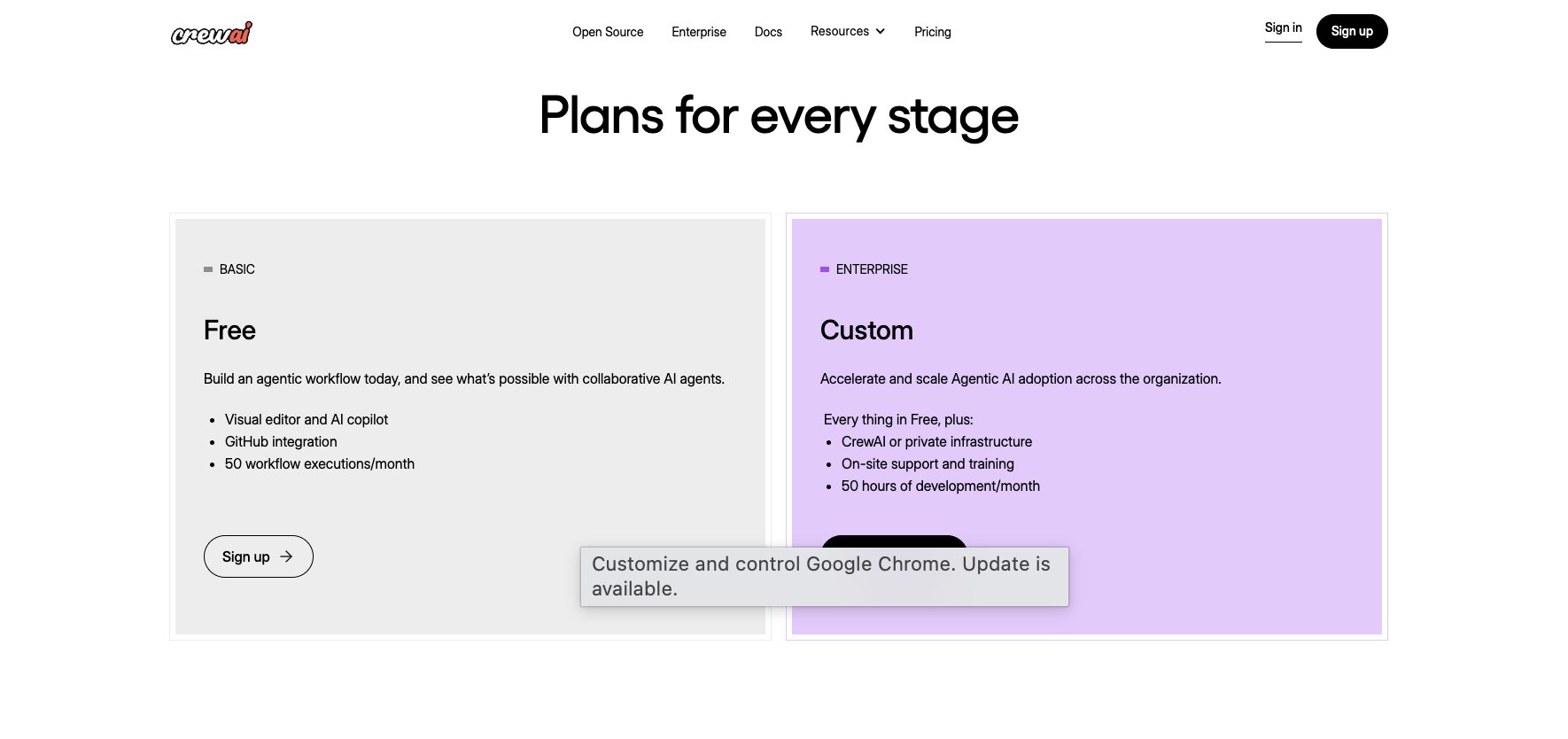
Here’s the general structure from CrewAI’s pricing page:
- OSS Framework: Free open-source framework for developers
- Enterprise platform: Custom pricing with enterprise deployment, governance, support, and operational tooling
If you want the full breakdown, you can check out CrewAI’s pricing page.
CrewAI reviews
Here’s how CrewAI is rated across developer and review platforms:
- GitHub: +41k stars on GitHub
- Trustpilot: 3.1 out of 5 star rating (from +2 user reviews)
Because CrewAI is heavily developer-focused and open-source-first, GitHub activity and community adoption are probably more useful signals here than traditional SaaS review volume alone.
Is there anything better than Superblocks?
I don’t think there’s one single ‘best’ Superblocks alternative because the platforms on this list are solving pretty different problems.
If you want AI-agent-native workflows where teams can build, share, and reuse automations across the organization, Gumloop is probably the platform I’d lean toward most heavily. It feels much more aligned with where this market is heading, especially for companies thinking beyond dashboards and internal tooling and toward collaborative AI workflows across teams.
If your priority is still developer-first internal tooling with strong engineering flexibility, Retool is probably the strongest fit. It’s still one of the most mature platforms available for building operational software tied into databases, APIs, and backend systems.
If infrastructure control matters most, Appsmith, and Budibase are both strong options. Appsmith leans more heavily into open-source flexibility, while Budibase offers a cleaner overall user experience.
If your goal is helping non-technical teams build lightweight operational apps quickly, Glide is probably the easiest platform here to adopt.
For regulated industries focused on secure AI workflows and governance, StackAI stands out. And if your engineering team wants to build agentic systems directly in Python, CrewAI is probably the strongest fit on this list.
The bigger shift I’m seeing is that companies aren’t just evaluating internal app builders anymore. They’re evaluating how AI workflows, automation, and institutional knowledge can actually be shared across teams.
That’s why Gumloop feels especially interesting right now. It’s one of the few platforms here that feels genuinely built around teams sharing workflows, agents, and operational knowledge together instead of keeping automation siloed inside one department.
If your company is moving in that direction, it’s worth seeing how Gumloop actually handles shared AI workflows across teams in practice.

Read related articles
Check out more articles on the Gumloop blog.