5 Salesforce AI agents I built that changed how I work

Before I built my first Salesforce AI agent, I had a love-hate relationship with Salesforce.
On one end, it's the most important CRM I have access to. And on the other end, it's one of my least favorite tools to open.
Don't get me wrong, Salesforce is great. And when maintained properly by GTM teams, sales teams, and marketing teams, it's often the main source of truth for all sales data.
Who is an MQL, who is an SQL, which contacts have a kickoff call coming up? All of these things matter for any revenue engine.
The only gripe I have with Salesforce is its UX. Functional? Yes. Form aesthetics? Could use some work.
I often find myself running into weird quirks when I'm deep trying to query something in Salesforce. And on top of that, it's sometimes hard to share with my team everything that's going on.
If only there was a way to slap AI onto my Salesforce account so I never have to log into it again, but can ask an agent to do anything with the data.
Well, I'm here to tell you that there is a way. And in this article, I'm going to show you all the top use cases I've seen for building Salesforce AI agents. I'll also show you how to create one (securely). But first, what is a Salesforce AI agent?
What is a Salesforce AI agent?
A Salesforce AI agent is an agent that has access to your Salesforce data. From there, you can treat your agent as the main mission control center of all your Salesforce needs.
Using the Salesforce MCP, you can create agents that can read CRM data (SOQL queries), make changes to your records, and allow you to create dashboards from your data.
In fact, I'll show you a dashboard I made with an AI agent for Salesforce that can leverage skill.md files to generate any report based on certain criteria I give it in my skills.
This way, I'm able to get a report sent to my email every day at 8 AM on all activity I care about that happened the previous day.
But to make this work, you want to use an AI agent builder that can integrate with Salesforce. Some might default to Claude Cowork, but because Salesforce can carry sensitive data, it's important to choose an agent builder with enterprise-level security.
So before I go into all the use cases I've found that have the most usage for Salesforce AI agents, let me briefly go over how to create one.
How to build a Salesforce AI agent (without a developer)
Salesforce has its own suite of autonomous agents that they call "Agentforce." It's essentially an assistant inside of Salesforce. They also have the ability to connect agents to Slack, so you can interact with your data.
But what people don't always get is that the harness you use an LLM (Large Language Model) in is extremely important. The same model can feel brilliant in one tool and useless in another, because what really matters is the reasoning engine around it.
Here's how I'd approach building a Salesforce AI agent.
1. Pick the right harness
This is the decision that matters most, since the harness shapes how well the agent handles prompt engineering and decides which agent actions to take.
Agentforce keeps everything native to Salesforce. Claude Cowork is a solid place to experiment with general agentic AI. And if you have engineering resources, you can always build a custom solution from scratch.
Each of these gets you some form of CRM automation, but they differ a lot in how far you can push sales automation, marketing automation, and even customer service automation once your needs grow.
But if you want an agent platform that's built with enterprise security and still makes it incredibly easy to build any Salesforce agent you can think of, you should check out Gumloop.
2. Connect Salesforce and your other tools
Once you've picked your harness, connect it to Salesforce and the rest of your stack.
The real value comes when your agent can reach beyond just a Salesforce CRM through third-party integrations, so it can pull context from tools like Gong or your calendar. This is what lets you build AI-powered workflows that span your whole sales and GTM motion.
3. Tell the agent what to do
Now you define the work. This is where you set up things like a lead qualification agent or a reporting agent by describing your criteria in plain language.
You can keep it simple with a single agent, or run multi agent systems that hand work off to each other for more complex jobs. The clearer your instructions, the better the agent reasons over your data.
4. Test, monitor, and keep it secure
Because these agents touch sensitive CRM data, you want to build for responsible AI from the start.
That means proper testing and monitoring, plus real guardrails around things like hallucination prevention instead of just good intentions. Make sure whatever you choose is built for enterprise AI and runs on enterprise grade security. You can read more about how Gumloop handles this here.
5. Share it across your team
This last step is the one people skip, and it's where the productivity gains really compound.
The tool I keep coming back to is Gumloop because it's multiplayer, so my whole sales team can share agents and skills instead of everyone rebuilding the same thing. One person sets up an agent, someone else borrows the skill, and the whole team levels up at once.
But really, the takeway here is to pick an agent platform that is both secure and easy to integrate with your sales tech stack. I'll give links to each use case I go over below, that way you can create these Salesforce AI agents for yourself.
Okay, let's get into the top ways Salesforce AI agents are being used today.
5 Salesforce AI agent use cases for RevOps teams
Here are the top Salesforce AI agent use cases:
- Report & dashboard summary agent
- Pipeline insights agent
- Inbound record-creation agent
- CRM hygiene & enrichment agent
- Call notes & activity logging agent
Alright, let's look at each of these.
1. Report & dashboard summary agent
- Best for: Creating custom dashboards based on Salesforce data
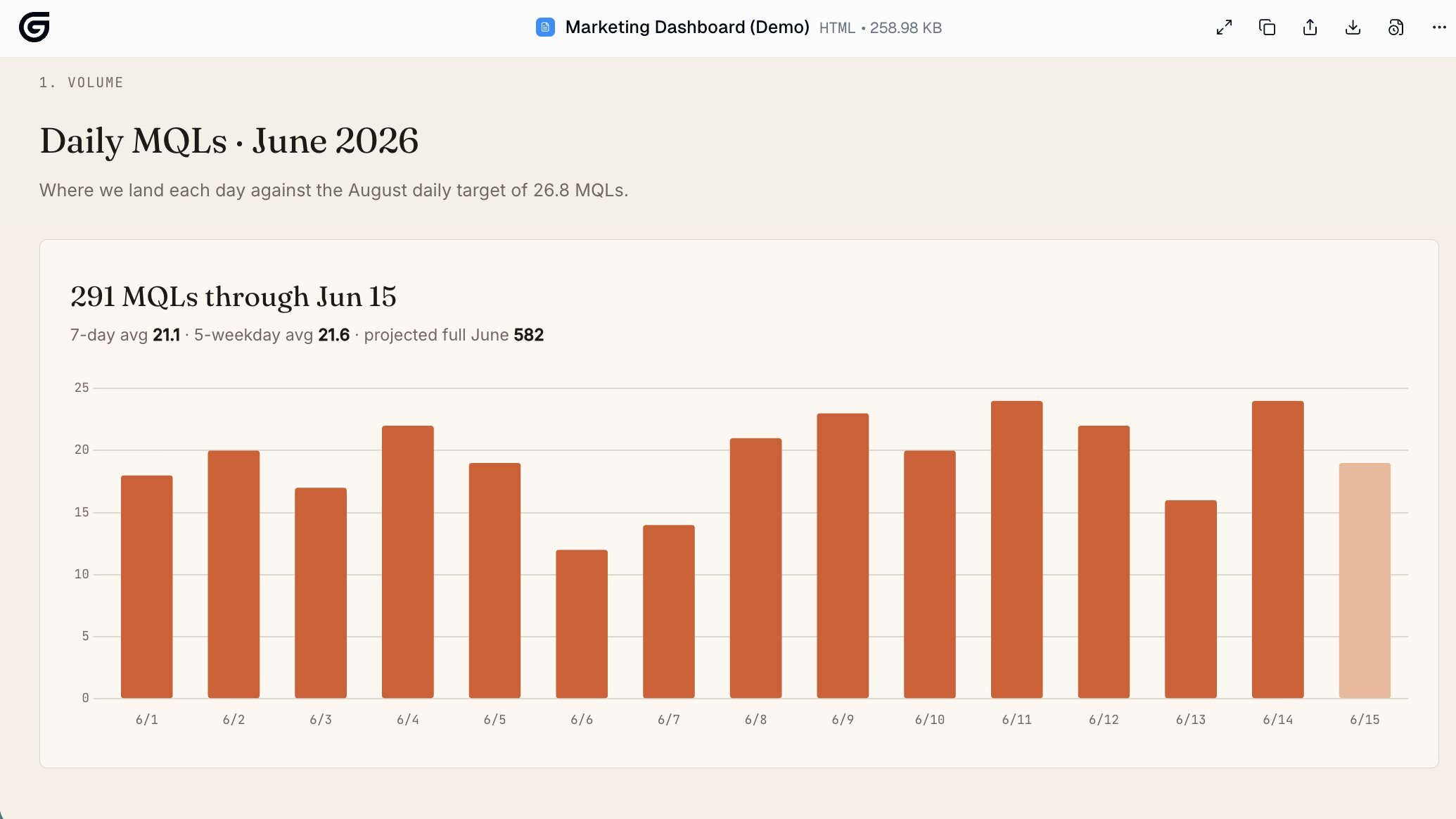
One of the main ways I use Salesforce with my AI agent is to create a daily MQL dashboard. I'm a head of growth, so I constantly need to see if our marketing initiatives are leading to more leads (no pun intended).
I also need to report on these numbers to our board, so I need a way to define what leads are considered a "marketing qualified lead" within Salesforce.
So to make this work, I have the Salesforce MCP integrated into a Gumloop agent. And from there, I have a specific skill that essentially filters out any junk that I would not consider an MQL.
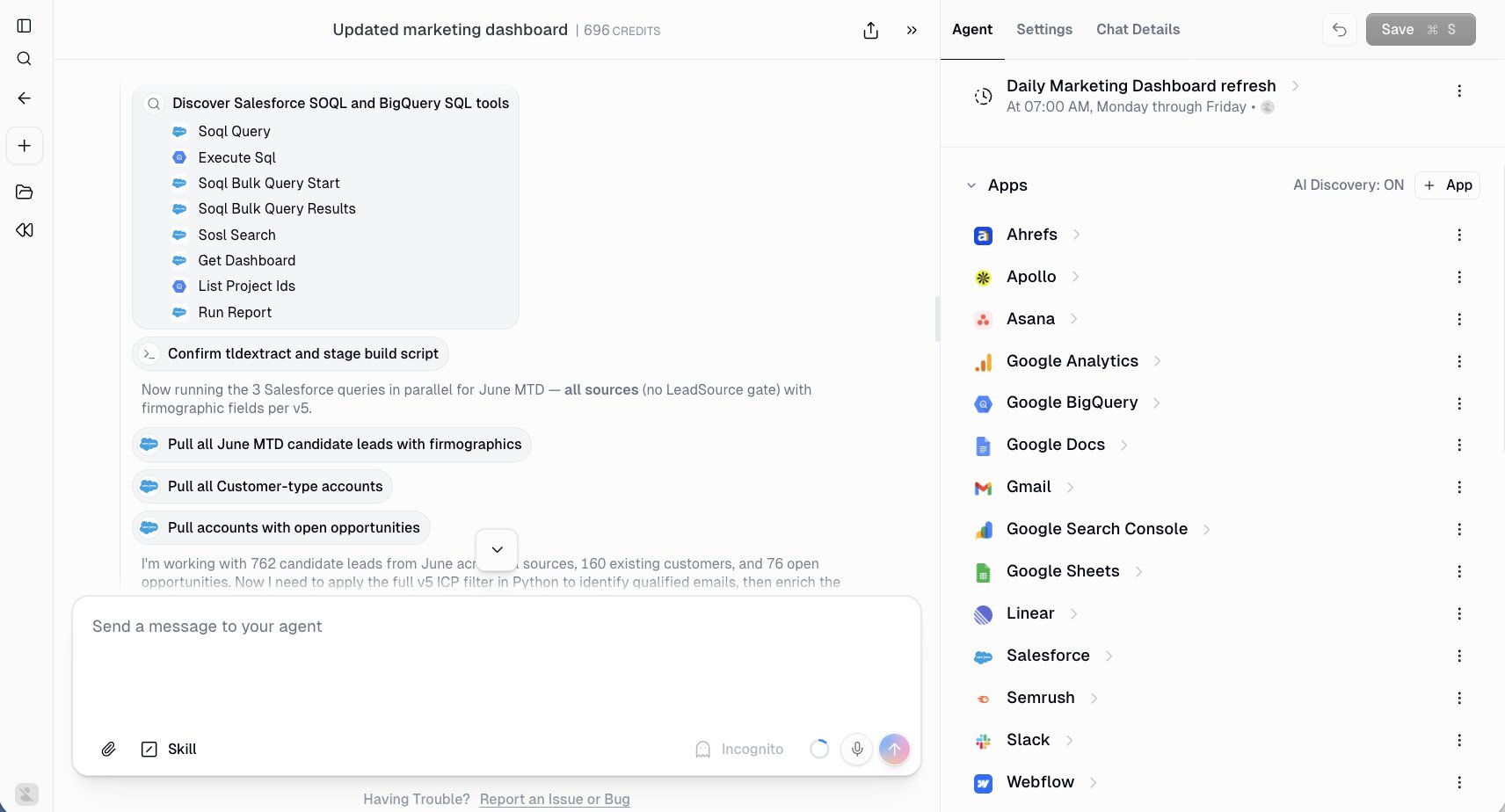
I simply told my agent exactly who my ICP was and what defines a lead as an MQL. And then, I asked the agent to pull the records from Salesforce. After some back and forth, I got the filtering just right and then asked my agent to create a skill called "Funnel Definitions."
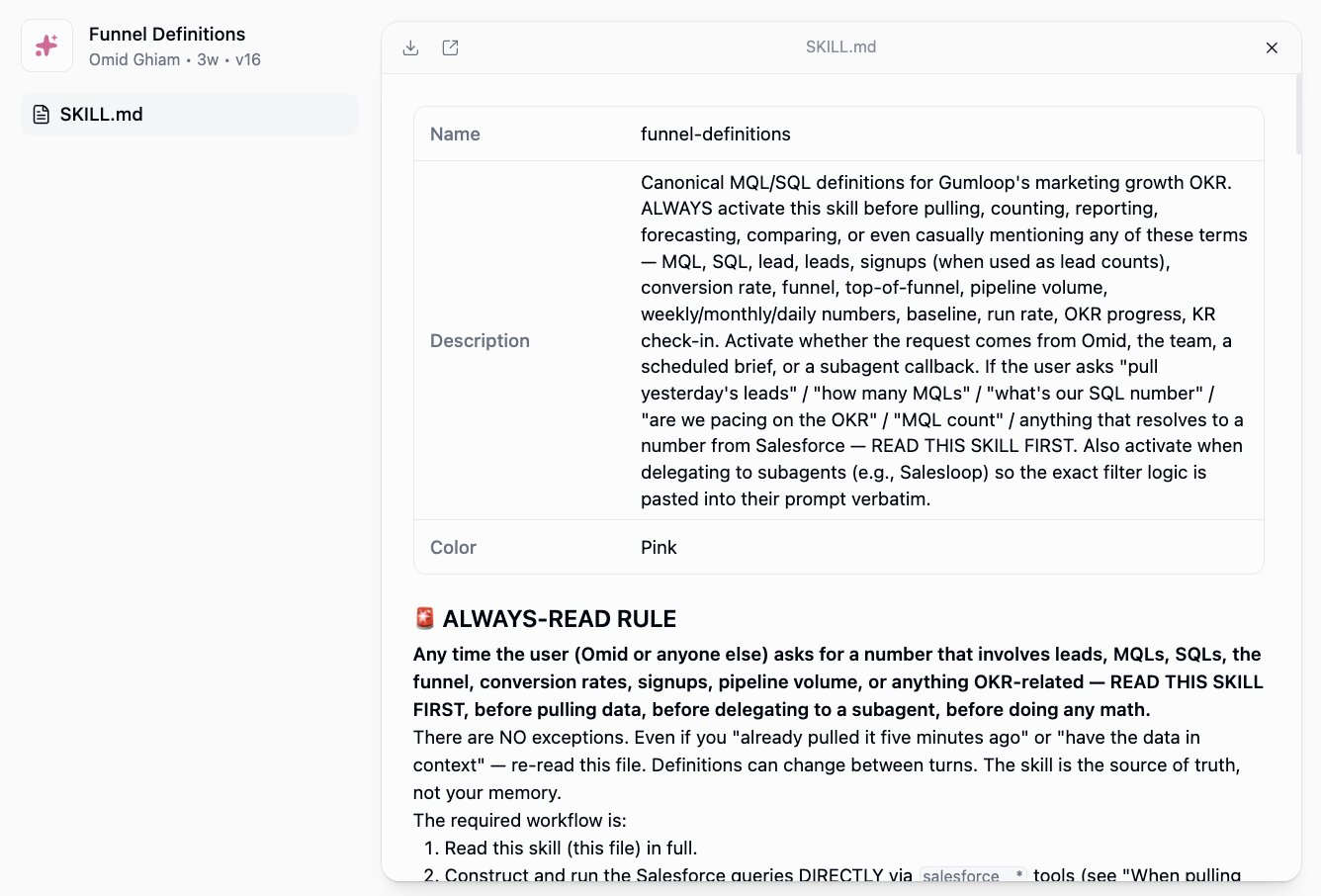
Then I asked the agent to send me an email report every day at 8 AM. And it created a trigger that does just that!
And now our sales team can also use the same agent or skill to run their own analysis against my own filtering.
But this is just one example. You can create so many different dashboards and reports with an agent that has access to Salesforce.
2. Pipeline insights agent
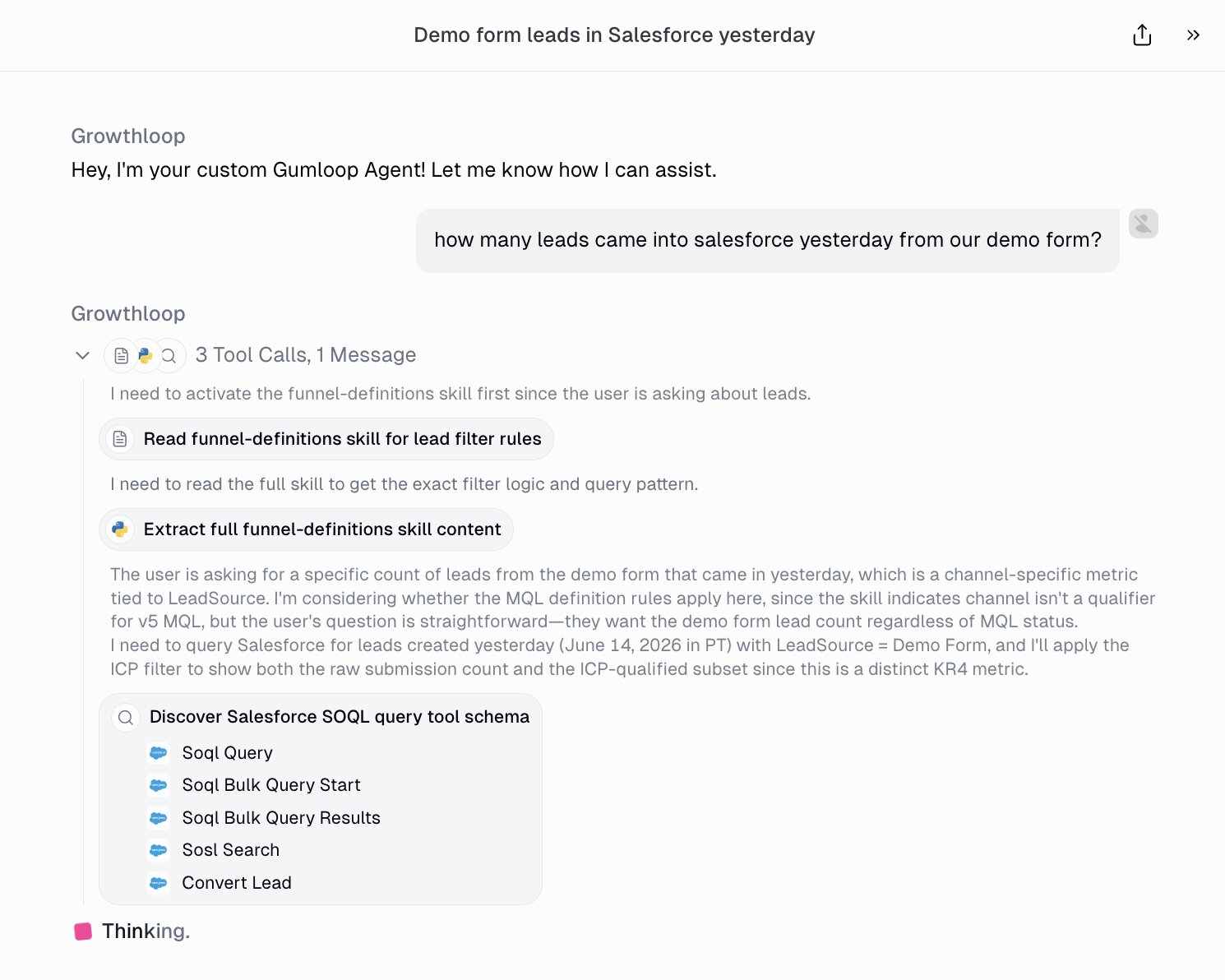
- Best for: Getting real answers about your pipeline without building a single report
One of my favorite use cases for AI agents is to give it access to a data source, and then constantly ask it questions regarding that data.
Instead of having to go into a dashboard and click around on settings and filters, I just chat to a Salesforce AI agent and it can answer any question I throw at it.
For example, I have a Slack agent called "Salesloop" that has access to all my Salesforce data (and my Gong calls too). Now, instead of logging into Salesforce, I just ask Salesloop right in Slack.
"What deals slipped a stage this week?" "Which opps over $50k haven't had any activity in 14 days?" "How does this month's pipeline compare to last month?" It runs the query and hands me the answer in plain English.
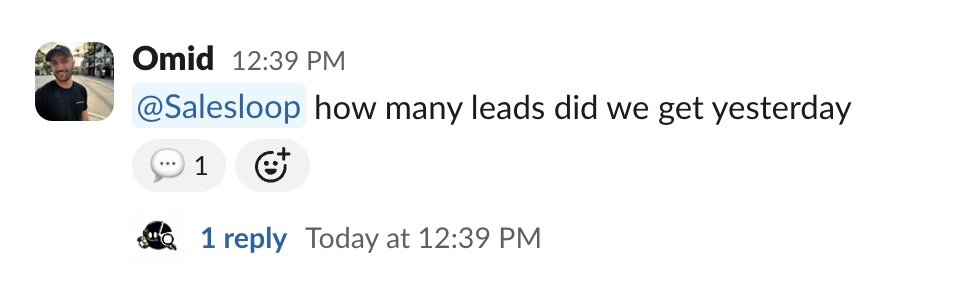
The reason this works so well is that querying CRM data is the thing Salesforce agents are best at. You ask a question, the agent writes the query, pulls the records, and reasons over them for you. No report builder, no filters, no exports.
Here's what Salesloop handles for me:
- Pulls live pipeline, account, contact, and opportunity data on demand
- Spots what changed since last week, like stage movement, stalled deals, and aging opps
- Summarizes pipeline health in plain language instead of a wall of rows
- Answers ad hoc questions on the fly without me building a new report every time
- Pulls in context from my Gong calls when I want the story behind a deal, not just the numbers
The main takeaway here is that I get the same answer in the time it takes to type the question, and I can keep asking follow-ups instead of rebuilding a report every time my question shifts a little.
3. Inbound record-creation agent
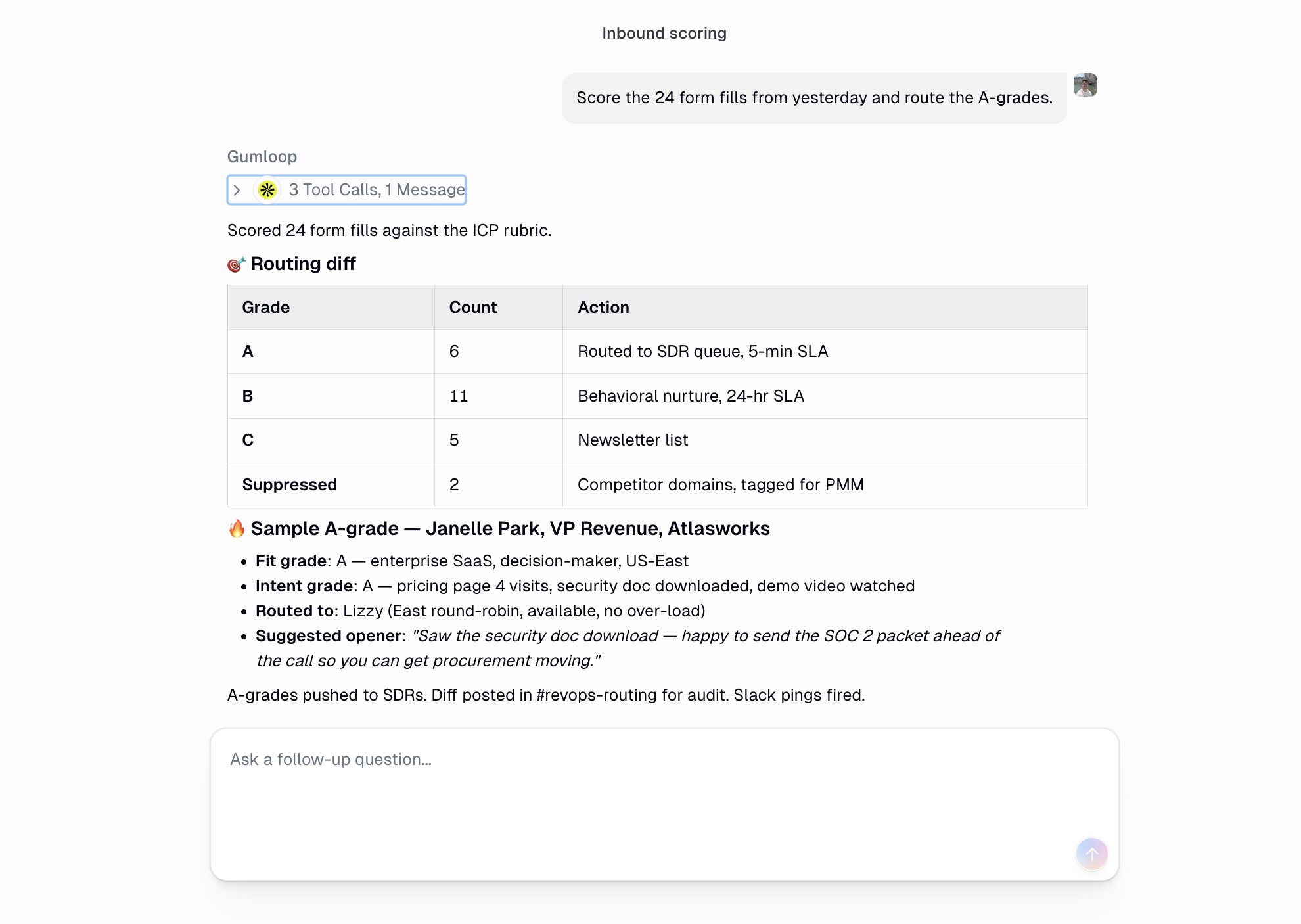
- Best for: Turning inbound signals into clean Salesforce records without manual data entry
Attribution is a mess these days. And I know both you and I can't 100% track everything going on in our sales pipeline.
A demo request comes in, someone replies to a campaign, a form gets filled out, and now somebody has to actually log it in Salesforce. Half the time it gets entered late, half the time the fields are wrong, and sometimes it just never makes it in at all.
So I set up an agent that handles this for me. It watches my inbound signals, like form fills, inbound emails, and meeting bookings, and it creates the record in Salesforce the moment something comes in. It also sends me a message in Slack as well.
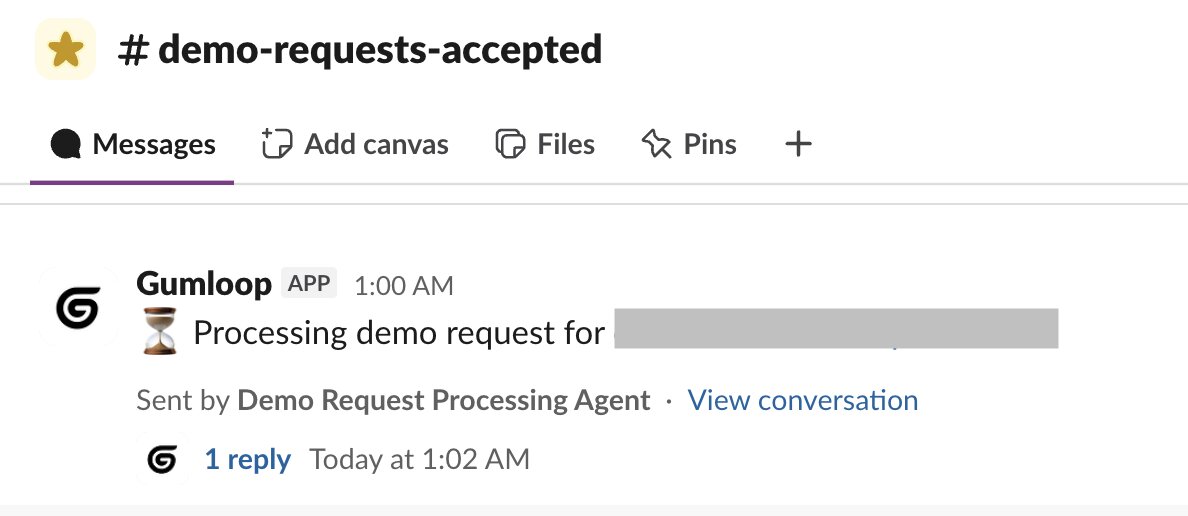
The nice part is that it doesn't just dump in a name and email. It fills out the fields I care about, checks whether the record already exists so I don't end up with duplicates, and adds context from the original signal so a rep can pick it up and know exactly what they're looking at.
Here's what this agent handles for me:
- Creates new leads, contacts, opportunities, and tasks from inbound signals
- Maps the incoming info to the right Salesforce fields automatically
- Checks for existing records first so it updates instead of duplicating
- Enriches the record with extra context before a rep ever touches it
- Drops a note in Slack so the right person knows a new lead just landed
The main takeaway is that everything is updated in Salesforce without me having to go in. My agent has access to my website as well as Salesforce, and all the skills that define how to think about everything.
The result is that an inbound lead turns into a clean, complete Salesforce record on its own, and my reps spend their time working leads instead of trying to enrich them manually.
4. CRM hygiene & enrichment agent
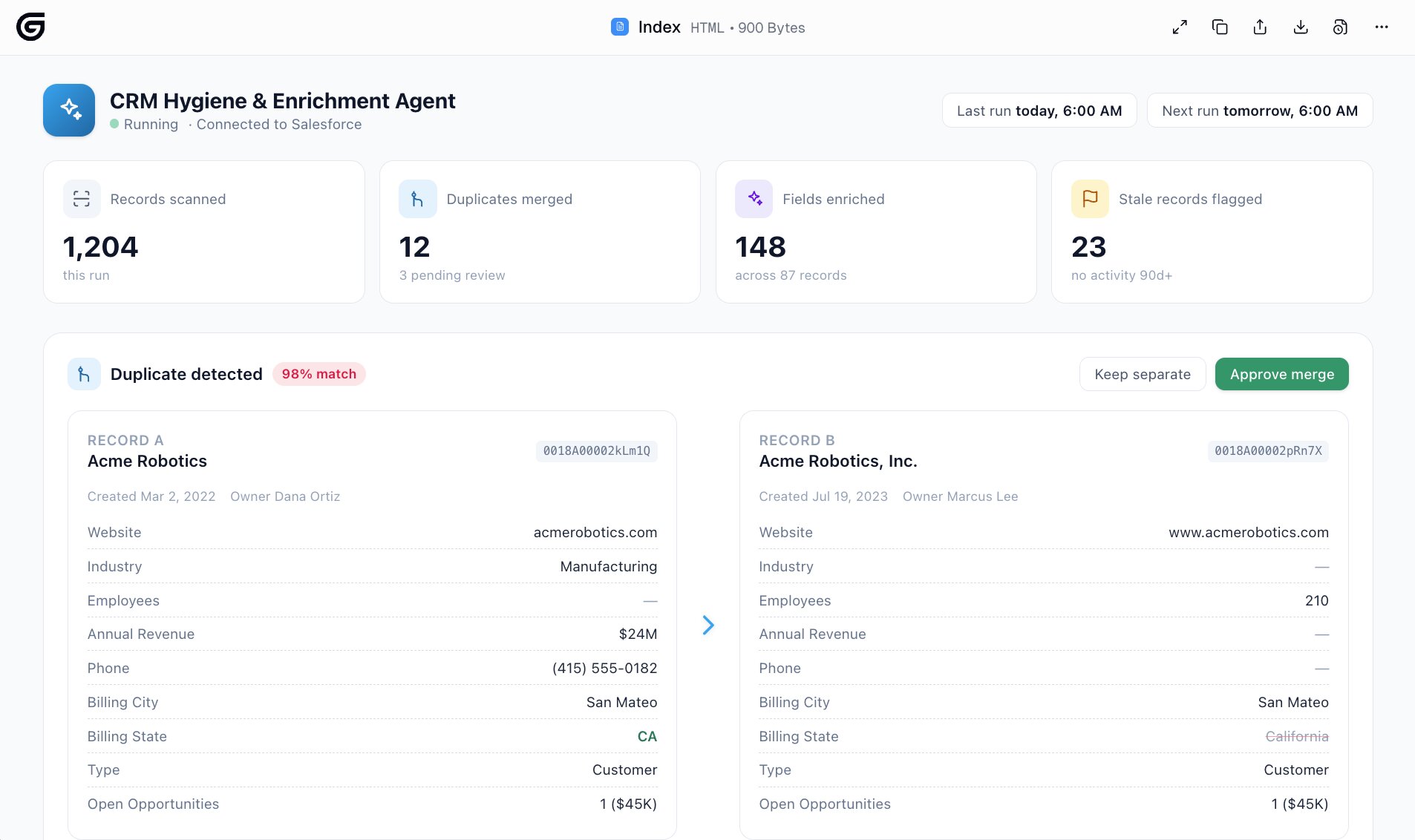
- Best for: Keeping your Salesforce data clean and complete so you can actually trust it
CRM data is only as good as the person (or thing) that is able to keep it up to date. One of my not so proud moments is logging into Salesforce and seeing three records for the same company, half the fields empty, contacts who left their jobs a year ago, and opportunities sitting open that should have been closed out months ago. Maintenance is hard.
On top of that, reporting time comes around and nobody trusts the numbers because the underlying data is a mess.
So I have an agent that runs in the background and updates and enriches records. It runs on a schedule, goes through my records, and cleans up the stuff I would never get around to doing myself. Duplicates get merged, missing fields get filled in, and stale records get flagged so they don't quietly skew my reports.
It also handles enrichment, which is the part I really care about. When a record is missing things like industry, company size, or a key contact detail, the agent fills it in and writes it back to Salesforce. So instead of me chasing down data to complete a record, it shows up already done.
Here's what this agent handles for me:
- Finds and merges duplicate accounts, contacts, and leads
- Fills in missing fields and writes the enriched data back to the record
- Flags or updates stale records, like opps with no recent activity
- Standardizes messy field values so reporting stays consistent
- Logs notes and activity summaries onto the right accounts and opps
The main takeaway is that my CRM stays in a state I can actually rely on. When I pull a report or ask Salesloop a question, I know the answer is built on clean data instead of a pile of duplicates and half-filled fields.
5. Call notes & activity logging agent
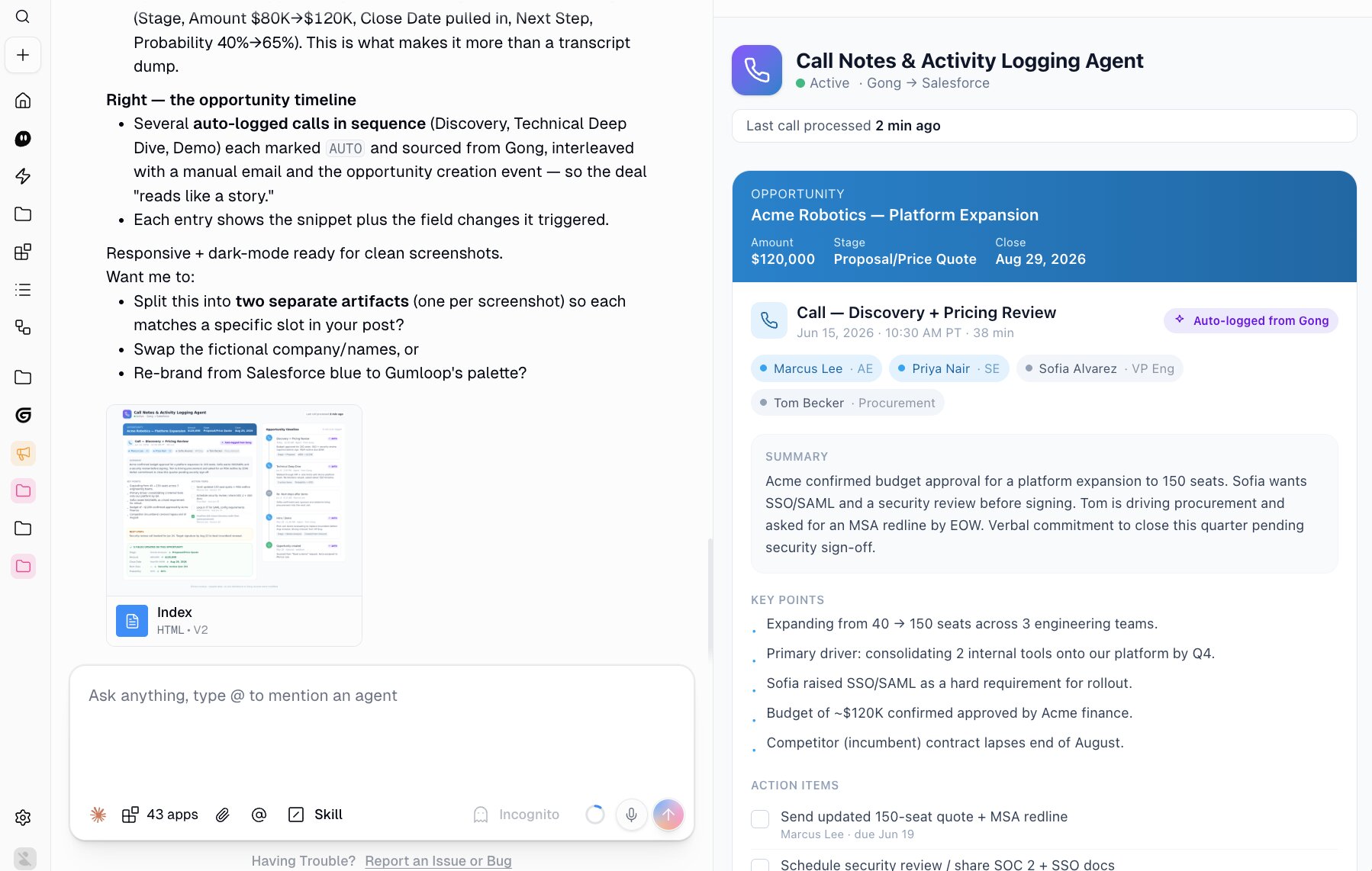
- Best for: Getting every call documented in Salesforce without anyone typing up notes
Logging call notes is the task everyone agrees is important and nobody actually wants to do. The call ends, you tell yourself you'll write it up later, and later never comes. Luckily AI has helped solve this pain.
And this use case really shines when you use an agent platform like Gumloop and add on a Gong integration. For example, after a call ends, my agent pulls the transcript, writes a clean summary with the key points and action items, and logs it straight onto the right account or opportunity. The notes go straight into Salesforce
What I like is that it does more than dump a transcript into a notes field. It understands what was actually decided, surfaces the next steps, and updates the record so the deal history reads like a story instead of a blank timeline.
Here's what this agent handles for me:
- Pulls call transcripts and turns them into clean, readable summaries
- Logs the notes and activity onto the right account or opportunity
- Captures action items and next steps so nothing falls through
- Updates relevant fields based on what came out of the call
- Keeps a running history on each record so anyone can catch up fast
The main takeaway is that every conversation actually makes it into the CRM. My reps stop losing time on after-call admin, and I get a complete picture of what's happening across deals without chasing anyone for an update.
Go beyond just Salesforce with a full RevOps agent
As you can see, Salesforce AI agents completely unlock a new way of interacting with your CRM. I personally don't think I could ever go back to using Salesforce without the help of AI agents.
My agents can create reports, read/write data, and even pull context from my other tools like Gong or my Google Calendar. Nothing before could allow me to do all of this.
And this is why you should not just stop with Salesforce. Using AI agents in your sales operations gives you and your team a whole new way to work.
Once Salesforce is connected, it's a small step to plug in the rest of your stack and let one agent reason across all of it. That's when it stops being a Salesforce agent and starts being a full RevOps agent that handles your pipeline, your records, your calls, and everything in between.
The good news is you don't need a developer to build any of this. You can create your own AI sales agents in Gumloop, connect them to Salesforce and the rest of your tools, and have something useful running the same day. Start with one of the use cases above, and build from there.

Read related articles
Check out more articles on the Gumloop blog.