5 best open source AI agents I'm using in 2026

AI agents are everywhere. The ads you're getting say you need them, your boss says you should build them, and every time you open LinkedIn or X, someone is showing off a crazy use case.
But one thing that many aren't talking about (yet) is how expensive AI can be. And that there's a whole world of open source AI agents that are waiting to be discovered.
I've personally been using open source AI models for the past month and I am completely blown away.
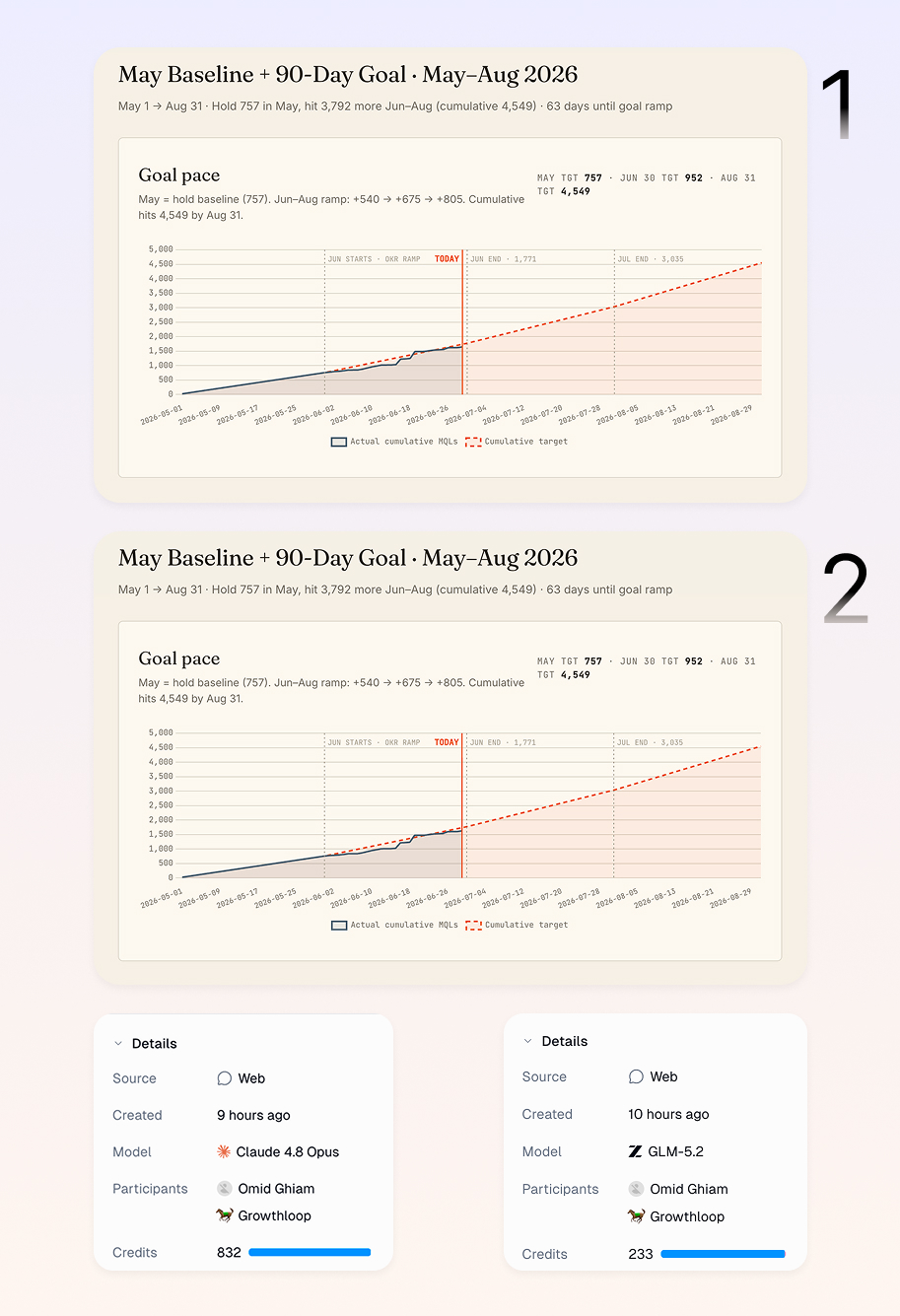
For example, I have an agent that emails me every morning at 8am all of our growth metrics from the previous day. I used to have this agent run on Claude Opus 4.8 because I wanted it to be as smart as possible.
It needs to pull data from tools like Salesforce, BigQuery, PostHog, Google Search Console, and our Slack. It also has to apply skills I've given it and generate a full dashboard. And then, email me.
It's a lot of compute. And it costs around $1.50 each time it runs.
A few weeks ago, I swapped out the model in the agent to the new open source model, GLM-5.2, and the report turned out identical. I could not tell a difference at all.
But I did tell a difference in price. The open source model ran the workflow at just $0.43.
The open source model was 72% cheaper than Claude. And the output was the exact same.
So I hope this gets you excited. In this article, I'm going to go over what an open source AI agent is, how I evaluated the platforms, and a list of tools that let you build open source agents.
Alright, no more rambling from me. Let's get into it.
What is an open source AI agent?
An open source AI agent is an agentic workflow builder that leverages open source LLM models to do reasoning and tool calls. Being open source also means that all of the code is under a license (usually MIT) and anyone can look at it.
Most open source AI agents are built on top of agent frameworks like LangChain or CrewAI. These frameworks give developers the building blocks to connect large language models to tools, memory, and data, and then chain everything together into a workflow an agent can run on its own.
Since the code is open, you can host it yourself, change how it works, and see exactly what's happening with all the tool calls.
There is also a second group worth knowing about. And honestly, the group I think most people reading this would find the most helpful.
Some platforms are not open source themselves, but they let you build agents that run on open source large language models like Llama, DeepSeek, Moonshot, MiniMax, Qwen, and more.
So instead of self-hosting the model and managing the infrastructure, the platform handles the LLM calls for you, and you just pick which open source model your agent uses. Both approaches get you an agent powered by an open source model, they just ask for different levels of technical work to set up.
Alright, now let me briefly go over how I evaluated these open source AI agents so you can find the right one for you.
How I chose the best open source AI agents platforms
I could give you a wide range of open source AI agent platforms. But I first want to tell you how to find one for yourself.
This way, when I go over the top five I found that are actually worth your time, you can evaluate them based on your own use cases and needs.
Here is how I generally think about picking a platform to build open source AI agents:
- Is it LLM agnostic? You want to be able to swap between open source and frontier large language models without rebuilding your whole setup.
- Does it connect to MCP servers? Support for the Model Context Protocol (MCP) makes it much easier to give your agents access to your tools and data through a standard layer.
- Can it handle RAG? Look for built-in support for vector databases and retrieval augmented generation (RAG) so your agents can pull from your own knowledge instead of guessing.
- Can it execute code? The best platforms let your agents run code when a task needs real logic, not just text generation.
- How is the ecosystem? A platform with lots of integrations, templates, and community support will get you building agentic systems faster.
- Does it scale? Something that works for one workflow should still hold up when you are running hundreds of them across a team.
- Is there a human in the loop? For anything high-stakes, you want the option to add approvals or review steps before an agent acts.
- What is the building experience like? Some platforms are built for engineers and others for non-technical users, so pick the one that matches your team.
Now that you know what to look for, here are the five best open source AI agent platforms I would recommend.
5 best open source AI agent platforms and frameworks
Here are the top open source AI agents:
Alright, lets go over each one.
1. Gumloop

- Best for: Building AI agents that run on open source LLM models without self-hosting any infrastructure
- Pricing: Free plan available, then starts at $37/month
- What I like: I can swap in open source models like GLM and cut my agent costs by over 70% with the same output
Gumloop is an AI agent platform built for automating work. Whether that's at a 10,000-person company or a small team, Gumloop is the AI operating system for all of your work.
The platform gives you access to open source LLM models from DeepSeek, Z.ai Moonshot, Qwen, and MiniMax. So you can create any agent that connects to your tools, has access to your skills, and can run on an open source LLM.
All of this is hosted in the cloud and everything is secure through an MCP gateway.
I have actually replaced Claude Opus with Z.ai's GLM models to run all of my growth analysis dashboards in Gumloop. And it has resulted in a 72% reduction in cost (while still having the same exact output).
It's actually insane, and I'm so bullish on using open source models for agentic workflows now.
Pros and cons
Here are some things I love about Gumloop:
- The platform has a great harness for open source AI models. This is really important if you plan on giving your agent access to your tech stack to read and write data.
- Each agent has Insights, which shows how many credits are being used and on what (whether that's reasoning or tool calling).
- Gumloop can create skills based on any interaction you have with it. If you have a chat you did with an agent, you can just ask it to turn the output into a repeatable skill.
Here are some cons:
- Gumloop is an agent builder that gives you access to open source LLMs. It is not a fully open source builder on its own.
- While Gumloop has a lot of native integrations, if you need to connect to an MCP server it can have a bit of a learning curve.
Overall, Gumloop is the tool I would reach for first if you want to build agents on open source models without managing servers or API keys yourself.
Gumloop pricing

Here are Gumloop's pricing plans:
- Free: $0/month with 5,000 credits, 1 seat, 1 active trigger, and unlimited agents and flows
- Pro: Starts at $37/month with 20,000+ credits, unlimited seats, MCP server hosting, and connector policies and guardrails
- Enterprise: Custom pricing with role-based access control, SCIM/SAML, audit logs, AI model access control, and a virtual private cloud
You can learn more about the pricing plans here.
Gumloop reviews
Here is what users rate Gumloop on third-party review sites:
- G2: 4.8/5 star rating (from +7 user reviews)
- Product Hunt: 5/5 star rating (from +9 user reviews)
2. LangChain
- Best for: AI engineers, data engineers, or product teams building agents internally
- Pricing: Free developer plan, then $39/seat per month
- What I like: It is fully modular and LLM agnostic, so you can reuse components and switch models anytime
LangChain is an open source AI framework licensed under MIT. It is a tool for developers to build AI agents and apps powered by LLMs.
The platform gives you all the features you need to build agents, like observability, evals, debugging, prompt management, tool integrations, memory, and deployment support. This way, you can create, test, and ship AI agents end to end.
Just like Gumloop, LangChain is also LLM agnostic. So you can use any LLM, from a frontier lab or open source model, in your agents. But unlike Gumloop's platform that allows you to use open source AI models, LangChain is a full open source framework.
So you do need an engineering background to use the platform. I would say LangChain is best for AI engineers, data engineers, or product teams that are trying to build agents internally.
Pros and cons
Here are some of the pros of LangChain:
- It is fully customizable and modular. You can reuse components like tools, models, prompts, and chains to make quick iterations and prototypes.
- It lets you use a wide range of LLM providers, so you can switch at any time.
- There is built-in support for RAG and agents that can do everything from vector stores to document processing and various tool calls.
- There is a big community around the platform, as well as lots of docs and examples to help you get started.
Here are some of the cons of LangChain:
- It does require heavy engineering infrastructure, so it is not a quick AI agent setup.
- There can be a lot of abstraction overhead, which can make debugging and deeper customizations a bit complex.
- Some users report that for complex workflows it can get a little messy, and it is a bit hard to create multi-agent orchestration workflows.
Overall, LangChain is a powerful, open source AI agent platform. It is great if you are looking for total flexibility, but if you need something with a bit more guardrails that is designed for security and reliability, then it might be worth looking into an alternative.
LangChain pricing
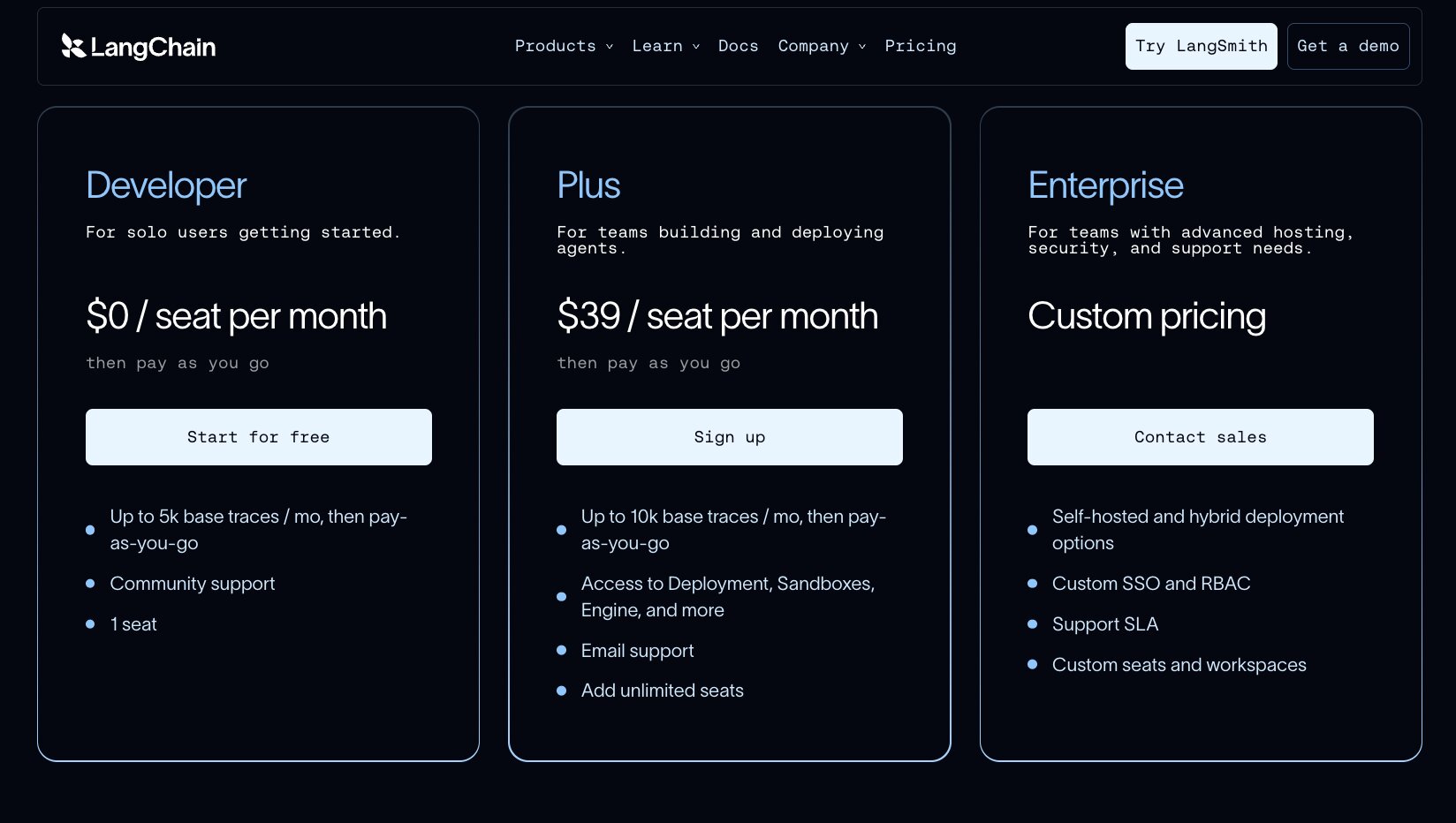
Here are LangChain's pricing plans:
- Developer is $0/seat per month with up to 5,000 base traces per month, community support, and 1 seat
- Plus is $39/seat per month with up to 10,000 base traces per month, access to deployment and sandboxes, email support, and unlimited seats
- Enterprise is custom pricing with self-hosted and hybrid deployment, custom SSO and RBAC, and a support SLA
You can learn more about what each plan has to offer on their pricing page.
LangChain reviews
Here is what users rate LangChain on third-party review sites:
- G2: 4.6/5 star rating (from +41 user reviews)
- Product Hunt: 4.9/5 star rating (from +109 user reviews)
3. Dify
- Best for: Non-technical and low-code users building AI apps and agents, often in marketing or ops
- Pricing: Free Sandbox plan, then $59 per workspace/month
- What I like: The visual no-code interface plus the option to self-host your agents and chatbots
Dify is an open source agentic workflow builder. Similar to LangChain, it gives you everything from agentic workflows, RAG pipelines, observability, and a wide range of integrations to help you build AI agents.
The platform lets you build AI apps, agents, chatbots, and workflows in a visual no-code interface. And because of this approach, it is better suited for non-technical or low-code users, typically in use cases around marketing or operations. But developers and product teams can also use it as a place to collaborate on different workflows and check evaluations across their org.
What makes Dify different is that it also allows companies to self-host their agents and chatbots.
Pros and cons
Here are some of the pros of Dify:
- It is great for prototyping and building agents.
- The low-code and no-code interface makes it easier for non-technical people to figure out how to use it.
- It is LLM agnostic, so you can use anything from frontier labs to open source models.
- The platform also has a cool marketplace full of different models, agent templates, and tools.
Here are some of the cons of Dify:
- The platform can be a bit confusing when you are trying to build workflows that go through parallel steps, and it can be a bit hard to manage how your agents are logically moving through the steps in a workflow.
- Some users report that the customization is a bit limited compared to fully custom platforms like LangChain.
Overall, Dify is a solid tool if you are looking for an all-in-one platform that can help you leverage open source models. It does sit in this middle ground of being developer friendly while also being non-technical friendly.
Dify pricing
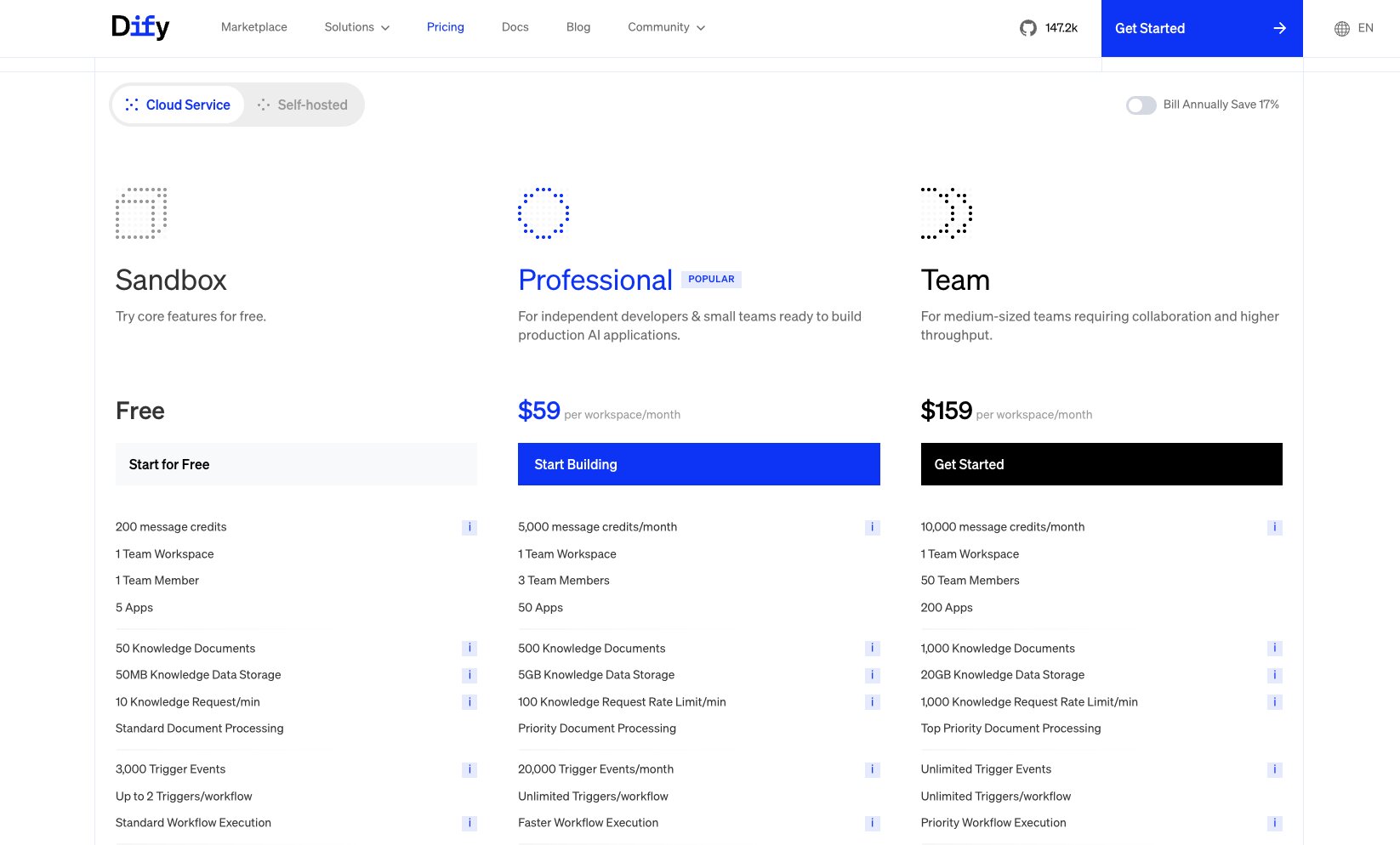
Here are Dify's pricing plans:
- Sandbox is free with 200 message credits, 1 team workspace, 1 team member, and 5 apps
- Professional is $59 per workspace/month with 5,000 message credits, 3 team members, and 50 apps
- Team is $159 per workspace/month with 10,000 message credits, 50 team members, and 200 apps
You can learn more about each plan on the Dify pricing page.
Dify reviews
Here is what users rate Dify on third-party review sites:
- G2: 4.1/5 star rating (from +20 user reviews)
- Product Hunt: 4.7/5 star rating (from +7 user reviews)
4. n8n
- Best for: Technical teams that want control, flexibility, and the option to self-host
- Pricing: Starts at $24/month, billed monthly
- What I like: The self-hosting option gives you full control over your data with no vendor lock-in
n8n is a visual AI automation platform and agent builder. It has become popular among business and technical teams that are trying to build and prototype agents internally. Similar to Gumloop, the platform is LLM agnostic, so you can use your own open source models. The only thing is you have to bring your own API keys.
I would say it is a comparable platform to Zapier or Make, these traditional automation tools. And I will admit, for me personally, it is not the easiest platform, but it is very flexible, and a huge selling point is its self-hosting ability that some IT departments do like.
It is great for a wide range of use cases, and it is a very horizontal platform, so you can do everything from marketing to operations and customer service use cases.
Pros and cons
Here are some of the pros with n8n:
- It is built for technical teams that want a lot of control but also want an easy-to-use agent abstraction tool.
- It is good for multi-agent orchestration and building complex workflows and ETL flows.
- The self-hosting open source option means you can have full control over your data and not be locked in to any vendor.
Here are some of the cons with n8n:
- There can be a slight learning curve to the platform, especially for non-technical users who have not used drag and drop visual tools.
- The platform feels more like a workflow builder than an agent platform, and it does require some manual work to get the agents just right.
Overall, n8n is a great platform, and I wanted to include it in this list because it is so flexible and allows you to use open source LLMs. If you are an engineer who likes the customizability of something like LangChain but you want a harness that is quick to set up, then this is a great platform.
But if you are looking for tools that are plug-and-play with open source AI models with a minimal learning curve, then it is worth looking into an alternative.
n8n pricing
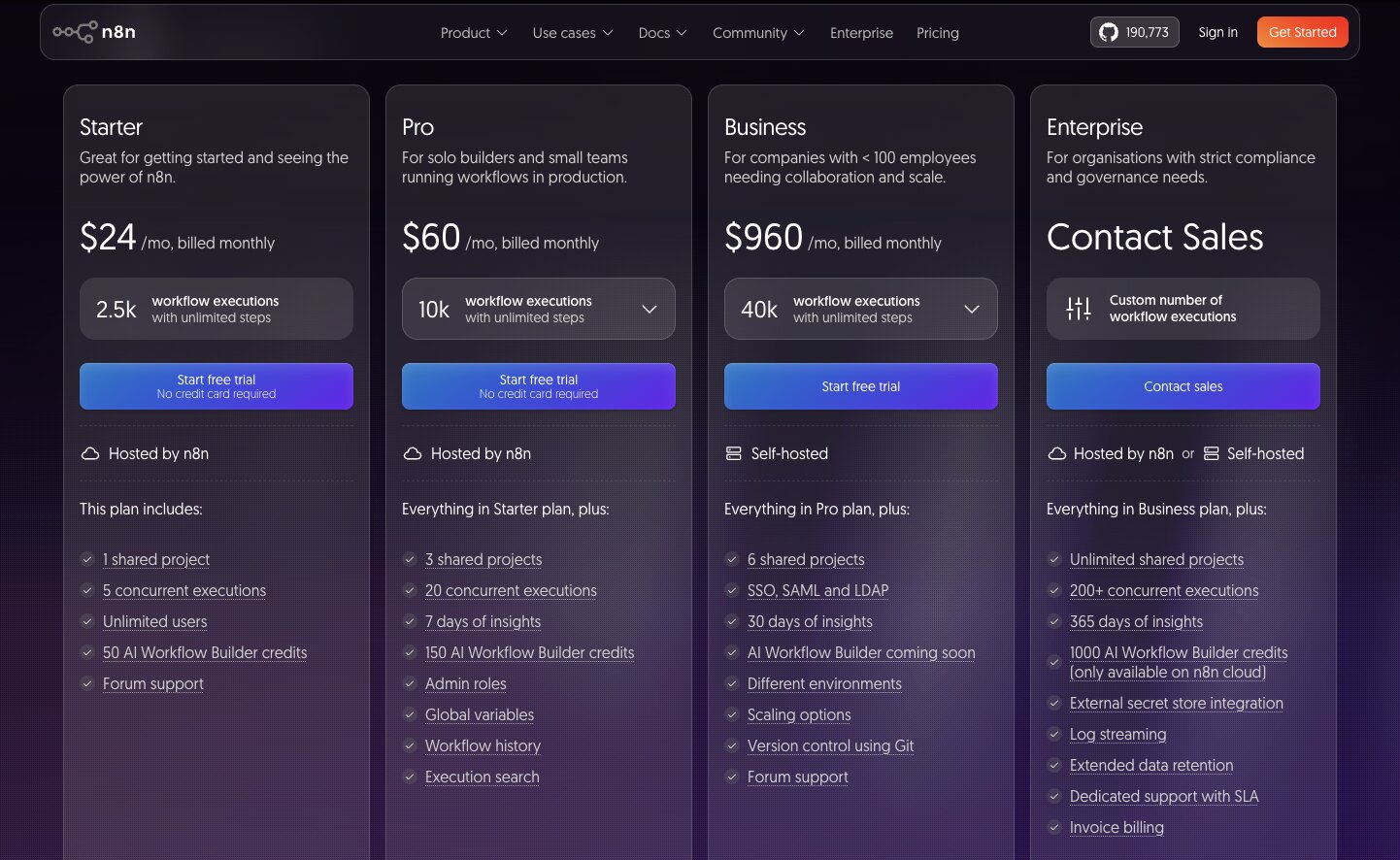
Here are n8n's pricing plans:
- Starter is $24/month with 2,500 workflow executions, 1 shared project, and unlimited users
- Pro is $60/month with 10,000 workflow executions, 3 shared projects, and admin roles
- Business is $960/month with 40,000 workflow executions, SSO and SAML, and self-hosting
- Enterprise is custom pricing with unlimited shared projects, 200+ concurrent executions, and log streaming
Check out their pricing page to learn more about all the features included (or not) in each plan.
n8n reviews
Here is what users rate n8n on third-party review sites:
- G2: 4.7/5 star rating (from +287 user reviews)
- Capterra: 4.6/5 star rating (from +45 user reviews)
5. CrewAI
- Best for: AI engineers and biz ops teams building multi-agent systems for research, lead gen, or support
- Pricing: Free Basic plan, then custom Enterprise pricing
- What I like: You can build visually and then export your agents to Python code
CrewAI is what they call "an open platform" that allows you to build and deploy AI agents. The platform is similar to n8n in that it has a visual workflow builder where you can build multi-agent systems. In fact, their value prop is around orchestrating agentic workflows. I mean, it is in their name after all.
You can also export all of your agents to Python code. If you are a developer, this is also a great platform for building open source AI agents.
This hybrid of being a visual networking tool while also focusing heavily on being an open platform makes it a fit for both AI engineers and biz ops teams that are trying to automate tasks around research, lead generation, or even customer support. So there are a wide range of use cases, as well as options for whatever type of role you want within the organization.
Pros and cons
Here are some of the pros with CrewAI:
- It is LLM agnostic, so you can use any of the open source or frontier models.
- It has a built-in knowledge base that can enable RAG patterns and create context over your agents.
- It is designed to help you build from idea to production quickly, so it has a lot of guardrails, observability, and enterprise features built in.
Here are some of the cons:
- It is very much focused around Python, so if you are using JavaScript or other languages, it might be a little confusing, at least for those who are technical and want to explore all the open platform features.
- The platform is a bit overkill for simple use cases that are just triggers and automations, so I would not recommend it if you do not already have complex workflows that you want to automate.
- While they do advertise themselves as an open platform, many of the advanced features are actually hidden under their enterprise offering.
Overall, CrewAI is a promising tool for creating a "crew" of AI agents. The platform allows you to use open source LLM models, and it is also an open source platform itself. But if you want something a bit more self-serve friendly, you might want to look at an alternative.
CrewAI pricing
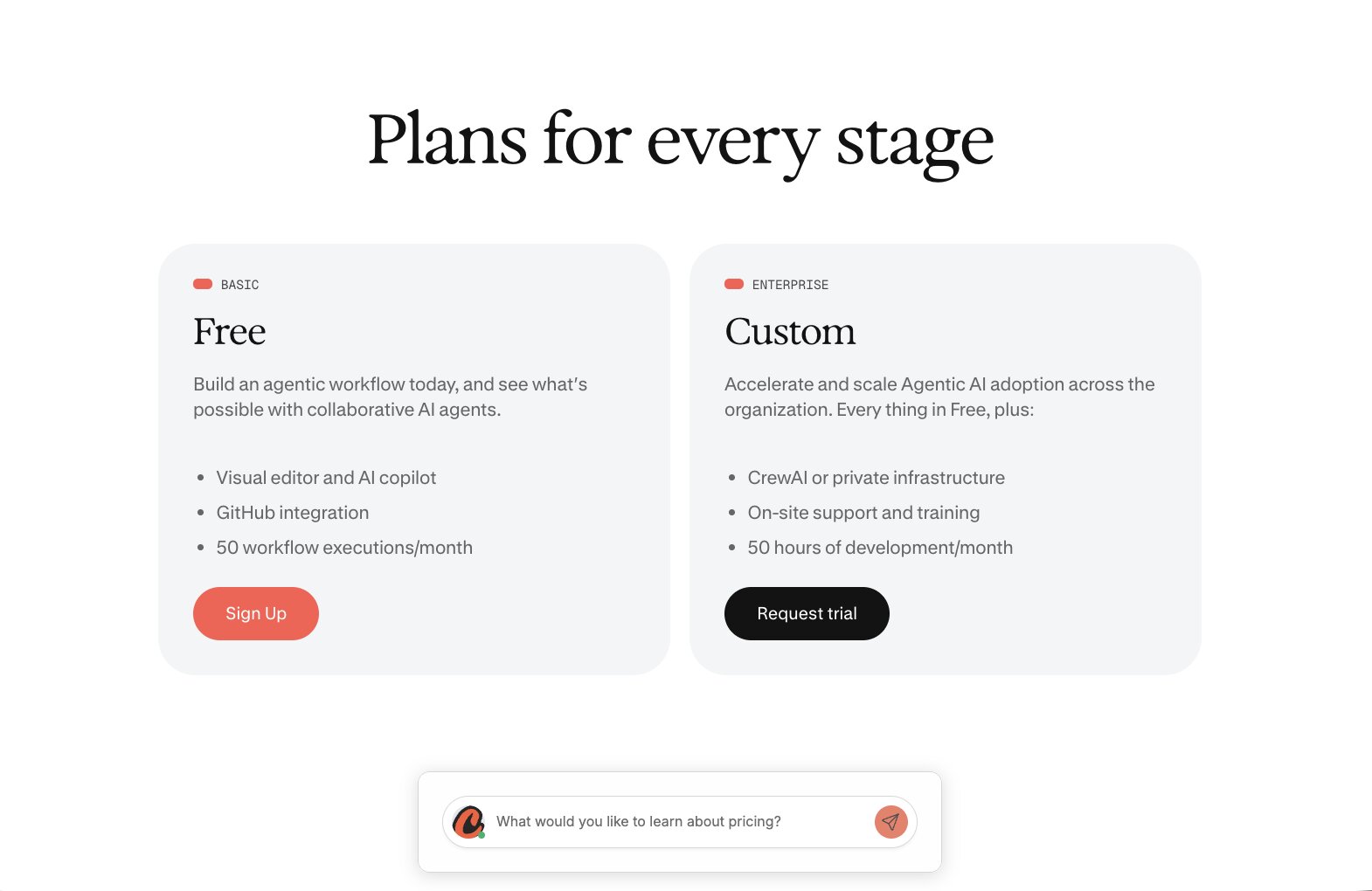
Here are CrewAI's pricing plans:
- Basic is free with a visual editor and AI copilot, GitHub integration, and 50 workflow executions per month
- Enterprise is custom pricing with CrewAI or private infrastructure, on-site support and training, and 50 hours of development per month
You can learn more about CrewAI's pricing here.
CrewAI reviews
Here is what users rate CrewAI on third-party review sites:
- Trustpilot: 3.1/5 star rating (from +3 user reviews)
- Product Hunt: 5/5 star rating (from +4 user reviews)
Which open source AI agent tool should you choose?
By now you can probably tell that "open source AI agent" means a few different things depending on what you are trying to build.
If you are not an engineer and you just want agents that run on open source models without touching any infrastructure, go with Gumloop. You pick a model like GLM, DeepSeek, or Qwen, connect your tools, and the platform handles the rest. This is the setup I use every day.
If you are an engineer who wants full control over your agent architecture, look at LangChain. With LangGraph you can add checkpointing and memory layers so your agents can handle complex tasks and pick up right where they left off. And if your whole focus is multi-agent collaboration, CrewAI was built around that idea.
For teams that care most about self-hosting, n8n and Dify are both solid open source tools. You get visual builders, vector search for your RAG setups, and the freedom to run everything on your own servers.
One last thing on picking a model though. Do not just trust a benchmark. Open source models have gotten so good that many of them now match frontier models like Claude and Gemini on real agentic work, but the only benchmark that matters is your own use case. Whether you are vibe coding a quick coding agent for yourself or building a serious system for your team, swap the open source model into your actual workflow and see if the output holds up.
And that brings me back to my morning metrics agent.
That one swap from Claude Opus to GLM-5.2 cut my cost by 72%, and I still get the exact same dashboard in my inbox at 8am every day. Nothing about the output changed except the price.
That is the whole reason I wanted to write this. Agentic AI keeps getting cheaper, and open source models are a big part of why. So pick a platform from this list, swap in an open source model, and see the difference for yourself.
Happy building!

Read related articles
Check out more articles on the Gumloop blog.
.webp)
.webp)