Firecrawl review: An honest thought about this AI scraper

Honestly, I think AI scrapers can be pretty shady.
AI scraping, or web scraping, is the process of automatically scanning and extracting data from websites. It’s an effective way to collect information, build databases, and save months of tedious manual data entry.
Maybe it’s my ancient 1990s upbringing or Creative Person identity, but in the past web scraping was associated with nefarious activity, like stealing other people’s work or harvesting data to use for DDoS server attacks or phishing scams.
Web scraping publicly available information isn’t illegal, but like many things, its overall legality depends on what you’re scraping and what you do with it afterwards.
When used ethically, web scraping powers services consumers use every day, such as price trackers that tell you when something’s on sale or how the Internet Archive has been able to preserve over one trillion websites since 1996. Even Google is a form of web scraping by crawling and indexing sites for their search engine.
Okay, let’s assume we both want to use AI scraping for the greater good… Should you go with Firecrawl?
I’m going to share my experience using Firecrawl, who I think should use it (and who should not), and a rundown of all its main features. (There’s a TLDR section summarizing my thoughts if you wanna skip to that.)
Who is Firecrawl for?
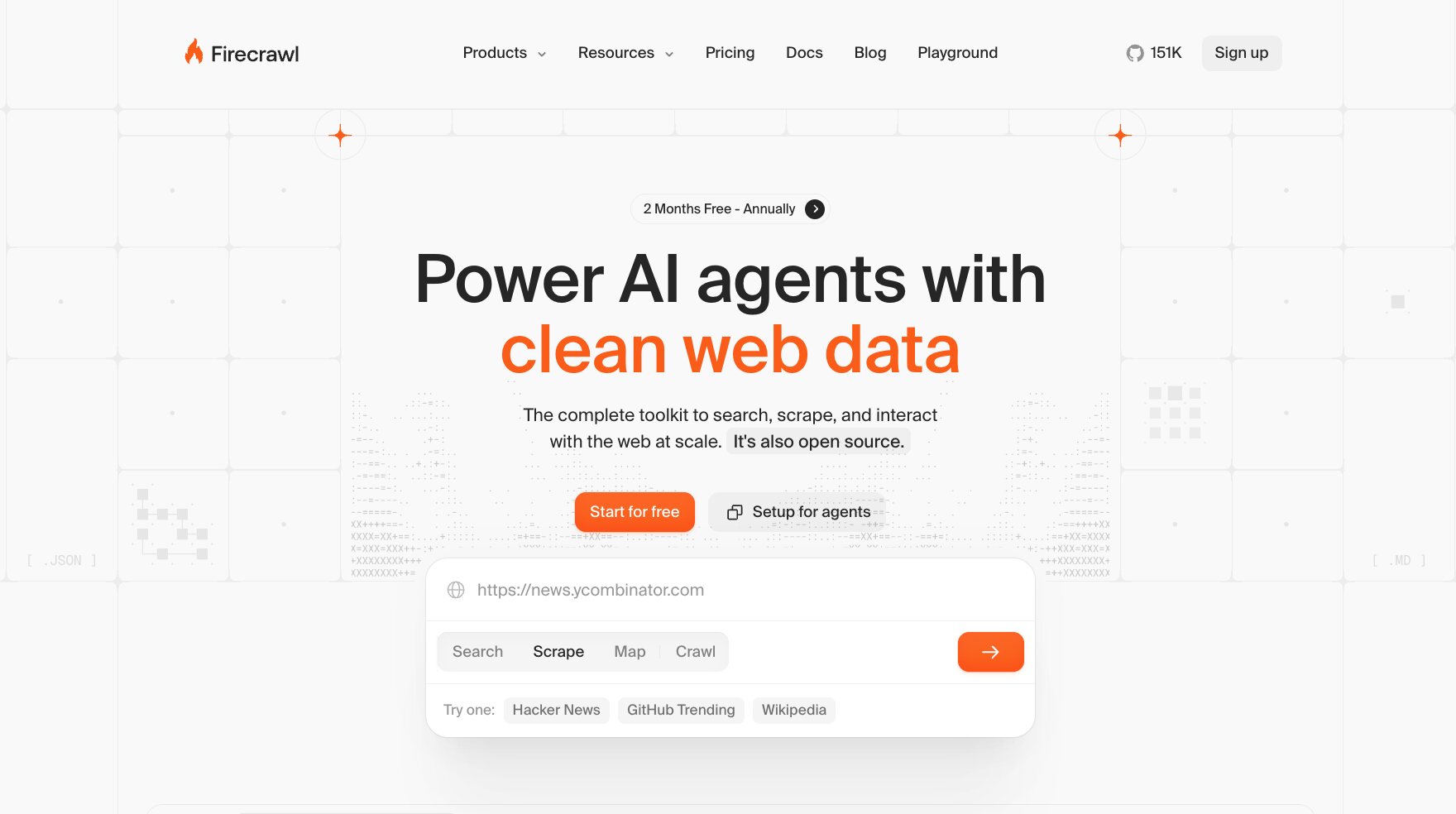
Firecrawl is an open source context API designed for searching, scraping, and monitoring the web. It outputs native markdown data that’s plug-and-play with AI agents and tools. That means the data it scrapes is instantly understandable by LLMs, so you don’t need to re-format it or clean it up.
Firecrawl is a popular web scraper for a reason: it just works. Even tech noobs like me can scrape LLM-optimized data to their heart’s content right away with Firecrawl + their choice of AI agent.
While I’ve never custom built a web scraping tool, I know from my research that 1) it can take weeks of custom Python coding (somewhat faster now with tools like Claude Code, but still needs technical knowledge), and 2) it’s a mega pain in the asterisk to maintain. If a website you’re scraping changes their code, boom, your scraper breaks and you need to figure out the issue and update your code or JavaScript rendering to be able to scrape that site again.
Multiply that by potentially hundreds or thousands of sites you’re scraping and just maintaining a custom scraping tool can become a full-time job.
Firecrawl takes all of that maintenance and initial development off your plate — claiming to cover 96% of the web — so you can get scraping fast and start using your data.
Whether you’re a developer wanting to easily integrate extracted data into your site or app, or you’re a researcher needing real-time source searching, Firecrawl lets you focus on your project without worrying about proxy pools or endless JavaScript rendering.
Firecrawl’s popular features
There isn’t a “one size fits all” way to scrape the web. Firecrawl offers six main methods of scraping in one convenient package, which is pretty much everything you need.
One caveat: I tested Firecrawl via their web-based Dashboard and Playground interfaces since I’m not a developer. However, Firecrawl’s full power comes from using it via API or through MCP. As a non-technie, connecting to a Gumloop AI agent via MCP server to unlock that power is easy, but I didn’t try writing any actual Python code or anything (because I can’t, lol).
Here’s a bit about how each core feature in Firecrawl works.
Search
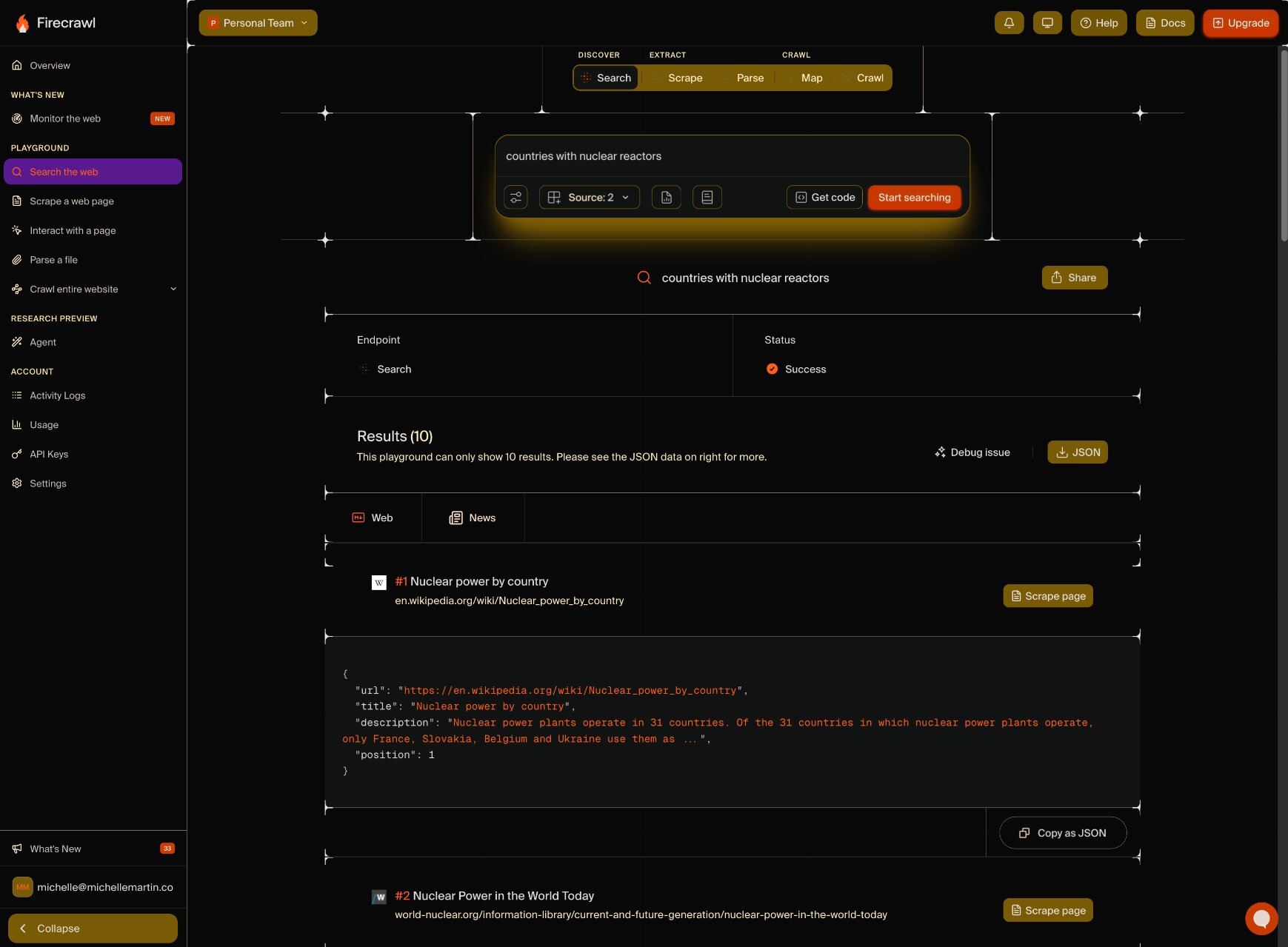
It’s like Google, but for AI agents (or humans via the web Dashboard above): you enter a phrase and Firecrawl searches the entire web. But instead of giving you a clickable list like Google, Firecrawl spits out the results in clean markdown format, perfectly prepped for and understandable by AI models.
Immediately upon signing up for Firecrawl, I can Search for anything with plenty of options to customize the results, from limiting the results, searching only specific locations, or scraping page content plus content from PDFs and other linked files.
I can also specify my output format: standard markdown or as a summary, links list, raw HTML, screenshots, JSON, or images. I can also choose from three specialty search modes: finding results within Github only, research to pore over journals and scientific papers, and PDF file scanning.
What I like about Search:
- It’s easy to get started with for non-techies — sign up and enter a search term.
- One API call for all search results and AI-ready extracted content, not a call per result.
- It’s really fast (and gets even faster with more concurrent requests on higher tier plans).
After running a search, I can scrape any result or export it as JSON. Of course, with Firecrawl connected to an AI agent — such as Gumloop, Claude, or others — searching, scraping, and exporting can all happen autonomously at rapid scale.
Scrape

In Scrape mode, I can enter any URL (or batch of URLs) to get all that page’s data into my chosen format, ready to import into an LLM (or pull in directly via MCP server connection to an AI agent). In the markdown format, it scrapes the page content as ready-to-paste markdown as well as an optional JSON download. I can also choose from the same formats as the Search page, including screenshots, links, raw HTML, and more.
The big game changer here is how Firecrawl handles JavaScript. I’m not a developer, but my research continuously showed me that scraping JavaScript-heavy pages with custom tools makes developers feel the same way I do when I walk 45 mins to the grocery store for Cool Ranch Doritos but they only have Zesty Cool Ranch in stock (uggggh).
Firecrawl easily handles the vast majority of complex JavaScript and dynamically loading content. Those things don't break the entire scrape like they often do with custom-coded tools, and Firecrawl can scrape PDFs too.
What I like about Scrape:
- Ability to test large scraping projects for output formatting in the Playground which doesn’t use credits, so you can be sure your final results will be worth the credit spend.
- Actually LLM-ready markdown, just copy and paste.
- Filter results by age, including returning results for pages you’ve scraped before instantly so you don’t waste credits on pages that don’t change often (kinda like a cache for scraping).
Again, Scrape is so easy to use for a non-techy like me (in Firecrawl’s Dashboard mode, anyway). Just enter a URL (or bunch of ‘em) and Firecrawl gives me AI-ready data in seconds.
Interact
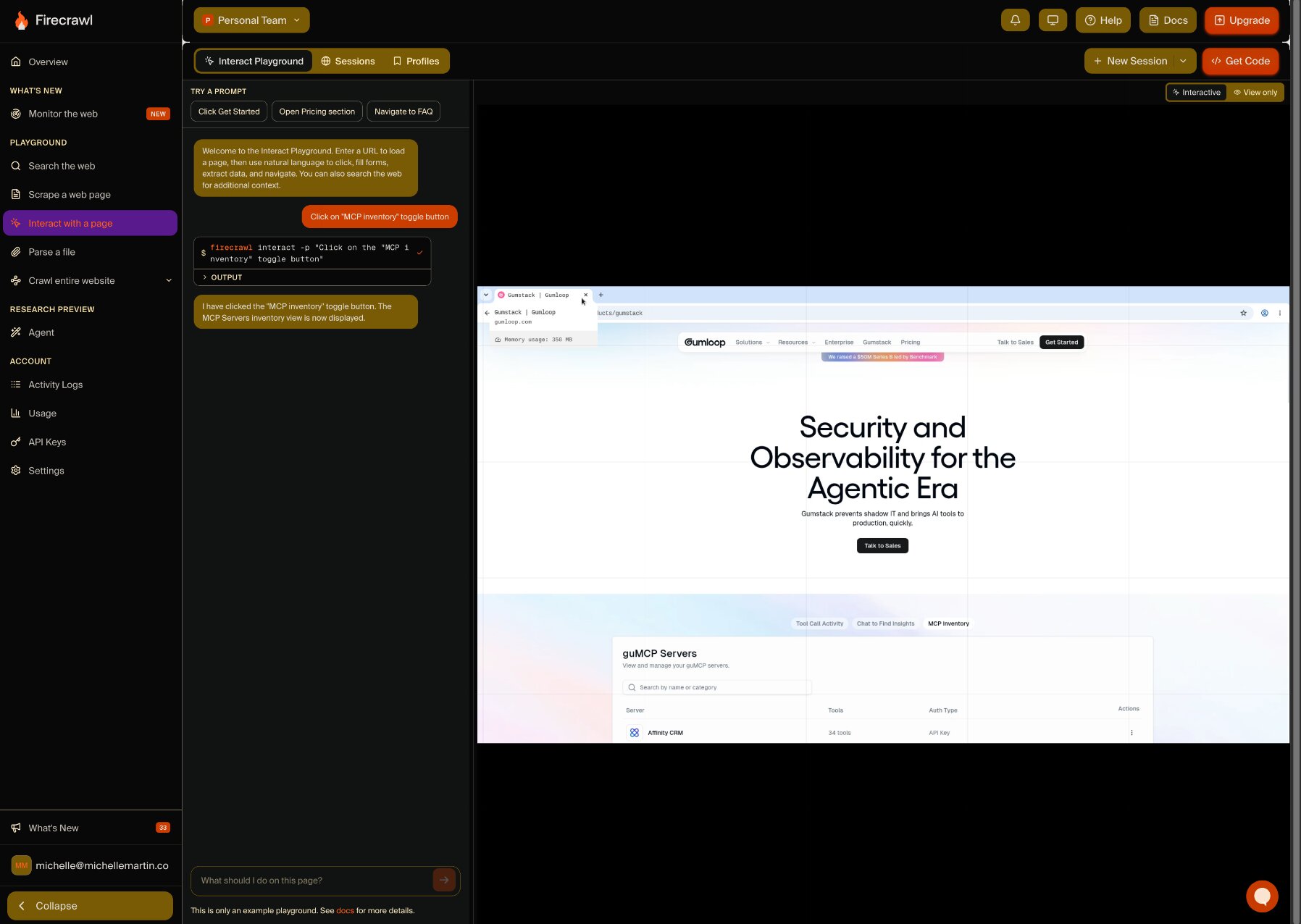
Interact is where I can get my AI agent to take action on a scraped page. This unlocks content hidden behind “load more” buttons, forms, or other dynamic elements that need some sort of interaction to show their content. I can ask Firecrawl to take an action on a page with a natural language prompt, such as, “Click the orange ‘sign up’ button,” or write code for more advanced control.
I enter a URL, Firecrawl scrapes it, then I can just chat in my browser to get Firecrawl to take action on the page (or my AI agent can direct it via MCP server connection). This is how you can get data that’s really difficult to extract otherwise.
A minor quibble I have is that directing an Interact session with AI prompts uses substantially more credits than coding — prompts use seven credits/minute compared to coding using two credits/minute.
What I like about Interact:
- Session memory so you can leave and resume whenever needed without redoing the call.
- Save browser states (cookies, local data, sessions) as Scrape and Interact profiles so you can stay logged in when resuming scraping.
- Connect to any CDP client (Playwright, Puppeteer, etc) to run your own code in the Interact browser.
One important thing to know about Interact sessions is because they stay open between actions, you (or your AI agent) need to close the session when you’re done to avoid extra credit usage and billing surprises.
Crawl
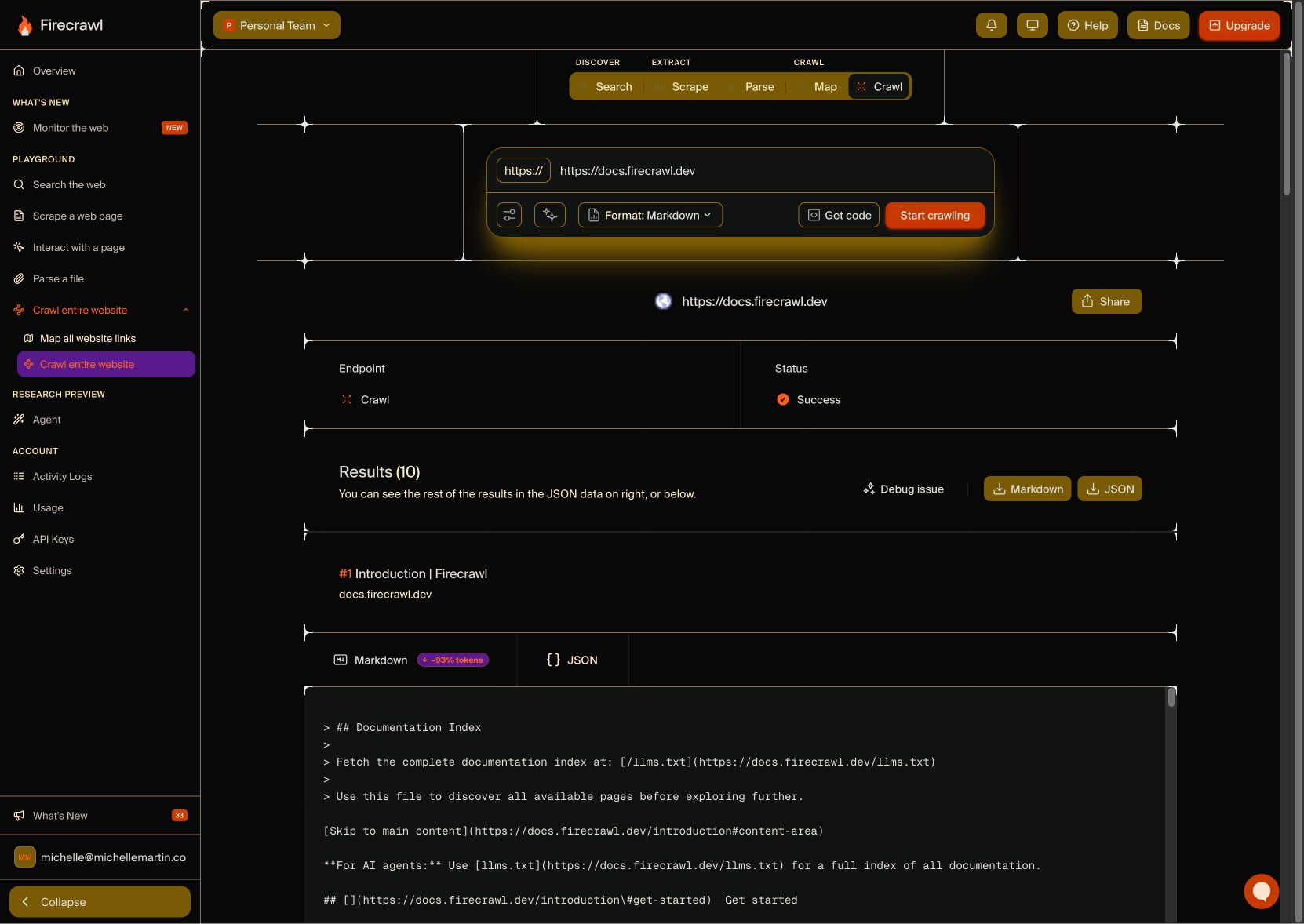
The Crawl section is actually two features in one: Crawl and Map. Crawl finds all a website’s pages and scrapes the content from them, whereas Map quickly outputs a list of all a website’s pages (like a sitemap) without scraping any content. All I have to do is enter a URL or subdomain and Firecrawl does its magic, capable of crawling millions of pages per day.
I can control how deep Firecrawl goes by setting page limits and filters, such as including or excluding specific paths (e.g. /blog). Using “Discovery depth,” I can tell Firecrawl to only crawl three levels away from the homepage, for example, or leave it blank to crawl the entire site. And, of course, export it into any of the formats Firecrawl offers, including easy markdown and JSON downloads ready for an AI agent to use.
What I like about Crawl (and Map):
- Plenty of filtering options to narrow down crawling to necessary pages only, saving you credits (a.k.a. money).
- Mapping gives you a complete sitemap quickly and easily.
- Extremely fast way to automatically develop your AI agent’s knowledge base by crawling a site or subdomain.
While both Crawl and Map are fast and useful when targeted correctly, each page discovered uses a credit, so crawling an entire website could end up in sticker shock when the bill comes. For best results, target your crawls and mapping to specific subdomains or include filters to get only the content or sitemap you need without spending extra.
Monitor
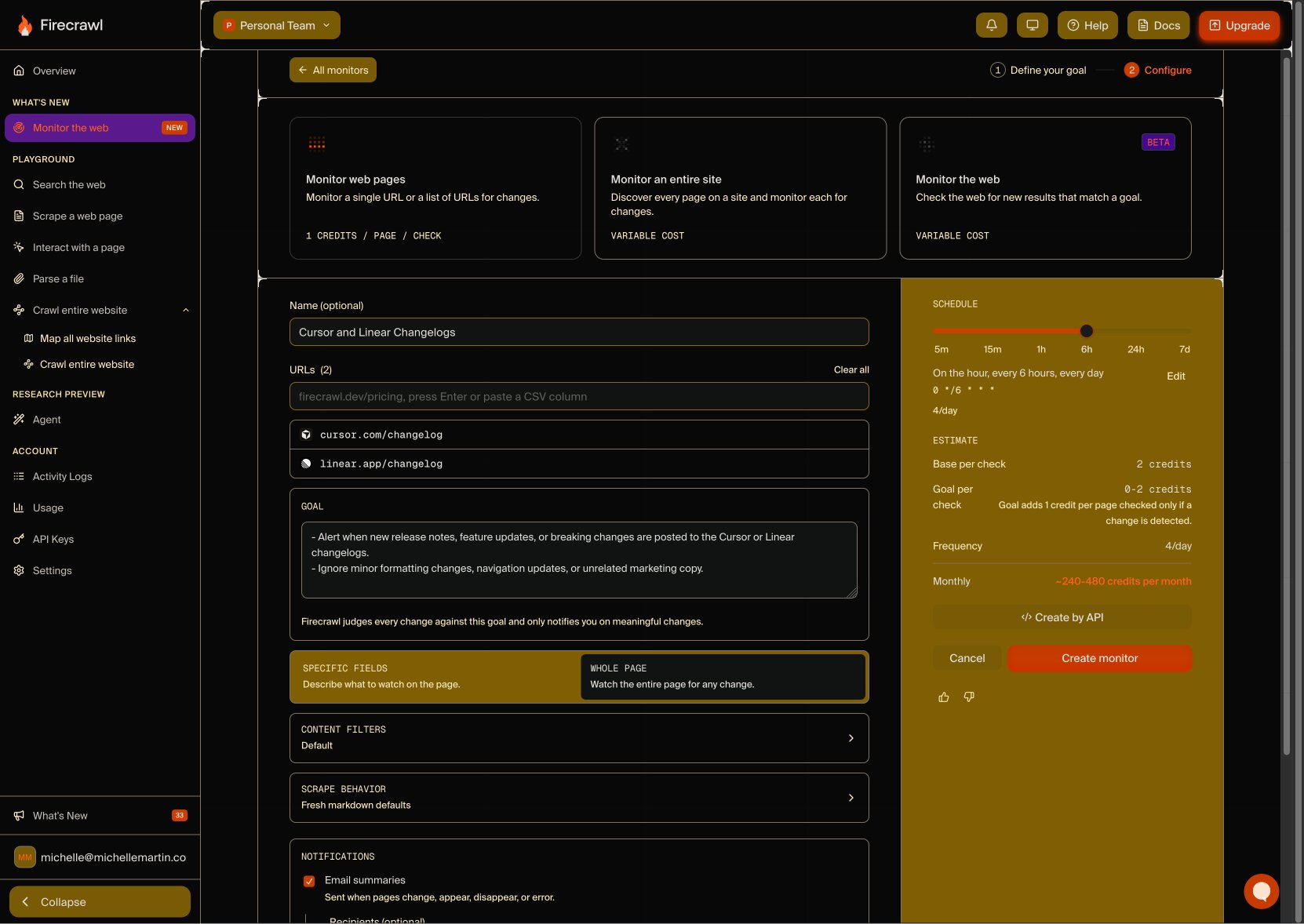
One of Firecrawl’s newest features is Monitor which tells me when a page I’m watching has new content and automatically scrapes only that new content, without wasting credits on content you’ve already scraped in the past.
I can set a frequency for Firecrawl to check for updates, such as every hour or day or week (or more), and even specify what I want to know about. For example, I can tell Firecrawl to only notify me and rescrape if pricing changes, not just if an inconsequential typo was corrected way down the page.
This eliminates over-notifying of irrelevant updates and keeps Firecrawl focused on the content you actually care about, whether it’s monitoring item prices, watching new feature launches from competitors, or anything else you’re keen to know about right away.
Besides automatically watching sites and pages you follow for changes, Firecrawl can also monitor search terms across the web to scan for new results. It’s almost like Google News Alerts for scraping, but with a goal in mind. For example, I can ask Firecrawl to tell me when anyone releases a new AI model, so I’m always in the loop — without wasting credits until that action actually has new, relevant information.
What I like about Monitor:
- Gets granular about what content changed — e.g. a competitor raised their prices — not just that something on a page changed.
- Ability to watch an entire website for important changes meeting my criteria, or drill down to watch only specific pages.
- Add Monitor tasks and updates to Slack for instant, convenient notifications of new content (love this in particular).
Scanning the web for search terms is a highly efficient way to stay informed of competitor activities, industry trends, and more. Monitor combines that broad visibility with scraping new content from previously crawled sites for the best of both worlds when it comes to knowin’ stuff and gettin’ data.
Agent
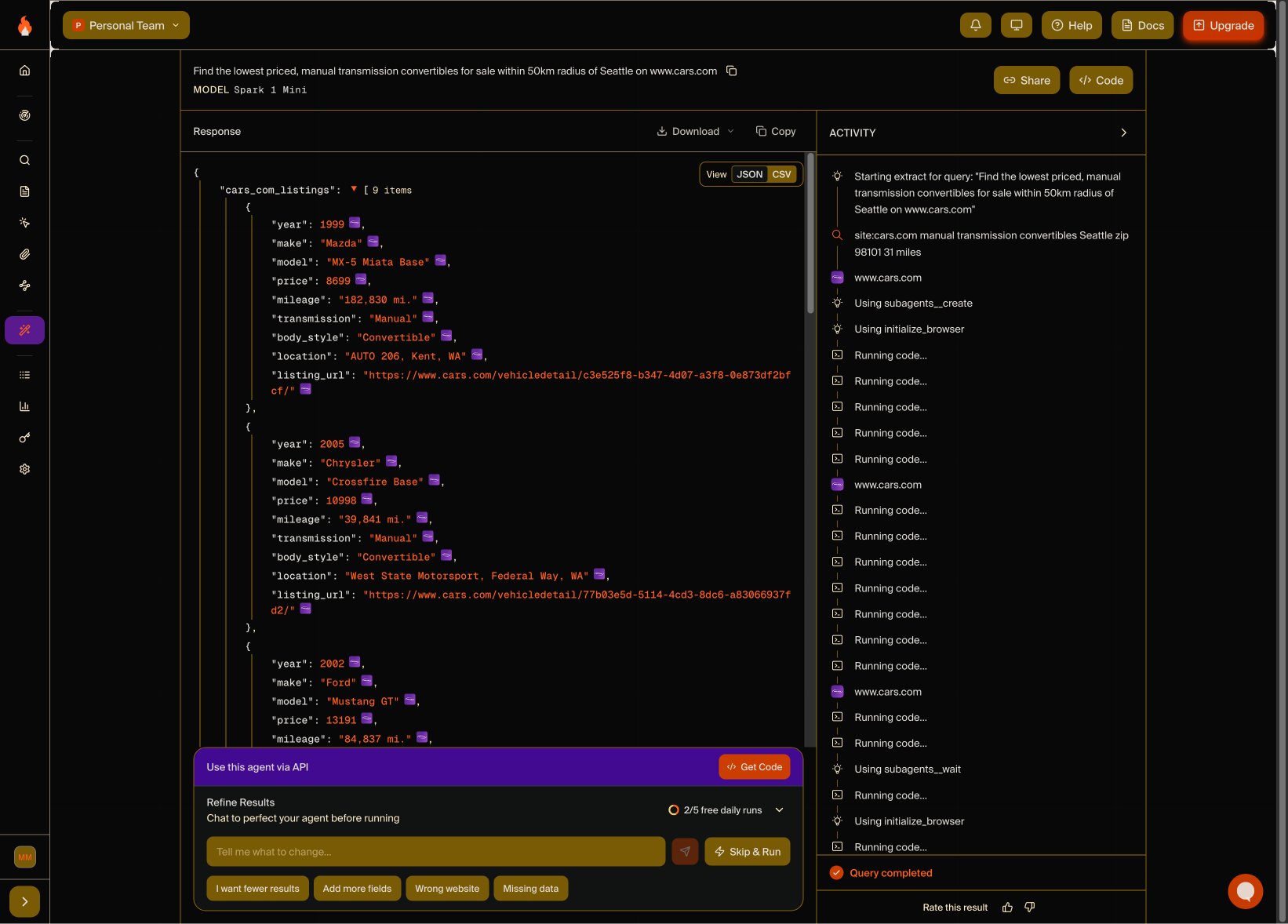
Firecrawl goes beyond AI scraping and enters full agentic AI automation mode with the launch of Agent, which carries out your natural-language prompts autonomously. I can ask a Firecrawl agent to round up the top five news stories in my industry from today and it will search on its own, figuring out sources to check and which stories are the most impactful.
You can use Agent for lots of different things: gathering competitive intel, summarizing market data or recent trends, helping with research, or even personal tasks. I asked Agent to find me the cheapest convertibles listed in my city on Cars.com, not expecting much, but within seconds Agent generated its search schema and was ready to run. (I was shooketh.)
All I had to do was write my one sentence prompt, include the website URL, and choose if I wanted JSON or CSV output. Within a few minutes, the Spark 1 Mini model gave me several reasonably-priced fun summer rides to choose from.
What I like about Agent:
- Now offers three AI models: Spark 1 Fast, Spark 1 Mini, and Spark 1 Pro. For budget optimization, the Mini model uses 60% less credits for simple requests.
- Shows its logic and thought process in real-time as it runs, including choices it makes and problems it encounters. Helpful for writing more precise prompts next time and seeing why it took certain actions.
- Available as SDK, API, and in MCPs for quick and secure integration with your AI gateway or preferred LLM.
- Everyone gets five free Agent runs per day.
I admit, I was skeptical of Agent’s true usefulness at first. But it actually surfaced exactly what I asked for. I can see how useful this is for automating an AI scraping workflow, especially when used via MCP server connection with your Gumloop AI Agents.
How much does Firecrawl cost?
Firecrawl works via usage credits, meaning each action uses up some of your monthly allotted credits.
One standard page of AI scraping costs one credit. Other actions, such as interactions, mapping, and Agent runs, cost varying amounts depending on complexity, choice of AI model, and other filtering options.
Firecrawl’s pricing plans
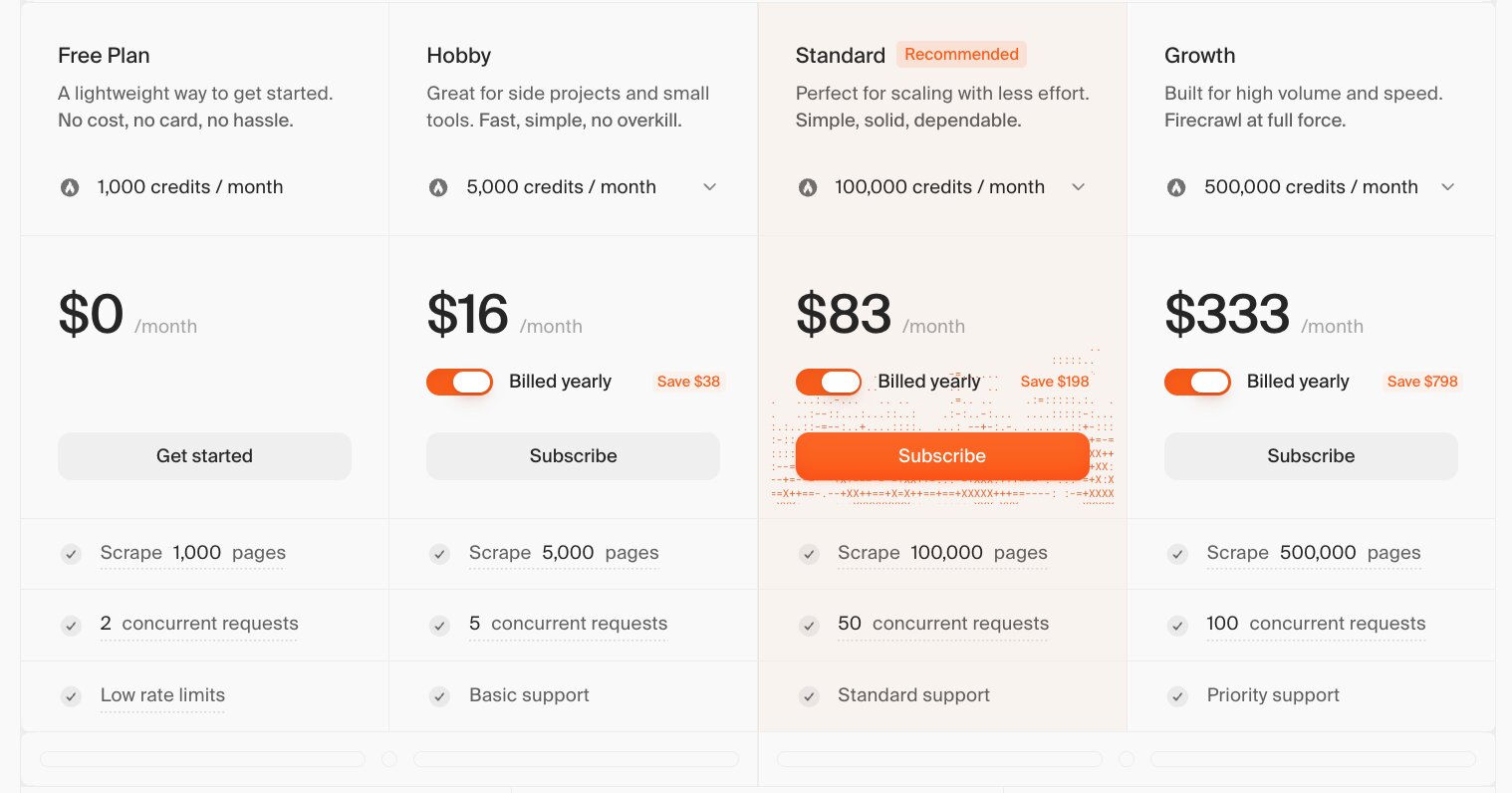
Firecrawl’s pricing tiers are:
- Forever Free: Scrape up to 1,000 pages for free every month with 1,000 monthly credits and two concurrent tasks.
- Hobby: Starts at $16/month for 5,000 credits, which is enough for 5,000 monthly scraped pages, and five concurrent tasks.
- Standard: Starts at $83/month for 100,000 credits and 50 concurrent tasks.
- Growth: Starts at $333/month for 500,000 credits, 100 concurrent tasks, and includes priority support.
- Scale: Starts at $599/month for one million monthly credits and 150 concurrent tasks.
- Enterprise: Custom quoted based on credit and usage needs, with ability to customize concurrent task quantity. Also includes a dedicated support manager, zero-data retention, and SSO.
All prices include savings for annual billing. Monthly rates run about 20% higher. You can see all the details on Firecrawl’s pricing page.
It’s important to note for credit usage that advanced AI scraping tasks use more than one credit per page — for example, direct JSON extraction to an LLM adds four credits per page (costing five total), which is a 5:1 cost ratio vs. basic scraping (one credit). Using Enhanced mode adds four more credits, bumping the cost of scraping one page up to nine credits if using both options.
So while a million credits a month sounds like a lot, it may actually be eaten up quickly depending on your needs.
Pros and cons of Firecrawl
As a summary, here are what I think are the biggest strengths and weaknesses of Firecrawl.
Firecrawl pros:
- It really does just work: Especially for non-engineers like me, Firecrawl’s visual Dashboard is easy to use and handles 99% of what most people need from an AI web scraping tool. Combined with an AI agent builder? Piece of cake.
- Clean, LLM-ready markdown: No need to re-format or edit the output, you can just plug Firecrawl’s data right into your LLM of choice (manually or via MCP server).
- Expertly handles JavaScript: Runs as a custom headless browser to scrape complex JavaScript without breaking.
- Can scrape 96% of the entire web: While I can’t independently verify this, Firecrawl says a combination of their advanced JavaScript handling and anti-bot-blocker tech achieves this.
- Maintenance-free: No stressing over code updates and configurations; Firecrawl handles all the infrastructure so you can get the data you need quickly.
Firecrawl cons:
- Can’t scrape content from social media networks: This isn’t unique to Firecrawl as social platforms like LinkedIn and Instagram use advanced anti-bot technology to basically ban all similar scrapers. If you need this, there are a few dedicated social media scrapers out there with the ability to overcome these defenses, such as on Apify.
- Can be difficult to predict credit usage in advance: Since adding filters or options to crawl requests can dramatically increase credit usage, it’s hard to estimate your average required budget if your project requirements often vary.
- Unused monthly credits don’t rollover: ‘Nuff said. Pay attention to usage to get the most value out of your plan.
TLDR: My final thoughts on Firecrawl
While I’m not a developer, I think Firecrawl is worth it if either of these situations describe where you are right now:
- You want to feed scraped data into an LLM and want the cleanest markdown output that’s 100% ready for AI.
Or:
- You don’t want to spend weeks building your own scraper (or ongoing time maintaining/fixing it) and having a ready-to-go, AI-optimized scraping tool is worth paying for simply due to the time it saves you.
It makes even more sense if you’re using an AI agent platform with native Firecrawl integration, like Gumloop.
Firecrawl has changed my mind about web scrapers in general: they’re not automatically nefarious. Firecrawl openly shares progress as an open source project, respects the FirecrawlAgent directive in robots.txt by default, and, well… leaves the ethics of what you scrape up to you.
Is Firecrawl worth it?
✅Yes, if you want live web data for AI research, real-time lead gen, competitive intelligence/monitoring, and aggregation or content workflows. If you’re feeding scraped data to AI, Firecrawl’s clean markdown is LLM-optimized and saves tons of time on re-formatting and data-checking.
❌No, if you need to scrape social media platform data, or you have simple web scraping needs (free tools suffice for this) or only need Firecrawl’s capabilities infrequently (lack of rollover credits is a waste).
What makes Firecrawl unique?
There are tons of web scrapers out there, many of them free. Firecrawl closes the gap between data scraping and AI usage.
With clean markdown export (plus many other formats), you don’t lose time cleaning up data and instead can feed your AI agents real-time data at any scale. Firecrawl is perfect for use with agentic AI via MCP server as it standardizes scraping, searching, crawling, and monitoring into one API, allowing your AI agents to work autonomously while saving usage credits along the way.
Gumloop’s AI agent platform offers native Firecrawl integration, so even non-technical users can scrape pages and extract data at scale, all in a visual no-code workflow. Then, connect that data straight into the LLM of your choice, or any other tool.

Read related articles
Check out more articles on the Gumloop blog.