6 best AI agent frameworks (and how I picked one) in 2026

I can't stop building AI agents.
Two years ago, I was a skeptic about AI. A year ago, I built my first AI agent and was mildly impressed.
But as of the last 3-6 months, the AI models have gotten so good that there are now a wide range of AI agent frameworks that are scary good.
And I’m a full believer now.
It still gives me chills with how powerful these tools are and where the tech industry is headed. It's safe to say that this is the most exciting (and confusing) time to be in tech.
But I like to lean on the optimistic side. And I see many of these AI agent platforms as a sign that we will have more abundance to come in our work. There will be less time spent on repetitive tasks, and more time spent on the creative and strategic stuff where we guide AI agents to do stuff for us.
So no fearmongering here. My goal is to show you what is real and what's not when it comes to AI agents.
In this article, I'm going over the best AI agent frameworks I've tested, what each one is best for, pricing, and how they compare. I'll also break down what to look for when choosing the right one so you're not just picking whatever has the best marketing.
Let's get into it.
What is an AI agent framework?
An AI agent framework is a platform that allows you to create AI assistants that have access to your tools and can complete tasks on your behalf. The benefit of using an existing AI agent framework is that you get a platform that has security and scalability built in.
This way, you don't have to worry about security issues with custom built solutions that can break or expose sensitive data as you scale. The framework handles the underlying infrastructure, so you can focus on building the actual agentic AI functions your team needs.
Most frameworks give you a way to define what tools your agents can access, what inputs they receive, and what outputs they produce. Some are code-heavy and give you full control over every step. Others are visual and let you build complex workflows by dragging and connecting nodes on a canvas.
The right framework for you really depends on how technical your team is and what you're trying to accomplish. But let me go over how I picked the AI agent framework I went with.
How I chose the right AI agent framework
When I was looking for the right AI agent framework, I had a few things in mind that I wanted to make sure were covered. And because I've tested a lot of these tools over the past year, I've gotten a good sense of what actually matters versus what some marketing campaign tries to tell me is good.
Here are the main things I looked at:
- Code vs no-code flexibility: Some frameworks require you to write Python or JavaScript to get anything done. Others give you a visual builder where you can drag and drop your way to a working agent. Depending on your technical background, this can be a dealbreaker in either direction.
- LLM model support: You want a framework that lets you choose which AI model to use, and ideally switch between them depending on the task. Some agents are better with GPT for planning, while Claude might be better for writing. It’s better to not be locked into one model that limits your outputs.
- Integrations and tool access: The whole point of an AI agent is that it can take action across your tech stack. So the framework needs to connect with the tools you're already using, whether that's Google Sheets, Slack, Salesforce, or something more niche with an MCP server.
- Multi-agent orchestration: If you want to build complex workflows where multiple agents collaborate on a single process, the framework needs to support that. Not every platform does, and the ones that do handle it very differently.
- Hosting and deployment: Some frameworks are open-source and require you to self-host everything. Others are fully managed and handle the infrastructure for you. This matters a lot depending on how you want to share agents across your team.
- Debugging and observability: When an agent does something unexpected, you need to be able to figure out why. Good frameworks give you visibility into each step of the workflow so you can trace what happened and fix it.
- Pricing and scalability: Some tools are free to start but get expensive fast as your usage grows. Others have flat pricing that makes it easier to predict costs. Make sure to check how credits or executions are counted before you commit.
- Security and compliance: If you're in a regulated industry, or handling sensitive data, you need a framework that takes security seriously. Things like SOC2 compliance, access controls, audit logging, and VPC deployment are things to look out for.
Most of the frameworks on this list check these boxes, as that’s what was important to me. But each one may be stronger in certain areas, and I made sure to call out where each tool shines and where it falls short.
Okay, now let’s get into the list!
6 best AI agent frameworks in 2026
Here are the top AI agent frameworks:
- Gumloop (best for building AI agents without code)
- StackAI (best for enterprise teams in regulated industries)
- CrewAI (best for open-source multi-agent orchestration)
- LangChain (best for flexible, code-first AI development)
- n8n (best for self-hosted workflow automation)
- AutoGen (best for research-grade multi-agent systems)
Alright, let’s go over each one.
1. Gumloop

- Best for: Non-technical teams and solo operators who want to build AI agents and automations without writing code
- Pricing: Free plan available, then $37/month
- What I like: You can build agents just by talking to it in natural language, and it gives you access to premium LLM models without needing separate API keys or subscriptions
Gumloop is an AI automation platform that lets you build AI agents and workflows using a visual drag-and-drop interface. It connects with 130+ apps and integrations, any major LLM model (OpenAI, Claude, Gemini, DeepSeek, and more), and MCP servers, all without you needing to set up separate accounts or API keys for each one.
I've been using Gumloop for 14 months now and it's easily my most-used tool when it comes to building AI agents and automations. And unlike some of the frameworks we’ll go over on this list, Gumloop isn't something you need an engineering background to use. It's built so that anyone can go from idea to working agent without touching code.
The platform has two core features. Flows and Agents. Flows are your standard automated workflows where you drag nodes onto a canvas and connect them with logic. Agents are even simpler. You give the agent access to tools in your tech stack, pick your LLM model, write some instructions, and then just chat with it. It figures out how to get things done on its own.
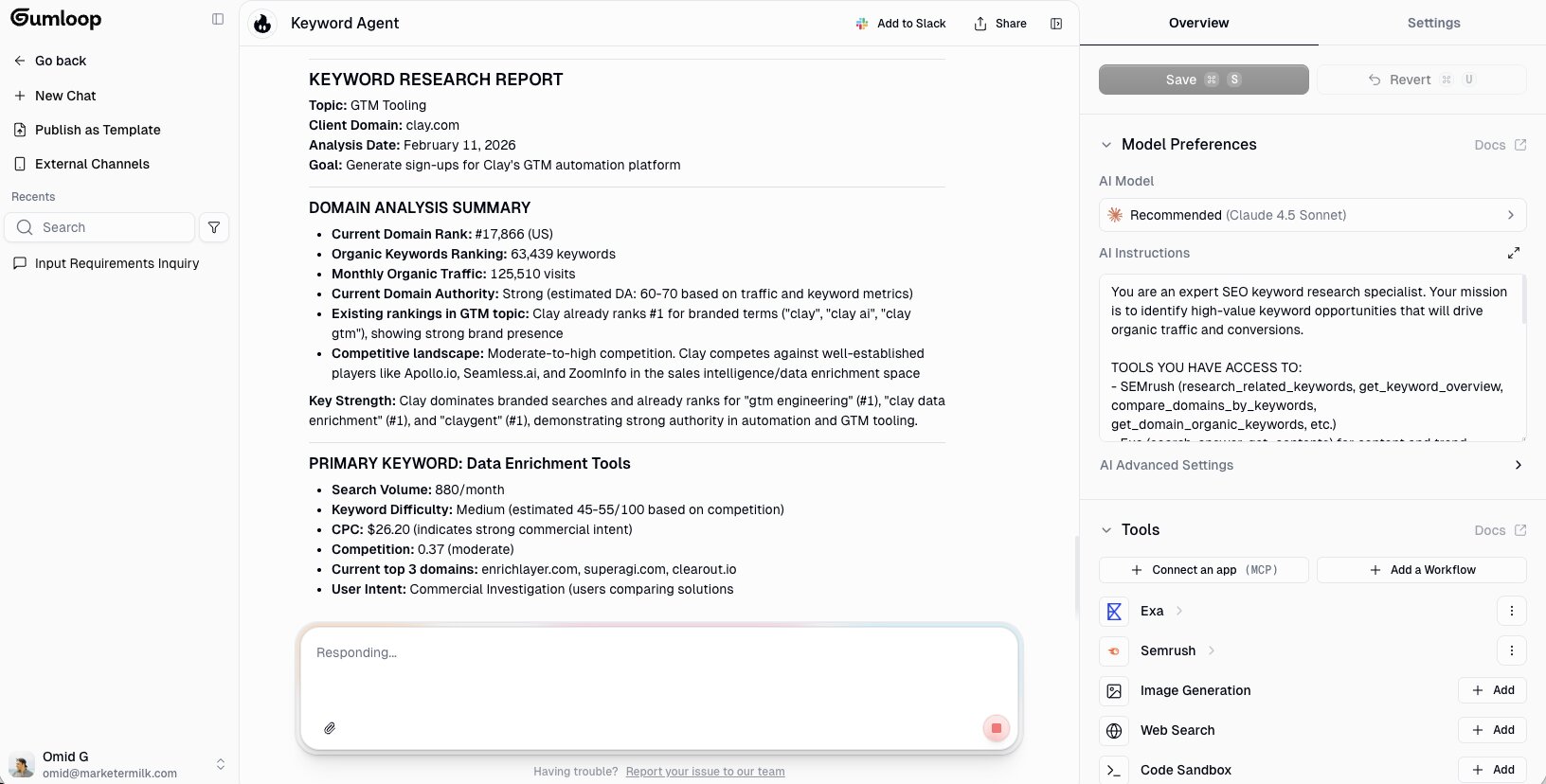
BUT, where Gumloop gets really powerful is when you combine these two features. You can build a workflow and drop specialized agents into it as individual nodes. So instead of one agent trying to do everything, you have a team of agents each handling one specific task inside a structured pipeline. I wrote a whole article on how to orchestrate AI agents using this exact approach if you want to go deeper.
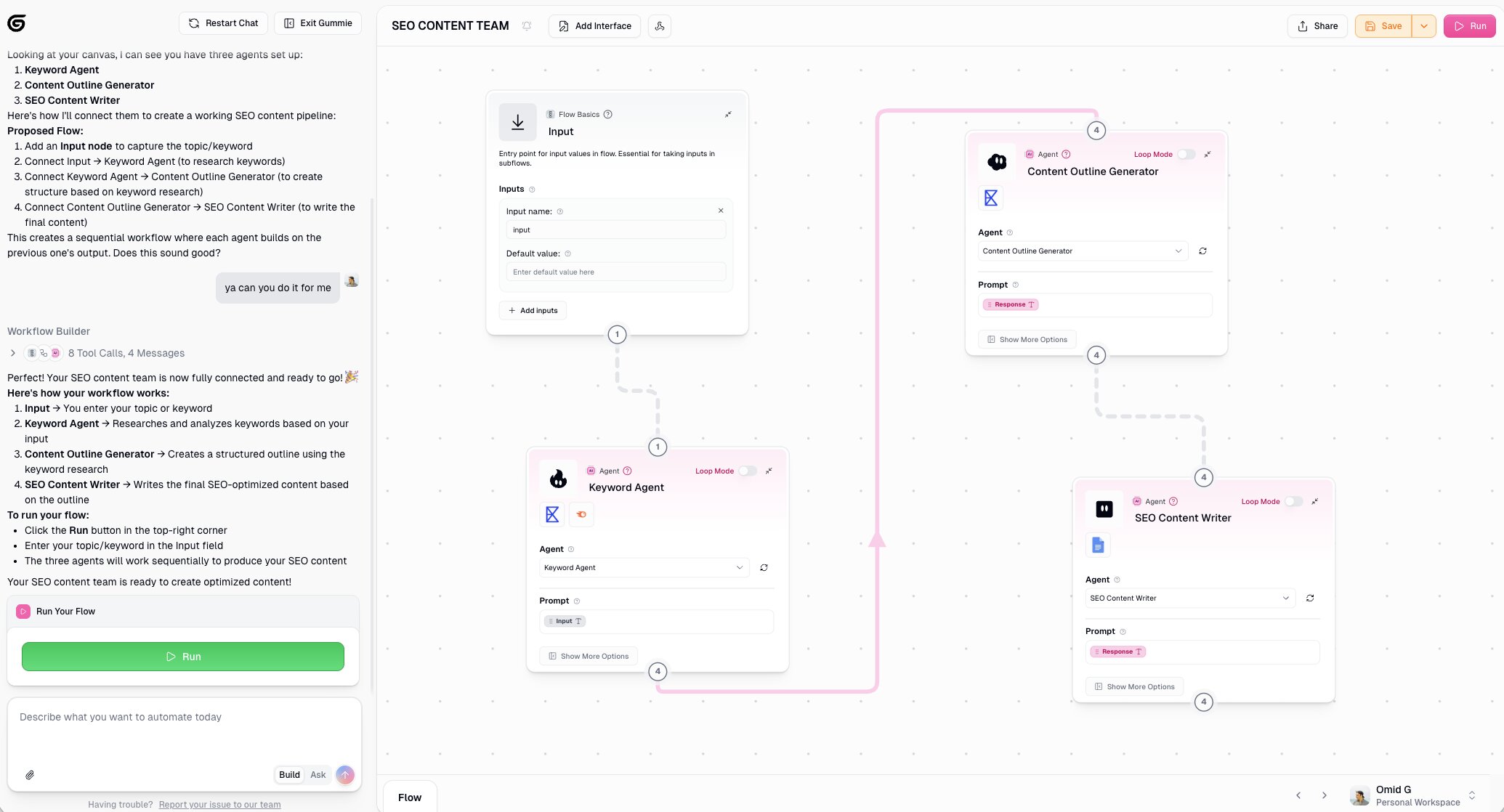
You can also connect it to Slack, which is something I use constantly. For example, the other day I needed to find blog posts on my Webflow site that had an outdated year in the title. I tagged my Gumloop agent in Slack, told it what I needed, and it found the posts and updated them (all from a Slack message).
It's used by companies like Shopify, Instacart, and Webflow, but also by freelancers and agency owners like myself. So it works whether you're a solo operator or an enterprise team rolling out AI across multiple departments.
Here are some things I like about Gumloop:
- Building agents is as simple as chatting with it in natural language, and the Gummie AI copilot can help you build any workflow from scratch
- You get access to all major LLM models included in your subscription. No extra API keys needed, although you can bring your own if you want.
- It lets you orchestrate multiple agents inside a single workflow, so each agent can be a specialist in one task instead of trying to do everything
- The platform connects with MCP servers and has 130+ native integrations, so it plays well with whatever tools you're already using
- Enterprise features like SOC2, GDPR, VPC deployments, audit logging, and access controls are built in for larger teams
Here are some things that could be improved:
- The template ecosystem is still growing compared to more established platforms like Zapier or n8n
- Getting the hang of organizing flows and agents across different workspaces can have a learning curve at first
- Because the platform can do so many things, it's easy to feel a bit of choice paralysis when you're just getting started
And I know you're reading this on the Gumloop blog, so I want to be upfront. I don't work at Gumloop. I'm a customer who uses the platform and was offered to write this because I spend a lot of time testing and reviewing AI tools on my personal blog. So, #notsponsored.
Gumloop pricing

Here are Gumloop's pricing plans:
- Free: $0/month with 2,000 credits per month, 1 seat, 1 active trigger, 2 concurrent runs, Gummie Agent, forum support, unlimited nodes, and unlimited flows
- Solo: $37/month with 10,000+ credits per month, everything in Free plus unlimited triggers, 4 concurrent runs, webhooks, email support, and bring your own API key
- Team: $244/month with 60,000+ credits per month, everything in Solo plus 10 seats, 5 concurrent runs, unlimited workspaces, unified billing, dedicated Slack support, and team usage and analytics
- Enterprise: Custom pricing with everything in Team plus role-based access control, SCIM/SAML support, admin dashboard, audit logs, custom data retention rules, regular security reports, incognito mode, AI model access control, virtual private cloud, and flow queuing
You can learn more about what each plan includes on their pricing page.
Gumloop reviews
Here's what customers of Gumloop rate the tool on third-party websites:
- G2: 4.8/5 star rating (from +6 user reviews)
- Product Hunt: 5/5 star rating (from +9 user reviews)
2. StackAI
- Best for: Enterprise teams in regulated industries that want to build internal AI agents and workflows
- Pricing: Free plan available, enterprise plans are custom pricing
- What I like: Has one of the cleanest UIs for building AI agents, and it takes security and compliance seriously with SOC2, HIPAA, and on-prem options
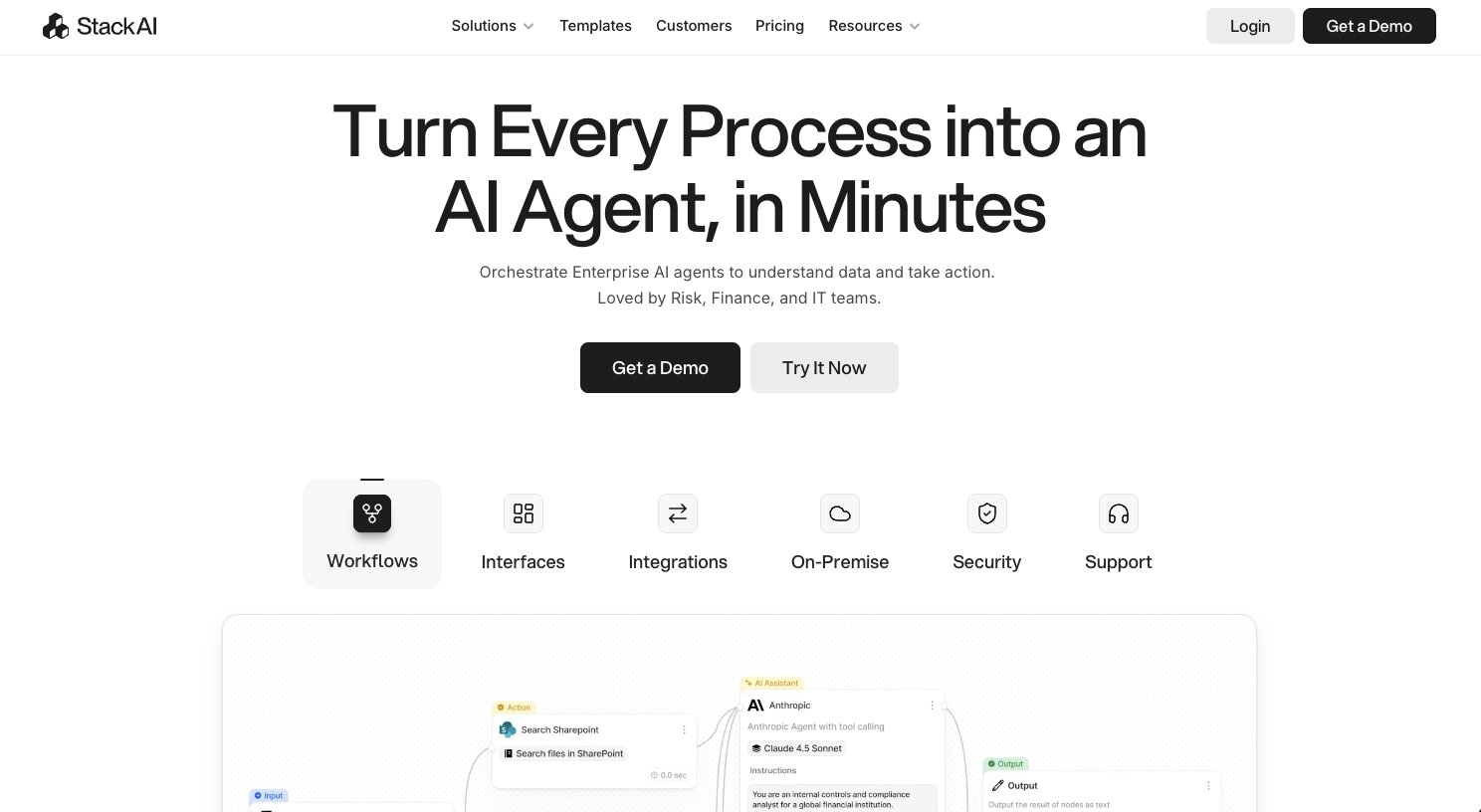
StackAI is an AI agent platform built for enterprise companies in industries like risk, finance, and IT. It acts as a workflow builder that lets you design automations in a visual canvas. You drag and drop nodes, connect them with logic, and choose from different LLMs you want your agent to run on.
I first used StackAI around 11 months ago when I started my AI agent journey, and it was one of the few platforms that I liked from a UI/UX perspective.
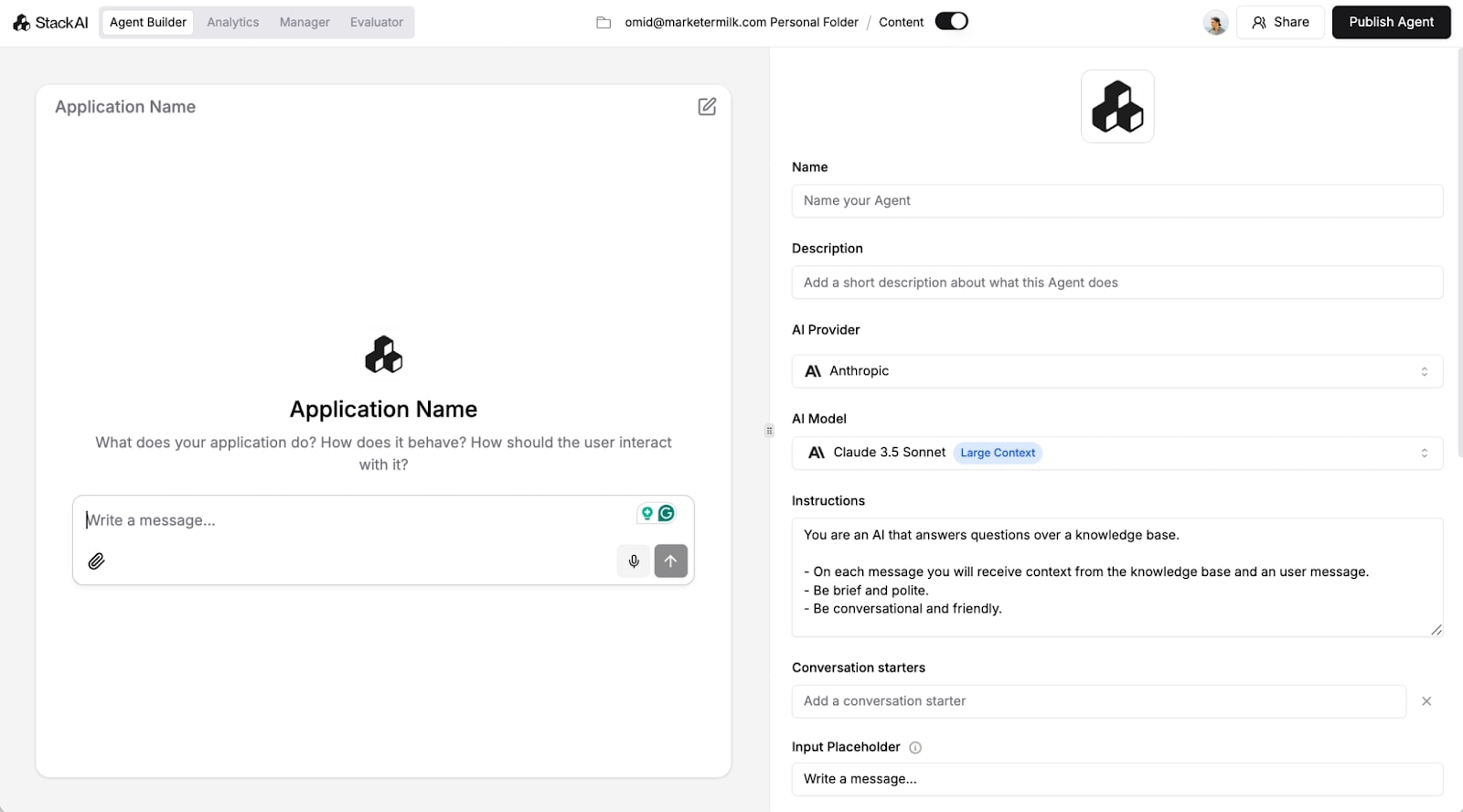
It's super clean and makes it pretty straightforward when trying to piece together your data sources, LLMs, tools, and business logic. And from there, you can deploy your workflow as a chat assistant, form, or API endpoint to be shared with your team.
Compared to some other tools like Make or Zapier, StackAI is focused purely on enterprise. So if you're in a regulated industry and things like security, compliance, and access control matter to you, then this is a platform you definitely want to check out.
Here are some things I like about StackAI:
- The UI/UX is beautiful and it makes it fun to build out AI agents and workflows
- Has deep integrations with tools you may already be using, like Slack, Airtable, Google Drive, and more
- Built for regulated industries and leverages SOC2, HIPAA, GDPR, RBAC, VPC/on-prem options, and governance controls for how models and data are used
- Similar to Gumloop, it's AI model agnostic so you're not locked into just using GPT or Claude models
Here are some things that could be improved:
- There is a free plan to play around with, but it's not built for startups or small businesses
- It's very internal document heavy, meaning it's not the best if you want to create customer facing AI agents (mostly built for internal use only)
- While the UI is nice, there still is a learning curve and you should be slightly technical to get the most out of the platform
Overall, I see StackAI as a great choice for the regulated industries I mentioned earlier. And if you are focused more on internal use cases, then you can't really beat this framework for creating AI agents.
StackAI pricing
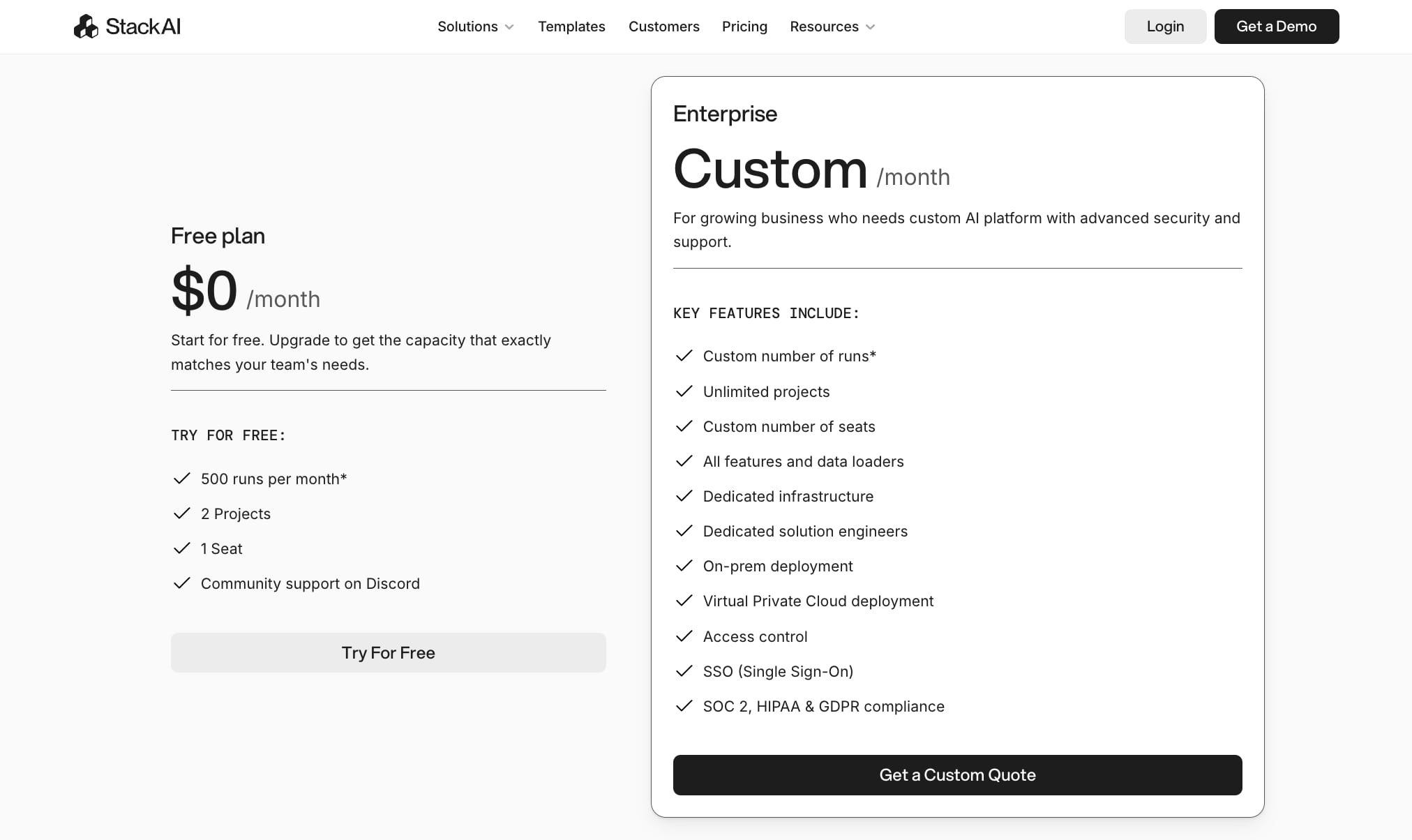
Here are StackAI's pricing plans:
- Free: $0/month with 500 runs per month, 2 projects, 1 seat, community support on Discord
- Enterprise: Custom pricing with custom number of runs, unlimited projects, custom number of seats, all features and data loaders, dedicated infrastructure, dedicated solution engineers, on-prem deployment, VPC deployment, access control, SSO, and SOC 2/HIPAA/GDPR compliance
You can learn more about what each plan includes on their pricing page.
StackAI reviews
Here's what customers of StackAI rate the tool on third-party websites:
- G2: 4.5/5 star rating (from +38 user reviews)
- Slashdot: 4.4/5 star rating (from +9 user reviews)
3. CrewAI
- Best for: Developers who want an open-source framework for building multi-agent systems where multiple AI agents collaborate on tasks
- Pricing: Free plan available, paid plans start at $25/month
- What I like: It's one of the few frameworks that's built specifically for multi-agent orchestration, and it's open source so you can self-host and read the code
CrewAI is a multi-agent framework that helps businesses orchestrate a "crew" of AI agents. The goal is to have multiple agents that can collaborate on different tasks at a time. This way, you don't have one main agent that can get bloated with context overload.
Creating multi-agent workflows really is the way to go if you want to get the most out of your AI investment. For example, you can define specialized agents (like a researcher, planner, reviewer) and have them coordinate via shared context and task delegation.
In the broader AI agent framework space, I think of CrewAI as a developer-first alternative to heavier orchestration platforms like LangGraph or AutoGen (which we'll also go over next). It's more opinionated than "just call the API yourself," but still light enough that I feel in control of the code, the tools, and the runtime.
Here are some things I like about CrewAI:
- The platform is built for multi-agent systems, so you don't have to hack together a bunch of agents and hope they share context
- It's open source and gives you the flexibility to self-host, read the code, or integrate it with existing Python projects
- It has a visual editor with a copilot that helps you prototype different agents
Here are some things that could be improved:
- It does lean more technical, so if you're not comfortable with Python or other programming languages, there will be a learning curve
- It can get a bit tedious when it comes to debugging your crew of agents if they get too big
Overall, CrewAI is a promising tool if your main focus is to find an open-source framework for orchestrating agents. However, if you need simpler use cases like AI workflow automation, and you know that not every AI agent needs to be a part of a "team" of other AI agents, then it might be worth looking into an alternative.
CrewAI pricing
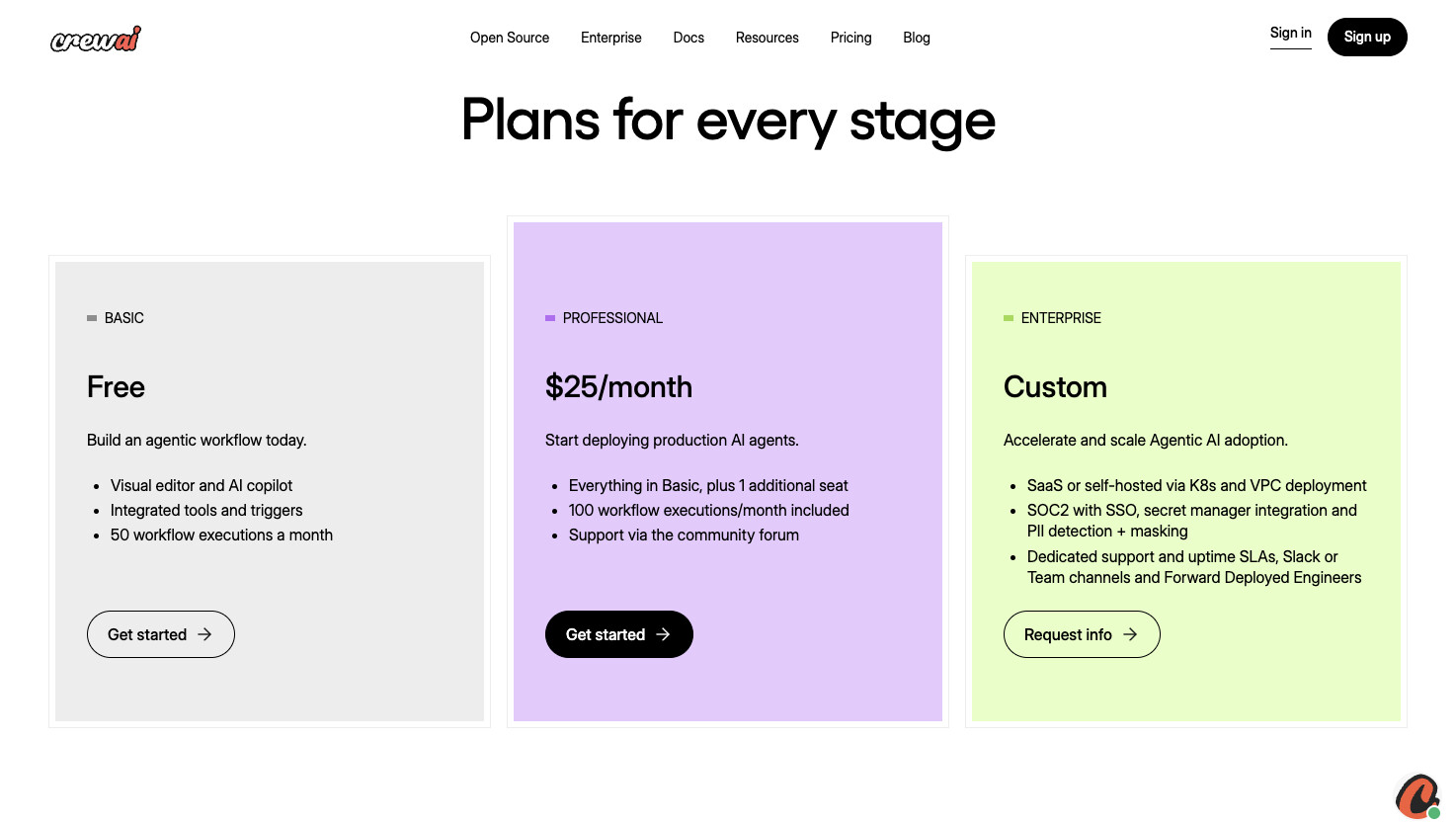
Here are CrewAI's pricing plans:
- Basic: $0/month with a visual editor and AI copilot, integrated tools and triggers, and 50 workflow executions per month
- Professional: $25/month with everything in Basic plus 1 additional seat, 100 workflow executions per month, and support via the community forum
- Enterprise: Custom pricing with SaaS or self-hosted deployment via K8s and VPC, SOC2 with SSO, secret manager integration, PII detection and masking, dedicated support and uptime SLAs, and forward deployed engineers
You can learn more about what each plan includes on their pricing page.
CrewAI reviews
Here's what customers of CrewAI rate the tool on third-party websites:
- G2: 4.5 out of 5 star rating (from +3 user reviews)
- Trustpilot: 3.1/5 star rating (from +2 user reviews)
4. LangChain
- Best for: Engineers who want a flexible, code-first framework for building custom AI agents and retrieval-based applications
- Pricing: Free and open-source, LangSmith starts at $0 for developers then $39/seat per month for teams
- What I like: One of the largest open-source AI communities out there with 100k+ GitHub stars, and the tooling around debugging and evaluation is really mature
LangChain is an open-source framework that gives developers a set of building blocks for creating AI agents and LLM-powered applications. It supports both Python and JavaScript, and the whole idea is that instead of manually stitching together API calls, you use reusable components like prompts, memory, tools, and chains to build out your workflows.
Where CrewAI is specifically about getting multiple agents to work together, LangChain is more of a Swiss Army knife. You can use it for single agents, multi-step workflows, retrieval-augmented generation (RAG) applications, or even more advanced multi-agent setups when you pair it with LangGraph. It doesn't force you into one pattern, which gives you a lot of room to experiment.
On top of the core framework, there's also LangSmith, which is their platform for tracing, monitoring, and evaluating your agents. If you're trying to figure out why an agent is behaving a certain way in production, that's where LangSmith comes in.
But I want to be upfront here. This is a developer tool through and through. If you're not writing code regularly, you're going to have a tough time getting value out of it. For non-technical teams, something like Gumloop or even CrewAI's visual editor would be a better starting point.
Here are some things I like about LangChain:
- The modular design lets you swap out individual pieces like your LLM provider or vector database without rebuilding everything from scratch
- It has built-in support for RAG applications, which is useful if you're building anything that needs to pull from internal documents or knowledge bases
- The community and ecosystem around it is huge, so finding integrations, examples, and support is easier than with most other frameworks
- LangSmith adds a layer of observability that makes it way easier to debug and improve your agents over time
Here are some things that could be improved:
- There are a lot of abstractions and moving parts, so getting started can feel overwhelming if you're new to the ecosystem
- Documentation and tutorials can be inconsistent because the framework has evolved so much over the past couple of years
- For simpler use cases, it can feel like you're using a sledgehammer when all you needed was a screwdriver
Overall, if you're an engineer who wants full control over how your AI agents are architected, LangChain is hard to beat. But if you want something that handles hosting, integrations, and LLM access without needing to write and maintain code, there are better options on this list for that.
LangChain pricing
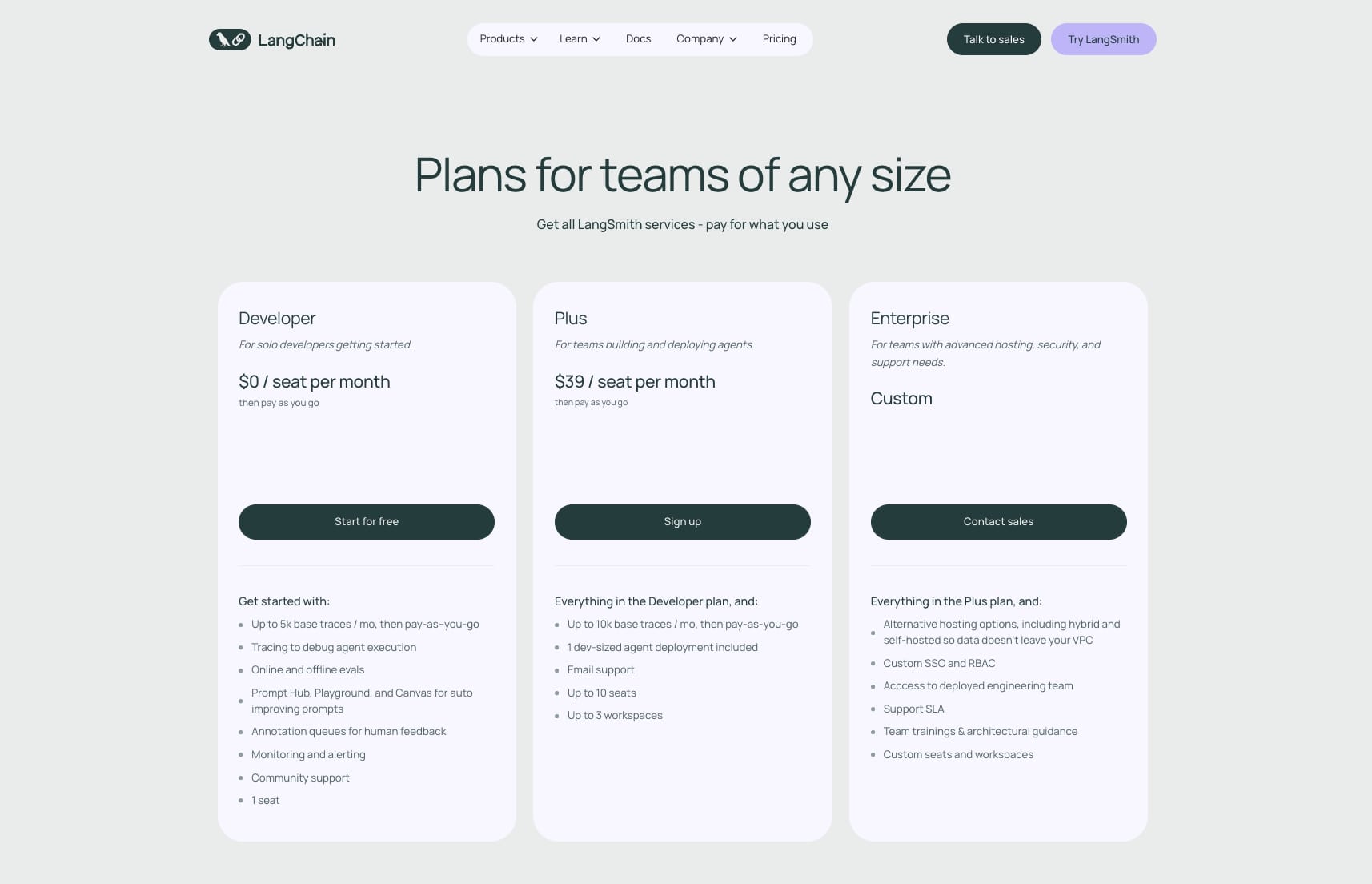
LangChain itself is free and open-source. However, LangSmith (their tracing, evaluation, and monitoring platform) has the following pricing:
- Developer: $0/seat per month with up to 5k base traces per month (pay-as-you-go after), tracing for debugging, online and offline evals, Prompt Hub, Playground, annotation queues, monitoring and alerting, community support, and 1 seat
- Plus: $39/seat per month with up to 10k base traces per month, 1 dev-sized agent deployment included, email support, up to 10 seats, and up to 3 workspaces
- Enterprise: Custom pricing with alternative hosting options including hybrid and self-hosted, custom SSO and RBAC, access to deployed engineering team, support SLA, and team trainings with architectural guidance
You can learn more about how they structure their pricing on their pricing page.
LangChain reviews
Here’s what people have to say about LangChain on third-party review sites:
- G2: 4.7 out of 5 star rating (from +37 user reviews)
- GitHub: 127k+ stars
5. n8n

- Best for: Technical teams who want a visual workflow builder with the option to self-host and drop into code when needed
- Pricing: Starts at $24/month, free trial available
- What I like: Huge integration library with 400+ apps, a large community template marketplace, and the ability to self-host everything on your own infrastructure
n8n is a popular low-code workflow automation platform that lets you build AI-powered automations using a visual canvas. You drag nodes onto a flow, connect them together, and mix no-code blocks with custom JavaScript or Python when you need more control.
In the context of AI agent frameworks, n8n is less of a pure agent framework and more of an orchestration layer that your agents run inside of. It's great for multi-step automations that need to touch real systems like databases, CRMs, and ticketing tools rather than just running reasoning loops in isolation.
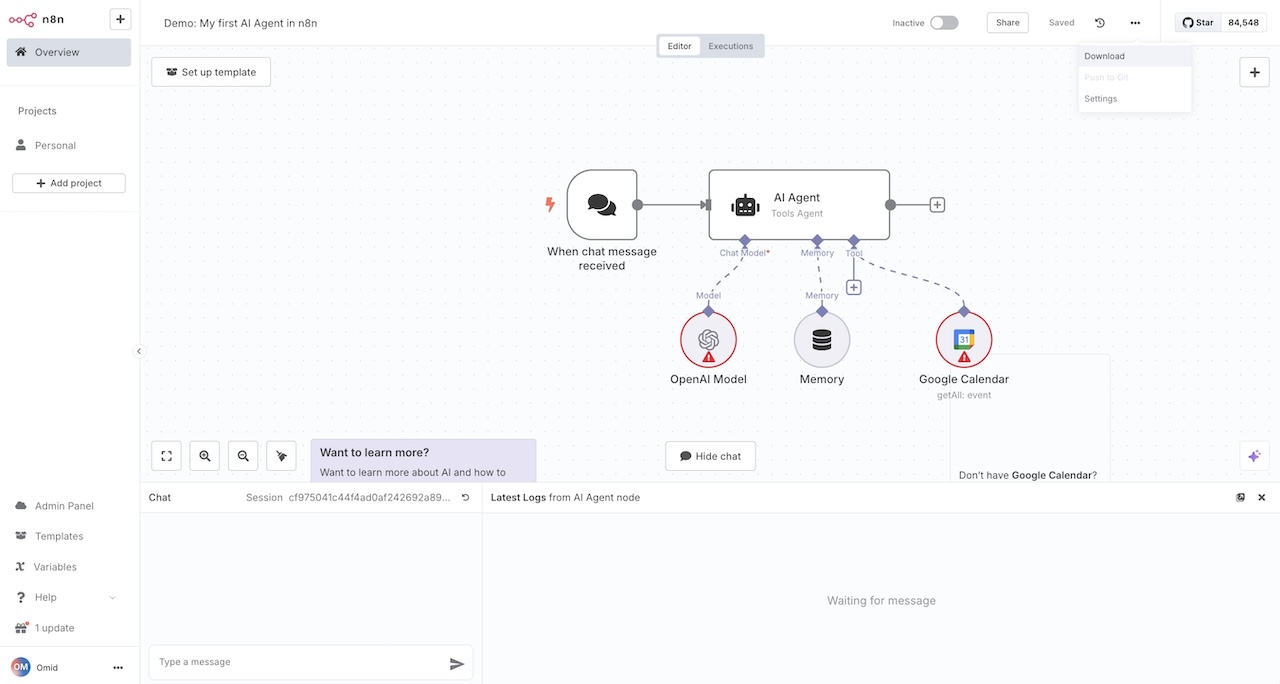
I still wanted to include to because if you've used tools like Zapier or Make, and kept hitting their limits, n8n feels like the next step up. It gives you the visual builder experience but with way more flexibility when it comes to custom logic, debugging, and infrastructure control. There's also a built-in AI agent builder with native connectors to different LLM providers and even a LangChain integration, so you can design agents that reason, branch, and take action across your stack.
The big selling point I’ve personally seen for a lot of teams is the self-hosting option. If you're dealing with sensitive data or strict compliance requirements, being able to run everything on your own infrastructure is a major advantage over most other tools in this space.
Here are some things I like about n8n:
- The visual editor plus embedded code nodes give you the best of both worlds. You can prototype quickly but still drop into JavaScript or Python when you need something custom.
- The integration catalog is massive, and even when something isn't built in, you can hit any API with HTTP nodes
- Self-hosting gives you real control over your data and infrastructure, which matters if you're handling regulated workloads
- The debugging experience is solid. You can re-run single nodes, inspect payloads, and view execution history, which makes it easier to trust complex automations in production.
Here are some things that could be improved:
- Even though it's marketed as "low-code," n8n is clearly built for technical users. If you're not comfortable with APIs or basic scripting, it's going to feel overwhelming.
- The UI/UX can feel a bit dated and clunky compared to newer platforms
- As your workflows get more complex, managing naming, versioning, and dependencies can get messy unless you're disciplined about it from the start
Overall, n8n is a powerful platform if you're a technical team that already thinks in APIs and automation. But if you're non-technical or you want something that handles hosting and LLM access for you out of the box, you’ll want to look into a comparable alternative.
n8n pricing
Here are n8n's pricing plans:
- Starter: $24/month with 2,500 workflow executions, 1 shared project, 5 concurrent executions, unlimited users, and forum support
- Pro: $60/month with 10,000 workflow executions, 3 shared projects, 20 concurrent executions, 7 days of insights, admin roles, global variables, workflow history, and execution search
- Business: $800/month with 40,000 workflow executions, 6 shared projects, SSO/SAML/LDAP, 30 days of insights, scaling options, version control using Git, and self-hosted option
- Enterprise: Custom pricing with unlimited shared projects, 200+ concurrent executions, 365 days of insights, external secret store integration, log streaming, extended data retention, dedicated support with SLA, and hosted by n8n or self-hosted options
You can learn more about what each plan includes on their pricing page.
n8n reviews
Here's what customers of n8n rate the tool on third-party websites:
- G2: 4.8 out of 5 star rating (from +214 user reviews)
- Capterra: 4.6 out of 5 star rating (from +41 user reviews)
6. AutoGen
- Best for: AI developers and researchers who want a powerful, event-driven framework for building multi-agent systems
- Pricing: Free and open-source, you pay for API calls to whatever AI models you use
- What I like: Backed by Microsoft Research, and the observability and debugging features for understanding how your agents think are really impressive
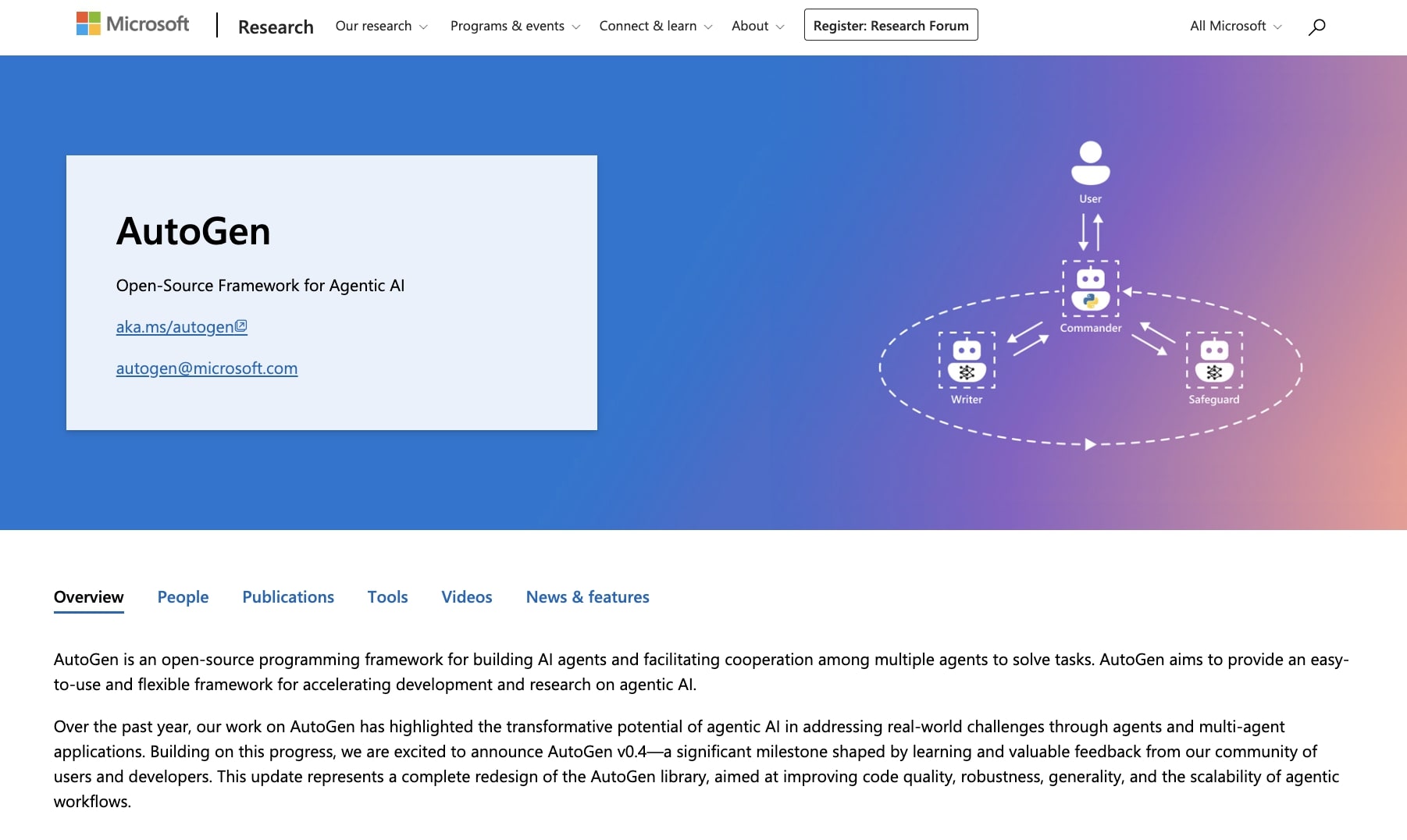
AutoGen is an open-source framework created by Microsoft Research for building multi-agent systems. The core idea is that instead of relying on one agent to handle everything, you define specialized agents (like a planner, researcher, coder, reviewer) and have them communicate with each other through messages to solve complex tasks together.
If LangChain is a general-purpose toolkit for LLM applications, AutoGen is more narrowly focused on conversational multi-agent orchestration. It uses an event-driven architecture, which means your agents can run in parallel, react to events, and handle long-running background tasks. It’s honestly a strong choice if you're building something more sophisticated than a basic chatbot or single-step automation.
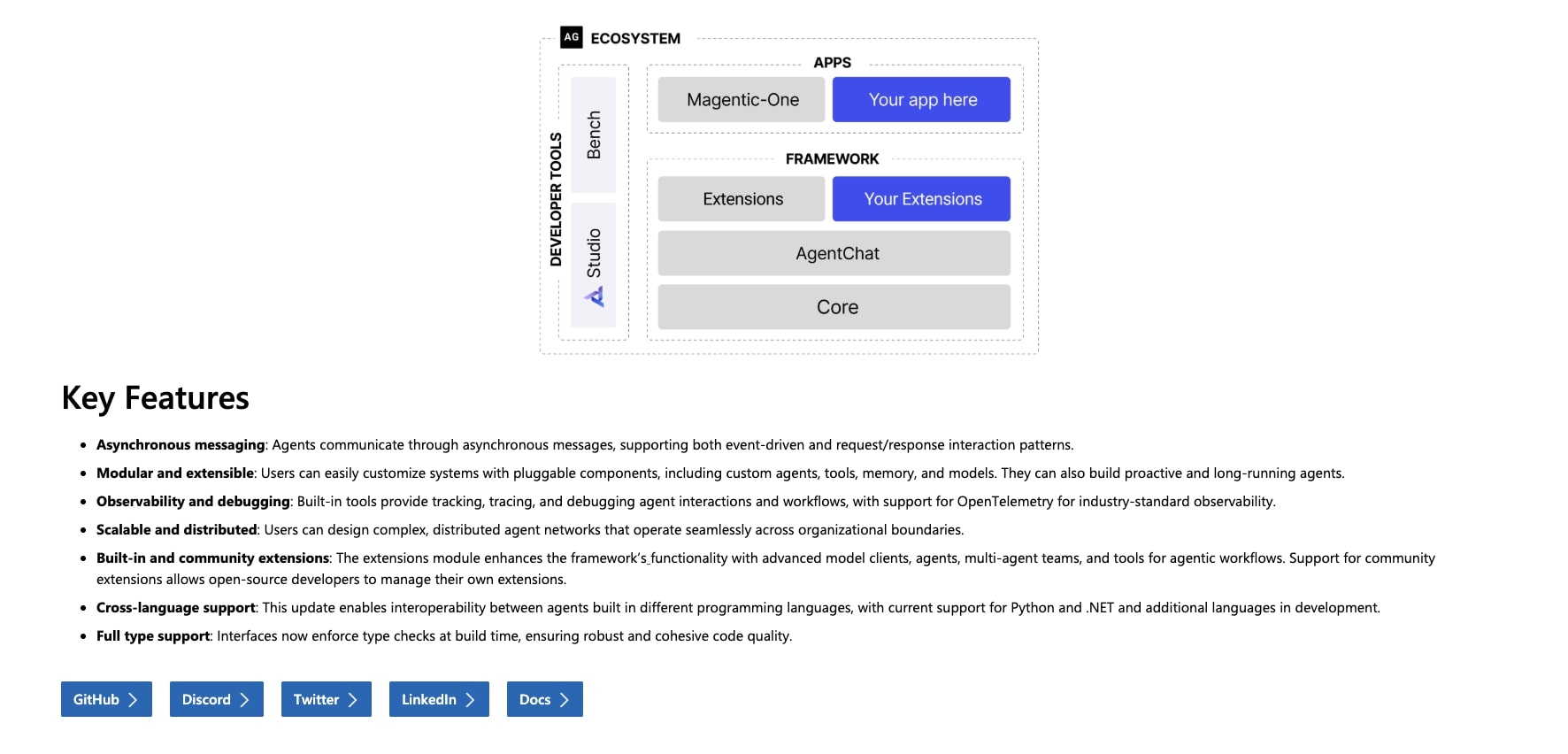
And the one thing that sets AutoGen apart is the observability layer. It has built-in tracing, logging, and telemetry hooks that let you see exactly why an agent made a certain decision or where a workflow got stuck. If you've ever tried debugging a multi-agent system (moment of silence if that’s you), you’ll know how powerful this is.
There's also AutoGen Studio, which gives you a GUI for building multi-agent workflows without writing code. So even though the framework is developer-heavy, there is a visual option if you want to prototype something quickly.
But similar to LangChain, this is not a turnkey framework. It’s quite raw and barebones so there's no built-in hosting, no managed infrastructure, and no integration marketplace. You're responsible for deployment, scaling, and connecting it to your own tools Similar to how it would be if you used Claude Code to build custom agents.
So if that sounds like too much technical work, a platform like Gumloop, StackAI, or n8n would be a better fit.
Here are some things I like about AutoGen:
- The multi-agent conversation model feels natural. The agents communicate in plain language messages, which makes it easier to understand what's happening and debug when things go wrong.
- The async, event-driven architecture lets you run agents in parallel and build long-running workflows that don't need constant input
- It's modular enough that you can plug in your own tools, memory, and models without being locked into a fixed set of behaviors
- Being backed by Microsoft Research means active development and long-term stability, plus it integrates well with Azure OpenAI and the broader Microsoft ecosystem
Here are some things that could be improved:
- It's very developer-heavy. If you're not comfortable with Python and event-driven thinking, this will no doubt feel intimidating
- The framework has evolved a lot, so it can be hard to figure out what's current best practice versus older patterns that are no longer recommended
- There's no built-in hosting or deployment tooling, so those pieces are entirely on you
Overall, AutoGen is a compelling framework if you're an engineer or research team exploring multi-agent architectures. But if you just need to automate workflows or build a simple agent without managing infrastructure, there are more accessible options on this list.
AutoGen pricing
AutoGen is free and open-source. You can download it from GitHub and start building immediately. But you will need to pay for API calls to whatever AI models you use (OpenAI, Azure OpenAI, Claude, etc.). The cost depends on your usage and which models you choose.
AutoGen reviews
AutoGen is an open-source developer framework, so it doesn't have traditional reviews on platforms like G2 or Capterra. Instead, you can gauge community sentiment through:
- GitHub: 54.7k+ stars and 8.2k+ forks on the microsoft/autogen repo
- Reddit: You can check out what others say about using AutoGen
What is the best AI agent framework?
It depends on what you're building and how technical your team is. If you need a production-ready platform that handles hosting, LLM access, and integrations for you, Gumloop is the one I keep coming back to. It's enterprise-grade, but accessible enough that I was building agents within my first 15 minutes on the platform. And because it connects with external tools through MCP servers and native integrations, you're not stuck duct-taping things together.
If you're an engineer who wants full control over your SDK, memory management, and multi-agent collaboration patterns, LangChain or AutoGen are strong picks. LangChain gives you the most flexibility for custom architectures, especially if you're building RAG applications or need to work across both Python and JavaScript. AutoGen is the move if you care about real-time event-driven orchestration and deep observability into how your agents make decisions.
For teams in regulated industries that need guardrails around how models and data are used, StackAI is one to look into. And if you want something in between, where you get a visual builder but can still drop into code and self-host, n8n and CrewAI both fill that gap well.
At the end of the day, the frameworks on this list, whether backed by Microsoft Research, built on top of Anthropic and OpenAI models, or designed as no-code platforms, are all signs that we're heading toward more abundance in how we work. Less busywork, more creative problem solving. And that's something worth being optimistic about.

Read related articles
Check out more articles on the Gumloop blog.