Meet Gumball: Your new AI sidekick


Gumball uses your apps, learns your style, and handles repeat work for you.
Introducing Gumball: a personal agent that’s ready to do work for you, from the moment you first log in to Gumloop. It uses your own connectors to read and act in the apps you use every day, as well as the skills you have access to (including your team’s skills) in order to act as your personal assistant. It can even delegate tasks to other agents.
You can chat with your Gumball in the Gumloop app, in Slack, or by emailing gumball@gumloop.ai. And the more you use Gumball, the more it learns about how you work and how it can help you.
In addition to chat, where you can ask it to do anything across your connected apps, Gumball comes with several prebuilt personal productivity features.
An always-active agent for your own cloud
Unlike other AI agents, which are based on your local environment and stop working when you close your laptop, Gumball works in the cloud. So when you’re sleeping, taking a break, or touching grass, Gumball is still working in the background: checking your emails, preparing for your upcoming day, and monitoring what you’ve told it to monitor.
And, if your organization deploys Gumloop in a virtual private cloud (VPC), then Gumball fully lives in your company’s cloud, so no data ever leaves.
Model routing
Gumball automatically picks the right model for each task by assessing how complex the task will be, then selecting the model that provides the best performance for the lowest cost (from the list of models allowed by your organization). You enjoy the savings without having to compare and contrast models yourself.

Manages agents across your entire org
Gumball has access to all the apps, skills, and agents that you have access to. That means Gumball can delegate tasks to other agents across the entire company. For example, if you ask Gumball to complete a finance-related task, Gumball will tag in your company’s custom finance agent; if you ask Gumball to check the CRM, it’ll delegate to the sales team’s sales agent; and so on.

Smart Inbox: Separating the signal from the noise
Gumball automatically labels new email as it lands in your Gmail or Outlook inbox, using labels you define. When Gumball decides a message needs a reply, it can write a draft straight into your mailbox for you to review, edit, and send.
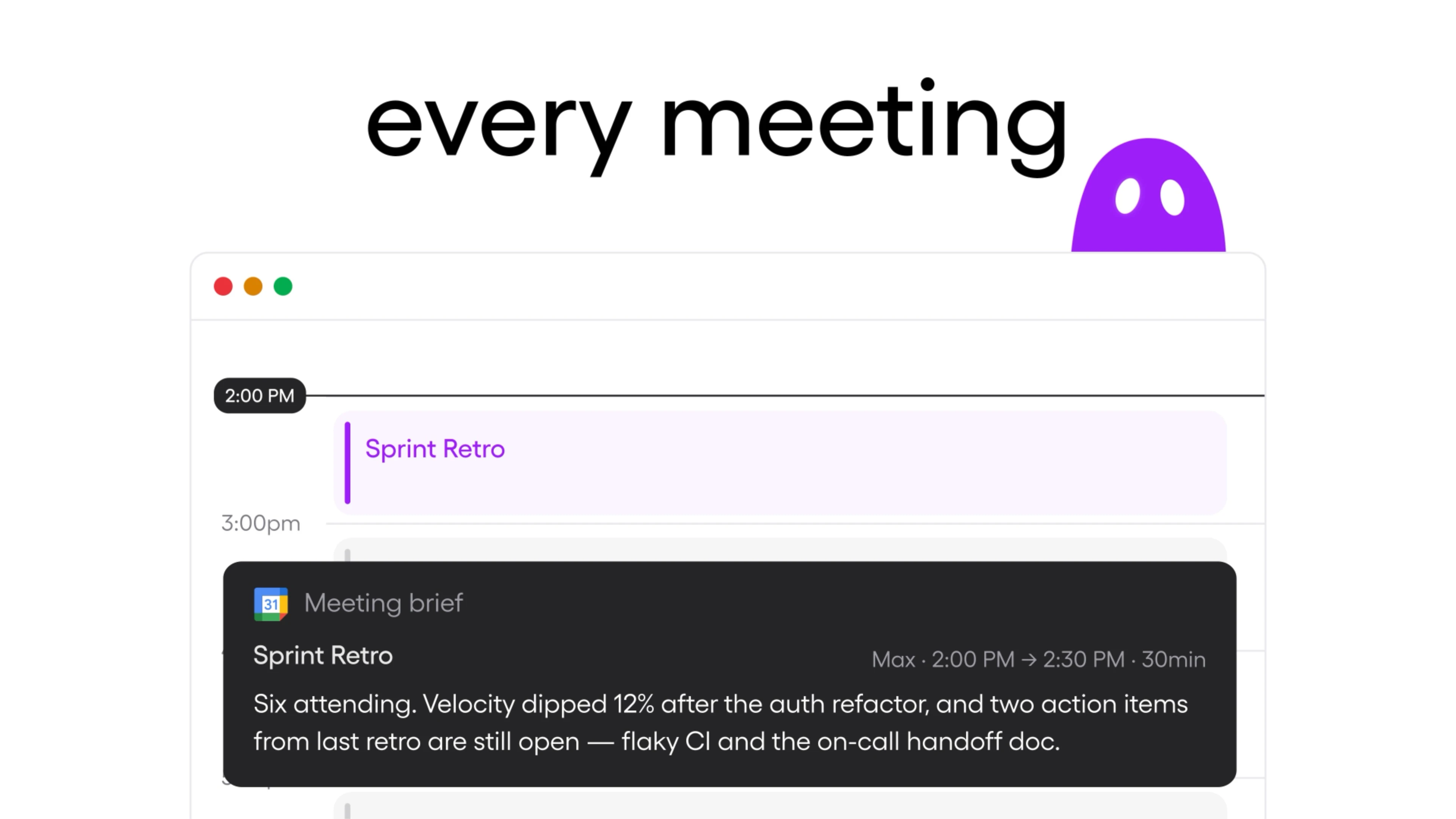
Meeting Prep: Gets you ready so you stay ready
Gumball checks your calendar and automatically sends you a thorough brief of all the relevant context before a meeting. By pulling from your email, Slack, CRM activity, and past meeting notes, Gumball can tell you who’s attending, what you’ve discussed with them previously, what’s on the agenda, and what topics you might want to raise. (By default, it’ll only prep for external meetings, but you can set it to prep for internal meetings too.)

Daily Chew: Your morning report
Get a short daily report of what’s going on across your connected apps, delivered to your inbox or as a Slack DM, on your schedule.
Set up which days and at what time you want your Daily Chew to be delivered (every weekday at 8am, for example) and Gumball searches through your connectors for what’s changed. It’ll give you a catch-up summary of what your team has been talking about, as well as an overview of your daily priorities, upcoming schedule, and suggested next steps.
Every day, Gumball will surface Highlights, the specific situations that most need your attention: a commitment you made; an upcoming deadline; a customer waiting on a reply; a Slack thread in which someone tagged you asking for your input. For each Highlight, Gumball also suggests a plan of action with concrete first steps. If Gumball's plan sounds good to you, all you have to do is click to approve, and Gumball will take action.
Tone and Design personalization skills
Gumball comes equipped with Tone and Design skills that influence how it writes and formats outputs for you.
If you ask it to curate the Tone skill, it’ll read your sent emails (with your permission) and turn that into a brief style guide outlining your typical response length, how formal you are, the salutations and sign-offs you like to use, or any other notable traits. Smart Inbox uses the Tone skill to draft replies to emails that sound like you.
To curate the Design skill, you can pick from a selection of curated themes, or you can give Gumball your website. Gumball will then analyze your organization's visual brand (including colors, typography, layout choices, object styling, and more) to ensure the artifacts it produces are all on-brand.
Get started with Gumball
Gumball is already waiting for you in the Gumloop app, ready to use whatever apps you’ve already connected. Just start chatting with Gumball there, or DM the Gumloop Slack app, or email Gumball from your work email at gumball@gumloop.ai.
Be sure to enable Daily Chew, Smart Inbox, and Meeting Prep. Connect more of the apps you use daily and Gumball will get smarter and more capable over time.
Read more about how to set up Gumball in our Docs.

Read related articles
Check out more articles on the Gumloop blog.