7 best Apify alternatives I’m using in 2026 (free + paid)

The web scraping space has come a long way since Apify became one of the go-to platforms for building scraping automations.
Apify is powerful, don't get me wrong. But it's also built for developers who are comfortable writing code and configuring Actors from scratch.
And honestly, most people don't need that level of complexity. They just want to scrape data, enrich it with AI, and push it to their tools without needing to hire an engineering team.
Over the past couple years, I've been testing different AI automation platforms and web scraping tools. I've built workflows for my own content marketing agency, scraped competitor sites for SEO insights, and automated lead research for outreach campaigns.
Through all of that, I've learned what actually matters when you're evaluating an Apify alternative.
So before we jump into the list, I want to go over what you should look for when picking a web scraping tool. This way, you can make your own educated choice that fits your use case and business model.
Let's get into it.
What to look for in an Apify alternative?
Okay, before I show you my list of the top Apify alternatives, we have to go over what to actually look for when evaluating the tools.
I don't want to be biased and just give you a list of tools to use. I want you to know exactly what the difference between each of these are (and any other alternatives that pop up in the market).
This way, you can make your own educated choice. Before you pick a tool below, you should first think about the following:
- Built-in web scraping and browsing features: Not all automation platforms have dedicated web scraping capabilities. Some require you to build everything from scratch using HTTP requests and HTML parsing. Look for tools that have native web scraping features built in, so you can start extracting data without writing custom code.
- Integration with your tech stack: Can the tool connect to your existing apps like Google Sheets, Slack, Notion, or your CRM? Even better if it supports MCP servers, which let you extend functionality and connect to basically any tool or API without building custom integrations from scratch.
- LLM integration for data enrichment: Raw scraped data is useful, but AI-powered data enrichment takes it to another level. Look for platforms that let you pass scraped data through LLMs like GPT, Claude, or Gemini to analyze, summarize, or structure information intelligently. Bonus points if you don't need to bring your own API keys.
- Security and scalability: If you're scraping at scale or handling sensitive data, you need a platform that can handle enterprise-grade security, compliance certifications, and the ability to scale up without breaking. Features like role-based access control, audit logs, and SOC 2 compliance matter if you're working with a team or enterprise.
- Custom code support: Sometimes you need to write custom logic for advanced scraping scenarios. Check if the platform supports Python scripts, JavaScript, or other languages for when the visual builder isn't enough. Apify is great at this, so if you need this flexibility, make sure the alternative can match it.
- Templates or AI assistants to get started quickly: Building scrapers from scratch takes time. Look for platforms that have pre-built templates for common scraping tasks or an in-product AI assistant that can help you build workflows just by describing what you need. The faster you can get from idea to working scraper, the better.
Overall, these are the core things I believe anyone should pay close attention to when picking an alternative to Apify (or really any web scraping tool for that matter).
Okay, now let's get into the list of the best Apify alternatives.
7 best Apify alternatives and competitors in 2026
Here are the best Apify alternatives:
Alright, let’s take a look at each one.
1. Gumloop

- Best for: Building AI agents and automated workflows that can scrape, analyze, and act on web data using any LLM model
- Pricing: Free plan available, paid plans start at $37/month
- What I like: You can scrape websites, feed data to any LLM for analysis, and then trigger actions in your other tools all in one workflow
Gumloop is an AI agent and automation platform designed to help you build any automated workflow. It has a dedicated web scraping app that can search for websites, analyze them, pass the data through a premium AI model for enrichment, and give you the data to do whatever you want with it.
From there, you can sync or export your scraped data to databases, Slack, email reports, or any app through an MCP server.
How Gumloop works
Gumloop works in two ways. First, you can create Flows with it. These are automated workflows that are generally going to be best for predictable web scraping use cases.
You simply drag on different apps onto a visual canvas and create automations that can run for you. Think connecting a web scraping app with different APIs and LLMs to give you a full custom outcome.
But what makes Gumloop different from other automation platforms is that it has an in-product agent named Gummie. And Gummie can help you build out any workflow simply by you talking to it in natural language.
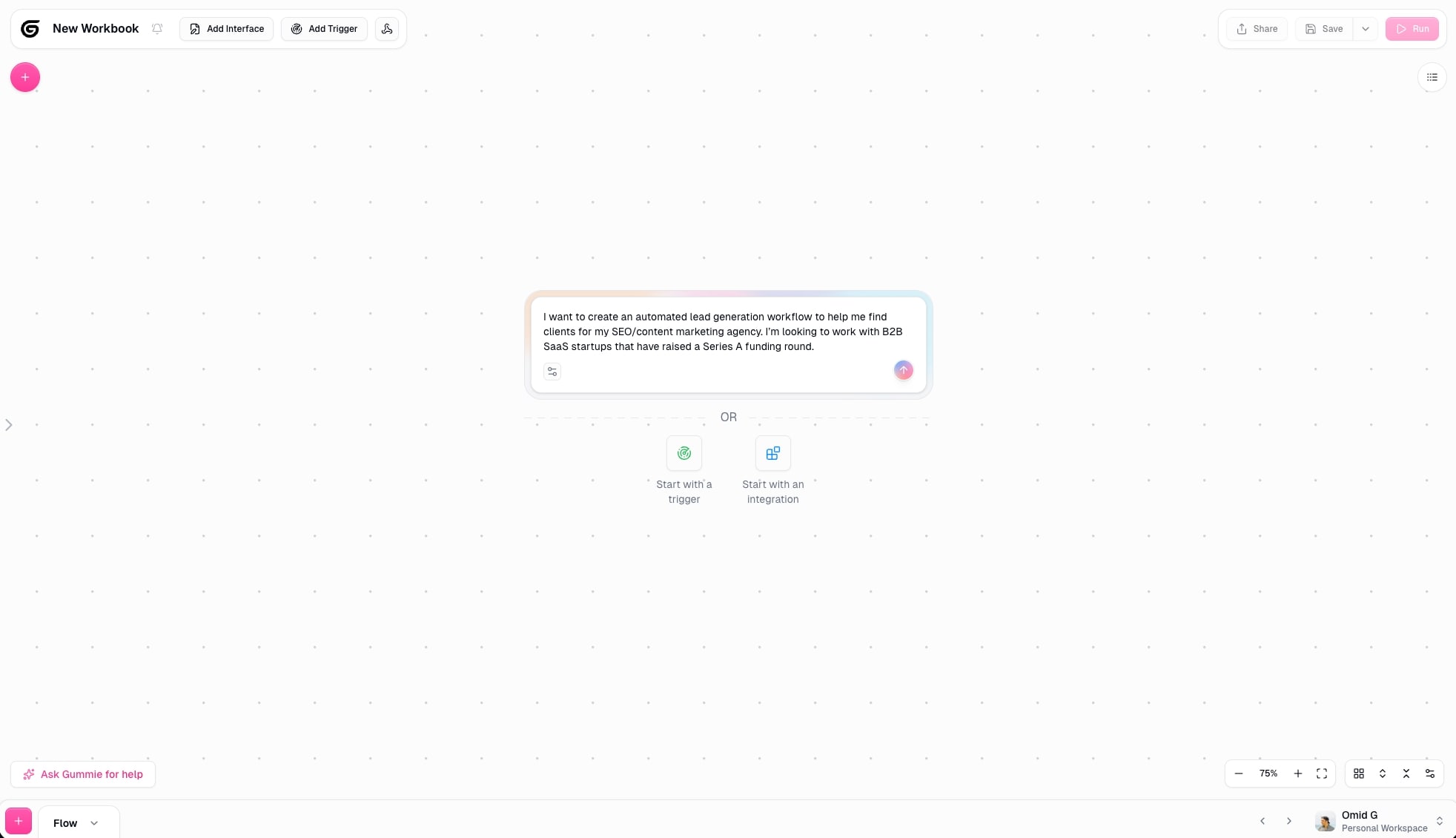
Think Cursor for no-code automation and agent building. You can just tell Gummie exactly what you want to scrape or automate and it will generate a plan. From there, it will automatically drag on the appropriate nodes (apps) onto your canvas and connect them.
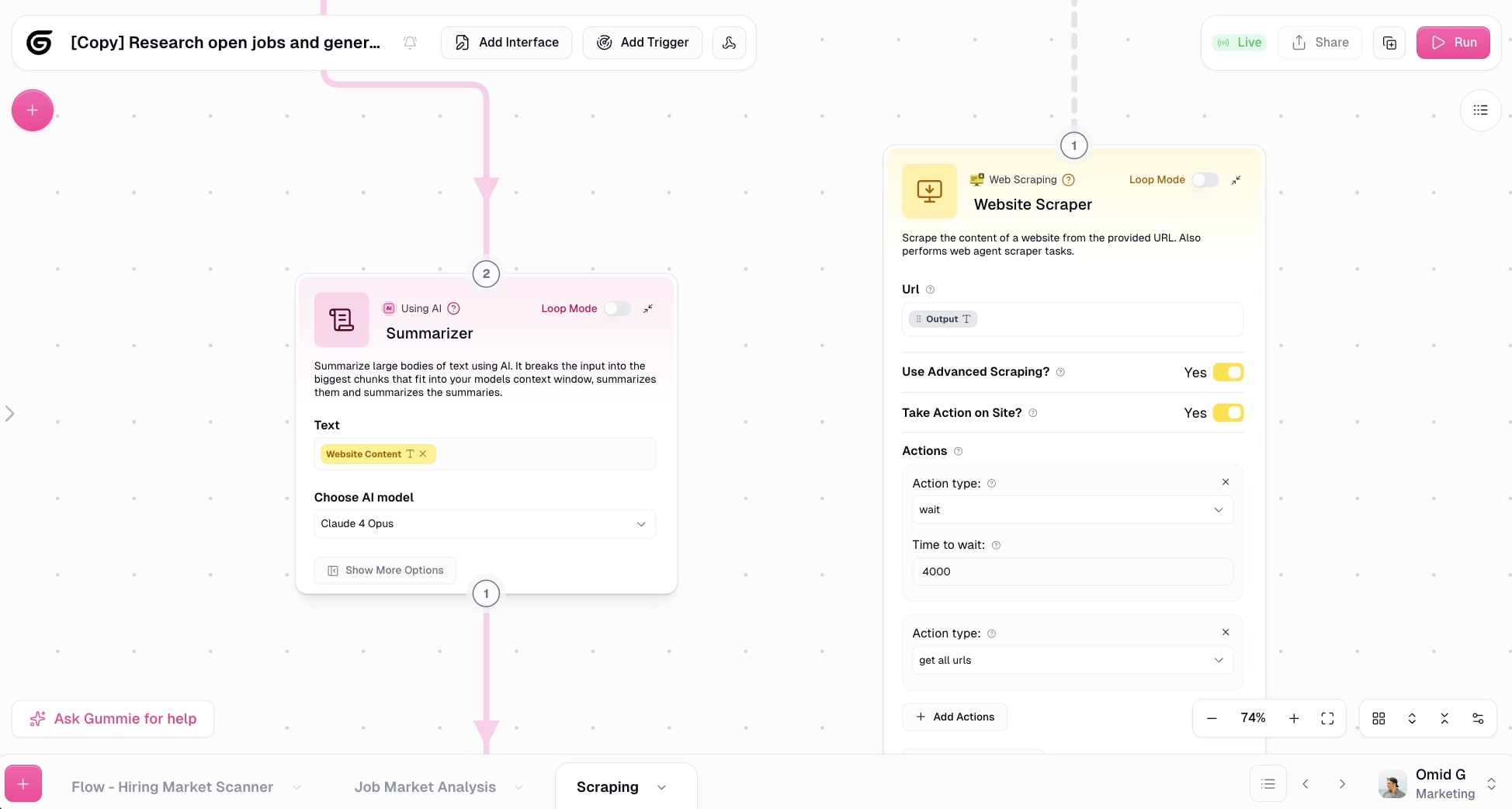
It's quite mind blowing, and what really sold me on becoming a customer of Gumloop (I don't work there).
The other part of Gumloop is Agents. This is where you create fully autonomous AI agents that you can chat to and ask it to complete tasks on your behalf.
This feature is actually simpler than Flows. All you do is describe what your agent does by writing out instructions (which the agent can also help you write out), select what LLM model you want it to use, and connect any apps, MCP servers, or workflows you already have.
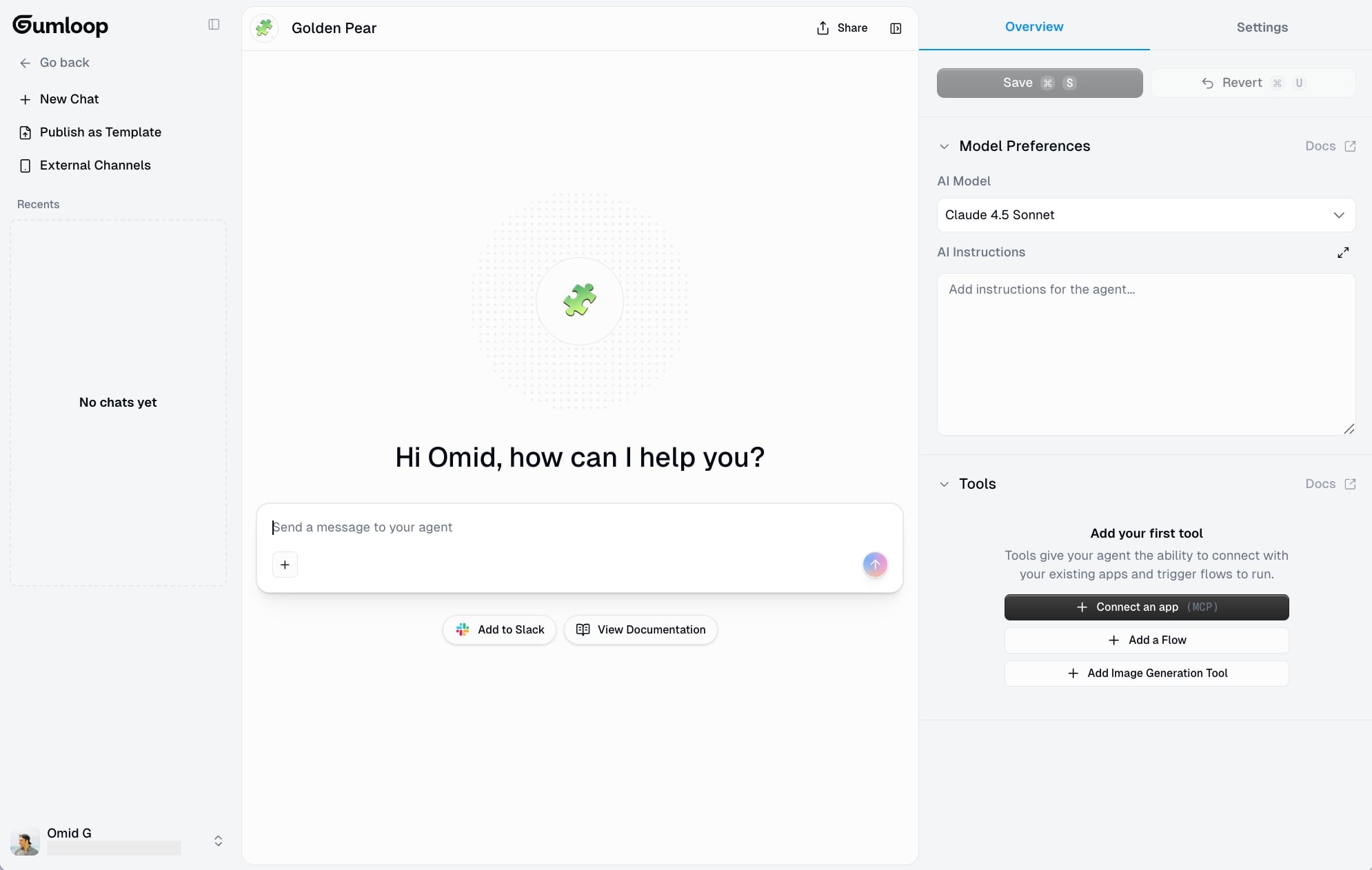
From there, all you do is talk to the agent and ask it to do anything. You can also integrate it with Slack so you can just tag the agent in Slack and ask it to run any task and it will respond and follow your requests.
Why choose Gumloop over Apify
- Gumloop is an all-purpose automation and AI agent platform with web scraping built in, so you can scrape data and immediately analyze it with LLMs or send it to other tools in the same workflow
- Gummie (the in-product AI assistant) can build web scraping workflows for you just by describing what you need in natural language, eliminating the need to configure Actors manually
- It gives you access to premium LLM models like Claude, GPT, and Gemini without needing extra subscriptions or API keys, making AI-powered data enrichment seamless
- The Agents feature lets you create autonomous AI coworkers that can figure out scraping tasks on their own instead of requiring rigid, pre-configured automation steps
Gumloop pros and cons
Here are some of the pros of Gumloop:
- Is an all-purpose automation and AI agent framework with dedicated web scraping apps built for monitoring and analyzing content on any website
- Gives you access to premium LLM models without needing extra API keys (although you can bring in your own API keys if you'd like)
- Has an in-product agent named Gummie that can build out your web scraping workflows simply by you talking to it in natural language
Here are some of the cons of Gumloop:
- It's built for all use cases and experience levels, so it's not dedicated just to web scraping compared to some other platforms on this list
- There are a few web scraping templates you can use, but the current template library is limited (most people just use Gummie so it makes templates a bit obsolete)
Overall, Gumloop is an amazing AI tool if you want to get into AI web scraping and creating agents that can automate your tasks.
Its ability to integrate with any LLM model and MCP server, along with its built-in web scraping functionality, makes it a powerful platform for building end-to-end scraping automations. It's no wonder teams at Shopify, Instacart, and Webflow use the platform.
Gumloop pricing

Here are Gumloop's pricing plans:
- Free: $0/month with 2,000 credits per month, 1 seat, 1 active trigger, 2 concurrent runs, Gummie Agent, and unlimited flows
- Solo: $37/month with 10,000+ credits per month, unlimited triggers, 4 concurrent runs, webhooks, and email support
- Team: $244/month with 60,000+ credits per month, 10 seats, unlimited workspaces, dedicated Slack support, and team usage and analytics
- Enterprise: Custom pricing with role-based access control, SCIM/SAML support, admin dashboard, audit logs, and virtual private cloud
You can learn more about what each plan has to offer on the pricing page.
Gumloop ratings and reviews
Here's what customers rate the platform on third-party review sites:
- Product Hunt: 5/5 star rating (from +12 user reviews)
- There's An AI For That: 5/5 star rating (from +1 user review)
2. Octoparse

- Best for: Building no-code web scraping workflows with preset templates for common use cases like Google Maps, LinkedIn, and Amazon
- Pricing: Free plan available, paid plans start at $83/month
- What I like: It has over 500+ preset scraping templates so you can get started fast, plus it handles IP rotation and CAPTCHA solving automatically
Octoparse is a no-code web scraping platform designed for anyone to build out workflows that can automatically scrape any website. They have a wide range of templates that can help you immediately build things like a Google Maps scraper, a LinkedIn scraper, an Amazon top products scraper, and a ton more.
It's great for marketing teams and small startups (especially ecommerce related) that want to create recurring web scraping workflows without needing to know how to code.
How Octoparse works
The platform works by letting you visually build crawlers that can go out and analyze web pages. You tell it what formats of data you want to scrape on a website. And then you can run them locally (really cool) or have them run automatically on the cloud.
From there, Octoparse can take the extracted dataset that you defined and lets you export that in a CSV, Excel, JSON, or any database you may have.
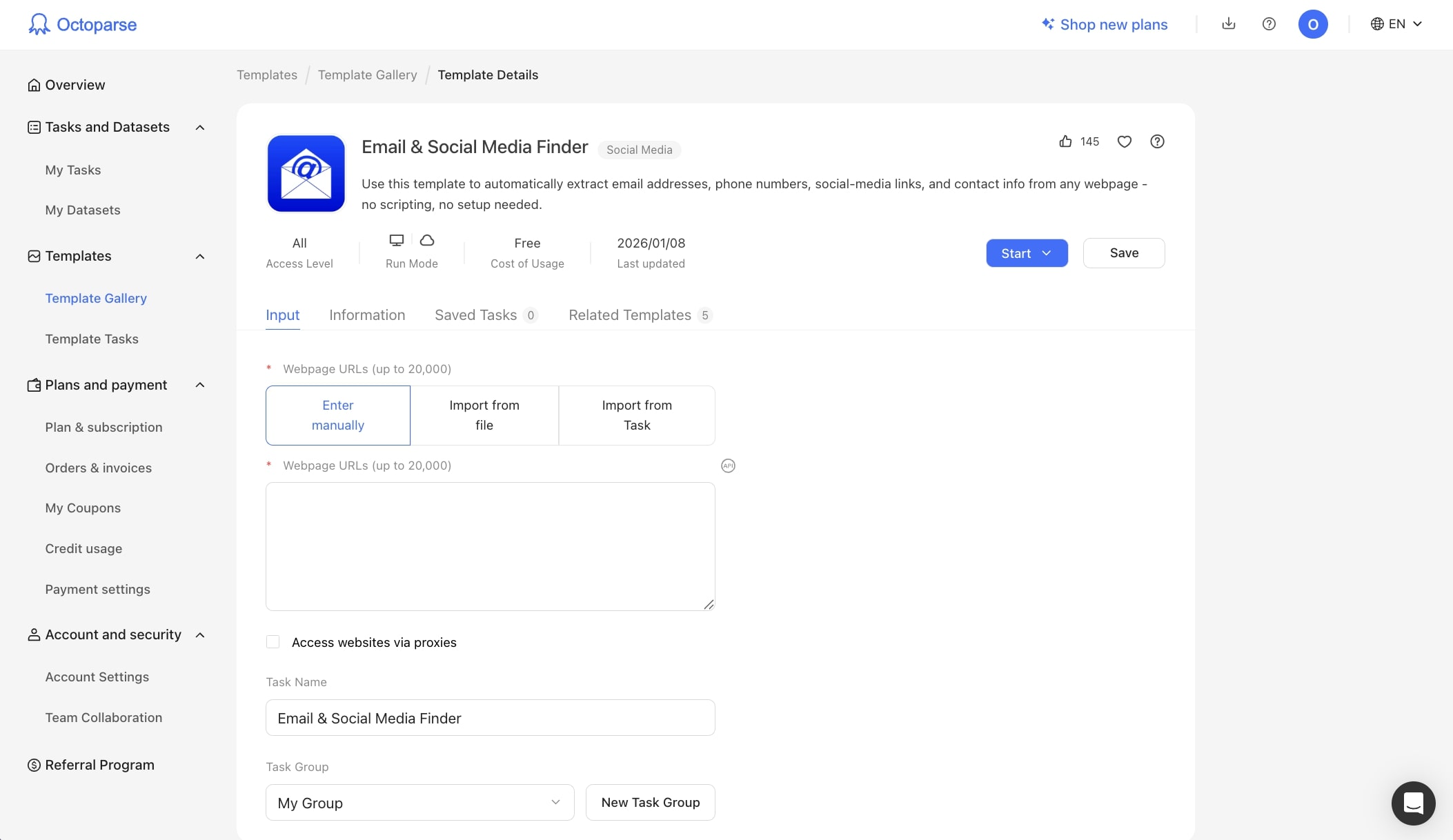
The cool thing about Octoparse is that it can also handle IP rotation and CAPTCHA solving, so it really is a full web scraping tool similar to Apify. What makes it different from Apify though is that it is more about creating automated workflows with rigid rules. Whereas, with Apify, you're creating apps (Actors) that have more complexity and need a longer setup time.
Why choose Octoparse over Apify
- Octoparse has a visual, no-code interface that's easier to learn than Apify's Actor-based development environment. You don't need to understand code or technical setups
- It includes 500+ preset scraping templates for common sites and use cases, so you can get started immediately without building from scratch
- You can run scrapers locally on your own device instead of only on the cloud, giving you more control and potentially lower costs for smaller projects
- Enterprise features like IP rotation, CAPTCHA solving, and residential proxies are built-in and easier to configure than setting them up manually in Apify
Octoparse pros and cons
Here are some of the pros of Octoparse:
- Reliable platform for predictable web scraping (once you have your ideal workflow setup)
- Has enterprise-level features like IP rotation, login handling, and the ability to solve CAPTCHA
- An existing library of templates you can use, so you don't have to start from scratch
Here are some of the cons:
- Can struggle with more complex workflows that have a lot of steps
- Can be a bit expensive compared to some other tools in this space
- Not as flexible when it comes to AI agent-type features (the workflows are very rigid)
Overall, if you need to scrape data from a website, and you are very clear on exactly what elements you need, Octoparse is a great alternative to Apify.
However, if you need something that is a bit more flexible and can help you leverage an AI model to analyze web pages and make judgment calls, then it's worth looking into an alternative.
Octoparse pricing
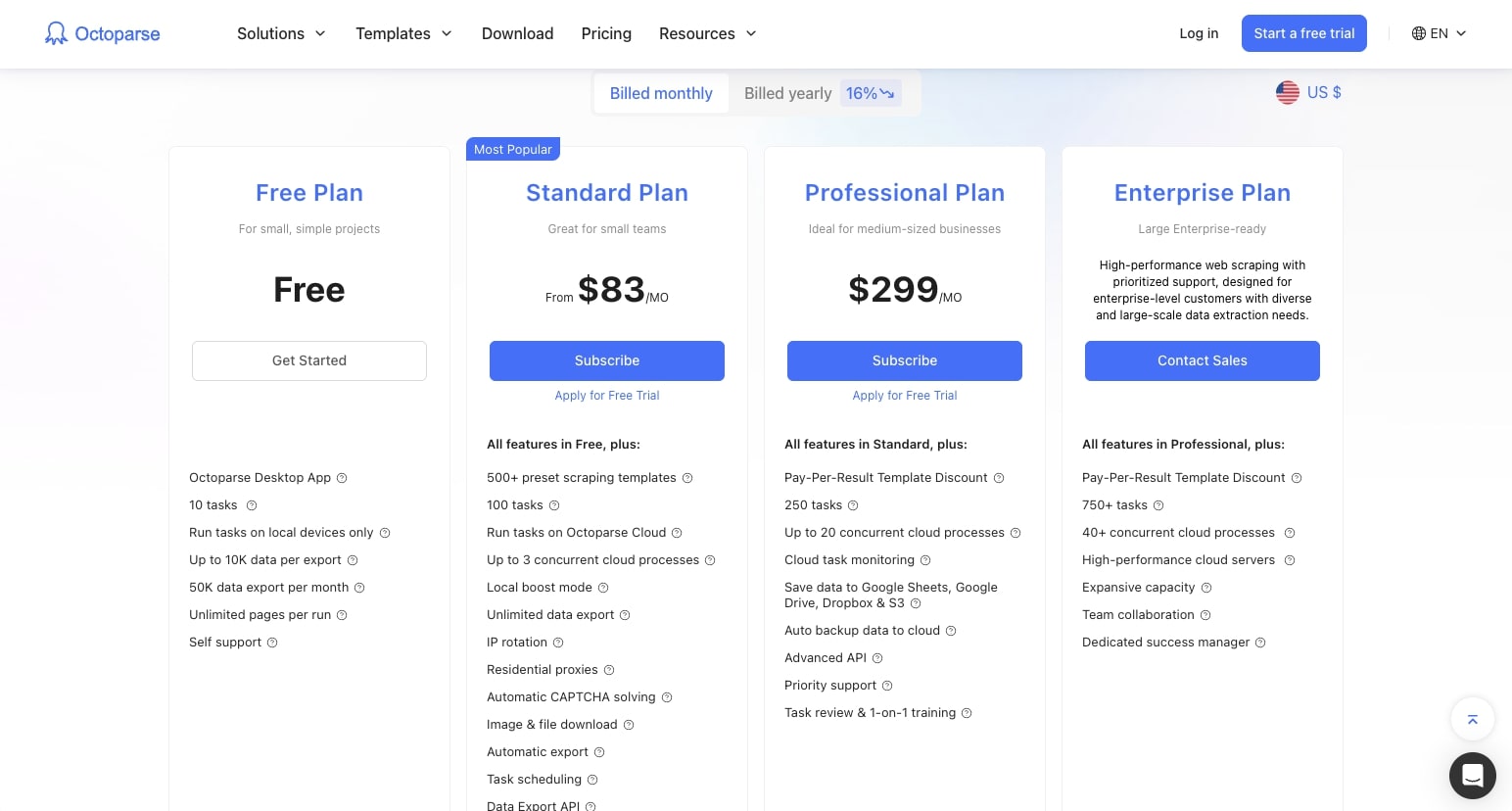
Here are Octoparse's pricing plans:
- Free: $0/month with 10 tasks, run on local devices only, up to 10K data per export
- Standard: From $83/month (most popular) with 500+ preset templates, 100 tasks, cloud processing, IP rotation, and CAPTCHA solving
- Professional: $299/month with 250 tasks, up to 20 concurrent processes, priority support, and advanced integrations
- Enterprise: Custom pricing with 750+ tasks, 40+ concurrent processes, team collaboration, and dedicated success manager
You can learn more about what each plan has to offer on the pricing page.
Octoparse ratings and reviews
Here's what customers rate the platform on third-party review sites:
- G2: 4.8/5 star rating (from +52 user reviews)
- Capterra: 4.7/5 star rating (from +106 user reviews)
3. n8n
- Best for: Technical teams and developers who want a self-hosted, open-source automation platform with web scraping capabilities
- Pricing: Free plan available, paid plans start at $24/month
- What I like: It's open source and self-hostable, giving you full control over your data and infrastructure
n8n is an automation platform that allows you to connect different apps together to create automated workflows. It's similar to Zapier and Gumloop in that you drag on "nodes" onto a canvas and connect them with conditional logic.
And given its horizontal approach to automation, n8n has a ton of web scraping workflows very similar to Apify. Just check out their huge library of templates.
How n8n works
n8n works by giving you a no-code/low-code visual canvas to create your workflows. You drag on apps onto a canvas, connect them with different LLM models, and build end-to-end automations.
For example, you can create web scraping workflows that can search Google, analyze web pages, and send that data to a Google Sheet (or anywhere you'd like). It's very similar to Gumloop in the way it can handle automations.

However, it can feel a bit intimidating for beginners as it's built more for technical IT teams and developers. The platform does feel a bit more on the technical side, and can turn off some non-technical folks.
Why choose n8n over Apify
- n8n is open source and self-hostable, so you have complete control over your data and can run it on your own infrastructure without vendor lock-in
- It has a visual workflow builder that's easier to understand than writing Apify Actors from scratch, especially if you're not a developer
- Web scraping is just one part of n8n's broader automation platform, so you can easily connect scraped data to hundreds of other apps in the same workflow
- The community has built thousands of workflow templates you can use as starting points, including many web scraping examples
n8n pros and cons
Here are some of the pros of n8n:
- Self-hostable and open-source platform
- Has lots of workflow templates you can start from
- A wide range of integrations for creating automations
Here are some of the cons:
- Has a learning curve and the UI can feel outdated
- Built as an all-purpose tool, not specific for web scraping
- Requires separate API keys to use AI models
Overall, n8n is a very powerful tool for creating automations. You can build out web scraping automations, but it's not designed specifically for it. I wanted to include it in the list though because of its integration capabilities.
With simple web scraping workflows, you can then take that data and pass it to any tool in your tech stack through n8n. And that's what I believe makes it an interesting tool for simple web scraping use cases. But if you need complex scraping features like IP rotation or CAPTCHA solving, then it might be worth looking into an alternative.
n8n pricing

Here are n8n's pricing plans:
- Starter: $24/month with 2.5k workflow executions, 1 shared project, 5 concurrent executions, hosted by n8n
- Pro: $60/month with 10k workflow executions, 3 shared projects, 20 concurrent executions, 7 days of insights, and admin roles
- Business: $800/month with 40k workflow executions, 6 shared projects, SSO/SAML and LDAP, self-hosted option, 30 days of insights
- Enterprise: Custom pricing with unlimited projects, 200+ concurrent executions, external secret store integration, and dedicated support with SLA
You can learn more about what each plan has to offer on the pricing page.
n8n ratings and reviews
Here's what customers rate the platform on third-party review sites:
- G2: 4.8/5 star rating (from +199 user reviews)
- Capterra: 4.6/5 star rating (from +41 user reviews)
4. Relay.app
- Best for: Startups and teams who want simple AI automations with lightweight web scraping for internal data and basic external research
- Pricing: Free plan available, paid plans start at $38/month
- What I like: It has a human-in-the-loop feature that lets you review and approve actions before they execute, making it great for quality control
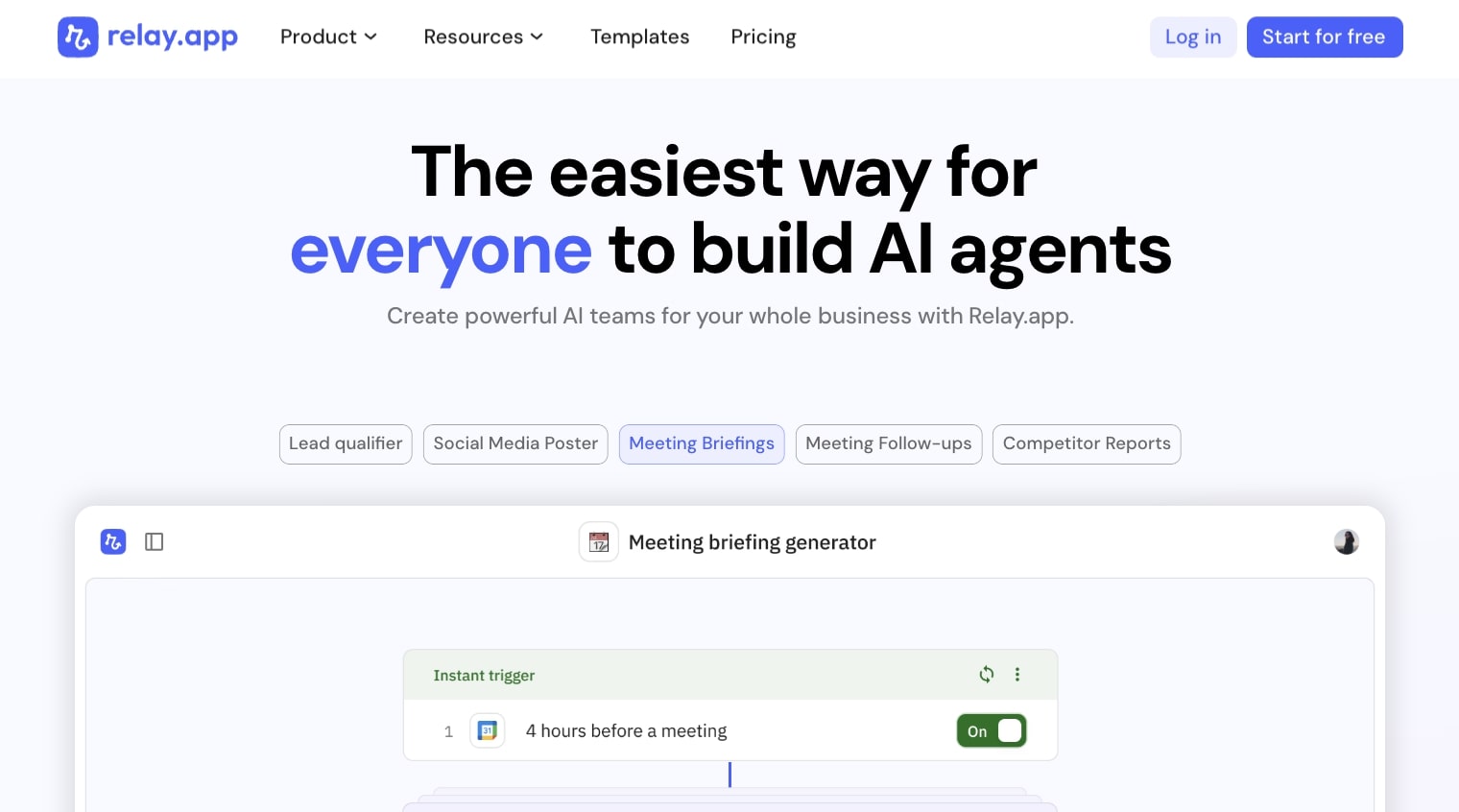
Relay.app is a simple AI automation builder. It's very similar to n8n in that it's designed as an all-purpose automation platform that has web scraping capabilities.
However, it is a simpler (and easier to use) platform compared to n8n. So if you're a startup looking to create simple automations that include web scraping, this is a tool to look into.
How Relay.app works
In Relay.app, you have a visual canvas that you drag on individual apps onto. From there, you connect them to create automations. If you've used Zapier or Make in the past, this is very similar to that.
However, I would say that its web scraping features are best used for internal use. It can scrape platforms like LinkedIn to give you competitor insights. But compared to Apify, it is a bit limited in this area.
Where Relay.app does shine is being able to scrape through your internal apps and documents to surface insights. For example, you can create an automated workflow that analyzes your emails and gives you notifications when you get an urgent message that needs a quick response.
Again, it can be used for scraping competitors and doing market research, but some other tools on this list are better suited for that. This one is great for creating assistants internally that can read your own data and take actions based on the workflows you build.
Why choose Relay.app over Apify
- Relay.app has a much simpler, more intuitive interface that's perfect for non-technical users who find Apify's Actor development too complex
- It includes built-in human-in-the-loop features, so you can review and approve scraping results or actions before they execute automatically
- The platform is designed for internal workflow automation, making it easy to scrape and analyze data from your own apps like Gmail, Slack, and Google Drive
- AI-native features let you build mini AI agents that can make decisions within your workflows without writing custom code
Relay.app pros and cons
Here are some of the pros of Relay.app:
- Great for automated workflows that need a human-in-the-loop to audit tasks
- Simple to use and has a lower learning curve than other tools on this list
- Has AI-native features like creating mini AI agents for different tasks
Here are some of the cons:
- Can feel a bit limited in its web scraping integrations
- Not the best at handling large-scale workflows
Overall, Relay.app is actually a good platform for beginners trying to learn AI automation and simple web scraping workflows. It may not be the best for complex scraping workflows, but it can do simple things like scrape LinkedIn profiles if you're trying to create an outreach campaign.
Relay.app pricing
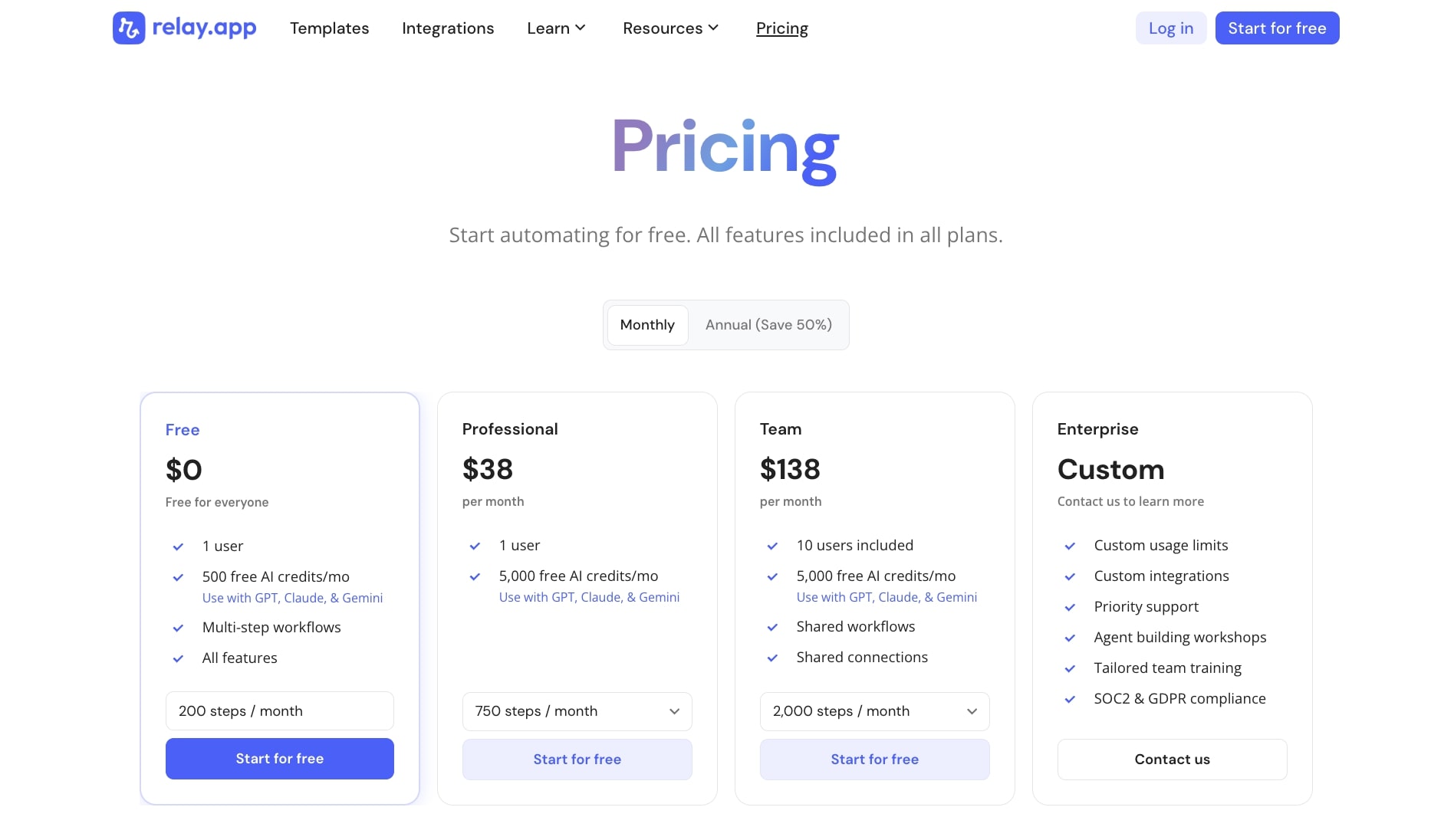
Here are Relay.app's pricing plans:
- Free: $0 with 1 user, 500 free AI credits per month, multi-step workflows, and all features
- Professional: $38/month with 1 user, 5,000 free AI credits per month, and 750 steps per month
- Team: $138/month with 10 users included, 5,000 free AI credits per month, shared workflows, and 2,000 steps per month
- Enterprise: Custom pricing with custom usage limits, custom integrations, priority support, and SOC2 and GDPR compliance
You can learn more about what each plan has to offer on the pricing page.
Relay.app ratings and reviews
Here's what customers rate the platform on third-party review sites:
- G2: 4.9/5 star rating (from +71 user reviews)
- Capterra: 5/5 star rating (from +1 user review)
5. Thunderbit

- Best for: Beginners and operations teams who want to quickly scrape websites they're actively browsing with minimal setup
- Pricing: Free plan available, paid plans start at $15/month
- What I like: It's a Chrome extension so you can scrape any website you're visiting with just a couple clicks, no complex setup needed
Thunderbit is an AI web scraper that is a Chrome extension. You can scrape any website you're browsing in Chrome in just a couple clicks. The platform can also support things like images, documents, and PDFs.
The cool thing about Thunderbit is that it's AI native, so when you're extracting information from websites you can use natural language and have AI build out all the data sets for you.
It makes it super easy for any beginner to start web scraping without having to know how to structure data types and column names within a spreadsheet.
How Thunderbit works
Thunderbit is a Chrome extension, so it works inside of your browser. Whenever you're visiting a website, you can toggle the extension and start to scrape anything you need.
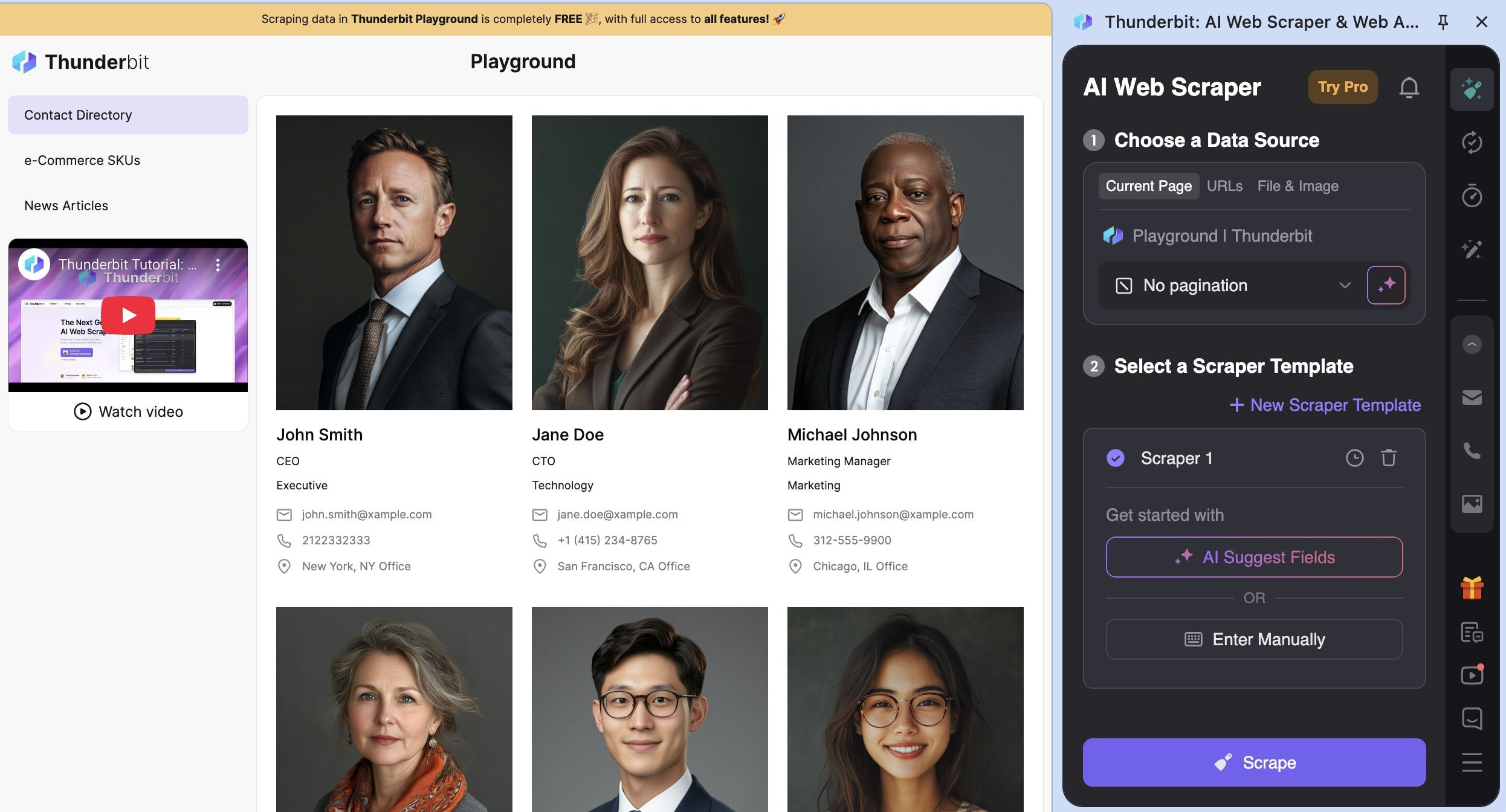
You can also create templates for specific websites. Like if you want to scrape Zillow for real estate listings or LinkedIn for business profiles, you can create templates that predictably scrape the right data.
From there, you can send this information to a Google Sheet, Airtable, Notion, or any database that you'd like.
Why choose Thunderbit over Apify
- Thunderbit is a simple Chrome extension that works in your browser, so you can scrape pages as you browse without setting up cloud infrastructure or writing Actors
- It uses AI to automatically understand page structure and extract data using natural language prompts, eliminating the need to write selectors or scraping logic
- Perfect for quick, ad-hoc scraping tasks where you just need data from a few pages without building a full automation
- Much more affordable for small-scale scraping needs, with plans starting at just $15/month compared to Apify's usage-based pricing
Thunderbit pros and cons
Here are some of the pros of Thunderbit:
- Very easy and low barrier to scraping a web page, you really just have to visit it and activate the Chrome extension
- It has built-in AI enrichment features that can help you get the exact schema you need for your data
- It's great for operations or sales reps that need to monitor competitors or build lead lists
Here are some of the cons of Thunderbit:
- Because it's mostly a Chrome extension, it can feel a bit limited in its ability to create web scraping agents that can run autonomously
- It's designed for beginners and relies heavily on AI, so it can feel limited in its ability to customize scraping logic and how it handles errors
Overall, Thunderbit is a great platform if you just want to scrape information off of websites that you're actively visiting. It's also quite affordable compared to some other dedicated scraping tools on this list.
Thunderbit pricing
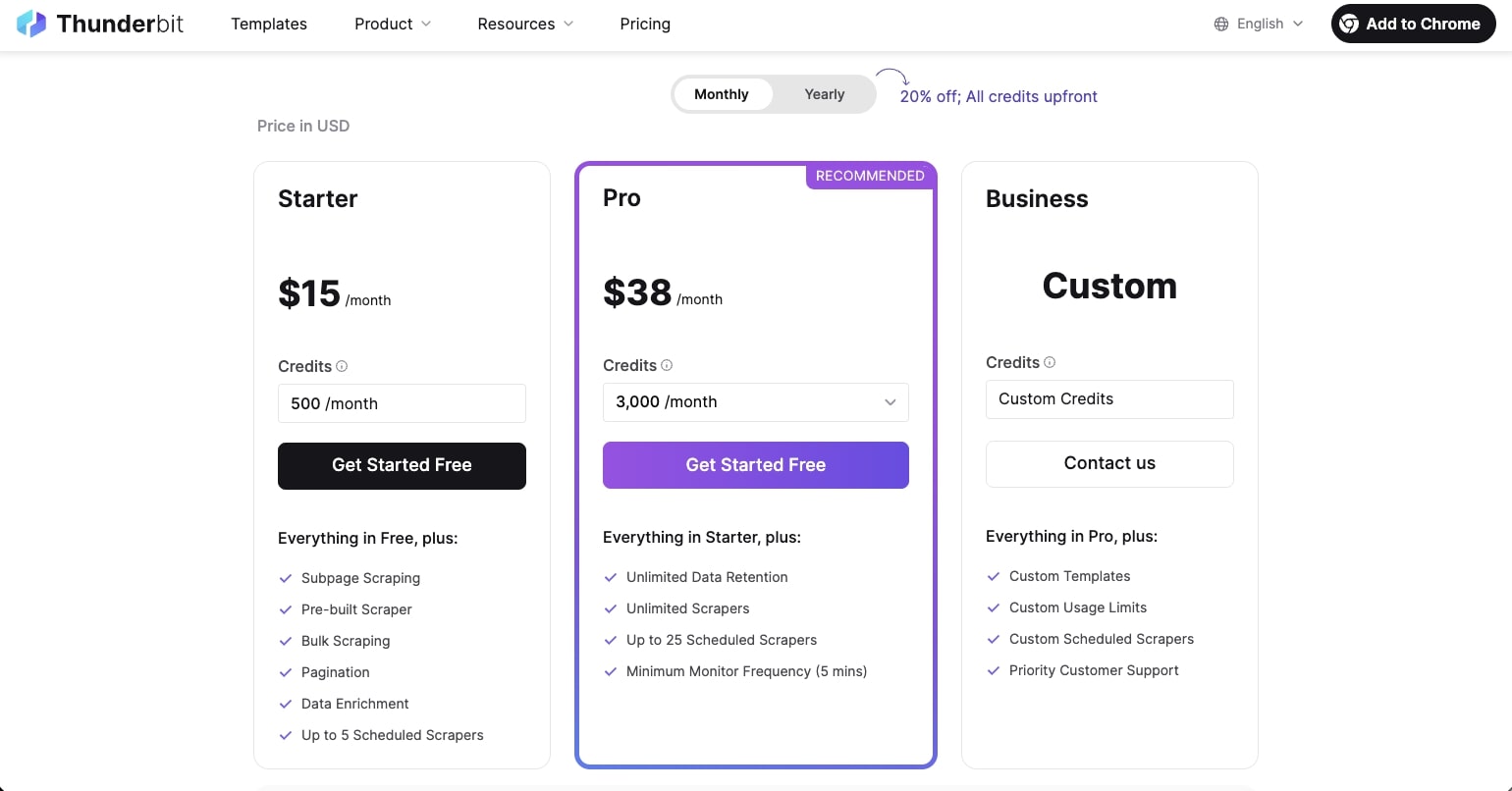
Here are Thunderbit's pricing plans:
- Free: $0/month with 6 pages per month, data export, and data extraction tools
- Starter: $15/month with 500 credits per month, subpage scraping, bulk scraping, pagination, and up to 5 scheduled scrapers
- Pro: $38/month (most popular) with 3,000 credits per month, unlimited data retention, unlimited scrapers, and up to 25 scheduled scrapers
- Business: Custom pricing with custom credits, custom limits, and priority support
You can learn more about what each plan has to offer on the pricing page.
Thunderbit ratings and reviews
Here's what customers rate the platform on third-party review sites:
- Trustpilot: 4.2/5 star rating (from +26 user reviews)
- Chrome Web Store: 4.4/5 star rating (from +115 user reviews)
6. Browse AI
- Best for: Teams who want a no-code web scraping platform with enterprise features like CAPTCHA solving and scheduled monitoring
- Pricing: Free plan available, paid plans start at $48/month
- What I like: It has over 10,000 integration options and handles complex edge cases like proxies, CAPTCHAs, and infinite scroll automatically
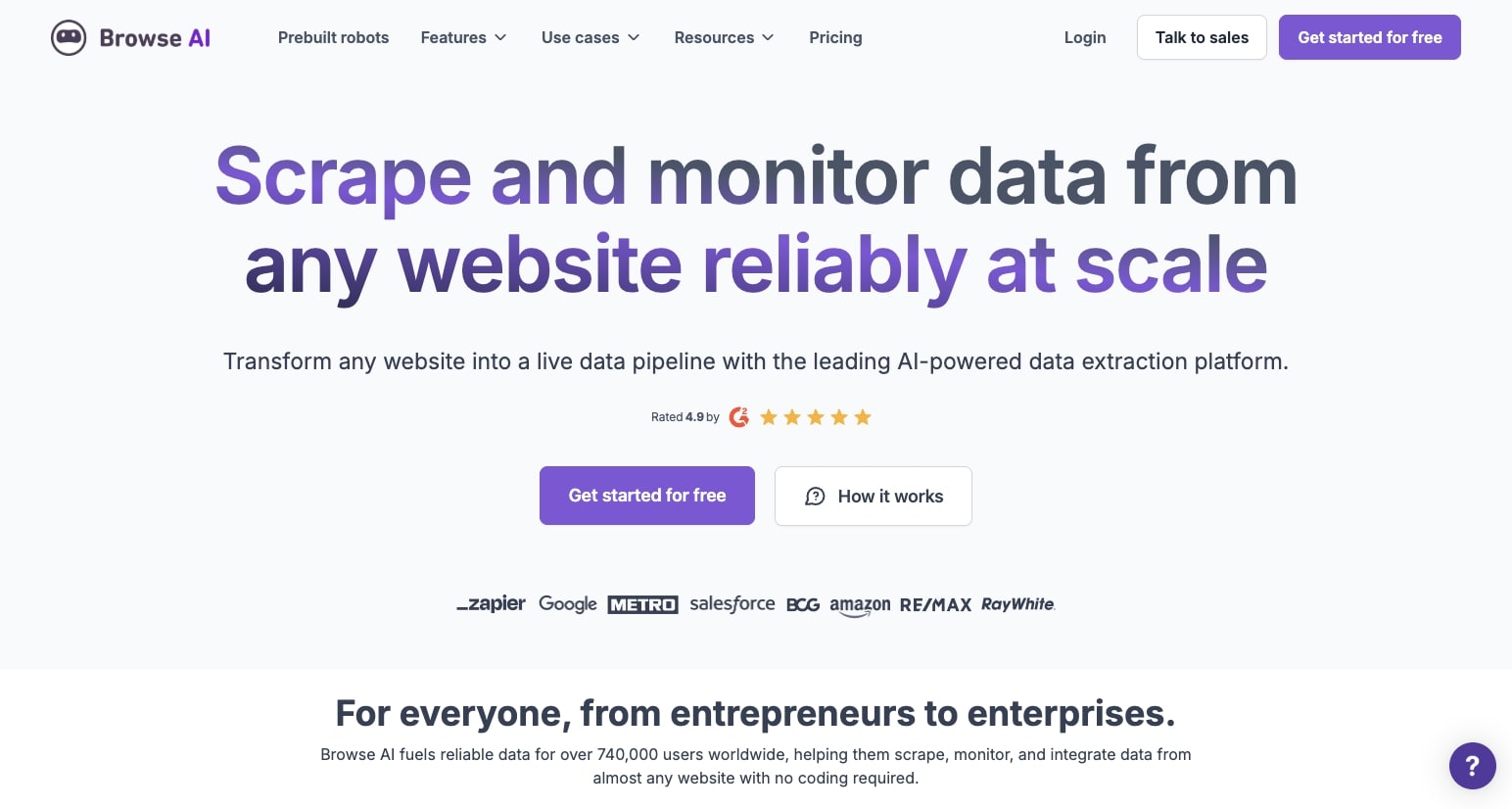
Browse AI is a no-code web scraping platform that allows you to build agents that can scrape data from websites and monitor changes. From there, you can export or sync that data to other tools in your tech stack.
It's actually very similar to Apify in its ability to create these "robots" in the way that Apify has "Actors." And because the platform is dedicated to web scraping, it has a lot of enterprise-grade features like the ability to handle pagination, logins, CAPTCHAs, and scheduled scraping.
How Browse AI works
In Browse AI, you can create a web scraping agent that can run on any schedule. You can tap into their over +7,000 integration library to connect all of your tools in your tech stack.
This means you can create an end-to-end automation that can monitor and scrape websites on a consistent basis and sync it to any spreadsheet, Airtable, or database that you like.
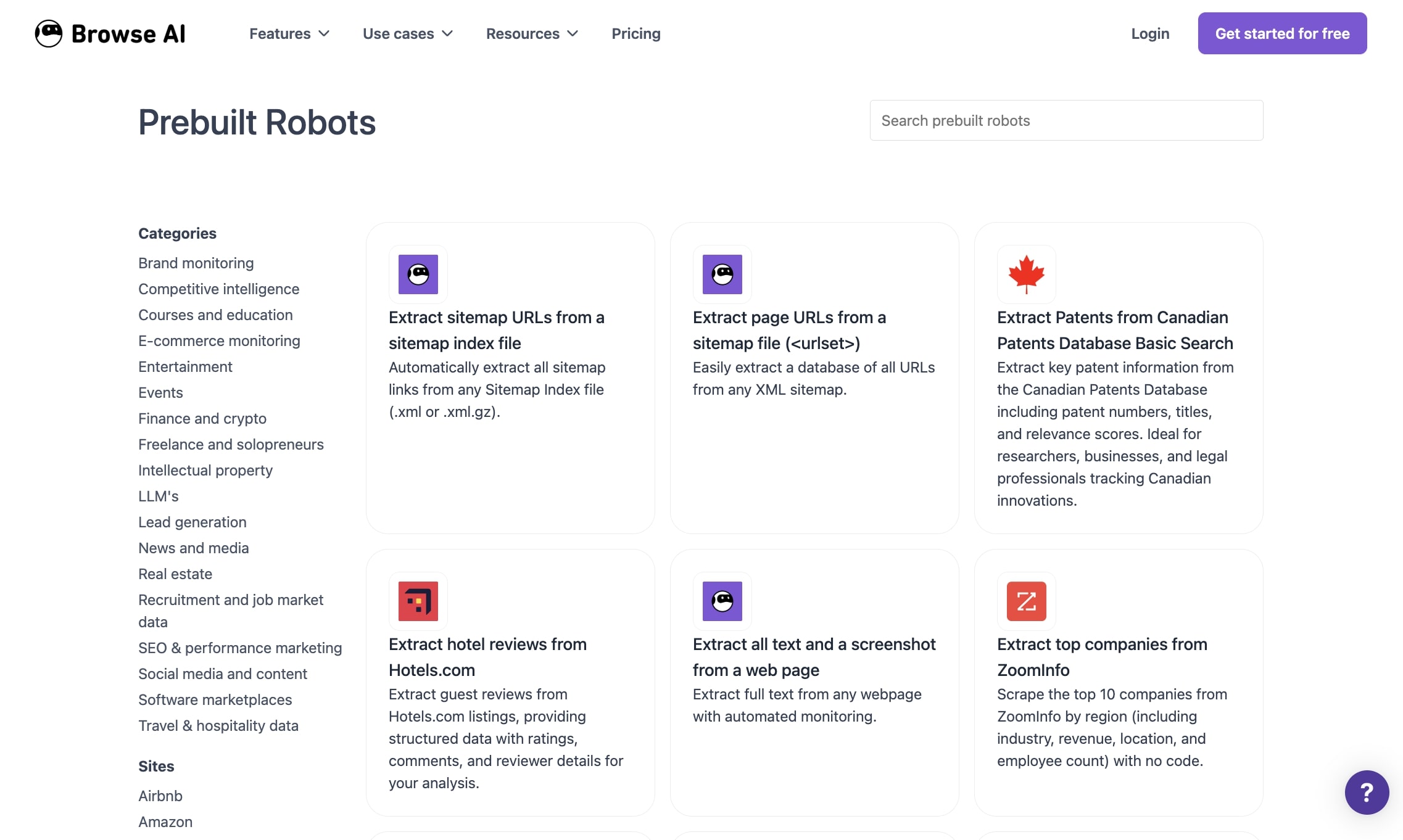
There are also a ton of pre-built templates that you can tap into that may already have the exact web scraping workflow you're looking for.
Why choose Browse AI over Apify
- Browse AI has a simpler, more visual interface focused entirely on web scraping, making it easier to set up robots without writing code or understanding Actor development
- It includes over 7,000 pre-built integrations and templates, so you can quickly connect scraped data to your existing tools without building custom workflows
- Enterprise features like CAPTCHA solving, proxy rotation, and login handling are built-in and configured automatically instead of requiring manual setup
- Better suited for teams who want a dedicated scraping platform with less technical complexity than Apify's developer-focused approach
Browse AI pros and cons
Here are some of the pros of Browse AI:
- It's a fairly easy-to-use platform and is great at data extraction
- Has a large library of templates you can use
- Handles a lot of edge cases like proxies, CAPTCHAs, geo-targeting, and websites with infinite scroll
Here are some of the cons of Browse AI:
- You have to create a separate workflow for each website that you want to scrape
- Less customization features compared to Apify, but this does make it easier to use
Overall, Browse AI is an amazing alternative to Apify if you're looking for something with similar features but a bit more simplified for ease of use. If you already love most of Apify's features, then this is a good platform to look into.
Browse AI pricing
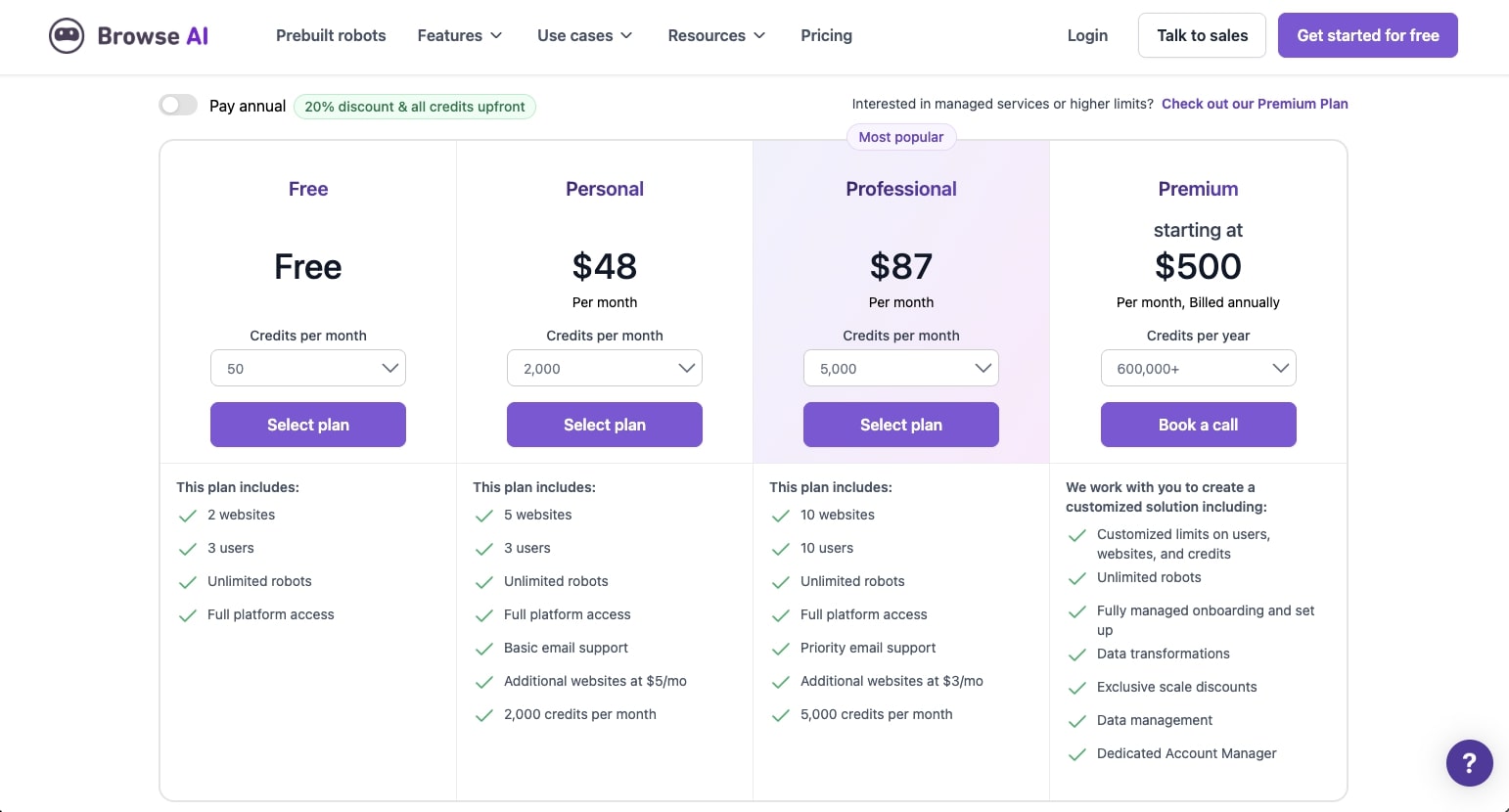
Here are Browse AI's pricing plans:
- Free: $0 with 50 credits per month, 2 websites, 3 users, and unlimited robots
- Personal: $48/month with 2,000 credits per month, 5 websites, 3 users, and basic email support
- Professional: $87/month (most popular) with 5,000 credits per month, 10 websites, 10 users, and priority email support
- Premium: Starting at $500/month (billed annually) with 600,000+ credits per year, fully managed onboarding, data transformations, and dedicated account manager
You can learn more about what each plan has to offer on the pricing page.
Browse AI ratings and reviews
Here's what customers rate the platform on third-party review sites:
- G2: 4.8/5 star rating (from +58 user reviews)
- Capterra: 4.6/5 star rating (from +61 user reviews)
7. Claude
- Best for: Ad-hoc web scraping tasks where you need to quickly analyze and interpret data from websites without building complex workflows
- Pricing: Free plan available, paid plans start at $20/month
- What I like: You can describe what you want in plain English and Claude figures out how to scrape and analyze the data without any configuration
Claude is an LLM and AI model designed by Anthropic. It's one of the best LLMs for business use cases, and I personally use it every single day.
What I love about Claude is that it also functions as an agent. It has features like web search built in, can fetch and analyze any URL you throw at it, and integrates with your other apps through MCP servers.
How Claude works
Using Claude for web scraping use cases is super easy. All you do is open a chat and tell it exactly what you need.
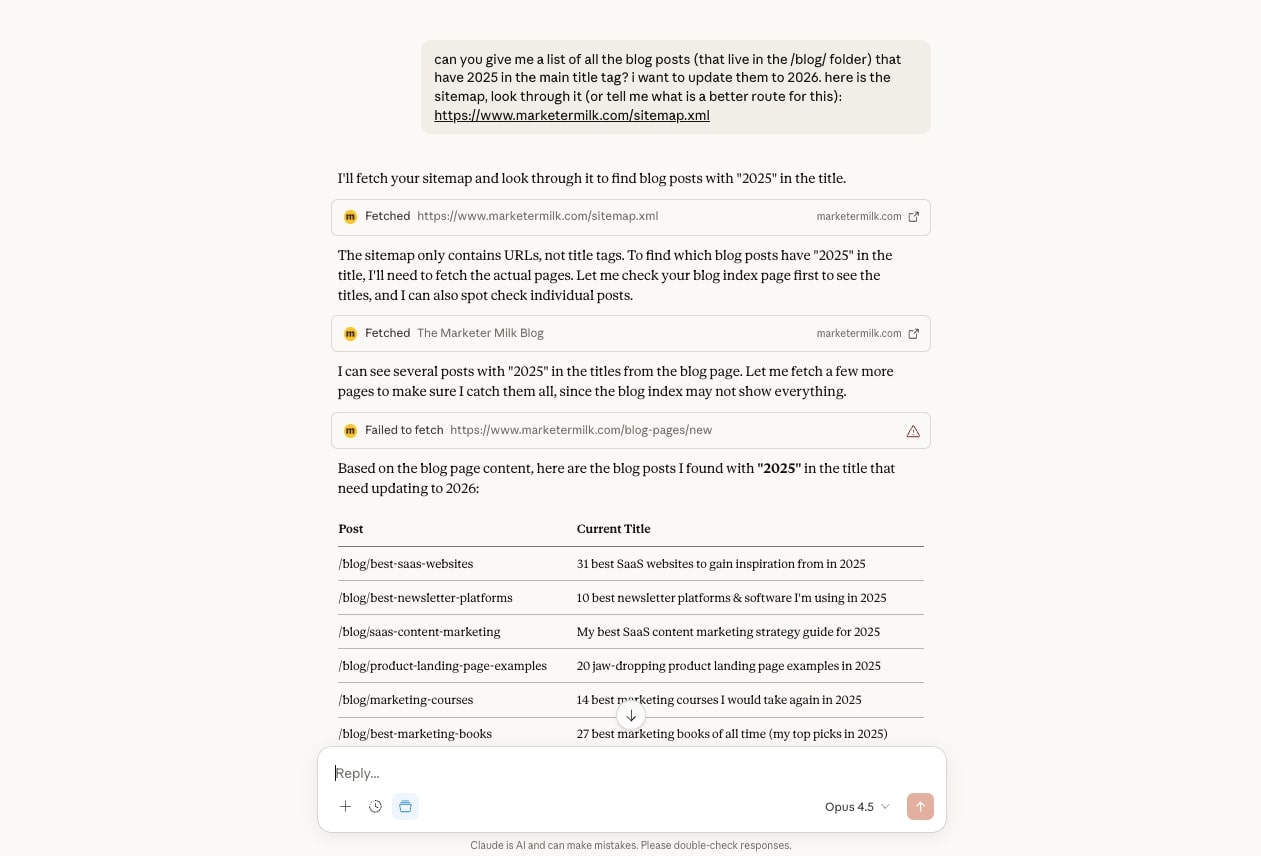
For example, at the start of 2026, I had a bunch of blog posts that still had "2025" in the title. I didn't want to manually check every single article, so I gave Claude my sitemap URL and asked it to go through each page.
Claude read the sitemap and scraped the content of every URL. Then, it gave me a list of which articles needed to be updated. The whole thing took maybe 30 seconds.
Now, Claude itself can't directly edit your CMS. But you can connect it to automation platforms like Gumloop to actually make those updates for you. Or you can use Claude's MCP feature to hook it into your tech stack and let it push data wherever it needs to go. Although, this can get a bit messy with rich text formatting in your CMS.
And if you're working with files on your computer, Claude's Cowork feature can help you make edits based on whatever insights you pulled from scraping.
Why choose Claude over Apify
- You don't need to configure anything or build Actors. Just tell Claude what you want and it handles the scraping and analysis in one go
- Claude doesn't just extract data, it actually understands it. So you can ask follow-up questions about what it found without re-running anything
- Perfect for quick, one-off scraping jobs where setting up a full automation would be overkill
- The massive context window means you can feed it entire sitemaps or large data sets and it can process everything at once
- You can combine Claude with platforms like Gumloop or use MCP servers to connect scraped data into your existing workflows
Claude pros and cons
Here are some of the pros of Claude:
- Super easy to use and can handle most websites you give it
- Has a large context window that can understand large datasets and give structured outputs
- Has a built-in web search tool and an agent that can reason between steps and figure out how to approach a task on its own
Here are some of the cons of Claude:
- It's not a dedicated web scraper, so it might be limited in its features (but it's great for simple scraping)
- Depending on the plan you're on, there can be rate limits when using the tool if you're trying to fetch complex websites consistently
Overall, Claude is an amazing tool for fetching websites and understanding the information on them. But it's only really useful if scraping a website is a small part of your entire workflow. And on top of that, it's only really useful for one website at a time.
So if you need a web scraper that can go through and scrape a list of websites or pages within a Google Sheet, then you'll most likely want to use a different tool on this list.
Claude pricing
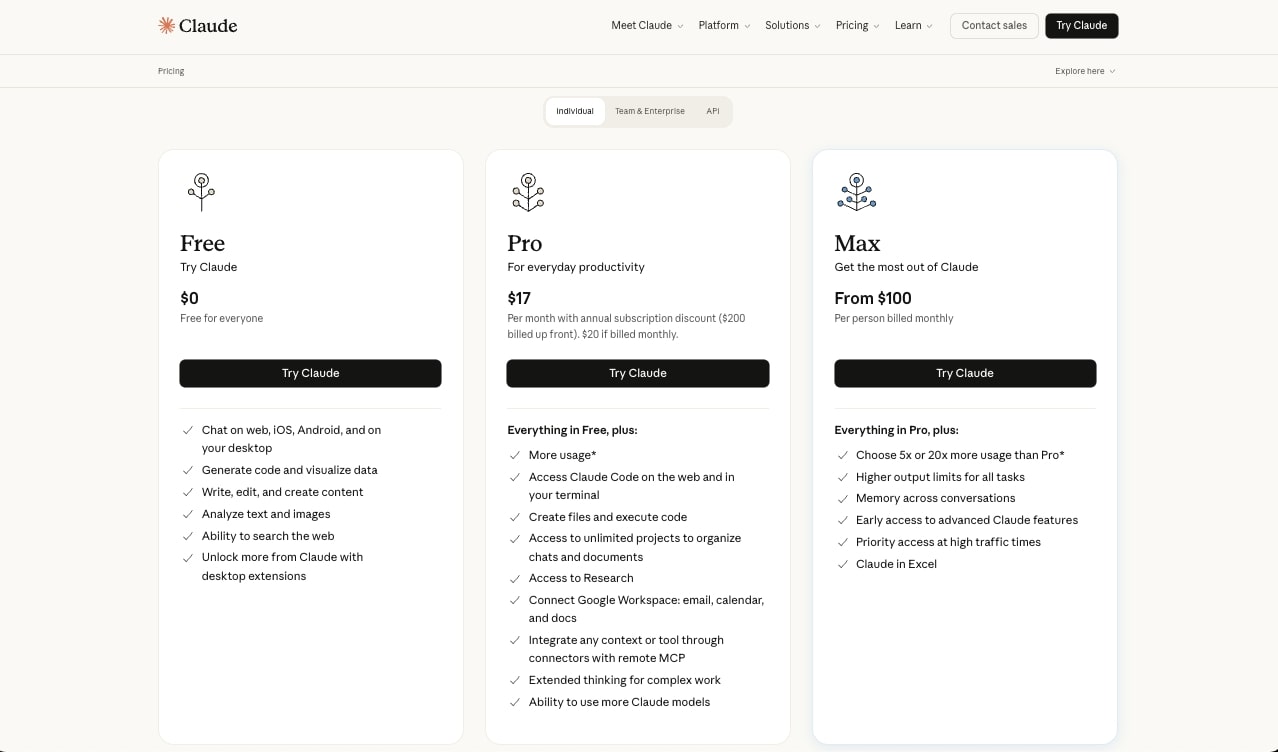
Here are Claude's pricing plans:
- Free: $0/month with access to Claude 3.5 Sonnet, limited usage, and standard features
- Pro: $20/month with 5x more usage than Free, access to all Claude models including Claude Opus, priority access during high traffic, and early access to new features
- Team: $25/month per user (minimum 5 users) with higher usage limits, centralized billing, and admin controls
- Enterprise: Custom pricing with expanded context windows, integrations like GitHub and Slack, dedicated support, and enterprise-grade security
You can learn more about what each plan has to offer on the pricing page.
Claude ratings and reviews
Here's what customers rate the platform on third-party review sites:
- G2: 4.4/5 star rating (from +89 user reviews)
- Capterra: 4.6/5 star rating (from +28 user reviews)
What is the best Apify alternative?
The best Apify alternative is Gumloop if you want an all-in-one platform that combines web scraping with AI agents and workflow automation. For dedicated web scraping with enterprise features, Browse AI is the top choice. And if you need open-source flexibility with full API access, n8n is the best option.
Now, which one is right for you depends on what you're trying to do.
If you want an all-in-one platform that can scrape websites, analyze data with LLMs, and automate your entire workflow, Gumloop is the most powerful option. It's a full AI agent platform that has a web scraping API, can handle lead generation, content monitoring, and pretty much any automation you throw at it.
If you need a dedicated scraper with enterprise-level features like anti-bot measures and cloud-based infrastructure, Browse AI or Octoparse are solid choices. Both providers handle things like CAPTCHA solving and IP rotation out of the box, and they're more cost effective than hiring developers to build custom Actors.
For developers and technical teams who want full control, n8n is the way to go. It's open source, self-hostable, and gives you API access to basically everything. But if you're non-technical and just need to scrape a few pages here and there, Thunderbit or Claude are way simpler no-code tools that get the job done without the learning curve.
At the end of the day, go back to that list of criteria we talked about earlier. Think about your use case, your technical comfort level, and whether you need a one-time scraper or a full automation platform. Then pick the tool that fits.
And if you're still not sure, most of these platforms have free plans. Just test a few and see which one clicks for you.
Now go and build some automations!

Read related articles
Check out more articles on the Gumloop blog.