5 best Octoparse alternatives I've used that actually work

The technology we have now to scrape the web is insane.
I remember back when I was a marketing intern in 2016 using Octoparse to try and scrape lead data for an outreach campaign.
Today, there are so many Octoparse alternatives that leverage AI models to make web scraping not only a lot easier, but a lot more accurate as well.
Over the past couple years, I have been testing different AI tools and reviewing them on my personal blog and YouTube channel. And one use case I needed was a web scraping tool.
I decided to check out if there were any new AI web scrapers out there, and to my surprise, there were many.
So I spent the past year testing different ones.
But I didn't just want a tool that could scrape a given website or database. I also wanted a tool that could take that data and execute tasks. I wanted a full web scraping AI agent.
And I'm excited to say I finally found a setup that works.
So I want to now give back and show you the best tools right now that can help you scrape information and also execute tasks through your existing tech stack.
But before we jump in, I want to go over what you should consider when evaluating the tools we are about to go over.
Let's get into it.
What to look for in an Octoparse alternative
Okay, before I show you my list of the top Octoparse alternatives, we have to go over what to actually look for when evaluating the tools.
I don’t want to be biased and just give you a list of tools to use. I want you to know exactly what the difference between each of these are (and any other alternatives that pop in the market).
This way, you can make your own educated choice that fits to your use case and business model. Before you pick a tool below, you should first think about the following:
- Ease of use: Some tools require programming skills to set up crawlers and configure HTML parsing. Others have drag-and-drop interfaces that let you build scrapers without touching any code. Know your technical comfort level before committing.
- AI and machine learning capabilities: Traditional scrapers just extract raw data. Newer tools use machine learning and LLMs to interpret website data, understand context, and structure information intelligently. If you want more than just pulling HTML, look for AI-native platforms.
- Data export and integrations: How do you want to use the data you scrape? Some tools only export to CSV or JSON files. Others have built-in data integrations with tools like Google Sheets, Airtable, Notion, or your CRM. Think about where your data needs to end up.
- Bot detection handling: Many websites have anti-bot measures in place. If you're scraping at scale, you'll want a tool with IP rotation, proxy support, and other features that help you avoid getting blocked.
- Scheduling and monitoring: Do you need to scrape once or on an ongoing basis? Some tools are better for one-off extractions, while others are built for scheduled crawlers that monitor changes over time.
- Customer support: When something breaks (and it will), you want to know someone can help. Look for tools with responsive customer support, active communities, or dedicated account managers if you're on an enterprise plan.
- Pricing at scale: Some tools look affordable until you start running a lot of scrapers. Pay attention to credit limits, compute costs, and whether pricing is subscription-based or pay-as-you-go.
Overall, these are the core things I believe anyone should pay close attention to when picking an alternative to Octoparse (or really any web scraping tool for that matter).
Okay, now let's get into the list of the best Octoparse alternatives.
5 best Octoparse alternatives and competitors in 2026
Here are the best alternatives to Octoparse:
Alright, let’s go over each of these in depth.
1. Gumloop

- Best for: Building AI agents and automated workflows that can scrape, analyze, and act on web data
- Pricing: Free plan available, paid plans start at $37/month
- What I like: You can scrape websites, feed data to any LLM for analysis, and then trigger actions in your other tools, all in one workflow
Gumloop is an AI automation and agent building platform. It has very similar workflow features to Octoparse in that it has a built-in web scraping node that can collect data from any website. And from there you can feed it to any LLM to analyze and categorize the data.
You can also create custom workflows that can enrich data and send you custom reports on whatever frequency you'd like.
But now with Gumloop Agents, you can also build a fully custom autonomous AI agent that can run any web scraping workflow and make decisions on what to do with that data based on instructions you give it.
How Gumloop works
Gumloop has two core features: Flows and Agents. Flows are your typical automated workflows where you drag nodes onto a canvas and connect them with if-this-then-that logic.
For example, you can trigger a web scraping workflow to run when someone fills out a form on your site. The agent takes that form data and runs an analysis on who the person is on LinkedIn, social media profiles, and/or information about them on different websites.
It's a rigid workflow that is predictable each time.
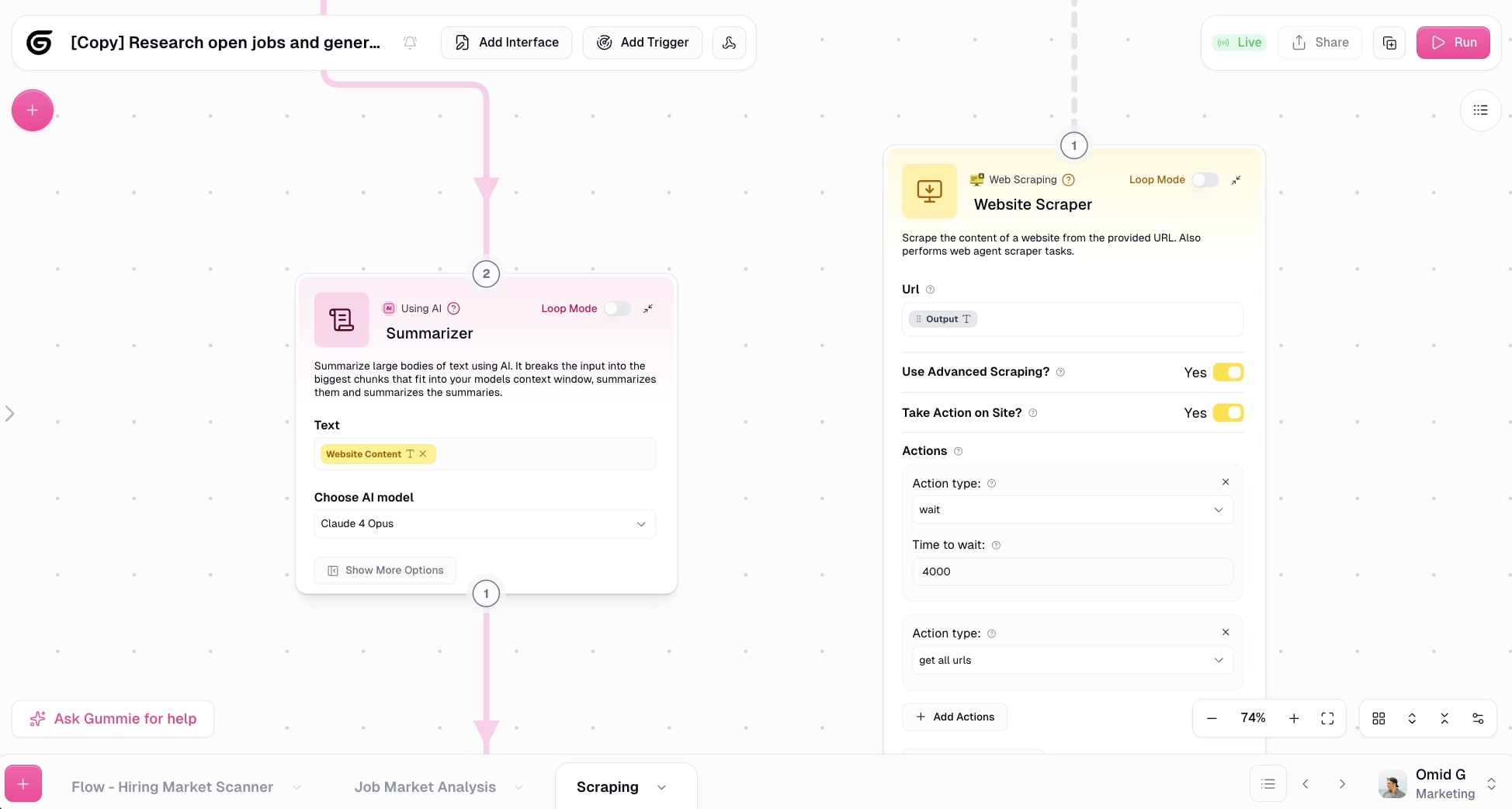
However, Agents act more as autonomous coworkers that can figure out how to accomplish any task you give it. Simply explain the behavior of the agent, connect it to any existing tools you want the agent to access (like Slack, Google Sheets, Notion, etc.), and select the best LLM model for web scraping (I like Claude, I'll show you why in the next tool on this list).
Then, you simply chat with your agent and it will do everything for you. For example, you can ask the agent to scrape LinkedIn company profiles in a particular industry that have 50-100 employees. And then tell it to import that into a Google Sheet.
It can do this all in one go.
It's so powerful that I have been a customer of Gumloop for over a year now and they let me write up this post because I'm so involved in the AI and web space (I am not an employee at Gumloop).
Why choose Gumloop over Octoparse
Here's why you might want to use Gumloop:
- Octoparse is focused on web scraping only. Gumloop lets you scrape data and then do something with it in the same workflow, like analyze it with an LLM, enrich it, or send it to your other tools.
- Gumloop's Agents feature lets you build autonomous AI coworkers that can figure out how to accomplish tasks on their own. Octoparse requires you to manually configure every step.
- It integrates with any premium LLM model without needing extra subscriptions or API keys, so you can add AI-powered analysis to your scraping workflows easily.
- The Gummie assistant can help you build workflows by just describing what you want, making it more beginner-friendly than Octoparse's interface.
Gumloop pros and cons
Here are some of the pros with Gumloop:
- Has built-in web scraping features and can integrate with any premium LLM model (without needing extra subscriptions or API keys)
- Is really easy to set up. Just use the Gummie assistant and tell it exactly what workflow or agent you want to build
- Has a generous free plan where you can start web scraping without needing to pull out your credit card
- Has a template marketplace with existing web scraping workflows and agents you can use to get ideas
- Built for both startups and enterprise companies (their customers include Shopify, Instacart, and more)
Here are some of the cons with Gumloop:
- It's a full agent and automation platform, so web scraping is just one part of the whole thing. If you only need web scraping features and don't care about other types of automations or AI agents in your business, it might be a bit overkill
- Its broad use case can sometimes make it hard to know what's possible with the tool, but you can ask the Gummie assistant anything and it will tell you if things are feasible, how to go about them, and it can also build out the workflows for you
Overall Gumloop is an amazing tool for creating AI agents and automated workflows that can scrape the web and collect data. The reason I love it so much is that scraping a website is generally the first step, not the last. You're obviously scraping information because you want to gain insights and do something with the data.
And with Gumloop's extensive MCP and app integrations, you can take that data and have an AI agent run actual tasks that affect real KPIs. It's also great for non-technical users as it's one of the easiest platforms for building agents.
Gumloop pricing

Here are Gumloop's pricing plans:
- Free: $0/month with 2,000 credits per month, 1 seat, 1 active trigger, 2 concurrent runs, Gummie Agent, forum support, unlimited nodes, and unlimited flows
- Solo: $37/month with 10,000+ credits per month, unlimited triggers, 4 concurrent runs, webhooks, email support, and bring your own API key
- Team: $244/month with 60,000+ credits per month, 10 seats, 5 concurrent runs, unlimited workspaces, unified billing, dedicated Slack support, and team usage and analytics
- Enterprise: Custom pricing with role-based access control, SCIM/SAML support, admin dashboard, audit logs, custom data retention rules, regular security reports, data exports, incognito mode, AI model access control, virtual private cloud, and flow queuing
You can learn more about how they structure their pricing here.
Gumloop ratings and reviews
Here's what others say about Gumloop on third-party review sites:
- Product Hunt: 5/5 star rating (from +12 user reviews)
- There's An AI For That: 5/5 star rating (from +1 user review)
2. Claude
- Best for: AI-powered web scraping and page analysis without any setup
- Pricing: Free plan available, Pro starts at $17/month
- What I like: Just talk to it and tell it what you want to scrape. No configuration, no learning curve.
At its core, Claude is an LLM. However, it now has a built-in web agent that can fetch URLs and understand data on a web page.
It's so powerful that I have been using it almost every day to analyze web pages for my SEO campaigns.
How Claude works
Claude is very easy to use. Probably the simplest web scraping tool you'll find on the market. All you do is talk to Claude and ask it anything.
For example, I recently wanted to update a list of blog articles that had the previous year in their main title tag. I went to Claude and simply gave it my sitemap and asked it to find articles that have the previous year in the title that need to be updated.
Claude went ahead and scraped my sitemap, and then from there, it went through each individual page and analyzed the content. If it detected that the previous year was in the title tag, it made a note of it and gave me a full report.
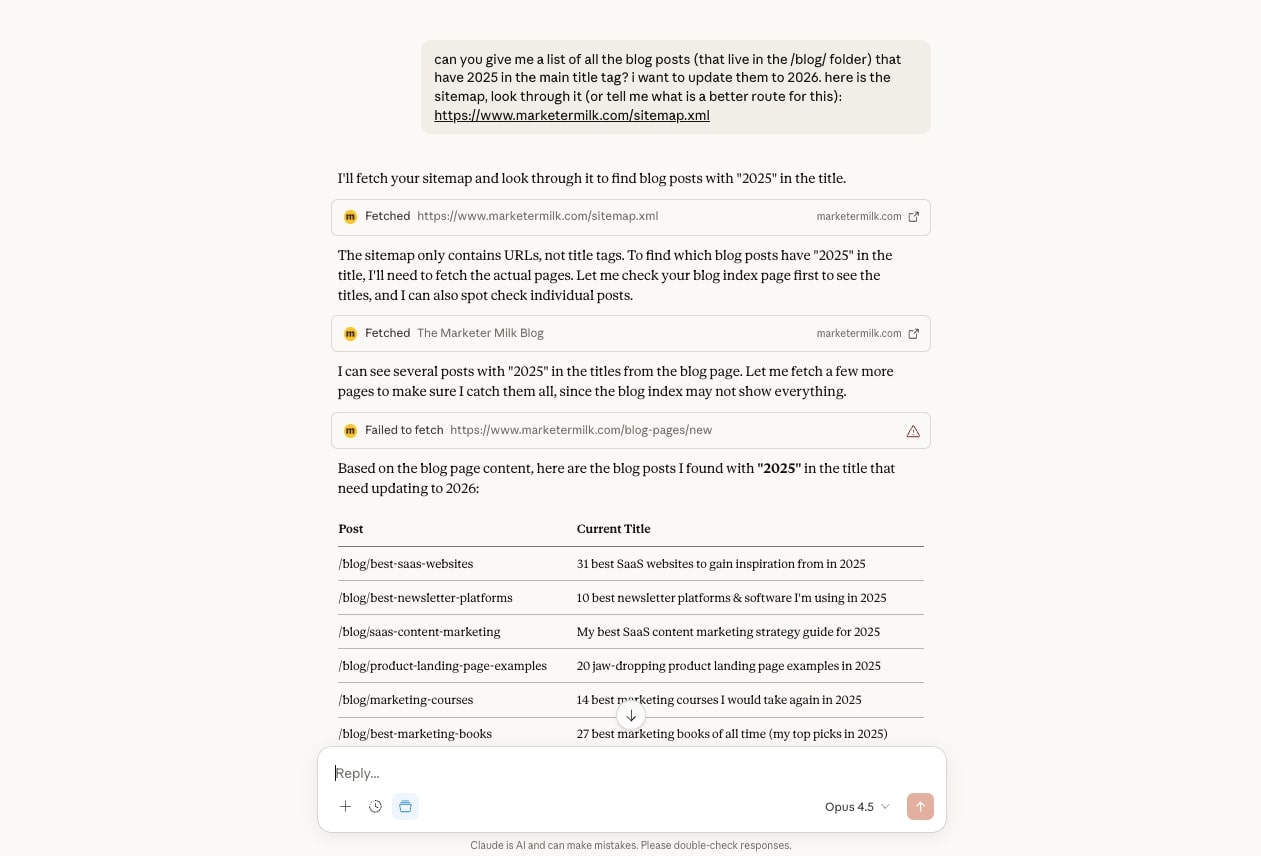
What makes this so powerful is that you can pair this technology with Gumloop and create a full AI scraping agent. Claude is used to fetch and analyze pages, and Gumloop is used to integrate any other tool that needs reference to that data.
For example, I could create an AI agent that would then take the update recommendations from Claude and automatically implement them in my CMS.
You could also do this with Claude MCP, but there is a technical setup to it.
Why choose Claude over Octoparse
Here's why you might want to use Claude:
- You can scrape web pages without dealing with any configuration or learning a new interface. Just describe what you need in plain English and it figures out the rest.
- Octoparse requires you to set up workflows, define selectors, and configure extraction rules. Claude skips all of that. You give it a URL, tell it what you're looking for, and it handles the scraping and analysis in one step.
- It's great if your scraping needs are more analytical. Instead of just pulling raw data, Claude can interpret, summarize, and make recommendations based on what it finds. That's something traditional scrapers like Octoparse simply cannot do.
Claude pros and cons
Here are some of the pros with Claude:
- Free to start using, and the paid plan is fairly affordable
- Easy to use. Simply give it your URLs and explain what and how you want it to scrape the page
- Can integrate with your existing tech stack using MCP servers
- Has a desktop app that can see your screen and help analyze data you’re looking at
Here are some of the cons with Claude:
- It's not a dedicated web scraper, but it can do what most web scrapers can
- Setting up MCP servers takes a bit of technical knowledge
Overall, you cannot beat Claude. I am so impressed with it and it just keeps getting better and better. Six months ago if you asked me if you could use it for web scraping I would say absolutely not. But today, I would say it's one of the best out there.
Claude pricing
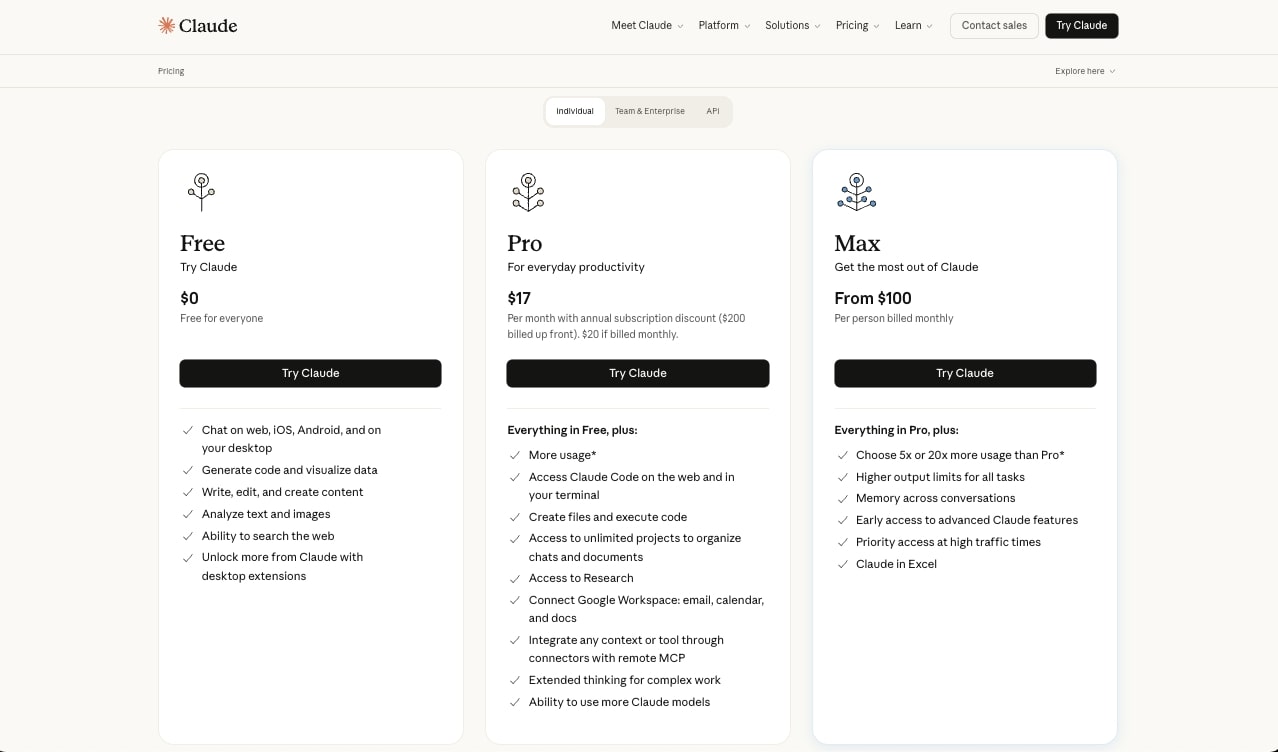
Here are Claude's pricing plans:
- Free: $0/month with web search, text and image analysis, code generation, and access on web, iOS, Android, and desktop
- Pro: $17/month (annual) or $20/month (monthly) with more usage, Claude Code, file creation, unlimited projects, Research, Google Workspace integration, MCP connectors, extended thinking, and access to more Claude models
- Max: From $100/person per month with 5x or 20x more usage than Pro, higher output limits, memory across conversations, early access to advanced features, priority access during high traffic, and Claude in Excel
You can learn more about how they structure their pricing here.
Claude ratings and reviews
Here's what customers rate the platform on third-party review sites:
- G2: 4.4/5 star rating (from +88 user reviews)
- Capterra: 4.6/5 star rating (from +28 user reviews)
3. Browse AI
- Best for: Web monitoring and scheduled scraping with pre-built robots
- Pricing: Free plan available, paid plans start at $48/month
- What I like: Over 250 built-in robots and 7,000+ integrations make it easy to get started fast
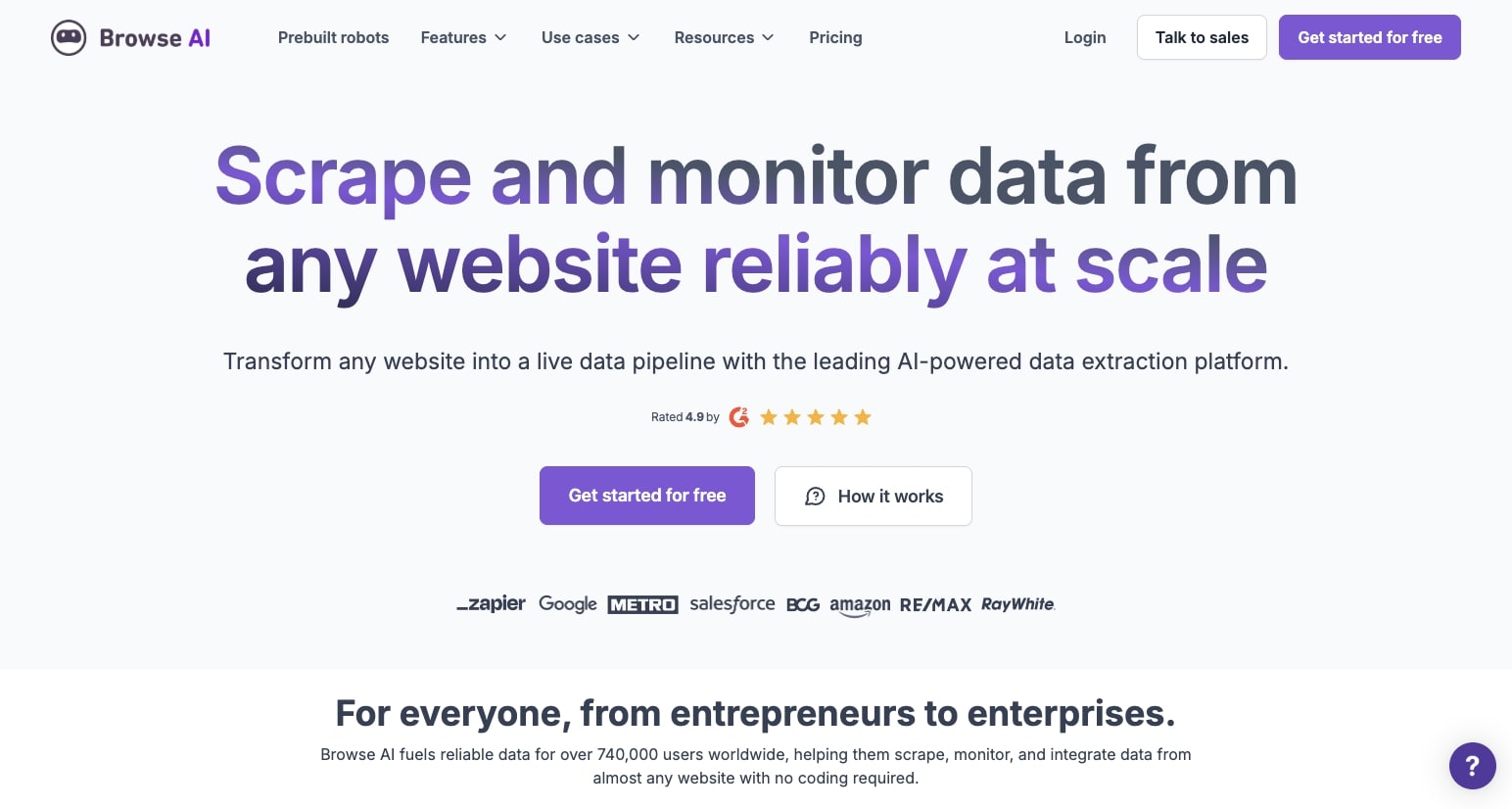
Browse AI is a web scraping and monitoring tool that lets you create mini agents that can monitor changes to websites, scrape their data, and send that data to different tools in your tech stack.
It's a classic web scraping tool very similar to Octoparse in that it's a no-code platform designed for non-technical teams that want to scrape information on websites and turn it into structured data.
How Browse AI works
The platform works by first recording yourself interacting with a page. Basically you want to train the robot to understand what you want it to do. While you're recording you can click on different elements, fill out forms, and do anything you would want the agent to mimic.
From there you can set the frequency of when you want the web scraping to happen. You can run it on an hourly basis, daily basis, etc.
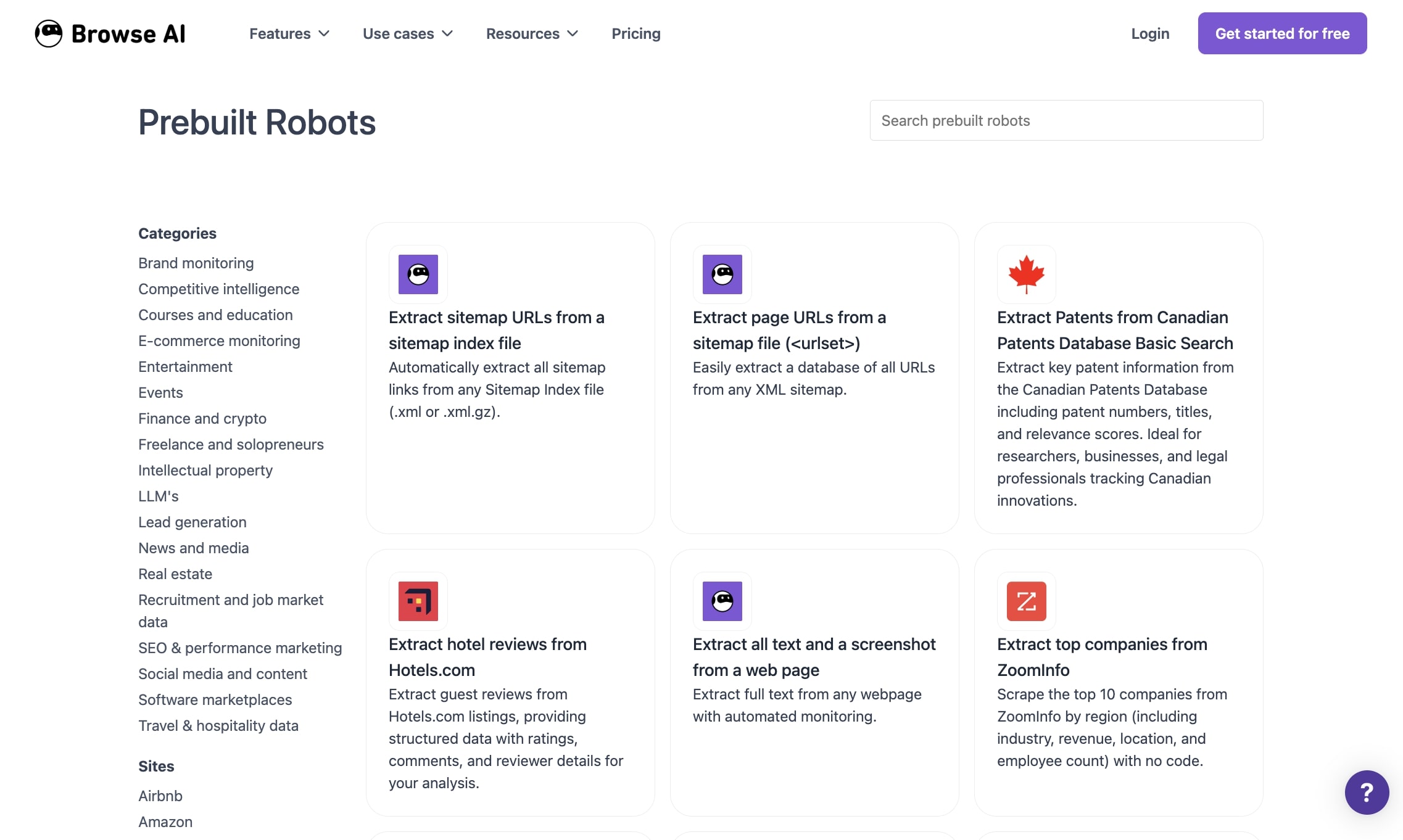
The platform also has over 250 built-in Robots (aka templates) you can use. And there are over 7,000 integrations with other tools so you can create a full data analysis agent.
Why choose Browse AI over Octoparse
Here's why you might want to use Browse AI:
- Browse AI focuses on training robots to scrape web pages on a set frequency, making it better for web monitoring use cases
- It has over 7,000 built-in integrations compared to Octoparse's more limited options
- The 250+ pre-built robot templates let you get started faster without building from scratch
- It's generally more affordable than Octoparse for similar functionality
Browse AI pros and cons
Here are some of the pros with Browse AI:
- It's fairly easy and fast to set up your first web scraping agent
- Once set up there's pretty low maintenance as it can run in the background
- It has scheduling features and can interact with your existing tech stack
- It has a Chrome extension to help you scrape the pages you're currently browsing
Here are some of the cons with Browse AI:
- There can be less workflow controls compared to Octoparse or Gumloop
- Not the best for enterprise companies as it runs only on the cloud
Overall Browse AI is a solid and promising tool. If you're looking for a more dedicated web scraper similar to Octoparse, you have to check this one out. But if you're looking for something that is more workflow automation-focused, it might be worth looking into an alternative.
Browse AI pricing
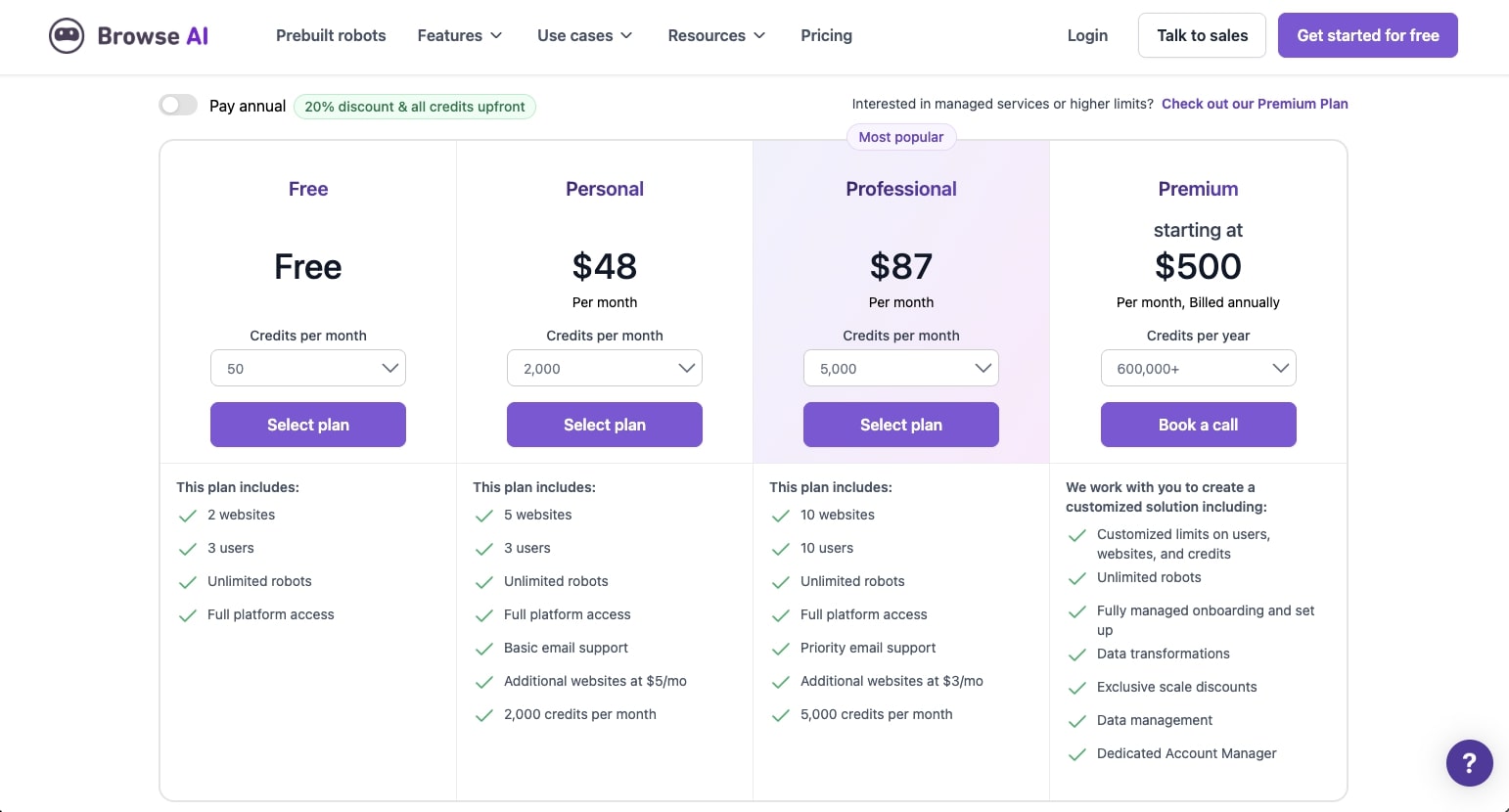
Here are Browse AI's pricing plans:
- Free: $0/month with 50 credits per month, 2 websites, 3 users, unlimited robots, and full platform access
- Personal: $48/month with 2,000 credits per month, 5 websites, 3 users, unlimited robots, full platform access, basic email support, and additional websites at $5/month
- Professional: $87/month with 5,000 credits per month, 10 websites, 10 users, unlimited robots, full platform access, priority email support, and additional websites at $3/month
- Premium: Starting at $500/month (billed annually) with 600,000+ credits per year, customized limits on users, websites, and credits, unlimited robots, fully managed onboarding and setup, data transformations, exclusive scale discounts, data management, and a dedicated account manager
You can learn more about how they structure their pricing here.
Browse AI ratings and reviews
Here's what customers rate the platform on third-party review sites:
- G2: 4.8/5 star rating (from +57 user reviews)
- Capterra: 4.6/5 star rating (from +61 user reviews)
4. Thunderbit

- Best for: Chrome extension-based web scraping for lead gen and e-commerce data
- Pricing: Free plan available, paid plans start at $15/month
- What I like: Extremely fast setup with templates for common marketplaces like Zillow, Amazon, and Shopify
Thunderbit is an AI web scraper designed to be primarily used as a Chrome extension. It can help you scrape data for ecommerce products, contact information for outreach campaigns, and help you take raw information from websites and turn it into structured data.
The platform is best for non-technical business owners focused on lead gen, competitor analysis, real estate data, social media content, or e-commerce.
How Thunderbit works
Similar to Browse AI, Thunderbit was designed to combine traditional web scraping features with the power of AI. This means you can essentially train an agent to think just like you.
For example, you can tell it exactly what you want it to pay attention to on a website, how to organize that data, and even extract it into a Google Sheet.
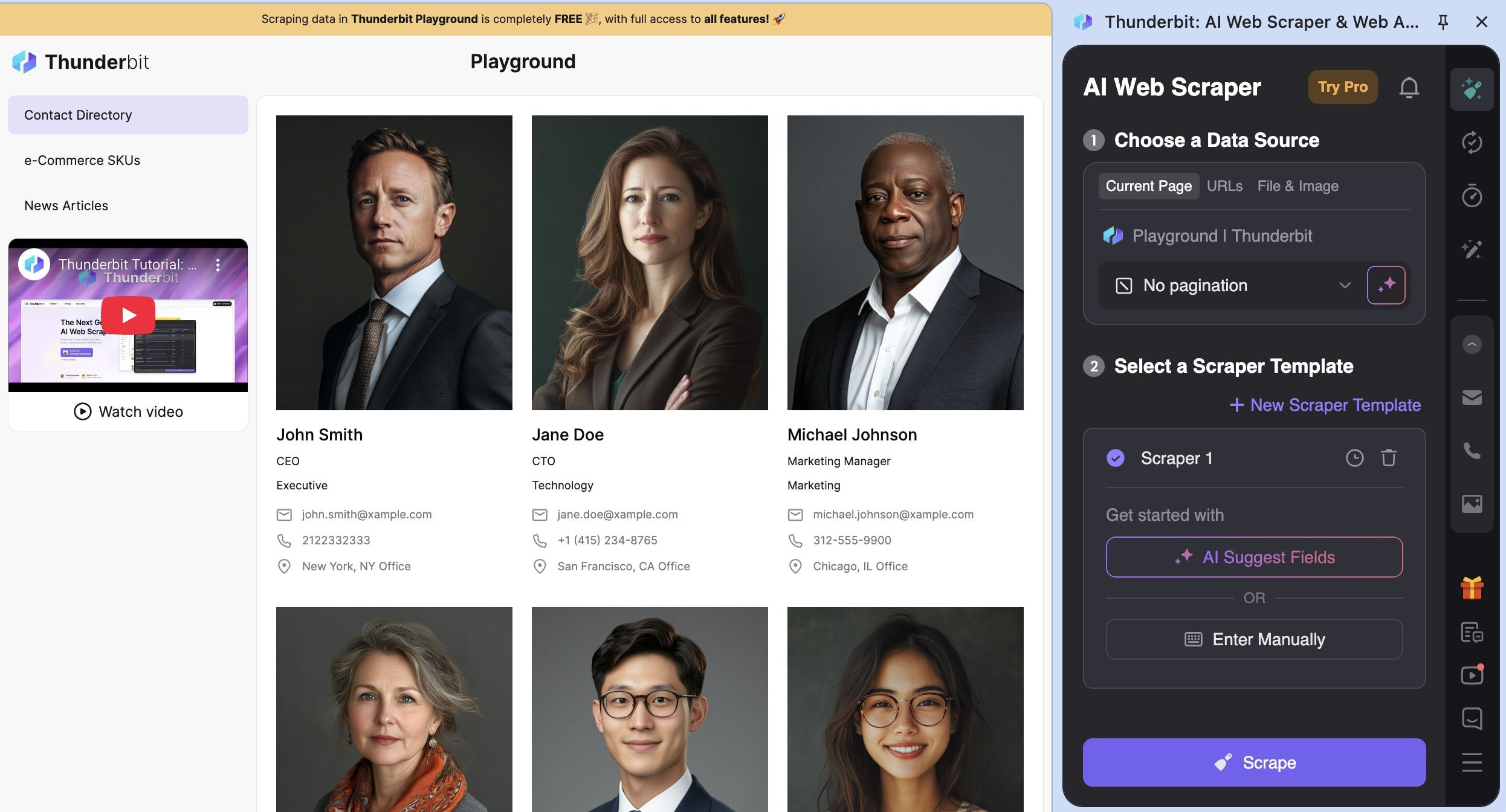
Given that AI models are so powerful now (especially with the Claude example we went over), you can extract any data using natural language and Thunderbit can understand the best way to structure it in a table. It can give you column names, organize your data, and act as a smart sidekick for whatever web scraping use case you have.
Thunderbit is different from Browse AI in that it focuses mostly on the web browser experience. As in, it's a Chrome extension first. It leans more on AI and natural language prompts.
It's also designed for business use cases like sales and ops, and has built-in enrichment features similar to Clay. So if you tried Browse AI but found it a bit confusing or complex, Thunderbit is a simpler version of it.
Why choose Thunderbit over Octoparse
Here's why you might want to use Thunderbit:
- It's a Chrome extension first, so you can scrape pages you're actively browsing without switching to a separate app
- It uses natural language prompts to extract and structure data, making it more intuitive than Octoparse's workflow builder
- It has built-in data enrichment features for lead gen and sales use cases
- It's more affordable and simpler to set up for quick scraping tasks
Thunderbit pros and cons
Here are some of the pros with Thunderbit:
- Extremely fast setup and has templates for common marketplaces like Zillow, Amazon, and Shopify websites
- Focused on lead gen and outreach, so you can scrape contacts and enrich company data in your CRM
- It can handle files like PDFs, images, and docs, and it can help you integrate with tools like Airtable, Notion, or export as a CSV
Here are some of the cons with Thunderbit:
- It's not designed for flexible workflows the same way Browse AI or Gumloop are
- It's not good at multi-step conditional logic, but it's really designed for simple browser data scraping
- While it's good for startups or freelancers, it may not be the best for enterprise companies looking to have multiple scraping and monitoring agents operating at the same time
Overall if you're looking for a simple Chrome extension that can scrape information from marketplaces, this is definitely a tool to check out. It may not be the best for creating full agents that can do more than just simple web scraping, but it's a great start for beginners learning how to extract data from websites and turn it into usable insights.
Thunderbit pricing
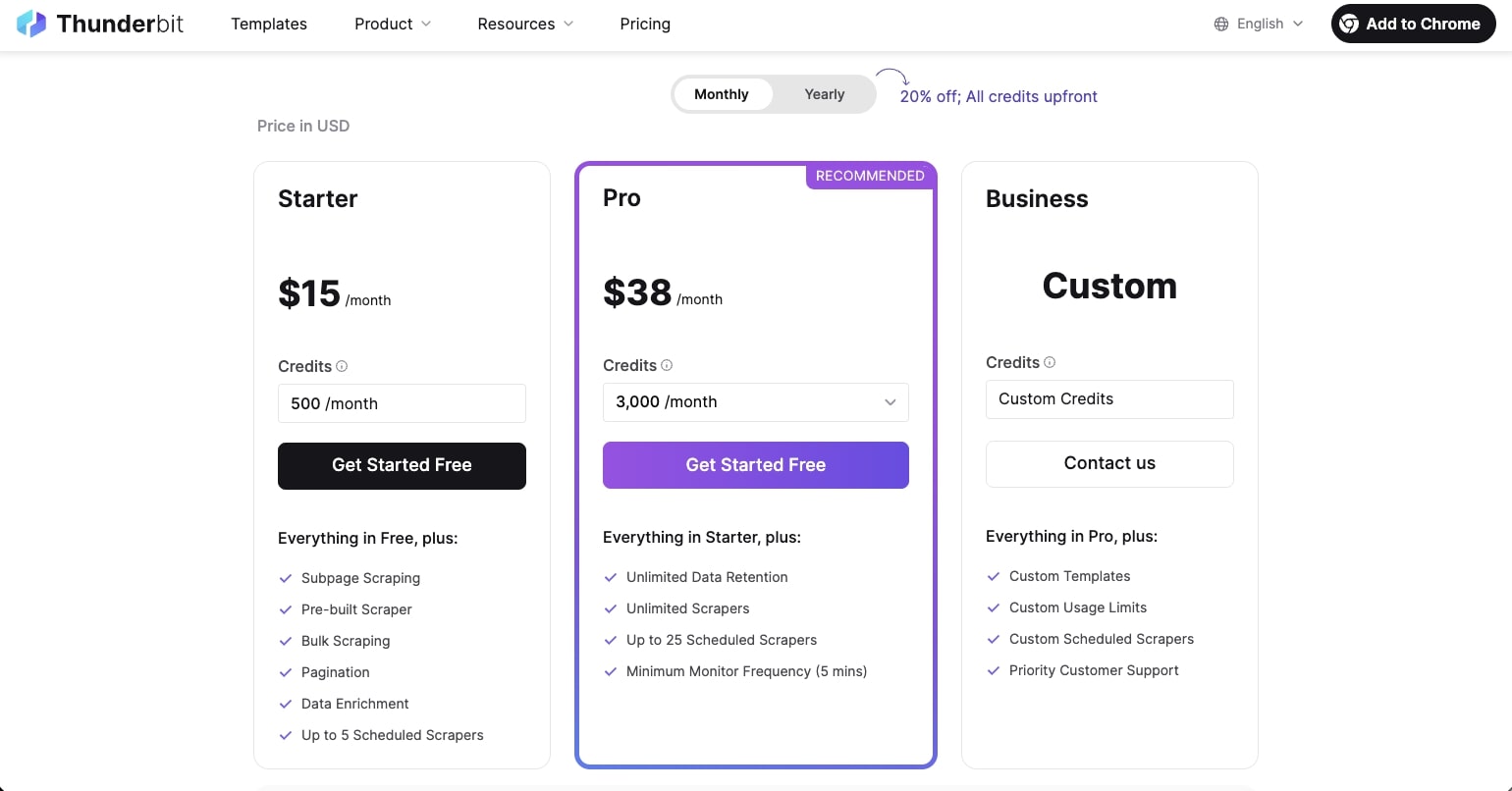
Here are Thunderbit's pricing plans:
- Free: $0/month with 6 pages per month (maximum of 30 credits per page), data export, and data extraction tools
- Starter: $15/month with 500 credits per month, subpage scraping, pre-built scrapers, bulk scraping, pagination, data enrichment, and up to 5 scheduled scrapers
- Pro: $38/month with 3,000 credits per month, unlimited data retention, unlimited scrapers, up to 25 scheduled scrapers, and minimum monitor frequency of 5 minutes
- Business: Custom pricing with custom credits, custom limits, and priority support and account management
You can learn more about how they structure their pricing here.
Thunderbit ratings and reviews
Here's what customers rate the platform on third-party review sites:
- Trustpilot: 4.3/5 star rating (from +34 user reviews)
- Chrome Web Store: 4.4/5 star rating (from +115 user reviews)
5. Apify
- Best for: Enterprise companies that need to scrape thousands of pages at scale
- Pricing: Free plan available, paid plans start at $39/month plus pay as you go
- What I like: Over 10,000 pre-built Actors in the marketplace and deep integrations with developer tools like GitHub, MCP servers, and JavaScript/Python SDKs
Apify is a cloud-based web scraping and browser automation platform that allows you to build scrapers to run at scale.
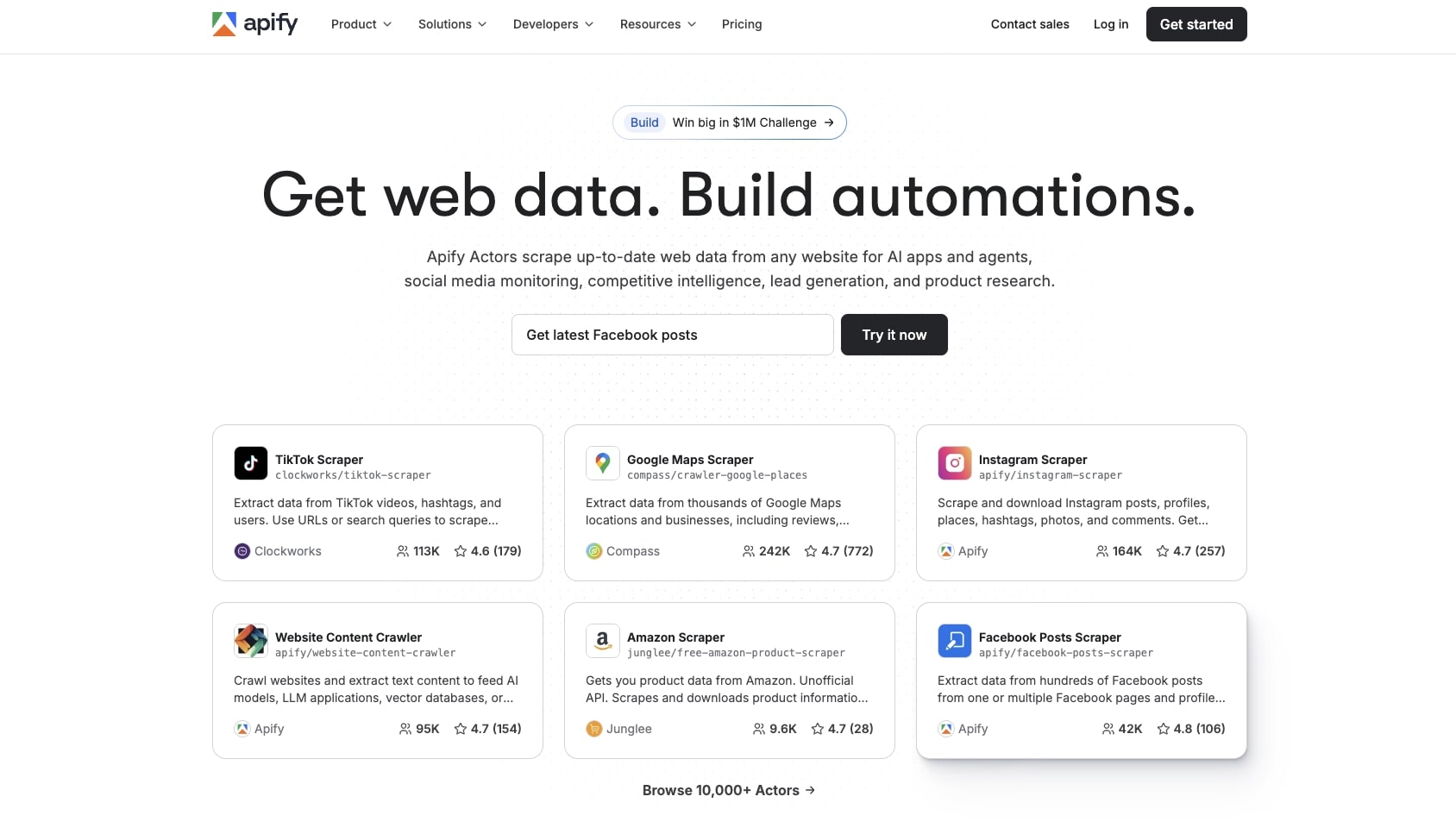
Compared to other tools on this list, Apify is built for enterprise companies that want to scrape thousands of pages on marketplaces and platforms like Google Maps, Instagram, Amazon, and whatever website.
It gives you all the core enterprise features like IP rotation, proxy rotation, scheduling, monitoring, storage, and API integrations.
How Apify works
Apify works by creating "Actors", which are essentially AI agents that run in the cloud. There's also a marketplace of over 10,000 of these Actors that can go out and scrape websites and use AI to collect web data. For example, there are Actors for scraping data from TikTok, scraping data from LinkedIn, and really any platform.
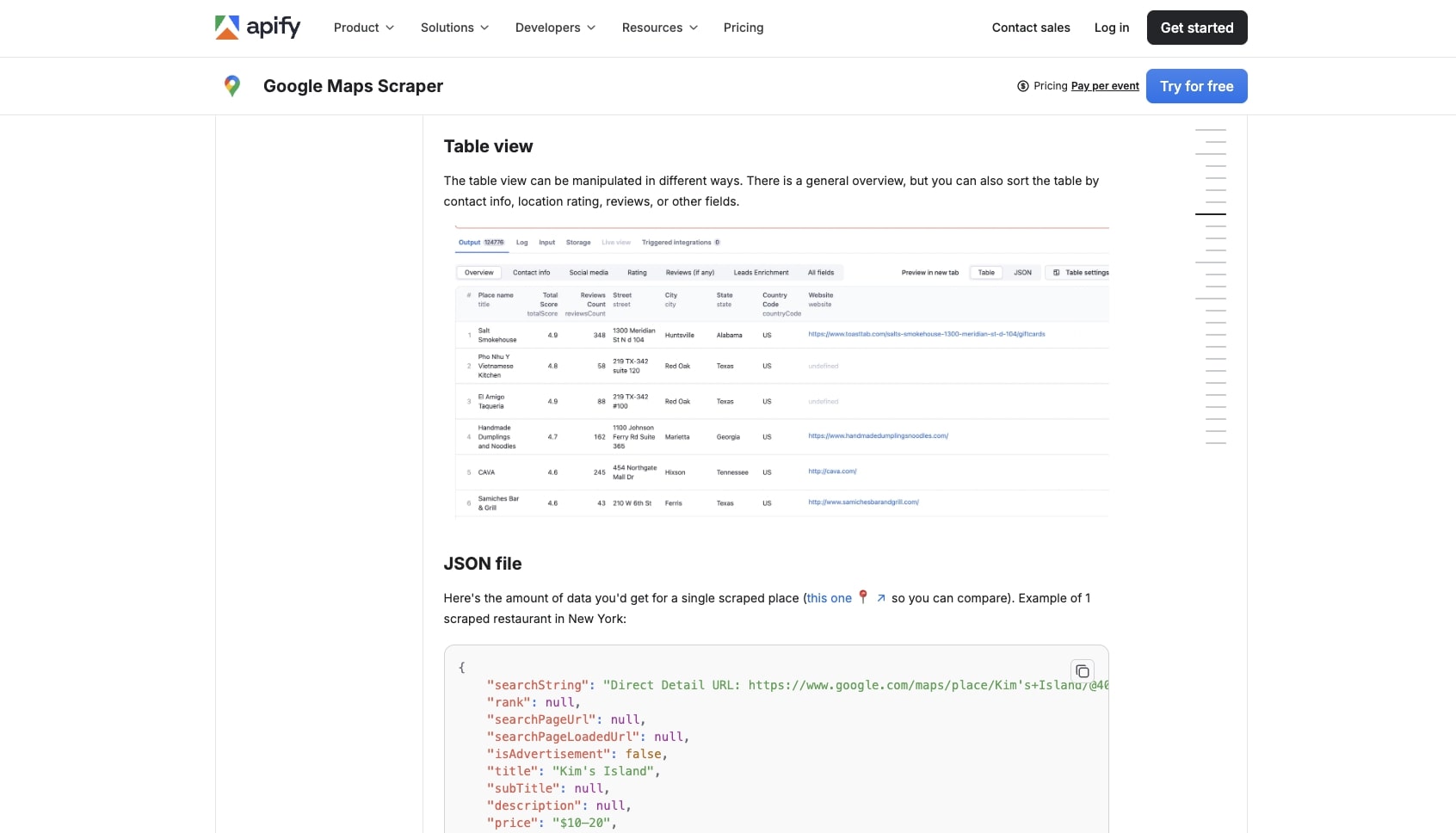
Given that it's an enterprise tool, you can also have a development team build fully custom web scrapers and deploy them across your organization. And if you don't have anybody on your team that can help, Apify also has experts that can go out and build custom solutions for you (typical of most enterprise level tools like this).
The platform also has a rich ecosystem of integrations and can connect with things like GitHub, MCP servers, Slack, Google Drive, and more. This way you can actually do things with the data that you scrape and send them to your other tools (similar to what you can do with Gumloop).
Why choose Apify over Octoparse
Here's why you might want to use Apify:
- Apify is built for technical teams and is developer focused. You create Actors which are apps that have different characteristics within broad web scraping use cases. Octoparse is a no-code/low-code platform for anyone.
- It's highly extensible with its app marketplace and its ability to integrate with open source tools like JavaScript and Python SDKs
- It's built for enterprise scale with SOC2 and GDPR compliance, making it better suited for large organizations with strict security requirements
- The 10,000+ actor marketplace means you can find pre-built solutions for almost any scraping use case
Apify pros and cons
Here are some of the pros with Apify:
- It's highly flexible and customizable and can handle large infrastructure for different web scraping needs within an enterprise company
- It's built with enterprise in mind and is SOC2 and GDPR compliant
- Has a large marketplace of templates so you don't have to start from scratch
Here are some of the cons with Apify:
- It's focused on developers so it may not be the easiest tool to use if you're a marketer or a startup/solo operator
- It has a learning curve and requires a lot of initial setup to get going
- The payment is a subscription plus pay-as-you-go model, so it can get pretty expensive if you have a lot of Actors running simultaneously and they're not optimized correctly
Overall, if you're a large company with engineering resources and you're looking to make custom web scraping apps internally, this is definitely a tool to check out. It gives you API access to other enterprise tools you may already be using, and is built with security and scalability in mind.
Apify pricing
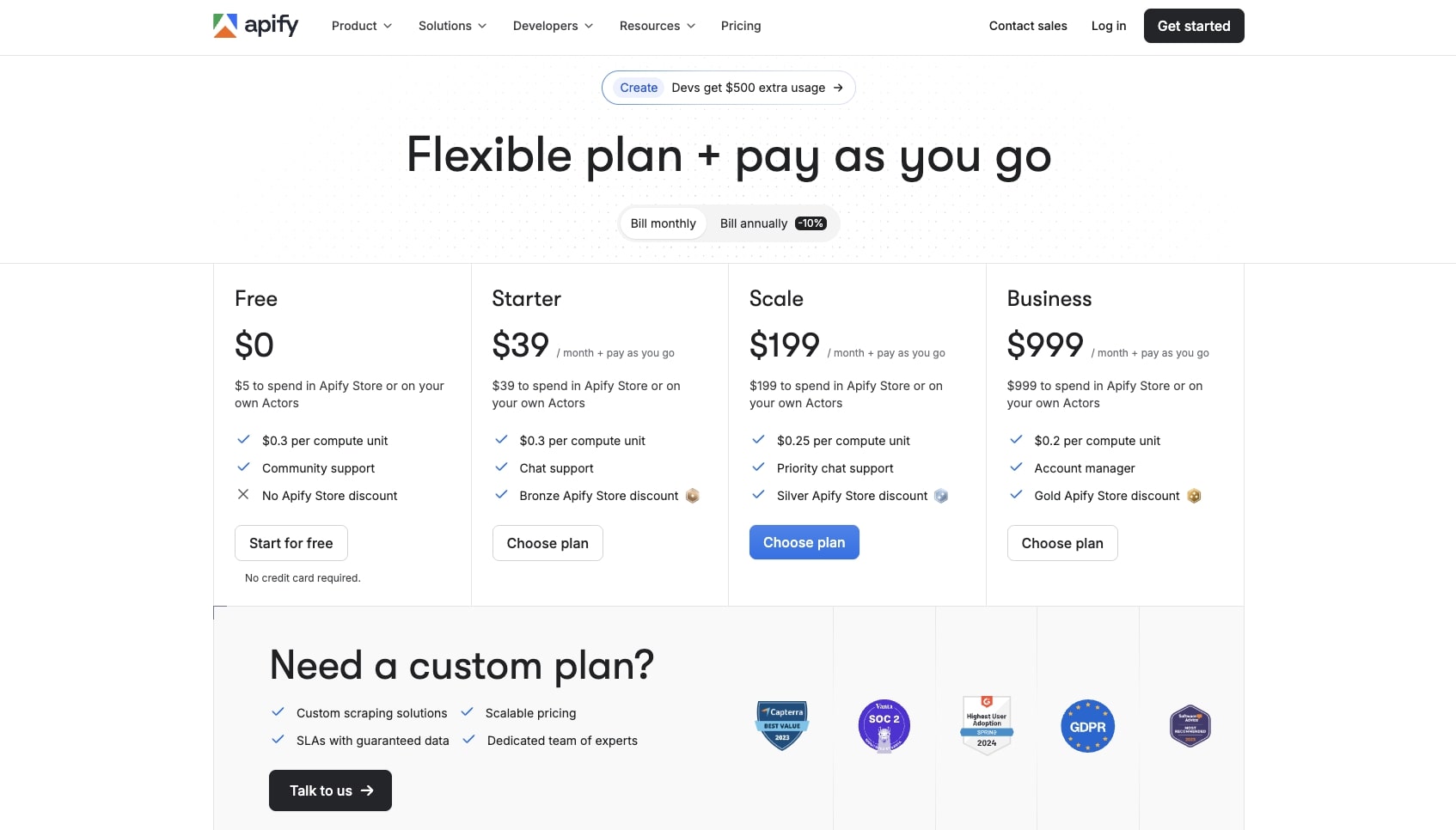
Here are Apify's pricing plans:
- Free: $0/month with $5 to spend in Apify Store or on your own Actors, $0.30 per compute unit, and community support
- Starter: $39/month plus pay as you go with $39 to spend in Apify Store or on your own Actors, $0.30 per compute unit, chat support, and Bronze Apify Store discount
- Scale: $199/month plus pay as you go with $199 to spend in Apify Store or on your own Actors, $0.25 per compute unit, priority chat support, and Silver Apify Store discount
- Business: $999/month plus pay as you go with $999 to spend in Apify Store or on your own Actors, $0.20 per compute unit, account manager, and Gold Apify Store discount
- Custom: Custom pricing with custom scraping solutions, scalable pricing, SLAs with guaranteed data, and a dedicated team of experts
You can learn more about how they structure their pricing here.
Apify ratings and reviews
Here's what customers rate the platform on third-party review sites:
- G2: 4.7/5 star rating (from +333 user reviews)
- Capterra: 4.8/5 star rating (from +378 user reviews)
What is the best AI tool for web scraping?
The best AI tool for web scraping depends on your use case. If you want to scrape data and then do something with it in the same workflow, Gumloop is the best option. If you want the simplest setup with no learning curve, Claude is the way to go. If you need scheduled monitoring and pre-built robots, Browse AI is a solid choice. If you want a lightweight Chrome extension for quick scraping, Thunderbit works well. And if you're an enterprise company with developer resources, Apify is built for scale.
For most people reading this, I would recommend starting with Gumloop or Claude.
Gumloop is what I personally use because web scraping is usually just the first step. I want to take that data and actually do something with it, whether that's enriching it, analyzing it with an LLM, or pushing it to my CRM or Google Sheets. Gumloop lets me do all of that in one workflow.
Claude is great if you just need to quickly scrape and analyze a page without setting anything up. You just talk to it and it figures out the rest.
Both have free plans, so you can test them out without any commitment.
Happy scraping!

Read related articles
Check out more articles on the Gumloop blog.