How to orchestrate AI agents (my practical guide for 2026)

For the past 6 months, I’ve been going hard on AI agents.
I’ve tried to automate so many parts of my work, from researching companies, to helping me generate content outlines, to even helping me proofread my work.
And I’ve done it.
Finally learning how to orchestrate AI agents (especially as a non-technical person) has been the greatest thing to happen in my career.
It took a while though, and it was hard to know what information and tools were hype and what was actually real.
So my goal is to clear it up for you.
We’ll go over what it actually means to orchestrate a team of AI agents and I’ll show you a real example. From there, you’ll be able to walk away from this article knowing exactly how to create a team of agents.
Okay, let’s get right to it.
What is AI agent orchestration?
AI agent orchestration is when you create a workflow that leverages multiple AI agents inside of it, each with one job. You can also think of it like a team of agents, all being an expert in one specific task, and when combined they all work together to complete an entire workflow.
The workflow is essentially the orchestration layer. This is where you can coordinate what each agent inside of it does, when it does it, and what data gets passed between the agents. You can think of it as the environment, or the system, that controls the entire workflow.
And within that system you have individual nodes, which are your specific AI agents.
So instead of one agent doing everything within a workflow, which can lead to errors or hallucinations, you make each agent a specialist in its own small task. This way it's multiple specialized agents working together in a single pipeline.
Workflows vs. agents vs. orchestration: what's the difference?
The most confusing thing about AI automation, and this whole AI agent craze, is that the term "AI agent" gets thrown around loosely. Some companies and people use the term interchangeably with AI workflows, which is not correct.
And I think this is why people can get confused trying to make sense of this all. So let's go over what a workflow is, what an agent is, and what agent orchestration is. This way when we go to create our agent orchestration workflow we actually know what we're doing.
Automated workflows (linear, predictable)
Automated workflows are linear node-to-node processes that connect apps and AI models together in a predictable sequence.
This is your typical automation workflow you see platforms like Zapier, Make, or n8n help you with. It's predictable and linear.
And this approach is great for repetitive tasks where the input and the output is very consistent. There's no agent that needs to reason or make decisions on its own. The workflow is all predefined by the user and it just runs on its own.
The benefit of an automated workflow is that it's generally cheaper to run because an AI doesn't have to run through tokens trying to figure out the best approach to a task. It's already been predefined.
The downside is that these workflows can be a little bit harder to set up initially, and if something breaks in the process the entire workflow fails to run. Remember it all works linearly, so if you have a 10-step workflow, and it fails on step 3, it can't move forward.
AI agents (reasoning, autonomous)
AI agents are great for reasoning tasks and can be fully autonomous. They can also do the same things workflows can but each output can sometimes vary. Let me explain.
Compared to workflows, AI agents are easier to set up because you don't have to build the full workflow step by step. All you do is give the AI agent tools you want it to have access to, give it instructions on the skill it has and what it's supposed to do, and select an LLM model you want it to run on.
From there, you can ask the AI agent to do anything and it will figure out the best approach to getting the desired output. And if something fails along the way, the benefit of an AI agent is that they can reason and find alternative paths to getting the desired output.
So this makes AI agents great for handling edge cases and self-correcting without needing specific error handling. But the downside is that they also cost more credits because of how much reasoning goes into it.
Agent orchestration (agents inside workflows)
Agent orchestration is when you build a workflow and specialized AI agents are nodes inside of it. It's the final boss of automation. You get the benefit of having a predictable input/output of a workflow, while also having the reasoning and autonomous task completion of an agent.
With agent orchestration each agent has a very specific job. For example, you can have an entire workflow around running an outreach campaign. And within that workflow you can have specific agents: one that's really good at finding leads on LinkedIn, another that's really good at enriching those leads, and another one that can write an extremely personalized email based on doing a web search about a lead.
The workflow gives you the structure and predictability, but the agents give you the flexibility and reasoning. This way, you get a much better output because each agent node is trained to be good at one very specific thing.
And on top of that, you can run orchestrated workflows on schedules, triggers, webhooks, or even in loops. And the idea is that you can pass the outputs between agents to give context to the next steps in your workflow.
When do you actually need agent orchestration?
A single AI agent can do a lot on its own, so not everything actually needs orchestration. Where agent orchestration comes in handy is when you have a process that has a ton of micro steps within it. And each of those micro steps require different types of reasoning and expertise.
You also want agent orchestration if you want to scale an AI agent across hundreds or thousands of records where agents are looping over data in parallel.
On top of that, some other reasons would be that you need reliability and structure around agent outputs, and you want agents to run automatically on specific triggers (not just manual chats and prompts you give it).
So going back to my outreach example from earlier, that's a great candidate for agent orchestration because you can have multiple agents that do very specific things like research or writing, but they still all fall into one core job to be done.
You can also have this with things like content pipelines where one agent is really good at creating an outline for a post, another is really good at writing based off that outline, and another is really good at publishing it to your CMS.
There are tons of different examples I can go over, but this article would be extremely long. Let me just show you how to orchestrate AI agents so you can get a better idea of the different use cases and how you can go about it for yourself.
How to orchestrate AI agents in 5 simple steps
Here’s how to orchestrate AI agents:
- Define what each agent needs to do
- Map out your orchestration flow
- Pick an AI agent builder with orchestration features
- Build your orchestrated workflow
- Test, monitor, and iterate
Okay, let’s go over each of these step by step.
1. Define what each agent needs to do
The first step to creating a system that can orchestrate AI agents is to figure out what each individual agent needs to do. This can be anything from personalization to analysis or decision-making.
Depending on the AI agent builder that you're using (more on this in step three), you can also think through if each node in your workflow needs to be an agent or if it can just be a simple app integration. I'll get more into this in step three and step four, but just wanted to mention it early so you can start thinking about that.
I know it's easy to not think this stuff is important or overlook it, but this is the most important step to getting the right output in your entire workflow. If you go out and create one agent to do everything, it's almost like a generalist approach to a task.
But if you break it up into sections for each agent to take on, then you're creating specialists within an entire workflow. And that yields a much different output.
So here's an example, and I'll use this for the rest of the article for consistency:
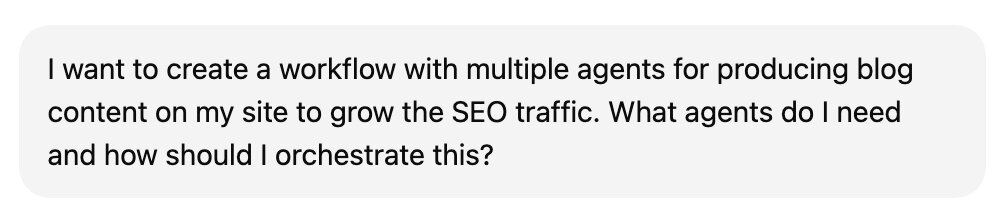
I want to automate a workflow for producing blog content to grow the SEO traffic of my website.
For this, either I can make the judgment call myself, or I can go into ChatGPT/Claude and ask it where it thinks I should break up the workflow into separate agents.
Here's what I asked ChatGPT:
And here’s what it told me (how many agents and what each should do):
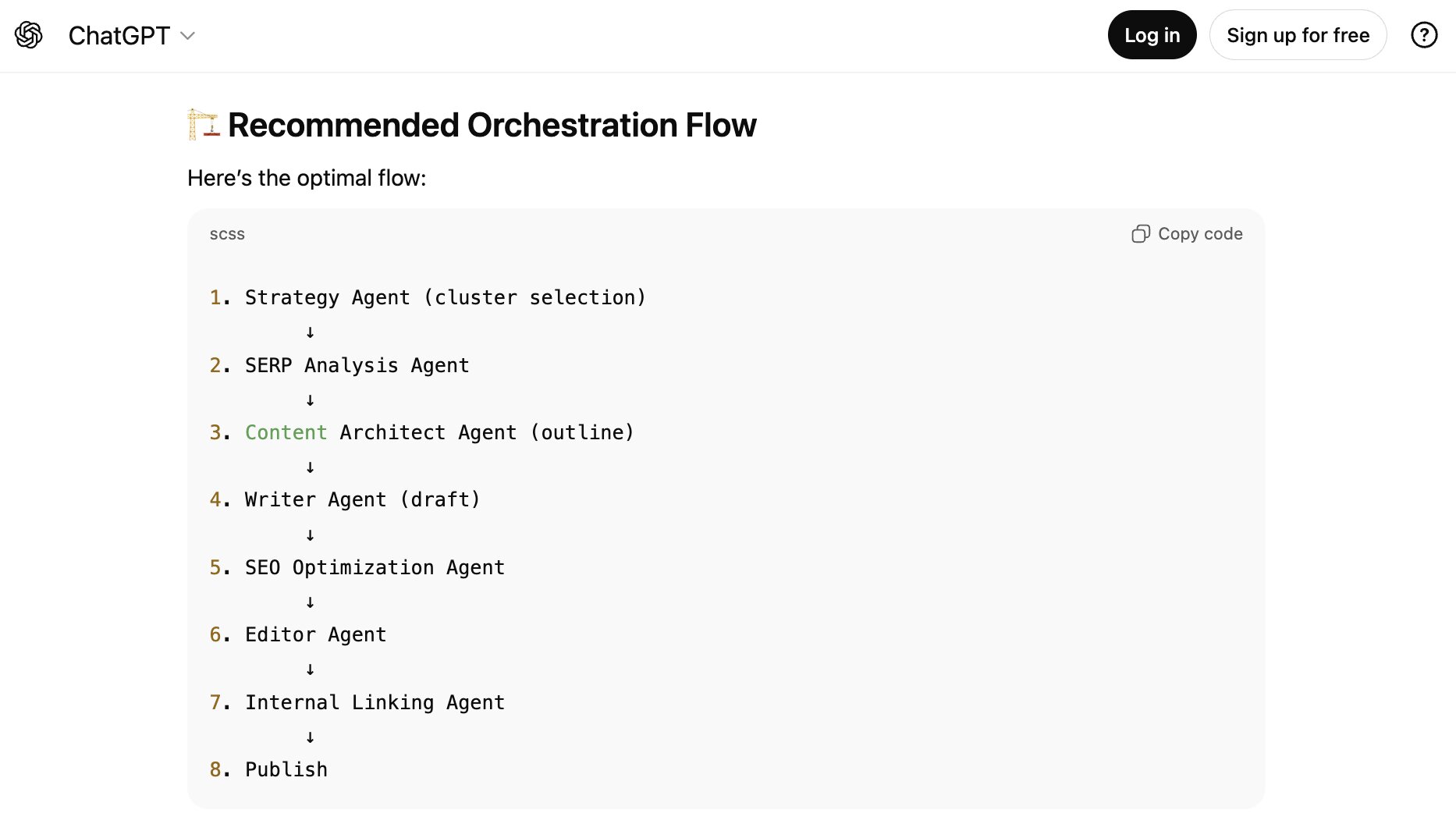
I did this logged out for this example because I didn't want it to pull any historical chat conversations. (If you already have used ChatGPT, Claude, or Gemini for your workflow stuff, asking with context could help yield more personalized ideas.)
So based on this example, I need a total of eight agents. I know that sounds like a lot. But remember that you only need to set this up once (and refine it) and then you can continue to use it.
eThe better and more thorough you are in this planning phase, the better results you'll have in the end.
Okay, now that we know what agents we need, we need to figure out what each of them needs to actually work properly.
2. Map out your orchestration flow
This next step is all about knowing the context your agents need to complete their given task. In step one when I showed you all the eight agents, you'll notice that each one relies on each other.
So we need to think about two things here:
- What does each individual agent need (instructions, tool access, LLM model) to have an amazing output?
- How does the output of an agent effectively lead to the input of the next agent in the workflow?
For the first part, this is probably best served by your own specialized knowledge on what you think it needs. But we can also do a sanity check to get some ideas with ChatGPT or Claude as well.
So for each individual agent, let's think about the inputs that agent needs, the context it needs, and the outputs that come from those two. Here's what ChatGPT gave for our first agent, the strategy agent (SEO planner):
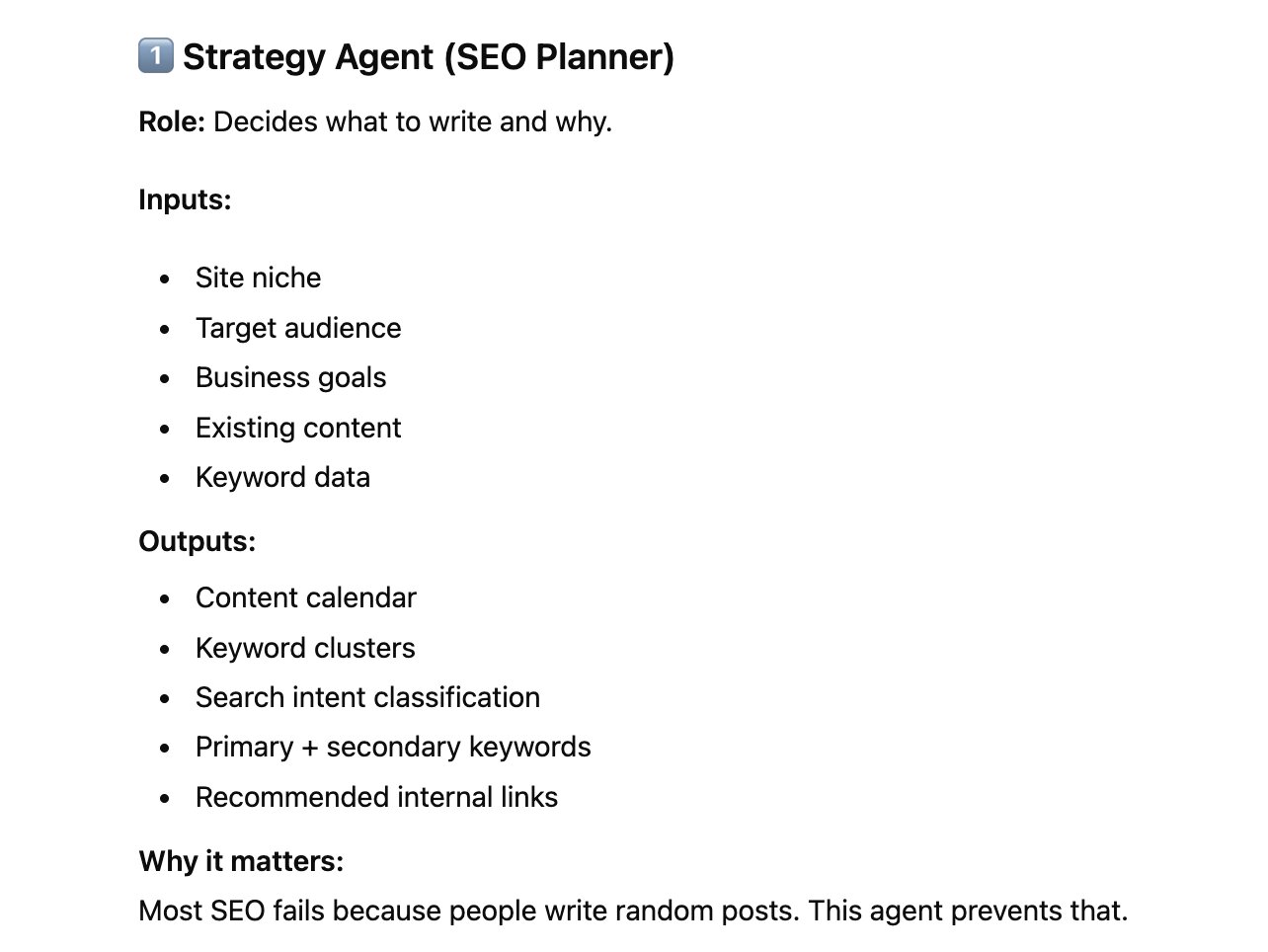
As you can see we clearly have the role defined that this initial agent is all about deciding what to write and why. And we can see its inputs and the outputs that it gives us.
From this I can also see that this agent is probably going to need inputs around the niche my own website is in, any existing content, my target audience, and keyword data.
So for giving it context and access to tools, it will probably need some sort of knowledge base on my brand and instructions on what my brand does. And it will probably need access to an SEO tool like Semrush to do some keyword research.
From here I need to pay attention to the outputs. Too many outputs can make the next agent in the workflow confused. If we can keep it simple and limited, we'll get a better result. So in this case I want to focus instead of on an entire content calendar, just one individual content piece.
This way the output of this agent is a report on what keyword to target, some examples of competitors that rank for this keyword, and maybe some existing content we have around this topic that we can use for interlinking opportunities.
This information can then be fed into an outliner agent (I'm going to simplify from the eight we had initially for the sake of this article), and based off of the SEO planner agent feeding the information to the outliner agent, we'll then have an output there of how the article should be approached.
And from there we can pass that outline to our writer agent.
But again note that this can be applied to any workflow that you're doing. It doesn't matter about your job role or industry, there is a way to tailor this to yourself. I'm just using an example that I know well to show how to think this through.
And at this point we're not even building yet. We're simply mapping out our plan, and talking through our favorite LLM of choice to figure out how to approach everything. Which brings us into the next step.
3. Pick an AI agent builder with orchestration features
Once we have a general idea of our plan, how many agents we need, and what each agent is responsible for, we need to find an AI agent builder that has all the right features to build agent systems.
There are a lot of platforms out there but the one that I've been using for over a year now is Gumloop. And yes I know you're reading this on the Gumloop blog so immediately it sounds biased. I get it.
But I'm actually not an employee at Gumloop. I've been a customer and love writing about AI, and offered to write this up.
The reason I like Gumloop is because it has all of the right features in a platform that makes it easy to orchestrate agents. You can build automated workflows in Gumloop, similar to Zapier, Make, or n8n. But you can also build AI agents as well.
And on top of that you can build automated workflows and bring in the AI agents that you've built. This is what makes the platform extremely powerful. And it's no wonder why teams at Shopify, Instacart, and Webflow use Gumloop internally.

It's pretty easy to set up (relatively speaking for a powerful AI framework), it's used by companies of all sizes, and it has a beautiful user experience for those who aren't AI engineers.
If you don't want to use Gumloop you can try some other platforms that orchestrate agents, but many of them either don't have self-serve options that are cheap, or they lock you into their own ecosystem.
For example you can use Claude to help you build AI agents of sorts, but then you're locked into using their LLM model. You can't switch between ChatGPT, Grok, DeepSeek, or anything else that might be better for a specific job.
So for the rest of this article I'm going to use Gumloop, and you can actually follow along because they have a pretty generous free plan as well. In fact Gumloop now also has a chat feature so I can do all of my planning, that I did in step two, all in one place.
Okay let's build this thing.
4. Build your orchestrated workflow
Here we are, we're ready to build our team of AI agents. If you remember, I want to build an SEO content operation team.
For this I'm going to simplify the original eight agents that ChatGPT recommended, and instead I'm going to have three different agents:
- One for doing research on finding the perfect keyword to target
- One for generating an outline for that keyword
- And one for writing on-brand content from that outline
Ideally I would also have an agent that can publish that content, which I can build as Gumloop does have built-in integrations and MCP servers for different CMSs, but I want to keep it simple.
Okay, in Gumloop let's go to the chat feature and start our plan.
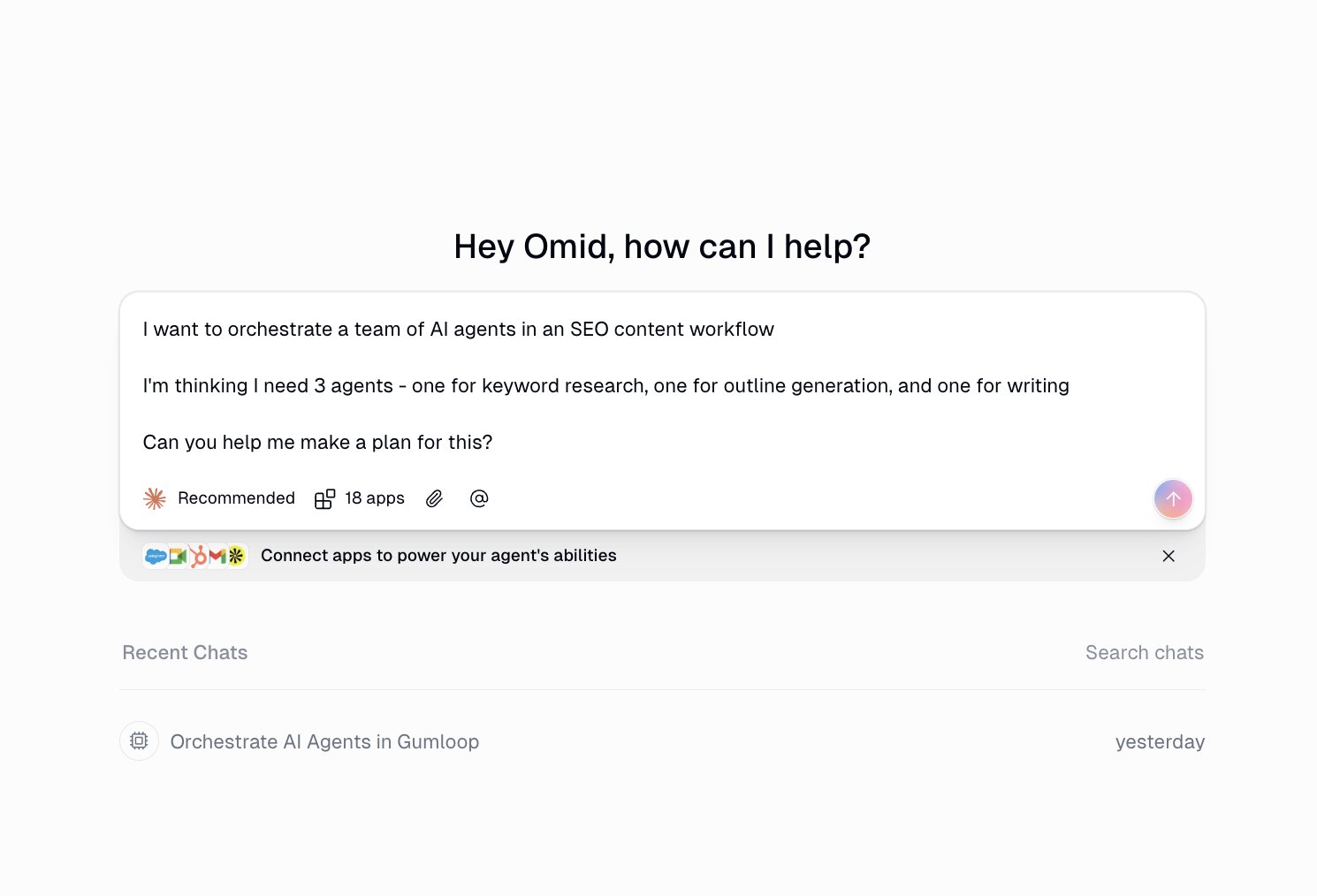
Now I can see that the chat gave me two routes to create this. The first one is the agent in a workflow like I've been mentioning in this article, and the second is creating one agent with smaller workflows inside of it.
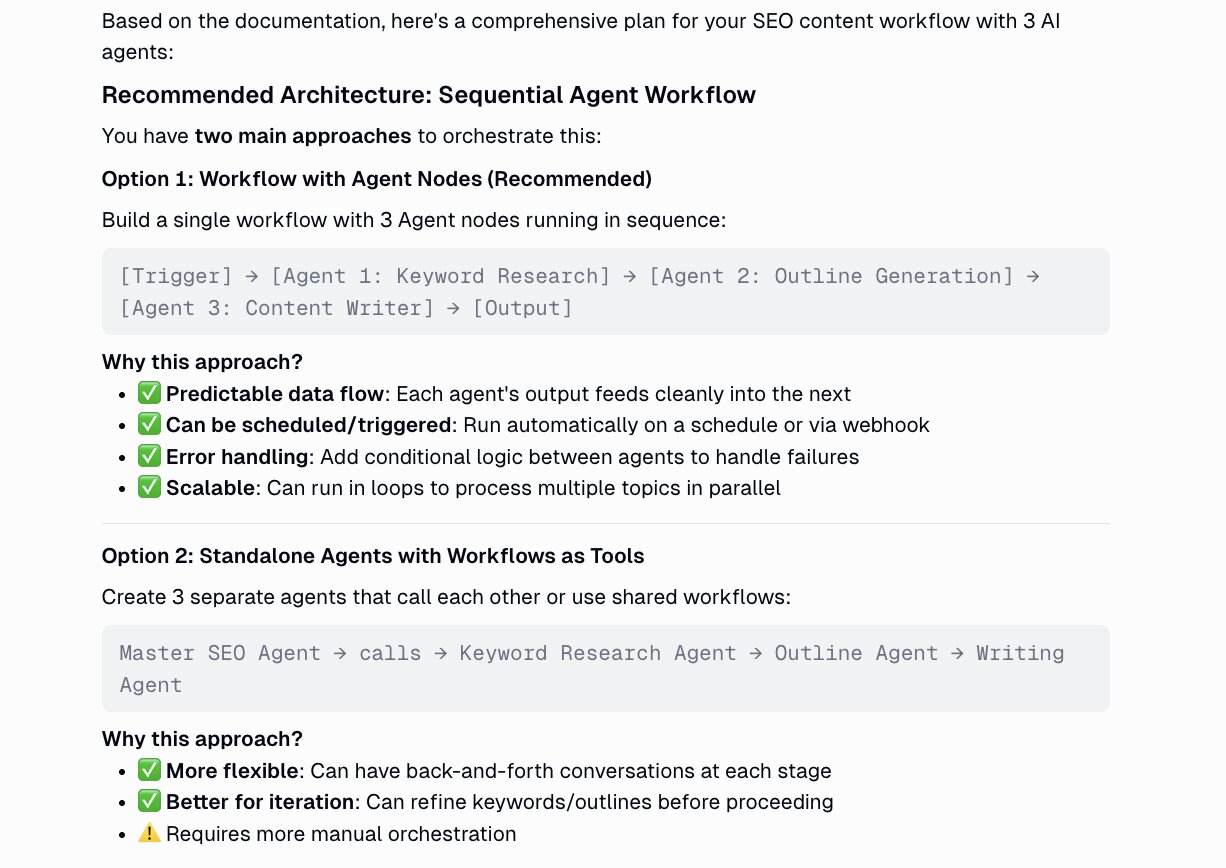
I'm going to go down the recommended path which is creating multiple agent nodes and orchestrating them into a workflow (which is essentially the whole point of this article). In that case, that's option one.
The amazing thing is that Gumloop also gave me a plan for how to create each individual agent. So I don't even have to leave the Gumloop platform and open up ChatGPT or Claude in a separate window.
Check it out:
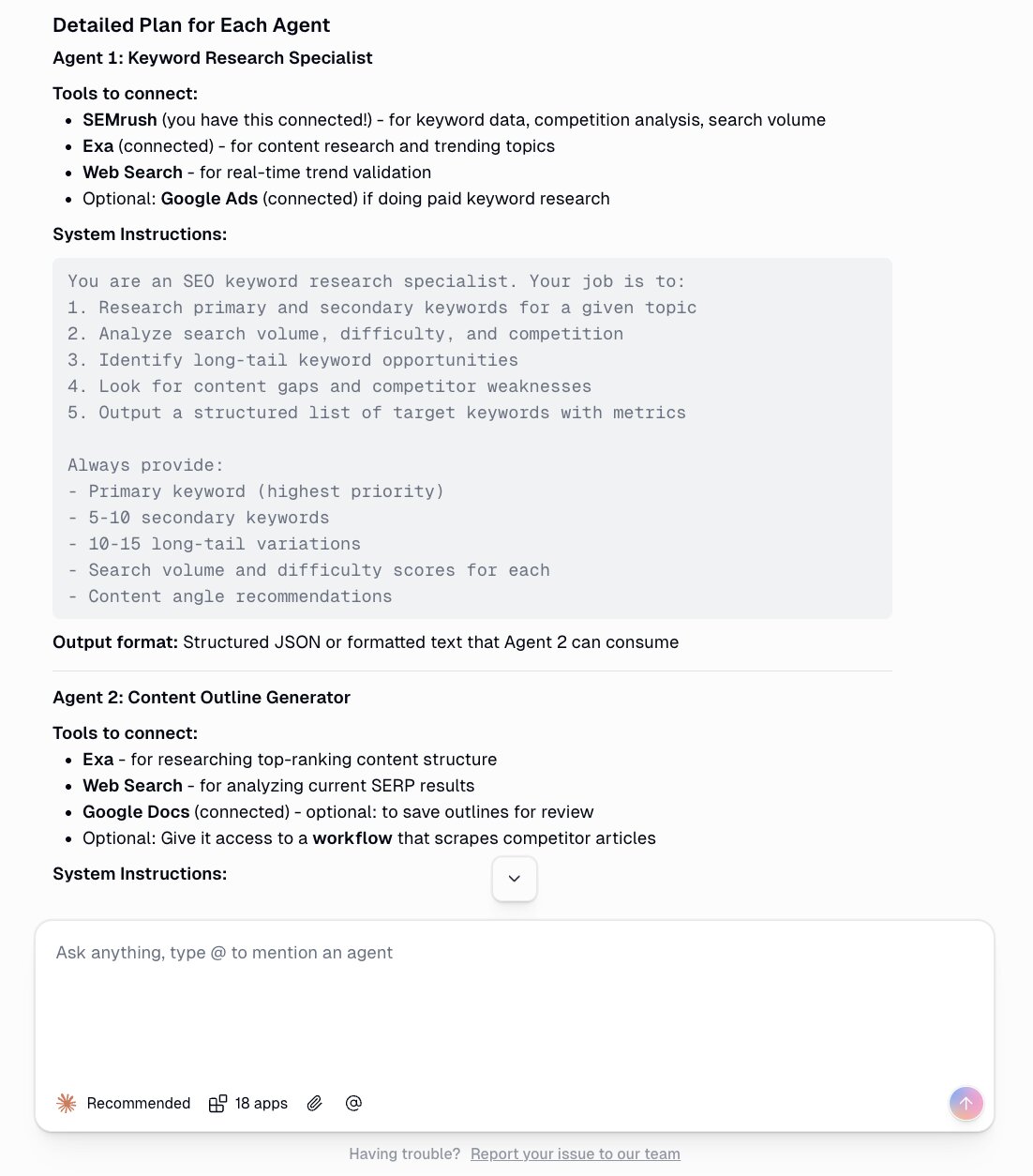
You can't tell me that's not pretty impressive.
From here Gumloop also asks if you want it to help you build out each individual agent. And I am going to do that. So you really only need to follow the instructions in the chat at this point.
If you want a detailed walkthrough on how to build just one agent in Gumloop, you should check out this lesson:
But what I did was essentially ask the chat to give me the system prompt and tools I need to integrate for each individual agent.
Then I went to the agents feature in Gumloop and I created each agent one by one, with the information I got from the original planning chat interface.
For example, here is me using the first agent (keyword agent). I give it 3 inputs and it tells me the best keywords to target:
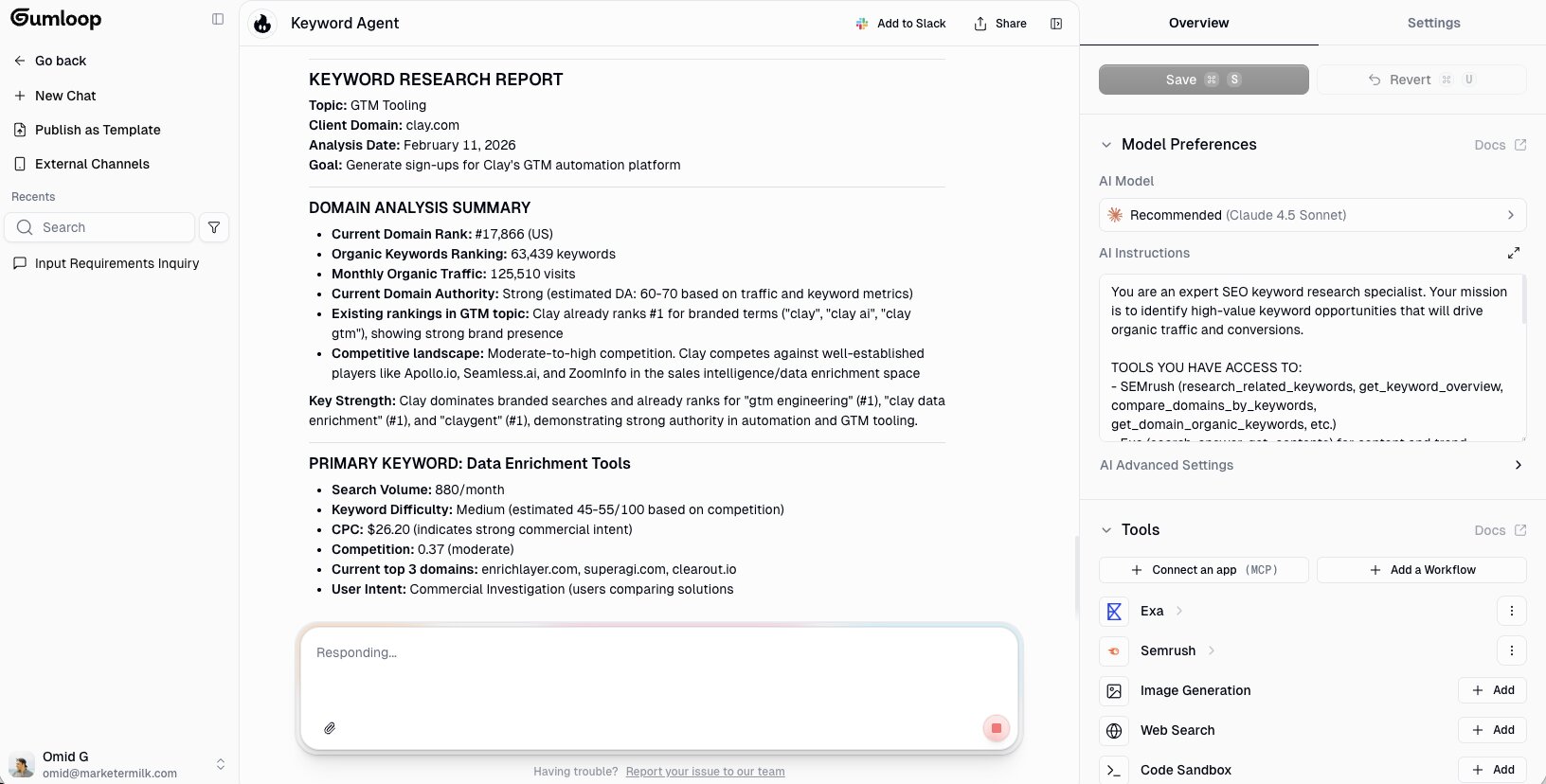
What it did in the background was do a web search on my website, used Semrush to look at competitors, and used my seed topic idea to match ideal keywords (with real data from Semrush).
From here, I can continue to create my other two agents: the outline agent and the writer agent.
Then, I go to the workflows feature in Gumloop. And here I can either chat with Gummie (the built-in assistant) to help me create my workflow. Or, I can just create it myself on the canvas.
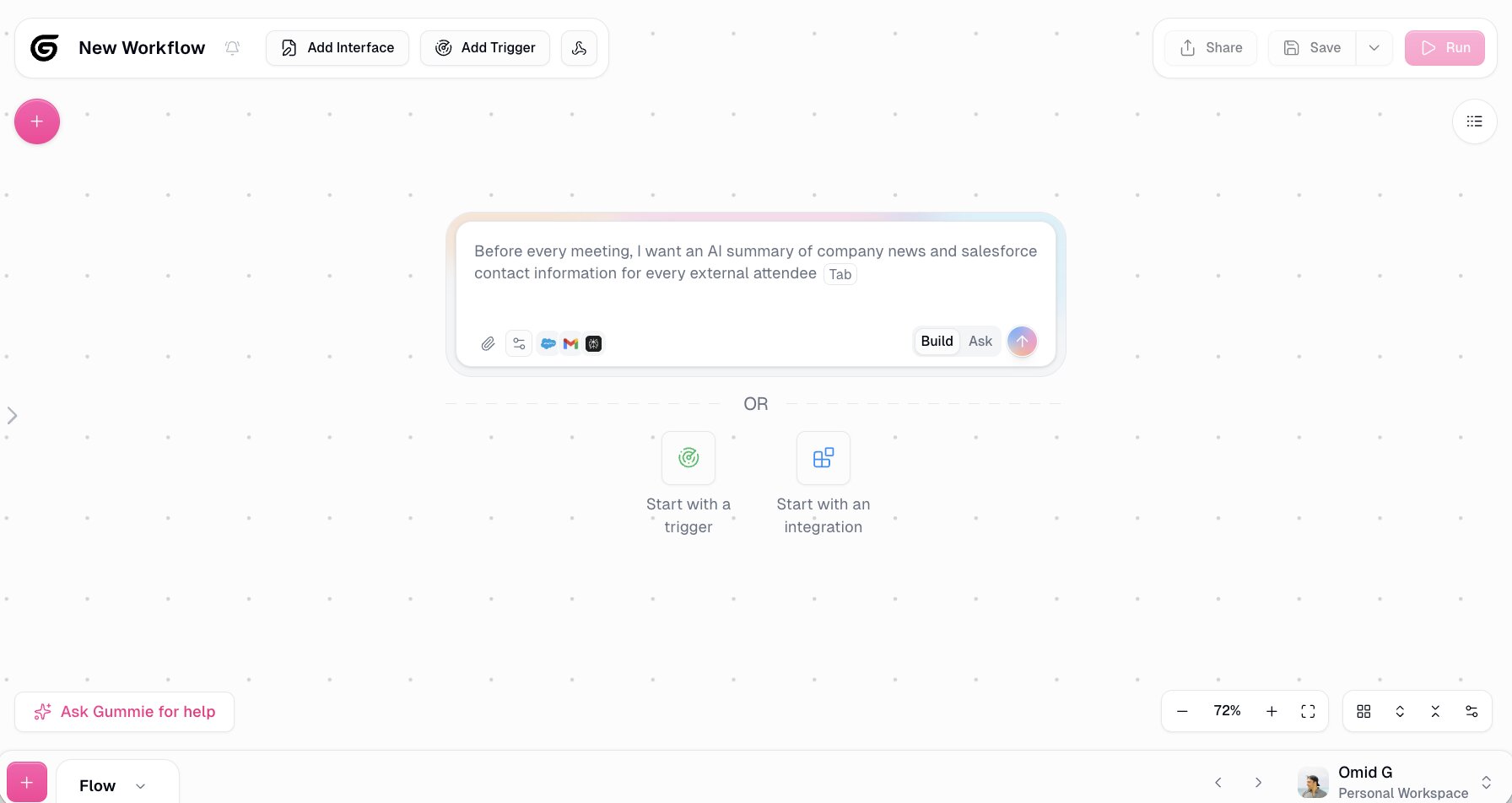
From here I can drag on my agent nodes I created earlier and I can also add in other apps or workflows as well. It all depends on the job you're trying to accomplish and how much detail you want.
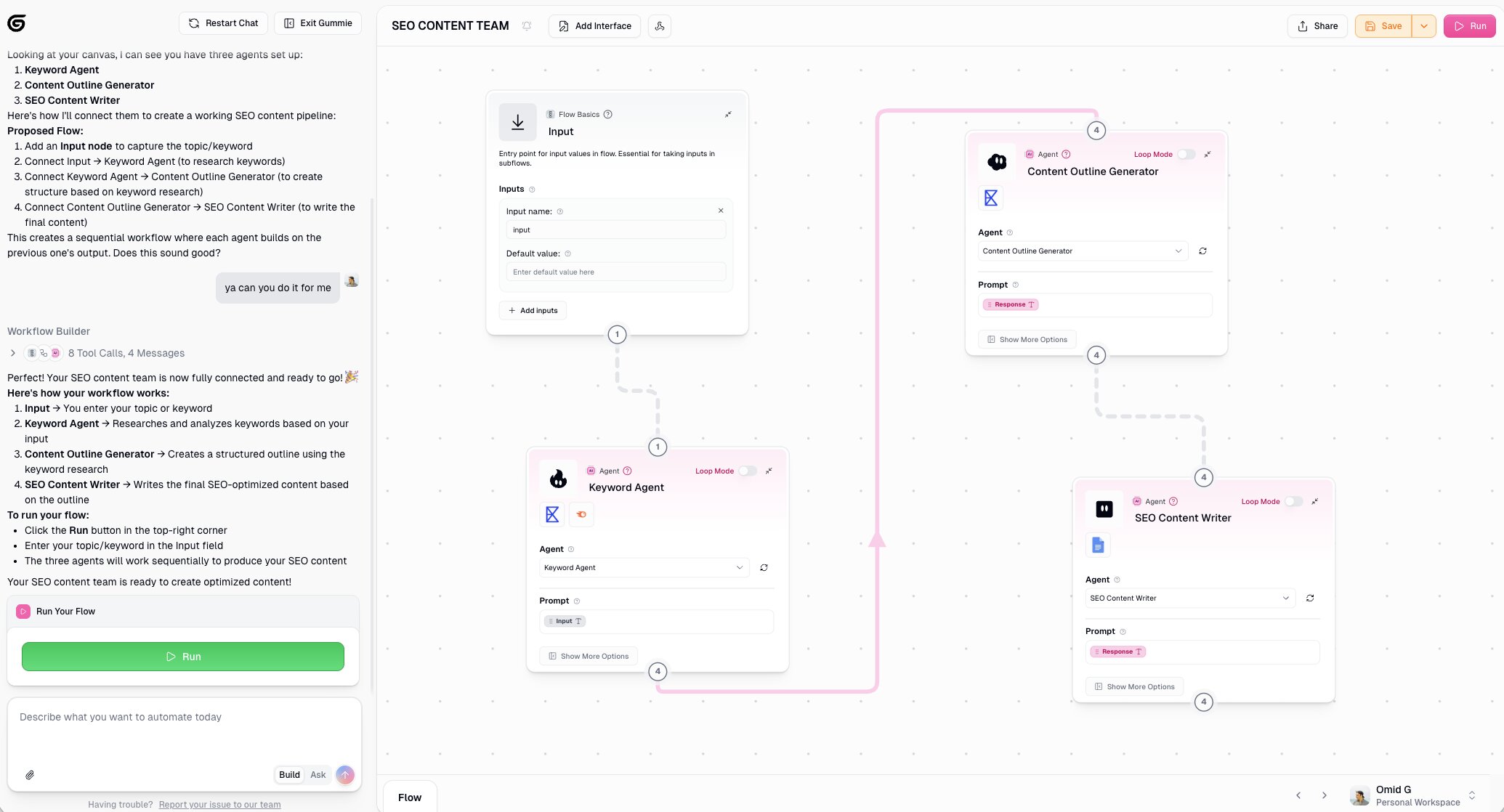
Bada bing bada boom! Just like that we orchestrated a team of agents.
If you get stuck anywhere, you can also chat with Gummie and it can see your canvas and tell you how to approach or fix something.
Which brings us into the next section.
5. Test, monitor, and iterate
No AI tool is going to give you the perfect output the first time you test it. You need to test, adjust, view the output, test, adjust, view the output, test, adjust… you get the point.
Every AI agent I've personally built has taken a few iterations. And to create the perfect AI agent will probably take you a couple hours of back and forth.
You'll want to tweak the instructions, play around with the LLM model, and understand which extra tools the agent might need to do a better job. From experience, the instructions usually have the biggest impact on the output. And then it's the LLM you choose.
Some LLMs are great at different things. ChatGPT is good at planning. But Claude is good at executing (writing words or code). So having an environment that allows each agent to run on the LLM model that gives it the best performance is really important.
This is what will make your agent orchestration team great. Just like a real team of humans, they all have their own personalities and specialties. So think of your agents the same way.
And together, they work to accomplish a clear goal.
So that's it. At this point just keep experimenting with what I mentioned above. And if you keep running into errors, let me talk about some stuff in the last part of this article.
Orchestration patterns and mistakes to avoid
Now that you know how to build an orchestrated workflow, let's talk about the two main patterns you'll run into and some mistakes that can save you a lot of headaches.
Sequential orchestration
This is what we built in the example above. Your agents run one after another in a chain. The keyword agent finishes, passes its output to the outline agent, which finishes and passes its output to the writer agent.
Sequential is the simplest pattern for multi-agent orchestration and the one I recommend starting with. It's easier to debug, easier to understand the dependencies, and works for most end-to-end workflows like content pipelines or outreach campaigns.
Hierarchical orchestration
This is where you have one "manager" agent that coordinates other agents and decides what to delegate and when. It's more powerful for complex workflows where the next step isn't always predictable, like when a manager agent needs to decide in real-time whether a lead should go to enrichment or skip straight to email based on what data is already available.
Great for adaptability, but harder to set up. Unless you actually need that kind of dynamic routing, stick with sequential.
Mistakes I've made (so you don't have to)
Here are some things to pay attention to when building agentic AI workflows. Well, actually, here are some mistakes I made. So you should pay attention.
Giving agents vague instructions
This is the biggest one. If your agent's instructions are "research this topic and give me good results," your outputs will be inconsistent. The more specific you are with what you want and the format you want it in, the better your multi-agent workflows perform.
Using agents for steps that don't need reasoning
If a step is just pulling data from an API or logging to a Google Sheet, that's a regular node. Using an agent for that just burns credits. Save agents for steps that need actual thinking.
Not thinking about outputs before inputs
When mapping your flow, focus on what the next agent needs to receive. If one agent spits out a wall of text, the next agent is going to struggle (unless it’s prepared for that). Keep outputs clean and structured so handoffs between agents are smooth. This is what makes your AI systems scalable.
Skipping the feedback loop
Don't just build it and let it run. Add a step where you (or even another agent) verify the output before it moves forward. Without this, early errors compound through the rest of your workflow and you end up with confident but wrong results.
Wrapping up
There's never been a more exciting time to be in tech. I know how overwhelming or exhausting it can feel to see a new AI development every week. Heck, it feels like it's multiple times a day now.
But beyond the hype, AI can create a lot of abundance. It can free you from repetitive admin work and give you space to think more creatively.
And that's really what agent orchestration is about. Instead of doing everything yourself, you build a team of AI agents that each handle one specific part of the process. You become the orchestrator, not the one doing every task.
Start by defining what each agent needs to do. Map out the flow. Pick a builder that lets you orchestrate agents inside workflows (I use Gumloop). Build it, test it, optimize, and keep iterating.
The earlier you start experimenting with multi-agent orchestration, the further ahead you'll be.
If you want to try building your own orchestrated workflow, you can get started with Gumloop's free plan and follow along with everything I showed in this article.
Happy orchestrating!

Read related articles
Check out more articles on the Gumloop blog.