8 best social media automation tools I'm using in 2026

First, we had the 10X engineer. Now, we have the 10X social media marketer.
2026 is the year of the marketer. With AI, we can now do what teams of 5 did by ourselves. And our tech stack is evolving to fulfill that reality.
This is where social media automation tools come into play. They have completely changed how marketers manage their online presence. What used to take hours of manual posting, scheduling, and monitoring can now be done in minutes with the help of AI.
I've been testing a bunch of different social media automation tools over the past year, and I wanted to share the ones that have actually made a difference in my workflow. Some are great for simple scheduling, others are built for agencies, and a few can even help you find viral content ideas using AI.
Let’s go over what these tools actually do and which ones are worth your time. I also updated every tool’s pricing for October 2026, so you’re not looking at old numbers.
What is a social media automation tool?
A social media automation tool is a platform that allows you to connect all of your social media accounts and lets you automate your workflows using AI. These platforms can help you ideate, create, schedule, post, and even monitor performance metrics.
Some more advanced platforms can even go as far as using AI for social listening, understanding market trends, or help you uncover viral post opportunities based off of your past performance data.
The main goal of these tools is to not only streamline most of your social posts, but it's also to help you grow your social media presence by helping you become an AI-powered marketer.
What tasks can social media automation tools handle?
Depending on the platform you use, social media automation tools can handle a wide range of tasks. Some of them can automate simple repetitive tasks like manual posting across different accounts. While others can get a bit more advanced and help you come up with viral content ideas by analyzing your previous posts that have done well.
Social media automation tools can help handle:
- Scheduling and posting content across multiple platforms automatically
- Turning one blog post or idea into AI-generated posts for each platform
- Monitoring brand mentions and keywords to track conversations
- Auto-generating content (captions, hashtags, posts) using AI
- Analyzing performance and creating automated reports on engagement metrics
- Engaging with followers through auto-responses and DM sequences
But it's not just limited to these. Below I'll give you some of the best social media automation tools right now that can help you with a wide range of tasks.
I'll tell you what each platform is best for, who I think should be using what, and I'll also give you the pros and cons of each. Okay, let's get into the list.
How to automate social media posts
If you’re new to this, here’s how I’d set up automated social media posting from scratch. Most social media posting tools work the same way, so these steps apply no matter which one you pick.
- Connect your accounts. Link every profile you post to, like LinkedIn, X, Instagram, TikTok, and Facebook.
- Set up automated content scheduling. Load your posts into a calendar and pick your best posting times so the tool publishes them for you.
- Use AI for first drafts. Let the tool turn a blog post, product update, or rough idea into captions for each platform. Then edit them so they sound like you.
- Automate the follow-up. Set up alerts for brand mentions, auto-replies for common questions, and weekly performance reports.
- Review what worked. Check your analytics every week or two and feed the winners back into your queue.
That’s the basic loop. Scheduling tools like Buffer handle the first two steps really well. AI-first tools like Gumloop help more with the last three.
8 best social media automation tools in 2026
Here are the best social media automation tools:
Here’s the quick version with starting prices as of October 2026.
- Gumloop: Best for AI-powered social media workflows. Starts at $37/month with a 14-day free trial.
- Ordinal: Best for fast-growing startup social teams. Starts at $95/month with a 14-day free trial.
- Plot: Best for consumer brands that run on UGC. Custom pricing only.
- Buffer: Best for simple automated posting. Free plan, then $6/month per channel.
- Hootsuite: Best for agencies. Starts at $99/user/month billed annually with a 14-day free trial.
- Statusbrew: Best for approvals and conversion tracking. Starts at $69/month billed annually with a 14-day free trial.
- Sprout Social: Best for enterprise social teams. Starts at $79/seat/month billed annually with a 30-day free trial.
- Planable: Best for freelancers and small agencies. First 50 posts free, then $33/workspace/month billed yearly.
Okay, let’s go over each one.
1. Gumloop

- Best for: Marketers who want AI agents to create, post, and report on social media content across all their tools
- Pricing: Starts at $37/month with a 14-day free trial
- What I like: You can build AI agents just by chatting with Gumloop in plain English
Gumloop is an AI agent platform that can handle everything from social media to SEO. The great thing about Gumloop is that you can create AI agents that handle different parts of your social media workflows.
For example, you can create an AI agent to analyze X posts and other websites for your brand mentions or trends. This is something Webflow did to create a social listening tool.
You can also use Gumloop to create post scheduling workflows and even automate your reporting. You can also create an AI Slack agent that can send you notifications when certain brands mention you or if any of your posts start trending.
Gumloop is also really useful for AI posting. You can set up an AI social media agent that analyzes your Instagram and TikTok content, researches trends in your niche, and builds a content calendar in Google Sheets. Or you can use a template to turn any article into LinkedIn posts so one blog post becomes a week of content.
The powerful thing with Gumloop is that it can connect to any premium LLM, whether that's ChatGPT, Claude, or Gemini, and you can connect all of your existing social media platforms to give your workflows super AI powers.
Gumloop pros and cons
Here are some of the pros of Gumloop:
- Integrate your existing social media tech stack to automate your workflows using any LLM model
- You can build agents simply by chatting with Gumloop in natural language (imagine talking to ChatGPT and it having access to all of your accounts already)
- A template marketplace that can help you get ideas on what to automate
- A 14-day free trial and unlimited seats on the Pro plan, so your whole team can use it
Here are some of the cons of Gumloop:
- It's a full automation platform, so you need to already have a social media workflow you want to automate (or it might be a little bit tricky to know what to automate)
- The platform is still new, so as new features are added, the UI/UX can change a little
Overall, Gumloop is a great platform to get familiar with becoming an AI-powered social media marketer. The tool lets you create almost any automation simply by describing it in plain English. So if you're a marketer that does more than social media, this can also be extremely useful. However, if you are looking for a platform that only does social media, it might be worth looking into one of the other tools on this list.
Gumloop pricing
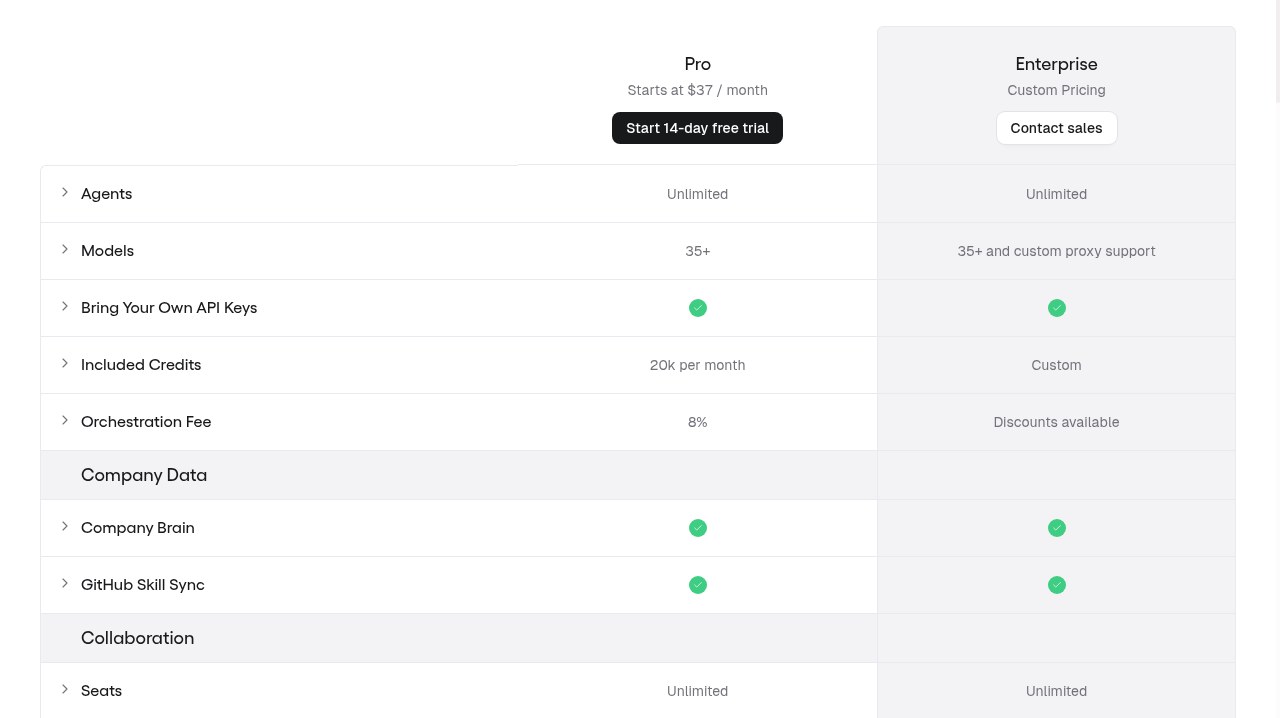
Here are Gumloop's pricing plans:
- Pro: Starts at $37/month with 20k credits/month, unlimited agents, 35+ AI models, bring your own API keys, unlimited seats and teams, 5 concurrent workflow runs, 25 concurrent agent chats, an 8% orchestration fee, and a 14-day free trial
- Enterprise: Custom pricing with custom credits, custom model proxy support, org-wide connector policies and guardrails, optional virtual private cloud, an optional embedded Gumloop expert, orchestration fee discounts, and admin and security features like role-based access control, SCIM/SAML support, audit logs, and AI model access control
If you want to learn more about what each plan has to offer, you can check out the pricing page.
Gumloop reviews
Here’s what real customers of Gumloop have said about the platform:
“With Gumloop, any team member can now identify a manual process and turn it into an automated workflow without writing a single line of code.” — David Phelps, VP @ Albert
“Gumloop has been critical in helping all teams at Instacart - including those without technical skills - adopt AI and automate their workflows, which has greatly improved our operational efficiency.” — Fidji Simo, CEO @ Instacart
Want to see how we automate social and growth work? I’m walking through how our marketing and growth team runs on Gumloop in a live session. Grab a seat below, even if you can’t make it live.
2. Ordinal
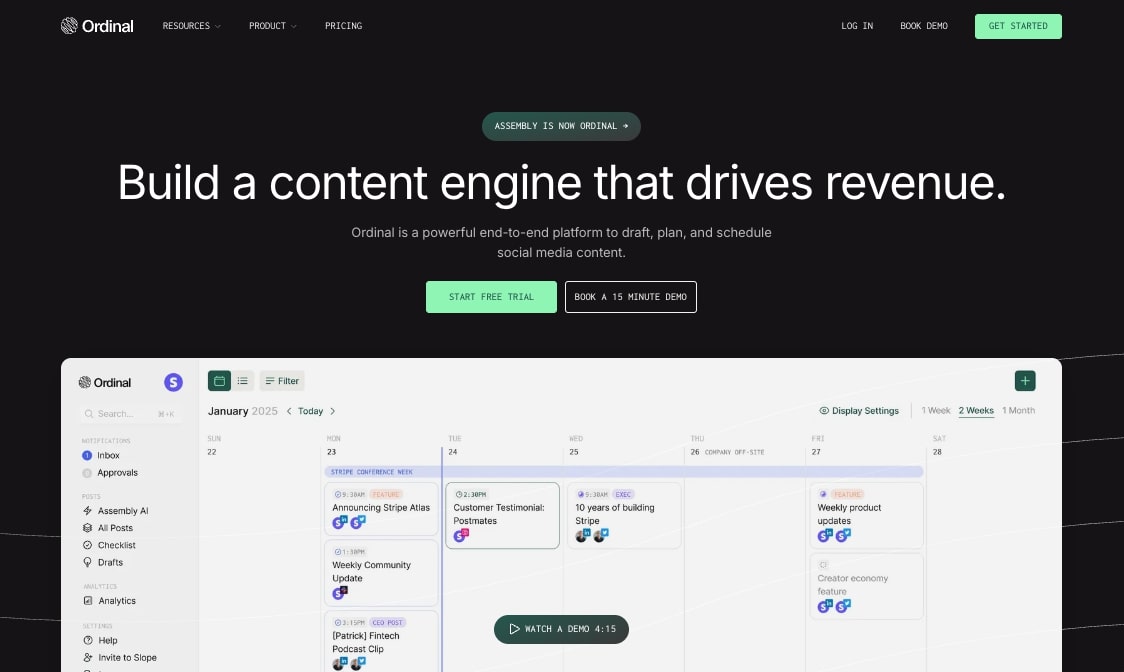
- Best for: Fast-growing startups that need end-to-end social media scheduling and team collaboration
- Pricing: Starts at $95/month ($85/month billed annually) with a 14-day free trial
- What I like: Automated team engagement features that notify your whole team when posts go live
Ordinal (formerly Assembly) is a full end-to-end social media automation tool that allows you to draft, plan, and schedule your content across different social media platforms.
It's used by some fast-growing startups like Beehiiv, Clay, Mercury, and Zapier. And I first came across this tool after my friend told me they were using it at their company.
The platform can help you automate scheduling and cross-posting across different social media channels like LinkedIn, X, Instagram, TikTok, Facebook, Threads, and more.
Similar to Gumloop, it also has automation features that can integrate with Slack. Using their boost post performance feature, you can notify your entire team when a new post is live so they can all go and engage with it.
There are also some other automated features like automatically liking posts from different accounts to automatically commenting and reposting across multiple accounts you might be managing.
Ordinal pros and cons
Here are some of the pros of using Ordinal:
- The platform can integrate with most social media channels and even your website
- Includes a full editorial calendar feature that can auto-publish for you
- Gives realistic social previews before they go live
- Has a collaborative aspect to it that allows multiple team members to partner on social content
Here are some cons of using Ordinal:
- The pricing may be a bit high for startups just starting out
- Analytics features are only available on higher-tiered plans
- Still a new and growing platform, so some features might be limited
Overall, if you're looking for a tool that can just do social media planning and automation well, and you have the budget, this is definitely a tool to check out.
Ordinal pricing
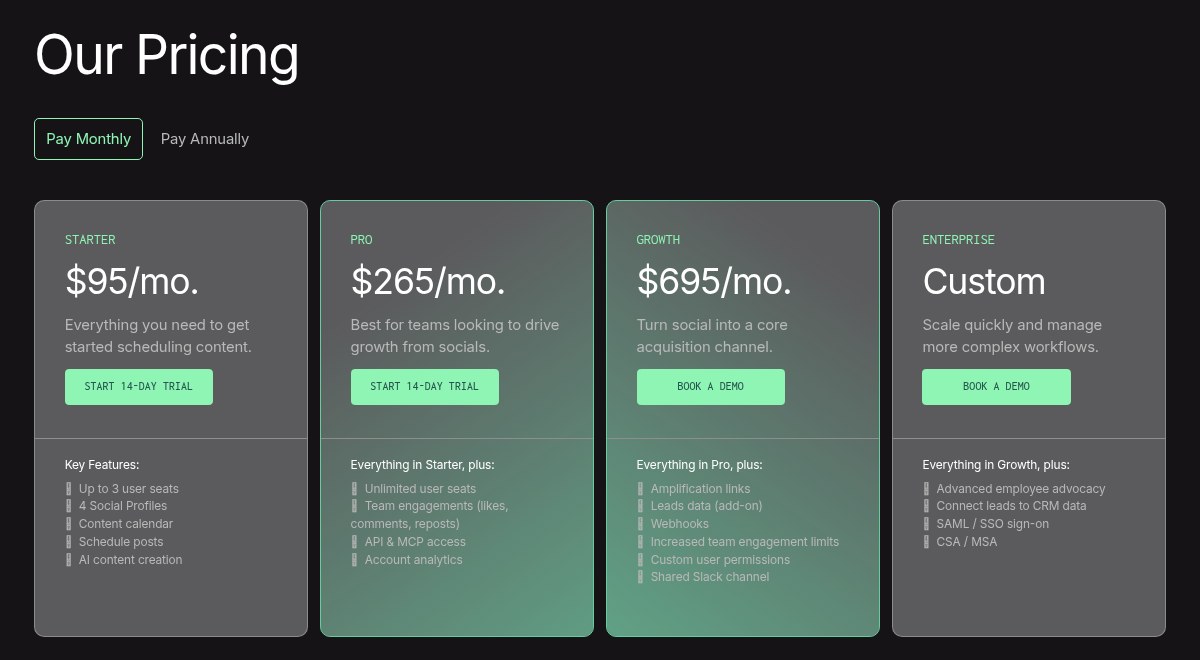
Here are Ordinal's pricing plans:
- Starter: $95/month ($85/month billed annually) with up to 3 seats, 4 social profiles, content calendar, scheduled posts, and AI content creation
- Pro: $265/month ($235/month billed annually) with everything in Starter, plus unlimited seats, team engagements (likes, comments, reposts), API and MCP access, and account analytics
- Growth: $695/month ($625/month billed annually) with everything in Pro, plus amplification links, leads data (add-on), webhooks, higher team engagement limits, custom user permissions, and a shared Slack channel
- Enterprise: Custom pricing with everything in Growth, plus advanced employee advocacy, leads connected to your CRM data, SAML/SSO sign-on, and CSA/MSA
Starter and Pro come with a 14-day free trial. Growth and Enterprise start with a demo. If you want to learn more about what each plan has to offer, you can check out the pricing page.
Ordinal reviews
Here's what customers of Ordinal rate the platform on third-party review sites:
- Product Hunt: 5/5 star rating (from +6 user reviews)
3. Plot
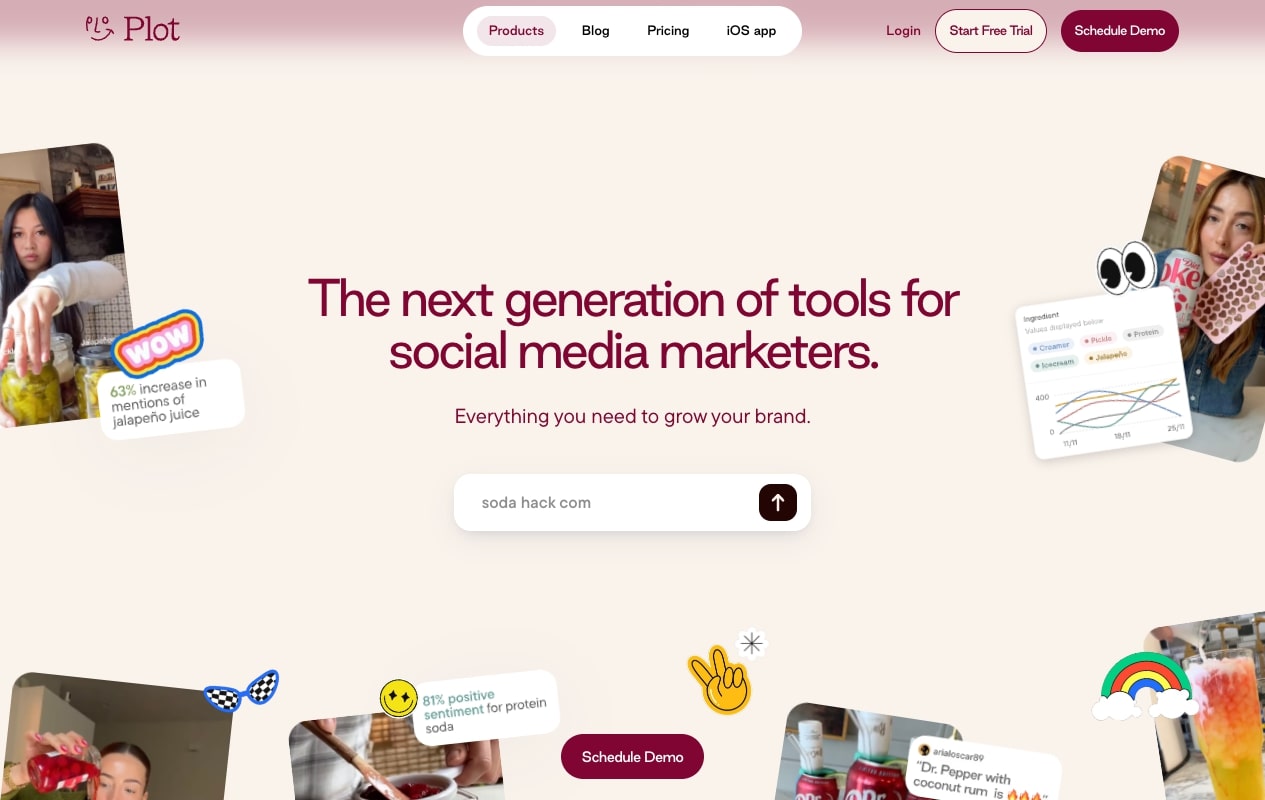
- Best for: Consumer brands that want to leverage UGC content and social listening for their social media strategy
- Pricing: Custom pricing for enterprise teams (no public plans)
- What I like: AI can track video conversations about your brand even when they aren't tagged
Plot is another all-in-one social media platform, except this one is designed more for automating UGC content creation. The platform gives you a community hub where you can create a database of passionate customers and evangelists to help you spread the word on social media.
Similar to Gumloop, you can also create social listening tools where AI can track video conversations that talk about your brand so you can see the sentiment around it.
The platform also has other things like an integrated content calendar and an AI-powered workspace that automatically organizes content for you and understands marketing trends and social patterns to help you craft personalized posts that are more likely to do well.
Plot has also gone all in on AI. It recently raised $10M to scale its AI agents for social video, and its product now centers on AI video social listening, a community hub, and creator intelligence.
Plot pros and cons
Here are some pros of using Plot:
- Has a UGC database for leveraging creators in your social media posts
- Used by some pretty big teams at Visa, Tory Burch, Cava, and more
- Has a social trends feature that allows you to discover ways to create engaging content
- Can analyze videos for social listening data even when they aren't tagged
Here are some cons of using Plot:
- There's no free or self-serve plan anymore, so you'll need to book a demo to get pricing
- The tool focuses a lot on social listening, so if you need other automation features for your social media channels, it might be worth looking into an alternative
Overall, if you're a consumer brand looking for a social media tool that can help you with research, content planning, and getting your community involved in your content, this is definitely a tool to check out.
Plot pricing
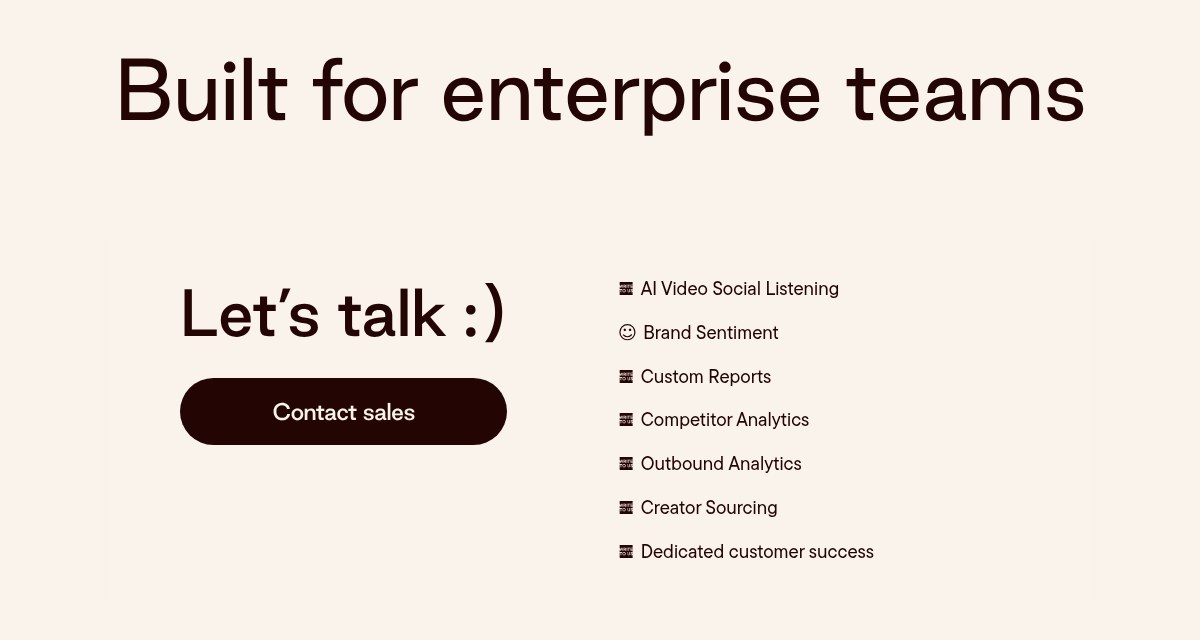
Plot now only sells custom plans for enterprise teams. Here's what's included.
- Enterprise: Custom pricing with AI video social listening, brand sentiment, custom reports, competitor analytics, outbound analytics, creator sourcing, and dedicated customer success
If you want to learn more about what each plan has to offer, you can check out the pricing page.
Plot reviews
Here's what customers of Plot rate the platform on third-party review sites:
- Product Hunt: 5/5 star rating (from +2 user reviews)
4. Buffer
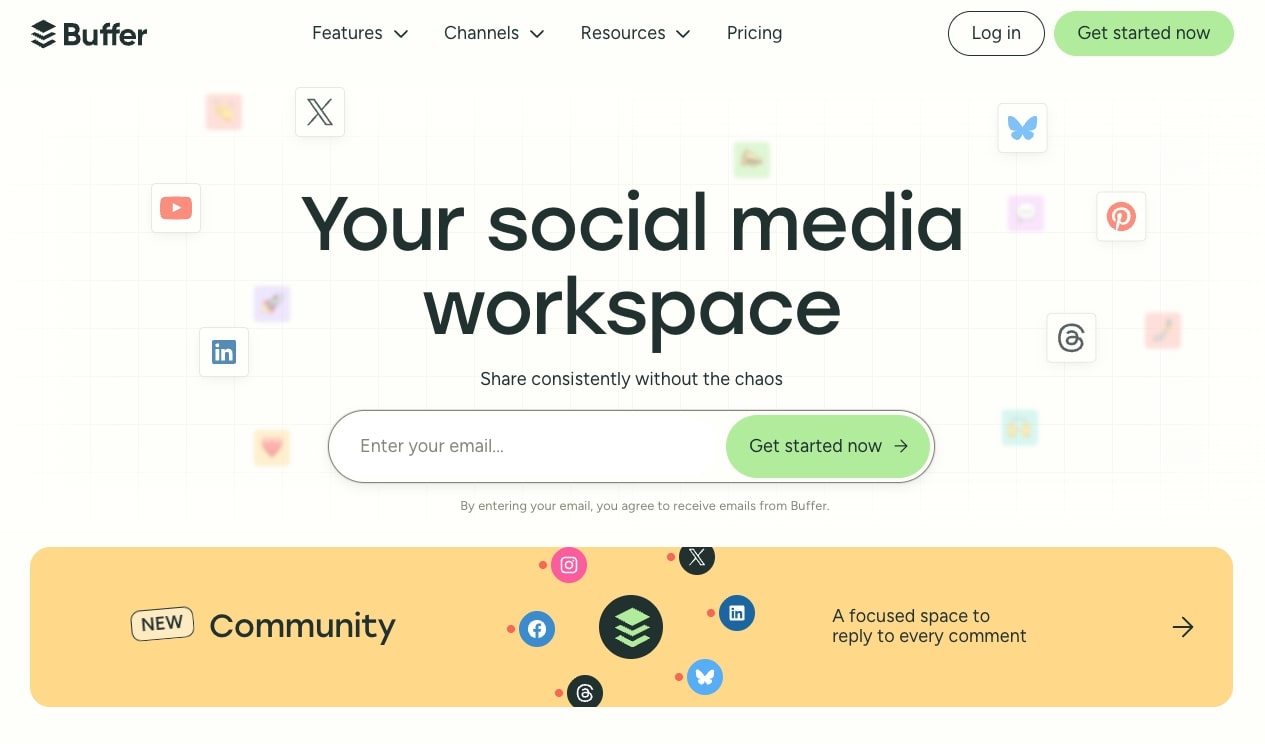
- Best for: Teams that need a reliable platform for cross-posting and scheduling content across multiple social media channels
- Pricing: Includes a free plan, then starts at $6/month per channel ($5/month billed yearly)
- What I like: The AI Assistant can brainstorm content ideas and create platform-specific posts automatically
Buffer is a social media workspace that has been a top player in the social media management software niche. If you work in social media, there's a good chance you already know about this tool.
However, since the rise of AI, there are now a ton of extra automation features that have allowed Buffer to stay up to date with some of the newer tools that we just went over.
With Buffer's AI Assistant, you can now brainstorm content ideas, create platform-specific posts, and automatically schedule your content across all of your social media channels.
The great thing about Buffer is that it also has a bunch of templates to give you a ton of different post ideas. So you don't need to start from scratch if you're just getting started in your social media career.
Buffer pros and cons
Here are some pros of Buffer:
- A stable platform that has existed for a while and has a large community around it
- Includes a ton of free social media templates to make it easier to post content
- The AI features can help you brainstorm and automatically schedule posts that are tailored to each social media platform
- Includes a generous free plan
Here are some of the cons of Buffer:
- It's a bit limited in its engagement and social listening features
- The user interface can feel a bit outdated compared to the newer tools out there
- Some of its reporting features can feel a bit limited
Overall, Buffer is a strong player in the post automation category. And if you're looking for a social media automation tool that can mainly handle cross-posting across your social media channels, this is a great tool to use. However, if you need something with social listening and advanced AI features, it might be worth looking into an alternative.
Buffer pricing
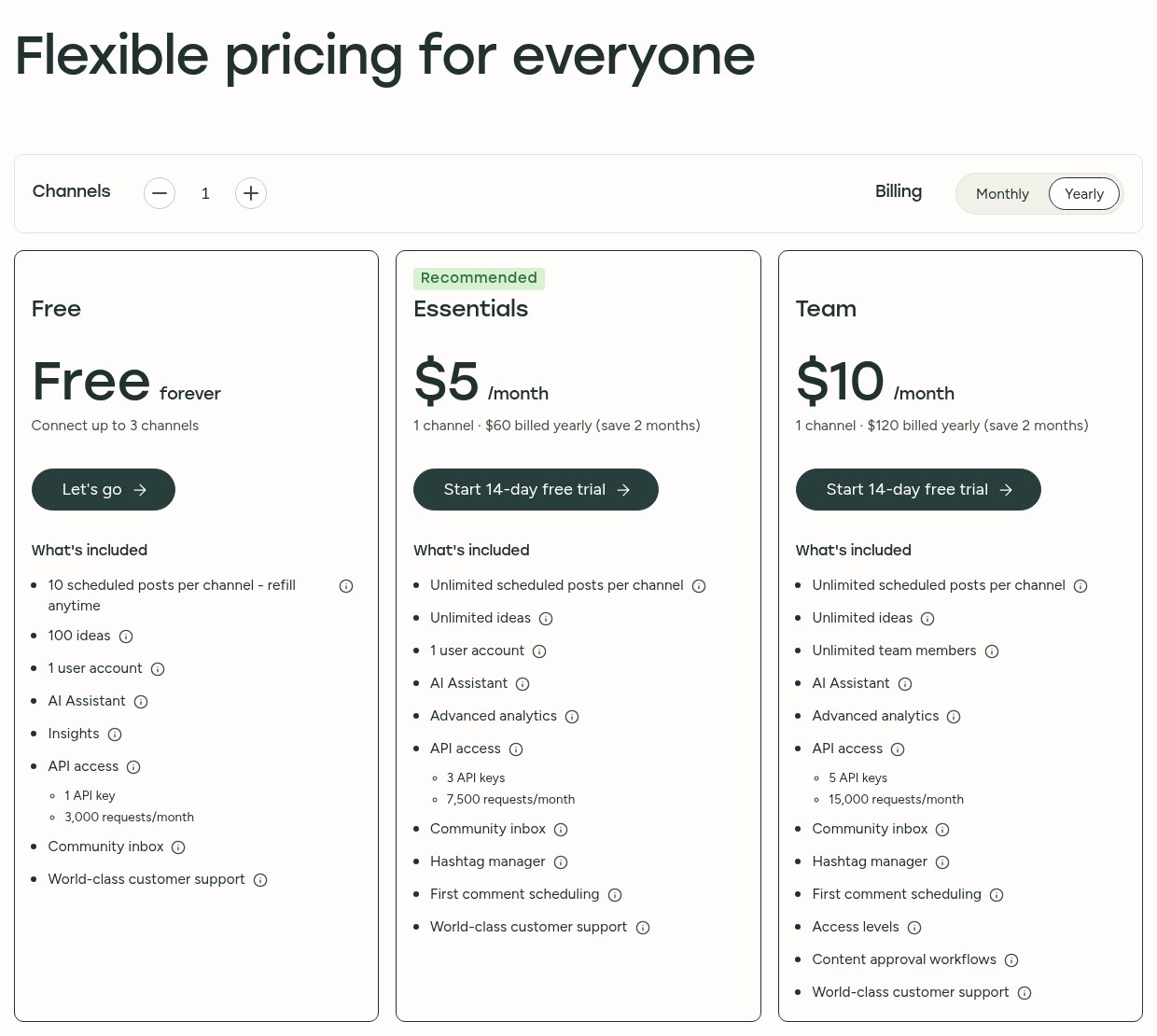
Here are Buffer's pricing plans:
- Free: $0/month with up to 3 channels, 10 scheduled posts per channel (refill anytime), 100 ideas, 1 user account, AI Assistant, insights with 30 days of history, API access, and a community inbox
- Essentials: $6/month per channel ($5/month billed yearly) with unlimited scheduled posts per channel, unlimited ideas, 1 user account, AI Assistant, advanced analytics, more API access, community inbox, hashtag manager, and first comment scheduling
- Team: $12/month per channel ($10/month billed yearly) with everything in Essentials, plus unlimited team members, access levels, and content approval workflows
All paid plans come with a 14-day free trial. Buffer also gives you volume discounts, so every channel above 10 costs less. If you want to learn more about what each plan has to offer, you can check out the pricing page.
Buffer reviews
Here's what customers of Buffer rate the platform on third-party review sites:
- G2: 4.3/5 star rating (from +1,022 user reviews)
- Capterra: 4.5/5 star rating (from +1,490 user reviews)
5. Hootsuite
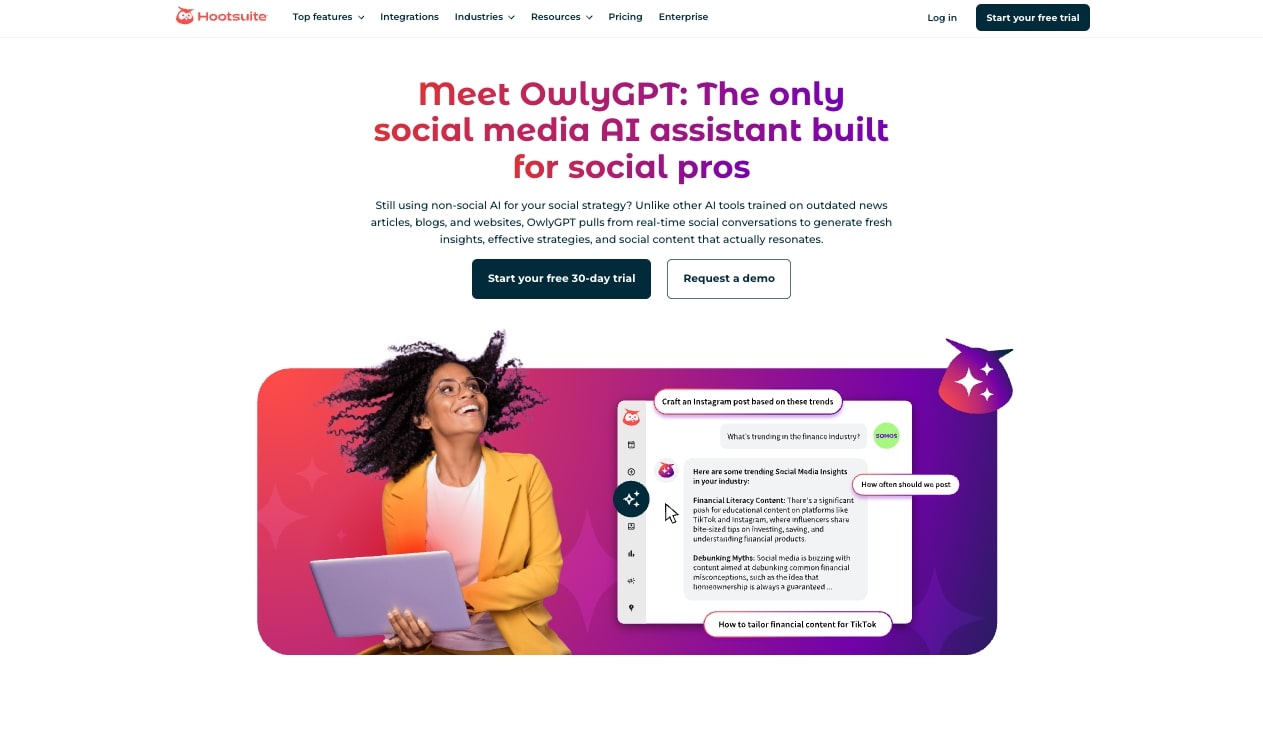
- Best for: Agencies managing multiple clients across different social media platforms
- Pricing: Starts at $99/month per user (billed annually) with a 14-day free trial
- What I like: Real-time data on brand mentions, keywords, and trends across all social accounts
Hootsuite is another prominent social media marketing tool that's just as popular as Buffer. The platform also started as a social media scheduling tool but has since evolved into a full marketing automation platform.
Every Hootsuite plan now runs on Wisdom, its built-in AI teammate. It can draft posts, give you recommendations, and analyze how your content is doing. You can also use the platform to analyze performance across all of your social media accounts and even see real-time data on your brand mentions, keywords, and trends.
Hootsuite pros and cons
Here are some of the pros to using Hootsuite:
- A trusted platform for enterprise companies like Adobe, U-Haul, and Ikea
- The built-in AI (called Wisdom) can help you draft posts and brainstorm content ideas
- Great for agencies that are managing multiple social media tasks for different clients
Here are some of the cons of Hootsuite:
- The mobile app can feel a bit lacking in its features
- The AI-generated suggestions can be a hit or miss
- There can be a delay in performance metrics compared to looking at the native social media app
Overall, Hootsuite is a solid platform if you're an agency managing multiple clients on different platforms. It has all the tools a social media agency would need like scheduling content, social media calendar, and the ability to create workspaces to organize and prioritize your work.
Hootsuite pricing
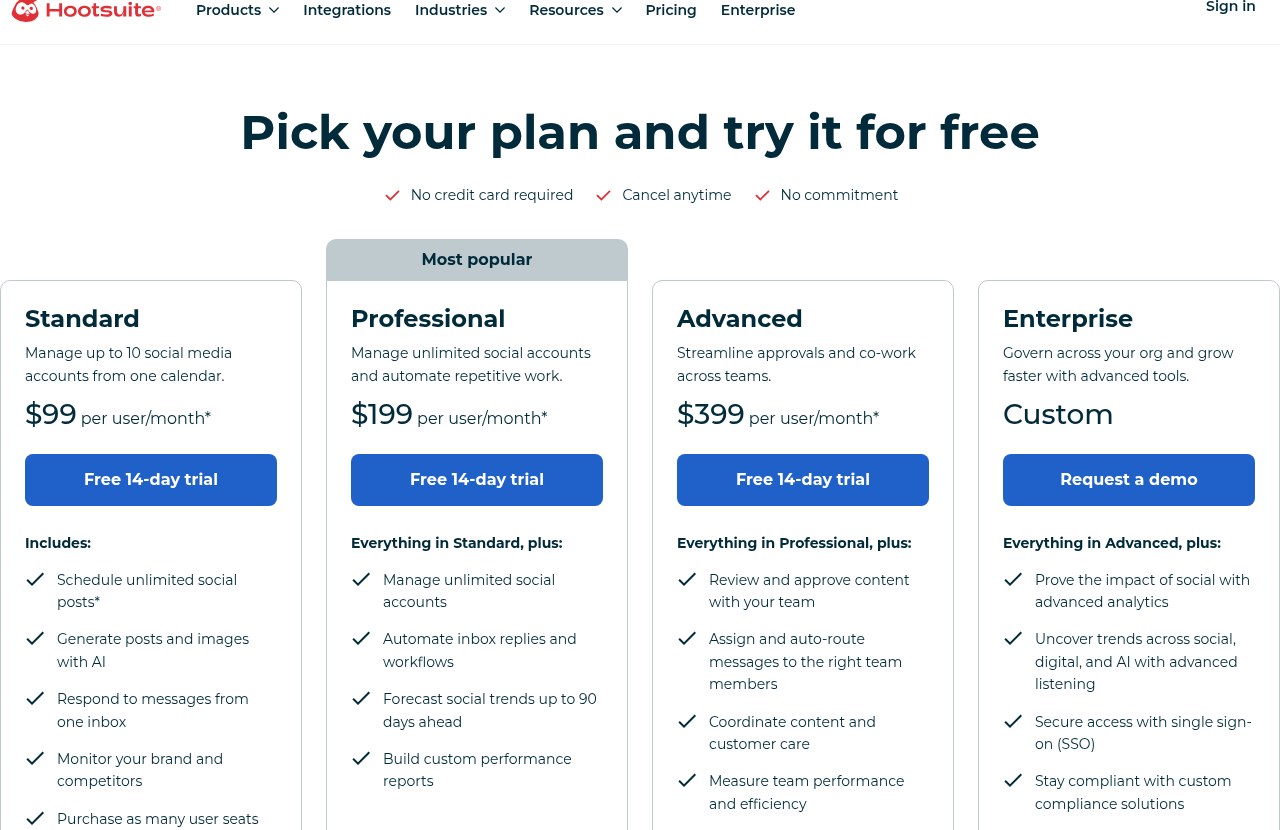
Here are Hootsuite's pricing plans:
- Standard: $99/month per user (billed annually) with up to 10 social accounts, unlimited post scheduling, AI-generated posts and images, one inbox for all your messages, and brand and competitor monitoring
- Professional: $199/month per user (billed annually) with everything in Standard, plus unlimited social accounts, automated inbox replies and workflows, social trend forecasts up to 90 days ahead, and custom performance reports
- Advanced: $399/month per user (billed annually) with everything in Professional, plus team content approvals, auto-routed messages, content and customer care coordination, and team performance reporting
- Enterprise: Custom pricing with everything in Advanced, plus advanced analytics, advanced listening across social, digital, and AI, single sign-on (SSO), and custom compliance solutions
Every plan comes with a 14-day free trial, and you can add as many user seats as you need. If you want to learn more about what each plan has to offer, you can check out the pricing page.
Hootsuite reviews
Here's what customers of Hootsuite rate the platform on third-party review sites:
- G2: 4.3/5 star rating (from +6,612 user reviews)
- Capterra: 4.4/5 star rating (from +3,783 user reviews)
6. Statusbrew

- Best for: Social media agencies that need approval workflows and want to track conversion data
- Pricing: Starts at $69/month with a 14-day free trial
- What I like: Ability to import existing reporting, post, and conversion data to show the real impact of social media work
Statusbrew is a social media management tool that is very similar to Hootsuite. You can automate everything from creating and scheduling social media content to viewing the analytics of how it's performing.
The platform is used by some pretty big consumer companies like Papa John's, Hilton, Casio, and more.
The cool thing about Statusbrew is that it has approval workflows, so if you're an agency or a large social media team, you can all collaborate on individual posts in one place. There's also an AI Composer that can help create captions, hashtags, or content ideas using the built-in AI tools.
Statusbrew pros and cons
Here are some of the pros of Statusbrew:
- The AI feature allows you to easily create caption ideas
- The link-in-bio feature allows you to turn your Instagram, TikTok, and other social media bios into a clickable grid
- Allows you to import any existing reporting, post, and conversion data (not many tools do this)
Here are some of the cons of Statusbrew:
- Some of the advanced features can have a learning curve to them
- Some of the integration features can require a good amount of setup time
- It can be a little expensive if you're a small business just starting out
Overall, Statusbrew is a great alternative to Hootsuite for social media agencies. I really like the ability to import your conversion data because at the end of the day, us marketers are posting on social media to help grow businesses. And if we can show the impact of our work, it helps raise the value of what we do.
Statusbrew pricing
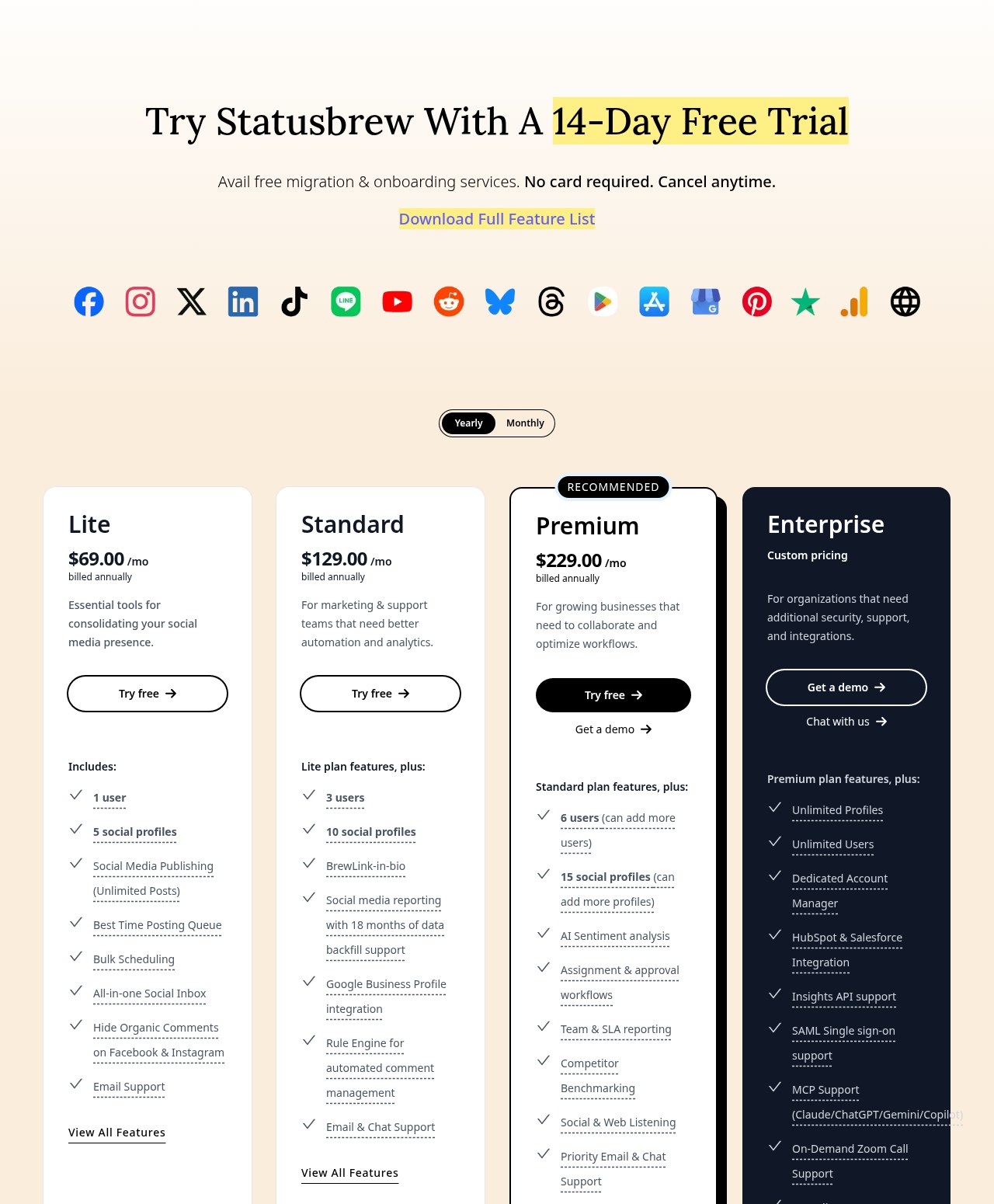
Here are Statusbrew's annual pricing plans:
- Lite: $69/month with 1 user, 5 social profiles, unlimited posts, social media publishing, best time posting queue, bulk scheduling, all-in-one social inbox, and email support
- Standard: $129/month with everything in Lite, plus 3 users, 10 social profiles, link-in-bio, social media reporting with 18 months of data backfill, Google Business Profile integration, rule engine for automated comment management, and email & chat support
- Premium: $229/month with everything in Standard, plus 6 users (can add more), 15 social profiles (can add more), AI sentiment analysis, assignment & approval workflows, team & SLA reporting, competitor benchmarking, social & web listening, and priority email & chat support
- Enterprise: Custom pricing with everything in Premium, plus unlimited profiles and users, dedicated account manager, HubSpot & Salesforce integration, insights API support, SAML single sign-on, MCP support for Claude, ChatGPT, Gemini, and Copilot, on-demand Zoom call support, and compliance support
- Agencies: Starts at $49/month per client with unlimited spaces, shareable calendars, and reports
If you want to learn more about what each plan has to offer, you can check out the pricing page.
Statusbrew reviews
Here's what customers of Statusbrew rate the platform on third-party review sites:
- G2: 4.9/5 star rating (from +708 user reviews)
- Capterra: 4.8/5 star rating (from +86 user reviews)
7. Sprout Social
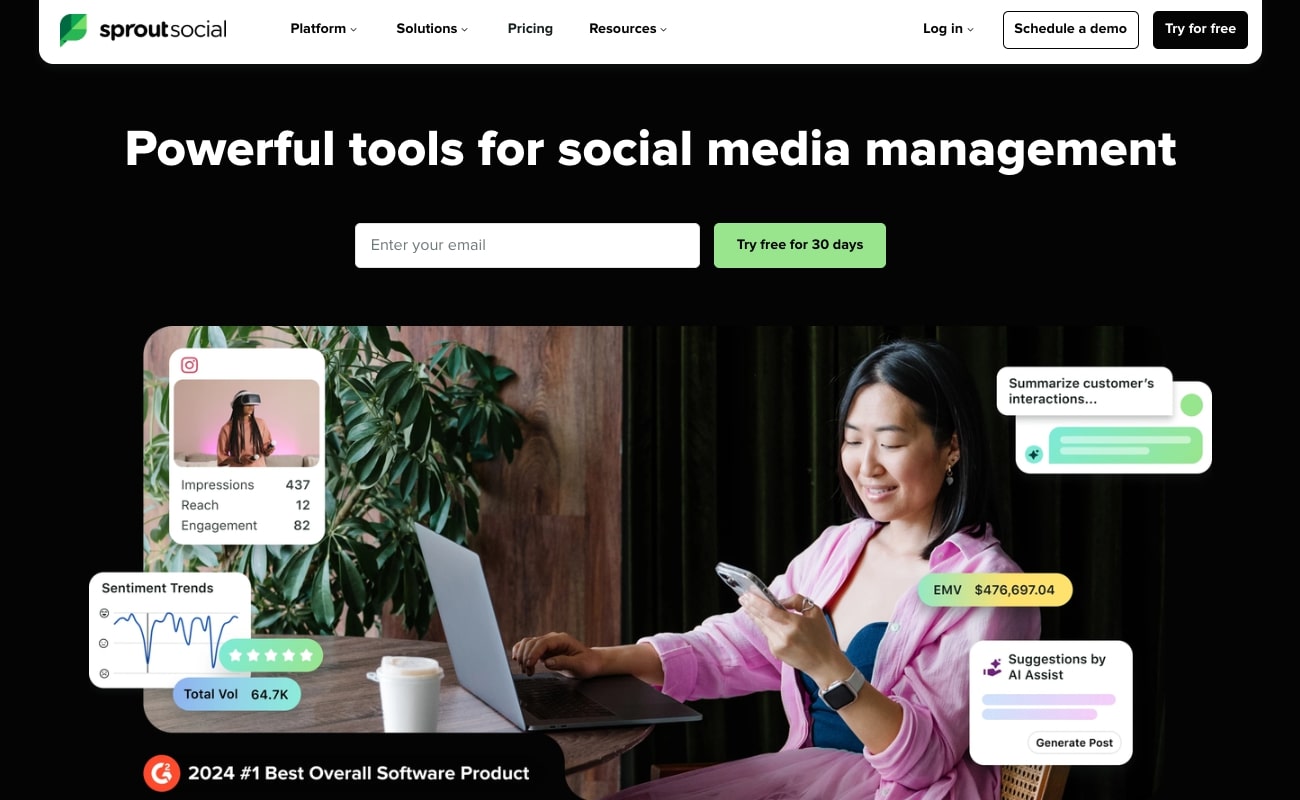
- Best for: Large marketing agencies managing social media accounts for enterprise brands
- Pricing: Starts at $79 per seat/month billed annually ($99 billed monthly) with a 30-day free trial
- What I like: The dashboards and interface are easy to understand, so there isn't a big learning curve for new team members
Sprout Social is a popular social media management and automation tool that is very similar to Hootsuite and Buffer. However, Sprout Social is built more for enterprise companies to help them bring all their social channels into one place.
It's like the operating system for running a full social media operation. And it's used by some pretty big businesses like Eventbrite, Square, Canva, and more.
Sprout Social pros and cons
Here are some of the pros of Sprout Social:
- It's built for enterprise companies that have a lot of cross-promotional posting happening at once
- Can manage tons of social media accounts, so it's also great for large marketing agencies
- The dashboards and interface are easy to understand, so there isn't a big learning curve for new team members
Here are some of the cons of Sprout Social:
- It's an expensive tool, so it may not be the best for startups
- The client review approval features can feel a bit limited
- Some users report that the labeling system for tagging posts can be a bit confusing and it's hard to find old posts you want to reference
Overall, Sprout Social is a powerful social media tool and it is probably the most premium one on this list. However, I believe it's best for large marketing agencies that manage social media accounts for enterprise brands. If you're a small social media team in-house, it might not be the best platform to use.
Sprout Social pricing
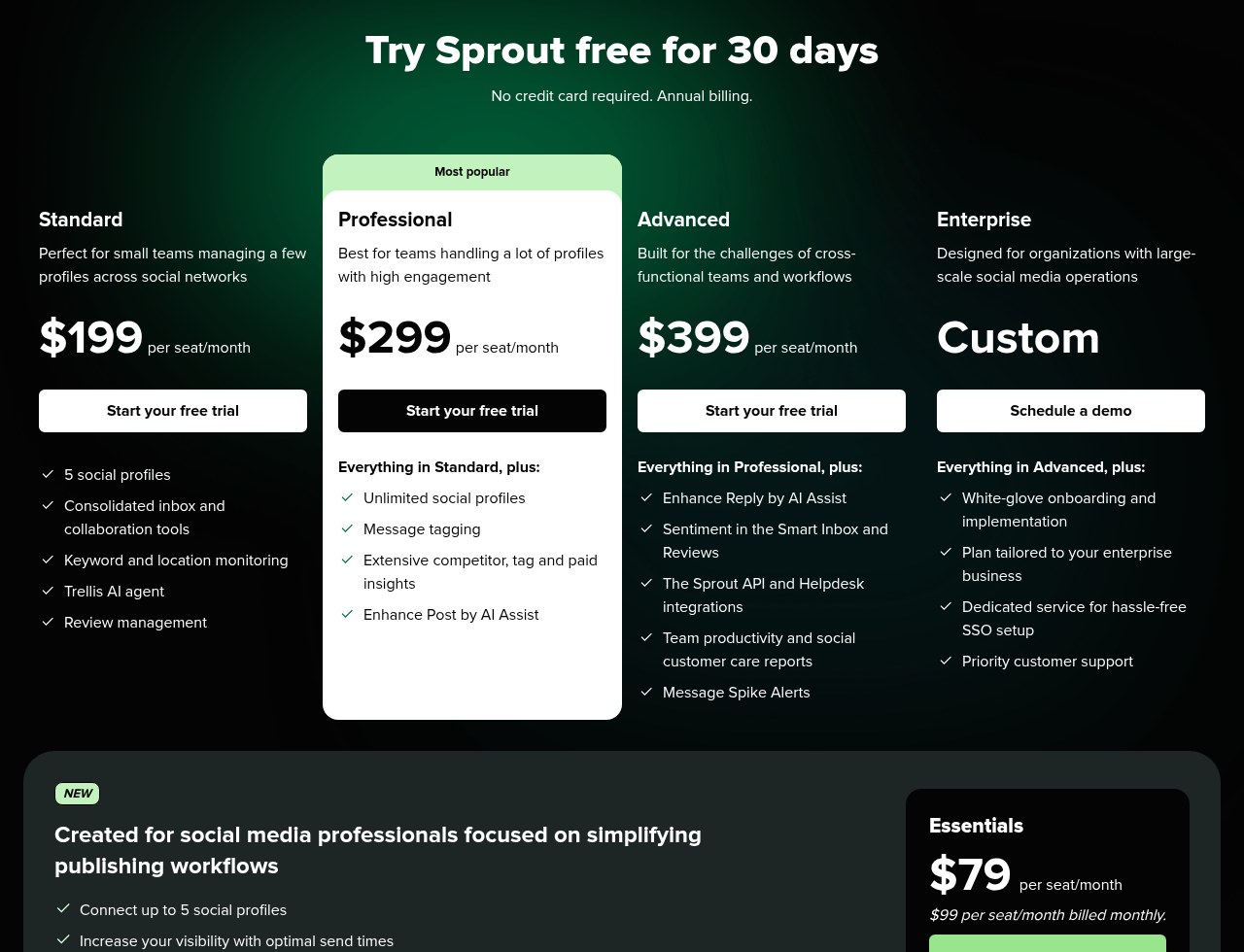
Here are Sprout Social's pricing plans:
- Essentials: $79 per seat/month (billed annually) with up to 5 social profiles, optimal send times, profile and post-level reporting, and Trellis, Sprout's AI teammate
- Standard: $199 per seat/month with 5 social profiles, consolidated inbox and collaboration tools, keyword and location monitoring, the Trellis AI agent, and review management
- Professional: $299 per seat/month with everything in Standard, plus unlimited social profiles, message tagging, extensive competitor, tag and paid insights, and Enhance Post by AI Assist
- Advanced: $399 per seat/month with everything in Professional, plus Enhance Reply by AI Assist, sentiment in the Smart Inbox and Reviews, the Sprout API and helpdesk integrations, team productivity and social customer care reports, and message spike alerts
- Enterprise: Custom pricing with everything in Advanced, plus white-glove onboarding, a plan tailored to your business, dedicated SSO setup, and priority support
All plans come with a 30-day free trial, and every seat gets 100 AI agent credits per month. If you want to learn more about what each plan has to offer, you can check out the pricing page.
Sprout Social reviews
Here's what customers of Sprout Social rate the platform on third-party review sites:
- G2: 4.4/5 star rating (from +5,704 user reviews)
- Capterra: 4.4/5 star rating (from +602 user reviews)
8. Planable

- Best for: Freelancers and small social media agencies just starting out
- Pricing: Your first 50 posts are free, then plans start at $33 per workspace/month billed yearly
- What I like: All-in-one solution without the enterprise price tag, and it's simple to understand
Planable is a simple social media management tool from the same product family as SE Ranking. It can help you automate scheduling, collaboration, and post organization all in a single place.
It kind of feels like using Miro and Buffer in one platform. And I would say Planable is designed for smaller social media agencies or even freelancers.
It gives you all the features you need from organizing ideas to creating a content calendar and even analyzing metrics of your social media posts. So it really is an all-in-one solution for smaller service-based businesses that may not need all the advanced features of a platform like Sprout Social or Hootsuite.
Planable pros and cons
Here are some of the pros of Planable:
- An all-in-one solution for freelancers and small social media agencies, without the enterprise price tag
- Can integrate with Google Business Profile and Pinterest, so it's not limited to the typical social media platforms
- It's a really simple and easy-to-understand platform, so the learning curve is not that bad
Here are some of the cons of Planable:
- Some of the post scheduling features can feel a bit basic and don't offer advanced customization (like optimizing for different content formats on different platforms)
- It can feel a bit slow once you add a lot of social media accounts or have a large content calendar
Overall, Planable is a great tool for social media marketing agencies that are just starting out. It's a pretty stable tool and great for any service provider as a first tool to use. If your agency starts to grow, then it might be worth looking into an enterprise solution that can scale without any performance issues.
Planable pricing
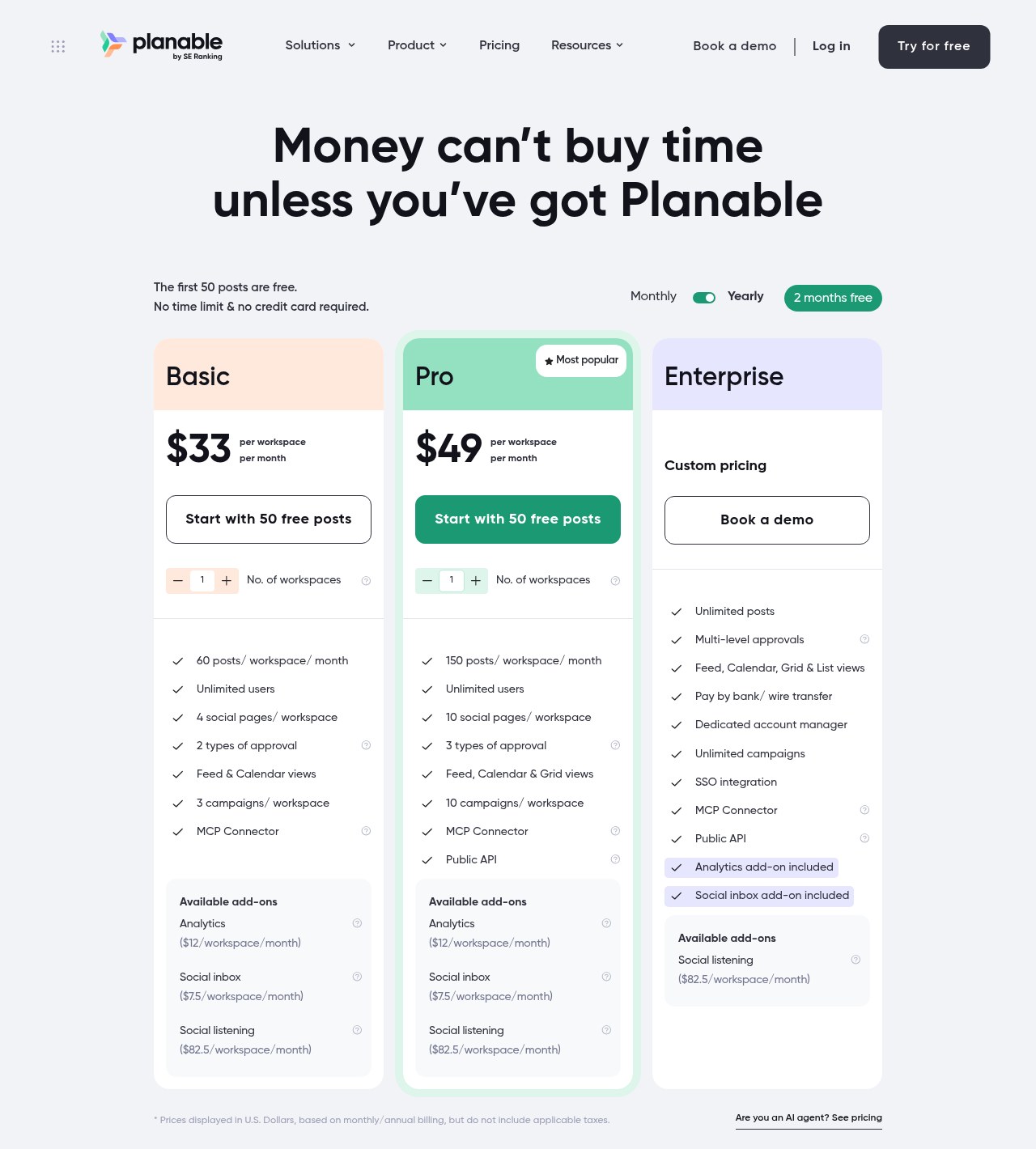
Here are Planable's pricing plans:
- Free: Your first 50 posts are free, with no time limit and no credit card required
- Basic: $33 per workspace/month (billed yearly) with 60 posts per workspace per month, unlimited users, 4 social pages per workspace, 2 types of approval, feed & calendar views, 3 campaigns per workspace, and an MCP connector
- Pro: $49 per workspace/month (billed yearly) with 150 posts per workspace per month, unlimited users, 10 social pages per workspace, 3 types of approval, feed, calendar & grid views, 10 campaigns per workspace, an MCP connector, and a public API
- Enterprise: Custom pricing with unlimited posts, multi-level approvals, feed, calendar, grid & list views, a dedicated account manager, unlimited campaigns, SSO, and the analytics and social inbox add-ons included
- Add-ons: Analytics ($12/workspace/month), social inbox ($7.50/workspace/month), and social listening ($82.50/workspace/month)
If you want to learn more about what each plan has to offer, you can check out the pricing page.
Planable reviews
Here's what customers of Planable rate the platform on third-party review sites:
- G2: 4.6/5 star rating (from +924 user reviews)
- Capterra: 4.5/5 star rating (from +323 user reviews)
Best free social media automation tools
A lot of tools say they're free when they really mean free trial. Here's how the tools on this list break down as of October 2026.
- Free plans: Buffer has a free plan with up to 3 channels and 10 scheduled posts per channel. Planable gives you your first 50 posts free with no time limit.
- Free trials: Gumloop, Ordinal, Hootsuite, and Statusbrew all have 14-day free trials. Sprout Social has a 30-day free trial.
- No free option: Plot is sales-led now, so you'll need to book a demo.
If budget is the main thing, start with Buffer's free plan for automated posting. Add Planable if you need client approvals. Then use a free trial to test one of the AI-heavy tools before you pay for anything.
Automated social media content for small businesses
Most small businesses don't have a social media team. It's usually the owner or one marketer doing everything. So the goal is simple. Post consistently without it eating your whole week.
Here's what I'd pick as a small business.
- You just need posts to go out on time: Use Buffer. The free plan covers 3 channels, and paid plans start at $6/month per channel.
- You work with clients or need approvals: Use Planable. Plans start at $33 per workspace/month billed yearly.
- You want AI to create the content too: Use Gumloop. An AI agent can study what's working on your accounts, research trends, and draft a content calendar for you.
Hootsuite, Sprout Social, and Statusbrew are great tools. But most small businesses won't need their team inbox, listening, and approval features on day one. You can always upgrade later.
Can automation tools improve engagement?
Yes, but there’s a huge caveat. Social media automation tools won't magically make your content go viral or turn boring posts into engagement magnets. No AI or automation tool will do that. So don’t worry, AI will not replace your creativity.
What they will do is free up your time so you can focus on the stuff that actually drives engagement, like turning your ideas into structured posts, responding to comments faster, and analyzing what's working.
The best use of automation is to take care of the repetitive stuff. Scheduling posts, cross-posting to multiple platforms, monitoring brand mentions, and pulling performance reports. All of that takes hours if you do it manually. But with automation, it can take minutes.
The engagement part comes from what you do with that extra time. You can spend more time crafting thoughtful stories, jumping into conversations in your comments, or testing new content formats based on conversion data your automation tool pulled for you.
So if you're looking for a tool that just posts for you and calls it a day, you're going to be disappointed. But if you want to become a more effective marketer by letting AI handle the busy work, then yeah, these tools can definitely help you improve engagement.
The social media marketers winning in 2026 are the ones who know how to use these tools to multiply their quantity while maintaining quality. Pick the right tool from this list, start automating the predictable stuff, and spend your time on the creative parts that get your target audience excited about what you have to offer.

Read related articles
Check out more articles on the Gumloop blog.